

is a comprehensive platform that combines CRM, document management, accounting, and many other features that are highly appreciated by managers, though not so much by IT staff. It is widely used by small and medium-sized enterprises, including small clinics, manufacturers, and even beauty salons. The main feature favored by managers is the integration of telephony and CRM, where every call is instantly logged in the CRM, client cards are created, and incoming caller information is displayed immediately, showing who they are, what can be sold to them, and how much they owe. However, the telephony service from Bitrix24 and its integration with CRM comes at a price, sometimes a significant one. In this article, I will share my experience of integrating with open tools and popular IP PBXs , and will also examine the workings of various components.
I work as a contractor for a company that specializes in selling, configuring, and integrating IP telephony solutions. When I was asked whether we could propose something for integrating Bitrix24 with the PBXs that clients have, as well as with virtual PBXs on various VDS platforms, I turned to Google. Naturally, it led me to , which contains descriptions, GitHub links, and seems to work well. However, when I tried using that solution, I discovered that Bitrix24 has changed significantly, and many adjustments were needed. Also, FreePBX is not just a bare Asterisk; one needs to consider how to merge usability with a hardcore dial plan in configuration files.
Examining the workings
So first, let's discuss how all this should function. When an external call comes into the PBX (the SIP INVITE event from the provider), the dial plan (dialplan) processing begins — rules that dictate what actions to take and in what order. From the initial packet, we can extract a lot of information that can later be used in the rules. A great tool for exploring the ins and outs of SIP is the analyzer sngrep () that can be easily installed on popular distributions via apt install/yum install and similar methods, or built from source. Let's take a look at the call log in sngrep.
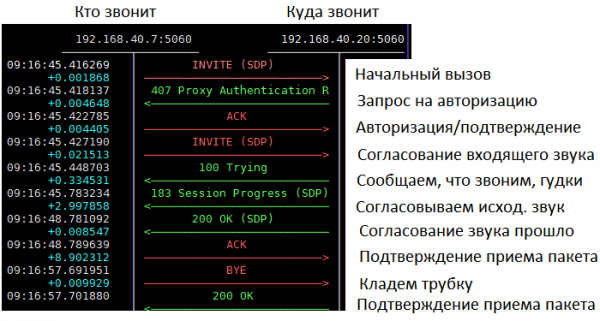
In simplified terms, a dial plan deals only with the first package, sometimes call transfers and button presses (DTMF) occur during the conversation, along with various features like FollowMe, RingGroup, IVR, and others.
What's inside the Invite package
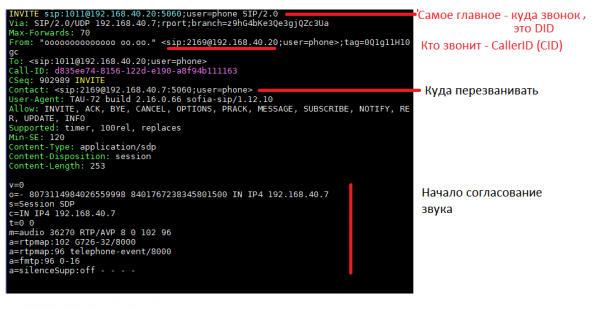
Most simple dial plans operate with the first two fields, and all the logic revolves around DID and CallerID. DID is where we are calling, and CallerID is who is calling.
However, we have a company, not just one phone — which means our PBX likely has call groups (simultaneous/sequential calling of several devices) for landline numbers (Ring Group), IVR (Hello, you have called... Press one for...), Auto Attendants (Phrases), Time Conditions, Forwarding to other numbers or mobile (FollowMe, Forward). This makes it quite challenging to definitively determine who the call will actually reach and with whom the conversation will take place upon receiving a call. Here’s an example of a typical call flow in the PBX of our clients.
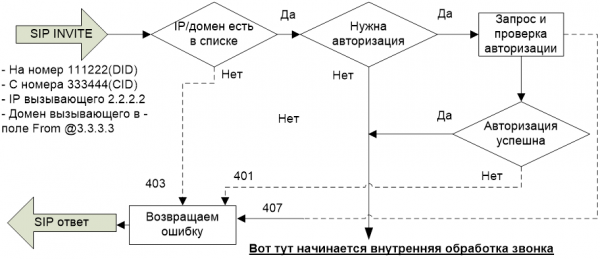
After the call successfully enters the PBX, it journeys through the dial plan in different “contexts.” A context, from the perspective of Asterisk, is a numbered set of commands, each containing a filter based on the dialed number (known as exten; for an external call at the initial stage, exten=DID). The commands in a dial plan line can be anything — internal functions (for example, to call an internal subscriber — Dial(), hang up — Hangup()), conditional operators (IF, ELSE, ExecIF and similar), transitions to other rules of this context (Goto, GotoIF), jumping to other contexts by calling functions (Gosub, Macro). The directive include context_name, is noteworthy as it adds commands from another context to the end of the current context. Commands included via include are always executed after the commands of the current context.
The entire logic of FreePBX operates on including different contexts into one another through include and calling them via Gosub, Macro, and Handler processors. Let's consider the context of incoming calls in FreePBX.
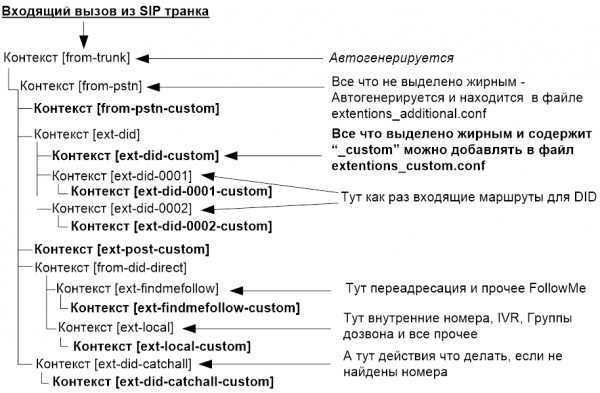
The call proceeds through all contexts from top to bottom in order, where each context may call other contexts as macros (Macro), functions (Gosub), or simply transitions (Goto), hence the actual tree of what gets called can only be tracked in the logs.
The typical configuration scheme of a standard office PBX is shown below. Upon a call, the incoming routes look for the DID, check the time conditions, and if everything is fine, the voice menu is launched. From there, by pressing button 1 or on timeout, it transitions to the operators' dialing group. After the call ends, the hangupcall macro is invoked, after which nothing else can be executed in the dialplan except special handlers (hangup handler).
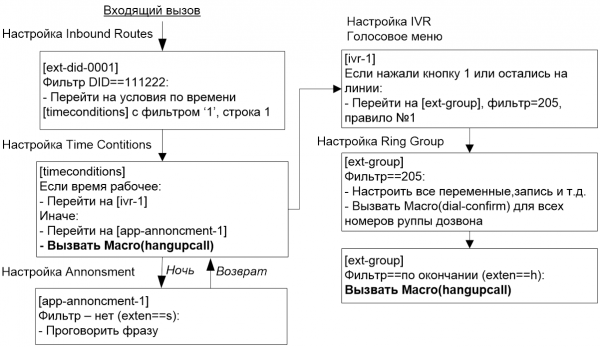
Where in this call algorithm should we provide information about the start of the call to the CRM, where to start recording, where to end recording, and send it along with the call information to the CRM?
Integration with external systems
What is the integration of PBX and CRM? It involves settings and programs that convert data and events between these two platforms and relay them to one another. The most common method of interaction between independent systems is APIs, and the most popular way to access an API is HTTP REST. But not for Asterisk.
Inside Asterisk, there are:
AGI — synchronous call to external programs/components, mainly used in the dialplan, with libraries like ,
AMI — a textual TCP socket that operates on a subscription-based model for events and input of text commands, reminiscent of SMTP from the inside, capable of tracking events and managing calls, with the library — the most popular for establishing a connection with Asterisk.
Example output of AMI
Event: Newchannel
Privilege: call,all
Channel: PJSIP/VMS_pjsip-0000078b
ChannelState: 4
ChannelStateDesc: Ring
CallerIDNum: 111222
CallerIDName: 111222
ConnectedLineNum:
ConnectedLineName:
Language: en
AccountCode:
Context: from-pstn
Exten: s
Priority: 1
Uniqueid: 1599589046.5244
Linkedid: 1599589046.5244
ARI — a mix of the two, all through REST, WebSocket, in JSON format — but the newer libraries and wrappers aren't very good; off the top of my head, there are (, ) that had their development stall about 3 years ago.
Example output of ARI when initiating a call
{ "variable":"CallMeCallerIDName", "value":"111222", "type":"ChannelVarset", "timestamp":"2020-09-09T09:38:36.269+0000", "channel":{ "id":"1599644315.5334", "name":"PJSIP/VMSpjsip-000007b6", "state":"Ring", "caller":{ "name":"111222", "number":"111222" }, "connected":{ "name":"", "number":"" }, "accountcode":"", "dialplan":{ "context":"from-pstn", "exten":"s", "priority":2, "appname":"Stasis", "appdata":"hello-world" }, "creationtime":"2020-09-09T09:38:35.926+0000", "language":"ru" }, "asteriskid":"48:5b:aa:aa:aa:aa", "application":"hello-world" }
The convenience or inconvenience, the possibility or impossibility of working with a particular API is determined by the tasks that need to be solved. The tasks for CRM integration are as follows:
Track the start of the call, where it was redirected, extract CallerID, DID, start and end times, and possibly data from the directory (to link the phone and CRM user)
Start and end call recording, save in the required format, inform where the file is located after recording is complete
Initiate a call based on an external event (from the program), call an internal number, an external number, and connect them
Optional: integrate with CRM, call groups, and FollowME for automatic call redirection when not on-site (based on CRM information)
All these tasks can be solved via AMI or ARI, but ARI provides much less information, many events are missing, and many variables that are still present in AMI are not tracked (for example, macro calls, setting variables within macros, including call recording). Therefore, for accurate monitoring, let's choose AMI for now (but not definitively). Furthermore (and who could do without this, we are lazy people) — in the original work () PAMI is used. *Then we need to try rewriting it on ARI, but there's no guarantee it will work.
Reinventing the integration from scratch
To allow our FreePBX to report to AMI in simple ways about the start of a call, end time, numbers, names of recorded files, and to calculate the call duration, it is easiest to use the same trick as the original authors — introduce your own variables and parse the output for their presence. PAMI suggests doing this simply through a filter function.
Here is an example of setting your own variable for the call start time (s is a special number in the dialplan that executes BEFORE the search by DID begins)
[ext-did-custom]

exten => s,1,Set(CallStart=${STRFTIME(epoch,,%s)})
Example AMI event from this line
Event: Newchannel
Privilege: call,all
Channel: PJSIP/VMS_pjsip-0000078b
ChannelState: 4
ChannelStateDesc: Ring
CallerIDNum: 111222
CallerIDName: 111222
ConnectedLineNum:
ConnectedLineName:
Language: en
AccountCode:
Context: from-pstn
Exten: s
Priority: 1
Uniqueid: 1599589046.5244
Linkedid: 1599589046.5244
Application: Set AppData:
CallStart=1599571046
Since FreePBX overwrites the files extention.conf and extention_additional.conf, we will use the file extention_custom.conf
The complete code extention_custom.conf
[globals]
;; Check the paths and permissions for the directories - user asterisk must have write permissions
;; Conversations will be logged here
WAV=/var/www/html/callme/records/wav
MP3=/var/www/html/callme/records/mp3

;; Recordings will be played and downloaded from these paths
URLRECORDS=https://www.host.ru/callmeplus/records/mp3

;; Address for the callback during an outgoing call
URLPHP=https://www.host.ru/callmeplus

;; Yes, we are recording conversations
RECORDING=1

;; This macro is for recording conversations in our folder.
;; System recording can also be used, but for now, let's keep this one -
;; it works
[recording]
exten => ~~s~~,1,Set(LOCAL(calling)=${ARG1})
exten => ~~s~~,2,Set(LOCAL(called)=${ARG2})
exten => ~~s~~,3,GotoIf($["${RECORDING}" = "1"]?4:14)
exten => ~~s~~,4,Set(fname=${UNIQUEID}-${STRFTIME(${EPOCH},,%Y-%m-%d-%H_%M)}-${calling}-${called})
exten => ~~s~~,5,Set(datedir=${STRFTIME(${EPOCH},,%Y/%m/%d)})
exten => ~~s~~,6,System(mkdir -p ${MP3}/${datedir})
exten => ~~s~~,7,System(mkdir -p ${WAV}/${datedir})
exten => ~~s~~,8,Set(monopt=nice -n 19 /usr/bin/lame -b 32 --silent "${WAV}/${datedir}/${fname}.wav"  "${MP3}/${datedir}/${fname}.mp3" && rm -f "${WAV}/${fname}.wav" && chmod o+r "${MP3}/${datedir}/${fname}.mp3")
exten => ~~s~~,9,Set(FullFname=${URLRECORDS}/${datedir}/${fname}.mp3)
exten => ~~s~~,10,Set(CDR(filename)=${fname}.mp3)
exten => ~~s~~,11,Set(CDR(recordingfile)=${fname}.wav)
exten => ~~s~~,12,Set(CDR(realdst)=${called})
exten => ~~s~~,13,MixMonitor(${WAV}/${datedir}/${fname}.wav,b,${monopt})
exten => ~~s~~,14,NoOp(Finish if_recording_1)
exten => ~~s~~,15,Return()


;; This is the main context to start a conversation
[ext-did-custom]

;; It's a bit of a hack to do it this way here, but it works - adding '8' to the number
nexten => s,1,Set(CALLERID(num)=8${CALLERID(num)})

;; Various variables for the script
nexten => s,n,Gosub(recording,~~s~~,1(${CALLERID(number)},${EXTEN}))
exten => s,n,ExecIF(${CallMeCallerIDName}?Set(CALLERID(name)=${CallMeCallerIDName}):NoOp())
exten => s,n,Set(CallStart=${STRFTIME(epoch,,%s)})
exten => s,n,Set(CallMeDISPOSITION=${CDR(disposition)})

;; The most important! Handler for call termination.
;; Normal endings through (exten=>h,1,somethinghere) in FreePBX do not work - Macro(hangupcall,) messes everything up.
;; So we attach Hangup_Handler to the end of the call
nexten => s,n,Set(CHANNEL(hangup_handler_push)=sub-call-from-cid-ended,s,1(${CALLERID(num)},${EXTEN}))

;; Handler for the end of an incoming call
[sub-call-from-cid-ended]

;; Report the values at the end of the call
nexten => s,1,Set(CDR_PROP(disable)=true)
exten => s,n,Set(CallStop=${STRFTIME(epoch,,%s)})
exten => s,n,Set(CallMeDURATION=${MATH(${CallStop}-${CallStart},int)})

;; Call status - Answered, Not answered...
exten => s,n,Set(CallMeDISPOSITION=${CDR(disposition)})
exten => s,n,Return


;; Handler for outgoing calls - all similar
[outbound-allroutes-custom]

;; Recording
nexten => _.,1,Gosub(recording,~~s~~,1(${CALLERID(number)},${EXTEN}))
;; Variables
nexten => _.,n,Set(__CallIntNum=${CALLERID(num)})
exten => _.,n,Set(CallExtNum=${EXTEN})
exten => _.,n,Set(CallStart=${STRFTIME(epoch,,%s)})
exten => _.,n,Set(CallmeCALLID=${SIPCALLID})

;; Attach Hangup_Handler to the end of the call
nexten => _.,n,Set(CHANNEL(hangup_handler_push)=sub-call-internal-ended,s,1(${CALLERID(num)},${EXTEN}))

;; Handler for the end of an outgoing call
[sub-call-internal-ended]

;; Variables
nexten => s,1,Set(CDR_PROP(disable)=true)
exten => s,n,Set(CallStop=${STRFTIME(epoch,,%s)})
exten => s,n,Set(CallMeDURATION=${MATH(${CallStop}-${CallStart},int)})
exten => s,n,Set(CallMeDISPOSITION=${CDR(disposition)})

;; Call the script that will report the call to CRM - it's outgoing,
;; so it will actually happen at the end
nexten => s,n,System(curl -s ${URLPHP}/CallMeOut.php --data action=sendcall2b24 --data ExtNum=${CallExtNum} --data call_id=${SIPCALLID} --data-urlencode FullFname='${FullFname}' --data CallIntNum=${CallIntNum} --data CallDuration=${CallMeDURATION} --data-urlencode CallDisposition='${CallMeDISPOSITION}')
exten => s,n,Return
The feature and distinction from the original dialplan by the authors of the source article are
The dialplan in .conf format, as FreePBX requires (it does support .ael, but not all versions and not always conveniently)
Instead of processing the end through exten=>h, processing is done through hangup_handler, because the FreePBX dialplan only worked with it
The call script line has been corrected, quotes and the external caller number ExtNum have been added
Processing has been moved to _custom contexts, allowing modifications to FreePBX configs to be untouched — incoming through [ext-did-custom], outgoing through [outbound-allroutes-custom]
There is no binding to numbers — the file is universal and requires only path configuration and a link to the server
To get started, scripts need to be allowed in AMI with a username and password — for this, FreePBX also has a _custom file
The file manager_custom.conf
;; this is the username
[callmeplus]
;; this is the password
secret = trampampamturlala
deny = 0.0.0.0/0.0.0.0

;; I work with a local machine - but if needed, others can be specified
permit = 127.0.0.1/255.255.255.255
read = system,call,log,verbose,agent,user,config,dtmf,reporting,cdr,dialplan
write = system,call,agent,log,verbose,user,config,command,reporting,originate
Both of these files need to be placed in /etc/asterisk, then the configs should be reloaded (or Asterisk restarted)
# astrisk -rv
  Connected to Asterisk 16.6.2 currently running on freepbx (pid = 31629)
#freepbx*CLI> dialplan reload
     Dialplan reloaded.
#freepbx*CLI> exit
Now let's move on to PHP
Script initialization and service creation
Since the working scheme with Bitrix 24, a service for AMI, is not very simple and transparent, we need to stop here separately. When AMI is activated, Asterisk simply opens a port and that’s all. When a client connects, it requests authorization, then the client subscribes to the necessary events. The events arrive as plain text, which PAMI converts into structured objects and provides the opportunity to set up filtering functions based only on the relevant events, fields, numbers, etc.
As soon as a call comes in, a NewExten event occurs starting from the parent context [from-pstn], and then all events follow in the order they appear in the contexts. When retrieving information from the _custom variables CallMeCallerIDName and CallStart defined in the dialplan, it is invoked
The UserID query function corresponds to the internal number to which the call was directed. What if it is a call group? This is a political question; should we create a call to everyone at once (when all are calling at the same time) or create them sequentially as each call comes in? Most clients have a First Available strategy, so this is not a problem; only one person will get the call. But we need to address this issue.
This is the function for registering a call in Bitrix24, which returns the CallID needed later for reporting call parameters and the link to the recording. It requires either an internal number or the UserID.
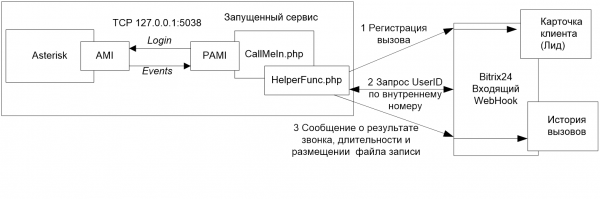
After the call ends, a function is called to upload the recording, which at the same time informs the status of the call completion (Busy, No Answer, Success), and also uploads the link to the mp3 file with the recording (if available).
Since the CallMeIn.php module needs to run continuously, a SystemD startup file was created for it. callme.service, which should be placed in /etc/systemd/system/callme.service
[Unit]
Description=CallMe

[Service]
WorkingDirectory=/var/www/html/callmeplus
ExecStart=/usr/bin/php /var/www/html/callmeplus/CallMeIn.php 2>&1 >>/var/log/callmeplus.log
ExecStop=/bin/kill -WINCH ${MAINPID}
KillSignal=SIGKILL

Restart=on-failure
RestartSec=10s

# here you need to check the folder permissions
#User=www-data  #Ubuntu - debian
#User=nginx #Centos

[Install]
WantedBy=multi-user.target
The initialization and launch of the script occur through systemctl or service.
# systemctl enable callme
# systemctl start callme
The service will restart automatically as needed (in case of crashes). The incoming call monitoring service does not require a web server, only PHP is needed (which is definitely available on the FeePBX server). However, without access to the call recordings through the web server (also with HTTPS), there will be no possibility to listen to the call recordings.
Now let's talk about outgoing calls. The CallMeOut.php script has two functions:
Initiation of the call upon receiving a request to the PHP script (including the ‘Call’ button in Bitrix itself). It does not work without a web server; the request is made via HTTP POST, containing a token.
Notification about the call, its parameters, and recordings in Bitrix occurs at the initiative of Asterisk in the dial plan [sub-call-internal-ended] upon call completion.
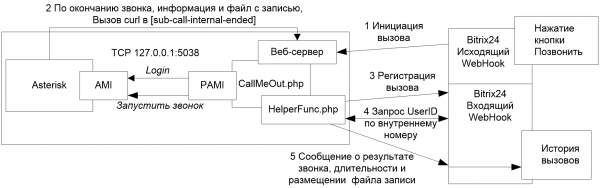
The web server is only needed for two things — to upload recording files to Bitrix (via HTTPS) and to call the CallMeOut.php script. You can use the built-in FreePBX server, whose files are located in /var/www/html, install another server, or specify a different path.
Web server
We'll leave the web server configuration for self-study (, , ). If you don't have a domain, you can try FreeDomain( ), which will give you a name for your white IP for free (don't forget to forward ports 80 and 443 through the router if the external address is only on it). If you've just created a DNS domain, you'll need to wait (from 15 minutes to 48 hours) for all servers to propagate. From my experience with domestic providers — it takes from 1 hour to a day.
Automation of installation
Development of an installer has started on GitHub, so you can install even easier. However, it looked perfect on paper — for now, we install everything manually, but after digging into all this, it became crystal clear who gets along with whom, where to go, and how to debug it. The installer is not available yet (
Docker
If you want to try the solution quickly — there's an option with Docker — you can quickly create a container, expose its ports, provide configuration files, and test it (this is the option with the Let's Encrypt container; if you already have a certificate, you just need to redirect the reverse proxy to the FreePBX web server (we assigned it a different port — 88), Let's Encrypt in Docker is inspired by
You must run the file in the downloaded project folder (after git clone), but first, check the Asterisk configurations (in the asterisk folder) and specify the paths to your recordings and website URL there.
version: '3.3'
services:
  nginx:
    image: nginx:1.15-alpine
    ports:
      - "80:80"
      - "443:443"
    volumes:
      - ./nginx/ssl_docker.conf:/etc/nginx/conf.d/ssl_docker.conf
  certbot:
    image: certbot/certbot
  freepbx:
    image: flaviostutz/freepbx
    ports:
      - 88:80 # for configuration
      - 5060:5060/udp
      - 5160:5160/udp
      - 127.0.0.1:5038:5038 # for CallMeOut.php
#      - 3306:3306
      - 18000-18100:18000-18100/udp
    restart: always
    environment:
      - ADMIN_PASSWORD=admin123
    volumes:
      - backup:/backup
      - recordings:/var/spool/asterisk/monitor
      - ./callme:/var/www/html/callme
      - ./systemd/callme.service:/etc/systemd/system/callme.conf
      - ./asterisk/manager_custom.conf:/etc/asterisk/manager_custom.conf
      - ./asterisk/extensions_custom.conf:/etc/asterisk/extensions_custom.conf
#      - ./conf/startup.sh:/startup.sh

volumes:
  backup:
  recordings:
This docker-compose.yaml file is run using
docker-compose up -d
If nginx didn't start, it means there is something wrong with the configuration in the nginx/ssl_docker.conf folder.
Other Integrations
Why not integrate several CRMs into scripts, we thought. We studied several APIs from other CRMs, especially the free one built into some PBXs — ShugarCRM and Vtiger, and yes! It's possible, the principle is the same. But that's another story which we will upload to GitHub separately.
Links
The code itself on GitHub —
Original article for reference
Disclaimer: any similarities to real-life events are purely coincidental and this was not me,
Source: habr.com
