

Hello, Habr. I'm finishing the series of articles, featuring the launch of the course from OTUS, on VxLAN EVPN routing technology within the fabric and using a Firewall to restrict access between internal services.

Previous parts of the series can be found at the links:
Today we will continue examining the routing logic within the VxLAN fabric. In the previous part, we looked at routing within the fabric under one VRF. However, there can be a huge number of client services in the network, and all must be distributed across different VRFs to limit access between them. Additionally, businesses might need to connect a Firewall to restrict access between these services. While this isn't the best solution, modern realities require 'modern solutions.'
We will consider two options for routing between VRFs:
- Routing without leaving the VxLAN fabric;
- Routing on external equipment.
Let's start with the routing logic between VRFs. There is a certain number of VRFs. To route between VRFs, it's necessary to allocate a device in the network that knows about all VRFs (or at least the ones between which routing is needed). Such a device could be, for example, one of the Leaf switches (or all of them at once). This topology would look as follows:
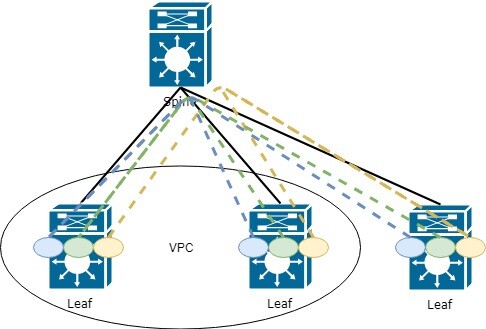
What are the drawbacks of such a topology?
Correct, every Leaf must know about all VRFs (and all the information within them) in the network, which leads to memory loss and increased load on the network. Indeed, quite often, each Leaf switch does not need to know everything that exists in the network.
However, let’s examine this method in more detail, as it can be quite suitable for small networks (if there are no specific business requirements).
At this point, you may wonder how to transfer information from one VRF to another, since the essence of this technology is that information dissemination should be limited.
The answer lies in functions like exporting and importing route information (the configuration of this technology was discussed in the part of the series). To briefly summarize:
When setting the VRF in AF, it is necessary to specify route-target for importing and exporting routing information. It can be set in automatic mode. Then the value will include ASN BGP and L3 VNI associated with VRF. This is convenient when your factory uses only one ASN:
vrf context PROD20
  address-family ipv4 unicast
    route-target export auto      ! RT-65001:99000 is exported in automatic mode
    route-target import auto
However, if you have more than one ASN and need to transfer routes between them, a manual configuration will be a more convenient and scalable option. route-target. The recommendation for manual configuration — use the first number that is convenient for you, for example, 9999.
The second should be equal to the VNI for this VRF.
Let's configure it as follows:
vrf context PROD10
  address-family ipv4 unicast
    route-target export 9999:99000
    route-target import 9999:99000
    route-target import 9999:77000         ! Example 1 import from another VRF
    route-target import 9999:88000         ! Example 2 import from another VRF
How it looks in the routing table:
Leaf11# sh ip route vrf prod

192.168.20.0/24, ubest/mbest: 1/0
 *via 10.255.1.20fault, [200/0], 00:24:45, bgp-65001, internal, tag 65001
(evpn) segid: 99000 tunnelid: 0xaff0114 encap: VXLAN ! prefix is available through L3VNI 99000
Let's consider the second routing option between VRFs — through external equipment, for example, a Firewall.
Several operating options can be assumed through external devices:
- The device knows what VxLAN is, and we can integrate it into part of the factory;
- The device knows nothing about VxLAN.
We will not dwell on the first option, as the logic will be almost the same as shown above — we route all VRFs to the Firewall and configure routing between VRFs there.
Let's consider the second option when our Firewall knows nothing about VxLAN (currently, of course, equipment with VxLAN support is emerging. For example, Checkpoint announced its support in version R81. You can read about it , however, this is all in the testing phase and there is no certainty about the stability of the operation).
When connecting an external device, we end up with the following scheme:
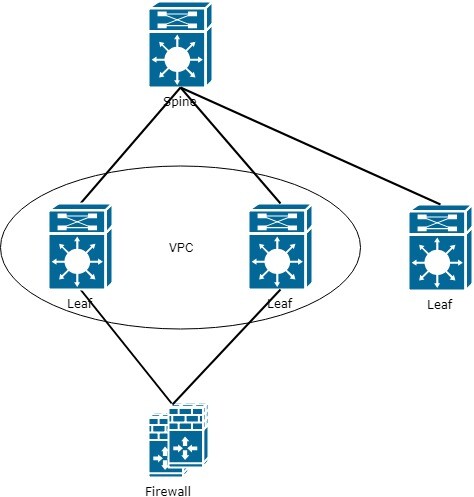
As seen in the diagram — a bottleneck appears at the interface with the Firewall. This must be taken into account in further network planning and traffic optimization.
However, let's return to the initial task of routing between VRFs. As a result of adding a Firewall, we conclude that the Firewall must be aware of all VRFs. For this, all VRFs should also be configured on the boundary Leaf, and the Firewall is connected in each VRF via a separate link.
As a result, the Firewall scheme:
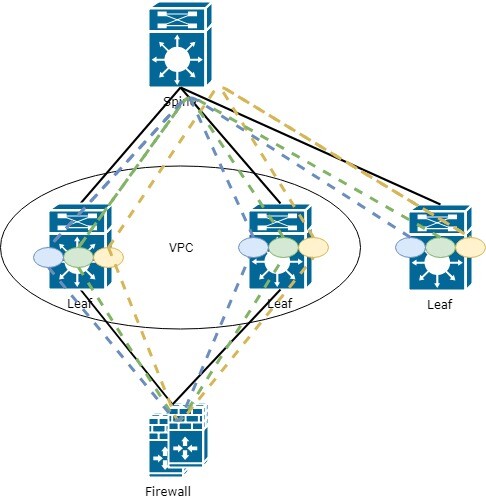
This means you need to configure the interface on the Firewall for each VRF present in the network. Overall, the logic isn't complicated, and the only thing that might be off-putting is the sheer number of interfaces on the Firewall, but this is where we should consider automation.
Alright. The Firewall is connected, and it has been added to all VRFs. But how do we get traffic from each Leaf to go through this Firewall now?
For the Leaf connected to the Firewall, there will be no issues, as all routes are local:
0.0.0.0/0, ubest/mbest: 1/0
    *via 10.254.13.55, [1/0], 6w5d, static       ! default route via Firewall
But what about the remote Leafs? How do we convey them the default external route?
That's right, through EVPN route-type 5, just like any other prefix in the VxLAN fabric. However, this isn't as straightforward (if we're talking about Cisco; I haven't checked the others).
You need to announce the default route from the Leaf that is connected to the Firewall. However, for the route to be conveyed, the Leaf must be aware of it itself. And here's where a certain problem arises (perhaps just for me); the route needs to be defined statically in the VRF where you want to announce that route:
vrf context PROD10
    ip route 0.0.0.0/0 10.254.13.55
Next, in the BGP configuration, you need to set this route in the AF IPv4:
router bgp 65001
    vrf prod
        address-family ipv4 unicast
            network 0.0.0.0/0
However, that's not all. Thus, the default route will not enter the family l2vpn evpn. In addition, redistribution needs to be configured:
router bgp 65001
    vrf prod
        address-family ipv4 unicast
            network 0.0.0.0/0
            redistribute static route-map COMMON_OUT
We specify which prefixes will enter BGP through redistribution
route-map COMMON_OUT permit 10
  match ip address prefix-list COMMON_OUT

ip prefix-list COMMON_OUT seq 10 permit 0.0.0.0/0
Now the prefix 0.0.0.0/0 goes into EVPN route-type 5 and is transmitted to the other Leafs:
0.0.0.0/0, ubest/mbest: 1/0
 *via 10.255.1.5fault, [200/0], 5w6d, bgp-65001, internal, tag 65001, segid: 99000 tunnelid: 0xaff0105 encap: VXLAN
 ! 10.255.1.5 - Virtual address of Leaf (as Leaf acts as a VPS pair), connected to the Firewall
In the BGP table, we can also observe the received route-type 5 with the default route through 10.255.1.5:
* i[5]:[0]:[0]:[0]:[0.0.0.0]/224
                      10.255.1.5                        100          0 i
*>i                   10.255.1.5                        100          0 i
This will conclude the series of articles dedicated to EVPN. In the future, I will try to examine the operation of VxLAN in conjunction with Multicast, as this method is considered more scalable (currently a controversial statement).
If you have any questions/suggestions regarding the functionality of EVPN, feel free to write, and we will consider them further.
Source: habr.com
