

Hello everyone. This article is written for those who are still torn between choosing virtualization platforms and after reading the article from the series "Installed proxmox and everything is great, 6 years uptime with no disruptions." But after installing one boxed solution or another, the question arises about how to tweak this and that, so monitoring becomes clearer, and then here to control backups.... Then the time comes, and you realize that you want something more functional, or you want everything within your system to be clear, rather than this black box, or you want to use something more than a hypervisor and a bunch of virtual machines. This article will include some reflections and practice based on the Opennebula platform — I chose it because it is not resource-intensive and its architecture is not too complex.
So, as we see, many cloud providers operate on KVM and create external wrappers for managing machines. Clearly, large hosting companies write their wrappers for cloud infrastructure, like YANDEX, for example. Some use OpenStack and create wrappers based on that — SELECTEL, MAIL.RU. But if you have your own hardware and a small team of specialists, they usually choose something off the shelf — VMWARE, HYPER-V, there are free licenses and paid ones, but that's not what we're discussing now. Let's talk about enthusiasts — those who aren’t afraid to propose and try something new, despite the fact that the company clearly made it known, "Who will maintain this after you?", "Are we going to roll this out into production? Scary." But, of course, one can start applying these solutions in a testing environment, and if everyone is satisfied, then the question about further development and usage in more serious environments can be raised.
Also, here is a link to the presentation from an active participant in the development of this platform.
This article may contain some redundant information that's already clear to experienced specialists, and in some cases, I won't describe everything, as similar commands and descriptions are available online. Here, I'm sharing solely my experience with this platform. I hope active participants will contribute in the comments about how to improve it and what mistakes I may have made. All actions were carried out under a home setup consisting of three PCs with different specifications. I also specifically chose not to mention how this software works and how to install it. No, just my administration experience and the issues I faced. Perhaps this will be helpful for someone in making a choice.
So, let's get started. As a system administrator, the following points are important to me; without them, I am unlikely to use this solution.
1. Repeatability of installation
There are plenty of installation guides for OpenNebula; there shouldn't be any problems here. With each version, new features appear that might not always work when transitioning from one version to another.
2. Monitoring
We will monitor the node itself, KVM, and OpenNebula. Fortunately, there are already solutions available. There are many options for monitoring Linux hosts, be it Zabbix or Node Exporter—whichever suits you best. At this moment, I define system metric monitoring (like temperature where it can be measured, consistency of the disk array) through Zabbix, while application monitoring is done via Prometheus exporter. For KVM monitoring, one can take the project and set it to launch via systemd; it works quite well and shows KVM metrics. There is also a ready-made dashboard at .
For instance, here's my file:
/etc/systemd/system/libvirtd_exporter.service
[Unit]
Description=Node Exporter

[Service]
User=node_exporter
ExecStart=/usr/sbin/prometheus-libvirt-exporter --web.listen-address=":9101"

[Install]
WantedBy=multi-user.target
So we have one exporter; we need a second one for monitoring OpenNebula itself, I used this one:
You can add it to a regular for monitoring the system as follows.
In the Node Exporter file, we change the start command as follows:
ExecStart=/usr/sbin/node_exporter --web.listen-address=":9102" --collector.textfile.directory=/var/lib/opennebula_exporter/textfile_collectorCreate the directory mkdir -p /var/lib/opennebula_exporter
The bash script presented above is first verified for functionality via console; if it shows the required output (if it throws an error, we install xmlstarlet), we copy it to /usr/local/bin/opennebula_exporter.sh
Add a cron job to run every minute:
*\/1 * * * * (\/usr\/local\/bin\/opennebula_exporter.sh > \/var\/lib\/opennebula_exporter\/textfile_collector\/opennebula.prom)Metrics are now available; they can be collected using Prometheus to build graphs and create alerts. For example, in Grafana, you can create a simple dashboard like this.
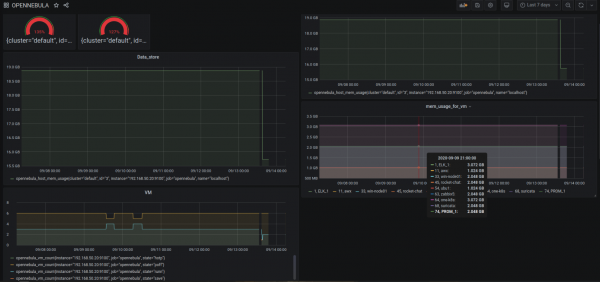
(it's clear that I've set up CPU and RAM overcommitment here)
For those who love and use Zabbix, there is
That's all on monitoring; the main thing is that it exists. Of course, you can also use built-in tools to monitor virtual machines and export data to billing, but everyone has their own approach; I haven't focused on this more closely yet.
Regarding logging, I haven't started on that yet. The simplest option is to add td-agent for parsing the directory \/var\/lib\/one with regular expressions. For example, the file sunstone.log fits under the regexp for nginx and other files that show the request history on the platform — what's the benefit? For instance, we can clearly track the number of "Error, error" and quickly identify where and at what level there is a fault.
3. Backups
There are also paid refined projects — for example, sep :OpenNebula_Backup. Here, we need to understand that simply backing up the machine image is not enough, as our virtual machines must operate with full integration (the same context file that describes network settings, VM name, and custom settings for your applications). Therefore, we need to determine what and how we will back up. In some cases, it may be better to back up what is inside the VM itself. Possibly, you only need to back up one disk from this machine.
For example, we agreed that all machines boot with persistent images; therefore, after reading
it means we can first export the image from our VM:
onevm disk-saveas 74 3 prom.qcow2
Image ID: 77

Let's see what name it was saved under

oneimage show 77
\/var\/lib\/one\/\/datastores\/100\/f9503161fe180658125a9b32433bf6e8

And then we copy it wherever needed. Of course, it's not the best approach. I just wanted to show that using OpenNebula tools, similar solutions can be built.
I also found and there's also , but this one is only for qcow2 storage.
As we all know, sooner or later there comes a moment when incremental backups are desired. This can be more complicated, and perhaps the management will allocate funds for a paid solution, or we can take another approach, understanding that we are only consuming resources here, and that backups should be done at the application level by adding more nodes and virtual machines. I suggest using the cloud solely for launching application clusters and running databases on another platform, or opting for a provider's ready-made solution if available.
4. Usability
In this point, I will describe the problems I encountered. For example, with images, as we know, there is a persistent option – when this image is mounted to the VM, all data is written into this image. If it's non-persistent, then the image is copied to storage and data is written to what has been copied from the source image – that's how template preparations work. I’ve repeatedly created issues for myself by forgetting to specify persistent, resulting in a 200 GB image being copied. The problem is that this procedure cannot be canceled; you need to go to the node and kill the current 'cp' process.
One of the major downsides is that you cannot simply undo actions using the GUI. Rather, you will try to cancel them and see that nothing happens, and you'll restart again, only to have two 'cp' processes running that are copying the image.
This leads to understanding why OpenNebula numbers each new instance with a new ID. For example, in Proxmox, I created a VM with ID 101, deleted it, and then recreated it with ID 101. This won't happen in OpenNebula; every new instance will be created with a new ID, and there's a logic behind that—like cleaning up old data or failed installations.
The same goes for storage; this platform is primarily aimed at centralized storage. There are addons for using local storage, but that’s not the focus here. I believe that in the future, someone will write an article on how to successfully use local storage on nodes in production.
5. Maximum Simplicity
Of course, the further you go, the fewer people there are who will understand you.
In my setup — 3 nodes with an NFS storage — everything works fine. However, when experimenting with power outages, for example during a snapshot launch and a power cut to the nodes, we retain settings in the database indicating that there is a snapshot, but in reality, it doesn't exist (we understand that it originally recorded this action in the SQL database, but the operation itself was unsuccessful). The advantage is that when creating a snapshot, a separate file is generated and there is a 'parent', so in case of issues, even if it doesn't work through the GUI, we can retrieve the qcow2 file and restore it separately.
Unfortunately, networks are not so simple. At least it's easier than in OpenStack; I've only used VLAN (802.1Q) — it works quite well, but if you make changes to the settings from the template network, those changes won’t apply to machines that are already running. You need to delete and re-add the network card for the new settings to take effect.
If you want to compare with OpenStack, you could say that in OpenNebula there is no clear definition of which technologies to use for data storage, network management, and resources — each administrator decides what works best for them.
6. Additional plugins and installations
As we know, the cloud platform can manage not only KVM but also VMware ESXi. Unfortunately, I didn't have a pool with vCenter; if anyone has tried, please let me know.
It's stated in the support of other cloud providers.
AWS, AZURE.
I also attempted to integrate VMware Cloud from Selectel, but it didn't work — overall I gave up, as there are many factors, and there’s no point in contacting the hosting provider's tech support.
Also, now in the new version, there is Firecracker — it's the launch of microVMs, a sort of KVM wrapper over Docker, which provides even more versatility, security, and performance improvement since it doesn't waste resources emulating hardware. I can only see advantages compared to Docker in that it doesn't occupy additional processes or sockets when using this emulation, so it can indeed be used as a load balancer (but perhaps a separate article is warranted for this, as I have not yet conducted full tests).
7. Positive experience of use and debugging errors
I wanted to share my observations about the work; I've described part of it above, but I want to write more. Indeed, I'm probably not the only one who initially thinks that this is not the right system and that everything here is a bit patchy — how do people even work with this? But then understanding comes, and it all starts to make sense. Of course, not everyone can be pleased, and some aspects need further refinement.
For example, a simple operation of copying a disk image from one datastore to another. In my case, there are 2 nodes with NFS; when I send the image, the copying goes through the OpenNebula frontend, even though we are used to copying data directly between hosts — in VMware and Hyper-V, we are accustomed to this, but here it works differently. Here there is a different approach and ideology, and in version 5.12, the 'migrate to datastore' button was removed — only the machine itself is moved, but not the storage, as a centralized storage is implied.
Next, a common error with various reasons: 'Error deploying virtual machine: Could not create domain from /var/lib/one//datastores/103/10/deployment.5'. Below will be a list of things to check.
- Permissions for the image for the user oneadmin;
- Permissions for the user oneadmin to run libvirtd;
- Is the datastore mounted correctly? Go and check the path on the node itself, something may have gone wrong;
- Incorrectly configured network; rather, on the frontend it's set in the network settings that the main interface for VLAN is br0, while on the node it is specified as bridge0 — they need to be consistent.
The system datastore stores metadata for your VM; if you run a VM with a persistent image, the VM must have access to the originally created configuration in the storage where you created the VM — this is very important. Therefore, when transferring a VM to another datastore, everything needs to be double-checked.
8. Documentation, Community. Further Development
And the rest, good documentation, community, and most importantly, that the project continues to thrive in the future.
Overall, everything here is quite well documented, and even from the official source, it won't be a problem to set up and find answers to questions.
The community is active. They publish many ready-made solutions that you can utilize in your setups.
At this point, some policies in the company have changed with version 5.12. It will be interesting to see how the project develops. At the beginning, I specifically mentioned some providers that utilize their own solutions and what the industry offers. There is no clear answer on what to use, of course. However, for small organizations, maintaining a small private cloud may not be as costly as it seems. The main thing is to know precisely what you need.
As a result, regardless of what you choose as a cloud system, you should not settle for just one product. If you have the time, it’s worth exploring other, more open solutions.
There's a good chat. actively helping and not sending you to search for problem solutions on Google. Join in.
Source: habr.com
