


In their work, computer forensics specialists regularly encounter cases where it is necessary to quickly unlock a smartphone. For instance, data from the phone is needed by investigators to understand the reasons behind a teenager's suicide. In another case, it may help trace a criminal group attacking long-haul truck drivers. There are also some heartwarming stories — parents who forgot the password to their gadget but found videos of their baby's first steps on it, though these are unfortunately rare. However, they still require a professional approach to the matter. In this article, Igor Mikhailov, a specialist at the Group-IB Computer Forensics Laboratory, discusses methods that allow forensic experts to bypass smartphone locks.
Important: this article is written to evaluate the security of passwords and graphical patterns used by mobile device owners. If you decide to unlock a mobile device using the methods described, remember that all actions taken to unlock devices are at your own risk. When manipulating mobile devices, you may lock the device, erase user data, or render the device inoperable. Recommendations are also provided for users on how to enhance the security of their devices.
Thus, the most common method of restricting access to user information contained within the device is screen lock. When such a device comes to a forensic laboratory, working with it can be complicated, as it is impossible to activate USB debugging mode (for Android devices) or to confirm permission for the expert's computer to interact with this device (for Apple mobile devices), and consequently, it is impossible to access the data stored in the device's memory.
The extent to which a standard mobile device screen lock prevents specialists from extracting data from it is illustrated by the fact that the FBI paid a large sum to unlock the iPhone of terrorist Syed Farook, one of the participants in the terrorist attack in San Bernardino, California [1].
Methods for Unlocking Mobile Device Screens
Typically, the following methods are used to lock a mobile device screen:
- Alphanumeric password
- Graphical password
Additionally, certain mobile devices may use SmartBlock technology methods for unlocking the screen:
- Fingerprint recognition unlock
- Facial recognition unlock (FaceID technology)
- Unlocking the device via iris recognition
Social methods for unlocking mobile devices
In addition to purely technical means, there are other ways to learn or bypass a PIN code or graphical pattern lock. In some cases, social methods may be more effective than technical solutions, aiding in unlocking devices where existing technical developments fail.
This section will describe methods for unlocking mobile device screens that do not require (or only require limited, partial) technical means.
To conduct social attacks, it is necessary to deeply study the psychology of the owner of the locked device, understand the principles by which they generate and store passwords or graphical patterns. The researcher will also need a bit of luck.
When using methods related to password guessing, please consider that:
- when entering ten incorrect passwords on Apple mobile devices, the user's data may be erased. This depends on the security settings established by the user;
- Android mobile devices may utilize Root of Trust technology, which means that after entering 30 incorrect passwords, the user's data may become either inaccessible or erased.
Method 1: ask for the password
It may sound strange, but the unlock password can be obtained simply by asking the device owner. Statistics show that about 70% of mobile device owners willingly share their password, especially if it speeds up the process and allows them to get their device back sooner. If there is no way to ask the owner for the password (for example, if the owner has passed away) or they refuse to divulge it, the password can sometimes be obtained from close relatives. Typically, relatives either know the password or can suggest possible options.
Protection Recommendation: The password to your phone is a universal key to all data, including payment information. Discussing, sharing, or writing it in messengers is a bad idea.
Method 2: Sneak a Peek at the Password
The password can be observed while the owner is using the device. Even if you only partially memorize the password (whether it’s a character or graphic password), it will significantly reduce the number of potential combinations, enabling you to guess it more quickly.
One variant of this method is to use footage from surveillance cameras that capture the owner unlocking the device with a graphic password [2]. The algorithm described in the paper "Cracking Android Pattern Lock in Five Attempts" [2], through video analysis, enables one to suggest possible variations of the graphic password and unlock the device within a few attempts (typically, this requires no more than five attempts). According to the authors, "the more complex the graphic password, the easier it is to guess."
Protection Recommendation: Using a graphic key is not the best idea. It is very difficult to sneak a peek at an alphanumeric password.
Method 3: Find the Password
The password might be found among the owner's records (files on their computer, in a notebook, on scraps of paper among their documents). If a person uses multiple mobile devices with different passwords, paper slips with written passwords can sometimes be found in the battery compartment of those devices or in the space between the smartphone case and cover.
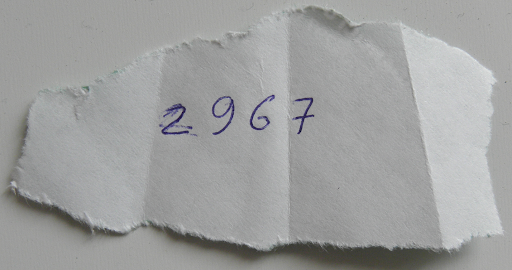
Protection Recommendation: You shouldn’t keep a "notebook" of passwords. It’s a bad idea, unless all those passwords are deliberately fake, to reduce the number of unlocking attempts.
Method 4: Fingerprints (Smudge Attack)
This method allows for the detection of fingerprint smudge traces on the device screen. These traces can be seen by treating the device's screen with a light fingerprint powder (instead of special forensic powder, baby powder or another chemically inert fine powder that is white or light gray can be used) or by viewing the screen in oblique light rays. By analyzing the arrangement of the fingerprint traces and having additional information about the device owner (for example, knowing their year of birth), one can try to deduce a text or graphical password. This is what fingerprint residue looks like on a smartphone screen in the form of a stylized letter Z:
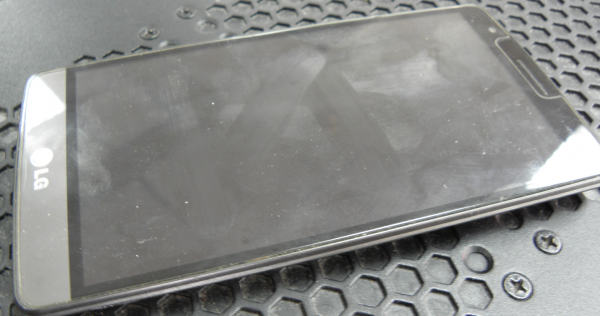
Protection Recommendation: As we mentioned, a graphical password is not the best idea, just like screens with poor oleophobic coatings.
Method 5: Artificial Finger
If the device can be unlocked with a fingerprint and the investigator has samples of the device owner's fingerprints, they can create a three-dimensional copy of the owner's fingerprint using a 3D printer and use it to unlock the device [3]:
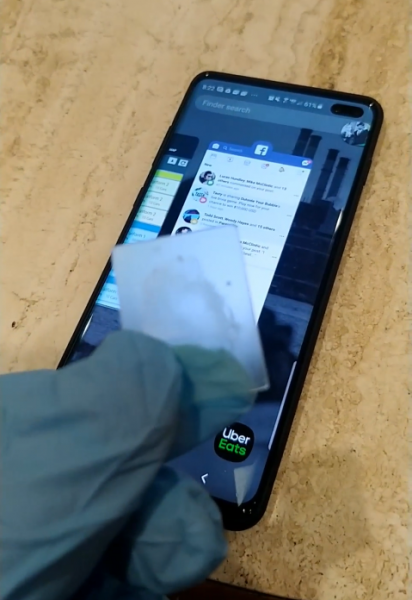
To more accurately imitate a live person's finger—especially when the smartphone's fingerprint sensor still detects heat—a 3D model is placed (pressed) against a living person's finger.
The device owner, even if they forget the screen lock password, can unlock the device using their fingerprint. This can be useful in certain situations where the owner cannot provide the password, but is nonetheless willing to assist the investigator in unlocking their device.
The investigator should be aware of the generations of sensors used in various mobile device models. Older sensor models may respond to the touch of practically any finger, not necessarily belonging to the device owner. In contrast, modern ultrasonic sensors scan quite deeply and clearly. Additionally, several contemporary under-screen sensors are simply CMOS cameras that cannot scan the depth of the image, making them much easier to deceive.
Protection Recommendation: If it's a finger, then only an ultrasonic sensor. But keep in mind that it's much easier to place a finger against your will than a face.
Method 6: "Snatch" (Mug attack)
This method is described by British police [4]. It involves covert surveillance of the suspect. At the moment when the suspect unlocks their phone, an undercover agent snatches it from the owner's hands and prevents the device from locking again until it is handed over to experts.
Protection Recommendation: I think if such measures are going to be applied against you, things are bad. But you need to understand that accidental locking devalues this method. For example, repeatedly pressing the lock button on an iPhone activates SOS mode, which not only disables FaceID but also prompts for a password.
Method 7: Errors in device control algorithms
In the news feeds of specialized resources, you can often find reports that certain actions with the device result in its screen being unlocked. For example, the lock screen of some devices may unlock when a call comes in. The downside of this method is that identified vulnerabilities are usually quickly fixed by manufacturers.
An example of a method for unlocking mobile devices released before 2016 is battery depletion. When the battery is low, the device unlocks and suggests changing power settings. At this point, you need to quickly navigate to the security settings page and disable the screen lock [5].
Protection Recommendation: Make sure to regularly update your device's OS, and if it is no longer supported, consider replacing your smartphone.
Method 8: Vulnerabilities in third-party programs
Vulnerabilities found in third-party applications installed on the device can also provide full or partial access to the data of the locked device.
An example of such a vulnerability is the data breach from Jeff Bezos's iPhone, the main owner of Amazon. A vulnerability in the messaging app WhatsApp, exploited by unknown parties, led to the theft of confidential data stored on the device [6].
Such vulnerabilities can be used by researchers to achieve their goals—extracting data from locked devices or unlocking them.
Protection Recommendation: You need to update not only the operating system but also the applications you use.
Method 9: Corporate Phone
Corporate mobile devices can be unlocked by company system administrators. For instance, corporate Windows Phone devices are linked to the company's Microsoft Exchange account and can be unlocked by its administrators. For corporate Apple devices, there is a service called Mobile Device Management, similar to Microsoft Exchange. Its administrators can also unlock corporate iOS devices. Additionally, corporate mobile devices can only connect to specific computers designated by the administrator in the mobile device settings. Therefore, without collaboration with the company's system administrators, it is impossible to connect such a device to a researcher's computer (or data extraction hardware/software system).
Protection Recommendation: MDM can be both good and bad in terms of protection. An MDM administrator can always remotely wipe the device. In any case, it is not advisable to store sensitive personal data on a corporate device.
Method 10: Information from Sensors
By analyzing information received from the device's sensors, it is possible to guess the device's password using a special algorithm. Adam J. Aviv demonstrated the possibility of such attacks by utilizing data obtained from a smartphone's accelerometer. In his studies, the researcher was able to correctly identify a symbolic password in 43% of cases and a graphical password in 73%.
Protection Recommendation: Be cautious about which applications you grant permission to track various sensors.
Method 11: Face Unlock
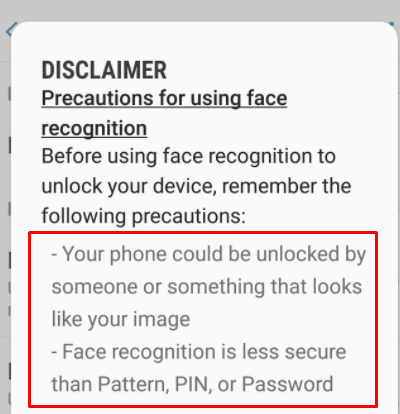
Just like with a fingerprint, the success of unlocking a device using FaceID technology depends on the sensors and the mathematical algorithms used in a particular mobile device. In the work "Gezichtsherkenning op smartphone niet altijd veilig" [8], researchers showed that some of the smartphones tested could be unlocked simply by presenting a photo of the owner to the smartphone's camera. This is possible when only a single front camera is used for unlocking and lacks the ability to scan depth data. After a series of high-profile publications and videos on YouTube, Samsung was forced to add a warning to its smartphones' firmware. Face Unlock Samsung:
More advanced smartphone models can be unlocked using a mask or through the device's self-learning capabilities. For instance, the iPhone X employs a special TrueDepth technology [9]: the device's projector, along with two cameras and an infrared emitter, projects a grid of over 30,000 points onto the owner's face. Such a device can be unlocked with a mask that mimics the contours of the owner's face. Mask for unlocking iPhone [10]:
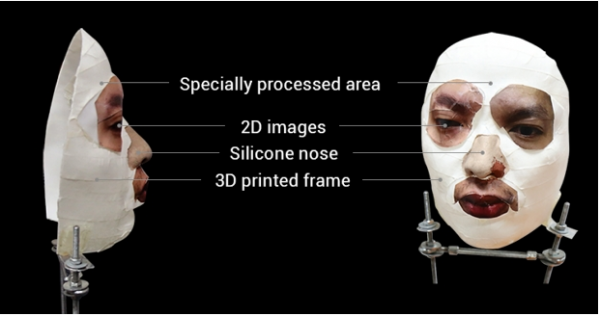
Since such systems are highly complex and do not function optimally under ideal conditions (natural aging of the owner, changes in facial configuration due to emotional expressions, fatigue, health states, etc.), they must constantly self-learn. Therefore, if a device is unlocked and is held in front of another person, that person's face will be remembered as the owner's face, allowing them to unlock the smartphone using FaceID technology in the future.
Protection Recommendation: Do not use photo unlocking — only systems with full facial scanners (Apple's FaceID and similar systems on Android devices).
The main recommendation is not to look directly at the camera; simply averting your gaze is enough. Even closing one eye significantly reduces the chances of unlocking, as does having hands on the face. Additionally, for facial unlocking (FaceID), you only get 5 attempts, after which a passcode entry will be required.
Method 12: using leaks
Leaked password databases are an excellent way to understand the psychology of the device owner (provided the researcher has information about the owner's email addresses). In the example given, searching by email address yielded two similar passwords that the owner used. It can be assumed that the password 21454162 or its derivatives (for instance, 2145 or 4162) might have been used as a mobile device unlock code. (Searching the owner's email address in leak databases shows what passwords the owner might have used, including to lock their mobile device).
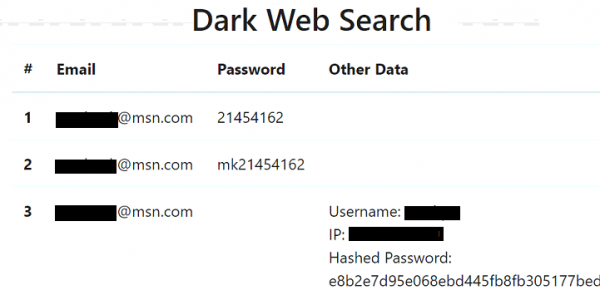
Protection Recommendation: Act preventively, track leak data, and timely change passwords noted in leaks!
Method 13: Common device lock passwords
Typically, the owner has not just one mobile device, but several. Often, there can be a dozen such devices. In this case, a password for a vulnerable device can be picked and tried on other smartphones and tablets seized from the same owner.
When analyzing data extracted from mobile devices, such data is displayed in forensic programs (often — even when extracting data from locked devices using various types of vulnerabilities).
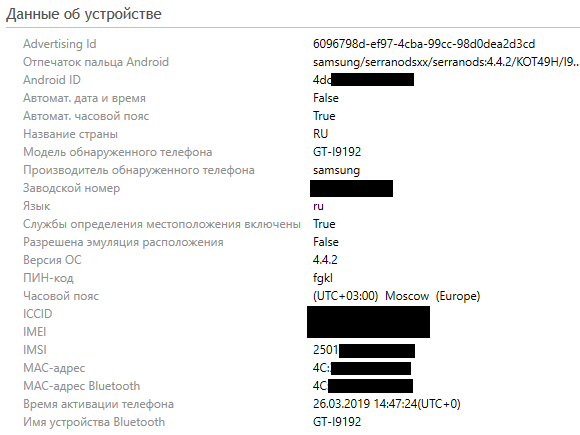
As seen in the screenshot of part of the working window of the UFED Physical Analyzer program, the device is protected by a rather unusual PIN code fgkl.
One should not underestimate the user's other devices. For instance, by analyzing passwords saved in the web browser cache on the computer of the mobile device owner, one can understand the principles of password generation that the owner adhered to. Saved passwords on the computer can be viewed using the utility from NirSoft [11].
There may also be Lockdown files on the owner's computer (laptop) that can help gain access to a locked Apple mobile device. This method will be discussed further.
Protection Recommendation: Use different, unique passwords everywhere.
Method 14: Common PIN codes
As previously noted, users often employ common passwords: phone numbers, bank card numbers, PIN codes. Such information can be used to unlock the provided device.
If nothing helps, you can refer to the following information: researchers have conducted an analysis and identified the most popular PIN codes (the listed PIN codes cover 26.83% of all passwords) [12]:
PIN
Frequency, %
1234
10,713
1111
6,016
0000
1,881
1212
1,197
7777
0,745
1004
0,616
2000
0,613
4444
0,526
2222
0,516
6969
0,512
9999
0,451
3333
0,419
5555
0,395
6666
0,391
1122
0,366
1313
0,304
8888
0,303
4321
0,293
2001
0,290
1010
0,285
Applying this list of PIN codes to a locked device will allow it to be unlocked with a probability of approximately 26%.
Protection Recommendation: check your PIN against the table above, and even if it does not match, change it anyway, because 4 digits is too little by the standards of 2020.
Method 15: Common graphical passwords
As described above, having data from surveillance cameras on which the device owner attempts to unlock it, one can deduce the unlock pattern from five attempts. Furthermore, just as there are common PIN codes, there are also typical patterns that can be used to unlock locked mobile devices [13, 14].
Simple patterns [14]:

Patterns of medium complexity [14]:

Complex patterns [14]:

A list of the most popular graphical patterns according to researcher Jeremy Kirby [15].
3>2>5>8>7
1>4>5>6>9
1>4>7>8>9
3>2>1>4>5>6>9>8>7
1>4>7>8>9>6>3
1>2>3>5>7>8>9
3>5>6>8
1>5>4>2
2>6>5>3
4>8>7>5
5>9>8>6
7>4>1>2>3>5>9
1>4>7>5>3>6>9
1>2>3>5>7
3>2>1>4>7>8>9
3>2>1>4>7>8>9>6>5
3>2>1>5>9>8>7
1>4>7>5>9>6>3
7>4>1>5>9>6>3
3>6>9>5>1>4>7
7>4>1>5>3>6>9
5>6>3>2>1>4>7>8>9
5>8>9>6>3>2>1>4>7
7>4>1>2>3>6>9
1>4>8>6>3
1>5>4>6
2>4>1>5
7>4>1>2>3>6>5
On some mobile devices, in addition to a graphical code, an additional PIN code may be set. In this case, if the graphical code cannot be guessed, the researcher may click the button Additional PIN code (additional PIN code) after entering an incorrect graphical code and attempt to guess the additional PIN code.
Protection Recommendation: it’s better not to use graphical keys at all.
Method 16: Alphanumeric passwords
If a device allows the use of an alphanumeric password, the owner could use the following popular passwords as the lock code [16]:
- 123456
- password
- 123456789
- 12345678
- 12345
- 111111
- 1234567
- sunshine
- qwerty
- iloveyou
- princess
- admin
- welcome
- 666666
- abc123
- football
- 123123
- monkey
- 654321
- !@#$%^&*
- charlie
- aa123456
- donald
- password1
- qwerty123
Protection Recommendation: use only complex, unique passwords with special characters and varying cases. Check if you are using one of the passwords listed above. If so, change it to a more secure one.
Method 17: cloud or local storage
If there is no technical ability to extract data from the locked device, forensic experts may search for its backups on the owner's computers or in corresponding cloud storages.
Often, Apple smartphone owners do not realize that when they connect to their computers, a local or cloud backup of the device may be created.
In the Google and Apple cloud storages, not only device data can be saved, but also the passwords stored by the device. Extracting these passwords can assist in guessing the lock code of the mobile device.
From the Keychain saved in iCloud, it is possible to extract the backup password set by the owner, which is likely to match the screen lock PIN code.
If law enforcement agencies contact Google and Apple, the companies may provide available data, which is likely to significantly reduce the need to unlock the device, as the data will already be with law enforcement.
For instance, after the terrorist act in Pensacola, copies of data stored in iCloud were provided to the FBI. From Apple's statement:
"Within a few hours after the first FBI request on December 6, 2019, we provided a wide range of information related to the investigation. From December 7 to 14, we received six additional legal requests and provided information in response, including iCloud backups, account information, and transaction data for multiple accounts."
We responded to every request promptly, often within a few hours, exchanging information with the FBI offices in Jacksonville, Pensacola, and New York. A lot of gigabytes of information were obtained from the investigation requests, which we passed on to the investigators.
Protection Recommendation: Everything you upload to the cloud in unencrypted form can and will be used against you.
Method 18: Google Account
This method is suitable for removing the graphic password that locks the screen of an Android mobile device. To use this method, you need to know the username and password of the device owner's Google account. The second condition is that the device must be connected to the internet.
After entering the wrong graphic password several times in a row, the device will prompt you to reset the password. After that, you must log in to the user's account, which will lead to unlocking the device's screen.
Due to the variety of hardware solutions, Android operating systems, and additional security settings, this method is applicable only to a limited number of devices.
If the investigator does not have the password to the device owner's Google account, it can be attempted to be recovered using standard password recovery methods for such accounts.
If the device is not connected to the internet at the time of the investigation (for example, the SIM card is blocked or there is insufficient balance), it can be connected to Wi-Fi by following these instructions:
- tap the 'Emergency Call' icon
- dial *#*#7378423#*#*
- select Service Test — Wlan
- connect to an available Wi-Fi network
Protection Recommendation: do not forget to use two-factor authentication wherever possible, and in this case, it is better with app integration rather than an SMS code.
Method 19: Guest Account
On mobile devices running Android 5 and above, there can be multiple accounts. Access to the data of an additional account may not have a PIN or graphic password lock. To switch, click on the account icon in the upper right corner and select a different account:
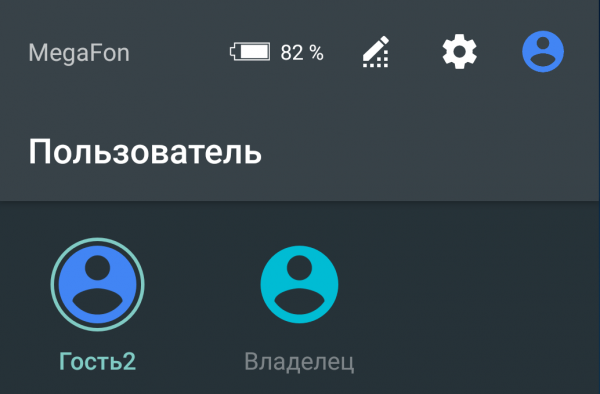
For the additional account, access to some data or applications may be restricted.
Protection Recommendation: It is important to update the OS. In modern versions of Android (9 and above with security patches from July 2020), the guest account typically does not provide any opportunities.
Method 20: specialized services
Companies that develop specialized forensic software also offer services for unlocking mobile devices and extracting data from them [20, 21]. The capabilities of such services are simply fantastic. They can unlock top models of Android and iOS devices, as well as devices in recovery mode (into which the device enters after exceeding the number of incorrect password attempts). The downside of this method is its high cost.
A fragment of a webpage from Cellebrite, describing from which devices they can extract data. The device can be unlocked at the developer's laboratory (Cellebrite Advanced Service (CAS)) [20]:
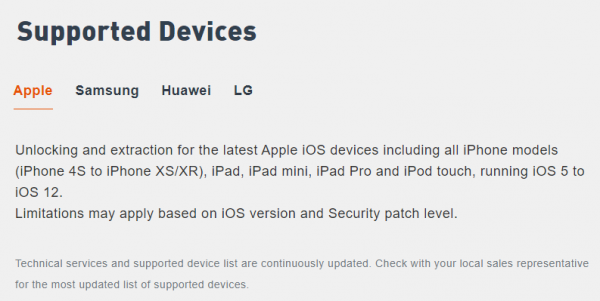
For such a service, the device must be provided to the regional (or head) office of the company. A specialist visit to the client is possible. Generally, breaking the screen lock code takes one day.
Protection Recommendation: It is practically impossible to protect oneself except by using a strong alphanumeric password and changing devices annually.
P.S. About these cases, tools, and many other useful tips in the work of a computer forensic expert, the experts of Group-IB Laboratory discuss within the framework of a training course . After completing the 5-day or extended 7-day courses, graduates will be able to conduct forensic investigations more effectively and prevent cyber incidents in their organizations.
P.P.S. A thrilling on information security, hackers, APT, cyberattacks, fraudsters, and pirates. Step-by-step investigations, practical cases using Group-IB technologies, and recommendations on how not to become a victim. Join us!
file — continuous reading of events from one or more local files;
- Guixin Ye, Zhanyong Tang, Dingyi Fang, Xiaojiang Chen, Kwang Kim, Ben Taylor, Zheng Wang.
- Dominic Casciani, Gaetan Portal.
- Anatoly Alizar.
- Maria Nefedova.
- Anton Makarov. Bypassing Graphic Passwords on Android Devices
- Jeremy Kirby.
- Andrey Smirnov.
- Maria Nefedova.
Source: habr.com
