

Getting the current date in any programming language is the equivalent operation to "Hello world!". The R language is no exception.
In this article, we will explore how date handling works in the basic syntax of the R language, as well as review several useful packages that enhance its capabilities for working with dates:
lubridate— a package that allows arithmetic operations between dates;timeperiodsR— a package for working with time intervals and their components.

Content
If you are interested in data analysis, particularly in the R language, you might find my and channels interesting. Most of the content is dedicated to the R language.
1.1.
1.2.
2.1.
2.2.
2.3.
3.1.
3.2.
Working with dates in basic R syntax
Converting text to date
Base R has a set of functions for working with dates. The downside of the base syntax is that the case of names and arguments is very inconsistent and lacks logical connections. Nevertheless, it is essential to know the base functions of the language, so let's start with them.
Most often, when loading data into R from CSV files or other sources, you receive the date in text format. To convert this text into the correct data type, use the function as.Date().
# создаём текстовый вектор с датами
my_dates <- c("2019-09-01", "2019-09-10", "2019-09-23")

# проверяем тип данных
class(my_dates)
#> [1] "character"# преобразуем текст в дату
my_dates <- as.Date(my_dates)
# проверяем тип данных
class(my_dates)#> [1] "Date"the net/http as.Date() which accepts dates in two formats: YYYY-MM-DD or YYYY/MM/DD.
If your dataset has dates represented in any other format, you can use the argument format.
as.Date("September 26, 2019", format = "%B %d, %Y")format which takes string representations of any time interval and its format; the most commonly used values are provided in the table below:
Format
Description
%d
Day number in the month
%a
Abbreviation of the weekday
%A
Full name of the weekday
%w
Day number of the week (0-6, where 0 is Sunday)
%m
Two-digit representation of the month (01-12)
%b
Abbreviation of the month name (apr, mar, …)
%B
Full name of the month
%y
Two-digit representation of the year
%Y
Four-digit representation of the year
%j
Day number in the year (001 — 366)
%U
Week number of the year (00 — 53), week starts on Sunday
%W
Week number of the year (00 — 53), week starts on Monday
Accordingly, "September 26, 2019" is the full name of the month, the day, and the year. This date format can be described with the following operators:"%B %d, %Y".
Where:
%B— Full name of the month%d— Day number in the month%Y— Four-digit representation of the year
When describing the date format, it is important to include all extra characters from your string, such as dashes, commas, periods, spaces, and so on. In my example, "September 26, 2019", there is a comma after the date, and you should also include a comma in the format description:"%B %d, %Y".
There are situations when you receive a date that not only does not conform to standard formats (YYYY-MM-DD or YYYY/MM/DD), but also in a language that differs from the default set on your operating system. For example, you downloaded data where the date is presented as: "December 15, 2019". Before converting this string to a date, you need to change the locale.
# Меняем локаль
Sys.setlocale("LC_TIME", "Russian")
# Конвертируем строку в дату
as.Date("Декабрь 15, 2019 г.", format = "%B %d, %Y")
Extracting date components in base R
In base R, there are not many functions that allow you to extract any part of a date from an object of class Date.
current_date <- Sys.Date() # current date
weekdays(current_date)     # get the weekday number
months(current_date)       # get the month number in the year
quarters(current_date)     # get the quarter number in the year
In addition to the main object class Date base R also has 2 more data types that store timestamps: POSIXlt, POSIXct. The main difference of these classes from Date is that they store time in addition to the date.
# получить текущую дату и время
current_time <- Sys.time()

# узнать класс объекта current_time
class(current_time)
# "POSIXct" "POSIXt"
Function Sys.time() returns the current date and time in the format POSIXct. This format is similar in meaning to UNIXTIME, and stores the number of seconds since the beginning of the UNIX era (midnight (UTC) on December 31, 1969 to January 1, 1970).
Class POSIXlt also stores time and date, along with all their components. Therefore, it is an object with a more complex structure, but from which any component of date and time can be easily obtained since essentially POSIXlt this list.
# Получаем текущую дату и время
current_time_ct <- Sys.time()

# Преобразуем в формат POSIXlt
current_time_lt <- as.POSIXlt(current_time_ct)

# извлекаем компоненты даты и времени
current_time_lt$sec   # секунды
current_time_lt$min   # минуты
current_time_lt$hour  # часы
current_time_lt$mday  # день месяца
current_time_lt$mon   # месяц
current_time_lt$year  # год
current_time_lt$wday  # день недели
current_time_lt$yday  # день года
current_time_lt$zone  # часовой пояс
Conversion of numeric and text data to POSIX* formats is performed by functions as.POSIXct() and as.POSIXlt(). These functions have a small set of arguments.
- x — A number, string, or object of class Date, which needs to be converted;
- tz — Time zone, default is "GMT";
- format — Description of the date format in which the data passed to parameter x is presented;
- origin — Used only when converting a number to POSIX, this argument must be passed a date and time object from which the seconds are counted. Generally used for converting from UNIXTIME.
If your date and time data is represented in UNIXTIME, then use the following example to convert it into a clear, readable date:
# Конвертируем UNIXTIME в читаемую дату
as.POSIXlt(1570084639,  origin = "1970-01-01")
In origin, you can specify any timestamp. For example, if your data indicates the date and time as the number of seconds since September 15, 2019, 12:15, then to convert it into a date, use:
# Конвертируем UNIXTIME в дату учитывая что начало отсчёта 15 сентября 2019 12:15
as.POSIXlt(1546123,  origin = "2019-09-15 12:15:00")
Working with dates using the lubridate package
lubridate perhaps the most popular package for working with dates in R. It additionally provides you with three more classes.
- durations — duration, i.e., the number of seconds between two timestamps;
- periods — periods allow calculations between dates in human-readable intervals: days, months, weeks, and so on;
- intervals — objects that provide a start and end time.
Installing additional packages in R is done using the standard function install.packages().
Install package lubridate:
install.packages("lubridate")Converting text to date with lubridate
The functions of the package lubridate greatly simplify the process of converting text into date, and also allow you to perform any arithmetic operations with dates and times.
To get the current date or the date and time, the functions will help you today() and now().
today() # current date
now()   # current date and time
To convert a string to a date in lubridate there is a whole family of functions whose names always consist of three letters and denote the sequence of date components:
- y — year
- m — month
- d — day
List of functions for converting text to date via lubridate
ymd()ydm()mdy()myd()dmy()dym()yq()
Several examples for converting strings to dates:
ymd("2017 jan 21")
mdy("March 20th, 2019")
dmy("1st april of 2018")
As you can see, lubridate significantly more efficiently recognizes textual descriptions of dates, and allows you to convert text into dates without using additional operators to describe the format.
Extracting date components with the lubridate package
Also, using lubridate you can extract any component from a date:
dt <- ymd("2017 jan 21")

year(dt)  # year
month(dt) # month
mday(dt)  # day of the month
yday(dt)  # day of the year
wday(dt)  # weekday
Arithmetic operations with dates
But the most important and core functionality lubridate lies in the ability to perform various arithmetic operations with dates.
Date rounding is performed by three functions:
floor_date— rounding down to the nearest past timeceiling_date— rounding up to the nearest future timeround_date— rounding to the nearest time
Each of these functions has an argument service, which allows you to specify the rounding unit: second, minute, hour, day, week, month, bimonth, quarter, season, halfyear, year
dt <- ymd("2017 jan 21")

round_date(dt, unit = "month")    # round to month
round_date(dt, unit = "3 month")  # round to 3 months
round_date(dt, unit = "quarter")  # round to quarter
round_date(dt, unit = "season")   # round to season
round_date(dt, unit = "halfyear") # round to halfyear
So, let’s figure out how to get the date that will be 8 days after the current date and perform various other arithmetic calculations between two dates.
today() + days(8)   # what date will be in 8 days
today() - months(2) # what date was 2 months ago
today() + weeks(12) # what date will be in 12 weeks
today() - years(2)  # what date was 2 years ago
Simplified work with periods, the timeperiodsR package.
timeperiodsR — a new package for working with dates that was published on CRAN in September 2019.
Install package timeperiodsR:
install.packages("timeperiodsR")The main purpose is to quickly determine a specific time interval relative to a given date. For example, with its functions, you can easily:
- Get the previous week, month, quarter, or year in R.
- Get a specified number of time intervals relative to the date, such as the last 4 weeks.
- Easily extract the components of the obtained time interval: start and end date, number of days in the interval, the entire sequence of dates that fall within it.
The names of all package functions timeperiodsR are intuitive and consist of two parts: direction_interval, where:
- direction in which to move relative to the given date: last_n, previous, this, next, next_n.
- time interval to calculate the period: day, week, month, quarter, year.
Complete set of functions:
last_n_days()last_n_weeks()last_n_months()last_n_quarters()last_n_years()previous_week()previous_month()previous_quarter()previous_year()this_week()this_month()this_quarter()this_year()next_week()next_month()next_quarter()next_year()next_n_days()next_n_weeks()next_n_months()next_n_quarters()next_n_years()custom_period()
Time intervals in timeperiodsR
These functions are useful in cases where you need to generate reports based on data from the past week or month. To get the last month, use the function of the same name. previous_month():
prmonth <- previous_month()After that, you will have an object prmonth class tpr, from which the following components can be easily obtained:
- the start date of the period, in our example this is the previous month
- the end date of the period
- the number of days included in the period
- the sequence of dates included in the period
Moreover, each of the components can be obtained in different ways:
# первый день периода
prmonth$start
start(prmonth)

# последний день периода
prmonth$end
end(prmonth)

# последовательность дат
prmonth$sequence
seq(prmonth)

# количество дней входящих в период
prmonth$length
length(prmonth)
You can also obtain any of the components using the argument part, which is present in each of the functions of the package. Possible values: start, end, sequence, length.
previous_month(part = "start")    # start of the period
previous_month(part = "end")      # end of the period
previous_month(part = "sequence") # sequence of dates
previous_month(part = "length")   # number of days in the period
So, let's look at all the arguments available in the package functions timeperiodsR:
x— The reference date from which the time period will be calculated, by default, it is the current date;n— The number of intervals to be included in the period, for example, the last 3 weeks;part— Which component of the objecttpryou need to obtain, by defaultall;week_start— This argument is present only in functions for working with weeks, and allows you to specify the day of the week that will be considered its start, by default, the week starts on Monday, but you can set any from 1 — Monday to 7 — Sunday.
Thus, you can calculate any time period relative to the current or any other specified date, let me give a few more examples:
# получить 3 прошлые недели
# от 6 октября 2019 года
# начало недели - понедельник
last_n_weeks(x = "2019-10-06",
             n = 3,
             week_start = 1)
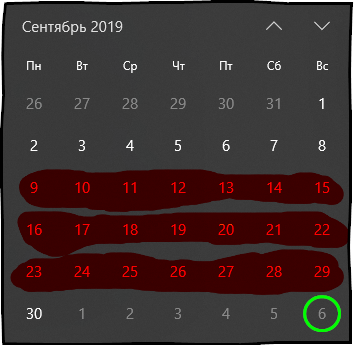
Time period: from 9 September of 2019, Monday to 29 September of 2019, SundayOctober 6 is a Sunday:
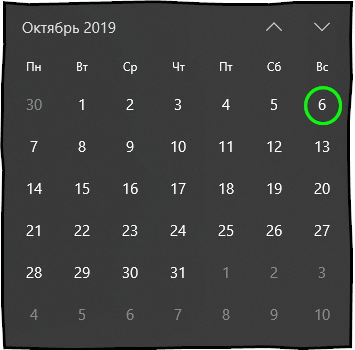
We need a period that will take 3 previous weeks relative to October 6, excluding the week that includes October 6 itself. Accordingly, this is the period from September 9 to 29.
# получить месяц отстающий на 4 месяца
# от 16 сентября 2019 года
previous_month(x = "2019-09-16", n = 4)
Time period: from 1 May of 2019, Wednesday to 31 May of 2019, FridayIn this example, we are interested in the month that was 4 months ago, considering the date of September 16, 2019, accordingly, it was May 2019.
Filtering a vector of dates using timeperiodsR
To filter dates in timeperiodsR there are several operators:
- %left_out% — compares two tpr class objects and returns the values from the left that are absent in the right.
- %left_in% — compares two tpr class objects and returns the dates from the left object that are included in the right.
- %right_out% — compares two tpr class objects and returns the values from the right that are absent in the left.
- %right_in% — compares two objects of class tpr and returns the dates from the right object that are present in the left.
period1 <- this_month("2019-11-07")
period2 <- previous_week("2019-11-07")

period1 %left_in% period2   # get dates from period1 that are in period2
period1 %left_out% period2  # get dates from period1 that are not in period2
period1 %right_in% period2  # get dates from period2 that are in period1
period1 %right_out% period2 # get dates from period2 that are not in period1
The package timeperiodsR has an official Russian-language .
Conclusion
We have thoroughly reviewed the classes of objects designed in the R language for working with dates. You will also now know how to perform arithmetic operations on dates and quickly obtain any time periods with the package timeperiodsR.
If you're interested in the R language, I invite you to subscribe to my Telegram channel , where I share useful materials daily about using the R language to tackle my everyday tasks.
Source: habr.com
