

As is known, SAP offers a comprehensive range of software for managing transactional data and processing that data in analytical and reporting systems. In particular, the SAP Business Warehouse (SAP BW) platform is a toolkit for data storage and analysis with extensive technical capabilities. Despite its objective advantages, the SAP BW system has one significant drawback: the high cost of data storage and processing, which is particularly noticeable when using the cloud-based SAP BW on Hana.
What if we start using some non-SAP, preferably Open Source product as storage? At X5 Retail Group, we chose GreenPlum. This certainly addresses the cost issue, but it immediately raises questions that were practically resolved by default when using SAP BW.

In particular, how to extract data from source systems, many of which are SAP solutions?
"HR-metrics" became the first project in which it was necessary to address this issue. Our goal was to create a repository for HR data and build analytical reporting on employee management. The primary data source is the SAP HCM transactional system, which maintains all personnel, organizational, and payroll activities.
Data extraction
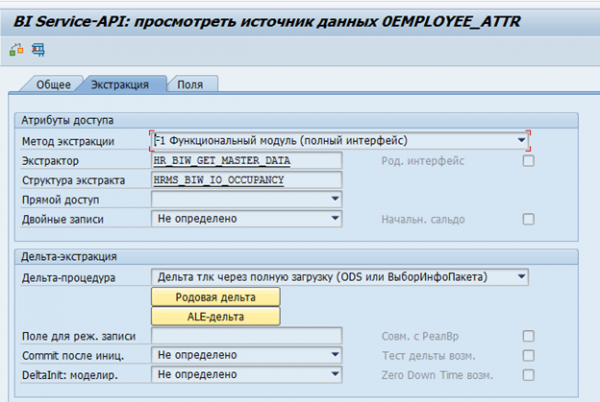
In SAP BW, there are standard data extractors for SAP systems. These extractors can automatically collect the necessary data, monitor its integrity, and determine delta changes. For example, here is a standard data source for employee attributes 0EMPLOYEE_ATTR:
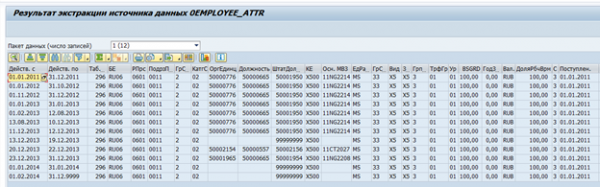
The result of data extraction from it for one employee:
If necessary, such an extractor can be modified to meet specific requirements, or a custom extractor can be created.
The initial idea about the possibility of reusing them arose. Unfortunately, this turned out to be an unfeasible task. Most of the logic is implemented on the SAP BW side, and it was not possible to seamlessly separate the extractor from the source in SAP BW.
It became clear that the development of a custom data extraction mechanism from SAP systems would be required.
Data storage structure in SAP HCM
To understand the requirements for such a mechanism, we first need to determine what specific data we will require.
Most data in SAP HCM is stored in flat SQL tables. Based on this data, SAP applications visualize organizational structures, employees, and other HR information for the user. For example, the organizational structure in SAP HCM looks like this:
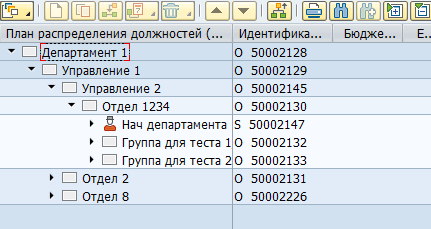
Physically, this tree is stored in two tables — in hrp1000 for objects and in hrp1001 for the relationships between these objects.
Objects "Department 1" and "Division 1":

Relationship between the objects:

There can be a vast number of both object types and relationship types between them. There are standard relationships between objects, as well as customized ones for specific needs. For example, the standard B012 relationship between the organizational unit and the position indicates the department head.
Displaying the manager in SAP:
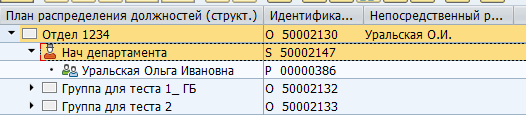
Storage in the database table:

Employee data is stored in the pa* tables. For instance, data on employee personnel events is stored in the pa0000 table.
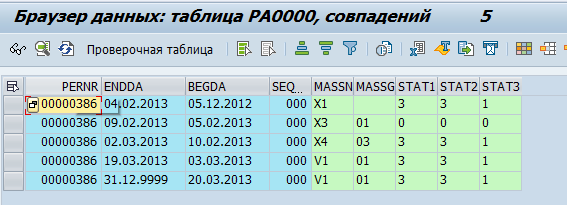
We decided that GreenPlum would pull "raw" data, i.e., simply copy it from SAP tables. In GreenPlum, they will then be processed and transformed into physical objects (e.g., Department or Employee) and metrics (e.g., average headcount).
Approximately 70 tables were identified, from which data needs to be transferred to GreenPlum. After that, we began to work on the method for transferring this data.
SAP offers a significant number of integration mechanisms. However, direct access to the database is prohibited due to licensing restrictions. Therefore, all integration flows must be implemented at the application level. server applications.
The next issue was the absence of data on deleted records in the SAP database. When a row is deleted in the database, it is physically removed. Thus, it was not possible to generate deltas based on the time of change.
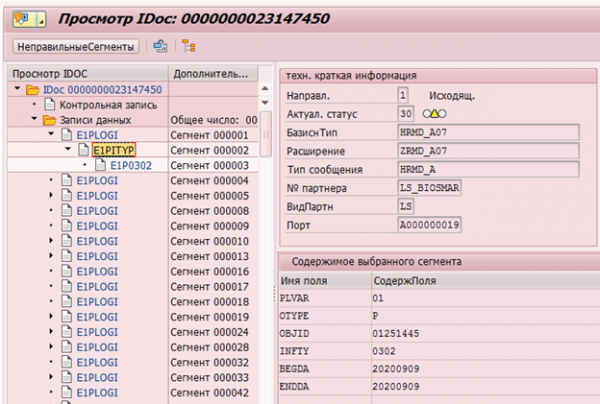
Of course, SAP HCM has mechanisms to log data changes. For example, for subsequent transmission to recipient systems, there are change pointers that log any changes and based on which Idocs (objects for transmission to external systems) are formed.
Example of IDoc changing the infotype 0302 for an employee with personnel number 1251445:
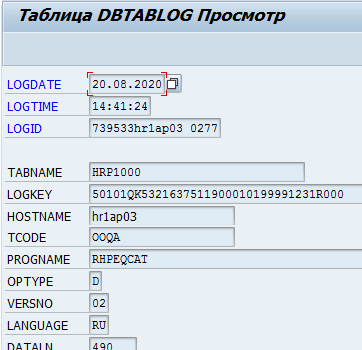
Or maintaining logs of changes in the DBTABLOG table.
Example of a log for deleting a record with key QK53216375 from the hrp1000 table:
However, these mechanisms are not available for all necessary data, and processing them at the application server level can consume quite a lot of resources. Therefore, mass enabling of logging for all necessary tables may lead to a noticeable degradation in system performance.
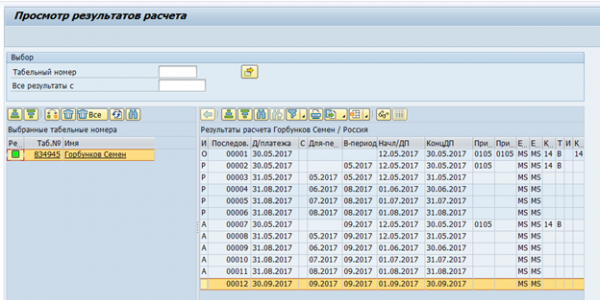
The next serious issue was clustered tables. Time estimation and payroll calculation data in SAP HCM RDBMS version is stored as a set of logical tables for each employee for each calculation. These logical tables are stored as binary data in the pcl2 table.
Payroll calculation cluster:
Data from clustered tables cannot be read with a SQL command; it requires the use of SAP HCM macro commands or specialized function modules. Consequently, the read speed of such tables will be quite low. On the other hand, such clusters store data that is only needed once a month – final payroll calculations and time estimates. Therefore, speed in this case is not so critical.
When considering options for generating a delta of data changes, we also decided to explore the option of a full data export. The idea of transferring gigabytes of unchanged data between systems daily does not look appealing. However, it has a number of advantages – there is no need for delta implementation on the source side, as well as integrating this delta on the receiver side. Consequently, this reduces the cost and timeframe for implementation and increases the reliability of integration. It was determined that almost all changes in SAP HR occur within a three-month horizon prior to the current date. Thus, it was decided to proceed with daily full data exports from SAP HR for N months prior to the current date and a monthly full export. The parameter N depends on the specific table
and ranges from 1 to 15.
The following scheme was proposed for data extraction:

The external system generates a request and sends it to SAP HCM, where the request is checked for data completeness and access permissions to the tables. In the case of a successful check, a program in SAP HCM collects the necessary data and forwards it to the integration solution Fuse. Fuse determines the necessary topic in Kafka and sends the data there. Subsequently, the data from Kafka is transferred to Stage Area GP.
In this chain, we are interested in the issue of extracting data from SAP HCM. Let's look into it in more detail.
Interaction diagram of SAP HCM-FUSE.
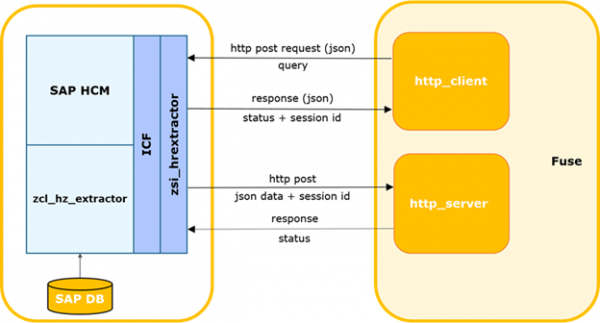
The external system determines the time of the last successful request to SAP.
The process can be triggered by a timer or another event, including setting a timeout for waiting for a response from SAP, which initiates a repeated request. After that, it generates a delta request and sends it to SAP.
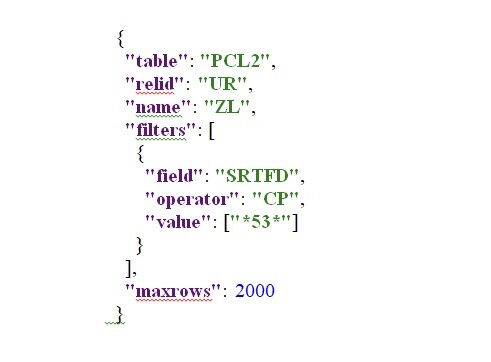
The request data is sent in the body in json format.
HTTP method: POST.
Example request:
The SAP service performs a check on the request for completeness, adherence to the current structure of SAP, and the existence of permission to access the requested table.
In case of errors, the service returns a response with the corresponding code and description. In the case of successful validation, it creates a background process for generating the selection, generates, and synchronously returns a unique session ID.
In case of an error, the external system logs it. Upon receiving a successful response, it transmits the session ID and the name of the table from which the request was made.
The external system registers the current session as open. If there are other sessions for this table, they are closed with a warning logged.
The SAP background task generates a cursor based on the specified parameters and a data packet of a specified size. The packet size is the maximum number of records that the process reads from the database. By default, it is set to 2000. If the database selection contains more records than the used packet size, after sending the first packet, the next block is generated with the appropriate offset and an incremented packet number. The numbers are incremented by 1 and sent strictly sequentially.
Next, SAP sends the packet to the input of the external system's web service. This system performs controls on the incoming packet. A session must be registered in the system with the received ID, and it must be in an open status. If the packet number > 1, the successful receipt of the previous packet (package_id-1) must be registered in the system.
In case of successful control, the external system parses and saves the table data.
Additionally, if the packet contains the final flag and serialization has been successful, the integration module is notified of the successful completion of session processing, and the module updates the session status.
In the case of an error in controls/parsing, the error is logged, and packets for this session will be rejected by the external system.
Similarly, in the reverse case when the external system returns an error, it is logged and the transmission of packets is halted.
To request data on the SAP HCM side, an integration service has been implemented. The service is built on the ICF framework (SAP Internet Communication Framework — ). It allows querying data from the SAP HCM system based on specific tables. When forming a data request, it is possible to specify a list of specific fields and filtering parameters in order to obtain the necessary data. The service's implementation does not imply any business logic. Algorithms for calculating deltas, request parameters, integrity checks, etc., are also implemented on the external system side.
This mechanism allows collecting and transmitting all necessary data within a few hours. This speed is on the edge of acceptable, therefore this solution is considered by us as temporary, having fulfilled the need for an extraction tool in the project.
In the target picture for solving the data extraction task, options for using CDC systems like Oracle Golden Gate or ETL tools like SAP DS are being explored.
Source: habr.com
