

Percona XtraBackup is a utility for hot backups of databases MySQL.
During the backup process, there are no locks on tables, allowing your system to continue operating without any restrictions.
XtraBackup 2.4 can create backups of tables InnoDB, XtraDB and MyISAM on servers MySQL 5.11, 5.5, 5.6, and 5.7, as well as on the server Percona for MySQL with XtraDB.
To work with MySQL 8.x you should use version XtraBackup 8.x. This article will only discuss XtraBackup 2.4.
The main advantage XtraBackup is suitable for creating backups of both high-load serversand low-transaction systems.
If the total size of your MySQL databases is significant (tens of gigabytes), the standard utility mysqldump will not allow you to quickly create a backup, and restoring the dump will take a long time.
Installation
Installation XtraBackup from the repository apt Percona.
Execute the following commands sequentially:
wget https://repo.percona.com/apt/percona-release_latest.$(lsb_release -sc)_all.deb

sudo dpkg -i percona-release_latest.$(lsb_release -sc)_all.deb

sudo apt-get update

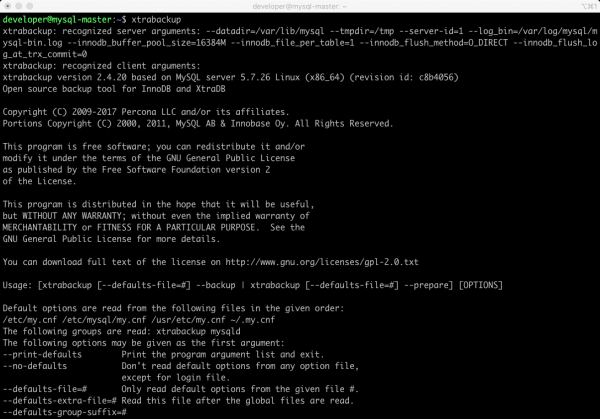
sudo apt-get install percona-xtrabackup-242. After installation, run the command xtrabackup -v. It is important to ensure that the utility operates correctly on the server. As a result, something like this will be displayed on the screen:
xtrabackup: recognized server arguments: — datadir=/var/lib/mysql — tmpdir=/tmp — server-id=1 — logbin=/var/log/mysql/mysql-bin.log — innodbbufferpoolsize=16384M — innodbfilepertable=1 — innodbflushmethod=Odirect — innodbflushlogattrxcommit=0xtrabackup version 2.4.20 based on MySQL server 5.7.26 Linux (x8664) (revision id: c8b4056)
Permissions, rights, and privileges
XtraBackup must be able to:
Connect to your MySQL server.
Have access rights to the directory datadir.
During the backup creation, have write permissions to the directory specified by the target-dir parameter.
What is datadir?
datadir — it is the directory where the database server MySQL stores its data. All databases, all tables are located there. In most Linux distributions, this directory is by default /var/lib/mysql.
What is the target-dir directory?
target-dir — it is the directory where the backup will be saved.
The database user needs the following access rights to the tables and databases that are to be backed up:
RELOAD and LOCK TABLES
REPLICATION CLIENT
CREATE TABLESPACE
PROCESS
SUPER
CREATE
INSERT
SELECT
Configuration
Configuration XtraBackup is performed using options that behave the same as standard MySQL parameters.
What does this mean?
Configuration parameters can be specified either in the command line or in the DBMS configuration file, for example in /etc/my.cnf.
The XtraBackup utility reads sections after starting [mysqld] and [xtrabackup] from MySQL configuration files. This is done so that the utility can use the settings of your DBMS without the need to specify parameters manually for each backup.
For example, the value datadir and some parameters InnoDB XtraBackup obtain from your DBMS configuration.
If you want to override parameters for XtraBackup that are located in the section [mysqld], simply specify them in the configuration file in the section [xtrabackup]. Since they will be read later, their priority will be higher.
You may not need to add any parameters in my.cnf. All required parameters can be specified in the command line. Usually, the only thing that can be conveniently placed in the section [xtrabackup] of your my.cnf — is the parameter target_dir, which by default defines the directory where backups will be stored. But this is not mandatory.
Example of specifying the path to the backup directory in my.cnf:
[xtrabackup]
target_dir = /data/backups/mysql/
Backup script
To create a backup, you can use the following script:
#!/bin/bash

# Удаляем данные в каталоге бекапа
rm -rf /mysql/backup

# Cоздаём бекап
xtrabackup --user=xtrabackup
 --password=xxxx_SECRET_xxxx
 --backup
 --target-dir=/mysql/backup

# Выполняем подготовку бекапа для развёртывания
xtrabackup --prepare --target-dir=/mysql/backup

# Создаём архив
tar -zcvf /home/developer/dumps/xtrabackup-all-dbs-"$(date +%F-%H:%M:%S)".gz /mysql/backup
What happens during the script execution?
First, we clean (delete) the directory where we will save the backup:
rm -rf /mysql/backup.
Then, using the utility XtraBackup we create a backup and save it to /mysql/backup/:
xtrabackup --user=xtrabackup --password=xxxxz1cYf95550Gc6xxxxxxxpE3rB03xxxx --backup --target-dir=/mysql/backupPreviously in MySQL, we created the user xtrabackup with the required privileges. Using the parameter target-dir we specify the directory where the backup should be saved.
Important point!
Note the line in the script:
xtrabackup --prepare --target-dir=/mysql/backup
Data in the directory /mysql/backup are not consistent until they are prepared.
The thing is that changes may have occurred during the copying of files. The operation xtrabackup --prepare --target-dir=/mysql/backup makes backup data perfectly time-consistent.
The data preparation operation can be performed on any machine. There is no need to do this on the server where the original DBMS resides. You can copy the backup to the target server and prepare it there.
The last thing we do is create an archive where we place our backup:
tar -zcvf /home/developer/dumps/xtrabackup-all-dbs-«$(date +%F-%H-%M-%S)».gz /mysql/backupRestoring a Backup
Before proceeding with the restoration of the backup on the target server, the data must go through a preparation phase. See above for how to do this.
The data restoration process is very straightforward. You need to extract the backup from the archive and replace the data in datadir.
How to replace data in datadir?
Let's consider two options.
Option 1
Use the utility XtraBackup. You need to specify the option --copy-back.
The command below will transfer the backup to datadir the target server:
xtrabackup --copy-back --target-dir=/mysql/backupOption 2
Alternatively, you can proceed without the utility. XtraBackup.
All you need to do is copy the backup to datadir. You can do this using cp or rsync.
It is important to understand that the backup restoration procedure simply involves replacing the contents of the directory. datadir.
Before you start restoring the backup on the target server, you need to:
Stop the MySQL server.
Clear the folder datadir or move its contents elsewhere. The directory datadir must be empty.
After completing the data transfer to datadir the MySQL server can be started.
Materials Used
.
Source: habr.com
