

Hello, Habr! In the comments to one of our readers asked an interesting question: “Why would you need a flash drive with hardware encryption when there’s TrueCrypt?” – and even expressed some concerns about “How can we ensure that there are no backdoors in the software and hardware of the Kingston drive?”. We provided brief answers to these questions, but then decided that the topic deserved a thorough examination. That’s what we’ll do in this post.
Hardware encryption AES, like software encryption, has been around for a long time, but how exactly does it protect important data on flash drives? Who certifies these drives, and can these certifications be trusted? Who really needs such “complex” flash drives when you can use free programs like TrueCrypt or BitLocker? As you can see, the topic raised in the comments generates a lot of questions. Let’s try to sort all of this out.
How does hardware encryption differ from software encryption?
In the case of flash drives (as well as HDDs and SSDs), hardware data encryption is carried out using a special chip located on the device's circuit board. It contains a random number generator that creates encryption keys. Data is automatically encrypted and instantly decrypted upon entering the user password. In this scenario, gaining access to the data without the password is practically impossible.
With software encryption, the “locking” of data on the drive is ensured by external software that acts as a budget alternative to hardware encryption methods. The drawbacks of such software may include the mundane requirement for regular updates to offer resilience against continuously improving hacking techniques. Moreover, to decrypt data, the computational power of the computer is used (rather than a separate hardware chip), meaning that the level of protection of the PC determines the level of protection of the drive.
The main feature of drives with hardware encryption is the presence of a separate cryptographic processor, which ensures that encryption keys never leave the USB drive, unlike software keys that can be temporarily stored in the computer's RAM or hard drive. Since software encryption uses the PC's memory to store the number of login attempts, it cannot prevent brute-force attacks on the password or key. An attacker can continuously reset the login attempt counter until the password cracking program finds the correct combination.
By the way…, in the comments to the article “” users also noted that, for example, the TrueCrypt program has a portable mode. However, this is not a significant advantage. The issue is that, in this case, the encryption program is stored in the flash drive's memory, making it more vulnerable to attacks.
In conclusion: the software approach does not provide as high a level of security as AES encryption. It is more of a basic protection. On the other hand, software encryption of important data is still better than having no encryption at all. This fact allows us to clearly differentiate these two types of cryptography: hardware encryption for flash drives is more of a necessity for the corporate sector (for example, when employees use drives provided by the company); whereas software encryption is more suitable for personal needs.
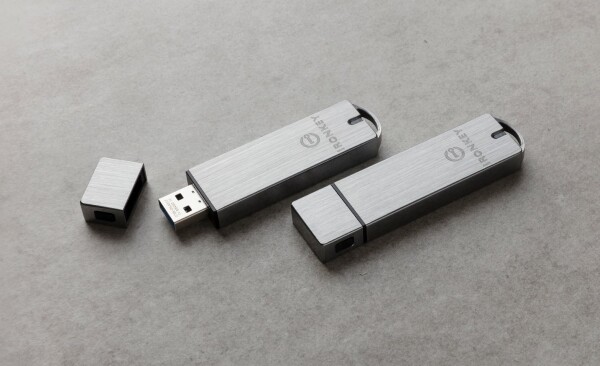
However, Kingston divides its storage models (e.g., IronKey S1000) into Basic and Enterprise versions. Functionally and in terms of security features, they are nearly identical, but the Enterprise version offers the ability to manage the drive using SafeConsole/IronKey EMS software. With this software, the drive operates either with cloud or local servers to remotely enforce password protection and access policies. Users are provided with options for password recovery, while administrators can switch unused drives to new tasks.
How do Kingston flash drives with AES encryption work?
Kingston utilizes 256-bit hardware AES-XTS encryption (using an additional full-size key) for all its secure drives. As mentioned earlier, the flash drives include a dedicated chip within their component base for data encryption and decryption, acting as a continuously active random number generator.
When you first connect the device to a USB port, the initialization setup wizard prompts you to set a master password for accessing the device. Once the drive is activated, the encryption algorithms will automatically start operating according to user preferences.
For the user, the operation of the USB flash drive remains unchanged — they can still download and store files on the device as they would with a regular USB flash drive. The only difference is that when connecting the flash drive to a new computer, you will need to enter the established password to access your information.
Why do organizations need flash drives with hardware encryption?
For organizations where confidential data is part of the business (whether financial, medical, or governmental), encryption is the most reliable means of protection. Hardware encryption AES is a scalable solution that can be used by any company, from individuals and small businesses to large corporations, as well as military and government organizations. To be more specific, the use of encrypted USB drives is essential:
- To ensure the security of confidential company data
- To protect customer information
- To safeguard companies from loss of profits and customer loyalty
It is worth noting that some manufacturers of secure flash drives (including Kingston) offer custom solutions for corporations designed to meet the needs and tasks of clients. However, the mass-market lines (like the DataTraveler flash drives) effectively fulfill their purpose and can provide corporate-grade security.
1. Ensuring the security of confidential company data
In 2017, a London resident found a USB drive in a park that contained unencrypted information related to Heathrow Airport security, including the locations of surveillance cameras and detailed information on protection measures for high-profile arrivals. The drive also contained data on electronic passes and access codes to restricted areas of the airport.
Analysts attribute the cause of such situations to the cyber illiteracy of employees who may inadvertently leak confidential data due to negligence. Hardware encrypted flash drives partially resolve this issue, as in the event of losing such a drive, accessing the data without the master password of the same security officer is not possible. Nonetheless, this does not negate the necessity of training employees on how to handle flash drives, even when it comes to devices protected by encryption.
2. Protecting customer information
An even more important task for any organization is caring for customer data, which should not be exposed to compromise risks. Notably, this information is most often shared between different business sectors and is typically confidential in nature: for example, it may contain data about financial transactions, medical histories, and so on.
3. Protection against loss of profits and customer loyalty
The use of USB devices with hardware encryption can help prevent devastating consequences for organizations. Companies that violate data protection laws may face hefty fines. Therefore, one must ask the question of whether it's worth the risk of sharing information without proper protection.
Even disregarding the financial ramifications, the amount of time and resources spent on correcting security breaches can be equally substantial. Furthermore, if a data leak compromises customer information, the company risks losing brand loyalty, especially in markets where competitors offer similar products or services.
Who guarantees there are no ‘backdoors’ from the manufacturer when using flash drives with hardware encryption?
In the topic we raised, this question is arguably one of the main ones. Among the comments on the article about Kingston DataTraveler drives, we came across another interesting question: “Do your devices have audits from independent third-party experts?”. Well..., it's a perfectly logical interest: users want to ensure that there are no common flaws in our USB drives, such as weak encryption or the possibility of bypassing password entry. In this part of the article, we will discuss the certification procedures that Kingston drives undergo before being deemed truly secure.
Who guarantees reliability? It might seem that we could simply say, 'Kingston produced it — they guarantee it.' However, this statement would be incorrect, as the manufacturer is an interested party. Therefore, all products go through verification by a third party with independent expertise. Specifically, Kingston drives with hardware encryption (except for DTLPG3) participate in the Cryptographic Module Validation Program (CMVP) and are certified under the Federal Information Processing Standard (FIPS). Additionally, the drives are certified according to GLBA, HIPAA, HITECH, PCI, and GTSA standards.
1. Cryptographic Module Validation Program
The CMVP is a joint project of the National Institute of Standards and Technology under the U.S. Department of Commerce and the Canadian Cyber Security Centre. The objective of the project is to stimulate demand for validated cryptographic devices and provide security metrics to federal agencies and regulated industries (such as financial and healthcare institutions) that use this equipment.
Device testing for compliance with a set of cryptographic and security requirements is conducted by independent cryptography and security testing laboratories accredited by NVLAP (National Voluntary Laboratory Accreditation Program). Each laboratory report is checked for compliance with the Federal Information Processing Standard (FIPS) 140-2 and validated by the CMVP.
Modules certified as compliant with the FIPS 140-2 standard are recommended for use by federal agencies in the U.S. and Canada until September 22, 2026. After this date, they will move to an archived list, although they can still be used. The deadline for submitting applications for validation under the FIPS 140-3 standard was September 22, 2020. After passing inspections, devices will be moved to the active list of validated and reliable devices for five years. If a cryptographic device fails the test, its use in U.S. and Canadian government agencies is not recommended.
2. What security requirements does FIPS certification impose?
Hacking data from even an uncertified encrypted drive is difficult and achievable only by a few, which means that when choosing consumer drives for home use that have certification, one may not need to worry too much. In the corporate sector, however, the situation is different: when selecting secure USB drives, companies often pay attention to the levels of FIPS certification. Yet, not everyone has a clear understanding of what these levels mean.
The current standard FIPS 140-2 defines four different security levels that flash drives can meet. The first level provides a moderate set of security features. The fourth level imposes strict self-protection requirements for devices. Levels two and three provide a gradation of these requirements and represent a sort of golden mean.
- First security level: for USB drives certified at this level, the use of at least one encryption algorithm or another security function is assumed.
- Second security level: here, the drive is required not only to provide cryptographic protection but also to log unauthorized intrusions at the firmware level if someone tries to access the drive.
- Third security level: this requires preventing hacks by destroying encryption 'keys'. That is, a response to intrusion attempts is required. The third level also guarantees a higher level of protection against electromagnetic interference, meaning that data cannot be read from the flash drive using wireless hacking devices.
- Fourth security level: the highest level, which implies complete protection of the cryptographic module, ensuring the maximum likelihood of detection and counteraction to any unauthorized access attempts by unauthorized users. Drives that have received fourth-level certification include options for protection that prevent hacking by altering voltage and temperature of the surrounding environment.
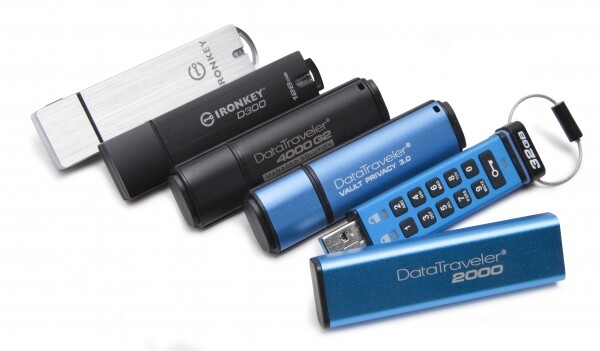
According to the FIPS 140-2 standard, the following Kingston drives are certified at level three: DataTraveler DT2000, DataTraveler DT4000G2, IronKey S1000, IronKey D300. A key feature of these drives is their ability to respond to unauthorized access attempts: after 10 incorrect password entries, the data on the drive will be destroyed.
What else can Kingston flash drives do besides encryption?
When it comes to complete data security, alongside hardware encryption of flash drives, built-in antivirus protection, resilience against external threats, synchronization with personal clouds, and other features come to the rescue, which we will discuss below. There isn't a significant difference between flash drives with software encryption. The 'devil' is in the details. And here’s how.
1. Kingston DataTraveler 2000
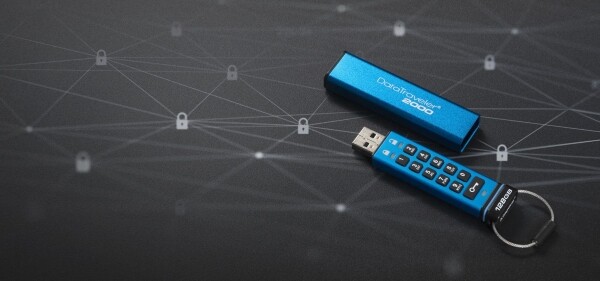
Let’s take, for example, a USB drive . This is one of the flash drives with hardware encryption, but it is also the only one with its own physical keyboard on the casing. This 11-key keyboard makes the DT2000 completely independent of host systems (to use the DataTraveler 2000, you must press the 'Key' button, then enter your password and press the 'Key' button again). Moreover, this flash drive has an IP57 rating for water and dust resistance (surprisingly, Kingston does not mention this anywhere on the packaging or in the specifications on its official website).
Inside the DataTraveler 2000, there is a lithium-polymer battery (capacity 40 mAh), and Kingston advises customers to connect the drive to a USB port for at least an hour before using it to allow the battery to charge. By the way, in one of our previous materials : there is no reason for concern – in the charging device, the flash drive does not activate because there are no requests to the controller from the system. Therefore, no one can steal your data through wireless intrusions.
2. Kingston DataTraveler Locker+ G3
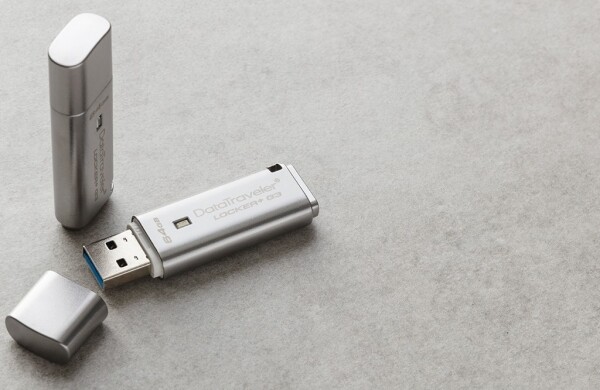
Speaking of the Kingston model – it attracts attention with its ability to configure data backup from the flash drive to cloud storage like Google Drive, OneDrive, Amazon Cloud, or Dropbox. Data synchronization with these services is also supported.
One of the questions we get from our readers is: “How do I retrieve encrypted data from a backup?” It's quite simple. When synchronizing with the cloud, the information is decrypted, and the backup's protection in the cloud depends on the capabilities of the cloud itself. Therefore, such procedures are made solely at the user's discretion. Without their permission, no data will be uploaded to the cloud.
3. Kingston DataTraveler Vault Privacy 3.0
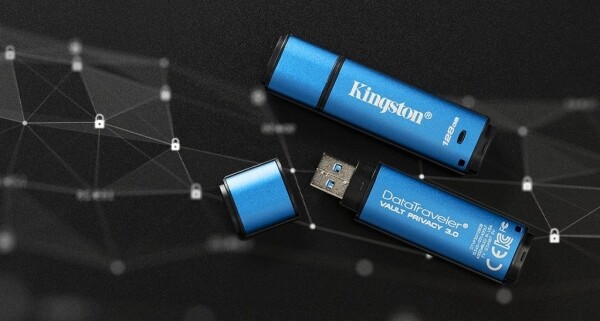
Here are Kingston devices also come with built-in antivirus Drive Security from ESET. This antivirus protects data from virus intrusions, spyware, trojans, worms, rootkits, and connections to foreign computers. It effectively handles these threats. The antivirus will instantly alert the drive owner about potential dangers if any are detected. In addition, the user does not need to install antivirus software independently or pay for this option. ESET Drive Security is pre-installed on the flash drive with a five-year license.
The Kingston DT Vault Privacy 3.0 is designed primarily for IT professionals. It allows administrators to use it as a standalone drive or as part of a centralized management solution. It can also be used to set up or remotely reset passwords and configure device policies. Kingston has even added USB 3.0, enabling faster data transfer than USB 2.0.
Overall, the DT Vault Privacy 3.0 is an excellent choice for the corporate sector and organizations that require maximum protection for their data. It is also recommended for all users who operate computers on public networks.
For more information about Kingston products, please visit .
Source: habr.com
