


How to upgrade network equipment in a large enterprise without halting production? The large-scale project in a 'heart surgery' mode is described by Project Management Manager at Linxdatacenter, Oleg Fedorov.
In recent years, we have noticed an increased demand from clients for services related to the network component of IT infrastructure. The need for connectivity between IT systems, services, applications, monitoring tasks, and operational management of business in nearly every sector compels companies today to pay increased attention to networks.
The range of requests varies from ensuring network fault tolerance to creating and managing a client autonomous system by acquiring a unit (the key to connect to is specified, and iroh finds the associated host and establishes an encrypted connection using the QUIC protocol). Direct P2P connections are established whenever possible, but if not, it falls back to using relays, which are also employed for host discovery by keys. You can run your own relay or connect to public relays supported by the community., configuring routing protocols and managing traffic according to organizational policies.
There is also growing demand for comprehensive solutions for building and maintaining network infrastructure, primarily from clients whose network infrastructure is either created from scratch or is outdated, requiring significant modification.
This trend coincided with the period of development and complexity of Linxdatacenter's own network infrastructure. We expanded our geographical presence in Europe by connecting to remote locations, which, in turn, required improvements to the network infrastructure.
The company launched a new service for clients, Network-as-a-Service: we take on all clients' network tasks, allowing them to focus on their core business.
In the summer of 2020, the first major project in this direction was completed, which we would like to discuss.
At the start
A large industrial complex approached us for the upgrade of the network part of the infrastructure at one of its facilities. It was necessary to replace the old equipment with new, including the core of the network.
The last equipment upgrading at the enterprise took place about 10 years ago. The new management decided to improve connectivity, starting with upgrading the infrastructure at the most basic physical level.
The project was divided into two parts: upgrading the server park and network equipment. We were responsible for the second part.
The basic requirements for the work included minimizing production line downtime during operations (and completely eliminating it in some areas). Any stop results in direct financial losses for the client, which must not occur under any circumstances. Due to the 24/7/365 operation mode of the facility, and taking into account the complete absence of planned downtime in the company's practice, the task was essentially to perform surgery on a beating heart. This became the main distinguishing feature of the project.
Let's go
The work was planned based on a movement from remote network nodes to closer ones, as well as from those that impacted production lines less significantly to those that had a direct impact on them.
For example, if we take a network node in the sales department, any communication failure resulting from work in this department would not affect production. However, such an incident would help us, as a contractor, to validate the correctness of the chosen approach for working on such nodes and, by adjusting our actions, improve work in the subsequent stages of the project.
It is necessary not only to replace nodes and wires in the network but also to properly configure all components for the solution to function correctly as a whole. Configurations were tested in this way: starting the work from a distance from the core, we effectively gave ourselves a "margin for error," not exposing critically important areas for the company's operation to risk.
We identified zones that do not impact the production process, as well as critical areas – workshops, loading and unloading blocks, warehouses, etc. For the key areas, acceptable downtime for each network node was agreed upon with the client, ranging from 1 to 15 minutes. It was impossible to completely avoid disconnecting individual network nodes, as the cable must be physically switched from the old equipment to the new, and during the switch, it is also necessary to untangle the "spaghetti" of wires that has formed over years of operation without proper maintenance (one of the consequences of outsourcing the installation of cable lines).
The work was divided into several stages.
Stage 1 – Audit. Preparation and agreement on the approach to work planning and assessment of the readiness of the teams: the client, the contractor performing the installation, and our team.
Stage 2 – Development of a format for conducting the work, with in-depth detailed analysis and planning. We selected a checklist format with precise indication of the order and sequence of actions, down to the sequence of patch cord switching by ports.
Stage 3 – Conducting work in racks that do not affect production. Assessment and adjustments of downtime for subsequent stages of work.
Stage 4 – Conducting work in racks that directly affect production. Assessment and adjustments of downtime for the final stage of work.
Stage 5 – Conducting work in the server room to switch the remaining equipment. Initiating routing on the new core.
Stage 6 – Sequential switching of the system core from old network configurations to new ones for a smooth transition of the entire system complex (VLAN, routing, etc.). At this stage, we connected all users and migrated all services to the new equipment, verified the correctness of the connections, ensured that none of the enterprise services were halted, and guaranteed that any arising problems would be directly linked to the core, simplifying troubleshooting and final adjustments.
Cable spaghetti
The project turned out to be challenging also due to the complicated initial conditions.
Firstly, the vast number of nodes and network segments, with a tangled topology and classification of cables by their purpose. Such 'spaghettis' needed to be extracted from the racks and meticulously 'styled', figuring out which cable goes where.
It looked something like this:
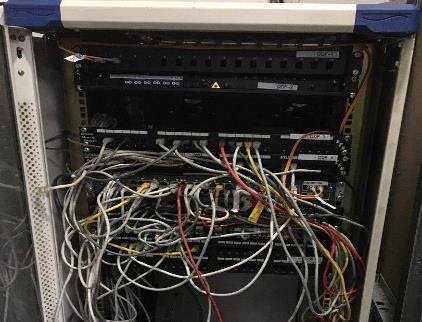
as follows:
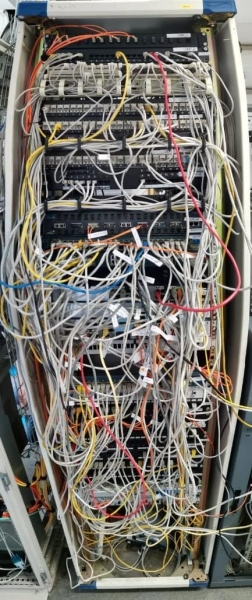
or like this:
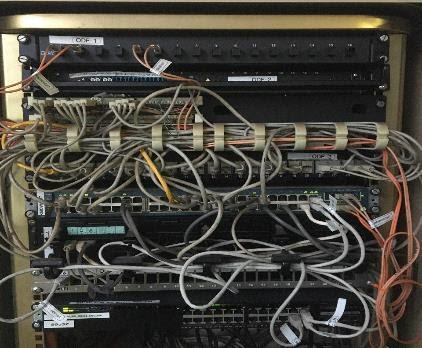
Secondly, for each of these tasks, it was necessary to prepare a file describing the process. "Take wire X from port 1 of the old equipment and plug it into port 18 of the new equipment." It sounds simple, but when your data sources have 48 fully occupied ports and there’s no option for downtime (we're talking about 24/7/365), the only option is to work in blocks. The more wires you can pull from the old equipment at once, the faster you can organize and insert them into the new network hardware, avoiding interruptions and downtime in network operations.
Therefore, during the preparatory phase, we segmented the network into blocks—each corresponding to a specific VLAN. Each port (or subset of them) on the old equipment corresponds to a VLAN in the new network topology. We grouped them as follows: the first ports of the switch housed user networks, the middle ones contained production networks, and the last ones served access points and uplinks.
This approach allowed us to pull and organize not just 1 wire from the old equipment at a time, but 10-15. This significantly accelerated the workflow.
By the way, here is what the cables look like in the racks after organizing:
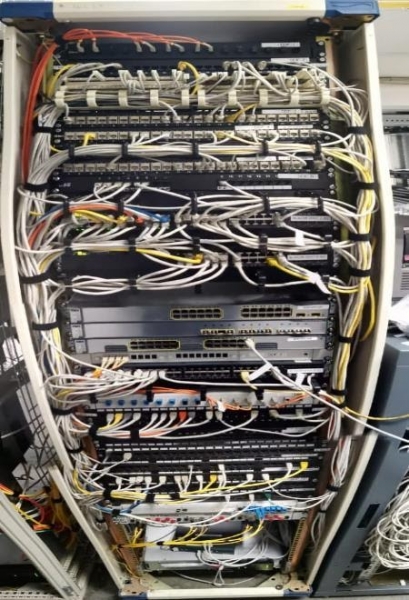
or, for example, like this:
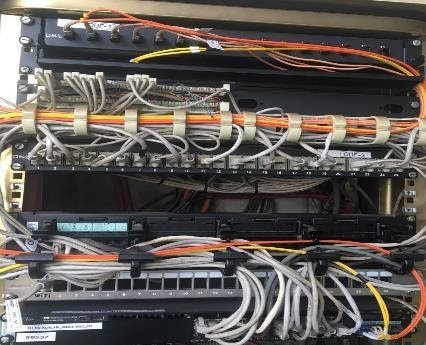
After completing the second phase, we took a break to analyze errors and project dynamics. For instance, minor discrepancies arose due to inaccuracies in the network diagrams provided to us (an incorrect connector in the diagram led to the purchase of the wrong patch cord and the need for its replacement).
The break was necessary because in server work, even a minor mistake in the process was unacceptable. If the goal was to ensure downtime in the network segment of no more than 5 minutes, then exceeding that was not an option. Any deviation from the schedule had to be agreed upon with the client.
However, preliminary planning and project segmentation allowed us to stay within the planned downtime for all segments and, in most cases, to avoid any downtime at all.
The challenge of our time – a project under COVID-19
However, there were additional complications. Certainly, the coronavirus served as one of the obstacles.
The work became complicated due to the onset of the pandemic, making it impossible for all specialists involved in the process to be present at the client's site. Only employees of the installation organization were allowed on site, while control was conducted via a Zoom room, where the network engineer from Linxdatacenter, myself as the project manager, the client's network engineer responsible for the work, and the installation team were located.
During the work, unforeseen problems arose, and adjustments had to be made on the fly. This helped us quickly mitigate human factors, such as errors in the schematic and mistakes in determining the status of interface activity, etc.
Although the remote work format seemed unusual at the beginning of the project, we quickly adapted to the new conditions and reached the final stage of the work.
We launched a temporary network configuration to allow the parallel operation of two network cores—the old and the new—for a smooth transition. However, it turned out that one unnecessary line had not been removed from the configuration file of the new core, preventing the transition. This forced us to spend some time identifying the problem.
It became clear that the main traffic was being transmitted correctly, while the control traffic did not reach the node through the new core. Thanks to the clear division of the project into stages, we were able to promptly identify the segment of the network where the issue occurred, diagnose the problem, and resolve it.
As a result
Technical outcomes of the project
First of all, a new core for the enterprise's new network was established, for which we built physical/logical rings. This was done in such a way that each switch in the network had a 'secondary link'. In the old network, many switches connected to the core through a single route, one link (uplink). If it was cut, the switch became completely unavailable. Moreover, if multiple switches were connected through a single uplink, a failure would take out an entire department or production line in the enterprise.
In the new network, even a serious network incident cannot bring down the entire network or a significant part of it under any scenario.
90% of all network equipment has been updated, with media converters (signal media conversion devices) decommissioned, and the need for dedicated power lines for powering equipment eliminated by connecting to PoE switches, where power is supplied via Ethernet cables.
Additionally, all optical connections in the server room and in location racks have been labeled – at all key communication nodes. This has enabled the preparation of a topological diagram of the equipment and connections in the network, reflecting its actual state today.
Network Diagram
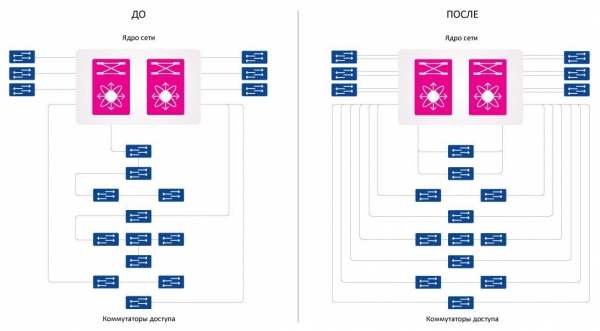
The most significant outcome technically is that sizable infrastructure work was completed quickly, causing no disturbances in the company’s operations and being virtually unnoticed by its staff.
Business Outcomes of the Project
In my opinion, this project is interesting primarily from an organizational rather than a technical standpoint. The complexity lay primarily in planning and thinking through the steps for implementing the project tasks.
The project's success allows us to assert that our initiative to develop the networking direction within the Linxdatacenter service portfolio is the right choice for the company's developmental vector. A responsible approach to project management, a sound strategy, and clear planning enabled us to execute the work at a high level.
Confirmation of the quality of work – a request from the client for the continuation of services for the modernization of the network at its other sites in Russia.
Source: habr.com
