

Five years ago, I tried working with Tarantool, but it didn't suit me back then. Recently, I conducted a webinar discussing Hadoop and how MapReduce works. I was asked the question — 'Why not use Tarantool for this task?'
Out of curiosity, I decided to return to it, test the latest version — and this time I really liked the project. Now I'll show you how to write a simple application in Tarantool, load it, and check its performance, and you'll see how easy and cool everything is.

What is Tarantool?
Tarantool positions itself as a super-fast DB. You can shove any data you want into it. Additionally, you can replicate and shard the data — which means splitting up a huge amount of data across several servers and combining the results — and create fault-tolerant setups like 'master-master'.
Secondly, it is an application server. You can write your apps on it, work with data, for example, deleting old records in the background according to certain rules. You can even write an HTTP server directly in Tarantool that will interact with the data: outputting the quantity, recording new data, and reducing everything to the master.
I read an article about how a team created a message queue with just 300 lines of code that tears through it — they achieve a minimum performance of 20,000 messages per second. Here, you can really unleash your creativity and write a very large application, and these won't be stored procedures like in PostgreSQL.
I'll attempt to describe a server somewhat like this, but simple, in this article.
Installation
For the test, I set up three standard virtual machines – a 20-gigabyte hard disk, Ubuntu 18.04, 2 virtual CPUs, and 4 gigabytes of RAM.
We install Tarantool — start a shell script or add the repository and do apt-get install Tarantool. The script link is (curl -L | VER=2.4 sudo -E bash). We get commands like: tarantoolctl
— the main command for managing Tarantool instances. — this is where all the configuration lies.
/etc/tarantool var/log/tarantool
— here are the logs. var/lib/tarantool
— here the data is stored, and then it is split across instances. — this is where data is stored, and then they are divided by instances.
There are instance-available and instance-enabled folders — the latter contains what will be launched — the configuration file of the instance with Lua code, which describes which ports it listens on, what memory is available to it, Vinyl engine settings, the code that triggers when the server starts, sharding, queues, deletion of outdated data, and so on.
Instances work just like in PostgreS. For example, you may want to run several copies of a database that are hosted on different ports. Thus, multiple database instances are started on one server, each listening on different ports. They can have completely different configurations — one instance implements one logic while the second implements another.
Managing Instances
We have a command tarantoolctl that allows you to manage Tarantool instances. For example, tarantoolctl check example checks the configuration file and indicates — the file is ok if there are no syntax errors.
You can check the status of an instance — tarantoolctl status example. Similarly, you can perform start, stop, and restart.
When an instance is running, you can connect to it in two ways.
1. Administrative Console
By default, Tarantool opens a socket, where ordinary ASCII text is transmitted to manage Tarantool. Connection to the console always occurs under the admin user, with no authentication required, so there is no need to expose the console port for external management of Tarantool.
To connect this way, you need to enter Tarantoolctl enter instance name. This command will start the console and connect under the admin user. Never expose the console port externally — it is better to leave it as a unit socket. This way, only those with write access to the socket will be able to connect to Tarantool.
This method is needed for administrative tasks. For data management, use the second method — the binary protocol.
2. Using the Binary Protocol to Connect to a Specific Port
In the configuration, there is a listen directive that opens a port for external communication. This port is used with the binary protocol, and authentication is enabled there.
For this connection, the command tarantoolctl connect to port number is used. Utilizing it, you can connect to remote servers, use authentication, and grant various access rights.
Data Recording and the Box Module
Since Tarantool serves as both a database and an application server, it has various modules. We are interested in the box module — it manages data operations. When you write something to the box, Tarantool either writes the data to disk, keeps it in memory, or does something else with it.
Record
For example, we access the box module and call the box.once function. This will prompt Tarantool to execute our code during server initialization. We create a space where our data will be stored.
local function bootstrap()
    local space = box.schema.create_space('example')
    space:create_index('primary')
    box.schema.user.grant('guest', 'read,write,execute', 'universe')

    -- Keep things safe by default
    --  box.schema.user.create('example', { password = 'secret' })
    --  box.schema.user.grant('example', 'replication')
    --  box.schema.user.grant('example', 'read,write,execute', 'space', 'example')
end
After that, we create a primary index – primary – which will be used for data searches. By default, if no parameters are specified, the first field of each record will be used for the primary index.
Next, we grant the guest user, which we use to connect via the binary protocol. We allow reading, writing, and executing across the entire instance.
Compared to regular databases, everything is quite simple here. We have a space — an area where our data is simply stored. Each record is called a tuple. It is packaged in MessagePack. This is a very cool format — it’s binary and takes up less space – 18 bytes versus 27.
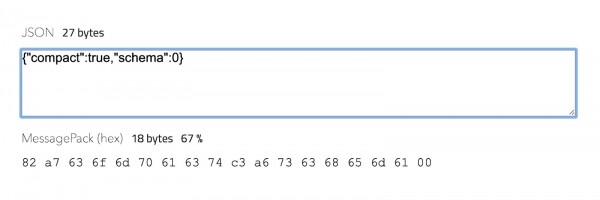
Working with it is quite convenient. Almost every line, every data record can have completely different columns.
We can view all spaces using the command Box.space. To specify a particular instance, we type box.space example and receive full information about it.
Tarantool has two built-in engine types: Memory and Vinyl. Memory stores all data in RAM. Thus, everything works simply and quickly. Data is dumped to disk, and there is also a write-ahead log mechanism, so we won't lose anything during a server crash.
Vinyl stores data on disk in a more familiar way — meaning you can store more data than you have memory, and Tarantool will read it from the disk.
Now we will use Memory.
unix/:/var/run/tarantool/example.control> box.space.example
---
- engine: memtx
  before_replace: 'function: 0x41eb02c8'
  on_replace: 'function: 0x41eb0568'
  ck_constraint: []
  field_count: 0
  temporary: false
  index:
    0: &0
      unique: true
      parts:
      - type: unsigned
        is_nullable: false
        fieldno: 1
      id: 0
      space_id: 512
      type: TREE
      name: primary
    primary: *0
  is_local: false
  enabled: true
  name: example
  id: 512
...

unix/:/var/run/tarantool/example.control>
Index:
A primary index must be created for any space, because without it nothing will work. Just like in any database, we create the first field – the record ID.
Parts:
Here we specify what our index consists of. It consists of one part – the first field we will use, of type unsigned — a positive integer. If I remember correctly from the documentation, the maximum number that can be used is 18 quintillion. That's a huge amount.
Next, we can insert data using the insert command.
unix/:/var/run/tarantool/example.control> box.space.example:insert{1, 'test1', 'test2'}
---
- [1, 'test1', 'test2']
...

unix/:/var/run/tarantool/example.control> box.space.example:insert{2, 'test2', 'test3', 'test4'}
---
- [2, 'test2', 'test3', 'test4']
...

unix/:/var/run/tarantool/example.control> box.space.example:insert{3, 'test3'}
---
- [3, 'test3']
...

unix/:/var/run/tarantool/example.control> box.space.example:insert{4, 'test4'}
---
- [4, 'test4']
...

unix/:/var/run/tarantool/example.control>
The first field is used as a primary key, so it must be unique. There are no limits on the number of columns, so we can insert as much data as we want. They are specified in MessagePack format, which I described above.
Outputting data
Next, we can output data using the select command.
Box.example.select with key {1} will output the desired record. If we omit the key, we will see all records we have. They all differ in the number of columns, but here there is basically no concept of columns — there are field numbers.
There can be absolutely any amount of data. And for example, we need to search for them by the second field. For this, we create a new secondary index.
box.space.example:create_index('secondary', { type = 'TREE', unique = false, parts = {{field = 2, type ='string'} }}) We use the Create_index command.
We name it Secondary.
Next, we need to specify the parameters. The index type is TREE. It can be non-unique, so we set Unique = false.
Then we specify what parts our index consists of. Field — this is the field number to which we tie the index, and we specify the type as string. And it has been created.
unix/:/var/run/tarantool/example.control> box.space.example:create_index('secondary', { type = 'TREE', unique = false, parts = {{field = 2, type = 'string'}}})
---
- unique: false
  parts:
  - type: string
    is_nullable: false
    fieldno: 2
  id: 1
  space_id: 512
  type: TREE
  name: secondary
...

unix/:/var/run/tarantool/example.control>
Now we can call it like this:
unix/:/var/run/tarantool/example.control> box.space.example.index.secondary:select('test1')
---
- - [1, 'test1', 'test2']
...
Saving
If we restart the instance and try to call the data again, we will see that they are gone — everything is empty. This happens because Tarantool takes checkpoints and saves the data to disk, but if we stop before the next save, we will lose all operations — because we will recover from the last checkpoint, which was, for example, two hours ago.
Saving every second won't work either — because constantly dumping 20 GB to disk isn't a great idea.
For this, the concept of write-ahead log was designed and implemented. With it, a record is created in a small write-ahead log file for every change in the data.
Each record before the checkpoint is saved in them. We set a size for these files — for example, 64 MB. When it gets filled, the record starts going into the second file. After a restart, Tarantool recovers from the last checkpoint and then applies all later transactions up to the moment of shutdown.
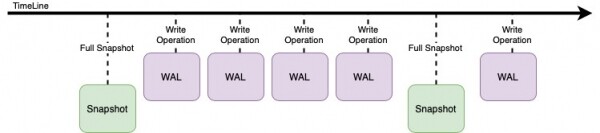
To enable such logging, you need to specify an option in the box.cfg settings (in the example.lua file):
wal_mode = "write";Using Data
With what we have just written, you can use Tarantool to store data, and it will work very quickly as a database. And now for the icing on the cake – what you can do with all this.
Writing an Application
For example, let’s write an application for Tarantool
See the application under the spoiler
box.cfg {
    listen = '0.0.0.0:3301';
    io_collect_interval = nil;
    readahead = 16320;
    memtx_memory = 128 * 1024 * 1024; -- 128Mb
    memtx_min_tuple_size = 16;
    memtx_max_tuple_size = 128 * 1024 * 1024; -- 128Mb
    vinyl_memory = 128 * 1024 * 1024; -- 128Mb
    vinyl_cache = 128 * 1024 * 1024; -- 128Mb
    vinyl_max_tuple_size = 128 * 1024 * 1024; -- 128Mb
    vinyl_write_threads = 2;
    wal_mode = "write";
    wal_max_size = 256 * 1024 * 1024;
    checkpoint_interval = 60 * 60; -- one hour
    checkpoint_count = 6;
    force_recovery = true;
    log_level = 5;
    log_nonblock = false;
    too_long_threshold = 0.5;
    read_only   = false
}

local function bootstrap()
    local space = box.schema.create_space('example')
    space:create_index('primary')

    box.schema.user.create('example', { password = 'secret' })
    box.schema.user.grant('example', 'read,write,execute', 'space', 'example')

    box.schema.user.create('repl', { password = 'replication' })
    box.schema.user.grant('repl', 'replication')
end

-- for first run create a space and add set up grants
box.once('replica', bootstrap)

-- enabling console access
console = require('console')
console.listen('127.0.0.1:3302')

-- http config
local charset = {}  do -- [0-9a-zA-Z]
    for c = 48, 57  do table.insert(charset, string.char(c)) end
    for c = 65, 90  do table.insert(charset, string.char(c)) end
    for c = 97, 122 do table.insert(charset, string.char(c)) end
end

local function randomString(length)
    if not length or length <= 0 then return '' end
    math.randomseed(os.clock()^5)
    return randomString(length - 1) .. charset[math.random(1, #charset)]
end

local http_router = require('http.router')
local http_server = require('http.server')
local json = require('json')

local httpd = http_server.new('0.0.0.0', 8080, {
    log_requests = true,
    log_errors = true
})

local router = http_router.new()

local function get_count()
 local cnt = box.space.example:len()
 return cnt
end

router:route({method = 'GET', path = '\/count'}, function()
    return {status = 200, body = json.encode({count = get_count()})}
end)

router:route({method = 'GET', path = '\/token'}, function()
    local token = randomString(32)
    local last = box.space.example:len()
    box.space.example:insert{ last + 1, token }
    return {status = 200, body = json.encode({token = token})}
end)

prometheus = require('prometheus')

fiber = require('fiber')
tokens_count = prometheus.gauge("tarantool_tokens_count",
                              "API Tokens Count")

function monitor_tokens_count()
  while true do
    tokens_count:set(get_count())
    fiber.sleep(5)
  end
end
fiber.create(monitor_tokens_count)

router:route( { method = 'GET', path = '\/metrics' }, prometheus.collect_http)

httpd:set_router(router)
httpd:start()
We declare a table in Lua that defines characters. This table is necessary for generating a random string.
local charset = {}  do -- [0-9a-zA-Z]
    for c = 48, 57  do table.insert(charset, string.char(c)) end
    for c = 65, 90  do table.insert(charset, string.char(c)) end
    for c = 97, 122 do table.insert(charset, string.char(c)) end
end
After that, we declare the function – randomString and pass the length value in parentheses.
local function randomString(length)
    if not length or length <= 0 then return '' end
    math.randomseed(os.clock()^5)
    return randomString(length - 1) .. charset[math.random(1, #charset)]
end
Then we connect the HTTP router and HTTP server to our Tarantool server, along with the JSON that we will return to the client.
local http_router = require('http.router')
local http_server = require('http.server')
local json = require('json')
Then we start the HTTP server on port 8080 on all interfaces, which will log all requests and errors.
local httpd = http_server.new('0.0.0.0', 8080, {
    log_requests = true,
    log_errors = true
})
Next, we declare a route that if a GET request comes to port 8080 /count, we will call a one-liner function. It returns a status — 200, 404, 403, or any other one we specify.
router:route({method = 'GET', path = '\/count'}, function()
    return {status = 200, body = json.encode({count = get_count()})}
end)
In the body, we return json.encode, specifying count and get_count, which is called to show the number of records in our database.
The second method
router:route({method = 'GET', path = '\/token'}, function()
    local token = randomString(32)
    local last = box.space.example:len()
    box.space.example:insert{ last + 1, token }
    return {status = 200, body = json.encode({token = token})}
end)
Where in the line router:route({method = ‘GET’, path = ‘\/token’}, function() we call the function and generate a token.
Line local token = randomString(32) – this is a random string of 32 characters.
In the line local last = box.space.example:len() we retrieve the last element.
And in the line box.space.example:insert{ last + 1, token } we write the data into our database, simply increasing the ID by 1. This can actually be done not only in this clumsy way. Tarantool has sequences for this purpose.
We write the token there.
Thus, we have written an application in one file. It can immediately interact with the data, and the box module will do all the dirty work for you.
It listens to HTTP and works with data, everything is in a single instance — both the application and the data. Therefore, everything happens quite quickly.
To start, we install the HTTP module:
How we do this, see under the spoiler
root@test2:/# tarantoolctl rocks install http
Installing http://rocks.tarantool.org/http-scm-1.src.rock
Missing dependencies for http scm-1:
   checks >= 3.0.1 (not installed)

http scm-1 depends on checks >= 3.0.1 (not installed)
Installing http://rocks.tarantool.org/checks-3.0.1-1.rockspec

Cloning into 'checks'...
remote: Enumerating objects: 28, done.
remote: Counting objects: 100% (28/28), done.
remote: Compressing objects: 100% (19/19), done.
remote: Total 28 (delta 1), reused 16 (delta 1), pack-reused 0
Receiving objects: 100% (28/28), 12.69 KiB | 12.69 MiB/s, done.
Resolving deltas: 100% (1/1), done.
Note: checking out '580388773ef11085015b5a06fe52d61acf16b201'.

You are in 'detached HEAD' state. You can look around, make experimental
changes and commit them, and you can discard any commits you make in this
state without impacting any branches by performing another checkout.

If you want to create a new branch to retain commits you create, you may
do so (now or later) by using -b with the checkout command again. Example:

  git checkout -b

No existing manifest. Attempting to rebuild...
checks 3.0.1-1 is now installed in /.rocks (license: BSD)

-- The C compiler identification is GNU 7.5.0
-- Check for working C compiler: /usr/bin/cc
-- Check for working C compiler: /usr/bin/cc -- works
-- Detecting C compiler ABI info
-- Detecting C compiler ABI info - done
-- Detecting C compile features
-- Detecting C compile features - done
-- Found TARANTOOL: /usr/include (found version "2.4.2-80-g18f2bc82d")
-- Tarantool LUADIR is /.rocks/share/tarantool/rocks/http/scm-1/lua
-- Tarantool LIBDIR is /.rocks/share/tarantool/rocks/http/scm-1/lib
-- Configuring done
-- Generating done
CMake Warning:
  Manually-specified variables were not used by the project:

    version


-- Build files have been written to: /tmp/luarocks_http-scm-1-V4P9SM/http/build.luarocks
Scanning dependencies of target httpd
[ 50%] Building C object http/CMakeFiles/httpd.dir/lib.c.o
In file included from /tmp/luarocks_http-scm-1-V4P9SM/http/http/lib.c:32:0:
/tmp/luarocks_http-scm-1-V4P9SM/http/http/lib.c: In function ‘tpl_term’:
/usr/include/tarantool/lauxlib.h:144:15: warning: this statement may fall through [-Wimplicit-fallthrough=]
    (*(B)->p++ = (char)(c)))
    ~~~~~~~~~~~^~~~~~~~~~~~
/tmp/luarocks_http-scm-1-V4P9SM/http/http/lib.c:62:7: note: in expansion of macro ‘luaL_addchar’
       luaL_addchar(b, '\');
       ^~~~~~~~~~~~
/tmp/luarocks_http-scm-1-V4P9SM/http/http/lib.c:63:6: note: here
      default:
      ^~~~~~~
In file included from /tmp/luarocks_http-scm-1-V4P9SM/http/http/lib.c:39:0:
/tmp/luarocks_http-scm-1-V4P9SM/http/http/tpleval.h: In function ‘tpe_parse’:
/tmp/luarocks_http-scm-1-V4P9SM/http/http/tpleval.h:147:9: warning: this statement may fall through [-Wimplicit-fallthrough=]
    type = TPE_TEXT;
    ~~~~~^~~~~~~~~~
/tmp/luarocks_http-scm-1-V4P9SM/http/http/tpleval.h:149:3: note: here
   case TPE_LINECODE:
   ^~~~
In file included from /tmp/luarocks_http-scm-1-V4P9SM/http/http/lib.c:40:0:
/tmp/luarocks_http-scm-1-V4P9SM/http/http/httpfast.h: In function ‘httpfast_parse’:
/tmp/luarocks_http-scm-1-V4P9SM/http/http/httpfast.h:372:22: warning: this statement may fall through [-Wimplicit-fallthrough=]
                 code = 0;
                 ~~~~~^~~
/tmp/luarocks_http-scm-1-V4P9SM/http/http/httpfast.h:374:13: note: here
             case status:
             ^~~~
/tmp/luarocks_http-scm-1-V4P9SM/http/http/httpfast.h:393:23: warning: this statement may fall through [-Wimplicit-fallthrough=]
                 state = message;
                 ~~~~~~^~~~~~~~~
/tmp/luarocks_http-scm-1-V4P9SM/http/http/httpfast.h:395:13: note: here
             case message:
             ^~~~
[100%] Linking C shared library lib.so
[100%] Built target httpd
[100%] Built target httpd
Install the project...
-- Install configuration: "Debug"
-- Installing: /.rocks/share/tarantool/rocks/http/scm-1/lua/http/VERSION.lua
-- Installing: /.rocks/share/tarantool/rocks/http/scm-1/lib/http/lib.so
-- Installing: /.rocks/share/tarantool/rocks/http/scm-1/lua/http/server/init.lua
-- Installing: /.rocks/share/tarantool/rocks/http/scm-1/lua/http/server/tsgi_adapter.lua
-- Installing: /.rocks/share/tarantool/rocks/http/scm-1/lua/http/nginx_server/init.lua
-- Installing: /.rocks/share/tarantool/rocks/http/scm-1/lua/http/router/init.lua
-- Installing: /.rocks/share/tarantool/rocks/http/scm-1/lua/http/router/fs.lua
-- Installing: /.rocks/share/tarantool/rocks/http/scm-1/lua/http/router/matching.lua
-- Installing: /.rocks/share/tarantool/rocks/http/scm-1/lua/http/router/middleware.lua
-- Installing: /.rocks/share/tarantool/rocks/http/scm-1/lua/http/router/request.lua
-- Installing: /.rocks/share/tarantool/rocks/http/scm-1/lua/http/router/response.lua
-- Installing: /.rocks/share/tarantool/rocks/http/scm-1/lua/http/tsgi.lua
-- Installing: /.rocks/share/tarantool/rocks/http/scm-1/lua/http/utils.lua
-- Installing: /.rocks/share/tarantool/rocks/http/scm-1/lua/http/mime_types.lua
-- Installing: /.rocks/share/tarantool/rocks/http/scm-1/lua/http/codes.lua
http scm-1 is now installed in /.rocks (license: BSD)

root@test2:/#
We also need prometheus to start.
root@test2:/# tarantoolctl rocks install prometheus
Installing http://rocks.tarantool.org/prometheus-scm-1.rockspec

Cloning into 'prometheus'...
remote: Enumerating objects: 19, done.
remote: Counting objects: 100% (19/19), done.
remote: Compressing objects: 100% (19/19), done.
remote: Total 19 (delta 2), reused 5 (delta 0), pack-reused 0
Receiving objects: 100% (19/19), 10.73 KiB | 10.73 MiB/s, done.
Resolving deltas: 100% (2/2), done.
prometheus scm-1 is now installed in /.rocks (license: BSD)

root@test2:/#
Starting and we can access the modules.
root@test2:/# curl -D - -s http://127.0.0.1:8080/token
HTTP/1.1 200 Ok
Content-length: 44
Server: Tarantool http (tarantool v2.4.2-80-g18f2bc82d)
Connection: keep-alive

{"token":"e2tPq9l5Z3QZrewRf6uuoJUl3lJgSLOI"}

root@test2:/# curl -D - -s http://127.0.0.1:8080/token
HTTP/1.1 200 Ok
Content-length: 44
Server: Tarantool http (tarantool v2.4.2-80-g18f2bc82d)
Connection: keep-alive

{"token":"fR5aCA84gj9eZI3gJcV0LEDl9XZAG2Iu"}

root@test2:/# curl -D - -s http://127.0.0.1:8080/count
HTTP/1.1 200 Ok
Content-length: 11
Server: Tarantool http (tarantool v2.4.2-80-g18f2bc82d)
Connection: keep-alive

{"count":2}root@test2:/#
/count отдает нам статус 200.
/token выдает токен и делает запись этого токена в базу.
Testing the speed.
Let’s run a benchmark for 50,000 requests with 500 concurrent requests.
root@test2:/# ab -c 500 -n 50000 http://127.0.0.1:8080/token
This is ApacheBench, Version 2.3
Copyright 1996 Adam Twiss, Zeus Technology Ltd, http://www.zeustech.net/
Licensed to The Apache Software Foundation, http://www.apache.org/

Benchmarking 127.0.0.1 (be patient)
Completed 5000 requests
Completed 10000 requests
Completed 15000 requests
Completed 20000 requests
Completed 25000 requests
Completed 30000 requests
Completed 35000 requests
Completed 40000 requests
Completed 45000 requests
Completed 50000 requests
Finished 50000 requests


Server Software:        Tarantool
Server Hostname:        127.0.0.1
Server Port:            8080

Document Path:          /token
Document Length:        44 bytes

Concurrency Level:      500
Time taken for tests:   14.578 seconds
Complete requests:      50000
Failed requests:        0
Total transferred:      7950000 bytes
HTML transferred:       2200000 bytes
Requests per second:    3429.87 [#/sec] (mean)
Time per request:       145.778 [ms] (mean)
Time per request:       0.292 [ms] (mean, across all concurrent requests)
Transfer rate:          532.57 [Kbytes/sec] received

Connection Times (ms)
              min  mean[+/-sd] median   max
Connect:        0   10 103.2      0    3048
Processing:    12   69 685.1     15   13538
Waiting:       12   69 685.1     15   13538
Total:         12   78 768.2     15   14573

Percentage of the requests served within a certain time (ms)
  50%     15
  66%     15
  75%     16
  80%     16
  90%     16
  95%     16
  98%     21
  99%     42
 100%  14573 (longest request)
root@test2:/#
Tokens are being issued. And we are continuously recording data. 99% of the requests were processed in 42 milliseconds. Therefore, we have about 3500 requests per second on a small machine with 2 cores and 4 gigabytes of memory.
You can also select a 50,000-token and check its value.
You can not only use HTTP but also run background functions that process your data. Additionally, there are various triggers. For example, you can invoke functions on updates, checking something — resolving conflicts.
You can write script applications directly in the database server without any restrictions, connect any modules, and implement any logic.
The application server can access external servers, retrieve data, and store it in its own database. Other applications will use the data from this database.
Tarantool will handle this itself, and you won't need to write a separate application.
In conclusion
This is just the first part of a large project. The second part will be published soon on the Mail.ru Group blog, and we will definitely add a link to it in this material.
If you are interested in attending events where we create such things online and ask questions in real time, join.
If you need to migrate to the cloud or have questions about your infrastructure, .
P.S. We have 2 free audits per month; your project might be one of them.
Source: habr.com
