

Which firmware version is the most 'correct' and 'working'? If the storage system guarantees fault tolerance at 99.9999%, does that mean it will operate continuously even without software updates? Or, conversely, to achieve maximum fault tolerance, should one always install the latest firmware? We will attempt to answer these questions based on our experience.
A small introduction
We all understand that each version of software, whether it is an operating system or a driver for some device, often contains bugs and other 'peculiarities' that may not 'manifest' until the end of the equipment's service life, or may only 'surface' under certain conditions. The quantity and significance of such nuances depend on the complexity (functionality) of the software and the quality of testing during its development.
Often, users remain on the 'factory firmware' (the famous 'if it works, don't touch it') or always install the latest version (in their understanding, the latest means the most reliable). We, however, take a different approach — we look at the release notes for all the equipment we use in the cloud mClouds. We reached this conclusion through experience. Using our own operational instance, we will explain why the promised 99.9999% reliability of the storage system means nothing if you don't timely monitor updates and descriptions of the software. Our case study is suitable for users of storage systems from any vendor, as such situations can occur with hardware from any manufacturer.
Choosing a new data storage system
At the end of last year, an interesting data storage system was added to our infrastructure: the junior model from the IBM FlashSystem 5000 line, which at the time of acquisition was called Storwize V5010e. It is now sold under the name FlashSystem 5010, but in fact, it is the same hardware base with the same Spectrum Virtualize inside.
At the end of last year, we added an interesting data storage system to our infrastructure: the junior model from the IBM FlashSystem 5000 line, which was known as the Storwize V5010e at the time of purchase. It is now sold under the name FlashSystem 5010, but essentially it is the same hardware platform with the same Spectrum Virtualize inside.
The presence of a unified management system is the main distinction of IBM FlashSystem. In the lower series models, it is almost indistinguishable from the higher-performance models. Choosing a certain model merely provides the corresponding hardware base, whose characteristics allow for the use of various functionalities or ensure a higher level of scalability. The software identifies the hardware component and delivers the necessary functionality for this platform.
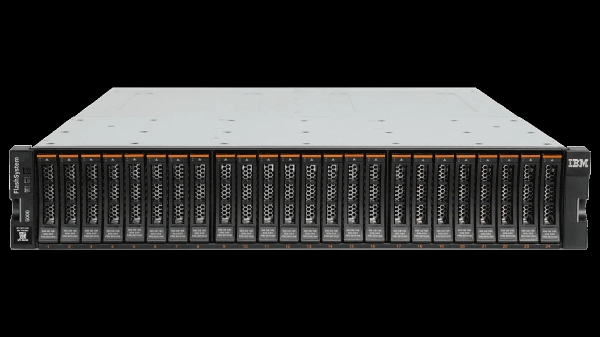 IBM FlashSystem 5010
A brief overview of our model 5010. This is a dual-controller block storage system for entry-level use. It can accommodate NLSAS, SAS, and SSD disks. NVMe installation is not available, as this model is intended for tasks that do not require the performance of NVMe disks.
The storage system was purchased for archiving information or data that is not accessed frequently. Therefore, we were content with the standard feature set: tiering (Easy Tier) and Thin Provisioning. Performance on NLSAS disks at 1000-2000 IOPS was also satisfactory.
Our experience — how we didn't update the firmware in time
Now, regarding the software update itself. At the time of purchase, the system had a slightly outdated version of Spectrum Virtualize software, specifically, 8.2.1.3.
We reviewed the firmware descriptions and planned the update to 8.2.1.9. If we had been a little more prompt, this article wouldn't exist — the bug would not have occurred with the newer firmware. However, for certain reasons, the update of this system was postponed.
As a result, a small delay in the update led to a very unpleasant situation, as described in the link: .
Yes, the firmware of that version contained the relevant so-called APAR (Authorized Program Analysis Report) HU02104. It manifests as follows: under load, under certain circumstances, the cache begins to overflow, and then the system enters a protective mode, which disables input-output for the pool. In our case, this looked like disabling three disks for the RAID group in RAID 6 mode. The disconnection lasts for 6 minutes. After that, access to the volumes in the pool is restored.
If anyone is unfamiliar with the structure and naming of logical entities in the context of IBM Spectrum Virtualize, I'll briefly explain now.
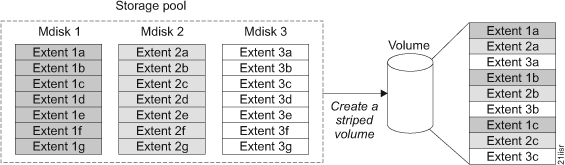 Structure of Logical Elements of Storage Systems
Disks are grouped together, referred to as MDisk (Managed Disk). An MDisk can represent a traditional RAID (0,1,10,5,6) or a virtualized one – DRAID (Distributed RAID). Using DRAID enhances the performance of the array, as all disks in the group are utilized, and it decreases rebuild time since only specific blocks need to be restored instead of all data from a failed disk.
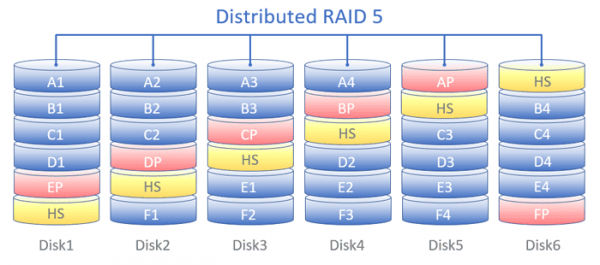 Distribution of data blocks across disks when using Distributed RAID (DRAID) in RAID-5 mode.
This diagram illustrates the logic of DRAID rebuild in the event of a single disk failure:
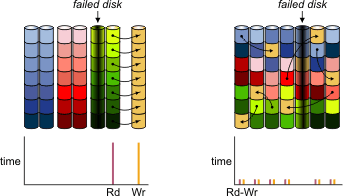 Logic of the DRAID rebuild process when a single disk fails
Next, one or several MDisk will form what is called a Pool. Within a single pool, it is not recommended to use MDisk with different levels of RAID/DRAID on disks of the same type. We won’t delve too deeply into this, as we plan to cover it in one of the upcoming articles. Moreover, the Pool is divided into Volumes (Tomas), which are presented via a specific block access protocol to the hosts.
So, we encountered a situation described in APAR HU02104, due to a logical failure of three disks, resulting in the MDisk becoming non-operational, which, in turn, led to the failure of the Pool and corresponding Volumes.
Since these systems are quite "smart," they can be connected to IBM Storage Insights cloud monitoring system, which automatically sends a service request to IBM support when a fault occurs. A ticket is created, and IBM specialists perform diagnostics remotely and contact the system user.
Thanks to this, the issue was resolved promptly, and we received a quick recommendation from support to update our system to the previously selected firmware version 8.2.1.9, in which this issue had already been fixed at that time. This is confirmed by the .
Conclusions and our recommendations
As the saying goes, "all's well that ends well." The firmware bug did not result in any serious problems — server operations were restored promptly and without data loss. Some clients had to restart their virtual machines, but overall we were prepared for more negative outcomes since we make daily backups of all infrastructure and client machines.
We have confirmed that even reliable systems with 99.9999% promised availability require attention and timely maintenance. Based on the situation, we have drawn several conclusions and are sharing our recommendations:
It is essential to monitor for updates, review Release Notes for potentially critical fixes, and perform scheduled updates in a timely manner.
This is an organizational and somewhat obvious point that may seem unworthy of focus. However, it is on this "even ground" that one can easily trip. In fact, this aspect contributed to the unpleasant issues described above. Treat the formulation of the update regulation with great care and equally vigilantly monitor its compliance. This point relates more to the concept of "discipline."
It is always better to keep the system with the most current version of the software. Moreover, the current version is not necessarily the one with the highest numerical designation but rather the one with the most recent release date.
For example, IBM maintains at least two software releases for its storage systems. At the time of writing this article, these are 8.2 and 8.3. Updates for 8.2 are released earlier and, shortly after, a similar update for 8.3 usually follows with a slight delay.
Release 8.3 has several functional advantages, such as the ability to expand MDisk (in DRAID mode) by adding one or more new disks (this feature became available starting with version 8.3.1). This is fairly basic functionality, but unfortunately, such an option does not exist in 8.2.
If it is not possible to upgrade for any reason, for versions of Spectrum Virtualize software prior to versions 8.2.1.9 and 8.3.1.0 (where the bug mentioned above is relevant), to reduce the risk of its occurrence, IBM technical support recommends limiting system performance at the pool level, as shown in the image below (the screenshot was taken in the Russian version of the GUI). The value of 10000 IOPS is shown as an example and should be selected according to the specifications of your system.
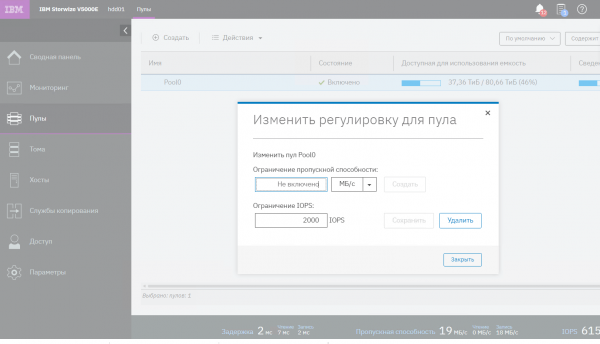 Performance Limitation of IBM Storage Systems
It is necessary to properly calculate the load on storage systems and avoid overloads. This can be done using either the IBM sizer (if accessible), with the help of partners, or third-party resources. It is imperative to understand the load profile on the storage system, as performance in MB/s and IOPS varies greatly depending on at least the following parameters:
operation type: read or write,
operation block size,
percentage ratio of read and write operations in the overall input/output flow.
Additionally, the speed of operation execution is influenced by how data blocks are read: sequentially or randomly. When performing multiple data access operations on the application side, there is the concept of dependent operations. This should also be taken into account. All of this can help see the aggregate data from performance counters of the OS, storage systems, servers/hypervisors, as well as understand the peculiarities of application operations, DBMS, and other 'consumers' of disk resources.
And lastly, always ensure you have backup copies that are up to date and operational. The backup schedule should be configured based on business-acceptable RPO values, and the integrity of backup copies should periodically be checked (many backup software manufacturers have implemented automated checks in their products) to ensure an acceptable RTO.
Thank you for reading to the end.
We are ready to answer your questions and comments in the comments section. We also, where we regularly hold promotions (discounts on IaaS and giveaways of promo codes up to 100% on VPS), share interesting news, and announce new articles on the Habra blog.
Source: habr.com
