

Hello, friends! We are pleased to welcome you to our new course on FortiAnalyzer Getting Started. In this course, we have already covered the functionality of FortiAnalyzer, but we touched on it rather superficially. Now, I want to talk more in depth about this product, its goals, objectives, and capabilities. This course should not be as extensive as the previous one, but I hope it will be interesting and informative.
Since this lesson is entirely theoretical, for your convenience, we decided to present it also in article format.
Throughout this course, we will cover the following points:
- General information about the product, its purpose, the problems it solves, and key features
- We will prepare a template and, during the preparation, we will examine the initial configuration of FortiAnalyzer in detail
- We will familiarize ourselves with the mechanisms for storing, processing, and filtering logs for convenient search, as well as look at the FortiView mechanism, which provides visual information about the network's status in the form of various graphs, charts, and other widgets
- We will examine the process of creating existing reports, as well as learn how to create our own reports and edit existing reports
- We will go over the main issues related to the administration of FortiAnalyzer
- We will discuss the licensing scheme once again—I already talked about it in lesson 11 of the course, but as they say, repetition is the mother of learning.
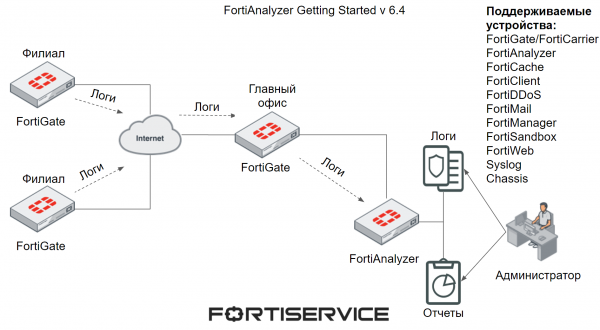
The main purpose of FortiAnalyzer is to provide centralized log storage from one or more Fortinet devices, as well as their processing and analysis. This allows security administrators to monitor various network events and security incidents from one location, quickly obtain necessary information from logs and widgets, and generate reports for all devices or those of interest.
The list of devices from which FortiAnalyzer can receive and analyze logs is presented in the figure below.
FortiAnalyzer has three key features—reporting, alerts, and archiving. Let's look at each of them.
Reporting provides a visual representation of network events, security incidents, and various activities occurring on supported devices. The reporting mechanism collects necessary data from the available logs and presents it in a readable and analyzable format. With reports, you can quickly obtain essential information about device performance, network security, the most visited resources, and more. There are numerous variations available. Reports can also be used to analyze the state of the network and supported devices over an extended period. They are often indispensable when investigating various security incidents.
Alerts enable quick responses to various threats occurring in the network. The system generates alerts when logs meet pre-configured conditions—such as virus detection, exploitation of vulnerabilities, and so forth. These alerts can be viewed in the FortiAnalyzer web interface, and their delivery can be configured via SNMP, to a syslog server, or to specified email addresses.
Archiving allows FortiAnalyzer to save copies of various content passing through the network. This is typically used in conjunction with the DLP mechanism for storing various files that fall under different rules of this mechanism. It can also be useful for investigating various security incidents.
Another interesting feature is the ability to use administrative domains. This technology allows the creation of groups of devices based on various criteria—device types, geographical locations, and so on. Creating such groups of devices aims to achieve the following goals:
- Grouping devices by similar characteristics for convenient monitoring and management—suppose the devices are grouped by geographical location. If you need to find specific information in the logs for devices located in the same group, instead of carefully filtering through the logs, you simply look at the logs for the relevant administrative domain and search for the necessary information.
- To differentiate administrative access — each administrative domain can have one or more administrators who only have access to that specific administrative domain.
- Effective management of disk space and data retention policies from devices — instead of creating a single data storage configuration for all devices, administrative domains allow for more suitable configurations for individual device groups. This can be helpful if you have multiple devices and need to retain data from one group for a year, while from another group for three years. Accordingly, appropriate disk space can be allocated for each group — allocating more space for a group generating a large number of logs and less space for another group.
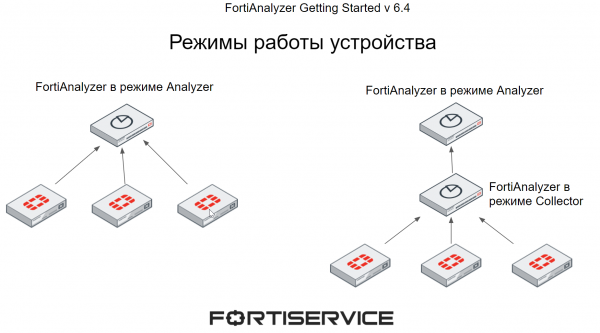
FortiAnalyzer can operate in two modes — Analyzer and Collector. The mode of operation is selected based on individual requirements and network topology.
When FortiAnalyzer operates in Analyzer mode, it serves as the primary log aggregator from one or more log collectors. The log collectors include both FortiAnalyzer in Collector mode and other devices supported by FortiAnalyzer (their list was provided above in the figure). This mode of operation is used by default.
When FortiAnalyzer operates in Collector mode, it collects logs from other devices and then forwards them to another device, such as FortiAnalyzer in Analyzer mode or Syslog. In Collector mode, FortiAnalyzer cannot use most functions, such as reporting and alerts, as its main goal is to collect and forward logs.
Using multiple FortiAnalyzer devices in different modes can enhance performance — FortiAnalyzer in Collector mode gathers logs from all devices and forwards them to Analyzer for further analysis, allowing FortiAnalyzer in Analyzer mode to conserve resources spent on receiving logs from multiple devices and fully focus on log processing.
FortiAnalyzer supports a declarative SQL query language for logging and reporting. It allows logs to be presented in a readable format. This query language is also used to generate various reports. Some reporting features require specific knowledge of SQL and databases, but often the built-in capabilities of FortiAnalyzer can suffice without such knowledge. We will encounter this further when we explore the reporting mechanism.
FortiAnalyzer can be presented in several formats. It can be a standalone physical device or a virtual machine—supporting various hypervisors, with a complete list available in the . It can also be deployed in specialized infrastructures such as AWS, Azure, Google Cloud, and others. The last option is FortiAnalyzer Cloud—a cloud service provided by Fortinet.
In the next lesson, we will prepare a template for further practical work. To not miss it, subscribe to our .
You can also follow updates on the following resources:
Source: habr.com
