

Welcome to the second lesson of the course . Today we will discuss the mechanism of administrative domains on , and we will also review the log processing—understanding the principles of these mechanisms is essential for initial setup . After that, we will discuss the layout we will be using throughout the course and perform an initial configuration . The theoretical part and the full video recording of the lesson can be found below.
To start, let's revisit administrative domains. There are a few key points you should know about them before you start using:
- The ability to create administrative domains is enabled and disabled centrally.
- For the registration of any devices other than FortiGate, a separate administrative domain is required. That means, if you want to register multiple FortiMail devices on one device, you need a separate administrative domain for that. However, this does not preclude the ability to create various administrative domains for the convenience of grouping FortiGate devices.
- The maximum number of supported administrative domains depends on the model of the FortiAnalyzer device.
- When enabling the ability to create administrative domains, you must select their operation mode—Normal or Advanced. In Normal mode, you cannot add various virtual domains (or VDOMs) of one FortiGate to different administrative domains of the FortiAnalyzer device. In Advanced mode, this is possible. The Advanced mode allows the processing of data from various virtual domains and obtaining separate reporting for them. If you've forgotten what virtual domains are, please refer to , where this is explained in detail.
We will look at the creation of administrative domains and the allocation of resources between them a bit later in the practical part of the lesson.
Now let's talk about the mechanism of logging and processing logs that come to the FortiAnalyzer.
Logs received by FortiAnalyzer are compressed and saved in a log file. When this file reaches a certain size, it is overwritten and archived. These logs are referred to as archived logs. They are considered offline logs, as they cannot be analyzed in real time. They are only available in raw format for viewing. The data retention policy in the administrative domain defines how long these logs will be stored in the device's memory.
At the same time, the logs are indexed in an SQL database. These logs are used for data analysis through the Log View, FortiView, and Reports mechanisms. The data retention policy in the administrative domain determines how long these logs will be stored in the device's memory. After the logs are deleted from the device's memory, they may remain as archived logs, but this depends on the data retention policy in the administrative domain.
For understanding the initial settings of this knowledge, we have enough information. Now let's discuss our layout:
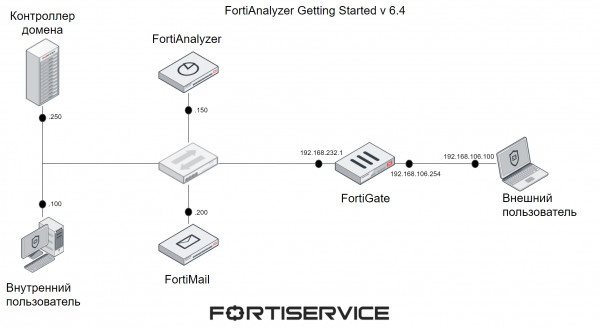
Here you see 6 devices – FortiGate, FortiMail, FortiAnalyzer, domain controller, external user computer, and internal user computer. FortiGate and FortiMail are used to generate logs from various Fortinet devices, allowing us to examine aspects of working with different administrative domains. The internal and external users, as well as the domain controller, are necessary for generating different traffic. The internal user computer has Windows OS installed, while the external user computer runs Kali Linux.
In this example, FortiMail operates in Server mode, meaning it is a separate mail server through which internal and external users can exchange emails. Necessary settings, such as MX records, are configured on the domain controller. For the external user, the DNS server is the internal domain controller – this is achieved through port forwarding (or using the Virtual IP technology) on FortiGate.
These settings are not covered in this lesson, as they are not related to the course topic. We will discuss the deployment and initial configuration of the FortiAnalyzer device. The other components of the current layout have been prepared in advance.
The system requirements for various devices are provided below. I have this layout running on a pre-prepared machine in a virtual environment using VMWare Workstation. The specifications of this machine are also listed below.
The device
RAM, GB
vCPU
HDD, GB
Domain Controller
6
3
40
Internal User
4
2
32
External User
2
2
8
FortiGate
2
2
30
FortiAnalyzer
8
4
80
FortiMail
2
4
50
Machine for the Layout
28
19
280
The system requirements outlined in this table are the minimum — typically, more resources are needed under real conditions. Additional information on system requirements can be found on .
The video tutorial includes the theoretical material discussed above, as well as the practical part — with the initial configuration of the FortiAnalyzer device. Enjoy watching!
In the next lesson, we will examine the aspects of working with logs in detail. To not miss it, subscribe to our .
You can also follow updates on the following resources:
Source: habr.com
