

What do we say to the god of IPv6?

That's right, and we will say the same to the god of encryption today.
This will be about unencrypted IPv4 tunneling, but not about the 'warm lamp' type, rather about the modern 'LED' one. Additionally, here we have raw sockets, and it involves working with packets in user space.
There are N tunneling protocols for every taste and color:
- stylish, trendy, youth-oriented
- multifunctional, like Swiss knives, OpenVPN and SSH
- old but not malicious GRE
- maximally simple, speedy, completely unencrypted IPIP
- actively developing
- many others.
But I'm a programmer, so I will only increase N by a fraction, leaving the development of real protocols to the Ē-developers.
In one yet-to-be-born project I'm currently working on, I need to reach hosts behind NAT from the outside. Using protocols with mature cryptography, I couldn't shake the feeling that it was like using a cannon to kill a sparrow. Since the tunnel is mostly used just to punch a hole in the NAT, internal traffic is usually also encrypted; they still push for HTTPS.
While exploring various tunneling protocols, the attention of my inner perfectionist was repeatedly drawn to IPIP due to its minimal overhead. But it has one and a half significant drawbacks for my tasks:
- it requires public IPs on both sides,
- and no authentication.
So, the perfectionist ended up retreating back into the dark corner of the skull, or wherever he sits.
And once while reading articles about in Linux, I stumbled upon FOU (Foo-over-UDP), i.e., whatever-wrapped-in-UDP. Currently, only IPIP and GUE (Generic UDP Encapsulation) are supported from what is available.
"There it is, the silver bullet! Even simple IPIP is enough for me," I thought.
In reality, the bullet turned out to be not fully silver. UDP encapsulation solves the first problem—clients behind NAT can be connected to externally using a pre-established connection—but here, half of the next drawback of IPIP blooms in a new light—anyone from the private network can hide behind the visible public IP and client port (this problem doesn't exist in pure IPIP).
To solve this one-and-a-half problem, the utility was born It implements a homemade authentication mechanism for the remote host without interfering with the kernel FOU, which will efficiently and swiftly process packets in the kernel space.
Your script is unnecessary!
Okay, if you know the client's public port and IP (for example, everything goes through NAT trying to map ports 1-to-1), you can create an IPIP-over-FOU tunnel using the following commands, without any scripts.
on the server:
# Подгрузить модуль ядра FOU
modprobe fou

# Создать IPIP туннель с инкапсуляцией в FOU.
# Модуль ipip подгрузится автоматически.
ip link add name ipipou0 type ipip
    remote 198.51.100.2 local 203.0.113.1
    encap fou encap-sport 10000 encap-dport 20001
    mode ipip dev eth0

# Добавить порт на котором будет слушать FOU для этого туннеля
ip fou add port 10000 ipproto 4 local 203.0.113.1 dev eth0

# Назначить IP адрес туннелю
ip address add 172.28.0.0 peer 172.28.0.1 dev ipipou0

# Поднять туннель
ip link set ipipou0 up
on the client:
modprobe fou

ip link add name ipipou1 type ipip
    remote 203.0.113.1 local 192.168.0.2
    encap fou encap-sport 10001 encap-dport 10000 encap-csum
    mode ipip dev eth0

# The options local, peer, peer_port, dev may not be supported by older kernels, and can be omitted.
# peer and peer_port are used to establish the connection immediately when creating the FOU listener.
ip fou add port 10001 ipproto 4 local 192.168.0.2 peer 203.0.113.1 peer_port 10000 dev eth0

ip address add 172.28.0.1 peer 172.28.0.0 dev ipipou1

ip link set ipipou1 up
where
ipipou*— the name of the local tunnel network interface203.0.113.1— the public IP of the server198.51.100.2— the public IP of the client192.168.0.2— the IP of the client assigned to the eth0 interface10001— the local port of the client for FOU20001— the public port of the client for FOU10000— the public port of the server for FOUencap-csum— an option to add a UDP checksum to encapsulated UDP packets; can be replaced withnoencap-csum, to not calculate, as integrity is controlled by the external layer of encapsulation (while the packet is inside the tunnel)eth0— the local interface to which the IPIP tunnel will be bound172.28.0.1— the client's tunnel interface IP (private)172.28.0.0— the server's tunnel interface IP (private)
As long as the UDP connection is alive, the tunnel will remain operational, but once it drops, it depends — if the IP: client port remains the same — it will stay active, if it changes — it will drop.
It's easiest to revert everything by unloading the kernel modules: modprobe -r fou ipip
Even if authentication is not required, the public IP and port of the client are not always known and are often unpredictable or changeable (depending on the type of NAT). If you omit encap-dport on the server side, the tunnel won't work, as it's not smart enough to take the remote connection port. In this case, ipipou can help, or WireGuard and its alternatives will be for your assistance.
Initially, a check is performed: does the client device support power via PoE? A voltage of 2.8 to 10 volts is supplied, and the input resistance is determined. If the results obtained are satisfactory for powering via PoE, the power device proceeds to the next stage.
The client (usually behind NAT) establishes a tunnel (as in the example above) and sends an authentication packet to the server to configure the tunnel on its side. Depending on the settings, this can be an empty packet (just to let the server see the public IP: port of the connection), or it may contain information that allows the server to identify the client. The data can be a simple plaintext password phrase (it reminds me of HTTP Basic Auth) or specially formatted data signed with a private key (analogous to HTTP Digest Auth but somewhat stronger, see the function client_auth in the code).
On the server side (the part with the public IP), when ipipou starts, it creates an nfqueue handler and configures netfilter so that the necessary packets are directed appropriately: connection-initiating packets go to nfqueue, while [almost] all others go directly to the FOU listener.
For those who aren’t familiar, nfqueue (or NetfilterQueue) is a special tool for amateurs who don’t know how to develop kernel modules, which allows redirecting network packets into user space and processing them there using primitive tools: modifying (optionally) and sending them back to the kernel, or dropping them.
There are bindings for working with nfqueue for some programming languages, but none were found for bash (not surprisingly), so I had to use Python: ipipou uses .
If performance isn’t critical, with this tool, you can relatively quickly and easily create your own logic for working with packets at a fairly low level, for example, crafting experimental data transmission protocols or trolling local and remote services with unconventional behavior.
Raw sockets work hand-in-hand with nfqueue; for example, once the tunnel is set up, and FOU is listening on the required port, you can't send a packet from that same port in the usual way — it's busy. However, you can create an arbitrary generated packet directly on the network interface using a raw socket, even though generating such a packet may require a bit more effort. This is how authentication packets are created in ipipou.
Since ipipou processes only the initial packets from a connection (as well as those that managed to get queued before the connection is established), performance is hardly affected.
As soon as the ipipou server receives an authenticated packet, a tunnel is created and all subsequent packets in the connection are processed by the kernel, bypassing nfqueue. If the connection has expired, the first packet of the next one will be sent to nfqueue, depending on the settings. If it is not an authentication packet but from the last remembered IP and port of the client, it may either be passed through or discarded. If an authenticated packet arrives from a new IP and port, the tunnel is reconfigured to use them.
A typical IPIP-over-FOU has another issue when working with NAT — it is not possible to create two IPIP tunnels encapsulated in UDP with the same IP, because the FOU and IPIP modules are sufficiently isolated from each other. That is, a pair of clients behind a single public IP cannot connect to the same server this way simultaneously. In the future, , this will be resolved at the kernel level, but that's not certain. Meanwhile, NAT issues can be resolved with NAT — if it happens that a pair of IP addresses is already occupied by another tunnel, ipipou will perform NAT from the public to an alternative private IP, voilà! — tunnels can be created until the ports run out.
Since not all packets in the connection are signed, such a simple protection is vulnerable to MITM, so if there is a villain lurking between the client and the server who can listen to and manipulate the traffic, they may redirect authenticated packets through another address and create a tunnel from an untrusted host.
If anyone has ideas on how to fix this while keeping most of the traffic in the kernel, feel free to speak up.
By the way, encapsulation in UDP has proven to be very effective. Compared to encapsulation over IP, it is much more stable and often faster despite the additional overhead from the UDP header. This is because on the Internet, most hosts reliably operate only with the three most popular protocols: TCP, UDP, ICMP. A significant portion might even discard everything else or process it more slowly, as they are optimized only for these three.
For example, that's why QUICK, which is based on HTTP/3, was created specifically on top of UDP, rather than IP.
Well, enough talk, it's time to see how this works in the 'real world.'
Battle
To emulate the real world, iperf3. In terms of realism, it's roughly akin to emulating the real world in Minecraft, but for now, it'll do.
The competition includes:
- reference main channel
- the hero of this article ipipou
- OpenVPN with authentication but without encryption
- OpenVPN in 'all-in-one' mode
- WireGuard without PresharedKey, with MTU=1440 (since IPv4-only)
Technical data for geeks
Metrics are collected with the following commands
on the client:
UDP
CPULOG=NAME.udp.cpu.log; sar 10 6 > "$CPULOG" & iperf3 -c SERVER_IP -4 -t 60 -f m -i 10 -B LOCAL_IP -P 2 -u -b 12M; tail -1 "$CPULOG"
# Where "-b 12M" is the bandwidth of the main channel divided by the number of streams "-P" to avoid generating excess packets and degrading performance.
TCP
CPULOG=NAME.tcp.cpu.log; sar 10 6 > "$CPULOG" & iperf3 -c SERVER_IP -4 -t 60 -f m -i 10 -B LOCAL_IP -P 2; tail -1 "$CPULOG"
ICMP latency
ping -c 10 SERVER_IP | tail -1
on the server (running simultaneously with the client):
UDP
CPULOG=NAME.udp.cpu.log; sar 10 6 > "$CPULOG" & iperf3 -s -i 10 -f m -1; tail -1 "$CPULOG"
TCP
CPULOG=NAME.tcp.cpu.log; sar 10 6 > "$CPULOG" & iperf3 -s -i 10 -f m -1; tail -1 "$CPULOG"
Tunnel configuration
ipipou
server
/etc/ipipou/server.conf:
server
number 0
fou-dev eth0
fou-local-port 10000
tunl-ip 172.28.0.0
auth-remote-pubkey-b64 eQYNhD/Xwl6Zaq+z3QXDzNI77x8CEKqY1n5kt9bKeEI=
auth-secret topsecret
auth-lifetime 3600
reply-on-auth-ok
verb 3
systemctl start ipipou@server
a client
/etc/ipipou/client.conf:
client
number 0
fou-local @eth0
fou-remote SERVER_IP:10000
tunl-ip 172.28.0.1
# pubkey of auth-key-b64: eQYNhD/Xwl6Zaq+z3QXDzNI77x8CEKqY1n5kt9bKeEI=
auth-key-b64 RuBZkT23na2Q4QH1xfmZCfRgSgPt5s362UPAFbecTso=
auth-secret topsecret
keepalive 27
verb 3
systemctl start ipipou@client
openvpn (without encryption, with authentication)
server
openvpn --genkey --secret ovpn.key  # Then you need to send ovpn.key to the client
openvpn --dev tun1 --local SERVER_IP --port 2000 --ifconfig 172.16.17.1 172.16.17.2 --cipher none --auth SHA1 --ncp-disable --secret ovpn.key
a client
openvpn --dev tun1 --local LOCAL_IP --remote SERVER_IP --port 2000 --ifconfig 172.16.17.2 172.16.17.1 --cipher none --auth SHA1 --ncp-disable --secret ovpn.key
openvpn (with encryption, authentication, over UDP, as it should be)
Configured using
wireguard
server
/etc/wireguard/server.conf:
[Interface]
Address=172.31.192.1/18
ListenPort=51820
PrivateKey=aMAG31yjt85zsVC5hn5jMskuFdF8C/LFSRYnhRGSKUQ=
MTU=1440

[Peer]
PublicKey=LyhhEIjVQPVmr/sJNdSRqTjxibsfDZ15sDuhvAQ3hVM=
AllowedIPs=172.31.192.2/32
systemctl start wg-quick@server
a client
/etc/wireguard/client.conf:
[Interface]
Address=172.31.192.2/18
PrivateKey=uCluH7q2Hip5lLRSsVHc38nGKUGpZIUwGO/7k+6Ye3I=
MTU=1440

[Peer]
PublicKey=DjJRmGvhl6DWuSf1fldxNRBvqa701c0Sc7OpRr4gPXk=
AllowedIPs=172.31.192.1/32
Endpoint=SERVER_IP:51820
systemctl start wg-quick@client
Results
A raw, ugly table
CPU load on the server isn't very indicative, as many other services are running that sometimes consume resources:
Proto bandwidth[Mbps] CPU_idle_client[%] CPU_idle_server[%]
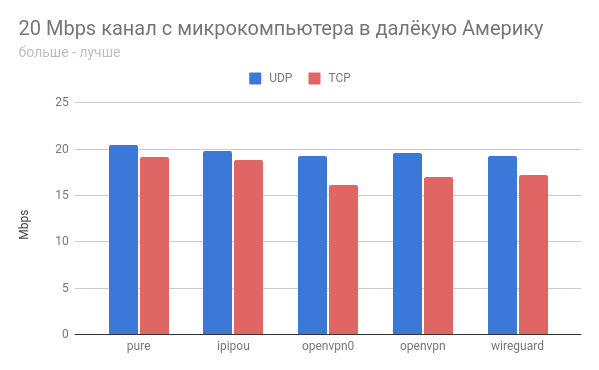
# 20 Mbps channel from a microcomputer (4 core) to VPS (1 core) across the Atlantic
# pure
UDP 20.4      99.80 93.34
TCP 19.2      99.67 96.68
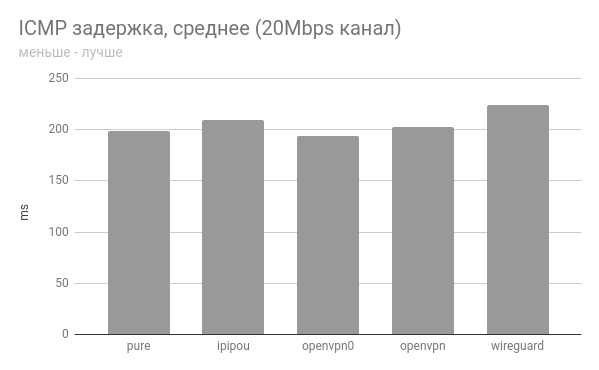
ICMP latency min/avg/max/mdev = 198.838/198.997/199.360/0.372 ms
# ipipou
UDP 19.8      98.45 99.47
TCP 18.8      99.56 96.75
ICMP latency min/avg/max/mdev = 199.562/208.919/220.222/7.905 ms
# openvpn0 (auth only, no encryption)
UDP 19.3      99.89 72.90
TCP 16.1      95.95 88.46
ICMP latency min/avg/max/mdev = 191.631/193.538/198.724/2.520 ms
# openvpn (full encryption, auth, etc)
UDP 19.6      99.75 72.35
TCP 17.0      94.47 87.99
ICMP latency min/avg/max/mdev = 202.168/202.377/202.900/0.451 ms
# wireguard
UDP 19.3      91.60 94.78
TCP 17.2      96.76 92.87
ICMP latency min/avg/max/mdev = 217.925/223.601/230.696/3.266 ms

## Approximately 1Gbps channel between VPS in Europe and the USA (1 core)
# pure
UDP 729      73.40 39.93
TCP 363      96.95 90.40
ICMP latency min/avg/max/mdev = 106.867/106.994/107.126/0.066 ms
# ipipou
UDP 714      63.10 23.53
TCP 431      95.65 64.56
ICMP latency min/avg/max/mdev = 107.444/107.523/107.648/0.058 ms
# openvpn0 (auth only, no encryption)
UDP 193      17.51 1.62
TCP 12      95.45 92.80
ICMP latency min/avg/max/mdev = 107.191/107.334/107.559/0.116 ms
# wireguard
UDP 629      22.26 2.62
TCP 198      77.40 55.98
ICMP latency min/avg/max/mdev = 107.616/107.788/108.038/0.128 ms
20 Mbps channel
1 optimistic Gbps channel
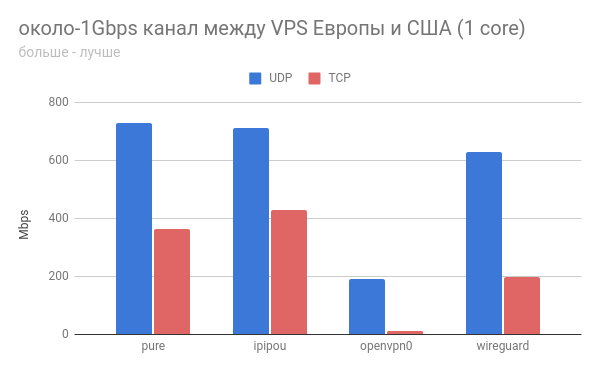
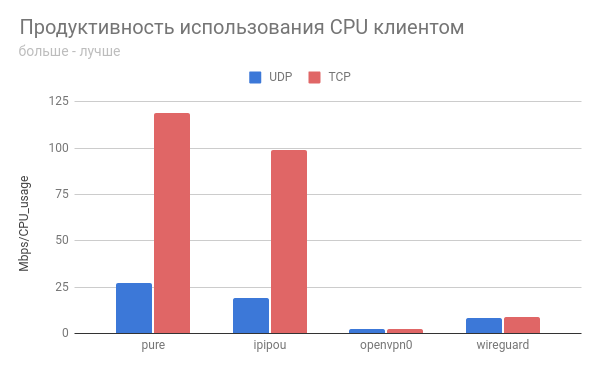
In all cases, ipipou's performance is quite close to the base channel, and that's great!
The unencrypted openvpn tunnel behaved rather strangely in both cases.
If anyone plans to test, it would be interesting to hear feedback.
May IPv6 and NetPrickle be with us!
Source: habr.com
