


Antivirus companies, cybersecurity experts, and enthusiasts set up honeypots on the internet to 'catch' new types of viruses or uncover unusual hacker tactics. Honeypots have become so common that cybercriminals have developed a sort of immunity: they quickly recognize the traps and simply ignore them. To study the tactics of modern hackers, we created a realistic honeypot that lived on the internet for seven months, attracting a variety of attacks. We detailed this experience in our research, "" Some findings from the research are shared in this post.
Honeypot Development: Checklist
The main task in creating our super trap was to avoid being uncovered by hackers who showed interest in it. This required significant effort:
- Create a realistic company backstory, including employee names and photos, phone numbers, and email addresses.
- Devise and implement a model of industrial infrastructure that aligns with the narrative of our company’s activities.
- Decide which network services would be accessible externally, while avoiding the temptation to open vulnerable ports so it doesn’t seem like a trap for the unwary.
- Organize a perception of information leakage from the vulnerable system and spread this information among potential attackers.
- Implement unobtrusive monitoring of hackers' actions within the trap infrastructure.
Now, let’s go through everything step by step.
Creating the Backstory
Cybercriminals have become accustomed to encountering numerous honeypots, which is why the most advanced among them conduct in-depth investigations of each vulnerable system to ensure it’s not a trap. For this reason, we aimed not only for the honeypot to appear realistic from a design and technical standpoint but also to create the appearance of a real company.
Putting ourselves in the shoes of a hypothetical cool hacker, we developed a verification algorithm that would differentiate a real system from a trap. It included searching for the company's IP addresses in reputation systems, reverse investigating IP address history, searching for names and keywords related to the company, its contractors, and many other things. In the end, the legend turned out to be quite convincing and appealing.
We decided to position the trap factory as a small boutique of industrial prototyping, working for very large anonymous clients from the military and aviation sectors. This freed us from the legal complications associated with using an existing brand.
Next, we needed to come up with a vision, mission, and name for the organization. We decided that our company would be a startup with a small number of employees, each of whom would be a founder. This added credibility to the legend of our business's specialization, which allows it to work on delicate projects for large and important clients. We wanted our company to appear weak in terms of cybersecurity, but at the same time, it was obvious that we were working with critical assets in target systems.

Screenshot of the honeypot site MeTech. Source: Trend Micro
As the name of the company, we chose the word MeTech. The site was built on a free template. We sourced images from stock photo banks, using the least popular ones and modifying them to make them less recognizable.
We wanted the company to appear real, so it was necessary to add employees with professional skills corresponding to the profile of the business. We invented names and personalities for them, and then tried to select images from stock photo banks according to ethnic backgrounds.

Screenshot of the honeypot site MeTech. Source: Trend Micro
To avoid being exposed, we searched for high-quality group photos from which we could select the faces we needed. However, we later abandoned this option, as a potential hacker could use reverse image search to discover that our 'employees' only existed in stock photo banks. Ultimately, we used photographs of non-existent people generated by neural networks.
The employee profiles published on the website contained important information about their technical skills; however, we avoided specifying particular educational institutions and cities.
To create email accounts, we utilized the hosting provider's server, and then we rented several phone numbers in the USA and integrated them into a virtual PBX with a voice menu and an answering machine.
Honeypot infrastructure
To avoid exposure, we decided to use a combination of real industrial equipment, physical computers, and secure virtual machines. To give a preview, we verified the result of our efforts using the Shodan search engine, which showed that the honeypot appeared as a real industrial system.
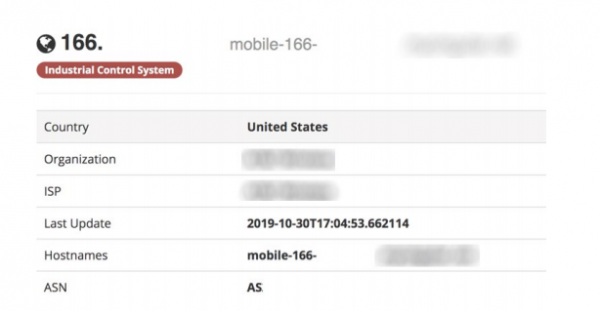
Honeypot scan results using Shodan. Source: Trend Micro
For our trap's 'hardware,' we used four PLCs:
- Siemens S7-1200,
- two Allen-Bradley MicroLogix 1100,
- Omron CP1L.
These PLCs were chosen for their popularity in the global market of control systems. Additionally, each of these controllers uses its own protocol, which allowed us to check which PLC would be attacked more frequently and whether they would draw interest at all.
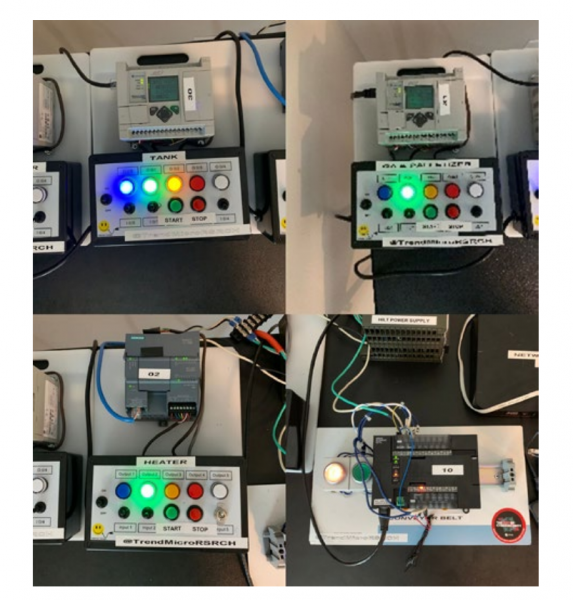
The equipment of our 'factory' trap. Source: Trend Micro
We didn't just set up the hardware and connect it to the internet. Each controller was programmed to perform tasks, including
- mixing,
- controlling the burner and conveyor belt,
- palletizing using a robotic manipulator.
To make the production process realistic, we programmed logic for randomly changing feedback parameters, simulating starting and stopping motors, and turning the burner on and off.
Our factory had three virtual computers and one physical one. The virtual machines were used to manage the plant, the palletizing robot, and as the workstation for the PLC programmer. The physical computer acted as a file server.
In addition to monitoring attacks on PLCs, we wanted to track the status of the programs loaded onto our devices. To achieve this, we created an interface that allowed us to quickly determine how the states of our virtual execution mechanisms and setups had been modified. Even in the planning stage, we found it much easier to implement this through a management program than through direct programming of the controller's logic. We provided access to the device management interface of our honeypot via VNC without a password.
Industrial robots are a key component of modern smart manufacturing. With this in mind, we decided to add a robot and a workstation for controlling it to our trap factory's equipment. To make the 'factory' more realistic, we installed actual software on the control workstation that engineers use for graphical programming of the robot's logic. Since industrial robots are usually located in an isolated internal network, we opted to leave VNC access to the control workstation unprotected.

The RobotStudio environment with a 3D model of our robot. Source: Trend Micro
On the virtual machine with the robot control workstation, we installed the RobotStudio programming environment from ABB Robotics. After configuring RobotStudio, we opened the simulation file with our robot so that its 3D image would be visible on the screen. As a result, Shodan and other search engines, discovering the unprotected VNC server, will receive this image from the screen and show it to those looking for industrial robots with open management access.
The essence of this attention to detail was to create an attractive and as realistic a target as possible for attackers, who, upon discovering it, would return to it again and again.
Engineer Workstation
To program the PLC logic, we added an engineering computer to the infrastructure. It was equipped with industrial software for programming PLCs:
- TIA Portal for Siemens,
- MicroLogix for Allen-Bradley controller,
- CX-One for Omron.
We decided that the engineering workstation would not be accessible outside the network. Instead, we set it up with the same password for the administrator account as on the publicly accessible robot control terminal and factory control terminal. This configuration is quite common in many companies.
Unfortunately, despite all our efforts, no attacker has reached the engineer's workstation.
File Server
We needed it as bait for the attackers and as a means to back up our own 'work' in the honeypot factory. This allowed us to exchange files with our honeypot using USB devices, leaving no traces in the trap network. We installed Windows 7 Pro as the OS for the file server, creating a shared folder that was accessible for reading and writing by anyone.
Initially, we did not create any hierarchy of folders and documents on the file server. However, it later became apparent that attackers were actively examining this folder, so we decided to fill it with various files. To do this, we wrote a Python script that created a file of random size with one of the specified extensions, generating a name based on a dictionary.
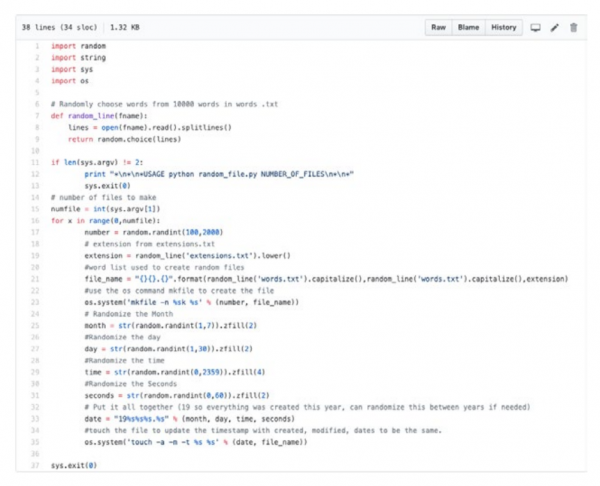
Script for generating appealing file names. Source: Trend Micro
After running the script, we got the desired result: a folder filled with files that had very interesting names.
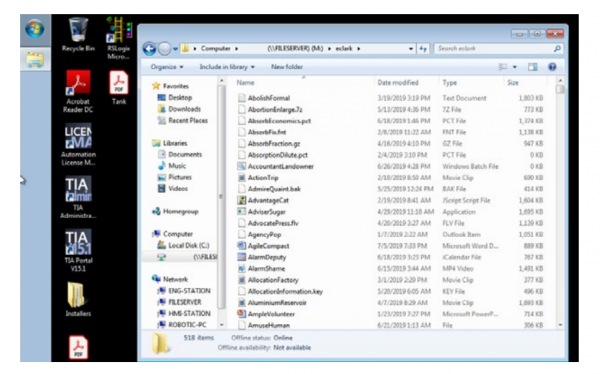
Result of the script's execution. Source: Trend Micro
Monitoring Environment
After putting so much effort into creating a realistic company, we simply couldn't afford to slip up on the environment for monitoring our 'visitors'. We needed to collect all data in real-time in such a way that attackers wouldn't notice they were being observed.
We implemented this using four USB-Ethernet adapters, four SharkTap Ethernet splitters, Raspberry Pi 3, and a large external drive. Our network layout looked like this:
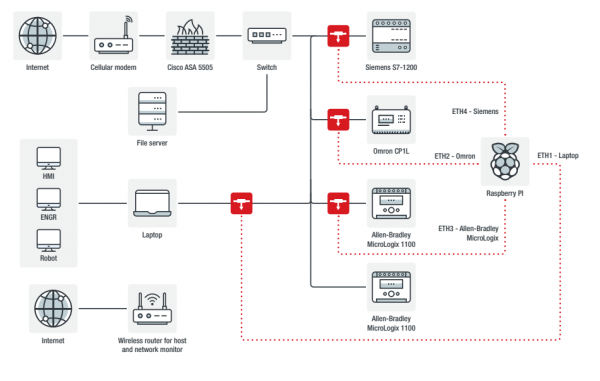
Honeypot network diagram with monitoring equipment. Source: Trend Micro
We positioned three SharkTap splitters to monitor all external traffic to the PLCs, which were only accessible from the internal network. The fourth SharkTap tracked traffic from the vulnerable virtual machine's guests.
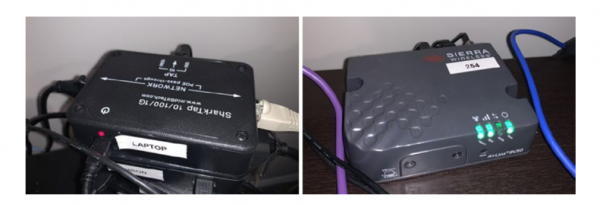
SharkTap Ethernet splitter and Sierra Wireless AirLink RV50 router. Source: Trend Micro
The Raspberry Pi performed daily traffic capture. We set up the internet connection using the Sierra Wireless AirLink RV50 cellular router, which is commonly used in industrial settings.
Unfortunately, this router did not allow us to selectively block attacks that did not align with our plans, so we added a Cisco ASA 5505 firewall to the network in transparent mode to implement blocking with minimal impact on the network.
Traffic Analysis
Tshark and tcpdump are suitable for quickly addressing current issues, but in our case, their capabilities were insufficient as we had many gigabytes of traffic being analyzed by several people. We utilized the open-source analyzer Moloch, developed by AOL. Functionally, it is comparable to Wireshark, but it offers more collaboration features, packet description and tagging, exporting, and other tasks.
Since we didn't want to process the collected data on the honeypot computers, PCAP dumps were exported daily to AWS storage, from where we imported them to the machine with Moloch.
Screen Recording
To document the actions of the attackers in our honeypot, we wrote a script that took screenshots of the virtual machine at set intervals and, by comparing with the previous screenshot, determined whether something was happening. When activity was detected, the script started screen recording. This approach proved to be the most effective. We also attempted to analyze VNC traffic from the PCAP dump to understand what changes occurred in the system, but ultimately, our implemented screen recording was simpler and more visual.
Monitoring VNC Sessions
For this, we used Chaosreader and VNCLogger. Both utilities extract keystrokes from PCAP dumps, but VNCLogger handles special keys like Backspace, Enter, and Ctrl more accurately.
VNCLogger has two disadvantages. First, it can only extract keystrokes by 'listening' to traffic on the interface, so we had to simulate a VNC session for it using tcpreplay. The second disadvantage, shared with Chaosreader, is that neither of them display the contents of the clipboard. For this, we had to resort to Wireshark.
We Lure Hackers
We created a honeypot to be attacked. To achieve this, we staged an information leak designed to attract potential hackers. The following ports were open on the honeypot:
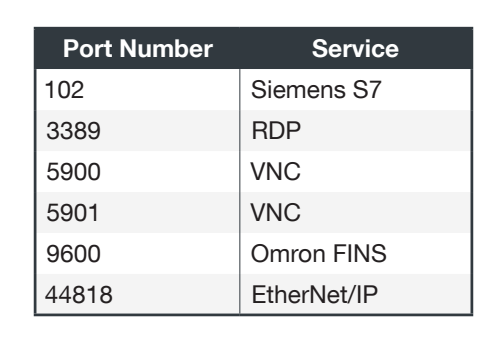
The RDP port had to be closed shortly after the operation began due to performance issues in our network caused by the massive amount of scanning traffic.
VNC terminals initially operated in a 'view-only' mode without a password, and then we 'accidentally' switched them to full access mode.
To attract attackers, we posted two articles with 'leaked' information about an available industrial system on PasteBin.
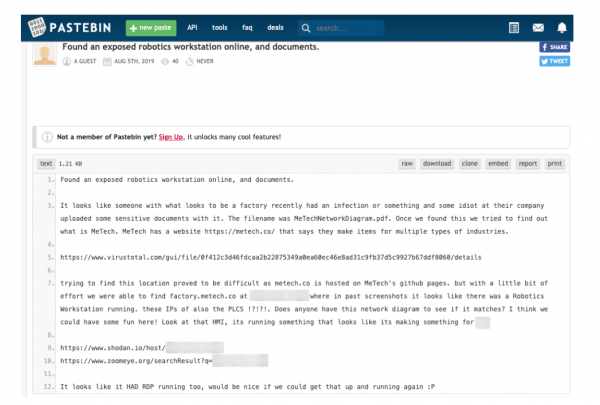
One of the posts placed on PasteBin to draw attacks. Source: Trend Micro
Attacks
The honeypot was online for about seven months. The first attack occurred a month after the honeypot went live.
Scanners
There was a lot of traffic from scanners of well-known companies—ip-ip, Rapid, Shadow Server, Shodan, ZoomEye, and others. There were so many that we had to exclude them an IP address from the analysis: 610 out of 9452 or 6.45% of all unique IP addresses belonged to quite legitimate scanners.
Fraudsters
One of the biggest risks we faced was the use of our system for criminal purposes: purchasing smartphones through subscriber accounts, cashing in airline miles with gift cards, and other types of fraud.
Miners
One of the first visitors to our system turned out to be a miner. He uploaded Monero mining software to it. He would not have made much profit on our specific system due to its low performance. However, if several dozen or even hundreds of such systems were combined, it could be quite profitable.
Ransomware
During the operation of the honeypot, we encountered real ransomware twice. In the first case, it was Crysis. Its operators accessed the system via VNC but then installed TeamViewer to carry out further actions. Waiting for the ransom message demanding $10,000 in BTC, we engaged in correspondence with the criminals, asking them to decrypt one of the files. They complied and reiterated the ransom demand. We managed to negotiate down to $6,000, after which we simply reinstalled the system on a virtual machine, as we had received all the necessary information.
The second ransomware was Phobos. The hacker who installed it spent an hour browsing the honeypot's file system and scanning the network before finally deploying the ransomware.
The third ransomware attack turned out to be fake. An unknown 'hacker' downloaded a file named haha.bat onto our system, after which we watched for some time as they attempted to get it to run. One of their attempts was to rename haha.bat to haha.rnsmwr.
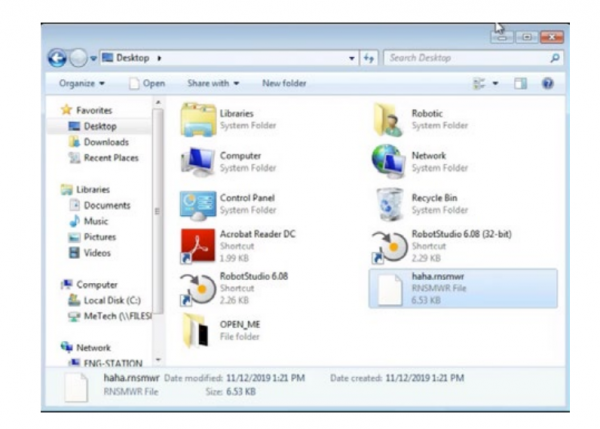
The 'hacker' increases the malice of the bat file by changing its extension to .rnsmwr. Source: Trend Micro
When the bat file finally started executing, the 'hacker' edited it, raising the ransom from $200 to $750. After that, they 'encrypted' all the files, left a ransom note on the desktop, and vanished, changing the passwords on our VNC.
A couple of days later, the hacker returned and to remind us of their presence, launched the bat file that opened numerous windows with a porn site. Apparently, they were trying to draw attention to their demand.
Summary
During the investigation, it became clear that as soon as information about the vulnerability was published, the honeypot attracted attention, with activity increasing day by day. To make the trap noticeable, we had to allow numerous security breaches in our fictitious company. Unfortunately, this situation is far from rare among many real companies lacking dedicated IT and cybersecurity staff.
In general, organizations should employ the principle of least privilege, while we implemented the complete opposite to attract attackers. The longer we observed the attacks, the more sophisticated they became compared to standard penetration testing methods.
Most importantly, all these attacks would have failed if adequate security measures had been implemented during the network setup. Organizations must ensure that their equipment and industrial infrastructure components are not accessible from the internet, as we intentionally did in our honeypot.
Although we did not record any attacks on the engineer's workstation, despite using the same local administrator password on all computers, it is advisable to avoid such practices to minimize the risk of intrusions. Poor security serves as an additional invitation for attacks on industrial systems, which have long attracted the interest of cybercriminals.
Source: habr.com
