


Release 13.4 has been launched with HashiCorp storage for CI variables, Kubernetes Agent, and a security center, along with switchable features in Starter.
At GitLab, we are always thinking about how to help users reduce risks, increase efficiency, and speed up delivery on your favorite platform. This month, we have added several useful innovations that enhance security features, reduce vulnerabilities, improve efficiency, streamline GitLab usage, and help your team deliver features even faster. We hope you find the key features of this release and 53 other new features, added in this release.
Enhanced security capabilities
We strive to introduce several new features to GitLab DevSecOps every month, and this release is no exception. as part of building and deploying. Additionally, organizations that want to maintain code deployment separation of duties can now . This role aligns with and will allow for merging requests (in the Russian localization of GitLab, "merge requests") and deploying code in secure environments without granting access to modify the code itself.
Another way to reduce risks is through the new . Operations professionals can deploy Kubernetes clusters from GitLab without the need to open access to their cluster to the entire internet. We also introduce automatic version control support for new Terraform state files with to support compliance requirements and ease debugging. Finally, the security dashboard in the instance has transformed into featuring vulnerability reports and security settings.
More convenient and effective work with GitLab
We have improved our global search by adding , allowing easy access to recent tickets, groups, projects, settings, and help sections. We are excited to announce that GitLab Pages for redirecting individual pages and directories within the site, allowing users to deploy their sites more efficiently. Additionally, for those who would like to receive extended information on deployment, this release allows !
Open Source Contributions
We present , which was added by . Coverage markers for unit test of changed code provide developers with a clear view of code coverage during review; this information helps speed up reviews and reduce time for merging and deploying new code. Also, we and plan to .
And this is just the beginning!
As always, there is too little space in the overall overview, and there are many cool features in release 13.4. Here are a few more:
- .
If you want to get a preview of what’s coming in the next release, check out .
.

this month —
Fabio made a significant downward API support (simultaneously with this in — a feature that has been long awaited in the GitLab community. This is truly an important contribution involving non-trivial changes that required constant collaboration with GitLab team members and touched on many areas of the project, such as UX, frontend, and backend.
Key features of GitLab 13.4
Use HashiCorp Vault keys in CI jobs
(PREMIUM, ULTIMATE, SILVER, GOLD)
In release 12.10, GitLab introduced the ability to obtain and send keys in CI jobs using the GitLab job handler (GitLab runner). Now we are expanding , adding new syntax secrets in the file .gitlab-ci.yml. This will simplify the setup and usage of HashiCorp storage with GitLab.
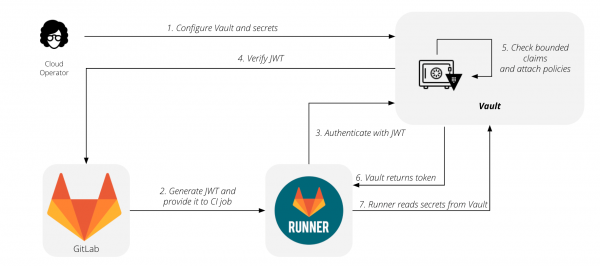
and .
Introducing GitLab Kubernetes Agent
(PREMIUM, ULTIMATE)
GitLab's integration with Kubernetes has long enabled deployments on Kubernetes clusters without the need for manual configuration. Many users have appreciated the ease of use of this combination, while others have encountered some difficulties. For the current integration, your cluster must be accessible from the internet for GitLab to connect to it. For many organizations, this is not feasible as they restrict access to their clusters for security, compliance, or regulatory reasons. To circumvent these limitations, users have had to create their own tools on top of GitLab, or they would be unable to utilize this feature.
Today, we introduce the GitLab Kubernetes Agent — a new way to deploy on Kubernetes clusters. The agent operates within your cluster, so you won't need to expose it to the entire internet. The agent coordinates deployments by requesting updates from GitLab instead of GitLab pushing updates to the cluster. Regardless of which GitOps method you use, GitLab will suit your needs.
Please note that this is the first release of the agent. Currently, we have focused on setup and management of deployments through code for the GitLab Kubernetes Agent. Some existing Kubernetes integration features, such as deployment boards and GitLab-managed applications, are not yet supported. , that these capabilities will be added to the agent in future releases, along with new integrations focused on security and compliance.
and .
Grant users deployment permissions without code access
(PREMIUM, ULTIMATE, SILVER, GOLD)
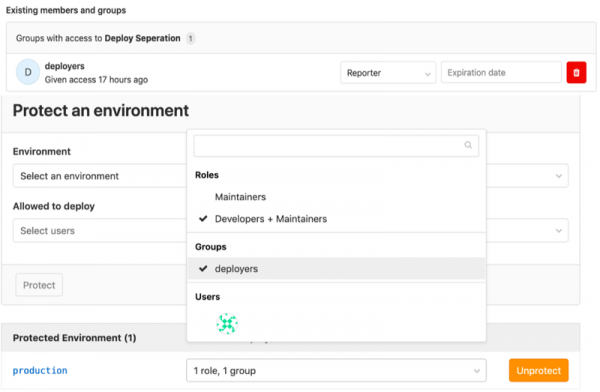
Previously, GitLab's permission system did not allow for effective separation of responsibilities within your team between those who handle development and those in charge of deployments. With the release of GitLab 13.4, you can grant permission to approve merge requests for deployments, as well as to actually deploy code to individuals who do not write code, without giving them maintainer access rights (translated in Russian GitLab as 'сопровождающий').
and .
Security Center
(ULTIMATE, GOLD)
Previously, instance-level vulnerability management was limited in both functionality and flexibility. The interface consisted of a single page that combined vulnerability details, metric graphics, and settings. There wasn't much room for the development of these features or the use of other security tools.
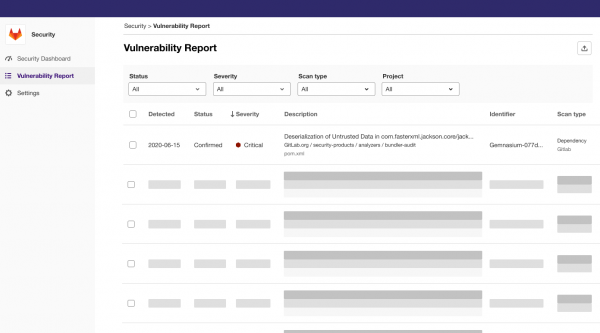
We have fundamentally changed security management and transparency in GitLab. The instance security panel has transformed into a full security center. The biggest change is the introduction of a new menu structure: instead of a single page, you now see the security dashboard, vulnerability report, and settings section separately. Although the functionality hasn’t changed, the segmentation allows us to improve this area, which would otherwise be difficult. It also creates a foundation for adding more security-related capabilities in the future.
The dedicated section for the vulnerability report now has more space to display important details. This section collects vulnerabilities currently in the project’s vulnerability list. Moving the vulnerability metric widgets to a separate section creates a user-friendly security dashboard. This is now a canvas for future visualizations—not just for vulnerability management but also for any security-related metrics. Finally, a separate settings area creates a common space for all instance-level security settings, not just for vulnerability management.
and .
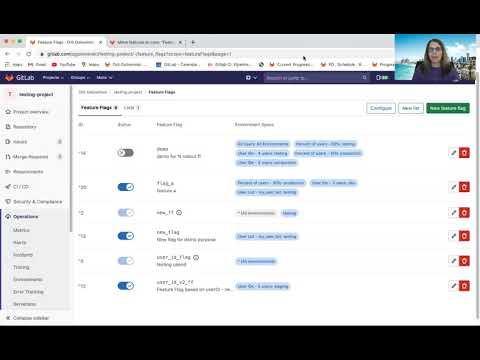
Feature flags are now in GitLab Starter
(STARTER, PREMIUM, ULTIMATE, BRONZE, SILVER, GOLD)
GitLab 11.4 was released . In 12.2, we introduced strategies for them and , and in 13.1, we added and for different environments.
Earlier this year, GitLab committed to to open source. In this release, we completed the transition of feature flags to the Starter plan and will continue moving them to Core with . We are excited to offer this capability to more users and want to hear how you will use them.
and .
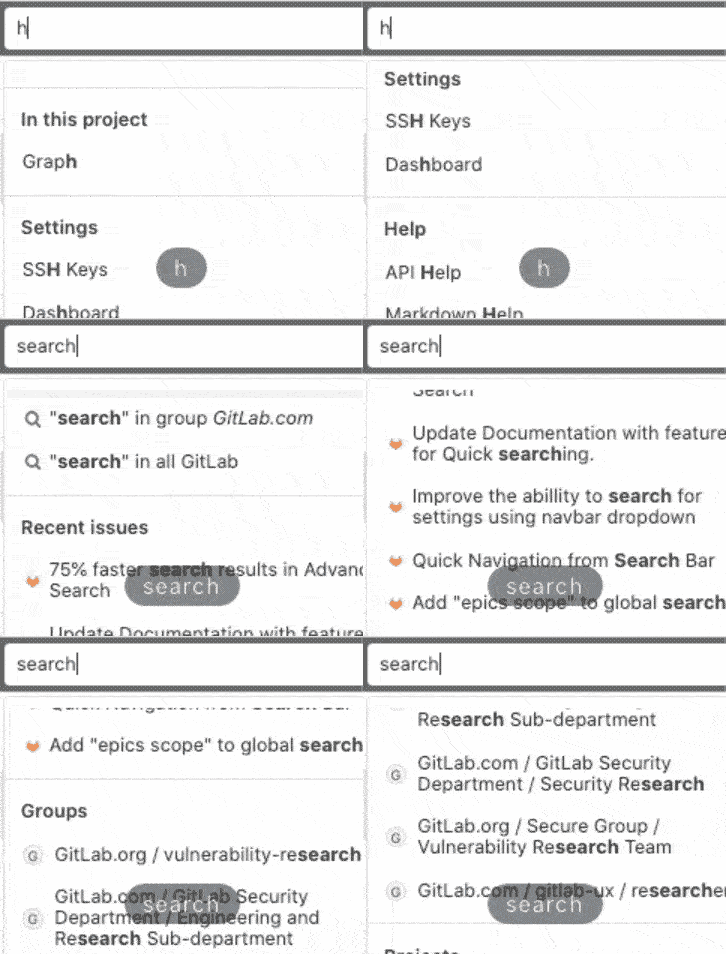
Quick navigation from the search bar
(CORE, STARTER, PREMIUM, ULTIMATE, FREE, BRONZE, SILVER, GOLD)
Sometimes, when navigating GitLab, you want to go directly to a specific project instead of the search results page.
With the global search panel, you can quickly navigate to recent tickets, groups, projects, settings, and help sections. You can even use a keyboard shortcut /, to move the cursor to the search panel, making it even more efficient to navigate GitLab!
and .
Displaying code coverage in merge request diffs
(CORE, STARTER, PREMIUM, ULTIMATE, FREE, BRONZE, SILVER, GOLD)
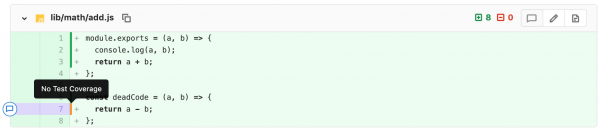
When reviewing a merge request, it can be difficult to determine if the modified code is covered by unit tests. Instead, reviewers may rely on overall coverage and require it to be increased before approving the merge request. This can lead to a haphazard approach to writing tests, which won’t truly improve the code quality or its test coverage.
Now, when viewing a merge request diff, you will see a visual representation of code coverage. New markers will help quickly determine if the modified code is covered by a unit test, which will help speed up code review and the time to merge and deploy new code.
Thank you and Siemens for this feature!
and .
More environments and projects on the environments panel
(PREMIUM, ULTIMATE, SILVER, GOLD)
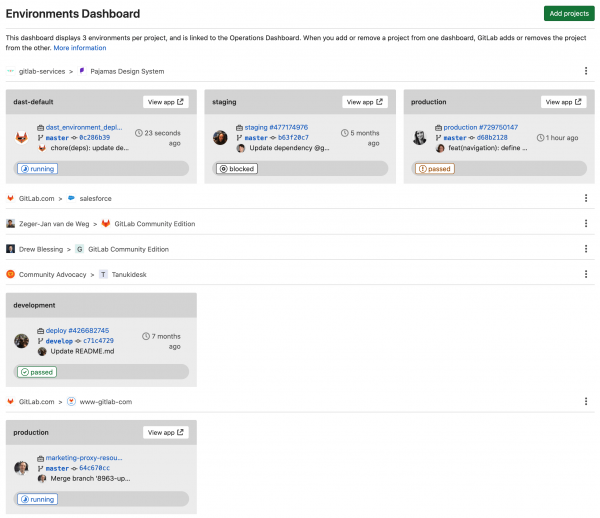
Since the release of GitLab 12.5 with the , you could track the status of environments, but no more than seven environments across three projects. We improved this panel in release 13.4 by breaking it into pages, helping you maintain and manage your environments on a larger scale. Now you can see more environments across more projects.
and .
GitLab has adopted the management of the GitLab Terraform provider
(CORE, STARTER, PREMIUM, ULTIMATE, FREE, BRONZE, SILVER, GOLD)
Recently, we and plan to . Over the past month, we accepted 21 merge requests and closed 31 tickets, including some long-standing bugs and missing features such as . You can in the Terraform documentation.

and .
Fuzzing API testing with OpenAPI specifications or a HAR file
(ULTIMATE, GOLD)
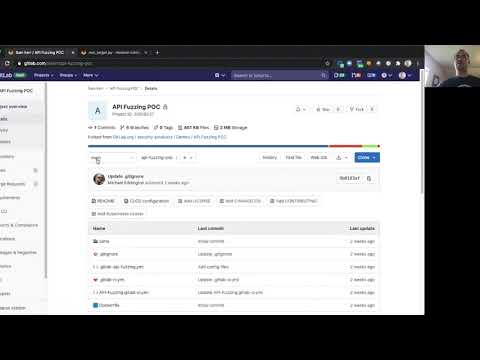
Fuzzing API testing is a great way to discover errors and vulnerabilities in your web applications and APIs that other scanners and testing methods may miss.
Fuzzing API testing in GitLab allows you to provide or of your application, and then automatically generates random input data intended to test edge cases and identify errors. The results are immediately displayed within your pipeline.
This is our first release of fuzzing API testing, and we would love to hear what you think. We have many more ideas for fuzzing testing that we will base on this feature's release. , which we will base on this feature's release.
and .
Preview of new charts on the metrics dashboard
(CORE, STARTER, PREMIUM, ULTIMATE, FREE, BRONZE, SILVER, GOLD)
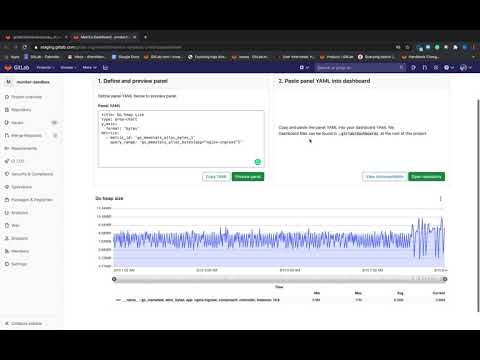
Previously, creating a chart on the metrics dashboard in GitLab was a challenging task. After you created a metric in the panel's YAML file, you made changes without the capability to verify that the newly created chart was working exactly as you intended. Starting with this release, you can preview changes as you create the chart, getting insight into the outcome before committing changes to the panel's YAML file. masterDocumentation for adding a new chart to the dashboard
and .
DevOps Cycle Stage: Verify
(PREMIUM, ULTIMATE, SILVER, GOLD)
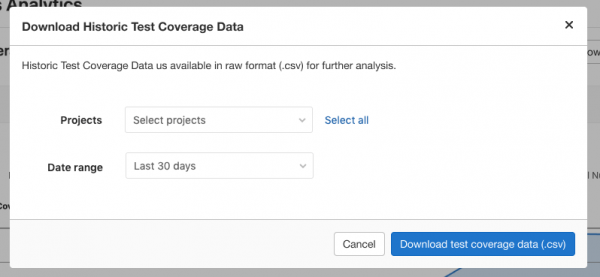
With the 13.4 release, it became easy and quick to gather all the code coverage data for all group projects or a selected subset into
.csv file. This feature is an MVC, and we will follow up with the ability to build a chart of average coverage over time. .
and .
This release introduces support for several new languages for fuzzing testing aimed at full coverage.
(ULTIMATE, GOLD)
This release introduces support for several new languages for fuzzing testing aimed at full coverage.
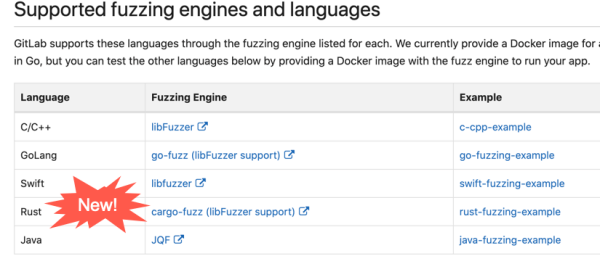
Now you can evaluate all the capabilities of fuzz testing in your applications in Java, Rust, and Swift and find errors and vulnerabilities that other scanners and testing methods might miss.
and .
Alerts on the main environments page
(PREMIUM, ULTIMATE, SILVER, GOLD)
The environments page shows the overall status of your environments. In this release, we enhanced this page by adding alert displays. Triggered alerts along with the status of your environments will help you take corrective actions more quickly.

and .
Nested pipelines can now trigger their nested pipelines
(CORE, STARTER, PREMIUM, ULTIMATE, FREE, BRONZE, SILVER, GOLD)
With the use of nested pipelines, you can now launch new pipelines within child pipelines. An additional level of depth can be useful if you need the flexibility to generate a varying number of pipelines.
Previously, when using nested pipelines, each child pipeline required a trigger job, manually set in the parent pipeline. Now, you can create nested pipelines that will dynamically trigger any number of new nested pipelines. For example, if you have a monorepo, you can dynamically generate the first nested pipeline, which will itself create the necessary number of new pipelines based on changes in the branch.
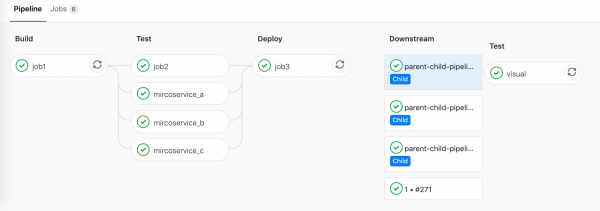
and .
Improved navigation between parent and nested pipelines
(CORE, STARTER, PREMIUM, ULTIMATE, FREE, BRONZE, SILVER, GOLD)
Navigating between parent and nested pipelines was previously quite inconvenient — it required multiple clicks to reach the desired pipeline. It was also not easy to understand which job triggered this pipeline. Now, seeing the connections between parent and nested pipelines will be much simpler.
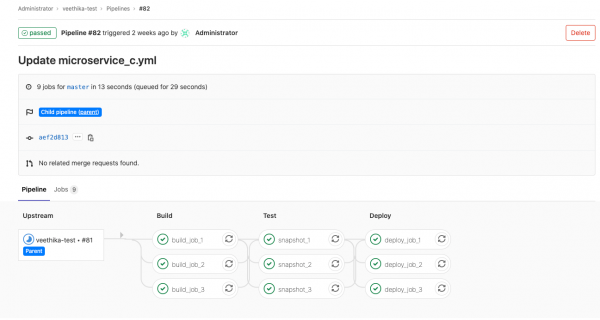
and .
Parallel matrix jobs display relevant variables in the job name.
(CORE, STARTER, PREMIUM, ULTIMATE, FREE, BRONZE, SILVER, GOLD)
If you have used , you may have noticed that it was difficult to determine which matrix variable was used for a specific job, as job names looked like matrix 1/4In release 13.4, you will see relevant values of the variables that were used in this job instead of the generic job title. For example, if your goal is debugging for the x86 architecture, then the job will be called matrix: debug x86.
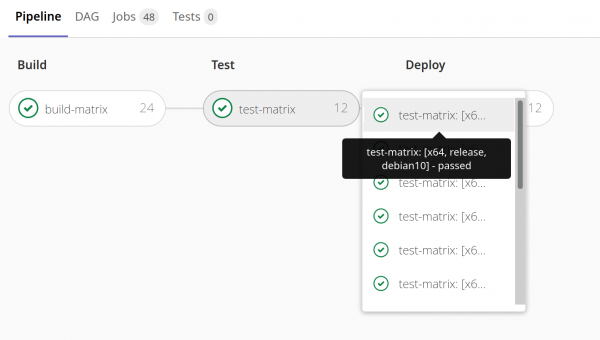
and .
Other improvements in GitLab 13.4
Connecting your Atlassian account
(CORE, STARTER, PREMIUM, ULTIMATE)
GitLab users will now be able to connect their GitLab accounts to their Atlassian Cloud account. This will allow them to log in to GitLab with their Atlassian credentials and lay the groundwork for future improvements in integration and with other products from the Atlassian lineup.
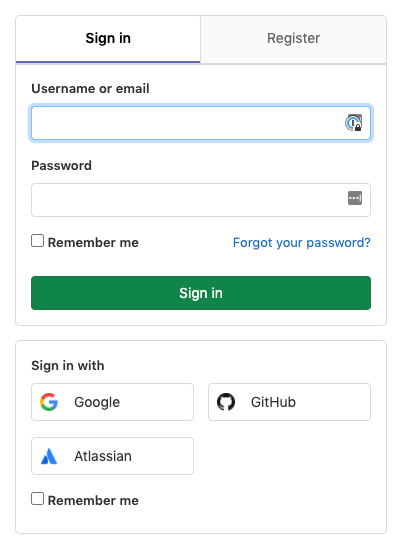
and .
Export the list of all merge commits
(ULTIMATE, GOLD)
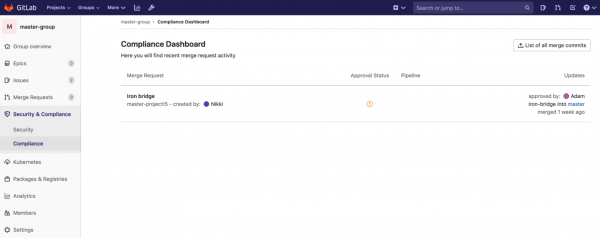
Organizations focused on compliance need a way to provide auditors with a comprehensive view of components related to any specific change in production. Within GitLab, this means gathering everything in one place: merge requests, tickets, pipelines, security scans, and other commit data. Until now, you had to either manually compile this in GitLab or set up your own tools to gather the information, which was not very efficient.
Now you can programmatically gather and export this data to meet audit requirements or conduct other analyses. To export the list of all merge commits for the current group, you need to go to and click the button List of all merge commits. The resulting file will contain all the merge request commits, their authors, the ID of the related merge request, group, project, approvers, and other information.
and .
Output list and manage personal access tokens via API
(ULTIMATE, GOLD)
Managing access to GitLab namespaces is a crucial part of compliance activities. From the principles of least privilege to temporarily disabling access, there may be several requirements related to personal access tokens in GitLab. To facilitate the maintenance and management of all user credentials within your namespace, we have provided the option to generate a list of all personal access tokens and optionally via the API.
These enhancements in the GitLab API allow users to list and revoke their own personal access tokens, while administrators can list and revoke their users' tokens. Now, administrators will find it easier to see who has access to their namespaces, make access decisions based on user data, and revoke personal access tokens that may have been compromised or that exceed the company's access management policies.
and .
Related tickets and other features are now in GitLab Core
(CORE, STARTER, PREMIUM, ULTIMATE, FREE, BRONZE, SILVER, GOLD)
A few months ago, we announced a plan to . In working to fulfill this promise, we have made , and (in the Russian localization of GitLab, 'discussion board') available in the Core plan. This applies only to 'related to' relationships; 'blocks' and 'blocked by' relationships remain in paid plans.
and .
Displaying the source branch name on the merge request sidebar
(CORE, STARTER, PREMIUM, ULTIMATE, FREE, BRONZE, SILVER, GOLD)
When reviewing code changes, discussions, and commits in a merge request, it is often desirable to perform a local checkout of the branch for a deeper review. However, finding the branch name becomes increasingly challenging as more content is added to the merge request description, requiring more scrolling.
We have added the branch name to the merge request sidebar, making it accessible at all times and eliminating the need to scroll through the entire page. Just like the merge request link, the source branch section includes a convenient 'copy' button.
Thank you for the significant contribution to the development of this feature!
and .
Indication of the presence of collapsed files in the merge request diffs
(CORE, STARTER, PREMIUM, ULTIMATE, FREE, BRONZE, SILVER, GOLD)
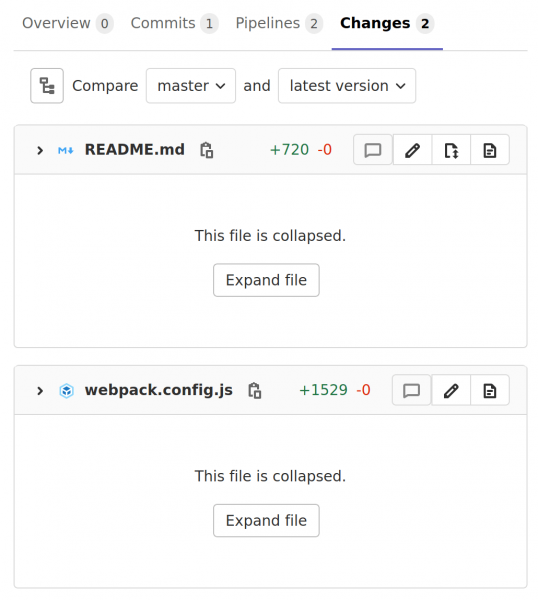
Merge requests that add changes to multiple files sometimes collapse the diffs of large files to improve rendering performance. When this happens, a reviewer may accidentally miss a file, especially in merge requests with a large number of files. Starting with version 13.4, merge requests will indicate diffs that contain collapsed files, ensuring that you don't overlook these files during the code review. For even greater clarity, we plan to add highlighting for these files in a future release. Stay tuned for updates in .
and .
Warning about the presence of collapsed files in the merge request diff
(CORE, STARTER, PREMIUM, ULTIMATE, FREE, BRONZE, SILVER, GOLD)
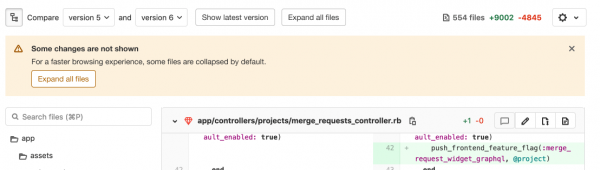
In the section with the merge request diffs, large files are collapsed for performance enhancement. However, while reviewing code, some files may be missed when the reviewer scrolls through the file list since all large files are collapsed.
We have added a visible warning at the top of the merge request diff page to inform users that there is a collapsed file in this section. This way, you will not miss any changes in the merge request during the review.
and .
Automatic recovery of Gitaly cluster repository
(CORE, STARTER, PREMIUM, ULTIMATE, FREE, BRONZE, SILVER, GOLD)
Previously, when the primary node of the Gitaly cluster went down, the repositories on that node were marked as read-only. This prevented data loss in situations where there were changes on the node that hadn't been replicated yet. When the node came back online, GitLab did not automatically recover, and administrators had to manually start the synchronization process or contend with data loss. Other situations, such as replication job failures on secondary nodes, could also lead to outdated or read-only repositories. In this case, the repository remained outdated until the next write operation triggered a replication job.
To resolve this problem It now schedules a replication task when it detects an outdated repository on one node and the latest version of the repository on another. This replication task automatically updates the repository, eliminating the need for manual data restoration. Automatic recovery also ensures quick updating of secondary nodes if the replication task fails, rather than waiting for the next write operation. Since many Gitaly clusters store a large number of repositories, this significantly reduces the time administrators and reliability engineers spend on data recovery after an error.
Additionally, automatic repair triggers repository replication on any new Gitaly node added to the cluster, removing the need for manual work when adding new nodes.
and .
Mark the to-do task as complete on the design page
(CORE, STARTER, PREMIUM, ULTIMATE, FREE, BRONZE, SILVER, GOLD)
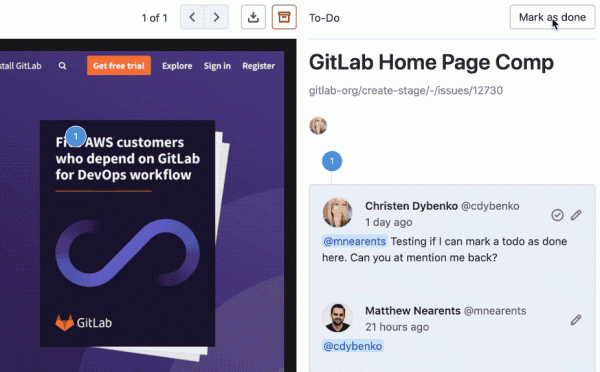
Effective communication in GitLab relies on to-do task lists. If you are mentioned in a comment, it is crucial to be able to navigate to the task and either start working on it or mark it as already completed. It is also important to be able to assign a task to yourself when you need to work on something or revisit it later.
Previously, you could not add tasks or mark them as completed when working with designs. This significantly disrupted communication efficiency among product teams, as to-do tasks are a critical element of the workflow in GitLab.
In release 13.4, designs align with comments on tickets in utilizing tasks, making the work with them more consistent and efficient.
and .
Enhanced Troubleshooting Guide for CI/CD
(CORE, STARTER, PREMIUM, ULTIMATE, FREE, BRONZE, SILVER, GOLD)
We have improved the troubleshooting guide for GitLab CI/CD by adding additional information about common issues you may encounter. We hope the enhanced documentation will be a valuable resource to help you quickly and easily set up and run GitLab CI/CD.
and .
Merge requests no longer drop out of the merge queue.
(PREMIUM, ULTIMATE, SILVER, GOLD)
Previously, merge requests could accidentally drop out of the merge queue due to late comments. If a merge request was already in the queue, and someone added a comment that created a new unresolved discussion, the merge request was deemed unsuitable for merging and dropped out of the queue. Now, after a merge request is added to the merge queue, new comments can be added without fear of disrupting the merging process.
and .
Displaying code coverage values in the merge request for jobs.
(CORE, STARTER, PREMIUM, ULTIMATE, FREE, BRONZE, SILVER, GOLD)
Developers should have the ability to see the code coverage value after the pipeline completes — even in complex scenarios like pipelines with multiple jobs that need to be parsed to calculate the coverage value. Previously, the merge request widget only showed the average of these values, meaning you had to navigate to the job page and back to the merge request to get the intermediate coverage values. To save you time and eliminate these extra steps, we have made it so the widget displays the average coverage value, its change between the target and source branches, and a tooltip that shows the coverage value for each job used to calculate the average.
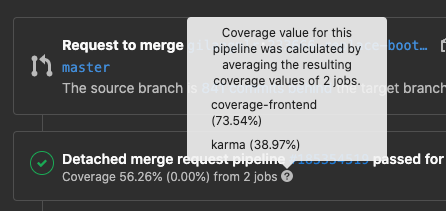
and .
Removing packages from the package registry when viewing a group.
(CORE, STARTER, PREMIUM, ULTIMATE, FREE, BRONZE, SILVER, GOLD)
The GitLab package registry is a place to store and distribute packages in various formats. When there are numerous packages in your project or group, you need to quickly identify unused packages and remove them to prevent others from downloading them. You can remove packages from your registry via or through the package registry user interface. However, until now, you couldn't remove packages while viewing a group through the user interface. As a result, you had to delete extraneous packages separately for each project, which was inefficient.
Now you can remove packages when viewing the group package registry. Just navigate to the group package registry page, filter packages by name, and delete all unnecessary ones.
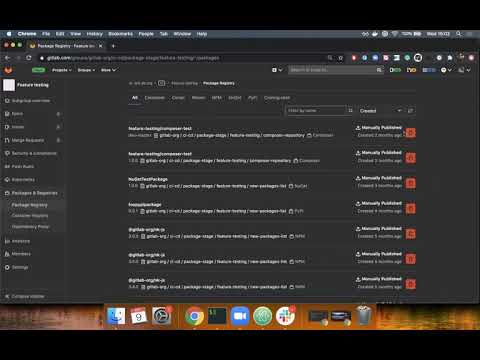
and .
Scaling Conan Packages to Project Level
(CORE, STARTER, PREMIUM, ULTIMATE, FREE, BRONZE, SILVER, GOLD)
You can use the Conan repository in GitLab to publish and distribute C/C++ dependencies. However, previously packages could only be scaled to the instance level, as the Conan package name could consist of a maximum of 51 characters. If you wanted to publish a package from a subgroup, for example gitlab-org/ci-cd/package-stage/feature-testing/conan, it was nearly impossible to do so.
Now you can scale Conan packages to the project level, allowing you to easily publish and distribute your project dependencies.
and .
Support for New Package Managers and Languages for Dependency Scanning
(ULTIMATE, GOLD)
We are pleased to add dependency scanning for projects written in C, C++, C#, and .Net that use NuGet 4.9+ or Conan package managers to our list You can now include dependency scanning as part of the Secure stage to check for known vulnerabilities in dependencies added via package managers. Detected vulnerabilities will be displayed in your merge request along with their severity level, so you know what risks the new dependency carries before merging. You can also configure your project to require for dependencies with critical (Critical), high (High), or unknown (Unknown) severity levels.
and .
Notifications When Changing Merge Request Settings to 'Merge When Pipeline Succeeds'
(CORE, STARTER, PREMIUM, ULTIMATE, FREE, BRONZE, SILVER, GOLD)
Previously, when setting the merge request configuration Merge When Pipeline Succeeds (MWPS), no email notifications were sent. You had to manually check the status or wait for a merge completion notification. In this release, we are pleased to introduce user contribution @ravishankar2kool Documentation for Merge Request Event Notifications
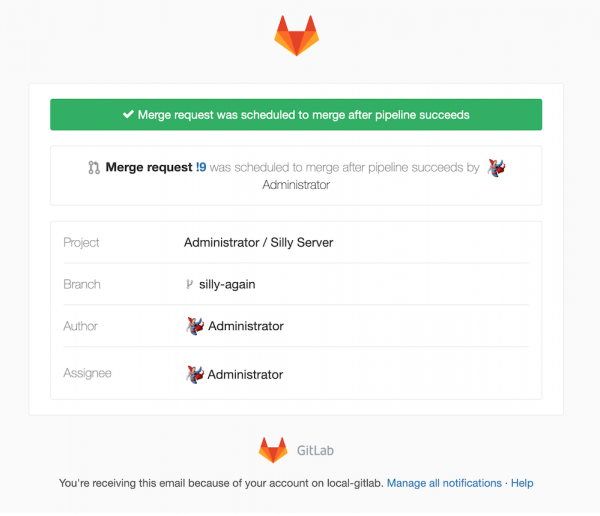
and .
Creating EKS clusters with a user-defined Kubernetes version
(CORE, STARTER, PREMIUM, ULTIMATE, FREE, BRONZE, SILVER, GOLD)
GitLab users can now choose the version of Kubernetes that will be provided by EKS; you can select between versions 1.14–1.17.
and .
Creating incidents as ticket types
(CORE, STARTER, PREMIUM, ULTIMATE, FREE, BRONZE, SILVER, GOLD)
Not every issue immediately triggers alert notifications: users report outages while team members investigate performance issues. Incidents are now a type of ticket, so your teams can quickly create them within their usual workflow. Click New task from anywhere in GitLab, and in the field Type select Incident.
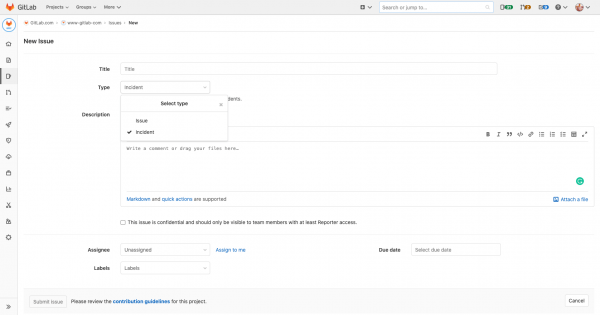
and .
Mentioning GitLab alerts in Markdown
(CORE, STARTER, PREMIUM, ULTIMATE, FREE, BRONZE, SILVER, GOLD)
We have enhanced GitLab alerts by adding a new type of mention specifically for them in GitLab-flavored Markdown, making it easier to share alerts and reference them. Use ^alert#1234, to mention an alert in any Markdown field: in incidents, tickets, or merge requests. This will also help you identify tasks created from alerts rather than from tickets or merge requests.
and .
Viewing alert load by incident
(CORE, STARTER, PREMIUM, ULTIMATE, FREE, BRONZE, SILVER, GOLD)
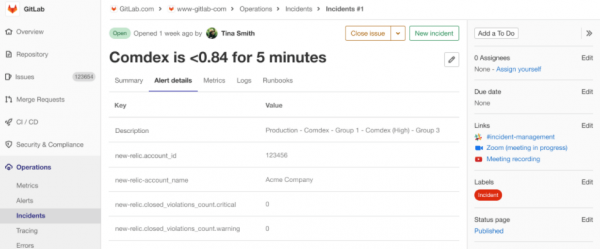
The alert description contains information critical for diagnosing failures and recovery, and this information should be easily accessible so you don't have to switch tools or tabs while working on resolving an incident. Alerts created from notifications display the full alert description in the Alert Details.
75% faster advanced search
(STARTER, PREMIUM, ULTIMATE, BRONZE, SILVER, GOLD)
GitLab, as a single application, has a unique ability to make content search across the entire DevOps workflow faster. In GitLab 13.4, the advanced search returns results 75% faster when it is , like on GitLab.com.
and .
Viewing deleted projects for administrators
(CORE, STARTER, PREMIUM, ULTIMATE)
The ability to delay project deletion was However, there was previously no way to see all projects awaiting deletion in one place. Now, administrators of GitLab user instances can view all projects pending deletion in one location, along with buttons for easily restoring these projects.
This feature allows administrators to better control project deletions by gathering all the necessary information in one place and providing the option to undo unwanted deletion actions.
Thank you for this feature!
and .
API support for push rules for group added
(STARTER, PREMIUM, ULTIMATE, BRONZE, SILVER, GOLD)
Previously, group push rules could only be set by visiting each group individually through the GitLab user interface and applying those rules. Now you can manage these rules through the API to support your custom tools and GitLab automation.
and .
Revocation of personal access tokens for self-managed credential storage
(ULTIMATE)
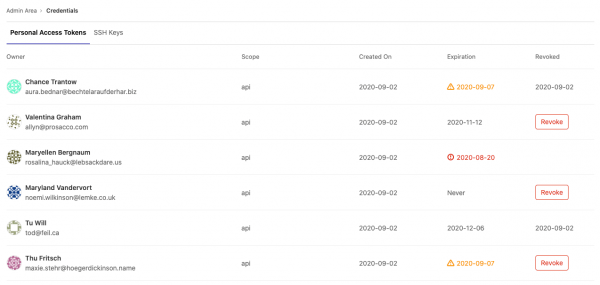
provides administrators with the information necessary to manage user credentials in their GitLab instance. As compliance-focused organizations vary in the strictness of their credential management rules, we’ve added a button that allows administrators to revoke a user's personal access token (PAT) if desired. Administrators can now easily revoke potentially compromised PATs. This feature is useful for organizations that require more flexible options to ensure compliance, minimizing distractions for their users.
and .
Configuration file for static site editor
(CORE, STARTER, PREMIUM, ULTIMATE, FREE, BRONZE, SILVER, GOLD)
In GitLab 13.4, we are introducing a new way to configure the static site editor. Although the configuration file does not save or retrieve any parameters in this release, we are laying the groundwork for future customization of the editor's behavior. In subsequent releases, we will add parameters to the file .gitlab/static-site-editor.yml to set , where , overriding Markdown syntax settings and other editor settings.
and .
Editing the front matter of a file using the static site editor
(CORE, STARTER, PREMIUM, ULTIMATE, FREE, BRONZE, SILVER, GOLD)
The front matter is a flexible and convenient way to define page variables in data files intended for processing by a static site generator. It is typically used to set the page title, layout template, or author, but can be used to pass any type of metadata to the generator when rendering the page in HTML. Included at the very top of each data file, the front matter is usually formatted as YAML or JSON and requires consistent and accurate syntax. Users unfamiliar with the specific syntax rules may inadvertently introduce invalid markup, which can lead to formatting issues or even build failures.
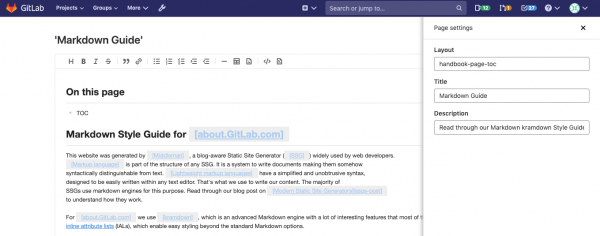
The WYSIWYG editing mode of the static site editor already removes the front matter from the editor to prevent these formatting errors. However, this does not allow you to change the values stored in that part without reverting to editing in source code mode. In GitLab 13.4, you can access any field and edit its value in a familiar form-based interface. By clicking the button Settings (Settings) a panel will open displaying a form field for each key defined at the beginning. The fields are populated with the current value, and editing any of them is simply a matter of entering it into the web form. This editing of the front matter avoids syntax complexities and gives you full control over the content while ensuring consistent formatting of the final result.
and .
GitLab for Jira and DVCS Connector now in Core
(CORE, STARTER, PREMIUM, ULTIMATE, FREE, BRONZE, SILVER, GOLD)
For Jira users in GitLab: and allow you to display information about GitLab commits and merge requests directly in Jira. Together with our built-in integration with Jira, you can easily navigate between the two applications while working.
These features were previously only available in our Premium plan, but now they are accessible to all users!
and .
Majority voting for Gitaly cluster transactions (beta version)
(CORE, STARTER, PREMIUM, ULTIMATE)
The Gitaly cluster allows replicating Git repositories across multiple ‘warm’ Gitaly nodes. This enhances fault tolerance by eliminating single points of failure. , introduced in GitLab 13.3, trigger a broadcast of changes to all Gitaly nodes in the cluster, but only those Gitaly nodes in agreement with the primary node will save changes to disk. If all replica nodes do not reach consensus, only one copy of the change will be saved to disk, creating a single point of failure until asynchronous replication is completed.
Majority voting increases fault tolerance by requiring the consent of the majority of nodes (not all) before saving changes to disk. If this toggled feature is enabled, the write must succeed on multiple nodes. Non-consenting nodes are automatically synchronized via asynchronous replication with those nodes that formed the quorum.
and .
Support for custom schema for JSON validation in Web IDE
(PREMIUM, ULTIMATE, SILVER, GOLD)
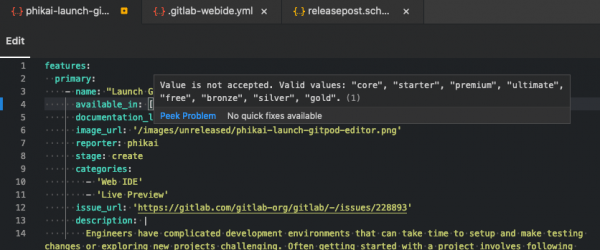
Projects where individuals write configurations in JSON or YAML format often face issues because it’s easy to make a typo and break something. Tools can be written to catch these issues in the CI pipeline, but using a JSON schema file can be helpful in providing documentation and hints.
Project participants can define the path to the custom schema in their repository in the file .gitlab/.gitlab-webide.yml, which specifies the schema and path to the files for validation. When a particular file is uploaded in the Web IDE, additional feedback and validation will be visible to assist in creating the file.
and .
The branching limit of the directed acyclic graph (DAG) has been increased to 50
(CORE, STARTER, PREMIUM, ULTIMATE, FREE, BRONZE, SILVER, GOLD)
If you are using pipelines (Directed Acyclic Graph (DAG)), you may have noticed that the limit of 10 jobs that a job can specify in needs:, too harsh. In 13.4, the default limit was increased from 10 to 50 to allow for more complex interdependencies between jobs in your pipelines.
If you are an administrator of a user instance of GitLab, you can raise this limit even further by configuring a toggleable feature, although we do not provide official support for this.
and .
Improved behavior needs for skipped jobs
(CORE, STARTER, PREMIUM, ULTIMATE, FREE, BRONZE, SILVER, GOLD)
In some cases, a skipped job in the pipeline could erroneously be considered successful for the dependencies specified in needs, causing subsequent jobs to run, which should not have happened. This behavior has been fixed in version 13.4, and needs now correctly handles cases of skipped jobs.
and .
Pin the last job artifact to prevent its deletion
(CORE, STARTER, PREMIUM, ULTIMATE, FREE, BRONZE, SILVER, GOLD)
GitLab now automatically pins the last artifact of a successful job and pipeline on any active branch, merge request, or tag to prevent its deletion after expiry. This makes it easier to enforce more aggressive expiration policies for cleaning up old artifacts. It helps reduce disk space consumption and ensures you always have a copy of the last artifact from the pipeline.
and .
CI/CD Guide for Pipeline Optimization
(CORE, STARTER, PREMIUM, ULTIMATE, FREE, BRONZE, SILVER, GOLD)
Optimizing CI/CD pipelines can increase delivery speed and save money. We have improved our documentation by adding a brief guide to help you get the most out of optimizing your pipelines.
and .
Test report sorted by test status
(CORE, STARTER, PREMIUM, ULTIMATE, FREE, BRONZE, SILVER, GOLD)
This is a simple way to see the results of all tests in the pipeline. However, with a large number of tests, finding failed tests can take a lot of time. Other issues that can make it difficult to use the report include scrolling through long trace output and rounding time down to zero for tests that run in less than 1 second. Now, by default, the test report prioritizes failed tests at the top when sorted, and then sorts tests by duration. This makes it easier to find failures and long-running tests. Additionally, the duration of tests is now displayed in milliseconds or seconds, making it much faster to read, and previous scrolling issues have also been resolved.
and .
File Size Limits for Uploads to the Package Registry
(CORE, STARTER, PREMIUM, ULTIMATE, FREE, BRONZE, SILVER, GOLD)
There are now limits on the size of package files that can be uploaded to the GitLab package registry. These limits have been introduced to optimize the performance of the package registry and prevent abuse. The limits depend on the package format. For GitLab.com, the maximum file sizes are:
- Conan: 250MB
- Maven: 3GB
- NPM: 300MB
- NuGet: 250MB
- PyPI: 3GB
For custom GitLab instances, the default values are the same. However, an administrator can update the limits via .
and .
Use CI_JOB_TOKEN to publish PyPI packages
(CORE, STARTER, PREMIUM, ULTIMATE, FREE, BRONZE, SILVER, GOLD)
You can use the GitLab PyPI repository to create, publish, and share Python packages alongside source code and CI/CD pipelines. However, previously you could not authenticate to the repository using a predefined environment variable CI_JOB_TOKEN. As a result, you had to use your personal credentials to update the PyPI repository, or you might have chosen not to use the repository at all.
It is now easier to use GitLab CI/CD to publish and install PyPI packages with the predefined environment variable CI_JOB_TOKEN.
and .
DAST Scanner Profiles on Demand
(ULTIMATE, GOLD)
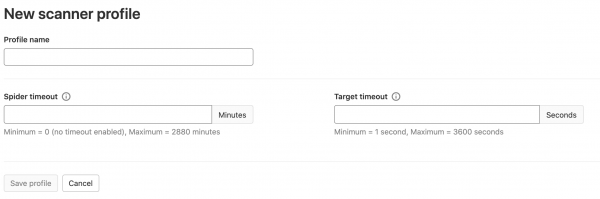
On-demand DAST scanning, which was , new DAST scanner profiles have been added. They enhance the configuration options for this scanning, allowing you to quickly create multiple profiles to cover various types of scans. In 13.4, the scanner profile initially includes a crawler timeout parameter, which sets how long the DAST crawler should run while trying to discover all pages of the scanned site. The profile also includes a target site timeout parameter to determine how long the scanner should wait for the site to become available before terminating the scan if the site does not respond with a status code of 200 or 300. As we continue to improve this feature in future releases, additional configuration parameters will be added to the scanner profile.
and .
Simple Redirect Configuration File for GitLab Pages
(CORE, STARTER, PREMIUM, ULTIMATE, FREE, BRONZE, SILVER, GOLD)
If you're using GitLab Pages and want to better manage URL changes, you may have noticed that managing redirects on your GitLab Pages site was not possible. GitLab now allows you to configure rules for redirecting one URL to another for your Pages site by adding a configuration file to the repository. This feature has been made possible thanks to the contributions of Kevin Barnett (), our Eric Eastwood (), and the GitLab team. Thank you all for your contributions.
and .
Terraform State Managed by GitLab
(CORE, STARTER, PREMIUM, ULTIMATE, FREE, BRONZE, SILVER, GOLD)
Access to previous versions of Terraform state is necessary for compliance and debugging when needed. Support for versioning Terraform state managed by GitLab is available starting with GitLab 13.4. Versioning is automatically enabled for new Terraform state files. Existing Terraform state files will in a later release.
and .
Important Incident Notification Details
(CORE, STARTER, PREMIUM, ULTIMATE, FREE, BRONZE, SILVER, GOLD)
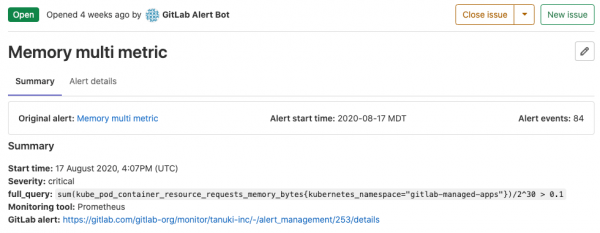
When handling incidents, you need to easily determine how long an alert has been open and how many times the event has triggered. These details are often crucial when assessing the impact on the customer and what your team should prioritize. On the new incident details panel, we display the alert start time, number of events, and a link to the original alert. This information is available for incidents generated from alerts.
and .
Setting and Editing Incident Severity Parameter
(CORE, STARTER, PREMIUM, ULTIMATE, FREE, BRONZE, SILVER, GOLD)
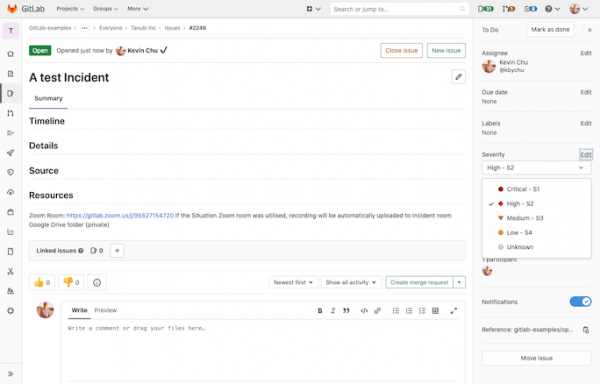
The incident severity parameter allows response specialists and stakeholders to determine the impact of the outage, as well as the methods and urgency of the response. As your team shares updates during incident resolution and restores functionality, they can modify this parameter. You can now edit the incident severity on the right sidebar of the 'Incident Details' page, and the severity level is displayed in the incident list.
and .
Creating, Editing, and Deleting Container Network Security Rules
(ULTIMATE, GOLD)
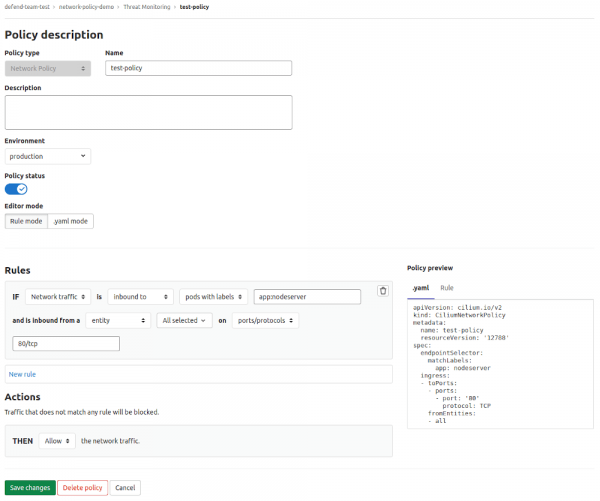
This enhancement of the container network security rules editor allows users to easily create, edit, and delete their rules right from the GitLab user interface. The editor features include a .yaml mode for experienced users and a rule editor with an intuitive interface for those who are not familiar with network rules. You can find new rule management capabilities in the section Security and Compliance > Threat Management > Policies (Security & Compliance > Threat Management > Policies).
and .
Support for Azure Blob Storage
(CORE, STARTER, PREMIUM, ULTIMATE, FREE, BRONZE, SILVER, GOLD)
Both GitLab and GitLab Runner now support , making it easier to run GitLab services on Azure.
GitLab instances support Azure for all types of object storage, including LFS files, CI artifacts, and . To set up Azure Blob Storage, follow the installation instructions for or .
GitLab Job Runners also support Azure for storing Azure storage can be configured through the section .
and .
Omnibus ARM64 packages for Ubuntu and OpenSUSE
(CORE, STARTER, PREMIUM, ULTIMATE)
In response to the growing demand for support for GitLab on 64-bit ARM architecture, we are pleased to announce the availability of the official ARM64 Ubuntu 20.04 Omnibus package. Many thanks to Zitai Chen and Guillaume Gardet for their tremendous contributions — their merge requests played a key role in this!
To download and install the package for Ubuntu 20.04, visit our and select Ubuntu.
and .
Support for authentication using smart cards for GitLab Helm chart
(PREMIUM, ULTIMATE)
Smart cards, such as Common Access Cards (CAC), can now be used for authentication in a GitLab instance deployed via Helm chart. Smart cards authenticate against the local database using X.509 certificates. As a result, smart card support with Helm chart is now aligned with smart card support available in Omnibus deployments.
and .
Detailed release notes and upgrade/installation instructions can be found in the original English post: .
Translation from English was done by , , and .
Source: habr.com
