

It is probably well known that with the release of Windows Vista back in 2007, and subsequently in all following versions of Windows, the sound API DirectSound3D was removed from Windows. Instead of DirectSound and DirectSound3D, new APIs XAudio2 and X3DAudio were introduced. As a result, sound effects like EAX (Environmental Audio Extensions) became unavailable in older games. In this article, I will explain how to restore DirectSound3D/EAX in all old games that support these technologies when playing on Windows 7/8/10. Of course, experienced gamers are already aware of this, but the article may be useful to someone.
Old games have not faded into history; on the contrary, they are in high demand among both older and younger generations. They look better on modern high-resolution monitors, and many games have mods that enhance textures and shaders, but initially, sound was a drawback. With the advent of the next generation, Windows Vista, following Windows XP, Microsoft developers deemed DirectSound3D to be outdated—limited to 6-channel sound, lacking sound compression, and processor-dependent—leading to the adoption of XAudio2/X3DAudio. Since Creative's EAX technology was not an independent API like A3D from Aureal, but merely an extension of DirectSound3D, Creative's sound cards ended up obsolete. Without special software wrappers, when playing older games on Windows 7/8/10, the menu items that include EAX will be inactive. Without EAX, the sound in games will lack richness, depth, and spatial positioning.
To solve this issue, Creative has developed the wrapper program ALchemy, which redirects DirectSound3D and EAX calls to the cross-platform OpenAL API. However, this program officially works only with Creative sound cards, and not all models are supported. For instance, the modern Audigy Rx card, featuring a hardware DSP processor CA10300, does not work officially. Owners of other sound cards, like the built-in Realtek ones, need to use the Creative Sound Blaster X-Fi MB software driver, which costs money. You can also try the native 3DSoundBack application, but it was left unfinished by Realtek—it was stopped at the beta version stage, works poorly, and is not compatible with all chips. But there is a better way that is easier to use and free.
The first method
Let's start with sound cards from ASUS. The ASUS sound cards DGX/DSX/DX/D1/Phoebus are based on C-Media chips, and even the ASUS AV66/AV100/AV200 chips are just rebranded C-Media chips. The specifications of these sound cards state that they support EAX 1/2/5. All these chips inherited the hardware/software EAX 1/2 and the software EAX 5 from their predecessor, the CMI8738 DSP block.
Owners of Xonar series cards are quite fortunate; everyone has seen the GX button on the driver panel, but perhaps not everyone knows what it does. I will show you screenshots from the AIDA64 program; this is what the DirectX sound tab looks like when the GX button is inactive for owners of built-in Realtek sound cards on Windows 7/8/10:
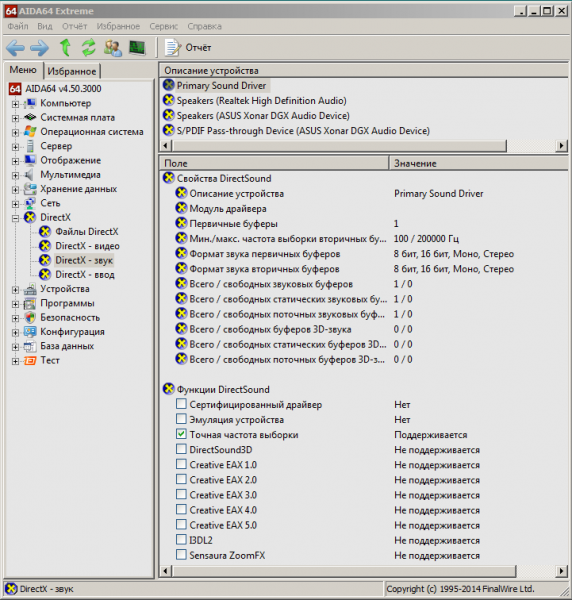
All sound buffers are equal to zero; all APIs are inactive. But immediately after enabling the GX button, we see
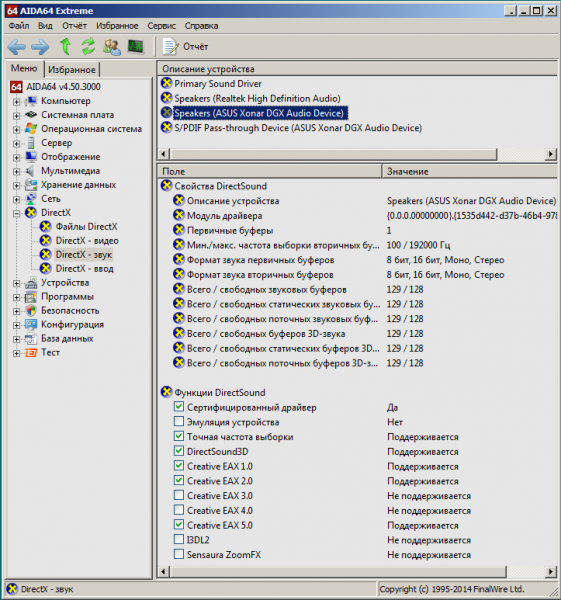
That is, it's very convenient — there's no need to run additional programs like Creative ALchemy and copy the dsound.dll file into every game folder. This raises a big question: why didn't Creative implement this in their drivers? Moreover, in all new models of Sound Blaster Z/Zx/AE, they do not utilize a hardware DSP processor for EAX processing, instead opting for software processing through the driver using simplified algorithms. Some people believe that software sound processing is sufficient because modern CPUs are much more powerful than the sound card processors from 10 years ago that handled sound hardware. This is not true. A CPU is optimized for processing x86 instructions, whereas a DSP processes sound much faster than a CPU can, just as a graphics card rasterizes faster than a CPU. The CPU can handle simple algorithms, but high-quality reverb with multiple sound sources will consume too many resources even from a powerful CPU, impacting FPS in games. This has already been recognized by Microsoft, which restored support for DSP processor sound processing in Windows 8, as has Sony, which added a dedicated chip for 3D sound processing in its PS5 console.
The second method
This option is suitable for users with an integrated sound card on their motherboard, which is the majority. There is a project called — a software emulation of DirectSound3D and EAX using OpenAL (OpenAL must be installed on the system) that does not require hardware acceleration. If your sound chip has any hardware functions for sound processing, they will be used automatically. The program works so well that EAX has functioned for me in all old games where the EAX checkbox is in the settings. Here’s what the AIDA64 window looks like when you copy the DSOAL files into the program folder:
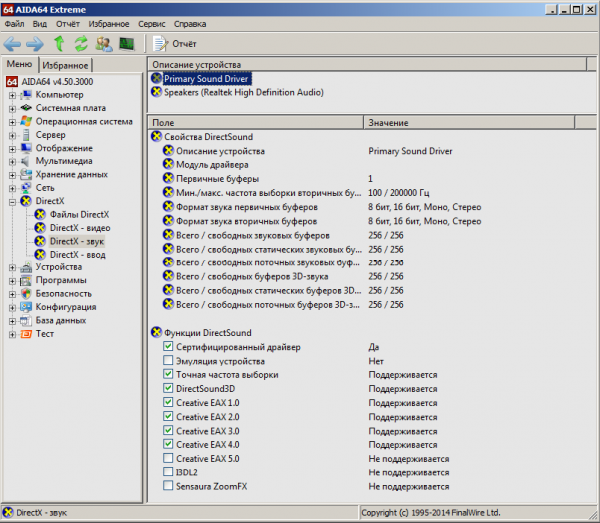
If this did not happen and you see an image like in the very first screenshot, it means that the native Windows dsound.dll does not allow API interception, as was the case for me. Then, this method will help — you will need to boot from some Windows Live-CD image and delete the file dsound.dll with the help of the Unlocker utility (making a copy beforehand in case of rollback) from the directory C:WindowsSysWOW64 and replace it with those very dsoal-aldrv.dll and dsound.dllI did this, and both Windows and all games worked smoothly; it's even more convenient—there's no need to copy these files into the game folders each time; if needed, I can always restore the originals. dsound.dll However, this method is suitable only if you don't use other ASUS or Creative sound cards, as in that case, DirectSound3D will always work only through DSOAL, not through the native driver or ALchemy.
You can listen to DSOAL in this video:
→ Download
Comparing how EAX sounds on different sound cards, I was surprised to discover that on the built-in Realtek, EAX sounds better than on Asus or my Audigy Rx. If you read the datasheets, you'll see that almost all Realtek chips support DirectSound3D/EAX 1&2. Running AIDA64 under Windows XP, you can see:
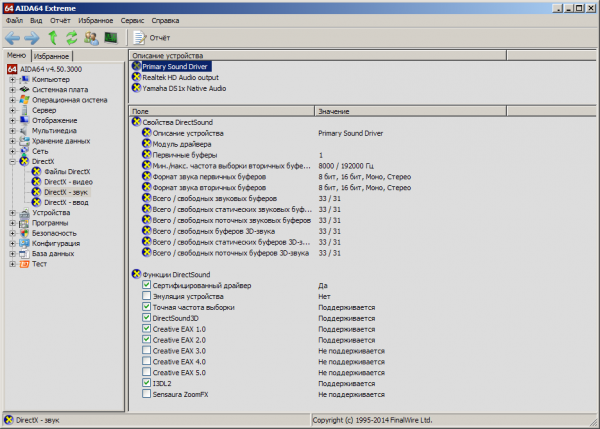
It turns out that Realteks, unlike ASUS and Creative sound cards, also support some I3DL2 (not all Realtek datasheets mention this). I3DL2 (Interactive 3D Audio Level 2) is an open industrial standard for working with 3D interactive sound; it's an extension for DirectSound3D to work with reverb and occlusion. Essentially, it's an analog of EAX, but sounds better—a more pleasant reverb for footsteps in games when a character runs through a cave or castle, and a more realistic surround sound in rooms. So if an old game works on Windows XP, I only play on XP, hoping the sound engine can utilize I3DL2. Although DSOAL is an open project and anyone can improve it, it will never be able to use I3DL2 because OpenAL does not work with I3DL2, only with EAX 1-5. But there's good news—starting from Windows 8, I3DL2 is included in So the sound in new games under Windows 10 will be better than under Windows 7.
Lastly, I want to remind you that all these 3D sound technologies were developed for headphones; you won't experience true 3D sound on just two speakers. To enjoy detailed sound, you need headphones at the level of SVEN AP860 which are not suitable; for affordable headphones, you should start with Axelvox HD 241 — there will already be a difference, like night and day. That’s the kind of guideline you should follow. SVEN AP860, like night and day. That's how you should orient yourself.
Source: habr.com
