

Logging all events that occur is one of the most important functions of any corporate system. Logs allow for problem resolution, auditing of information system operations, and investigation of information security incidents. Zimbra OSE also maintains detailed logs of its operations. They include all data from server performance to the sending and receiving of emails by users. However, reading the logs generated by Zimbra OSE is quite a challenging task. In this article, we will use a specific example to explain how to read Zimbra OSE logs and how to centralize them.

All local logs for Zimbra OSE are stored in the folder /opt/zimbra/log, and logs can also be found in the file /var/log/zimbra.log. The most important of these is mailbox.log. It records all actions that occur on the mail server, including email transmission, user authentication data, failed login attempts, and more. Entries in mailbox.log consist of a text string that includes the time an event occurred, the event level, the thread number in which the event took place, the username and their IP address, as well as a textual description of the event.

The log level indicates the impact of an event on server operations. By default, there are four event levels: INFO, WARN, ERROR, and FATAL. Let's review all levels in ascending order of their severity.
- INFO — events at this level are generally intended to inform about the progress of Zimbra OSE operations. Among the messages at this level are reports on the creation or deletion of mailboxes, and so on.
- WARN — events at this level inform about potentially dangerous situations that do not affect server operations. An example of a WARN level message would be a notification of a failed user login attempt.
- ERROR — this level of event in the log indicates that a local error has occurred, which does not hinder server operations. An error at this level might indicate that the index data for a particular user is corrupted.
- FATAL — this level marks errors that prevent the server from continuing to operate normally. For example, a log entry at FATAL level might report an inability to connect to the database.
The mail server log file is updated every day. The fresh version of the file always has the name Mailbox.log, while logs for specific dates have the date in their name and are stored in an archive. For example, mailbox.log.2020-09-29.tar.gz. This greatly simplifies the backup of action logs and the search through logs.
For the convenience of the system administrator, other logs are also located in the /opt/zimbra/log/ folder. These include only entries related to specific elements of Zimbra OSE. For example, audit.log contains only authentication records, clamd.log holds data about the antivirus operation, and so on. Incidentally, a great method to protect the Zimbra OSE server from intruders is , which works based on the audit.log. It is also good practice to add a cron job to execute the command grep -ir "invalid password" /opt/zimbra/log/audit.log, to receive daily information about unsuccessful login attempts.
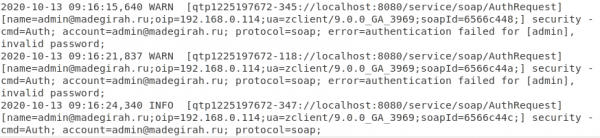
An example of how the audit.log displays both an incorrectly entered password and a successful login attempt
Logs in Zimbra OSE can be extremely helpful in determining the causes of various critical failures. At the moment when a critical error occurs, the administrator usually doesn't have time to read logs. It is necessary to restore server operation as quickly as possible. However, later, when the server is back up and generating numerous logs, finding the desired entry in a large file can be challenging. To quickly find an error entry, it is enough to know the time when the server was restarted and to locate in the logs the entry dated at that time. The preceding entry will be the record of the error that occurred. You can also find the error message by searching for the keyword FATAL.
The Zimbra OSE logs also allow for identifying non-critical failures. For example, to find handler exceptions, one can search for the phrase handler exception. Often, the errors generated by handlers are accompanied by a stack trace that explains the cause of the exception. In cases of email delivery errors, one should start searches with the keyword LmtpServer; for errors related to the POP or IMAP protocols, the keywords ImapServer and Pop3Server can be utilized.
Logs can also assist in investigating information security incidents. Consider a specific example. On September 20, one of the employees sent a virus-infected email to a client, resulting in the client’s computer data being encrypted. However, the employee swears that he sent nothing. As part of the incident investigation, the enterprise's security service requests email server logs for September 20 related to the user under investigation. Thanks to the timestamp, the system administrator locates the required log file, extracts the necessary information, and passes it to the security team. They, in turn, review it and discover that the IP address from which the email was sent corresponds to IP address the user’s computer. Surveillance camera footage confirmed that the employee was at his workstation when the email was sent. This data was sufficient to accuse him of violating information security rules and terminate his employment.
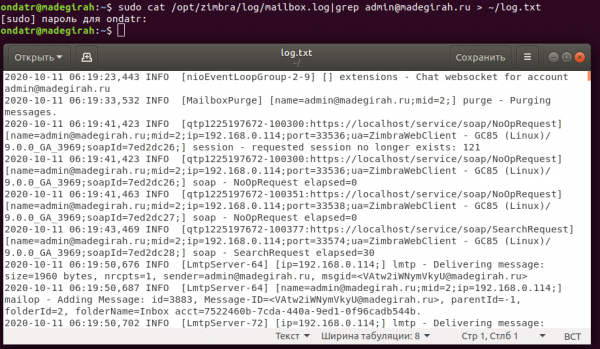
Example of extracting entries for one of the accounts from the Mailbox.log log into a separate file.
Everything becomes significantly more complicated when it involves a multi-server infrastructure. Since logs are collected locally, working with them in a multi-server environment is very inconvenient, thus necessitating the centralization of log collection. This can be achieved by setting up a host for log aggregation. There is no particular need to add a dedicated host to the infrastructure. Any email server can serve as a node for log collection. In our case, this will be the node Mailstore01.
On this server, we need to enter the commands provided below:
sudo su – zimbra
zmcontrol stop
exit
sudo /opt/zimbra/libexec/zmfixperms -e -v
Edit the file /etc/sysconfig/rsyslog, and set the parameter SYSLOGD_OPTIONS=”-r -c 2″
Edit /etc/rsyslog.conf and uncomment the following lines:
$ModLoad imudp
$UDPServerRun 514
Enter the following commands:
sudo /etc/init.d/rsyslog stop
sudo /etc/init.d/rsyslog start
sudo su – zimbra
zmcontrol start
exit
sudo /opt/zimbra/libexec/zmloggerinit
sudo /opt/zimbra/bin/zmsshkeygen
sudo /opt/zimbra/bin/zmupdateauthkeys
You can check that everything is working using the command zmprov gacf | grep zimbraLogHostname. After executing the command, the hostname that collects logs should be displayed. To change it, you need to enter the command zmprov mcf zimbraLogHostname mailstore01.company.ru.
On all other servers in the infrastructure (LDAP, MTA, and other mail stores), execute the command zmprov gacf |grep zimbraLogHostname to see the hostname to which the logs are sent. To change it, you can also enter the command zmprov mcf zimbraLogHostname mailstore01.company.ru.
Also, on each server, you need to enter the following commands:
sudo su - zimbra
/opt/zimbra/bin/zmsshkeygen
/opt/zimbra/bin/zmupdateauthkeys
exit
sudo /opt/zimbra/libexec/zmsyslogsetup
sudo service rsyslog restart
sudo su - zimbra
zmcontrol restart
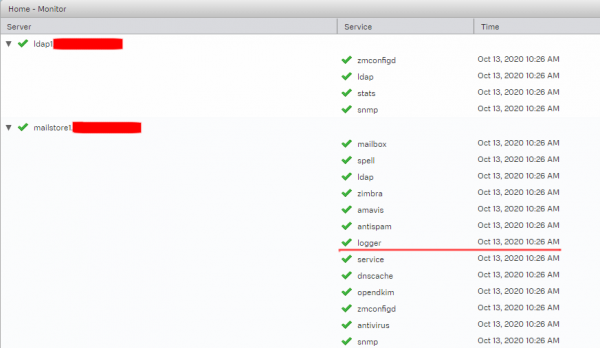
After this, all logs will be recorded on the specified server, where they can be conveniently viewed. Also, in the Zimbra OSE admin console, on the server status page, the running Logger service will be displayed only on the server mailstore01.
Another headache for the administrator may be tracking a specific email. Since emails in Zimbra OSE go through several different events: antivirus scanning, antispam checks, and so on, before being accepted or sent, it can be quite problematic for the administrator to trace at which stage an email got lost if it does not arrive.
To address this issue, a special script developed by information security expert Viktor Dukhoven is recommended for use by Postfix developers. This script concatenates log entries for a specific process, enabling quick display of all records related to the sending of a particular email based on its identifier. Its functionality has been tested on all versions of Zimbra OSE since 8.7. Below is the script text.
#! /usr/bin/perl

use strict;
use warnings;

# Postfix delivery agents
my @agents = qw(discard error lmtp local pipe smtp virtual);

my $instre = qr{(?x)
	A			# Absolute line start
	(?:S+ s+){3} 		# Timestamp, adjust for other time formats
	S+ s+ 		# Hostname
	(postfix(?:-[^/s]+)?)	# Capture instance name stopping before first '/'
	(?:/S+)*		# Optional non-captured '/'-delimited qualifiers
	/			# Final '/' before the daemon program name
	};

my $cmdpidre = qr{(?x)
	G			# Continue from previous match
	(S+)[(d+)]:s+	# command[pid]:
};

my %smtpd;
my %smtp;
my %transaction;
my $i = 0;
my %seqno;

my %isagent = map { ($_, 1) } @agents;

while (<>) {
	next unless m{$instre}ogc; my $inst = $1;
	next unless m{$cmdpidre}ogc; my $command = $1; my $pid = $2;

	if ($command eq "smtpd") {
		if (m{Gconnect from }gc) {
			# Start new log
			$smtpd{$pid}->{"log"} = $_; next;
		}

		$smtpd{$pid}->{"log"} .= $_;

		if (m{G(w+): client=}gc) {
			# Fresh transaction
			my $qid = "$inst/$1";
			$smtpd{$pid}->{"qid"} = $qid;
			$transaction{$qid} = $smtpd{$pid}->{"log"};
			$seqno{$qid} = ++$i;
			next;
		}

		my $qid = $smtpd{$pid}->{"qid"};
		$transaction{$qid} .= $_
			if (defined($qid) && exists $transaction{$qid});
		delete $smtpd{$pid} if (m{Gdisconnect from}gc);
		next;
	}

	if ($command eq "pickup") {
		if (m{G(w+): uid=}gc) {
			my $qid = "$inst/$1";
			$transaction{$qid} = $_;
			$seqno{$qid} = ++$i;
		}
		next;
	}

	# bounce(8) logs transaction start after cleanup(8) already logged
	# the message-id, so the cleanup log entry may be first
	#
	if ($command eq "cleanup") {
		next unless (m{G(w+): }gc);
		my $qid = "$inst/$1";
		$transaction{$qid} .= $_;
		$seqno{$qid} = ++$i if (! exists $seqno{$qid});
		next;
	}

	if ($command eq "qmgr") {
		next unless (m{G(w+): }gc);
		my $qid = "$inst/$1";
		if (defined($transaction{$qid})) {
			$transaction{$qid} .= $_;
			if (m{Gremoved$}gc) {
				print delete $transaction{$qid}, "n";
			}
		}
		next;
	}

	# Save pre-delivery messages for smtp(8) and lmtp(8)
	#
	if ($command eq "smtp" || $command eq "lmtp") {
		$smtp{$pid} .= $_;

		if (m{G(w+): to=}gc) {
			my $qid = "$inst/$1";
			if (defined($transaction{$qid})) {
				$transaction{$qid} .= $smtp{$pid};
			}
			delete $smtp{$pid};
		}
		next;
	}

	if ($command eq "bounce") {
		if (m{G(w+): .*? notification: (w+)$}gc) {
			my $qid = "$inst/$1";
			my $newid = "$inst/$2";
			if (defined($transaction{$qid})) {
				$transaction{$qid} .= $_;
			}
			$transaction{$newid} =
				$_ . $transaction{$newid};
			$seqno{$newid} = ++$i if (! exists $seqno{$newid});
		}
		next;
	}

	if ($isagent{$command}) {
		if (m{G(w+): to=}gc) {
			my $qid = "$inst/$1";
			if (defined($transaction{$qid})) {
				$transaction{$qid} .= $_;
			}
		}
		next;
	}
}

# Dump logs of incomplete transactions.
foreach my $qid (sort {$seqno{$a} <=> $seqno{$b}} keys %transaction) {
    print $transaction{$qid}, "n";
}
The script is written in Perl and must be saved to a file to run it. collate.pl, make it executable, and then run the file with the log file specified, using pgrep to extract the identification information of the desired email. collate.pl /var/log/zimbra.log | pgrep ''. The result will be a sequential output of lines containing information on the email's movement on the server.
# collate.pl /var/log/zimbra.log | pgrep '<20200929101700.user@mail.company.ru>'
Oct 13 10:17:00 mail postfix/pickup[4089]: 4FF14284F45: uid=1034 from=********
Oct 13 10:17:00 mail postfix/cleanup[26776]: 4FF14284F45: message-id=*******
Oct 13 10:17:00 mail postfix/qmgr[9946]: 4FF14284F45: from=********, size=1387, nrcpt=1 (queue active)
Oct 13 10:17:00 mail postfix/smtp[7516]: Anonymous TLS connection established to mail.*******[168.*.*.4]:25: TLSv1 with cipher ADH-AES256-SHA (256/256 bits)
Oct 13 10:17:00 mail postfix/smtp[7516]: 4FF14284F45: to=*********, relay=mail.*******[168.*.*.4]:25, delay=0.25, delays=0.02/0.02/0.16/0.06, dsn=2.0.0, status=sent (250 2.0.0 Ok: queued as 878833424CF)
Oct 13 10:17:00 mail postfix/qmgr[9946]: 4FF14284F45: removed
Oct 13 10:17:07 mail postfix/smtpd[21777]: connect from zimbra.******[168.*.*.4]
Oct 13 10:17:07 mail postfix/smtpd[21777]: Anonymous TLS connection established from zimbra.******[168.*.*.4]: TLSv1 with cipher ADH-AES256-SHA (256/256 bits)
Oct 13 10:17:08 mail postfix/smtpd[21777]: 0CB69282F4E: client=zimbra.******[168.*.*.4]
Oct 13 10:17:08 mail postfix/cleanup[26776]: 0CB69282F4E: message-id=zimbra.******
Oct 13 10:17:08 mail postfix/qmgr[9946]: 0CB69282F4E: from=zimbra.******, size=3606, nrcpt=1 (queue active)
Oct 13 10:17:08 mail postfix/virtual[5291]: 0CB69282F4E: to=zimbra.******, orig_to=zimbra.******, relay=virtual, delay=0.03, delays=0.02/0/0/0.01, dsn=2.0.0, status=sent (delivered to maildir)
Oct 13 10:17:08 mail postfix/qmgr[9946]: 0CB69282F4E: removed
The safety alphabet in Kubernetes: authentication, authorization, auditing
Source: habr.com
