

The report is dedicated to practical issues of developing an operator in Kubernetes, designing its architecture, and core operational principles.
In the first part of the report, we will discuss:
- what an operator in Kubernetes is and why it's needed;
- how exactly the operator simplifies the management of complex systems;
- what the operator can do and what it cannot do.
Next, we will move on to discussing the internal structure of the operator. We will examine the architecture and operation of the operator step by step. We will detail:
- the interaction between the operator and Kubernetes;
- the functions the operator takes on and what it delegates to Kubernetes.
We will look into shard and replica management in Kubernetes.
Next, we will discuss data storage issues:
- how to work with Persistent Storage from the operator's perspective;
- the pitfalls of using Local Storage.
In the concluding part of the report, we will review practical application examples of with Amazon or Google Cloud Service. The report is based on the development experience and operation of the operator for ClickHouse.
Video:
My name is Vladislav Klimenko. Today, I would like to share our experience in developing and operating an operator, specifically a specialized operator for managing database clusters. Using the example of for managing a ClickHouse cluster.
Why do we have the opportunity to talk about the operator and ClickHouse?
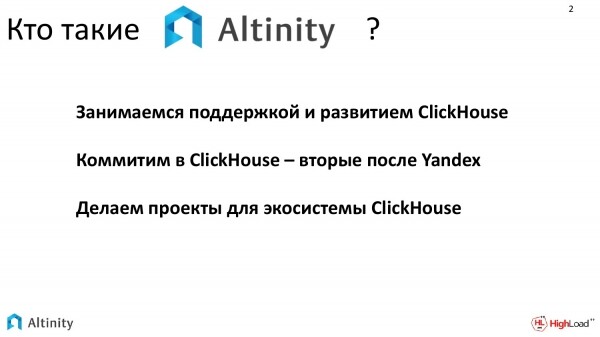
- We are involved in the support and development of ClickHouse.
- Currently, we are slowly contributing to the development of ClickHouse. We are the second largest contributors after Yandex in terms of changes made to ClickHouse.
- We strive to create additional projects for the ClickHouse ecosystem.
I would like to talk about one of these projects. It's about the ClickHouse-operator for Kubernetes.
In my report, I would like to address two topics:
- The first topic is how our operator for managing ClickHouse databases in Kubernetes works.
- The second topic is how any operator works, i.e., how it interacts with Kubernetes.
These two questions will overlap throughout my report.
Who might be interested in hearing what I’m trying to convey?
- It will be especially interesting for those who operate the operators.
- Or for those who want to create their own, to understand how it works internally, how the operator interacts with Kubernetes, and what pitfalls may arise.
To better understand what we will discuss today, it would be useful to know how Kubernetes works and have a basic background in cloud technologies.
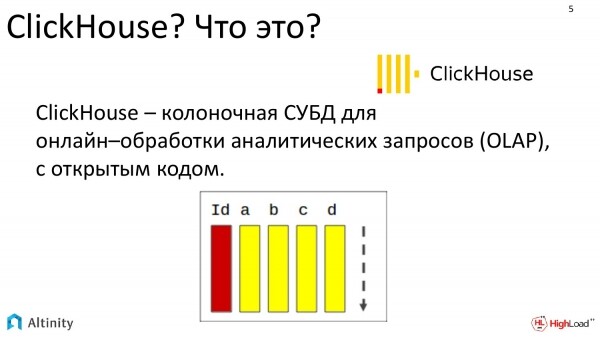
What is ClickHouse? It is a columnar database designed for online processing of analytical queries, and it is completely open source.
There are only two important things to know. First, it is a database, so what I will talk about will apply to almost any database. Second, ClickHouse is a database management system that scales very well, providing almost linear scalability. Hence, the state of the cluster is a natural state for ClickHouse. Our main interest is to discuss how to manage the ClickHouse cluster in Kubernetes.
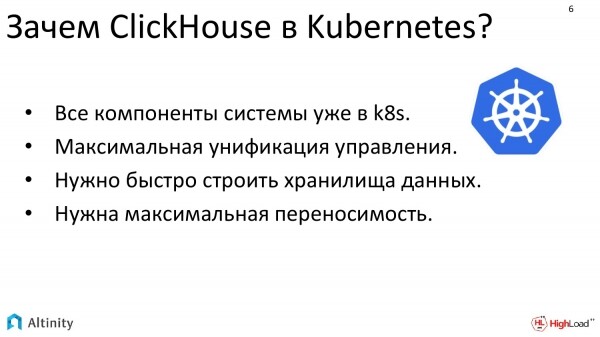
Why is it needed there? Why can't we continue to operate it independently? The answers are partly technical and partly organizational.
- In practice, we increasingly encounter situations where in large companies, nearly all components are already in Kubernetes. Databases remain outside.
- And the question is increasingly being asked: "Can we include this inside?" Therefore, large companies strive to achieve maximum unification of management to quickly manage their data storage.
- This is especially helpful when there is a need for maximum reproducibility in a new location, i.e., maximum portability.
How easy or difficult is this? Of course, it can be done manually. But it's not that simple because we deal with the complexity of managing Kubernetes, alongside the specifics of ClickHouse. This results in an aggregation of challenges.
All of this combined presents a significant set of technologies that become quite challenging to manage because Kubernetes brings its daily operational questions, while ClickHouse introduces its own day-to-day operational issues, especially if we have multiple ClickHouse instances and need to constantly interact with them.
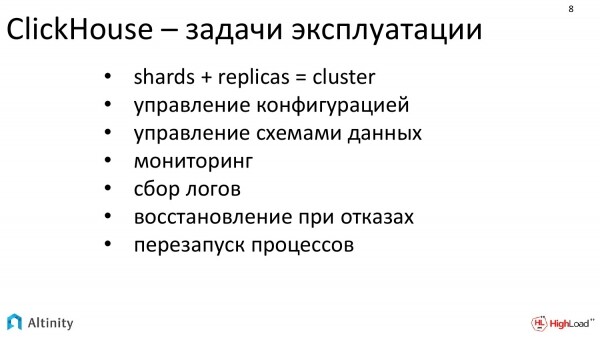
In ClickHouse, there are a significant number of issues that create a constant workload for DevOps during dynamic configuration.
- When we want to change something in ClickHouse, for example, to add a replica or a shard, we need to manage the configuration.
- Then we need to change the data schema because ClickHouse has a specific way of sharding. We need to distribute the data schema and configurations.
- We need to set up monitoring.
- Log collection for new shards and new replicas.
- We need to take care of recovery.
- And restarting.
These are routine tasks that we would really like to simplify in operations.
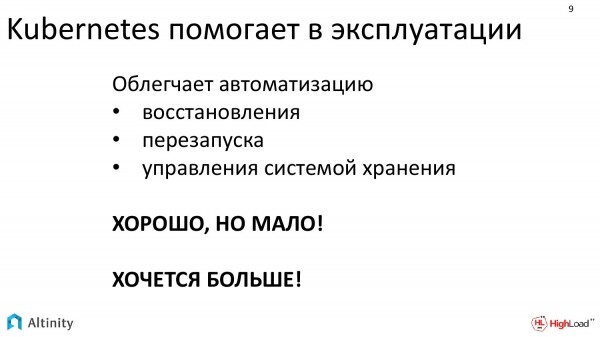
Kubernetes helps with operations, but primarily with basic system-level tasks.
Kubernetes effectively facilitates and automates tasks such as:
- Recovery.
- Restarting.
- Storage system management.
This is good; it's the right direction, but it has no full understanding of how to operate a database cluster.
We want more; we want our entire database to run in Kubernetes.
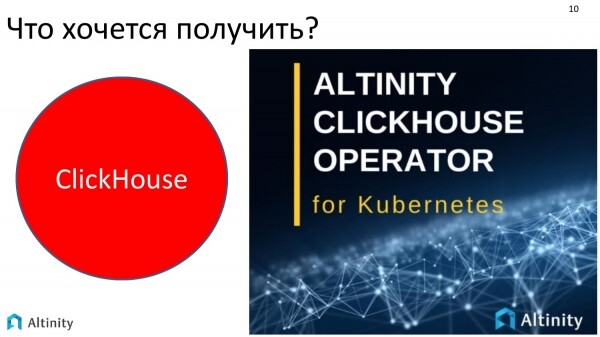
We aim to achieve something like a big magical red button that you press to deploy and maintain a cluster throughout its lifecycle, handling daily tasks that need to be addressed. ClickHouse cluster in Kubernetes.
We have tried to create a solution that would ease the workload. This is the ClickHouse-operator for Kubernetes from Altinity.
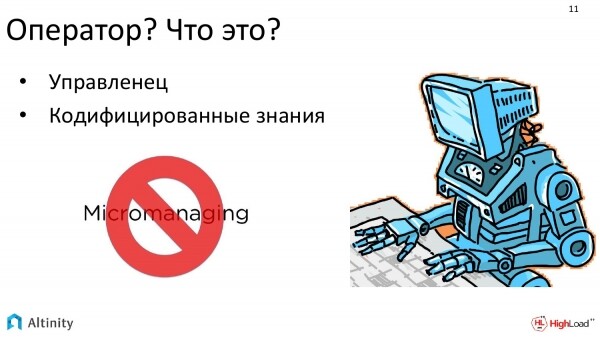
An operator is a program, whose main task is to manage other programs, i.e., it's a manager.
It contains behavior templates. This can be referred to as codified knowledge of the domain.
Its main goal is to ease the life of DevOps and reduce micromanagement, so that DevOps can think in high-level terms, meaning he does not get involved in micromanaging and does not manually configure every detail.
The operator acts as a helper robot that tackles micro-tasks and assists DevOps.
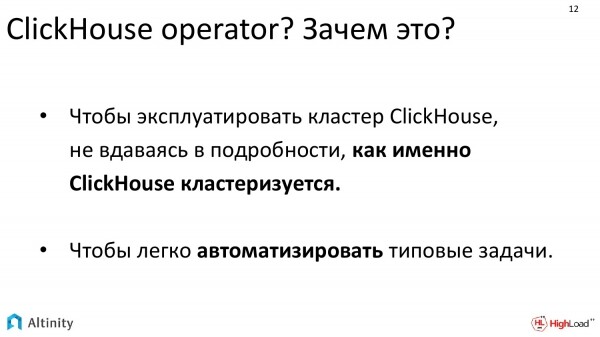
Why do we need an operator? It shows particularly good results in two areas:
- When a specialist dealing with ClickHouse lacks sufficient experience, but it's necessary to operate ClickHouse, the operator simplifies the process and enables the operation of a ClickHouse cluster with a quite complex configuration, without diving too deeply into the details of how it all works internally. You simply assign high-level tasks, and it works.
- The second task in which they excel is automating a large number of routine tasks. It relieves sysadmins of micro-tasks.
This is most necessary either for those who are just starting their journey or for those who need to focus heavily on automation.
What distinguishes the operator-based approach from other systems? There's Helm, which also helps to set up ClickHouse; you can draw helm charts that will even set up an entire ClickHouse cluster. So what is the difference between the operator and, for example, Helm?
The fundamental difference is that Helm is a package manager, while the operator goes a step further. It supports the entire lifecycle. It's not just installation; it includes daily tasks such as scaling, sharding, and everything that needs to be performed during the lifecycle (including removal if necessary) – all of this is handled by the operator. It aims to automate and manage the entire software lifecycle. This is its fundamental distinction from other available solutions.
That was the introductory part; let's move on.
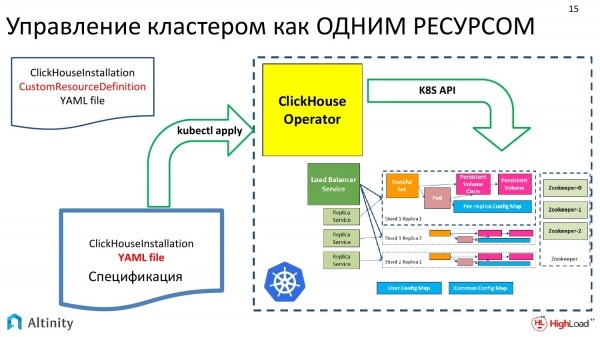
How do we build our operator? We try to approach the task by managing the ClickHouse cluster as a single resource.
On the left side of the picture, we have the input data. This is a YAML specification of the cluster, which is traditionally transferred to Kubernetes via kubectl. The operator picks it up, performs its magic, and what you get at the output is a diagram like this. This is the implementation of ClickHouse in Kubernetes.
And then we will gradually look at how the operator works, what standard tasks can be solved. We will only cover standard tasks because our time is limited. Not everything that the operator can solve will be discussed.
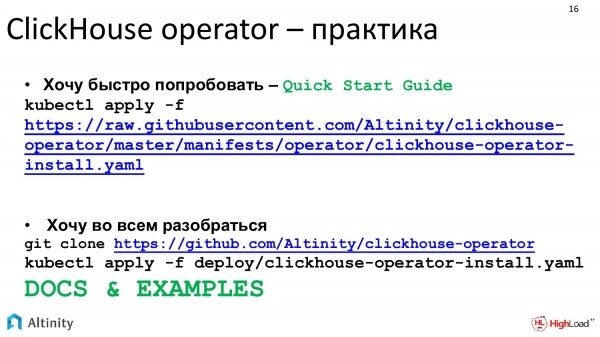
Let's start from practice. Our project is completely open source, so you can check GitHub to see how it works. You can also consider that if you just want to get started, you can begin with the Quick Start Guide.
If you want to understand the details, we try to keep the documentation in reasonably good shape.
Let's begin with a practical task. The first task we all want to start with is to launch the first example somehow. How can we launch ClickHouse using an operator, even without knowing exactly how it works? We write a manifest since all communication with k8s happens through manifests.
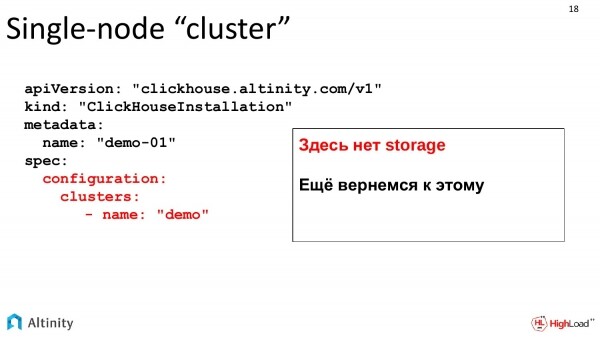
Here's a complex manifest. The parts highlighted in red are what we need to focus on. We ask the operator to create a cluster named demo.
So far, these are basic examples. Storage is not described yet, but we will return to storage a bit later. For now, we'll observe the development of the cluster dynamically.
We have created this manifest. We feed it to our operator. It processed it and did its magic.
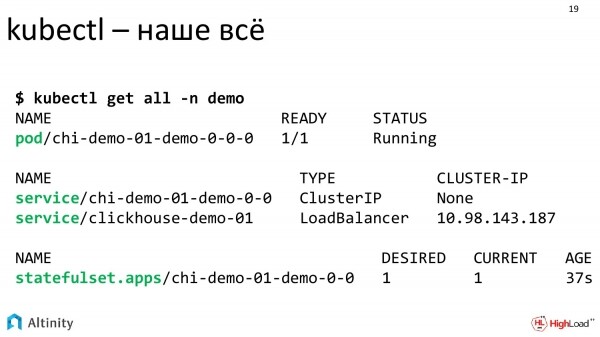
Looking in the console, three components are of interest: a Pod, two Services, and a StatefulSet.
The operator has completed its task, and we can see what exactly it created.
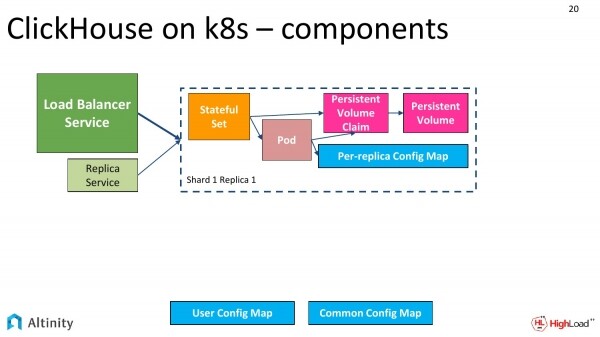
It creates a scheme like this. We have a StatefulSet, a Pod, a ConfigMap for each replica, and a ConfigMap for the entire cluster. There are also services as entry points to the cluster.
The services are the central Load Balancer Service, and you can also have one for each replica, for each shard.
Our basic cluster looks something like this. It consists of a single node.
Let's move on and complicate things. We need to shard the cluster.
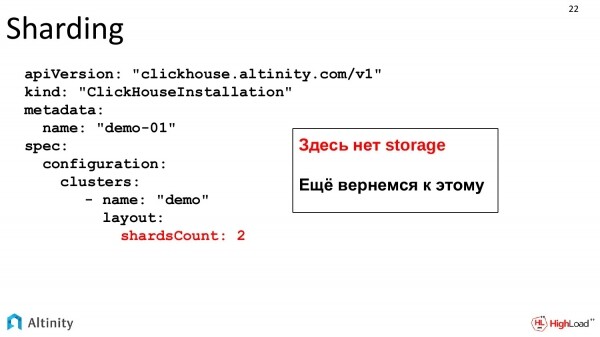
Our tasks are growing, and dynamics are beginning. We want to add a shard. We'll keep track of the development. We modify our specification, indicating that we want two shards.
This is the same file that dynamically evolves with the growth of the system. Storage is not included yet; it will be discussed further as a separate topic.
We feed the YAML operator and see what results we get.
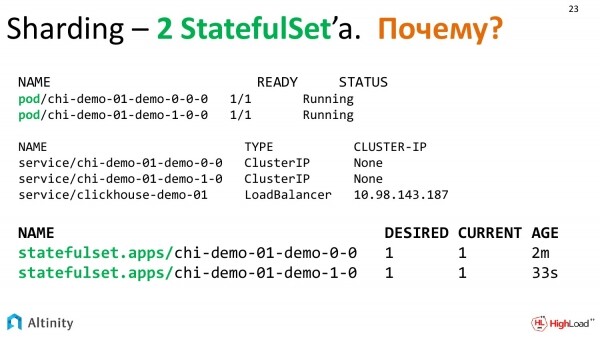
The operator thought it over and created the following entities. Now we have two Pods, three Services, and, unexpectedly, 2 StatefulSets. Why 2 StatefulSets?
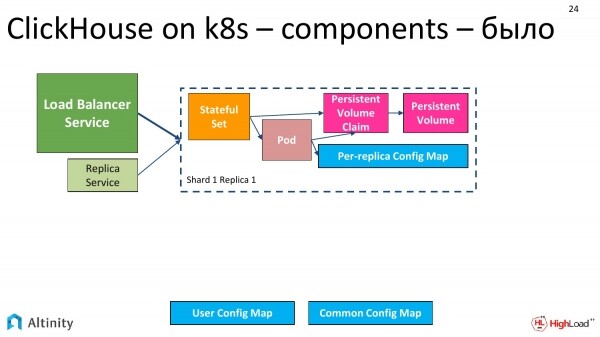
The scheme looked like this initially – we had one pod.
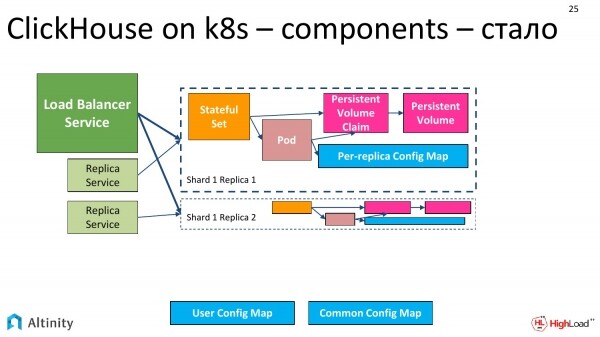
It has now changed to this. So far, everything is simple; it has been duplicated.
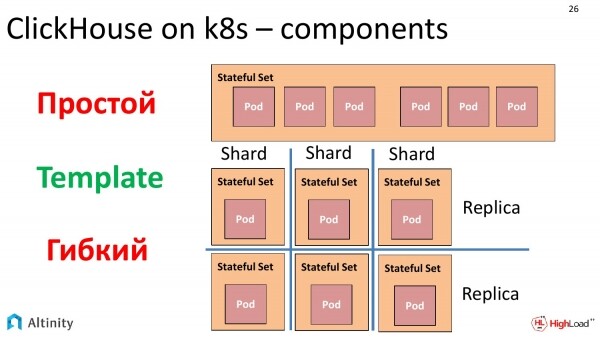
And why has there become two StatefulSets? We need to pause and discuss how Pods are managed in Kubernetes.
There is an object called StatefulSet that allows you to create a set of Pods from a template. The key factor here is the Template. You can run multiple Pods from a single template within one StatefulSet. The key phrase is “multiple Pods from a single template.”
There was a strong temptation to create the entire cluster packed into one StatefulSet. This would work without any issues. However, there is one nuance. If we want to assemble a heterogeneous cluster, meaning with multiple versions of ClickHouse, we start to encounter questions. Yes, StatefulSet can perform a rolling update, and you can deploy a new version, specifying a limit on how many nodes to update simultaneously.
But if we extrapolate the task and say we want to create a completely heterogeneous cluster, not just upgrading from an old version to a new one using a rolling update, but to simply create a heterogeneous cluster that comprises different versions of ClickHouse and various storage types, for instance, by placing some replicas on separate, slower disks, we want to build a fully heterogeneous cluster. Since StatefulSet creates a standardized solution from a single template, this cannot be achieved.
After some consideration, we decided to do it this way. Each replica will be in its own StatefulSet. There are some drawbacks to this approach, but in practice, it encapsulates everything within the operator. And there are many advantages. We can construct a cluster exactly as we want, for example, completely heterogeneous. Therefore, in a cluster where we have two shards with one replica each, we will have 2 StatefulSets and 2 Pods precisely because we chose this approach for the reasons mentioned above to enable the construction of a heterogeneous cluster.

Let’s return to practical tasks. In our cluster, we need to configure users, meaning we need to perform some configuration for ClickHouse in Kubernetes. The operator provides all the capabilities for this.
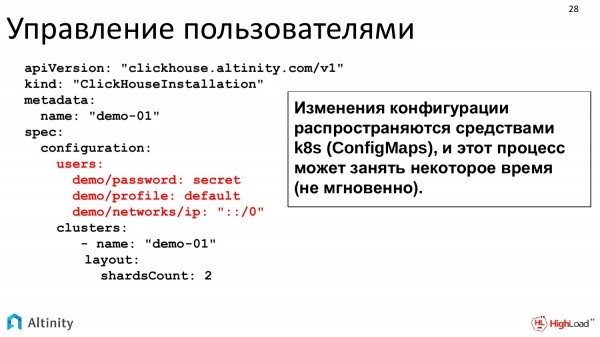
We can write directly in YAML what we want. All configuration options map directly from this YAML to the ClickHouse configs, which are then distributed throughout the cluster.
You can write it like this too. This is just an example. You can make the password encrypted. All configuration options for ClickHouse are fully supported. This is just a sample.
Cluster configuration is distributed as a ConfigMap. In practice, updating the ConfigMap does not happen instantly, so if there is a large cluster, the process of pushing the configuration takes some time. But all of this is very convenient for operation.
Let's complicate the task. The cluster is evolving. We want to replicate data. That is, we already have two shards, each with a replica, configured users. We are growing and want to manage replication.
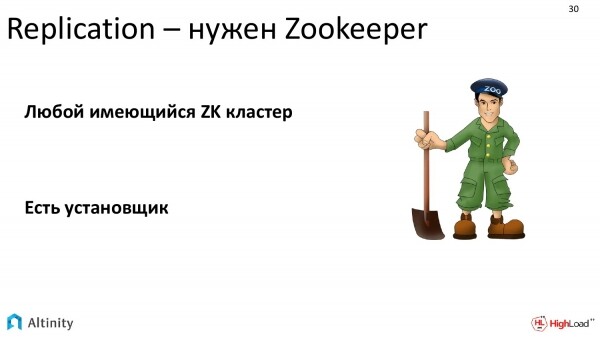
What do we need for replication?
We need ZooKeeper. In ClickHouse, replication is built using ZooKeeper. ZooKeeper is needed so that various ClickHouse replicas can reach consensus about which data blocks are available on which ClickHouse instance.
You can use any ZooKeeper. If there is an external ZooKeeper provided by the organization, it can be used. If not, you can install one from our repository. There is an installer that makes this process easier.
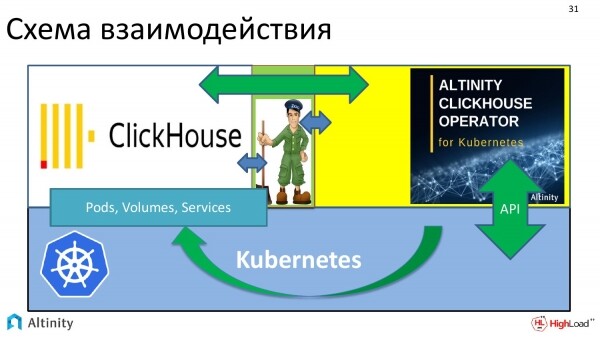
And the scheme for the interaction of the entire system looks like this. We have Kubernetes as the platform. ClickHouse operator runs on it. I've represented ZooKeeper here. The operator interacts with both ClickHouse and ZooKeeper. This creates a flow of interaction.
All of this is necessary for ClickHouse to successfully replicate data in k8s.
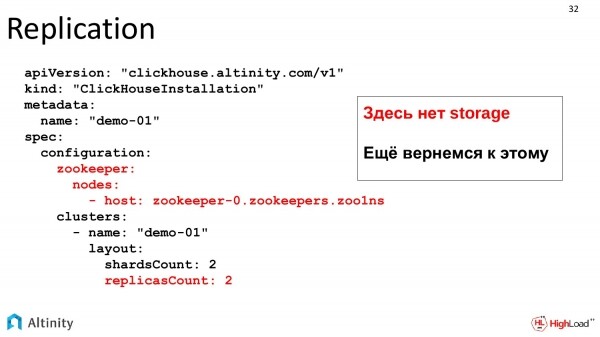
Now let's look at the task itself, how the manifest for replication will look.
We add two sections to our manifest. The first is where to get ZooKeeper from, which can be either inside Kubernetes or external. This is just a description. And we request replicas. That is, we want two replicas. In total, we should have 4 pods. We remember about storage, which will return a bit later. Storage is a separate topic.
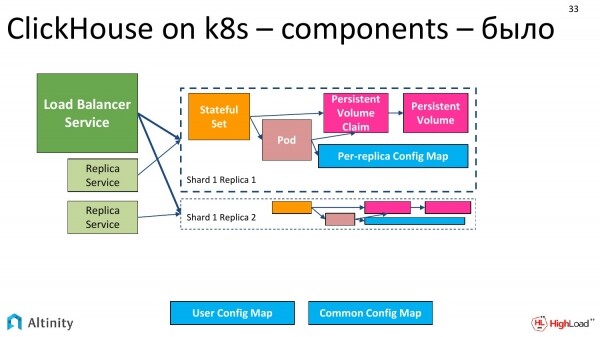
It was like this.
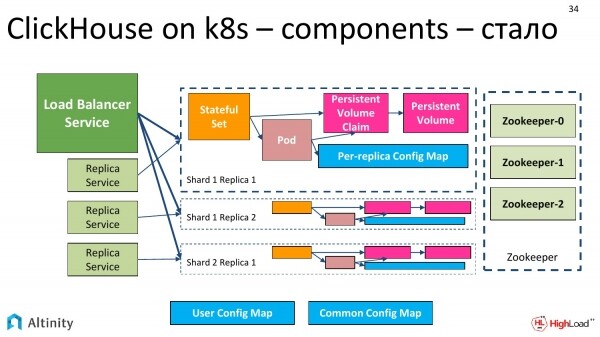
It becomes like this. Replicas are added. The fourth one didn't fit, we believe there can be many of them. And ZooKeeper is added on the side. The schemes are getting more complex.
And now it's time to add the next task. We will be adding Persistent Storage.
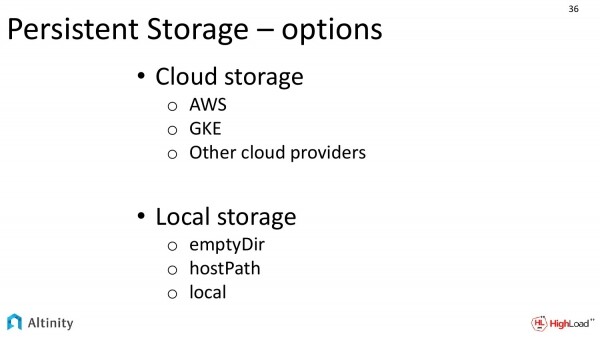 We have various options for implementing Persistent Storage.
If we are executing in a cloud provider, for example, using Amazon or Google, there is a strong temptation to use cloud storage. This is very convenient, it's good.
There is a second option. This is for local storage, where we have local disks on each node. This option is much more complex to implement, but it is more efficient.
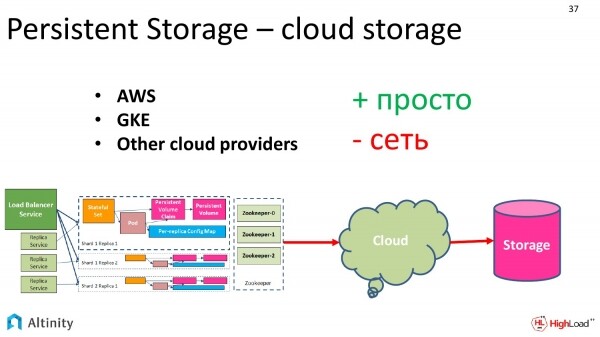
Let's take a look at what we have regarding cloud storage.
There are advantages. It is very easy to configure. We simply order from the cloud provider, asking for a certain capacity storage of a specific class. The classes are defined by the providers themselves.
And there is a downside. For some, this is not a critical disadvantage. Of course, there will be some performance overhead. It is very convenient to work with, reliable, but there are potential performance dips.
Since ClickHouse focuses precisely on performance, we can even say that it extracts everything possible, therefore many clients strive to squeeze out maximum performance.
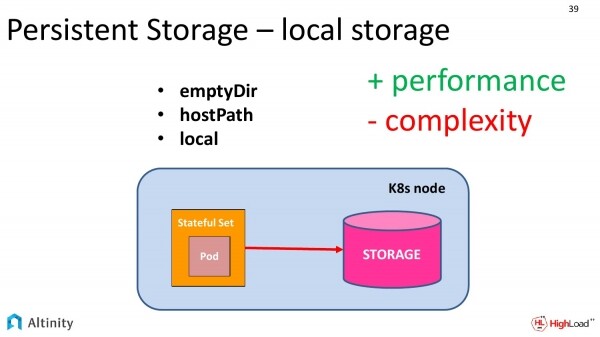
To achieve maximum performance, we need local storage.
Kubernetes provides three abstractions for using local storage in Kubernetes. These are:
- EmptyDir
- HostPath.
- Local
Let's consider how they differ and how they are similar.
First of all, in all three approaches, the storage consists of local disks that are on the same physical k8s node. However, they have some differences.
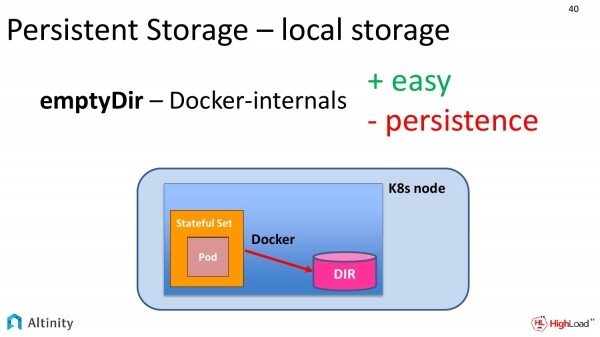
Let's start with the simplest, that is, with emptyDir. What is this in practice? We request the containerization system (most often Docker) in our specification to provide us access to a folder on the local disk.
In practice, Docker creates a temporary folder somewhere along its own paths, names it with a long hash, and provides access to it.
How will this work in terms of performance? It will operate at the speed of the local disk, i.e., it is complete access to its drive.
However, this method has its downside. The persistence in this case is quite questionable. Upon the first movement of Docker with containers, persistence is lost. If Kubernetes decides to move this Pod to another disk for any reason, the data will be lost.
This approach is good for testing, as it demonstrates normal speed, but it is not suitable for anything serious.
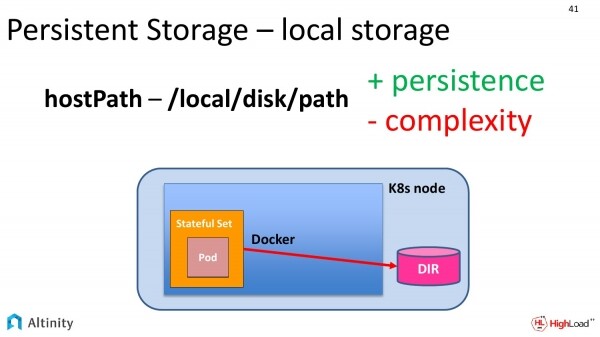
Therefore, there is a second approach. This is hostPath. If you look at the previous slide and this one, you can see just one difference. Our folder exited the Docker directly onto the Kubernetes node. This is a bit simpler. We directly specify the path in the local file system where we would like to store our data.
This method has its advantages. This is already a true Persistent, and a classic one at that. Our data will be saved on the disk at a specific address.
There are drawbacks as well. It's complicated to manage. Our Kubernetes may want to move a Pod to another physical node. This is where DevOps comes into play. They must properly explain to the system that these Pods can only be moved to nodes where something is mounted at these paths, and only one node at a time. This is quite complex.
Specifically for these purposes, we at the operator level have created templates to hide all this complexity. This way, you could simply say, "I want one instance of ClickHouse on each physical node and at a specified path."
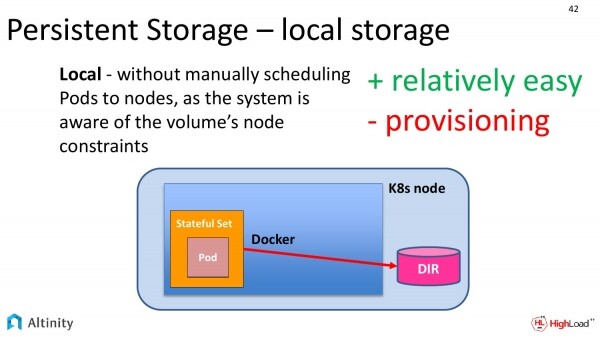
But this need is not only ours, so the gentlemen from Kubernetes also understand that people want access to physical disks, which is why they provide a third level.
It's called local. There is practically no difference from the previous slide. Previously, you had to manually ensure that these Pods could not be moved from node to node because they had to be attached at a specific path to the local physical disk, and now all this knowledge is encapsulated within Kubernetes itself. This makes configuration much easier.
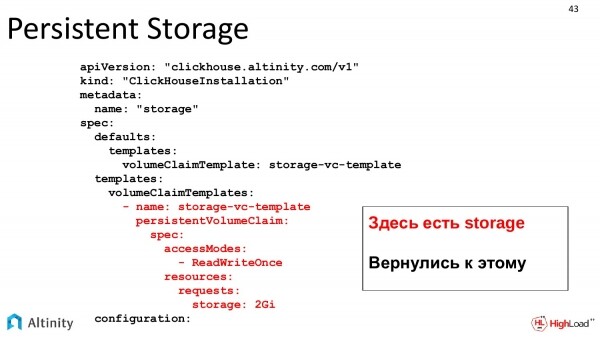
Let's return to our practical task. We'll go back to the YAML template. Here we have a real storage. We're back to this. We define a classic VolumeClaim template as in k8s and describe the storage we want.
After this, k8s will request storage. It will allocate it in the StatefulSet, and in the end, this will become available to ClickHouse.
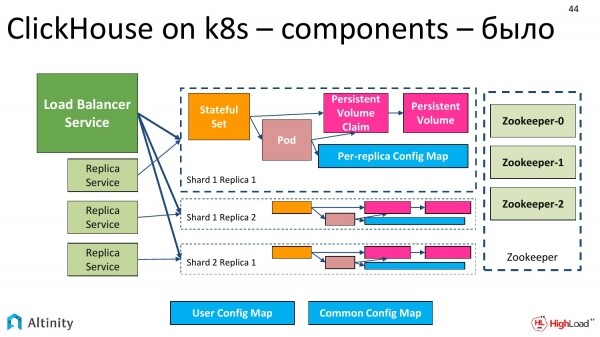
We had such a schema. Our Persistent Storage was red, which hinted that it needed to be created.
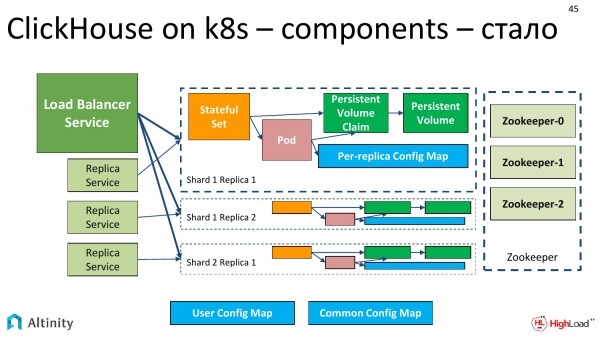
Now it turns green. The ClickHouse on k8s cluster schema is now fully finalized. We have shards, replicas, ZooKeeper, and a true Persistent storage implemented in one way or another. The schema is now fully operational.
We continue to move forward. Our cluster is developing. Alexey is working hard and releasing a new version of ClickHouse.
A practical task arises – to test the new version of ClickHouse on our cluster. Of course, we don't want to roll it out completely; we'd prefer to deploy the new version in a corner on one replica, and maybe not just one new version, but two, since they are released quite frequently.
What can we say about this?
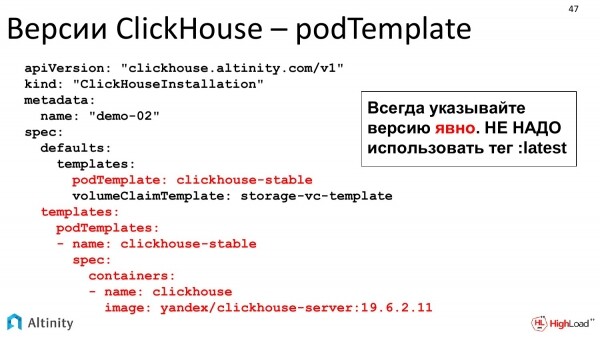
Here we actually have such an opportunity. These are pod templates. We can define them; our operator fully allows building a heterogeneous cluster. That is, we can configure everything from having all replicas together to customizing each individual replica with the version of ClickHouse we want, and the version of storage we want. We can fully configure the cluster in whatever configuration we need.
Let's go a bit deeper. Previously, we discussed how the ClickHouse operator works specifically with ClickHouse.
Now I would like to say a few words about how any operator generally works, as well as how it interacts with K8s.
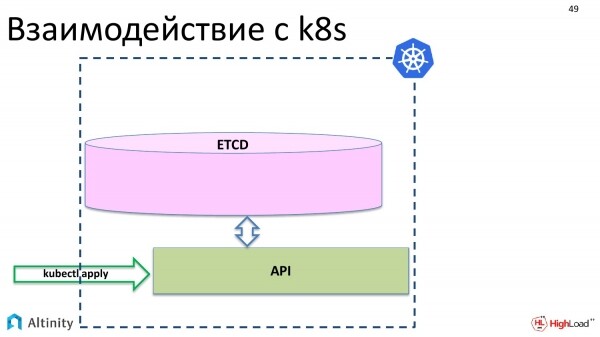
Let's start by considering the interaction with K8s. What happens when we execute kubectl apply? Our objects appear in etcd through the API.
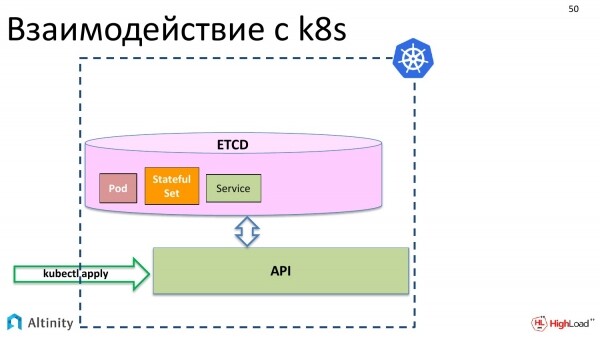
For example, the basic Kubernetes objects: pod, StatefulSet, service, and so on.
At this point, nothing physical happens yet. These objects need to be materialized in the cluster.
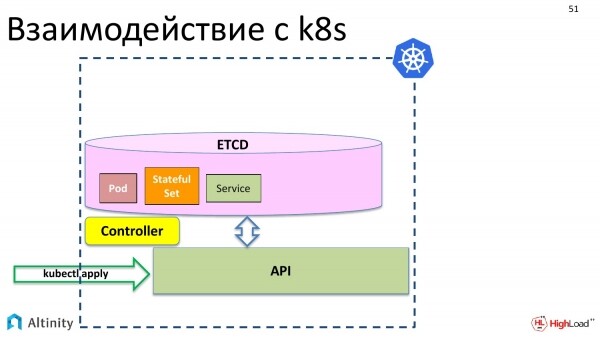
For this, a controller comes into play. A controller is a special component of k8s that can materialize these descriptions. It knows how and what needs to be done physically. It understands how to launch containers and what needs to be configured for the server to operate.
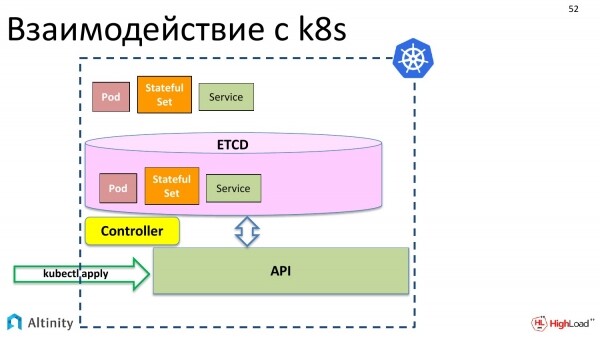
And it materializes our objects in K8s.
However, we want to operate not only with pods and StatefulSets; we want to create a ClickHouseInstallation, i.e., an object of the ClickHouse type, to manage it as a single entity. Currently, such an opportunity does not exist.
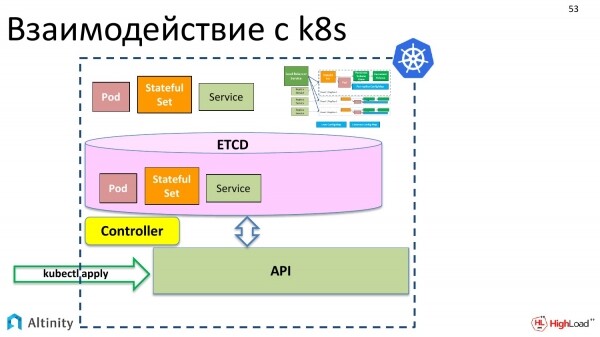
But K8s has the following nice feature. We want to have a complex entity somewhere that is assembled from pods and StatefulSets to form our cluster.
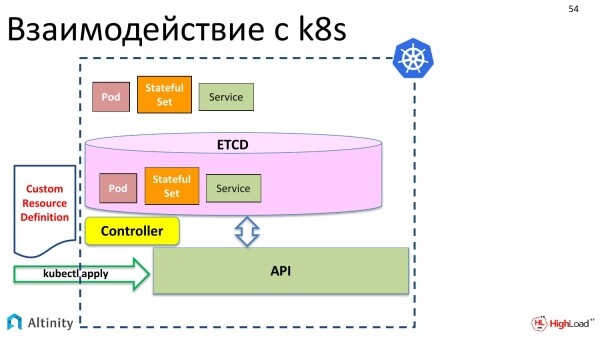
And what needs to be done for this? First of all, we introduce the Custom Resource Definition. What is it? It's a description for K8s that indicates there will be another data type, which we want to add to the pod and StatefulSet as a custom resource that will be complex internally. This describes the data structure.
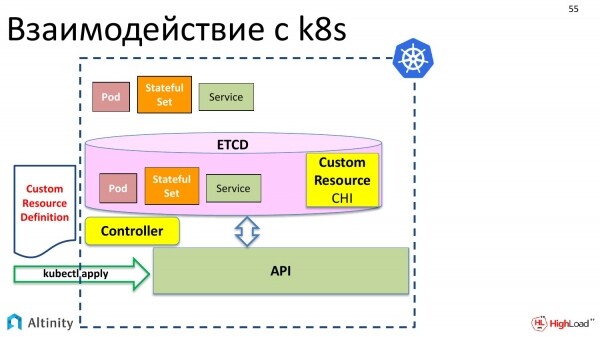
We also send it there via kubectl apply. Kubernetes happily accepts it.
And now we have the ability to write a custom resource called ClickHouseInstallation in the storage, which is an object in etcd.
But for now, nothing will happen. That is, if we create a YAML file that we discussed with the description of shards, replicas, and say 'kubectl apply', Kubernetes will accept it, store it in etcd and say: 'Great, but I don't know what to do with it. I don't know how to manage ClickHouseInstallation.'
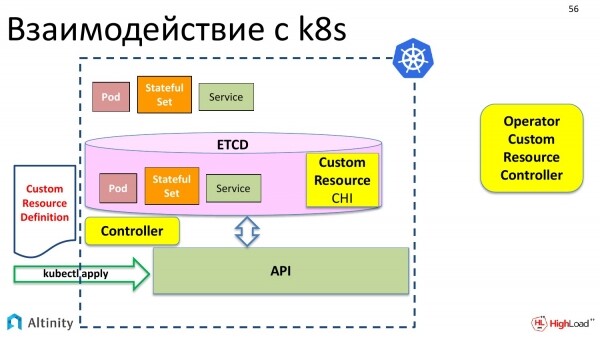
Therefore, we need someone to help Kubernetes manage the new data type. On the left, we have the default Kubernetes controller that works with standard data types. On the right, we should have a custom controller that can work with custom data types.
And it is also called an operator. I have deliberately placed it outside of Kubernetes here because it can run outside of K8s. Most often, of course, all operators run inside Kubernetes, but nothing prevents it from being positioned externally; hence it is specially placed outside here.
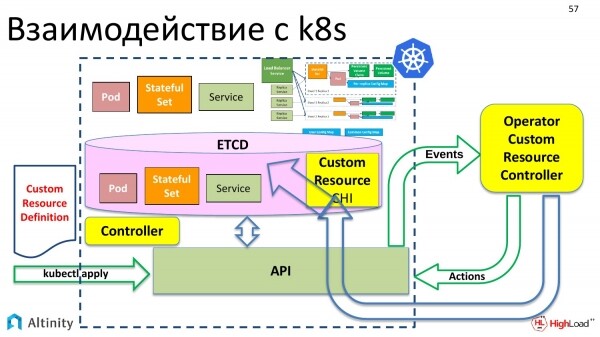
In turn, the custom controller, that is the operator, interacts with Kubernetes through the API. It already knows how to interact with the API and understands how to materialize the complex scheme we want from the custom resource. This is precisely what the operator does.
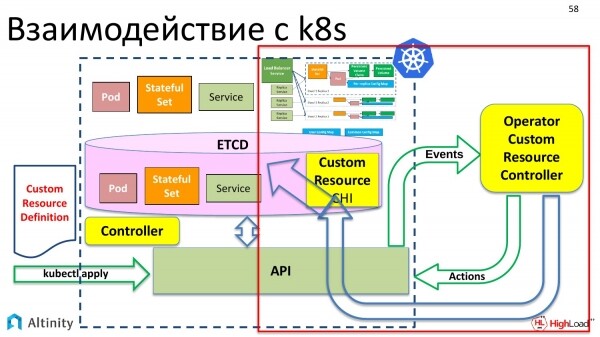
How does the operator work? Let's look at the right side to learn how it does this. We will find out how the operator materializes all this and how the interaction with K8s occurs further.
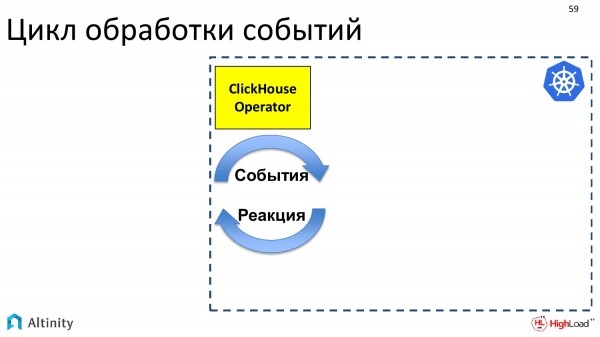
An operator is a program that is event-driven. The operator subscribes to events using the Kubernetes API. The Kubernetes API has entry points where you can subscribe to events. And if something changes in K8s, Kubernetes sends events to everyone interested, i.e., those who have subscribed to this API point will receive notifications.
The operator subscribes to events and must react to them. Its task is to respond to the events that arise.
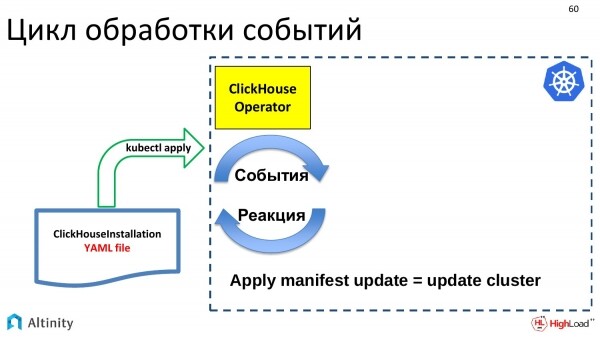
Events are generated by certain updates. Our YAML file with the description of ClickHouseInstallation is sent. It goes to etcd via kubectl apply. An event is triggered there, and eventually, this event is received by the ClickHouse operator. The operator gets this description, and it needs to do something. If an update for the ClickHouseInstallation object comes in, the cluster needs to be updated. The operator's task is to update the cluster.
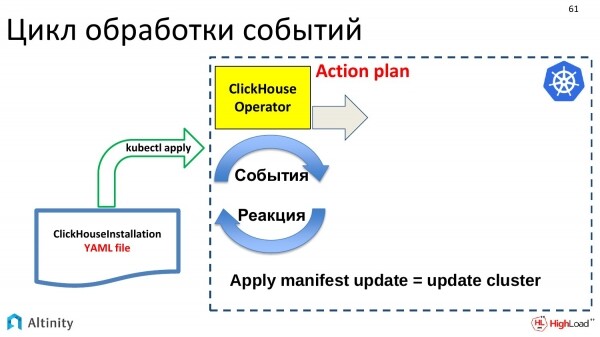
What does it do? First, it needs to create an action plan for handling this update. Updates can be very small, meaning small in YAML implementation, but can lead to significant changes in the cluster. Therefore, the operator creates a plan and then follows it.
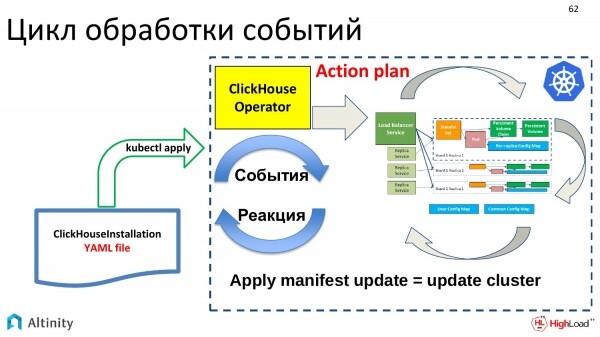
It begins to work through this plan to materialize pods, services, i.e., to perform its primary tasks. It’s like building a ClickHouse cluster in Kubernetes.
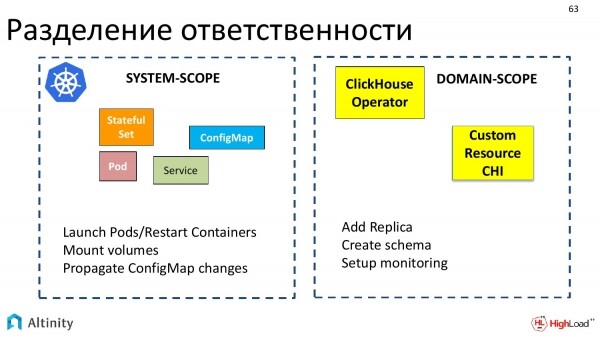
Now let's touch on an interesting aspect. This is the division of responsibilities between Kubernetes and the operator—what Kubernetes does, what the operator does, and how they interact with each other.
Kubernetes is responsible for system-level tasks, i.e., for the basic set of objects that can be interpreted as system-scope. Kubernetes knows how to run pods, restart containers, mount volumes, work with ConfigMaps, i.e., everything that can be considered as part of the system.
Operators operate within specific subject areas. Each operator is created for its subject area. We created one for ClickHouse.
The operator interacts specifically in terms of domain concepts, such as adding a replica, creating a schema, setting up monitoring. This results in a clear division.
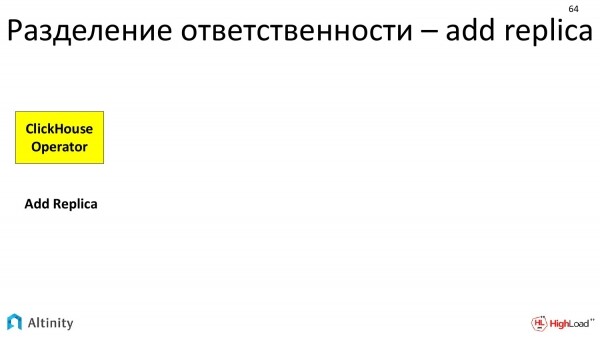
Let’s look at a practical example of how this division of responsibility occurs when performing the action to add a replica.
The operator receives the task to add a replica. What does the operator do? The operator will calculate that a new StatefulSet needs to be created, describing certain templates and volume claims.
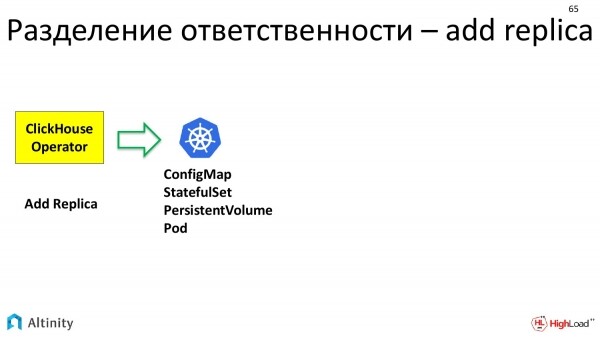
It prepares everything and forwards it to K8s. It specifies that it needs a ConfigMap, StatefulSet, and Volume. Kubernetes processes it, materializing the basic units that it operates with.
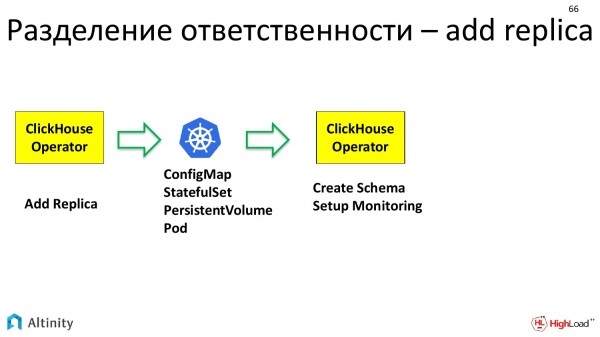
And then the ClickHouse operator comes into play again. It already has a physical pod where something can be done. The ClickHouse operator works again in domain-specific terms. That is, specifically for ClickHouse, to include a replica in the cluster, one must first configure the data schema that exists in this cluster. Secondly, this replica must be included in monitoring so that it can be properly tracked. The operator handles this configuration.
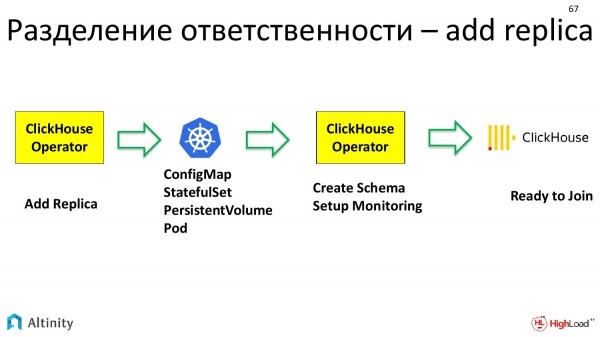
Only after that does ClickHouse itself come into play, i.e., another higher-level entity. This is already a database. It has its own instance, a configured replica that is ready to join the cluster.
Thus, the chain of execution and division of responsibility when adding a replica is quite long.
Let's continue with our practical tasks. If the cluster already exists, configuration migration can be carried out.
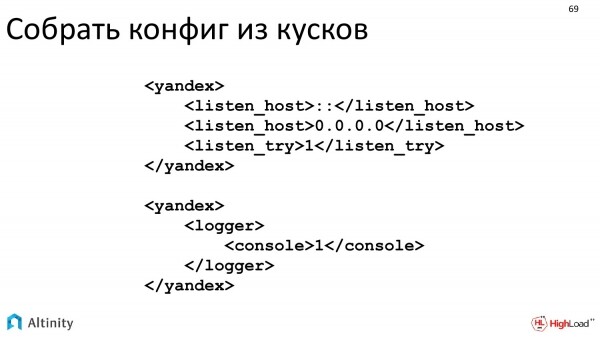
We have arranged it so that we can pass directly through the existing XML that ClickHouse understands.
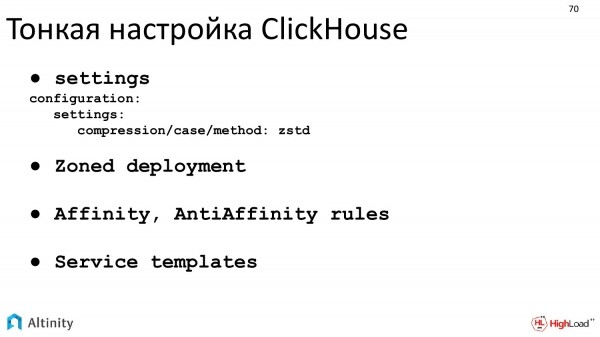
A fine-tuning of ClickHouse can be performed. Zoned deployment is exactly what I described when explaining hostPath and local storage. This is how to correctly implement zoned deployment.
The next practical task is monitoring.
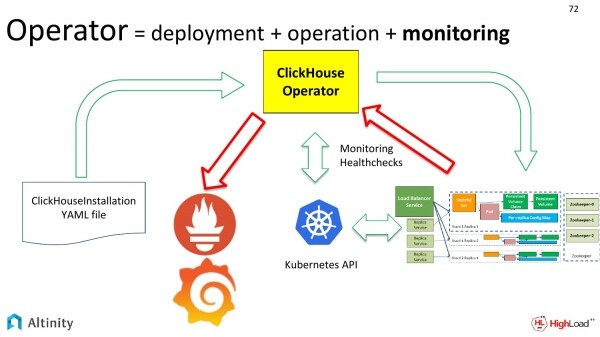
If our cluster changes, we need to periodically configure monitoring.
Let's look at the diagram. We have already reviewed the green arrows. Now let's examine the red arrows. This is how we want to monitor our cluster. How metrics from the ClickHouse cluster reach Prometheus and then Grafana.
What is the challenge with monitoring? Why is it considered some kind of achievement? The difficulty lies in the dynamics. When we have one static cluster, we can set up monitoring once and not worry about it anymore.
However, if we have many clusters, or if something is constantly changing, the process becomes dynamic. Continuously readjusting monitoring is a waste of resources and time; that is, just plain laziness. This needs to be automated. The complexity lies in the dynamics of the process. And the operator automates this very well.
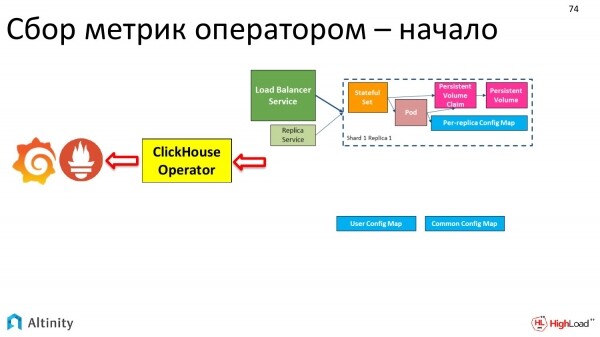
How did our cluster evolve? At first, it looked like this.
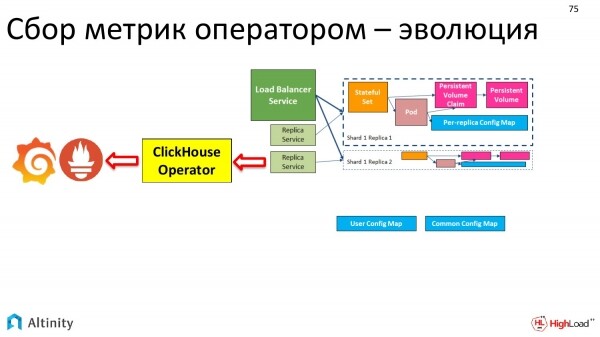
Then it looked like this.
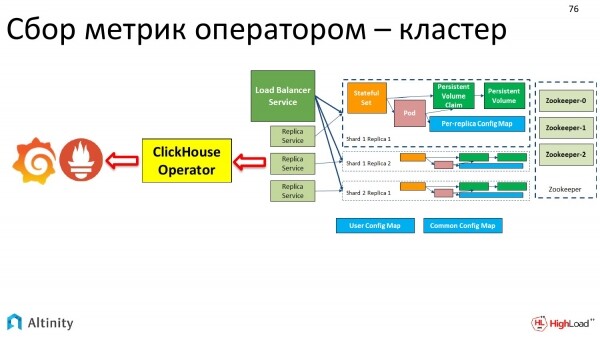
In the end, it became like this.
And the monitoring is done automatically by the operator. A single point of entry.
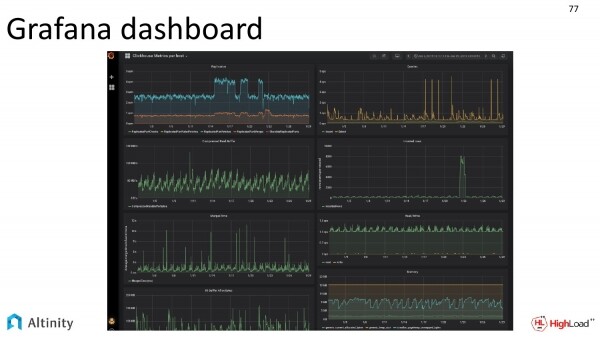
And we simply look at the Grafana dashboard to see the vibrant activity within our cluster.
By the way, the Grafana dashboard is also distributed with our operator directly in the source code. You can connect and use it. This screenshot was provided by our DevOps team.
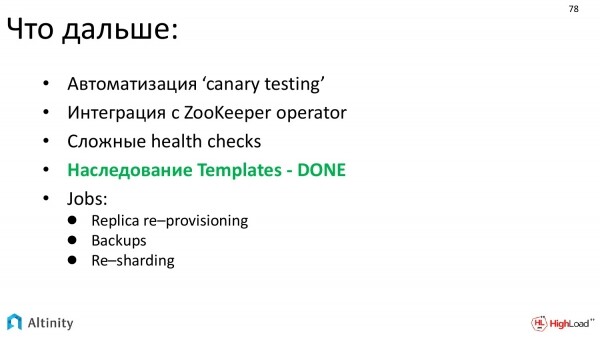
Where do we want to move next? This:
- Developing automated testing. The main task is automated testing of new versions.
- We also really want to automate the integration with ZooKeeper. We plan to integrate with the ZooKeeper operator. That is, an operator has been written for ZooKeeper, and it makes sense for the two operators to start integrating for a more convenient solution.
- We want to implement more complex health checks.
- I've highlighted in green what’s approaching: template inheritance – DONE, so with the next operator release, we will already have template inheritance. This is a powerful tool that allows the creation of complex configurations from pieces.
- And we want automation of complex tasks, the main one being re-sharding.
Let's take a moment to summarize.
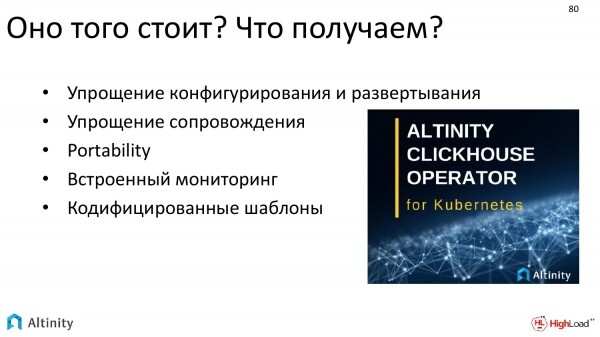
What do we achieve in the end? Is it worth pursuing or not? Should we even attempt to bring the database into Kubernetes and use the operator in general and the Alitnity operator in particular?
Ultimately, we achieve:
- Significant simplification and automation of configuration, deployment, and maintenance.
- Immediate built-in monitoring.
- And ready-to-use codified templates for complex situations. Actions like adding a replica no longer need to be done manually. The operator handles that.
One last question remains. We already have a database in Kubernetes, virtualization. What about the performance of such a solution, especially considering that ClickHouse is optimized for performance?
The answer is – everything is fine! I won’t go into detail; this is a topic for a separate presentation.
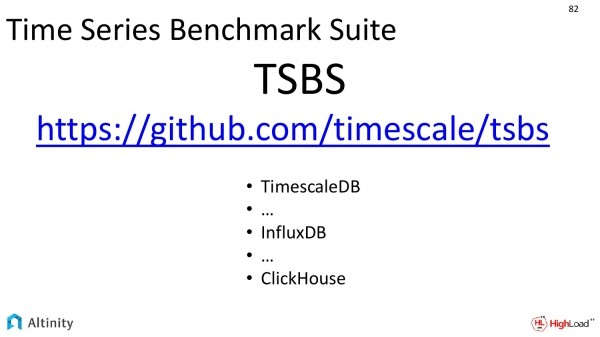
But there is a project called TSBS. What is its main purpose? It is a benchmark for database performance. It attempts to compare like with like.
How does it work? A single dataset is generated. Then this dataset is run through the same set of tests on different databases. Each database solves one task as it knows how to. The results can then be compared.
It already supports a large number of databases. I highlighted three main ones. They are:
- TimescaleDB.
- InfluxDB.
- ClickHouse.
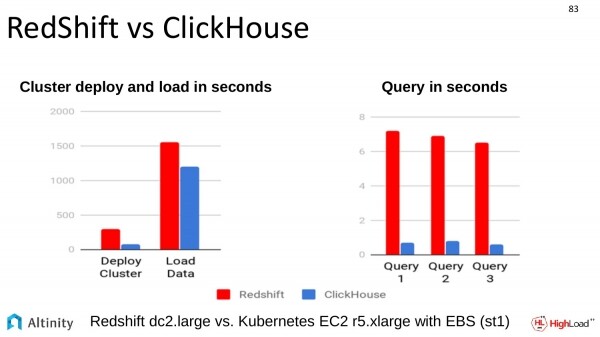
A comparison was also made with another similar solution. The comparison with RedShift was conducted on Amazon. ClickHouse also excels in this regard.
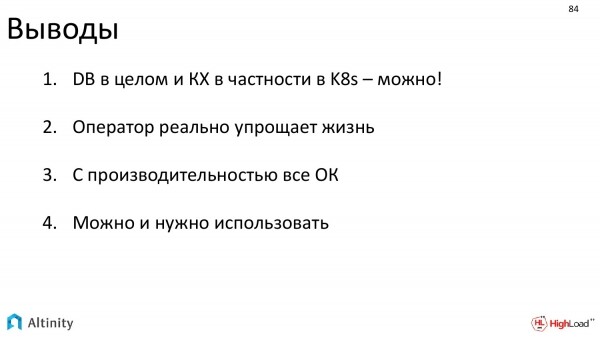
What conclusions can be drawn from what I shared?
- Databases can be used in Kubernetes. Probably any database can, but overall it seems feasible. ClickHouse can definitely be deployed in Kubernetes using our operator.
- The operator helps automate processes and genuinely simplifies life.
- Performance is normal.
- And we believe that it can and should be used.
Open source – join us!
As I mentioned, the operator is a fully open source product, so it would be great if as many people as possible used it. Join us! We are waiting for all of you!
Thank you all!
Questions
Thank you for the presentation! My name is Anton. I'm from SEMrush. I'm curious about logging. I hear about monitoring, but nothing about logging as it pertains to the cluster as a whole. For example, we have a cluster set up on hardware. We use centralized logging, gathering it all together with standard tools. Then we extract the data we are interested in from there.
Good question, meaning logging is on the todo list. Our operator currently does not automate this. It is still developing; the project is relatively young. We understand the need for logging. It is also a very important topic, probably no less important than monitoring. But monitoring was first on the list for implementation. Logging will come. We are, of course, trying to automate all aspects of the cluster's lifecycle. So the answer is – at the moment, the operator unfortunately does not do this, but it is on the agenda, and we will address it. If you want to join, please submit a pull request.
Hello! Thank you for the presentation! I have a standard question regarding Persistent Volumes. When we create a configuration with this operator, how does the operator determine which node a disk or folder is mounted on? Do we need to explain in advance that it should place our ClickHouse specifically on those nodes that have the disk?
As far as I understand, this question continues from local storage, particularly the part regarding hostPath. It's like explaining to the entire system what needs to be done for a pod to run on a specific node where we have a physically connected disk mounted at a certain path. This is a whole section that I touched on very superficially because the answer is quite extensive.
In brief, it looks like this. Naturally, we need to provision these volumes. Currently, there is no dynamic provisioning in local storage, so the DevOps team must allocate the disks themselves, these volumes. They need to inform Kubernetes provisioning that you will have Persistent volumes of a certain class located on specific nodes. Then, Kubernetes must be informed that pods requiring that class of local storage should only be scheduled on certain nodes based on labels. For these purposes, the operator has the option to assign certain labels and one per host instance. This way, the pods will be routed by Kubernetes to launch only on nodes that meet the label requirements, in simple terms. Administrators assign labels and manually provision disks. Then, it can scale.
And this third option for local storage helps alleviate this somewhat. As I emphasized, it's a painstaking configuration process that ultimately helps achieve maximum performance.
I have a second question related to this. Kubernetes was designed so that it doesn't matter whether we lose a node or not. What do we do in this case if we lose the node where our shard resides?
Yes, Kubernetes was originally positioned that our relationship with pods is like cattle, yet here, each disk becomes somewhat like a pet. There is this problem that we cannot simply discard them. The development of Kubernetes is moving in the direction where it's impossible to completely view these resources as disposable.
Now for a practical question. What should you do if you lose the node where the disk was? This task is already resolved at a higher level. In the case of ClickHouse, we have replicas operating at a higher level, i.e., at the ClickHouse level.
What is the resulting disposition? DevOps is responsible for ensuring that no data is lost. They must properly configure replication and monitor its execution. Data should be duplicated at the ClickHouse level in the replica. This is not a task handled by the operator, nor is it something Kubernetes resolves. It is a ClickHouse-level responsibility.
What should you do if your physical node fails? This means you'll need to set up a second one, provision a disk on it correctly, and apply labels. After this, it will satisfy the requirements for Kubernetes to run an instance of the pod on it. Kubernetes will launch it. You'll have a shortage of pods as required. It will go through the cycle I showed. At the highest level, ClickHouse will understand that a new replica has entered, which is still empty and needs data to be streamed to it. So, this process is not yet well automated.
Thank you for the presentation! When various issues occur, the operator fails and restarts, and in that moment events come in, do you handle this somehow?
What will happen if the operator fails and restarts, right?
Yes. And at that moment, events were entered.
The task of what to do in this case is partially divided between the operator and Kubernetes. Kubernetes has the capability to replay the occurred event. It replays it. The operator's task is to ensure that when they perform a replay of the event log, those events are idempotent. This means that re-entering the same event does not disrupt our system. Our operator handles this task well.
Hello! Thank you for the presentation! Dmitry Zavyalov, company Smedova. Is there a plan to add a setting option for the operator with haproxy? I'm interested in some other load balancer besides the standard one, something intelligent that understands that it is actually ClickHouse.
Are you talking about Ingress?
Yes, replace Ingress with haproxy. In haproxy, you can specify the cluster topology, where its replicas are located.
We haven't thought about this yet. If you need it and can explain why it's necessary, we could implement it, especially if you want to participate. We would be happy to consider the option. The short answer is no, we currently do not have this functionality. Thank you for the suggestion; we will look into it. If you could also explain the use case and why it's needed in practice, such as creating issues on GitHub, that would be great.
It already exists.
Good. We are open to any suggestions. And haproxy is on the todo list. The todo list is growing rather than shrinking for now. But that's good; it means the product is in demand.
Source: habr.com
