

In my work, I often encounter new technical solutions/software products for which there is little information in Russian-speaking Internet. In this article, I will try to fill such a gap with an example from my recent practice when it was necessary to set up CDC event sending from two popular databases (PostgreSQL and MongoDB) to a Kafka cluster using Debezium. I hope this overview article, which emerged from the work done, will be useful to others as well.
What is Debezium and CDC?
is a representative of the CDC software category (), and more specifically, it is a set of connectors for various databases that are compatible with the Apache Kafka Connect framework.
This licensed under the Apache License v2.0 and sponsored by Red Hat. Development has been ongoing since 2016 and currently it officially supports the following databases: MySQL, PostgreSQL, MongoDB, SQL Server. There are also connectors for Cassandra and Oracle, but they are currently in 'early access' status, and new releases do not guarantee backward compatibility.
When comparing CDC with the traditional approach (when an application reads data directly from the database), its main advantages include streaming data changes at the row level with low latency, high reliability, and availability. The last two points are achieved by using a Kafka cluster as the storage for CDC events.
Another advantage is that a unified model is used for event storage, so the end application does not have to worry about the nuances of operating various databases.
Finally, by using a message broker, there is room for horizontal scaling of applications that track data changes. At the same time, the impact on the data source is minimized since data retrieval occurs not directly from the database, but from the Kafka cluster.
About Debezium Architecture
The use of Debezium boils down to a simple diagram:
Database (as the data source) → connector in Kafka Connect → Apache Kafka → consumer
As an illustration, here is a diagram from the project website:
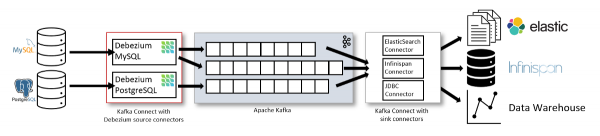
However, I don't really like this diagram because it gives the impression that only a sink connector can be used.
In reality, the situation is different: filling your Data Lake (the last link in the diagram above) — is not the only way to use Debezium. Events sent to Apache Kafka can be utilized by your applications to address various situations. For example:
- removing outdated data from the cache;
- sending notifications;
- updating search indexes;
- some form of audit logs;
- …
If you have a Java application and there is no need or possibility to use a Kafka cluster, there is also the option of using an . The obvious advantage is that it allows you to forgo additional infrastructure (in the form of a connector and Kafka). However, this solution has been deprecated since version 1.1 and is no longer recommended for use (support for it may be removed in future releases).
This article will discuss the architecture recommended by the developers, which provides fault tolerance and scalability.
Connector Configuration
To start tracking changes in the most valuable asset — data — we will need:
- a data source, which can be MySQL starting from version 5.7, PostgreSQL 9.6+, MongoDB 3.2+ ();
- an Apache Kafka cluster;
- a Kafka Connect instance (version 1.x, 2.x);
- a configured Debezium connector.
The work on the first two points, i.e., the installation process of the DBMS and Apache Kafka, goes beyond the scope of this article. However, for those who want to deploy everything in a sandbox, there is a ready-made .
We will focus more on the last two points.
0. Kafka Connect
Here and further in the article, all configuration examples are considered in the context of the Docker image distributed by the Debezium developers. It contains all the necessary plugin files (connectors) and allows for Kafka Connect configuration using environment variables.
If the use of Kafka Connect from Confluent is planned, you will need to manually add the required connector plugins to the directory specified in plugin.path or set through the environment variable CLASSPATH. The settings for the Kafka Connect worker and connectors are defined through configuration files, which are passed as arguments to the worker startup command. For more details, see .
The entire process of setting up Debezium with the connector occurs in two stages. Let's examine each of them:
1. Configuring the Kafka Connect framework
To stream data to an Apache Kafka cluster within the Kafka Connect framework, specific parameters must be set, such as:
- connection parameters to the cluster,
- the names of topics where the connector's configuration will be stored,
- the group name in which the connector is running (in case of using distributed mode).
The official Docker image of the project supports configuration using environment variables — and we will take advantage of that. So, let’s download the image:
docker pull debezium/connectThe minimal set of environment variables required to launch the connector is as follows:
-
BOOTSTRAP_SERVERS=kafka-1:9092,kafka-2:9092,kafka-3:9092— the initial list of Kafka cluster servers to obtain the full list of cluster members; -
OFFSET_STORAGE_TOPIC=connector-offsets— the topic for storing the positions at which the connector currently is; -
CONNECT_STATUS_STORAGE_TOPIC=connector-status— the topic for storing the connector's status and its tasks; -
CONFIG_STORAGE_TOPIC=connector-config— the topic for storing configuration data of the connector and its tasks; -
GROUP_ID=1— the worker group identifier on which the connector's task can be executed; necessary when using the distributed (distributed) mode.
Run the container with these variables:
docker run
  -e BOOTSTRAP_SERVERS='kafka-1:9092,kafka-2:9092,kafka-3:9092'
  -e GROUP_ID=1
  -e CONFIG_STORAGE_TOPIC=my_connect_configs
  -e OFFSET_STORAGE_TOPIC=my_connect_offsets
  -e STATUS_STORAGE_TOPIC=my_connect_statuses  debezium/connect:1.2
Note about Avro
By default, Debezium writes data in JSON format, which is acceptable for sandboxes and small data volumes, but may become problematic in high-load databases. An alternative to the JSON converter is serialization of messages using binary format, which helps reduce the I/O subsystem load in Apache Kafka.
To use Avro, a separate (for storing schemas) must be deployed. The variables for the converter will look as follows:
name: CONNECT_VALUE_CONVERTER_SCHEMA_REGISTRY_URL
value: http://kafka-registry-01:8081/
name: CONNECT_KEY_CONVERTER_SCHEMA_REGISTRY_URL
value: http://kafka-registry-01:8081/
name: VALUE_CONVERTER
value: io.confluent.connect.avro.AvroConverter
Details on using Avro and configuring the registry are beyond the scope of this article — for clarity, we will use JSON next.
2. Configuring the Connector
Now we can proceed directly to the configuration of the connector, which will read data from the source.
Let's look at the example of connectors for two databases: PostgreSQL and MongoDB, which I have experience with and where there are differences (although small, but significant in some cases!).
The configuration is described in JSON notation and is loaded into Kafka Connect via a POST request.
2.1. PostgreSQL
Example configuration of the connector for PostgreSQL:
{
  "name": "pg-connector",
  "config": {
    "connector.class": "io.debezium.connector.postgresql.PostgresConnector",
    "plugin.name": "pgoutput",
    "database.hostname": "127.0.0.1",
    "database.port": "5432",
    "database.user": "debezium",
    "database.password": "definitelynotpassword",
    "database.dbname" : "dbname",
    "database.server.name": "pg-dev",
    "table.include.list": "public.(.*)",
    "heartbeat.interval.ms": "5000",
    "slot.name": "dbname_debezium",
    "publication.name": "dbname_publication",
    "transforms": "AddPrefix",
    "transforms.AddPrefix.type": "org.apache.kafka.connect.transforms.RegexRouter",
    "transforms.AddPrefix.regex": "pg-dev.public.(.*)",
    "transforms.AddPrefix.replacement": "data.cdc.dbname"
  }
}
The operation of the connector after this configuration is quite simple:
- Upon first launch, it connects to the database specified in the configuration and runs in initial snapshot, sending an initial set of data to Kafka, obtained via the conditional
SELECT * FROM table_name. - After initialization is complete, the connector switches to reading changes from PostgreSQL WAL files.
About the options used:
-
name— the name of the connector for which the configuration described below is used; this name will be used for managing the connector (i.e. checking status/restarting/updating configuration) via the Kafka Connect REST API; -
connector.class— the class of the database connector that will be used by the configured connector; -
plugin.name— the name of the plugin for logical decoding of data from WAL files. Available choices includewal2json,decoderbuffsandpgoutput. The first two require the respective extensions to be installed in the database, whilepgoutputfor PostgreSQL version 10 and above does not require additional manipulations; -
database.*— options for connecting to the database, wheredatabase.server.name— the name of the PostgreSQL instance used to form the topic name in the Kafka cluster; -
table.include.list— a list of tables where we want to track changes; specified in the formatschema.table_name; cannot be used together withtable.exclude.list; -
heartbeat.interval.ms— the interval (in milliseconds) with which the connector sends heartbeat messages to a special topic; -
heartbeat.action.query— the query that will be executed when sending each heartbeat message (this option was introduced in version 1.1); -
slot.name— the name of the replication slot that will be used by the connector; publication.name— the name in PostgreSQL, which is used by the connector. If it does not exist, Debezium will attempt to create it. If the user connecting does not have sufficient rights to perform this action — the connector will terminate with an error;-
transformsdefines how to change the name of the target topic:-
transforms.AddPrefix.typeindicates that we will use regular expressions; -
transforms.AddPrefix.regex— the pattern by which the name of the target topic is overridden; -
transforms.AddPrefix.replacement— specifically what we are overriding it with.
-
More about heartbeat and transforms
By default, the connector sends data to Kafka with each committed transaction, and its LSN (Log Sequence Number) is recorded in a service topic offset. But what happens if the connector is configured to read not the entire database, but only part of its tables (where data updates do not occur frequently)?
- The connector will read the WAL files and will not detect any commits to the transactions in the tables it is monitoring.
- Therefore, it will not update its current position either in the topic or in the replication slot.
- This, in turn, will lead to the 'holding' of WAL files on the disk and a potential exhaustion of all disk space.
And here the options come to the rescue. heartbeat.interval.ms and heartbeat.action.queryUsing these options together allows for executing a data modification query in a separate table each time when sending a heartbeat message. This continuously updates the LSN at which the connector is currently located (in the replication slot). This allows the DBMS to delete WAL files that are no longer needed. More information about the functioning of the options can be found in .
Another option worth more attention is transforms. Although it is more about convenience and aesthetics...
By default, Debezium creates topics according to the following naming policy: serverName.schemaName.tableName. This is not always convenient. The options transforms You can use regular expressions to define a list of tables whose events need to be routed to a topic with a specific name.
In our configuration, thanks to In conclusion of the connector configuration description for PostgreSQL, it is worth discussing the following features/limitations of its operation: We check that the loading was successful and the connector has started: $ curl -i http://localhost:8083/connectors/pg-connector/status HTTP/1.1 200 OK Date: Thu, 17 Sep 2020 20:19:40 GMT Content-Type: application/json Content-Length: 175 Server: Jetty(9.4.20.v20190813){"name":"pg-connector","connector":{"state":"RUNNING","worker_id":"172.24.0.5:8083"},"tasks":[{"id":0,"state":"RUNNING","worker_id":"172.24.0.5:8083"}],"type":"source"} $ kafka/bin/kafka-console-consumer.sh --bootstrap-server kafka:9092 --from-beginning --property print.key=true --topic data.cdc.dbname A very long JSON with our changes A very long JSON with our changes In both cases, the records consist of the key (PK) of the record that was changed and the essence of the changes: what the record looked like before and what it looks like after. This connector uses the standard MongoDB replication mechanism, reading information from the oplog of the primary node of the DBMS. Similar to the already described PgSQL connector, here too, a primary data snapshot is taken on the first run, after which the connector switches to reading the oplog. Configuration example: As you can see, there are no new options compared to the previous example, but the number of options responsible for connecting to the DB and their prefixes has only decreased. Settings The issue of fault tolerance and high availability is more pressing than ever — especially when we are talking about data and transactions, and monitoring data changes is also included in this concern. Let's consider what could potentially go wrong and what would happen with Debezium in each case. There are three failure scenarios: However, there are exceptions. If the connector has been in an inactive state for an extended period (or was unable to reach the MongoDB instance), and the oplog has rotated during that time, upon reconnecting, the connector will calmly continue to read data from the first available position, causing some data to land in Kafka. do not . Debezium is my first experience with CDC systems, and overall it has been quite positive. The project is appealing due to its support for major DBMSs, ease of configuration, clustering support, and an active community. For those interested in practice, I recommend checking out the guides for and . Compared to the JDBC connector for Kafka Connect, the main advantage of Debezium is that changes are read from the DBMS logs, allowing data to be obtained with minimal latency. The JDBC Connector (supplied with Kafka Connect) makes requests to the tracked table at fixed intervals and (for this reason) does not generate messages when data is deleted (how can you request data that does not exist?). To address similar tasks, one can consider the following solutions (besides Debezium): Also read in our blog: Source: habr.comtransforms the following occurs: all CDC events from the tracked database will go into a topic named data.cdc.dbname. Otherwise (without these settings), Debezium would, by default, create a topic for each table of the form: pg-dev.public..
Connector limitations
So, let’s load our configuration into the connector:
curl -i -X POST -H "Accept:application/json"
-H "Content-Type:application/json" http://localhost:8083/connectors/
-d @pg-con.jsonGreat: it is configured and ready to go. Now let's pretend to be a consumer and connect to Kafka, after which we will add and modify an entry in the table:postgres=# insert into customers (id, first_name, last_name, email) values (1005, 'foo', 'bar', 'foo@bar.com');
INSERT 0 1
postgres=# update customers set first_name = 'egg' where id = 1005;
UPDATE 1
In our topic, this will be reflected as follows:{
"schema":{
"type":"struct",
"fields":[
{
"type":"int32",
"optional":false,
"field":"id"
}
],
"optional":false,
"name":"data.cdc.dbname.Key"
},
"payload":{
"id":1005
}
}{
"schema":{
"type":"struct",
"fields":[
{
"type":"struct",
"fields":[
{
"type":"int32",
"optional":false,
"field":"id"
},
{
"type":"string",
"optional":false,
"field":"first_name"
},
{
"type":"string",
"optional":false,
"field":"last_name"
},
{
"type":"string",
"optional":false,
"field":"email"
}
],
"optional":true,
"name":"data.cdc.dbname.Value",
"field":"before"
},
{
"type":"struct",
"fields":[
{
"type":"int32",
"optional":false,
"field":"id"
},
{
"type":"string",
"optional":false,
"field":"first_name"
},
{
"type":"string",
"optional":false,
"field":"last_name"
},
{
"type":"string",
"optional":false,
"field":"email"
}
],
"optional":true,
"name":"data.cdc.dbname.Value",
"field":"after"
},
{
"type":"struct",
"fields":[
{
"type":"string",
"optional":false,
"field":"version"
},
{
"type":"string",
"optional":false,
"field":"connector"
},
{
"type":"string",
"optional":false,
"field":"name"
},
{
"type":"int64",
"optional":false,
"field":"ts_ms"
},
{
"type":"string",
"optional":true,
"name":"io.debezium.data.Enum",
"version":1,
"parameters":{
"allowed":"true,last,false"
},
"default":"false",
"field":"snapshot"
},
{
"type":"string",
"optional":false,
"field":"db"
},
{
"type":"string",
"optional":false,
"field":"schema"
},
{
"type":"string",
"optional":false,
"field":"table"
},
{
"type":"int64",
"optional":true,
"field":"txId"
},
{
"type":"int64",
"optional":true,
"field":"lsn"
},
{
"type":"int64",
"optional":true,
"field":"xmin"
}
],
"optional":false,
"name":"io.debezium.connector.postgresql.Source",
"field":"source"
},
{
"type":"string",
"optional":false,
"field":"op"
},
{
"type":"int64",
"optional":true,
"field":"ts_ms"
},
{
"type":"struct",
"fields":[
{
"type":"string",
"optional":false,
"field":"id"
},
{
"type":"int64",
"optional":false,
"field":"total_order"
},
{
"type":"int64",
"optional":false,
"field":"data_collection_order"
}
],
"optional":true,
"field":"transaction"
}
],
"optional":false,
"name":"data.cdc.dbname.Envelope"
},
"payload":{
"before":null,
"after":{
"id":1005,
"first_name":"foo",
"last_name":"bar",
"email":"foo@bar.com"
},
"source":{
"version":"1.2.3.Final",
"connector":"postgresql",
"name":"dbserver1",
"ts_ms":1600374991648,
"snapshot":"false",
"db":"postgres",
"schema":"public",
"table":"customers",
"txId":602,
"lsn":34088472,
"xmin":null
},
"op":"c",
"ts_ms":1600374991762,
"transaction":null
}
}{
"schema":{
"type":"struct",
"fields":[
{
"type":"int32",
"optional":false,
"field":"id"
}
],
"optional":false,
"name":"data.cdc.dbname.Key"
},
"payload":{
"id":1005
}
}{
"schema":{
"type":"struct",
"fields":[
{
"type":"struct",
"fields":[
{
"type":"int32",
"optional":false,
"field":"id"
},
{
"type":"string",
"optional":false,
"field":"first_name"
},
{
"type":"string",
"optional":false,
"field":"last_name"
},
{
"type":"string",
"optional":false,
"field":"email"
}
],
"optional":true,
"name":"data.cdc.dbname.Value",
"field":"before"
},
{
"type":"struct",
"fields":[
{
"type":"int32",
"optional":false,
"field":"id"
},
{
"type":"string",
"optional":false,
"field":"first_name"
},
{
"type":"string",
"optional":false,
"field":"last_name"
},
{
"type":"string",
"optional":false,
"field":"email"
}
],
"optional":true,
"name":"data.cdc.dbname.Value",
"field":"after"
},
{
"type":"struct",
"fields":[
{
"type":"string",
"optional":false,
"field":"version"
},
{
"type":"string",
"optional":false,
"field":"connector"
},
{
"type":"string",
"optional":false,
"field":"name"
},
{
"type":"int64",
"optional":false,
"field":"ts_ms"
},
{
"type":"string",
"optional":true,
"name":"io.debezium.data.Enum",
"version":1,
"parameters":{
"allowed":"true,last,false"
},
"default":"false",
"field":"snapshot"
},
{
"type":"string",
"optional":false,
"field":"db"
},
{
"type":"string",
"optional":false,
"field":"schema"
},
{
"type":"string",
"optional":false,
"field":"table"
},
{
"type":"int64",
"optional":true,
"field":"txId"
},
{
"type":"int64",
"optional":true,
"field":"lsn"
},
{
"type":"int64",
"optional":true,
"field":"xmin"
}
],
"optional":false,
"name":"io.debezium.connector.postgresql.Source",
"field":"source"
},
{
"type":"string",
"optional":false,
"field":"op"
},
{
"type":"int64",
"optional":true,
"field":"ts_ms"
},
{
"type":"struct",
"fields":[
{
"type":"string",
"optional":false,
"field":"id"
},
{
"type":"int64",
"optional":false,
"field":"total_order"
},
{
"type":"int64",
"optional":false,
"field":"data_collection_order"
}
],
"optional":true,
"field":"transaction"
}
],
"optional":false,
"name":"data.cdc.dbname.Envelope"
},
"payload":{
"before":{
"id":1005,
"first_name":"foo",
"last_name":"bar",
"email":"foo@bar.com"
},
"after":{
"id":1005,
"first_name":"egg",
"last_name":"bar",
"email":"foo@bar.com"
},
"source":{
"version":"1.2.3.Final",
"connector":"postgresql",
"name":"dbserver1",
"ts_ms":1600375609365,
"snapshot":"false",
"db":"postgres",
"schema":"public",
"table":"customers",
"txId":603,
"lsn":34089688,
"xmin":null
},
"op":"u",
"ts_ms":1600375609778,
"transaction":null
}
}
INSERT: value before (before) equals null, and after — the string that was inserted. UPDATE: in payload.before the previous state of the row is displayed, and in payload.after — the new one reflecting the essence of the changes.2.2 MongoDB
{
"name": "mp-k8s-mongo-connector",
"config": {
"connector.class": "io.debezium.connector.mongodb.MongoDbConnector",
"tasks.max": "1",
"mongodb.hosts": "MainRepSet/mongo:27017",
"mongodb.name": "mongo",
"mongodb.user": "debezium",
"mongodb.password": "dbname",
"database.whitelist": "db_1,db_2",
"transforms": "AddPrefix",
"transforms.AddPrefix.type": "org.apache.kafka.connect.transforms.RegexRouter",
"transforms.AddPrefix.regex": "mongo.([a-zA-Z_0-9]*).([a-zA-Z_0-9]*)",
"transforms.AddPrefix.replacement": "data.cdc.mongo_$1"
}
}transforms this time it does the following: transforms the target topic name from the schema .. downward API support (simultaneously with this in data.cdc.mongo_.Fault tolerance
Conclusion
P.S.
