

Preface
Our "friendship" began two years ago. I started at a new job where the previous admin casually left me this software as a legacy. It was impossible to find anything on the internet besides the official documentation. Even now, if you google "rudder," 99% of the results show: ship steering wheels and quadcopters. I found a way to approach it. Since the community around this software is minuscule, I decided to share my experiences and pitfalls. I think this will be helpful for someone.
So, Rudder
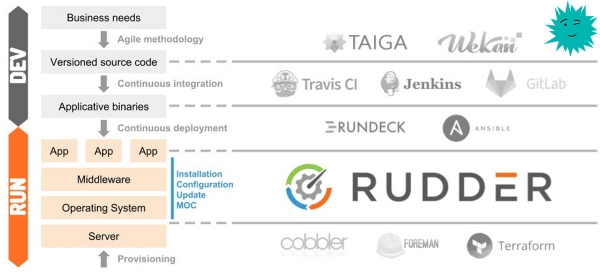
Rudder is an open-source audit and configuration management utility that helps automate system setup. It works by installing an agent on each end user. Through a user-friendly interface, we can observe how well our infrastructure adheres to the defined policies.
Using
Below, I will outline how I use Rudder.
File and config control: ./ssh/authorized_keys; /etc/hosts; iptables; (and then wherever imagination takes us)
Control of installed packages: zabbix.agent or any other software
Server Installation
Recently upgraded from version 5 to 6.1, everything went smoothly. Below are the commands for Debian/Ubuntu, but support also exists for: and .
I will hide the installation in spoilers so as not to distract you.
Spoiler
Dependencies
For rudder-server, Java RE version 8 or higher is required, which can be installed from the standard repository:
Check if it is installed
java -versionif the output
-bash: java: command not foundthen we install it
apt install default-jreServer
Import the key
wget --quiet -O- "https://repository.rudder.io/apt/rudder_apt_key.pub" | sudo apt-key add -Here is the fingerprint
pub  4096R/474A19E8 2011-12-15 Rudder Project (release key)
      Key fingerprint = 7C16 9817 7904 212D D58C  B4D1 9322 C330 474A 19E8
Since we do not have a paid subscription, we add the following repository
echo "deb http://repository.rudder.io/apt/6.1/ $(lsb_release -cs) main" > /etc/apt/sources.list.d/rudder.listUpdate the repository list and install the server
apt update
apt install rudder-server-root
Create an admin user
rudder server create-user -u admin -p "Your Password"In the future, we can manage users through the configuration
All set, the server is ready.
Server Configuration
Now we need to add the IP addresses of the Rudder agents or an entire subnet, according to the security policy.
Settings → General
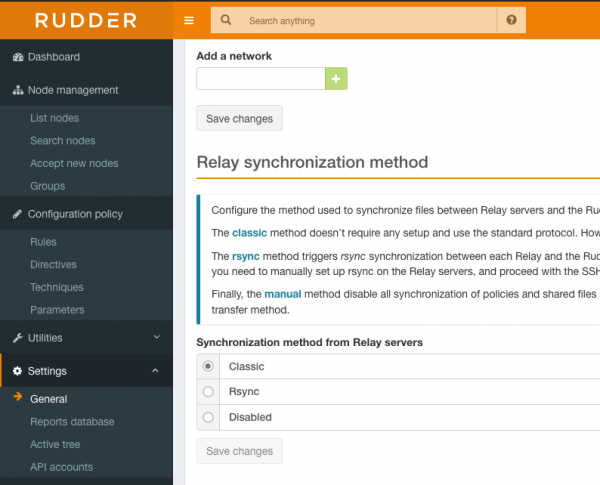
In the "Add a network" field, enter the address and mask in the format x.x.x.x/xx. To allow access from all addresses in the internal network (if this is a test network and you are behind NAT), enter: 0.0.0.0/0
Important — after adding the IP address, remember to click Save changes; otherwise, nothing will be saved.
Ports
On the server, we open the following ports
443 — tcp
5309 — tcp
514 — udp
We have dealt with the initial server setup.
Installing the Agent
Spoiler
Adding the key
wget --quiet -O- "https://repository.rudder.io/apt/rudder_apt_key.pub" | sudo apt-key add -Key fingerprint
pub  4096R/474A19E8 2011-12-15 Rudder Project (release key)
      Key fingerprint = 7C16 9817 7904 212D D58C  B4D1 9322 C330 474A 19E8
Adding the repository
echo "deb http://repository.rudder.io/apt/6.1/ $(lsb_release -cs) main" > /etc/apt/sources.list.d/rudder.listInstalling the agent
apt update
apt install rudder-agent
Agent configuration
We will specify the agent's IP address of the policy server
rudder agent policy-server #Without brackets. You can also use the domain name By running the following command, we will send a request to add the new agent to the server; in a couple of minutes, it will appear in the list of new agents. I will explain how to add it in the next section.
rudder agent inventoryWe can also forcibly start the agent, and it will send the request immediately.
rudder agent runOur agent is configured, let's move on.
Adding agents
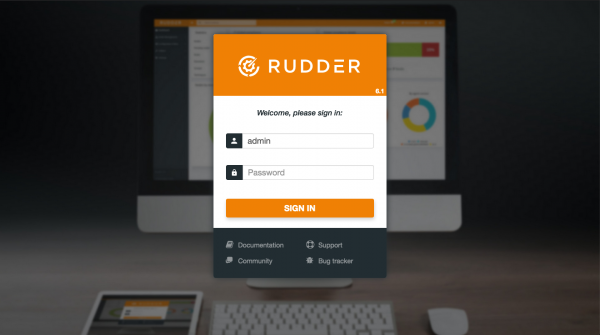
We log in
https://127.0.0.1/rudder/index.html
In the "Accept new nodes" section, your agent will appear. Check the box and click Accept.
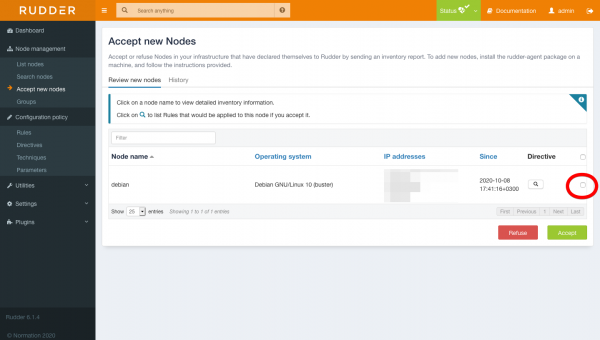
It will take some time for the system to check the server for compliance.
Creating server groups
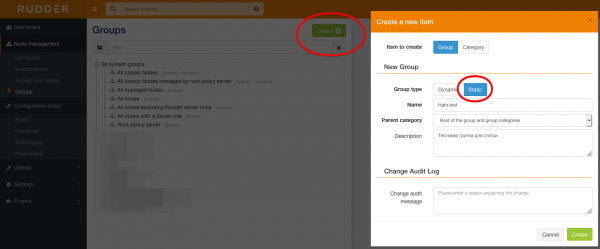
Let's create a group (what a hassle), no idea why the developers made such a cumbersome group formation, but as far as I understand, there’s no other way. Go to the Node management -> Groups section and click Create, choose a static group and name it.
We filter the server we need based on specific features, for example, by IP address, and save it.
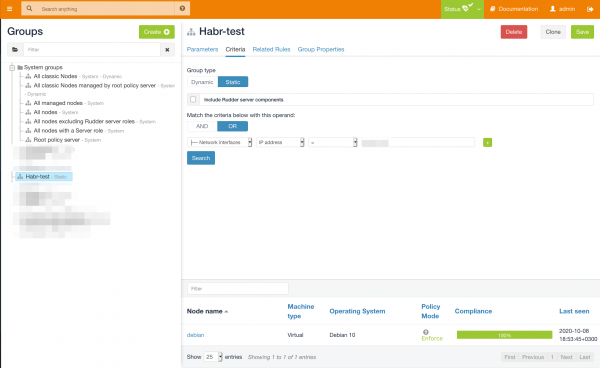
The group is configured.
Setting up rules
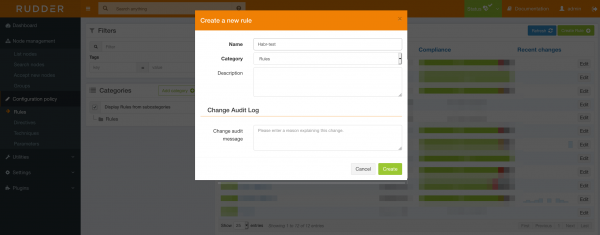
Go to Configuration policy → Rules, and create a new rule.
Add the previously prepared group (this can also be done later).
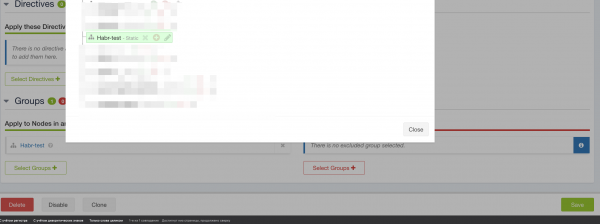
And we create a new directive.
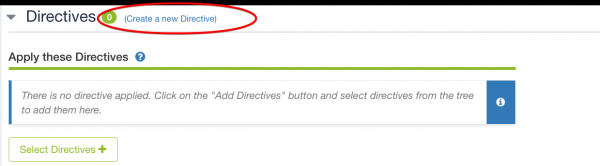
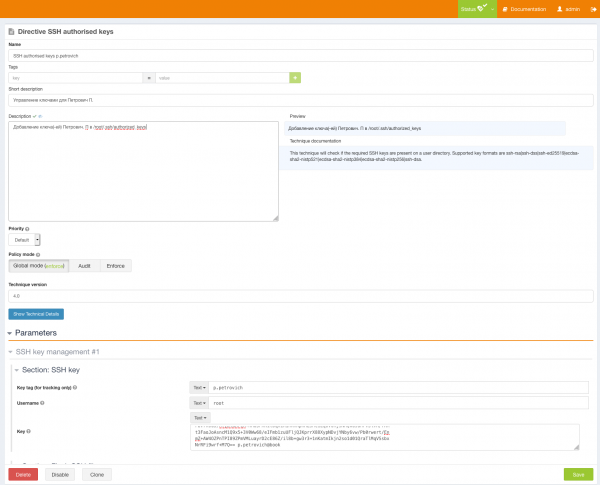
Let's create a directive to add public keys to .ssh/authorized_keys. I use this in the case of a new employee leaving, or as a precaution, for example, if someone accidentally deletes my key.
Go to Configuration policy → Directives; on the left, we see the "Directive library." Find "Remote access → SSH authorized keys," and on the right, click Create Directive.
We enter the user's data and add their key. Then we choose the application policy.
Global — The policy set by default.
Enforce — Execute on the selected servers.
Audit — It will conduct an audit and indicate which clients are key.
We must state our rule.
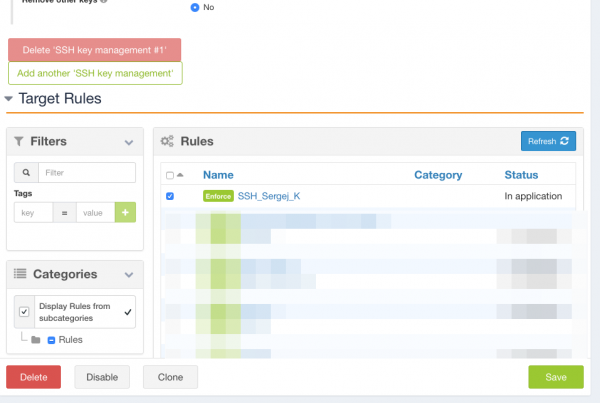
Then we save it, and everything is ready.
Checking

Key successfully added.
Perks.
The agent provides complete information about the server, including lists of installed packages, interfaces, open ports, and much more that you can see in the screenshot below.
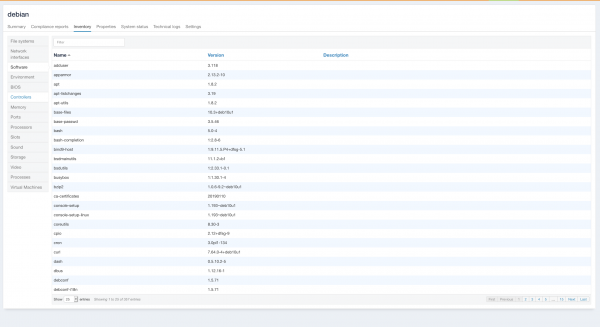
You can also install and manage software not only on Linux but also on Windows; I haven't checked the latter, as there was no need.
From the author.
You might ask, why reinvent the wheel when Ansible and Puppet have long existed?
Let me answer: Ansible has its drawbacks; for instance, we cannot see the current state of this config, or the familiar situation when you run a role or playbook and encounter errors about crashes, leading you to investigate what package has been updated on the server. I have just not worked with Puppet.
Does Rudder have any downsides? Yes, quite a few... Starting from agents falling off and needing to be reinstalled or using the rudder reset command (though, by the way, I haven't seen that in version 6), to extremely complicated setup and a non-intuitive interface.
Are there advantages? There are many advantages too: Unlike the well-known Ansible, we have a web interface where we can see the compliance we've applied. For example — are ports exposed to the outside world, what is the state of the firewall, and are security agents or other tools installed?
This software is excellent for the information security department, as the state of the infrastructure will always be visible, and if any rules turn red, that is a reason to check the server. As I mentioned, I have been using Rudder for two years now, and if you delve into it a bit, life gets better. The most challenging aspect in a large infrastructure is not remembering the state of the server, whether a junior missed the installation of security agents or configured iptables correctly; Rudder will help keep you informed about all events. Knowledge is power! )
P.S. It turned out much more than I planned; I won't describe how to install packages. If there are requests, I will write a second part.
P.S.S This article is for informational purposes; I decided to share it as there is very little information available online. Perhaps this will be of interest to someone. Have a good day, dear friends :)
Advertising
Epic servers — this is or Windows with powerful AMD EPYC processors and very fast Intel NVMe disks. Hurry to order!

Source: habr.com
