

Recently, I had some time to rethink how the secure password reset function should work, first when I was embedding this functionality into , and later when I was helping someone else do something similar. In the second case, I wanted to provide him with a link to a canonical resource with all the details about the secure implementation of a reset function. However, the problem is that such a resource does not exist, at least none that describes everything I think is important. So I decided to write it myself.
You see, the world of forgotten passwords is actually quite mysterious. There are many different, perfectly acceptable points of view and a lot of quite dangerous ones. There's a likelihood that you've encountered each of these as an end-user many times; therefore, I will try to use these examples to show who does everything right and who doesn't, and what to focus on for a proper implementation of the function in your application.
Storing passwords: hashing, encryption, and (oh!) plain text
We cannot discuss what to do with forgotten passwords until we discuss how they are stored. In the database, passwords are stored in one of three main types:
- Plain text. There is a column with the password stored in plain text.
- Encrypted. Usually with symmetric encryption (one key used for both encryption and decryption), and encrypted passwords also stored in one column.
- Hashed. A one-way process (a password can be hashed but cannot be unhashed); the password, let's hope, is accompanied by a salt, and each is in its own column.
Let's address the simplest question right away: never store passwords in plain text! Never. Just one vulnerability to , one thoughtlessly made backup, or one of dozens of other simple mistakes — and that's it, game over, all your passwords — that is, sorry, the passwords of all your clients become public domain. Naturally, this would mean a huge likelihood that public domain will consist of from all their accounts in other systems. And this will be your fault.
Encryption is better but has its weaknesses. The problem with encryption lies in decryption; these seemingly crazy ciphers can be transformed back into plain text, and when that happens, we revert to the situation with readable passwords. How does this occur? A small flaw penetrates the code that handles password decryption, making it publicly accessible — that's one way. Hackers gain access to the machine where encrypted data is stored — that's the second way. Another method involves stealing a database backup, and someone also acquiring the encryption key, which is often stored very insecurely.
And this brings us to hashing. The idea behind hashing is that it is one-way; the only way to compare a user-entered password with its hashed version is by hashing the input and comparing them. To prevent attacks using tools like 'rainbow tables', we add randomness to the process with salt (for completeness, read my on cryptographic storage). Ultimately, with proper implementation, we can with a high degree of confidence assume that hashed passwords will never become plain text again (I will discuss the advantages of different hashing algorithms in another post).
A brief argument about hashing and encryption: the only reason you would ever need to encrypt a password instead of hashing it is when you need to see the password in plain text, and you should never want that, at least in the case of a standard website. If you need it, chances are, you are doing something wrong!
Attention!
Right below in the post is a part of a screenshot from the pornographic website AlotPorn. It is neatly cropped, and there’s nothing in it that you wouldn’t see at the beach, but if this might still cause any issues, then do not scroll down.
Always reset the password, never remind it
Have you ever been asked to create a reminder function? Forgot your password? Take a step back and reconsider this request from another angle: why is there a need for this 'reminder'? Because the user has forgotten their password. What we really want to do is help them log in again.
I understand that the word 'reminder' is often used in a conversational sense, but what we're actually trying to do is securely assist the user in getting back online. Since security is paramount, there are two reasons why reminders (i.e., sending the user their password) are not appropriate:
- Email is an insecure channel. Just as we wouldn’t transmit anything confidential over HTTP (we would use HTTPS), we should avoid sending anything via email, as its transport layer is not secure. In fact, it's much worse than simply transmitting information over an unencrypted transport protocol, because email is often stored on a device, accessible to system administrators, forwarded and distributed, exposing it to malware, and so forth. Unencrypted email is an extremely insecure channel.
- You should not have access to the password at all. Revisit the previous section on storage — you should have a hashed password (with a good, strong salt), meaning you should not be able to extract the password in any way and send it via email.
Let me illustrate the problem with an example : Here’s a typical login page:
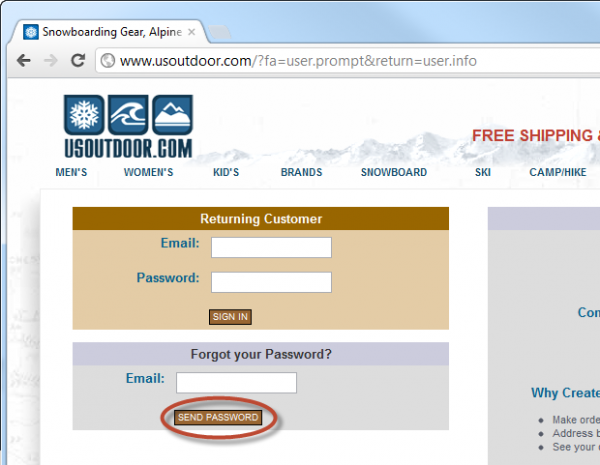
Clearly, the first issue is that the login page does not load over HTTPS, and the site also offers to send the password ('Send Password'). This might be an example of the conversational usage of the term mentioned above, so let's take another step and see what happens:
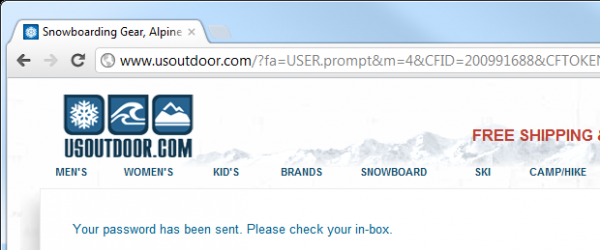
It unfortunately doesn’t look much better; and email confirms there's a problem:
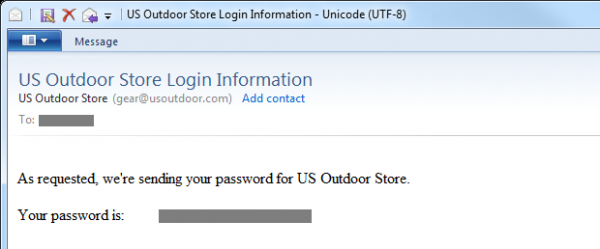
This tells us two important aspects of usoutdoor.com:
- The site does not hash passwords. At best, they are encrypted, but it’s quite possible that they are stored in plain text; we see no evidence to the contrary.
- The site sends a long-term password (we can go back and use it repeatedly) over an unprotected channel.
Having addressed this, we need to verify whether the reset process is being executed securely. First, we need to ensure that the requester has the right to perform the reset. In other words, prior to this, we need an identification check; let’s look at what happens when the identity is confirmed without first verifying that the requester is indeed the account owner.
The enumeration of usernames and its impact on anonymity
This issue is better illustrated visually. The problem:
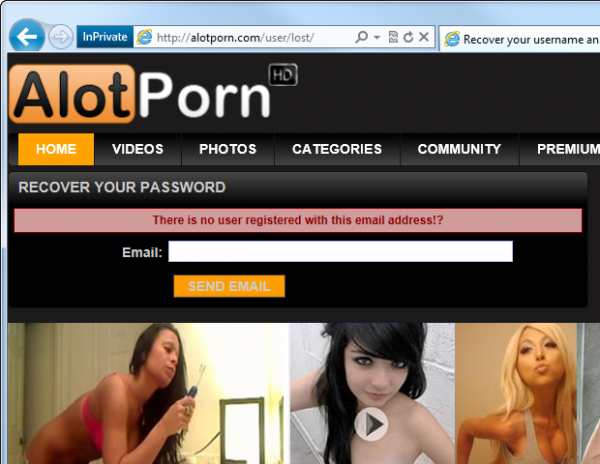
Do you see? Note the message, "There is no user registered with this email address." The problem clearly arises if a website confirms this. the presence of a user registered with that email address. Bingo — you just discovered your husband’s/boss’s/neighbour’s porn fetish!
Of course, pornography is a classic example of the importance of privacy; however, the danger of associating identity with a particular website is much broader than the potentially awkward situation described above. One of the dangers is social engineering; if an attacker can associate a person with a service, they will have information that they can start to exploit. For example, they can contact the individual, posing as a representative of the website, and request additional information while attempting to engage in .
Such practices also create the danger of "username enumeration," where one can check the existence of an entire collection of usernames or email addresses on a website using simple bulk queries and analyzing the responses. Do you have a list of email addresses for all employees and a few minutes to write a script? Then you see what the problem is!
So what is the alternative? In fact, it is quite simple and wonderfully implemented in :
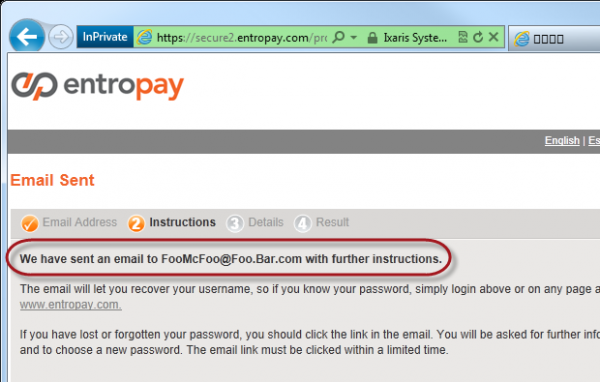
Here, Entropay reveals absolutely nothing about the existence of an email address in its system to anyone who does not own that address. If you own if this address does not exist in the system, you will receive an email like this:
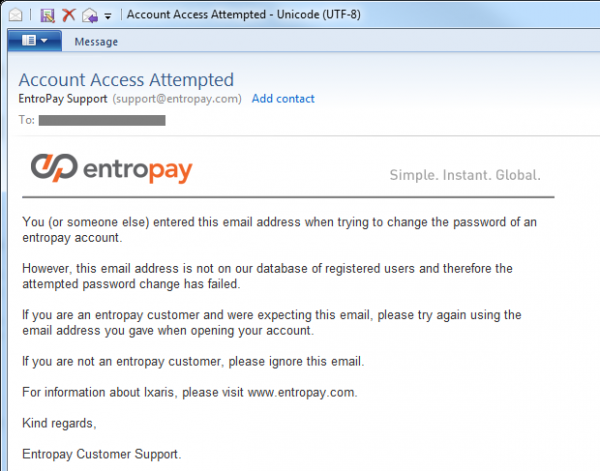
Of course, there can be acceptable situations where someone thinks, that they registered on the website, but this is not the case, or they did it with a different email address. The example shown above successfully handles both situations. Obviously, if the address matched, you would receive an email facilitating the password reset.
The nuance of the chosen Entropay solution is that the identification check is performed via email before any online verification. Some sites ask users for answers to security questions (more on this below) up to about how the reset can begin; however, the problem with this is that one must answer the question while providing some form of identification (email or username), which makes it almost impossible to respond intuitively without revealing the existence of an anonymous user's account.
With this approach, there is a small reduction in usability because in the case of trying to reset a non-existent account, there is no instant feedback. Naturally, that is the purpose of sending the email, but from the perspective of the actual end user, if they enter an incorrect address, they will only find out about this when they receive the email. This can create a certain tension on their part, but it's a small price to pay for such a rare process.
Another note, slightly off-topic: login help functions that reveal the validity of a username or email address face the same issue. Always respond to the user with the message 'Your username and password combination is invalid,' instead of explicitly confirming the existence of identifying information (for example, 'the username is correct, but the password is incorrect').
Sending a reset password versus sending a reset URL
The next concept we need to discuss relates to the method of password reset. There are two popular solutions:
- Generating a new password on the server and sending it via email
- Sending an email with a unique URL that simplifies the reset process
Despite , the first option should never be used. Its problem is that it implies the presence of a stored password, which can be revisited and reused at any time; it was transmitted over an unsecured channel and remains in your inbox. There is a chance that your inbox synchronizes with mobile devices and email clients, plus they can be stored online in a webmail service for a very long time. The point is that an inbox cannot be considered a reliable means for long-term storage.
. But aside from this, the first point has another serious issue — it greatly simplifies malicious account blocking. If I know the email address of the person who owns an account on a website, I can block them at any time simply by resetting their password; this is a denial-of-service attack served on a silver platter! That is why the reset should only be conducted after successful verification of the requester's right to it.
When we talk about a reset URL, we mean the web address that is unique to this specific reset process. Naturally, it needs to be random, not easily guessable, and should not contain any external links to the account that would facilitate the reset. For example, the reset URL should not simply be a path like 'Reset/?username=JohnSmith'.
We want to create a unique token that can be sent via email as a reset URL, and then verify it against the record on the server with the user's account, thus confirming that the account owner is indeed the same person attempting to reset the password. For instance, the token might look like '3ce7854015cd38c862cb9e14a1ae552b' and be stored in a table along with the user ID performing the reset and the token generation time (more on this shortly). When sending the email, it contains a URL like 'Reset/?id=3ce7854015cd38c862cb9e14a1ae552b', and when the user loads it, the page requests the existence of the token, after which it verifies the user's information and allows password changes.
Of course, since the process described above (hopefully) allows the user to create a new password, we need to ensure the URL loads over HTTPS. No, This URL with the token must utilize transport layer security to prevent any attacks on the new password input form. and the password created by the user must be transmitted over a secure connection.
Additionally, the password reset URL should have a token time limit, allowing the reset process to be completed within a specific timeframe, say within an hour. This ensures that the reset time window is minimized so that the recipient of this reset URL can only act within this very small window. Naturally, an attacker can initiate the reset process again, but they would need to obtain another unique reset URL.
Finally, we need to ensure the one-time use of this process. After the reset process is completed, the token must be removed so that the reset URL is no longer functional. The previous point ensures that an attacker has a very small window in which they can manipulate the reset URL. Plus, of course, after a successful reset, the token is no longer needed.
Some of these steps may seem overly redundant, but they absolutely do not hinder usability and actually actually enhance security, even in situations we hope will be rare. In 99% of cases, the user will engage in the reset within a very short period and will not reset their password again in the near future.
The Role of CAPTCHA
Ah, CAPTCHA, that security measure we all love to hate! In fact, CAPTCHA is less a means of protection and more of identification — to determine whether you are a human or a bot (or automated script). Its purpose is to prevent automatic form submissions, which, naturally, take the parameter can be used as an attempt to breach security. In the context of password resets, CAPTCHA ensures that the reset function cannot be hacked through brute force to either spam the user later or attempt to determine the existence of accounts (which, of course, will be impossible if you followed the advice from the verification section).
Of course, CAPTCHA itself is not perfect; there are many precedents of its software 'hacking' with sufficient success rates (60-70%). Moreover, there is a solution mentioned in my post about , where one can pay people a fraction of a cent to solve each CAPTCHA and achieve a success rate of 94%. That means it is vulnerable, yet it slightly raises the entry barrier.
Let's take a look at the PayPal example:
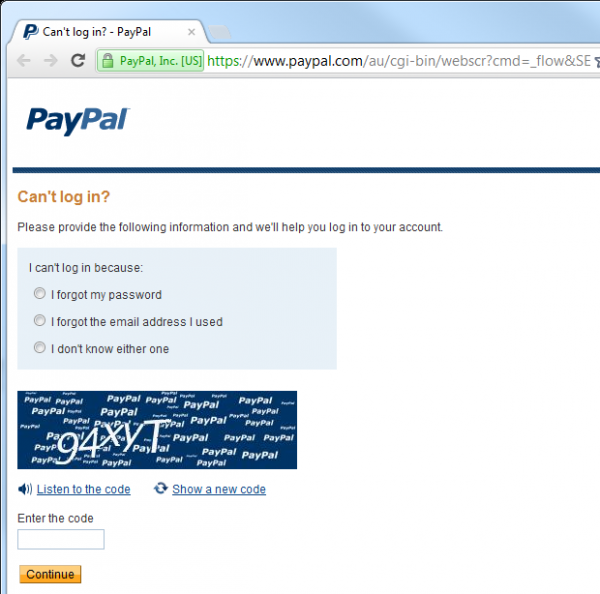
In this case, the reset process simply cannot begin until the CAPTCHA is solved, so theoretically automating the process is impossible. Theoretically.
However, for most web applications, this would be overkill and definitely represents a decrease in usability — people simply dislike CAPTCHA! Furthermore, CAPTCHA is something that can easily be revisited if necessary. If a service starts to come under attack (this is where logging comes in handy, but more on that later), adding CAPTCHA is a straightforward task.
Security questions and answers
With all the methods we've discussed, we had the opportunity to reset the password simply by having access to the email account. I say 'simply,' but of course, illegally gaining access to someone else's email account should be a difficult process. However, .
In fact, the link presented above regarding the hacking of Sarah Palin's Yahoo! account serves two purposes; firstly, it illustrates how easily (some) email accounts can be hacked, and secondly, it shows how maliciously bad security questions can be exploited. But we'll return to this later.
The problem with password resets that rely entirely on email is that the integrity of the website account whose password you are trying to reset becomes entirely dependent on the integrity of the email account. Anyone who has access to your email has access to any account that can be reset by simply receiving an email.For such accounts, email is the 'key to all doors' in your online life.
One way to reduce this risk is to implement a secret question and answer pattern. Without a doubt, you've seen them before: you choose a question to which only you should know the answer, after which, when resetting the password, you are asked that question. This adds confidence that the person attempting to reset is indeed the account owner.
Let's revisit Sarah Palin: the mistake was that the answers to her secret question/questions were easily discoverable. In particular, when you are such a significant public figure, information like your mother's maiden name, educational history, or where someone might have lived in the past isn't very secret. In fact, much of it can be found by almost anyone. And that's exactly what happened with Sarah:
Hacker David Kernell gained access to Palin's account by finding details about her biography, such as her college and date of birth, and then used the forgotten password recovery function for Yahoo! accounts.
First and foremost, this is a design flaw on Yahoo!'s part—by asking such simple questions, the company essentially undermined the value of the secret question, and therefore, the security of its system. Of course, resetting passwords for email accounts is always more complex, as you cannot confirm ownership by sending an email to the owner (without having a second address), but fortunately, there are not many ways to implement such a system today.
Returning to secret questions—there is an option to allow users to create their own questions. The problem is that the result will tend to be horrendously obvious questions:
What color is the sky?
Questions that put people in an awkward position when identifying a secret question use the person (for example, in a call center):
Who did I sleep with on Christmas?
Or downright silly questions:
How do you spell 'password'?
When it comes to secret questions, users need to be saved from themselves! In other words, the secret question should be determined by the site itself, or even better, ask a series of secret questions from which the user can choose. And not just choose one; ideally, the user should select two or more secret questions at the time of account registration.which will then be used as a second identification channel. Having multiple questions increases the confidence in the verification process, as well as allows for some randomness (not always showing the same question), plus it provides a bit of redundancy in case the legitimate user forgets their password.
What should a good security question be like? Several factors influence this:
- It should be concise — the question should be clear and unambiguous.
- The answer should be specific — we don't need a question that one person can answer in different ways.
- Possible answers should be diverse — a question about someone's favorite color gives a very small subset of possible answers.
- Search the answer must be complicated — if the answer can easily be found any (let's remember people in high positions), then it's a bad one.
- The answer should be constant over time — if you ask about someone's favorite movie, a year later the answer may be different.
As it happens, there is a website dedicated to good questions called . Some questions seem quite good, while others fail some of the tests described above, especially the 'ease of search' test.
Let me demonstrate how security questions are implemented in PayPal and, in particular, what efforts the site makes for identification. Earlier we saw the page beginning the process (with CAPTCHA), and here we will show what happens after you enter your email address and solve the CAPTCHA:
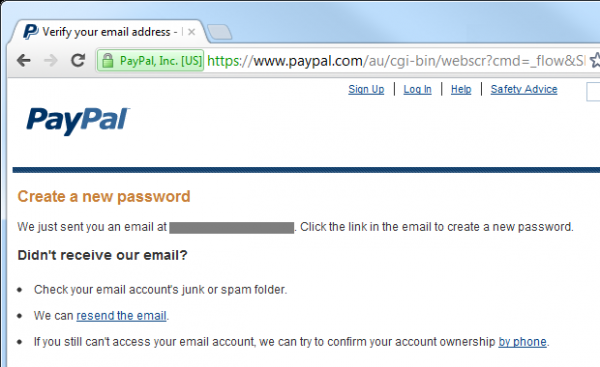
As a result, the user receives such an email:
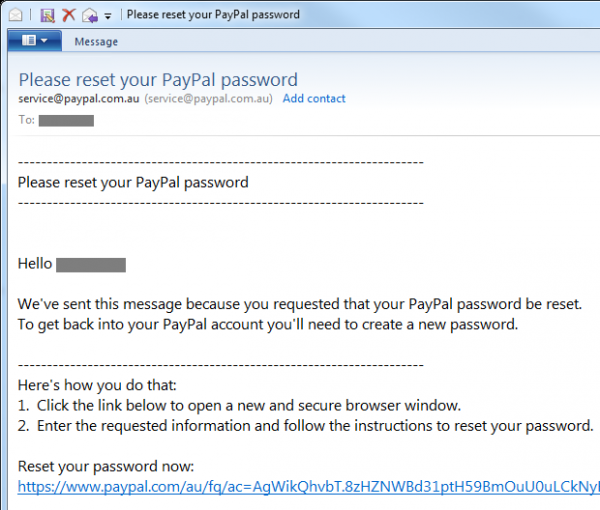
So far, everything is quite normal, but here's what lies behind this reset URL:
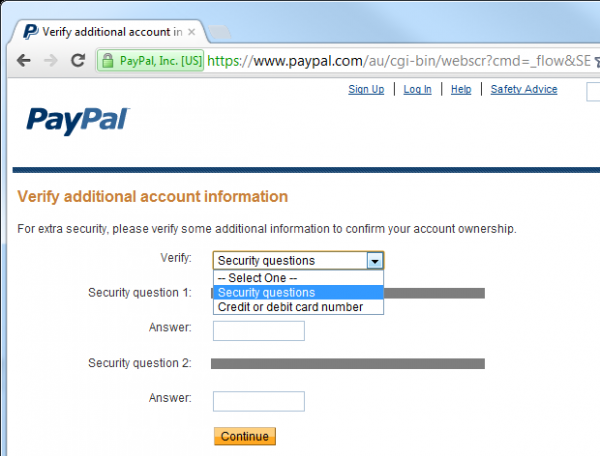
Thus, the security questions come into play. In fact, PayPal also allows you to reset your password by confirming your credit card number, which provides an additional channel that many sites do not have access to. I simply can't change the password without answering both security questions (or knowing the card number). Even if someone captures my email, they won't be able to reset my PayPal account password unless they know a bit more personal information about me. What information? Here are the security question options offered by PayPal:
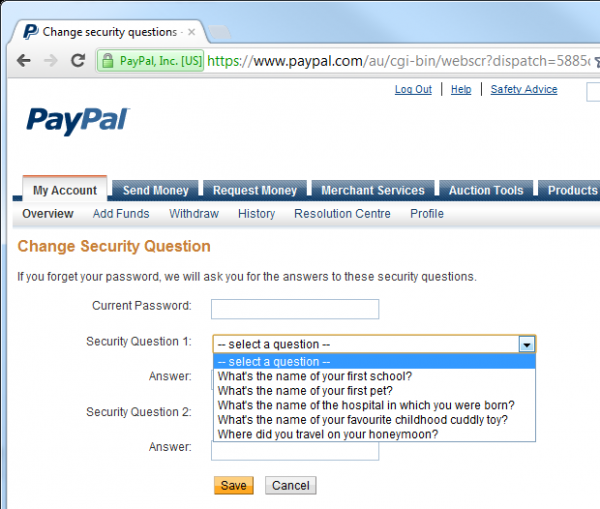
The question about schools and hospitals may seem somewhat dubious in terms of ease of search, but the others are not so bad. However, to enhance security, PayPal requires additional identification for changes answers to secret questions:
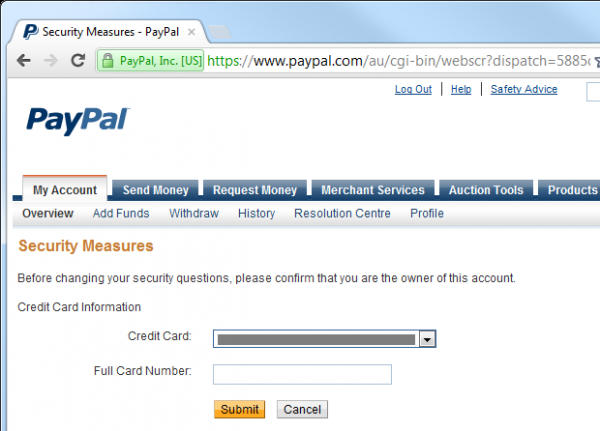
PayPal is quite an ideal example of secure password reset: it implements CAPTCHA to reduce the risk of brute force attacks, requires two secret questions, and then demands yet another form of completely different identification just to change the answers — and this is after the user has already logged in. Of course, this is precisely what we expected from PayPal; it is a financial organization dealing with large sums of money. This does not mean that every password reset should follow these steps — in most cases, it's overkill — but it's a good example for situations where security is a serious business.
The convenience of the secret questions system is that if you didn't implement it right away, it can be added later if the level of resource protection requires it. A good example of this is Apple, which recently implemented this mechanism [article written in 2012]. Once, while updating an app on my iPad, I saw the following prompt:
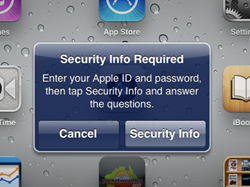
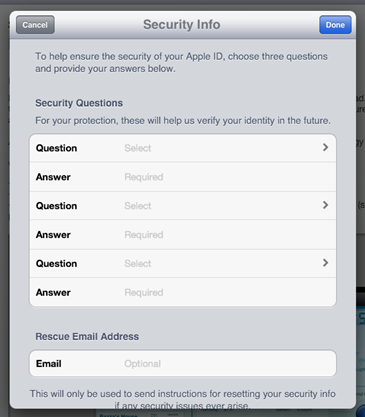
Then I saw a screen where I could choose several pairs of secret questions and answers, as well as a rescue email address:
As for PayPal, the questions are selected in advance and some of them are actually quite good:
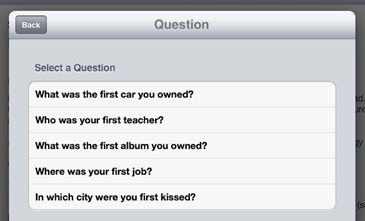
Each of the three pairs of questions and answers represents a distinct set of possible questions, so there are enough ways to configure the account.
Another aspect to consider regarding the response to a secret question is storage. Having plain text in the database presents almost the same threats as a password, namely — the disclosure of the database instantly reveals the value and endangers not only the application but potentially entirely different applications that use the same secret questions (this again ). One option is secure hashing (a strong algorithm and cryptographically random salt), yet unlike most cases of password storage, there may be a legitimate reason to see the response as plain text. A typical scenario is identity verification by a live operator over the phone. Naturally, hashing is applicable in this case too (the operator can simply enter the response provided by the client), but at the very least, the secret answer should reside at some level of cryptographic storage, even if it's just symmetric encryption. In summary: treat secrets as secrets!
And the final aspect of security questions and answers is that they are more susceptible to social engineering. Trying to directly extract the password for someone else's account is one thing, while striking up a conversation about their education (a popular security question) is entirely another. In fact, you could very well be conversing with someone about many aspects of their life that could represent a security question, without raising suspicion. The essence of a security question is that it relates to someone's life experience, which makes it memorable, and therein lies the problem — people love to talk about their life experiences! There’s not much that can be done about that unless you choose such options for security questions that are less likely to be extracted through social engineering. it would probably be possible to extract through social engineering.
[Continued.]
Advertising
VDSina offers reliable , each server connected to an internet channel of 500 Megabits and is free from DDoS attacks!
Source: habr.com
