

Observing the development of a file-sharing network is interesting, but participating in it is even more fascinating.
Today, by setting up and launching a modern hub, a newly minted administrator gains access to virtually all the developments and accumulated expertise in this area from their predecessors. They have a system ready for expansion and customization, including through numerous scripts.
C hubs differently. The structure of this protocol implies extensibility. Want a new feature? Well then – propose, promote, implement, deploy, and use.
Consequently, you can indeed get a ready-made hub 'out of the box', but just launching it and forgetting about it would be unwise. Extensibility in a historical context also implies having varying amounts of different features for client and server software depending on the version. What works perfectly for one user might be incompatible with another client's, and this needs to be considered.
This also happened with IPv6. The old-timer NMDC can't handle it at all, but ADC is inherently ready for it. However, it's not that simple.
Just a bit of theory
An 'active' user can accept incoming connections. In fact, the outgoing connection request from them is essentially an invitation..
A 'passive' user can generally only use outgoing requests. Through the hub, they ask the active user to send an invitation – and the connection is established.
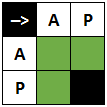
And yes, this mechanism does not depend on the version of the IP protocol used.
The Swan, the Cancer, and the Pike
Let's talk about client software.
Support for IPv6 in is experimental. There are no separate settings for it, and it was all the more surprising for me to see different operating modes for different IP versions, with the passive mode actually designed for the sixth, though that's not precise.
I couldn't obtain the active mode with manual settings even when explicitly using a domain with an AAAA record as the WAN IP, but in automatic mode with UPnP, everything worked as it should.
also supports IPv6 connections, and it is implemented separately from IPv4. Moreover, this client modifies user tags in such a way that it displays the operational modes for both IP protocols simultaneously. The hubs themselves cannot do this (yet), which is unfortunate.
I should clarify right away: AirDC++ does this for itself as well. Moving forward for convenience, I will use combinations like AP or AA as an indication of the active or passive modes for IPv4 and IPv6 respectively, rather than displaying them in the actual client's tag on a real hub. This is important.
In our experiment, we will use FlylinkDC++ as a client not familiar with IPv6. It should also be noted that support for was not implemented for it anywhere at the time of writing this article.
Beginning
First, we will consider connections between users of different IP protocol versions that are definitively impossible. The test will use with resource A- and AAAA-records for the domain name, acting as its address.
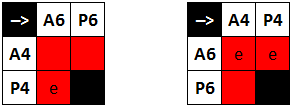
Note that here, upon (actual) attempts to contact a user with an IP address of version six, an error is displayed.
Hub:	[Outgoing][IPv4:412]	 	DRCM AACX AACU ADCS/0.10 337151563
Hub:	[Incoming][IPv4:412]	 	DCTM AACU AACX ADCS/0.10 1988 337151563
Hub:	[Outgoing][IPv4:412]	 	DSTA AACX AACU 240 IPsunknown
In human terms, this sounds like
P4: – May I connect to you?
A6: – Go ahead!
P4: – Life is pain 0_0
A brief glossary, just in case, .
And if the connection is initiated by A4, then no error is displayed, and the connection simply "hangs."
Hub: [Outgoing][IPv4:412] DCTM AACX AACU ADCS/0.10 1993 3871342713To be, not to seem
What is important is the connection mode displayed on the hub.
Clients without IPv6 support will see users connected through it as undeniably passive simply because the hub does not fill in I4 or I6 the field accordingly.
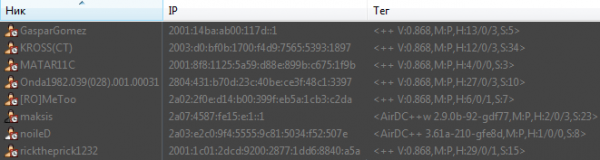
FlylinkDC++ vs. IPv6
In reality, the situation is both simpler and more complicated.
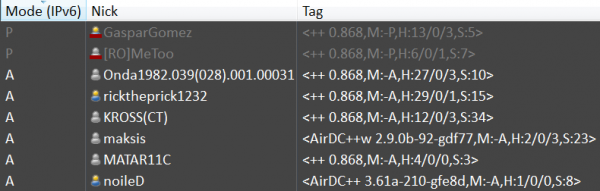
AirDC++ vs. IPv6
Simpler because IPv6 takes precedence over IPv4, and that is clear. It is through it (although there is an option for overriding) that a connection to the hub will be established, and its active client will offer to connect to the passive one.
More complicated because if there are users with IPv6 support on the hub, but they are strictly connected via an IPv4 address, then...
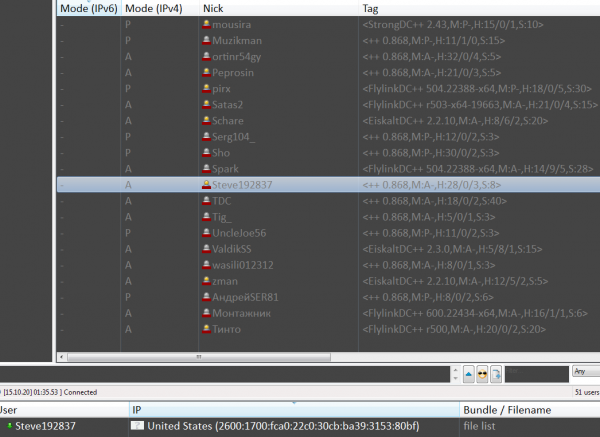
… you can connect with them (randomly) without having IPv4 at all.
Note that the remote client has identified itself as active, but is treated as passive. Why?
Let’s send him to the swing.
Now let’s try to connect clients with different, but partially common IPv4 protocol support sets.
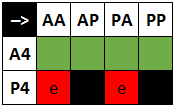
Yes, it’s a shame that passive users have to sit on the sidelines. But there’s nothing you can do about it, as their visible IP address doesn’t matter much – that’s why they are passive.
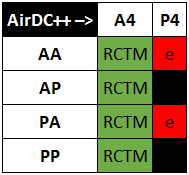
Wow! The active client is sending ?.. Логично было бы ожидать «зависшего» соединения, но нет, оно получается на условиях A4.
Why is that? We turn to the developer and get the response:
isn’t good if the other user doesn’t support IPv6.
And you can’t argue with that! But this requires internal logic that is independent of the hub (see code and ). Passive users still cannot be helped because
Active mode =
Attempts to connect between clients with common IPv6 protocol support sets look as follows. Let me remind you, to achieve PA for DC++ I couldn't manage.
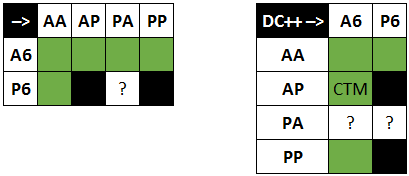
And again a surprise. It turns out that the passive mode for IPv6, demonstrated by DC++, is either an intentional fake or a bug.
What's next?
Currently, there are exactly two ways to solve all possible connection issues for users in different modes and with different IP protocol support sets.
The first is to disable IPv6 altogether or, conversely, create a hub that works only through it.
The second is this , which has just reached the testing stage.
And while being lazy to configure active mode for DC, remember:
To whom much is given, from him much will be required; and to whom little is given, from him even that little will be taken away. Luke 8:18
Source: habr.com
