

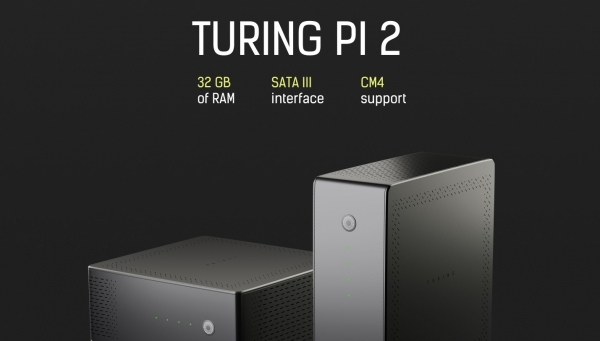
Greetings, Habr community! Recently, I wrote about our first-generation cluster board. []. Today, I want to talk about our work on the of RAM.
We are passionate about mini servers that can be used for both local development and local hosting. Unlike desktop computers or laptops, our servers are designed to operate 24/7, and they can be quickly connected in a federation; for example, there were 4 processors in the cluster, and within 5 minutes, there were 16 processors (without additional networking equipment) and all this in a compact form factor, silently and energy-efficiently.
The architecture of our servers is based on a cluster principle, meaning we create cluster boards that connect several computing modules (processors) via an onboard Ethernet network. For simplification, we are not yet creating our own computing modules, but are using Raspberry Pi Compute Modules, and we had high hopes for the new CM4 module. However, things took an unexpected turn with their new form factor, and I think many are disappointed.
Below, I will explain how we transitioned from V1 to V2 and how we adapted to the new form factor of the Raspberry Pi CM4.
So, after creating a cluster with 7 nodes, the question is — what next? How to increase the value of the product? 8, 10, or 16 nodes? What module manufacturers? Considering the product as a whole, we realized that the key here is not the number of nodes or who the manufacturer is, but the essence of clusters as building blocks. We need to find the minimal building block that
First, will act as a cluster while having the capacity to connect disks and expansion boards. The cluster block must be a self-sufficient basic node with extensive expansion capabilities.
The second reason, so that minimal cluster blocks can be interconnected to form larger clusters efficiently in terms of budget and scaling speed. The scaling speed should be faster than connecting regular computers in a network and significantly cheaper than server equipment.
Thirdly, the minimal cluster blocks must be compact, mobile, energy-efficient, cost-effective, and not demanding in terms of operational conditions. This is one of the key differences from server racks and everything related to them.
We started by determining the number of nodes.
Number of nodes
Through simple logical reasoning, we realized that 4 nodes are the best option for a minimal cluster block. 1 node is not a cluster, 2 nodes are insufficient (1 master, 1 worker, no scaling capability within the block, especially for heterogeneous options), 3 nodes look fine, but they are not a power of 2 and scaling within the block is limited. 6 nodes end up costing almost as much as 7 nodes (from our experience, this results in high costs), and 8 nodes are too many, not fitting in a mini ITX form factor, and represent an even more expensive solution for PoC.
We consider four nodes per block to be the golden mean:
- fewer materials for the cluster board, thus cheaper production
- multiples of 4, a total of 4 blocks provide 16 physical processors
- a stable scheme of 1 master and 3 workers
- more heterogeneous variations, general-compute + accelerated-compute modules
- mini ITX form factor with SSD drives and expansion boards
Computing modules
The second version is based on the CM4; we thought it would be released in a SODIMM form factor. But...
We decided to make a SODIMM daughter board and assemble the CM4 directly into the modules so that users wouldn’t have to think about the CM4.
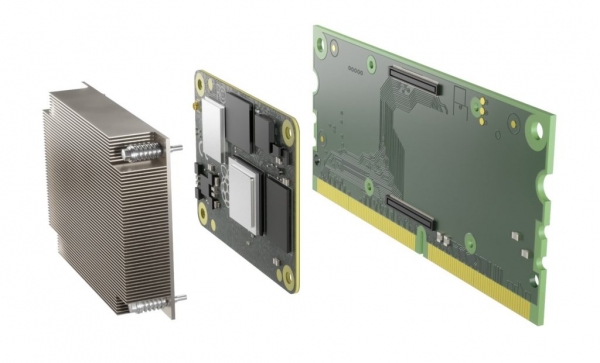
Turing Pi Compute Module with support for Raspberry Pi CM4
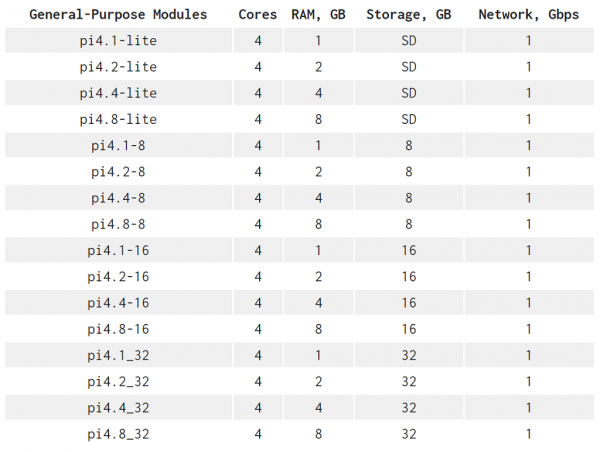
In fact, during our search for modules, an entire market of computing modules was discovered ranging from small modules with 128 MB RAM to those with 8 GB RAM. We are looking ahead to modules with 16 GB RAM and more. For edge hosting of applications based on cloud-native technologies, 1 GB RAM is already insufficient, and the recent appearance of modules with 2, 4, and even 8 GB RAM provides a good potential for growth. We even considered options with FPGA modules for machine learning applications, but their support has been postponed due to the lack of a developed software ecosystem. While studying the module market, we came up with the idea of creating a universal interface for modules, and in V2, we are starting to unify the interface of computing modules. This will allow V2 version owners to connect modules from other manufacturers and mix them for specific tasks.
V2 supports the entire range of Raspberry Pi 4 Compute Modules (CM4), including Lite versions and modules with 8 GB RAM
Peripheral
After determining the module vendor and the number of nodes, we approached the PCI bus, which hosts the peripherals. The PCI bus is a standard for peripheral devices and is present in almost all computing modules. We have several nodes, and ideally, each node should be able to share PCI devices in a competitive request mode. For example, if it’s a disk connected to the bus, then it is available to all nodes. We began searching for PCI switches with multi-host support and found that none of them met our requirements. All these solutions were mostly limited to one host or multi-hosts but without competitive request mode to endpoints. The second issue was the high cost starting at $50 and above per chip. In V2, we decided to postpone experiments with PCI switches (we will return to them later as developments progress) and opted for assigning roles to each node: the first two nodes exposed one mini PCI Express port per node, while the third node exposed a 2-port 6 Gbps SATA controller. To access disks from other nodes, we can use a network file system within the cluster. Why not?
Sneakpeek
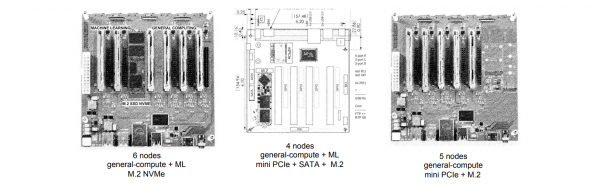
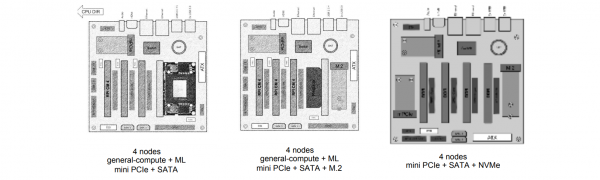
We decided to share some sketches showing how the minimal cluster block has evolved over time through discussion and contemplation.
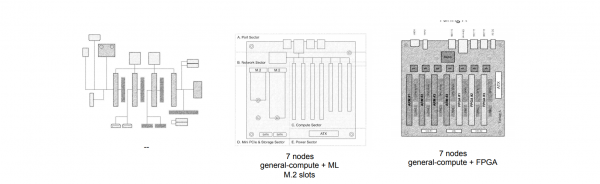
As a result, we arrived at a cluster block with 4 nodes, 260-pin, 2 mini PCIe (Gen 2) ports, and 2 SATA (Gen 3) ports. The board features a Layer-2 Managed Switch with VLAN support. The first node has a mini PCIe port that can accommodate a network card, providing an additional Ethernet port or 5G modem, thereby turning the first node into a router for the network within the cluster and Ethernet ports.
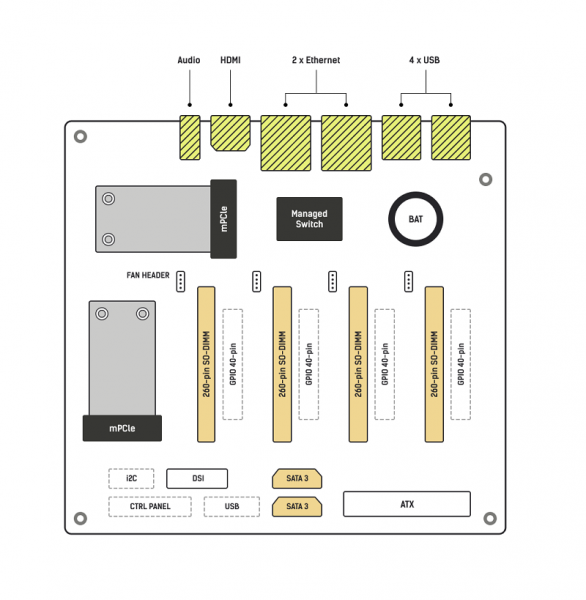
The cluster bus has more features, including the ability to flash modules directly through all slots and, of course, FAN connectors on each node with speed control.
The use of
Edge infrastructure for self-hosted applications & services
We designed V2 to serve as a minimal building block for consumer/commercial-grade edge infrastructure. With V2, it is inexpensive to start proof of concept and scale up as needs grow, gradually moving applications that are economically and practically feasible to host at the edge. Cluster blocks can be connected together, building larger clusters. This can be done progressively without significant risks to established systems.
processes. Today, there are already a vast number of applications for business that can be hosted locally. .
ARM Workstation
With up to 32 GB RAM per cluster, the first node can be used for the desktop version of the OS (e.g., Ubuntu Desktop 20.04 LTS), while the remaining 3 nodes can be used for compilation, testing, debugging, and developing cloud-native solutions for ARM clusters. It can also serve as a CI/CD node for the ARM peripheral infrastructure in production.
The Turing V2 cluster with CM4 modules is architecturally almost identical (with minor version differences in ARMv8) to the cluster based on AWS Graviton instances. The CM4 module processors use ARMv8 architecture, allowing you to build images and applications for AWS Graviton 1 and 2 instances, which are known to be significantly cheaper than x86 instances.
Source: habr.com
