


HashiCorp has introduced a new project to . It uses an HCL-based file to describe the build, delivery, and release of applications across various cloud platforms, from Kubernetes to AWS and Google Cloud Run. One could think of Waypoint as a combination of Terraform and Vagrant for outlining the process of building, delivering, and releasing your applications.
Staying true to itself, HashiCorp released Waypoint as open-source, complete with numerous examples. The level of orchestration is up to you; Waypoint comes as an executable that you can run directly on your laptop or from your chosen CI/CD orchestration tool. The target for application deployment is also your choice, as Waypoint supports Kubernetes, Docker, Google Cloud Run, AWS ECS, and more.
After reading the stunning and magnificent of applications provided by HashiCorp, we decided to take a closer look at orchestrating Waypoint with GitLab CI/CD. To do this, we will take a simple Node.js application running on AWS ECS from the example repository.
After cloning the repository, let's look at the structure of the application that displays a single page:
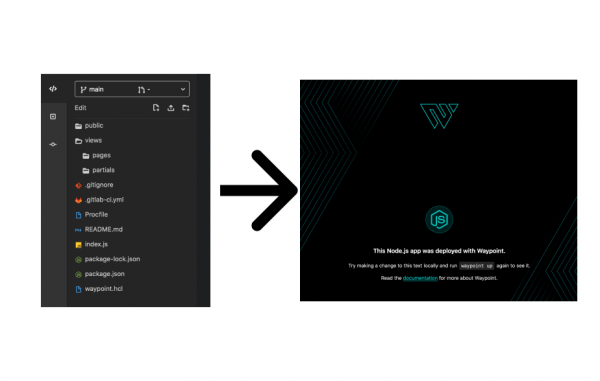
As you might have noticed, there is no Dockerfile in this project. They haven't been added in the example because they aren't needed at all, since Waypoint will take care of them for us. Let's take a closer look at the file waypoint.hcl, to understand what it will do:
project = "example-nodejs"

app "example-nodejs" {
  labels = {
    "service" = "example-nodejs",
    "env" = "dev"
  }

  build {
    use "pack" {}
    registry {
    use "aws-ecr" {
        region = "us-east-1"
        repository = "waypoint-gitlab"
        tag = "latest"
    }
    }
  }

  deploy {
    use "aws-ecs" {
    region = "us-east-1"
    memory = "512"
    }
  }
}
During the build stage, Waypoint uses Cloud Native Buildpacks (), to determine the programming language of the project and create a Docker image without using a Dockerfile. Essentially, this is the same technology used by GitLab in the Auto Build step. It's nice to see that CNB from CNCF is gaining more traction among industry users.
Once the image is built, Waypoint will automatically push it to our AWS ECR registry, ready for delivery. After the build is complete, the delivery step uses to deploy our application to our AWS account.
From my laptop — it's all straightforward. I set up Waypoint, which is already authenticated with my AWS account, and it 'just works.' But what if I want to go beyond my laptop? Or suddenly I want to automate this deployment as part of my overall CI/CD pipeline, where my current integration tests, security tests, and others run? This is where GitLab CI/CD comes into the story!
N.B. If you're just planning to implement CI/CD or want to start applying best practices in building pipelines, check out the new course from Slyer. . It is currently available at a pre-order price.
Waypoint in GitLab CI/CD
To orchestrate all this in GitLab CI/CD, let's see what we need in our file. .gitlab-ci.yml:
- First of all, we need a base image to run inside it. Waypoint works on any Linux distribution, it only requires Docker, so we can start with a generic Docker image.
- Next, we need to install Waypoint in this image. In the future, we can build and containerize this process for ourselves.
- Finally, we will run Waypoint commands.
What we’ve outlined above is everything our pipeline will need to run the necessary scripts for deployment, but for deploying to AWS, we need one more thing: we must authenticate in our AWS account. In the Waypoint documentation for authentication and authorization. HashiCorp also released an impressive project this week, . But for now, we can simply handle authentication and authorization ourselves.
For GitLab CICD authentication in AWS, there are several options. The first option is to use the built-in . This is suitable if your team is already using Vault to manage credentials. Another method, which is applicable if your team manages authorization through AWS IAM — ensure that the delivery tasks are executed through , authorized to run the deployment through IAM. But if you just want to familiarize yourself with Waypoint and want to do it quickly, there's one last option — add your AWS API and Secret keys to AWS_ACCESS_KEY_ID and AWS_SECRET_ACCESS_KEY.
Bringing it all together
Once we sorted out authentication, we can begin! Our final .gitlab-ci.yml looks like this:
waypoint:
  image: docker:latest
  stage: build
  services:
    - docker:dind
  # Define environment variables, e.g. `WAYPOINT_VERSION: '0.1.1'`
  variables:
    WAYPOINT_VERSION: ''
    WAYPOINT_SERVER_ADDR: ''
    WAYPOINT_SERVER_TOKEN: ''
    WAYPOINT_SERVER_TLS: '1'
    WAYPOINT_SERVER_TLS_SKIP_VERIFY: '1'
  script:
    - wget -q -O /tmp/waypoint.zip https://releases.hashicorp.com/waypoint/${WAYPOINT_VERSION}/waypoint_${WAYPOINT_VERSION}_linux_amd64.zip
    - unzip -d /usr/local/bin /tmp/waypoint.zip
    - rm -rf /tmp/waypoint*
    - waypoint init
    - waypoint build
    - waypoint deploy
    - waypoint release
You can see that we start with the image docker:latest and set up several environment variables required for Waypoint. In the section script we download the latest version of the Waypoint executable and install it in /usr/local/bin. Since our runner is already authenticated with AWS, we then simply run waypoint init, build, deploy and release.
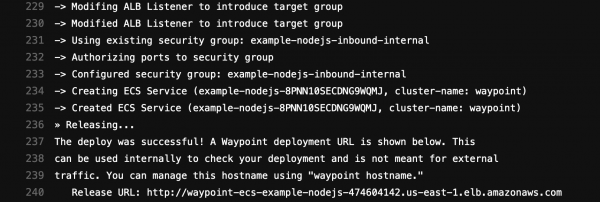
The build job output will show us the endpoint where we deployed the application:
Waypoint is one of , which work excellently with GitLab. For example, in addition to deploying applications, we can orchestrate the underlying infrastructure using . To standardize security in the SDLC, we can also integrate to manage secrets and tokens in CI/CD pipelines, providing a comprehensive solution for developers and administrators relying on secret management during development, testing, and production use.
The joint solutions developed by HashiCorp and GitLab help companies discover the best ways to develop applications, ensuring consistent management of delivery flows and infrastructure. Waypoint has taken another step in the right direction, and we look forward to the project's further development. You can learn more about Waypoint , and it's also worth exploring and . We have added our insights to . If you want to try everything out yourself, you can take a fully functional example from .
Understanding CI/CD principles, mastering the intricacies of working with GitLab CI, and starting to implement best practices can be achieved by taking the video course . Join us!
Source: habr.com
