

This article discusses a simple and quick data discovery tool, the operation of which you can see on KDPW. Interestingly, Whale is designed to be hosted on a remote git server. Details below.
How the Airbnb data discovery tool changed my life
In my career, I've had the pleasure of working on some fun problems: I studied flow mathematics while pursuing my degree at MIT, worked on incremental models, and contributed to an open-source project at Wayfair, as well as implementing new targeting models on the homepage and improvements to CUPED at Airbnb. But all this work was never glamorous — in fact, I often spent most of my time searching, examining, and validating data. While this was a constant state at work, it never occurred to me that it was a problem until I got to Airbnb, where it was resolved with a data discovery tool — .
Where can I find {{data}}? Dataportal.
What does this column mean? Dataportal.
How is {{metric}} doing today? Dataportal.
What is the meaning of life? In Dataportal, probably.
Alright, you've painted the picture. Finding data and understanding what it means, how it was created, and how to use it all takes just a few minutes, not hours. I could spend my time drawing simple conclusions or working on new algorithms (… or answering random data questions) instead of digging through notes, writing repetitive SQL queries, and pinging colleagues on Slack to try to recreate the context that someone else already had.
So what's the problem?
I realized that most of my friends did not have access to such a tool. Few companies want to allocate huge resources to build and maintain a platform tool like Dataportal. And while there are a few open-source solutions, they are generally built for scale, making customization and maintenance difficult without a dedicated DevOps engineer. So, I decided to create something new.
Whale: a ridiculously simple data discovery tool

And yes, by ridiculously simple, I mean ridiculously simple. Whale has only two components:
- A Python library that collects metadata and formats it in MarkDown.
- A command line interface in Rust for querying this data.
From the perspective of internal infrastructure, there's just a multitude of text files and an updating text program. That's it, so hosting on a git server, like Github, is trivial. No new query language to learn, no management infrastructure, no backups. Git is known to everyone, so synchronization and collaboration come free of charge. Let's take a closer look at the functionality. .
A full-featured graphical interface based on git.
Whale is designed to navigate the ocean of a remote git server. It to configure: define some connections, copy the Github Actions script (or write one for your chosen CI/CD platform) — and you immediately get a web tool for data discovery. You will be able to search, browse, document, and share your tables directly on Github.
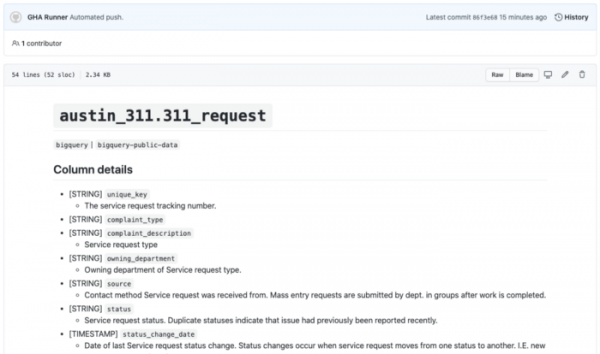
An example of a placeholder table generated using Github Actions. Full working demonstration .
Lightning-fast search from the CLI through your repository.
Whale lives and breathes in the command line, providing functional, millisecond searches through your tables. Even with millions of tables, we managed to make whale incredibly performant by using some clever caching mechanisms, as well as reworking the backend in Rust. You won't notice any search delay [hello, Google DS].

Whale demonstration, searching through a million tables.
Automatic metric computation [in beta]
One of my least favorite things as a data scientist is running the same queries over and over just to verify the quality of the data being used. Whale supports the ability to define metrics in simple SQL that will be executed on schedule along with your metadata cleaning pipelines. Define a metrics block in YAML format inside the placeholder table, and Whale will automatically run on a schedule and execute the queries nested within metrics.
```metrics
metric-name:
  sql: |
    select count(*) from table
``` 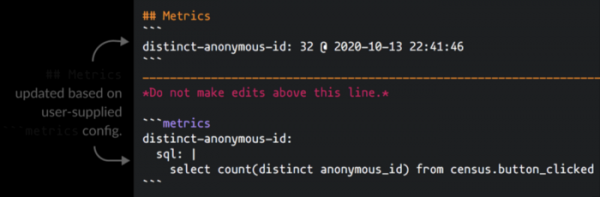
Combined with GitHub, this approach means that whale can serve as an easy central source of truth for metric definitions. Whale even saves values along with timestamps in the directory "~/.whale/metrics" if you want to create a chart or conduct deeper research.
The Future
After talking to users of our pre-release versions of whale, we realized that people needed broader functionality. Why a table search tool? Why not a metric search tool? Why not monitoring? Why not a SQL querying tool? While whale v1 was initially designed as a simple CLI companion tool, Dataportal/Amundsen, it has already transformed into a fully functional standalone platform, and we hope it becomes an integral part of a data scientist's toolkit.
If there is anything you want to see during the development process, join our , open Issues on , or even reach out directly to . We already have a number of interesting features — Jinja templates, bookmarks, search filters, Slack notifications, Jupyter integration, even a CLI dashboard for metrics — but we welcome your contributions.
Conclusion
Whale is developed and maintained by Dataframe, a startup I recently had the pleasure of founding with others. While whale is designed for data processing specialists, Dataframe is aimed at data processing teams. For those of you who want to collaborate more closely — don’t hesitate to , we will add you to the waiting list.
And with the promo code HABR, you can get an additional 10% off the discount indicated on the banner.
More Courses
Recommended Articles
Source: habr.com
