

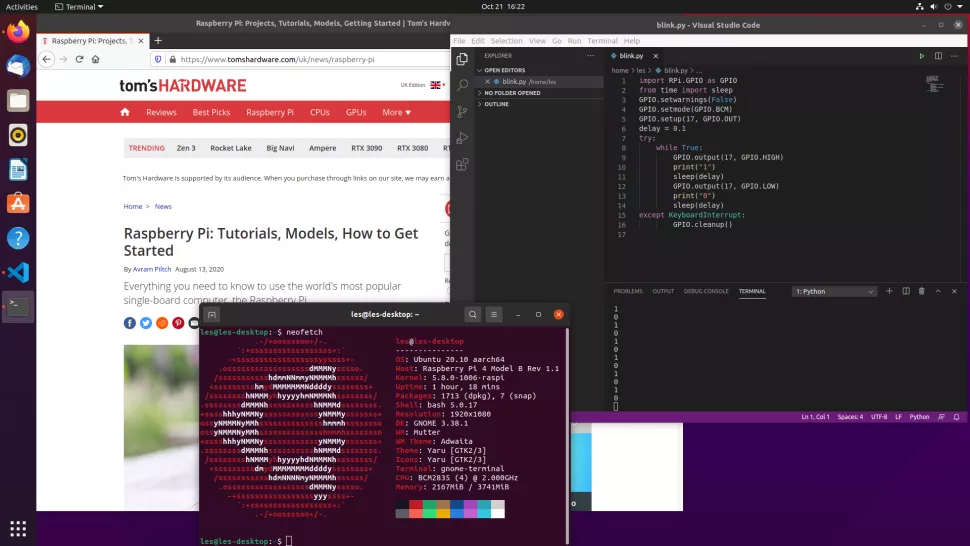
Yesterday on the Ubuntu download page the Ubuntu 20.10 distribution 'Groovy Gorilla'. Support will be provided until July 2021. New images in the following editions: Ubuntu, Ubuntu Server, Lubuntu, Kubuntu, Ubuntu Mate, Ubuntu Budgie, Ubuntu Studio, Xubuntu, and UbuntuKylin (the edition for China).
Additionally, for the first time on the day of release, developers released a specialized version for Raspberry Pi. Furthermore, this is a full , not a server version with a shell as in previous versions. In general, now Ubuntu works out of the box with the 'Raspberry Pi'.
What's new in Ubuntu 20.10?
- The main changes are application version updates. The desktop has been updated to GNOME 3.38, and the Linux kernel to version 5.8. Updated versions include GCC 10, LLVM 11, OpenJDK 11, Rust 1.41, Python 3.8.6, Ruby 2.7.0, Perl 5.30, Go 1.13, and PHP 7.4.9. A new release of the LibreOffice 7.0 office suite has been proposed. System components have been updated, such as glibc 2.32, PulseAudio 13, BlueZ 5.55, NetworkManager 1.26.2, QEMU 5.0, and Libvirt 6.6.
- Developers have switched to using nftables as the default filter. Fortunately, backward compatibility has been maintained — for this, the iptables-nft package is provided, which offers utilities with the same command line syntax as iptables.
- The Ubiquity installer now includes the option to enable Active Directory authentication.
- The popcorn package, which was used to transmit anonymized telemetry about downloads, installations, updates, and package removals, has been removed. Popcorn had been part of Ubuntu since 2006, but unfortunately, for a long time, this package and the related backend were inoperable.
- Changes have been made to Ubuntu Server, including improved Active Directory support in adcli and realmd, increased encryption performance for SMB3, the updated Dovecot IMAP server, added Liburing library, and the Telegraf package.
- Images for cloud systems have been modified. In particular, cloud system builds with specialized kernels and KVM for faster booting now load without initramfs by default (regular kernels still use initramfs).
- In Kubuntu, the KDE Plasma 5.19 desktop has become available, a set of KDE Applications 20.08.1 and Qt 5.14.2 library have appeared. Additionally, versions of Elisa 20.08.1, latte-dock 0.9.10, Krita 4.3.0, and Kdevelop 5.5.2 have been updated.
- The interface has been improved for quick navigation across open windows and grouping windows in a grid. In particular, the 'sticky neighbors' feature has been added, along with tools for command-line management. Distraction icons have been removed.
- In Ubuntu Studio, KDE Plasma is used as the default desktop environment. Previously, Xfce was the default option. KDE Plasma provides tools for graphic artists and photographers, plus enhanced support for Wacom tablets.
- As for Xubuntu, the versions of components have been updated: Parole Media Player 1.0.5, Thunar File Manager 1.8.15, Xfce Desktop 4.14.2, Xfce Panel 4.14.4, Xfce Terminal 0.8.9.2, Xfce Window Manager 4.14.5, and so on.
Installing the build for Raspberry Pi
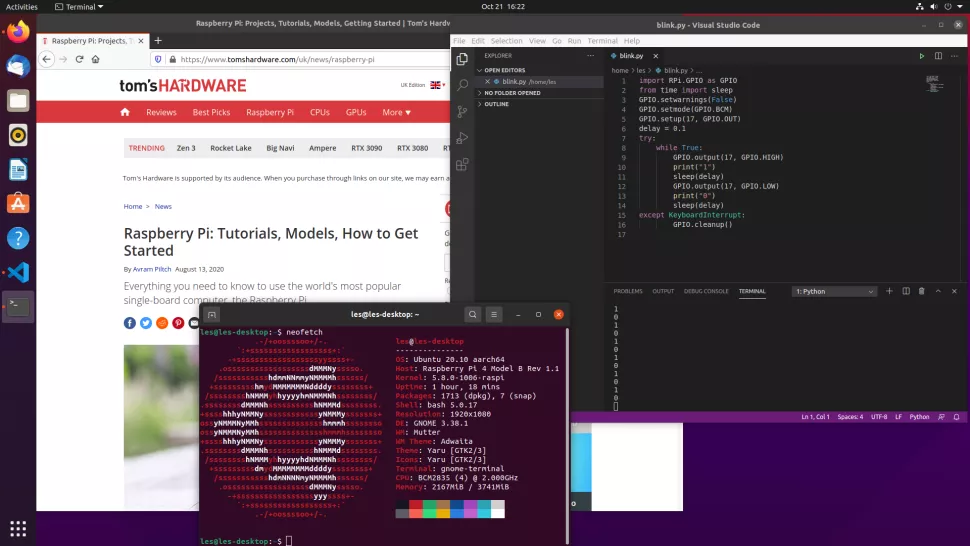
To install Ubuntu 20.10, you will need a memory card, Balena Etcher or Raspberry Pi Imager. It is advisable to use a 16 GB card. The OS is 64-bit, so it will work well on Raspberry Pi with 4 or 8 GB.
During the first stage, the installer will ask a series of questions that will determine the course of the process — this part is familiar. After the installation, 'Groovy Gorilla' will show its full capabilities. Users familiar with Ubuntu will easily navigate the interface and find many familiar elements, applications, etc.
One of the advantages is that with this OS, you can turn your Raspberry Pi into a hotspot. This feature may come in handy for some users.
By the way, wireless connectivity in the combination of Ubuntu and Raspberry Pi works excellently. It has already been mentioned that the OS works out of the box, supporting all the Raspberry Pi's functions — and that is indeed the case. Users who have tested the system report no connectivity issues. 'Not a single drop,' as they say in the golden quotes of the Russian internet.
In addition to wireless connectivity, the Raspberry Pi Camera also works perfectly — both the standard and the HQ camera, which has only recently become available.
An important point is that GPIO also works flawlessly in Ubuntu 20.10.
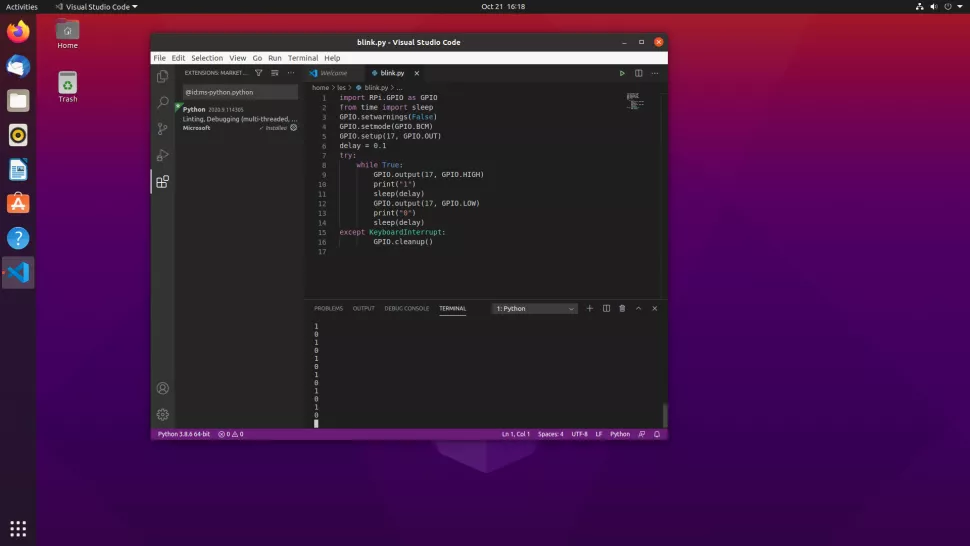
However, by default, there are no tools for working with GPIO, so to gain access to GPIO for Python, you need to install the RPi.GPIO module. Usually, you can use pip, but in this case, it is necessary to use the package from apt repositories.
After installation, it's worth checking the GPIO functionality using Python 3 and the imported module — you can test it by controlling an LED. Everything works, but sudo is required. It's not the ideal solution, of course, but for now, there are no alternatives.
Now regarding performance and video playback support. Unfortunately, in tandem with Ubuntu, the "Raspberry Pi" does not deliver decent quality. The WebGL Aquarium test shows only 15 frames per second with just one object. For 100 objects, the fps drops to 14, and for 500 — to 10.
But it's unlikely anyone buys a "Raspberry Pi" just to watch 4K videos, right? For everything else, its capabilities are more than sufficient — even for image recognition in a video stream. Soon we will publish an article testing the Raspberry Pi with image recognition and machine learning.
If you happened to miss the news about the release of the Raspberry Computing Module 4, you can see what it is and how it works .
Source: habr.com
