Available Firefox 84.
- The last release with Adobe Flash support. In the next release, support for NPAPI is planned to be removed since Flash is the only NPAPI plugin allowed to run in Firefox.
- The number of systems where it is enabled has been expanded WebRender:
- Linux: GNOME/X11 (except of systems with proprietary NVIDIA drivers, as well as combinations of 'Intel graphics and resolution >= 3440×1440). In the next release is scheduled WebRender will be enabled for GNOME/Wayland (except XWayland)
- macOS: Big Sur
- Android: GPU Mali-G.
- Windows: Intel graphics 5th and 6th generations (Ironlake and Sandy Bridge). Additionally, WebRender is disabled for owners of NVIDIA graphics cards using multiple monitors with different refresh rates.
- Firefox can now to use PipeWire. PipeWire support has added in WebRTC.
- New methods of shared memory allocation have been implemented in Linux, improving performance and compatibility with Docker.
- Native support for Apple Silicon processors has been implemented. Compared to the Rosetta 2 emulator, the native build runs 2.5 times faster, and the responsiveness of web applications doubles. However, an emulator is still required for DRM content playback.
- Cylance antivirus software on macOS may mistakenly classify Firefox as malware, disrupting its installation.
- A process manager (page about:processes) has been added, allowing assessment of resource consumption by each thread. Additional information is planned to be output in the future.
- Picture-in-picture mode can now now remembers the size and position of the window. Additionally, the picture-in-picture window now opens on the same monitor where the browser window is open (previously it always opened on the main monitor).
- An experimental settings section (to see them, enable browser.preferences.experimental and open the page about:preferences#experimental) has been added, allowing multiple picture-in-picture windows to be used simultaneously.
- It is now possible to change the scale of panels, pop-ups, and side panels created by add-ons (Ctrl+mouse wheel).
- After importing data from another browser, Firefox will automatically enable the bookmarks toolbar if it was enabled in the other browser and had bookmarks on it.
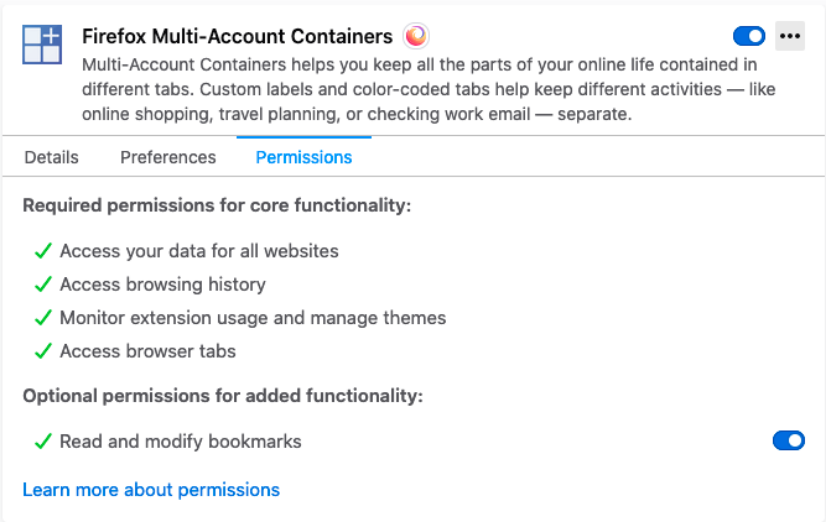
- The add-ons management page (about:addons) now displays not only the basic permissions but also additional permissions (which the add-on requests not at installation, but at the moment of enabling a specific setting that requires these permissions). Previously, additional permissions were not displayed and could not be revoked.
- When creating a new profile, information about all trusted intermediate certificate authorities will be downloaded from Mozilla servers on the same day, rather than over several weeks as before. This increases the likelihood that new Firefox users will not encounter security errors when visiting incorrectly configured websites.
- If the user refreshes the page in private browsing mode, Firefox will interpret this as a problem and suggest protection against vulnerabilities, such as that was found a year and a half ago in the Zoom client. For example, whereas before the option 'always use Zoom Meetings to open zoommtg:// links' applied to all sites (clicking such a link from any site would open the Zoom client), it now only works within the domain (if enabled on example1.com, clicking a zoommtg:// link from anothersite.com will prompt the window again). To avoid causing users too much inconvenience, the protection (controlled by the setting security.external_protocol_requires_permission) does not apply to certain popular schemes like tel: and mailto:
- In cases where the SSL certificate is issued only for www.example.com, if a user tries to access https://example.com, Firefox will automatically redirect to https://www.example.com (previously users encountered SSL_ERROR_BAD_CERT_DOMAIN in such cases).
- Firefox now always considers localhost addresses (http://localhost/ and http://dev.localhost/) as referring to the loopback interface (i.e., http://127.0.0.1). Thus, resources loaded from localhost are no longer treated as mixed content.
- PDF files, office documents, and media files now are always saved with the correct extension (sometimes they would save without an extension).
- The maximum number of failed attempts to use DoH (after which the browser automatically switches to standard DNS) has been increased from 5 to 15.
- On the Windows platform, 2D Canvas acceleration is now performed using the graphics processor.
- CSS:
- Pseudo-class :not() has gained support for complex selectors.
- The proprietary property -moz-default-appearance has lost support for the values scrollbar-small (instead, use scrollbar-width: thin) and scrollbar (only on macOS; instead, use scrollbar-horizontal and scrollbar-vertical).
- JavaScript: кастомные форматы даты и времени, указанные в качестве параметра конструктора Intl.DateTimeFormat(), now supports specifying the number of digits used to represent fractional seconds (fractionalSecondDigits).
- API:
- API Paint Timing: added interface PerformancePaintTiming (tracking the rendering time of various parts of the page).
- Element.getAnimations() Navigator.registerProtocolHandler() now takes only two parameters: scheme and url. The title parameter is no longer supported.
- Element.getAnimations() MediaRecorder.start() now throws .InvalidModificationError if the number of tracks in the stream being recorded changes.
- Due to cross-site scripting concerns, support for application caching (used for running applications offline) has been removed. Instead, use the Service Worker API..
- Developer tools:
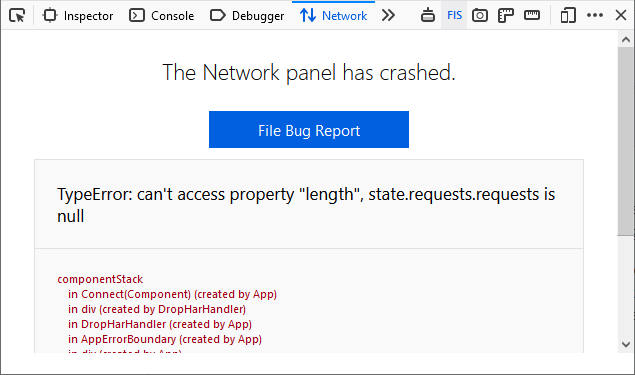
- The Network panel now take the parameter handles sudden failures and displays useful debugging details such as stack traces. Sending error messages has been simplified—just click the link.
- The accessibility inspector can now show the order of element traversal on the page using the Tab key.This allows developers to evaluate keyboard navigation usability.
Source: linux.org.ru