

After more than a year of development, the Tor project has released OnionShare 2.3, a tool that allows you to securely and anonymously send and receive files, as well as set up a public file-sharing service. The project's code is written in Python and is distributed under the GPLv3 license. Pre-built packages are available for Ubuntu, Fedora, Windows, and macOS.
OnionShare runs on the local system web server, operating as a Tor hidden service, and makes it accessible to other users. To access it, server an unpredictable onion address is generated, which serves as an entry point for file sharing (for example, "http://ash4…pajf2b.onion/slug", where slug is two random words for enhanced security). To upload or send files to other users, simply open this address in the Tor Browser. Unlike sending files via email or using services like Google Drive, Dropbox, and WeTransfer, the OnionShare system is self-contained, does not require interaction with external servers, and allows you to send files directly from your computer without intermediaries.
Other participants in file sharing do not need to install OnionShare; a regular Tor Browser and one instance of OnionShare on one of the users is sufficient. The confidentiality of the transfer is ensured by securely transmitting the address, for example, using end-to-end encryption mode in a messenger. After the transfer is completed, the address is immediately deleted, meaning that the file cannot be sent again in normal mode (a separate public mode is required). A graphical interface is provided on the user's system server for managing uploaded and downloaded files, as well as for monitoring data transfer.
Key innovations:
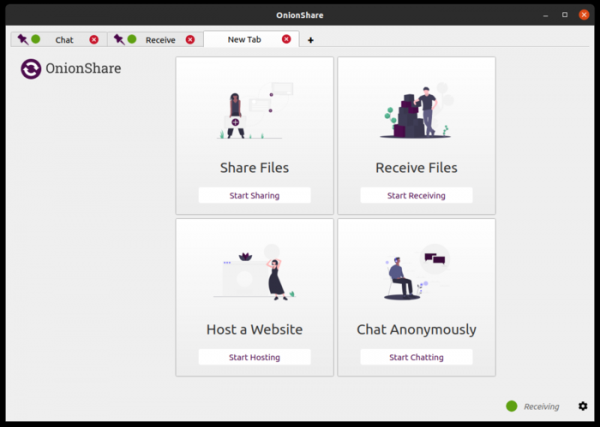
- Tab support has been implemented, allowing multiple actions to be performed simultaneously within the program. Four types of services can be launched in tabs: providing access to your files, receiving files from others, managing a local site, and chatting. For each service, multiple tabs can be opened, for example, you can run several local sites and create multiple chats. After restarting, previously opened tabs are saved and tied to the same OnionShare address.

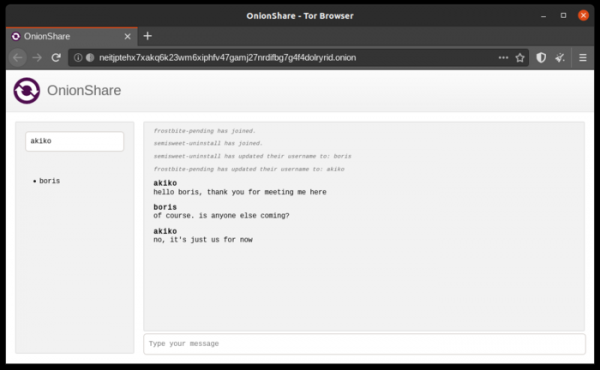
- A feature has been added to create secure one-time chat rooms for anonymous communication without saving chat history. Access to the chat is based on a typical OnionShare address that can be sent to participants you wish to discuss something with. The chat can be joined without the need to install OnionShare, simply by opening the sent address in the Tor Browser. Messaging in the chat is encrypted using end-to-end encryption, implemented based on standard Tor onion services without inventing additional encryption mechanisms.
One possible use case for the embedded chat is in situations where something needs to be discussed without leaving traces. Regular messaging apps do not guarantee that a sent message will be deleted by the recipient and not stored in intermediate caches and disk storage. In the OnionShare chat, messages are only displayed and not saved anywhere. OnionShare chat can also be used for quick communication without creating accounts or when participant anonymity is required.

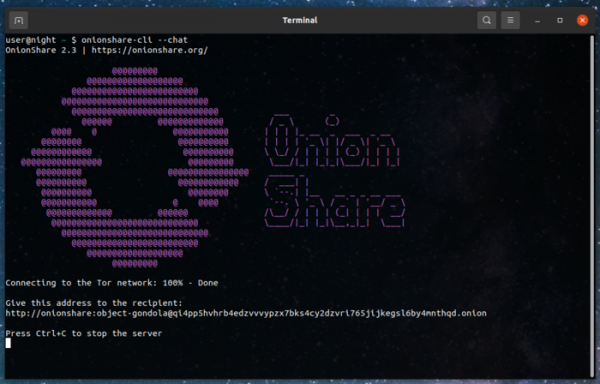
- The capabilities for working with OnionShare from the command line have been expanded without launching the graphical interface. The command line interface is now a separate application, onionshare-cli, which can be used on servers without a monitor. All basic operations are supported; for example, to create a chat, you can run the command 'onionshare-cli --chat', to create a website -- 'onionshare-cli --website', and to receive a file -- 'onionshare-cli --receive'.

Source: opennet.ru
