

The release of the web browser Firefox 87 has taken place. Additionally, an update for the long-term support branch 78.9.0 has been formed. The Firefox 88 branch has entered beta testing, with a release scheduled for April 20.
Key innovations:
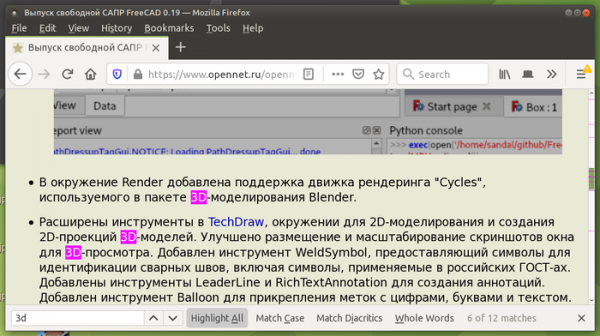
- When using the search function and activating the Highlight All mode, markers now appear on the scroll bar to indicate the position of found keywords.

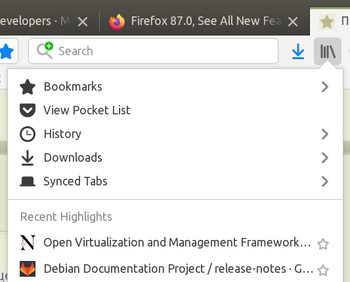
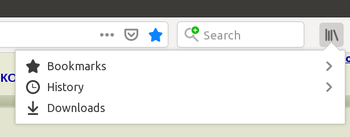
- Rarely used items have been removed from the Library menu. The Library menu now only includes bookmarks, history, and downloads (synchronized tabs, recent bookmarks, and Pocket list have been removed). The screenshot below shows the state on the left as it used to be, and on the right — as it is in Firefox 87:


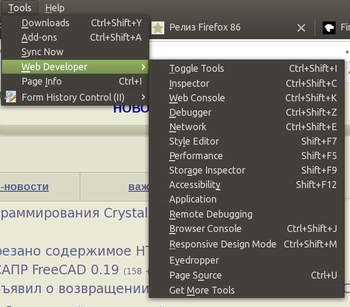
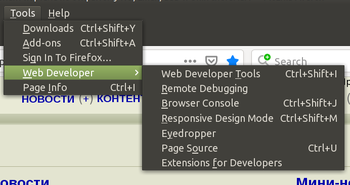
- The Web Developer menu has been significantly simplified — separate links to tools (Inspector, Web Console, Debugger, Network Style Error, Performance, Storage Inspector, Accessibility, and Application) have been replaced with a single Web Developer Tools item.


- The Help menu has been simplified, removing links to support pages, keyboard shortcuts, and the overview tour, which are now available on the general Get Help page. The button for importing from another browser has been removed.
- A SmartBlock mechanism has been added, addressing issues on websites that arise due to the blocking of external scripts in private browsing mode or when enhanced tracking protection is activated (strict). SmartBlock also significantly improves the performance of some websites that may lag due to the inability to load tracking script code. It automatically replaces tracking scripts with placeholders that ensure the correct loading of the site. Placeholders have been prepared for some popular user tracking scripts listed in Disconnect, including scripts with widgets from Facebook, Twitter, Yandex, Vkontakte, and Google.
- The Backspace key handler has been disabled by default outside the context of input forms. The removal of the handler is explained by the fact that the Backspace key is actively used while typing in forms, but outside focus on an input form, it is processed as a navigation to the previous page, which may lead to the loss of typed text due to unintentional movement to another page. An option browser.backspace_action has been added in about:config to restore the old behavior.
- The generation of the HTTP Referer header has been modified. By default, the policy is set to ‘strict-origin-when-cross-origin’, which means paths and parameters are stripped when making requests to other hosts over HTTPS, the Referer is removed when transitioning from HTTPS to HTTP, and the full Referer is sent for internal transitions within the same site. This change will apply to regular navigation requests (link transitions), automatic redirects, and when loading external resources (images, CSS, scripts). For example, when clicking a link to another site over HTTPS, instead of ‘Referer: https://www.example.com/path/?arguments’, now it sends ‘Referer: https://www.example.com/’.
- A small percentage of users have been enabled to use the Fission mode, featuring an enhanced multi-process architecture for stricter page isolation. When Fission is activated, pages from different sites are always loaded into separate processes in memory, each running its own isolated sandbox. Moreover, the process separation is done by domains rather than by tabs, which allows additional isolation of external scripts and iframe content. You can manually enable Fission mode on the page about:preferences#experimental or via the ‘fission.autostart=true’ variable in about:config. To check if it’s enabled, you can visit the about:support page.
- The experimental implementation of the TCP Fast Open (TFO) mechanism, which allows for reducing the number of steps in establishing a connection by combining the first and second steps of the classical 3-step connection handshake into a single request, has been removed. By default, the TCP Fast Open mode was disabled and required changes in about:config for activation (network.tcp.tcp_fastopen_enable).
- In accordance with changes made to the specifications, the element will no longer undergo checks using the pseudo-classes ‘:link’, ‘:visited’, and ‘:any-link’.
- Non-standard values of the CSS parameter caption-side — left, right, top-outside, and bottom-outside have been removed (there is an option to revert this via the setting layout.css.caption-side-non-standard.enabled).
- The 'beforeinput' event and the getTargetRanges() method are enabled by default, allowing web applications to override text editing behavior before the browser modifies the DOM tree and gain greater control over input events. The 'beforeinput' event is sent to the <input> handler or another element with the 'contenteditable' attribute before the element's value is changed. The getTargetRanges() method, provided by the inputEvent object, returns an array with values that indicate which part of the DOM will be modified if the input event is not canceled.
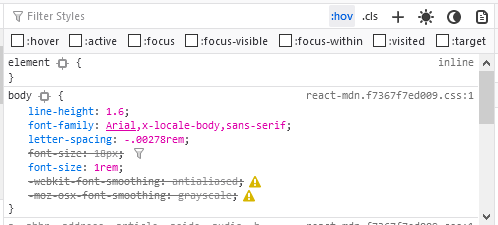
- For web developers in the page inspection mode, the ability to simulate 'prefers-color-scheme' media queries has been implemented for testing light and dark themes without switching themes in the operating system. Buttons featuring the sun and moon icons have been added to the top right of the developer tools panel to enable dark and light theme simulation.
- The inspection mode has added the ability to activate the ':target' pseudo-class for the selected element, similar to previously supported pseudo-classes like ':hover', ':active', ':focus', ':focus-within', ':focus-visible', and ':visited'.

- In the CSS inspection mode, the handling of inactive CSS rules has improved. Specifically, the 'table-layout' property is now set to inactive for non-table elements, while 'scroll-padding-*' properties are marked inactive for elements that do not support scrolling. Incorrectly marking the 'text-overflow' properties for certain values has been corrected.
In addition to new features and bug fixes, Firefox 87 addresses 12 vulnerabilities, 7 of which are classified as dangerous. Six vulnerabilities (collected under CVE-2021-23988 and CVE-2021-23987) are caused by memory management issues, such as buffer overflows and access to freed memory areas. These issues could potentially allow an attacker to execute code upon opening specially crafted pages.
The beta testing phase of Firefox 88 is notable for its support for pinch-to-zoom on touchpads in Linux with graphical environments based on the Wayland protocol and the default inclusion of support for the AVIF (AV1 Image Format) image format, which utilizes intra-frame compression technologies from the AV1 video encoding format.
Source: opennet.ru
