

Microsoft has announced the beginning of testing for the ability to run Linux applications with a graphical user interface in environments based on the WSL2 (Windows Subsystem for Linux), which is designed to execute Linux executable files on Windows. The applications integrate fully with the main Windows desktop, supporting features like shortcuts in the Start menu, sound playback, microphone recording, OpenGL hardware acceleration, displaying program information in the taskbar, switching between programs using Alt-Tab, and copying data between Windows and Linux applications through the clipboard.
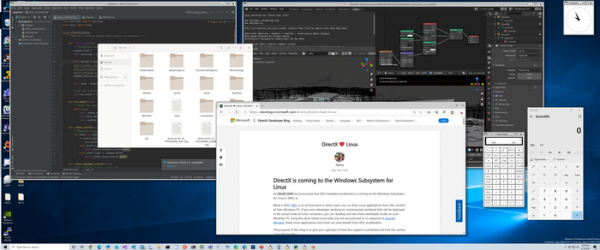
To manage the output of Linux applications' interfaces on the main Windows desktop, Microsoft has developed a composite manager called RAIL-Shell, which utilizes the Wayland protocol and is based on the Weston codebase. The output is facilitated through the RDP-RAIL (RDP Remote Application Integrated Locally) backend, which differs from the previously available RDP backend in Weston, as the composite manager does not render the desktop itself but instead forwards individual surfaces (wl_surface) over the RDP RAIL channel for display on the main Windows desktop. X11 applications are run using XWayland.
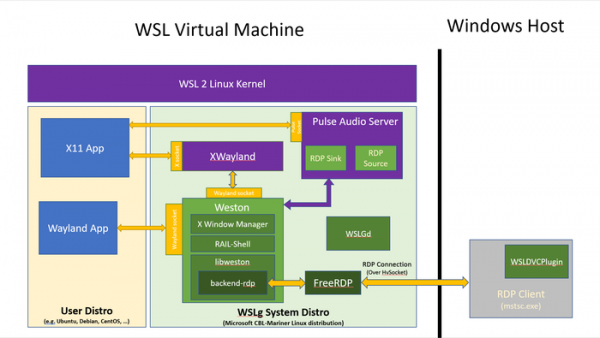
Sound output is organized using server PulseAudio, which also interacts with Windows via the RDP protocol (for sound output, the rdp-sink plugin is used, while rdp-source is utilized for input). The composite server, XWayland, and PulseAudio are packaged in a universal mini-distribution called WSLGd, which includes components to abstract the graphical and audio subsystems and is based on the CBL-Mariner Linux distribution also used in Microsoft's cloud infrastructure. WSLGd operates using virtualization mechanisms, and virtio-fs is employed for sharing between the guest Linux environment and the host Windows system.
As a RDP servers, running in a Linux environment WSLGd, uses FreeRDP, while the RDP client on the Windows side is mstsc. To identify available graphical Linux applications and display them in the Windows menu, a handler WSLDVCPlugin has been prepared. With standard Linux distributions like Ubuntu, Debian, and CentOS installed in the WSL2 environment, the set of components running in WSLGd interacts through the provision of sockets processing requests via the Wayland, X11, and PulseAudio protocols. The bindings prepared for WSLGd are distributed under the MIT license.
To install WSLGd, Windows 10 Insider Preview version 21362 or higher is required. In the future, the ability to install WSLGd will also be provided for regular Windows releases without needing to participate in the Insider Preview program. Installing WSLGd is done by executing the standard command "wsl --install", for example, for Ubuntu — "wsl --install -d Ubuntu". For existing WSL2 environments, WSLGd is installed through the command "wsl --update" (only WSL2 environments using the Linux kernel, not call translation, are supported). Graphical applications are installed via the distribution's standard package manager.
WSLGd provides only mechanisms for 2D graphics output, while to accelerate 3D graphics based on OpenGL in distributions installed in WSL2, it is recommended to use a virtual GPU (vGPU). vGPU drivers for WSL are provided for AMD, Intel, and NVIDIA chips. Graphics acceleration is ensured through a layer that implements OpenGL over DirectX 12. This layer is presented as a d3d12 driver included in the main composition of Mesa 21.0 and developed in collaboration with Collabora.
The virtual GPU operates in Linux using the device /dev/dxg with services mimicking the Windows Display Driver Model (WDDM) D3DKMT of the Windows kernel. The driver establishes a connection with the physical GPU via the VM bus. Linux applications have the same level of access to the GPU as native Windows applications, without resource partitioning between Windows and Linux. Performance testing on a Surface Book Gen3 device with an Intel GPU showed that in the native Win32 environment, the Geeks3D GpuTest displayed 19 FPS, in the Linux environment with vGPU — 18 FPS, and with software rendering in Mesa — 1 FPS.
Source: opennet.ru
