

Introduction
Good day, friends! I was surprised to notice that there aren't many articles on Habr dedicated to products from a vendor like [Extreme Networks](https://tssolution.ru/katalog/extreme). To address this and to familiarize you more with Extreme's product line, I plan to write a small series of articles, starting with switches for Enterprise.
The series will include the following articles:
- Overview of Extreme Enterprise-level switches
- Enterprise network design on Extreme switches
- Configuration settings for Extreme switches
- Comparative overview of Extreme switches with equipment from other vendors
- Warranty, technical support, and service contracts for Extreme switches
I invite all those interested in this vendor, as well as network engineers and administrators dealing with the selection or configuration of these switches, to read the series of articles.
About the Company
To begin with, I want to introduce you more closely to the company and its history:
Extreme Networks is a telecommunications company founded in 1996 to promote advanced Ethernet technological solutions and develop the Ethernet standard. Many Ethernet standards in the areas of network scalability, quality of service, and fast recovery are open patents of Extreme Networks. The headquarters is located in San Jose, California, USA. Currently, Extreme Networks is a publicly traded company focused on the development of Ethernet.
As of December 2015, the number of employees was 1,300.
Extreme Networks offers wired and wireless network solutions that meet the demands of today's mobile world with the constant movement of users and devices, as well as the migration of virtual machines both within and outside data centers to the cloud. The use of the unified ExtremeXOS operating system allows for the creation of advanced solutions for both telecom operators and data center networks, as well as local/campus networks.
The company's partners in the CIS
- In Russia, Extreme Networks has three official distributors—RRC, Marvel, and OCS—as well as more than 100 partners, with the number continuously increasing.
- In Belarus, Extreme Networks has three official distributors: Solidex, MUK, and Abris. Solidex is an authorized training partner.
- In Ukraine, there is one official distributor – 'Informatsiine Merezhyvo.'
- In Central Asian countries, as well as in Georgia, Armenia, and Azerbaijan, the official distributors are RRC and Abris.
Now that we've been introduced, let's take a look at what switches this vendor can offer for our Enterprise network.
They can offer us the following:
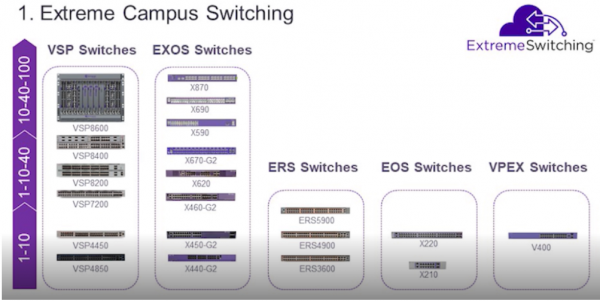
The image above shows the models of switches based on the type of operating system managing the switches and the technologies supported by the ports (vertical arrow on the left):
- 1 Gigabit Ethernet
- 10 Gigabit Ethernet
- 40 Gigabit Ethernet
- 100 Gigabit Ethernet
Let's take a closer look at Extreme switches, starting with the V400 series.
V400 Series Switches
These switches operate using Virtual Port Extending technology (based on the IEE 802.1BR specification). The switches themselves are called Virtual Port Extenders.
The essence of this technology is that all control and dataplane functionality is offloaded from the switch to the aggregation switches – Controller Bridges/CB.
Only the following models can be used as Controller Bridge switches:
- x590
- x670-G2
- x620-G2
Before describing the typical connection schemes for these switches, I will outline their specifications:
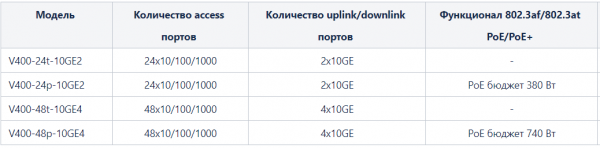
As seen from the table above, depending on the number of GE access ports, 24 or 48, there are 2 or 4 10GE SFP+ uplink ports.
There are also switches with PoE ports for connecting and powering PoE devices using the 802.3af (up to 15 W per port) and 802.3at (up to 30 W per port) standards.
Below are 4 typical connection schemes for the V400 switches and CB:
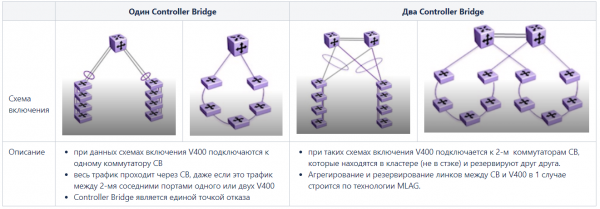
Advantages of Virtual Port Extending technology:
- Ease of maintenance – if one of the V400 switches fails, it can simply be replaced, and the new switch will automatically be detected and configured to work with the CB. Thus, there is no need to configure each access switch.
- All configuration is housed only on the CB; the V400 switches are visible only as additional ports on the CB, which simplifies the management of these switches.
- When using V400 in conjunction with the Controller Bridge, you get the full functionality of the Controller Bridge on the V400 switches.
Technology limitation - supports up to 48 Port Extenders switches V400 (2300 access ports).
Switches of the X210 and X220 series
The E200 family switches have a fixed number of 10/100/1000 BASE-T ports, operate on L2/L3 levels, and are designed for use as Enterprise access switches. Depending on the model, the switches feature:
- PoE/PoE+ ports
- 2 or 4 10 GE SFP+ ports (X220 series)
- stacking support - up to 4 switches in a stack (X220 series)
Below is a table with the configuration and some capabilities of the X200 series switches
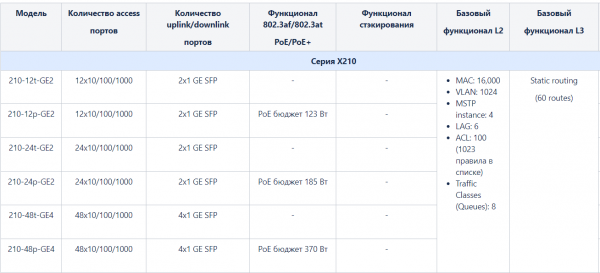
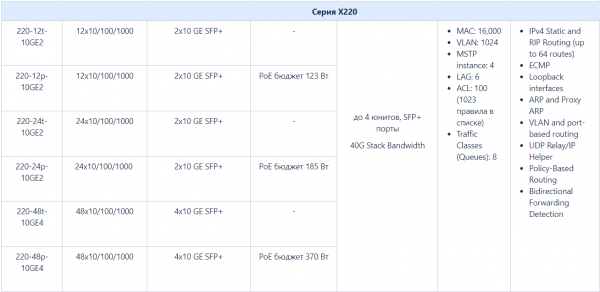
As can be seen from the table, the E210 and E220 series switches are designed for use as access switches. With the presence of 10 GE SFP+ ports, the X220 series switches can support stacking - up to 4 units per stack, with a stack bandwidth of 40 Gb.
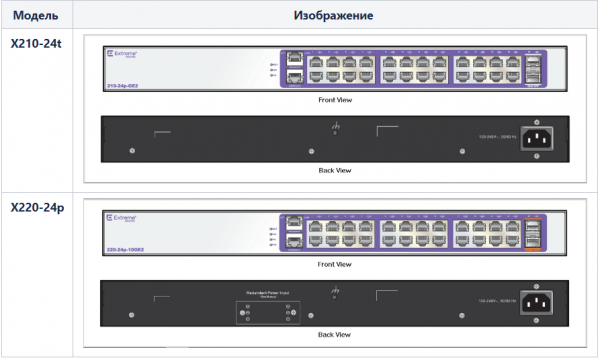
The switches are managed by the EOS operating system.
ERS Series Switches
Switches in this series are more powerful compared to the lower E200 series switches.
First of all, it is worth noting that:
- these switches have more advanced stacking capabilities:
- up to 8 switches in a stack
- depending on the model, both SFP+ ports and dedicated stacking ports can be used
- ERS series switches have a larger PoE budget compared to the E200 series
- ERS series switches offer broader L3 functionality compared to the E200 series
A more detailed examination of the ERS switch family begins with the lower series - ERS3600.
ERS3600 Series
Switches in this series are available in the following configurations:
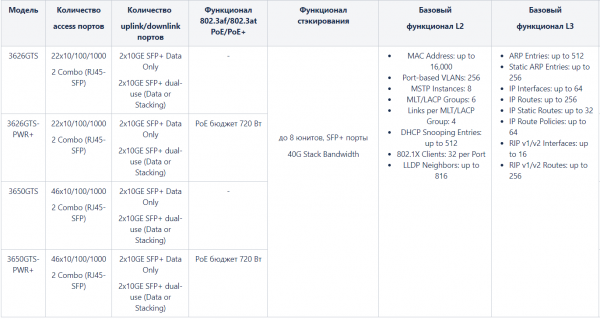
As can be seen from the table, ERS 3600 switches can be used as access switches, have a greater stack capacity, a larger PoE budget, and a wider range of L3 functions, although they are limited to RIP v1/v2 dynamic routing protocols, as well as the number of interfaces and routes involved.
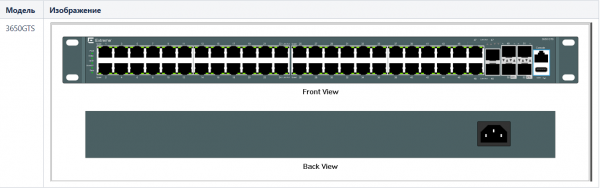
The image below shows the front and rear views of the 50-port ERS3600 switch:
ERS4900 Series
The configuration and functionality of the ERS4900 series switches can be briefly described in the following table:
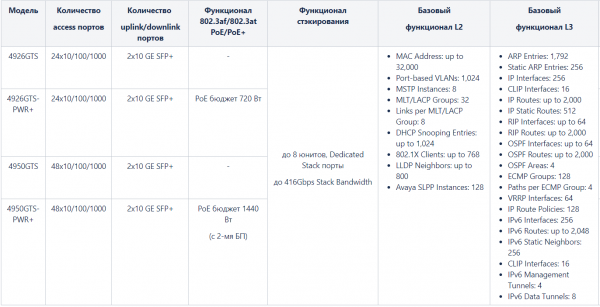
As we can see, these switches implement dynamic routing protocols such as RIPv1/2 and OSPF, feature gateway redundancy protocol — VRRP, and support IPv6 protocol.
Here I must make an important note - * additional L2 and L3 functionality (OSPF, VRRP, ECMP, PIM-SM, PIMSSM/PIM-SSM, IPv6 Routing) is activated by purchasing an additional license — Advanced Software License.
The pictures below show the front and rear views of the 26-port switch of the ERS4900 series and options for their stacking:
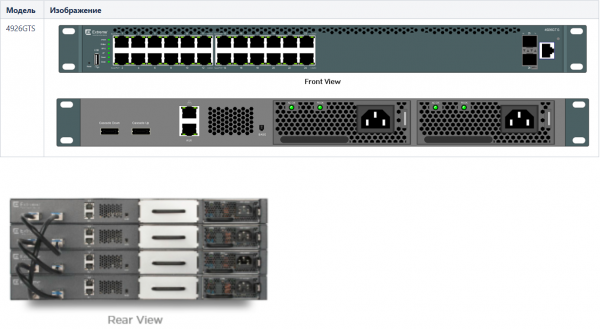
As seen in the images, the ERS4900 series switches have dedicated ports for stacking — Cascade UP/Cascade Down, and they can also be equipped with redundant power supplies.
ERS5900 Series
The latest and most advanced models in the ERS series are the ERS5900 switches.
Interestingly:
- some switches in the series implement Universal PoE — the ability to deliver 60W per port to power specialized devices and small switches/routers
- available are 100-port switches with a total PoE budget of 2.8 kW
- there are ports that support 2.5GBASE-T (802.3bz standard)
- support for MACsec functionality (802.1AE standard)
The configurations and functionality of the series switches are best described by the following table:
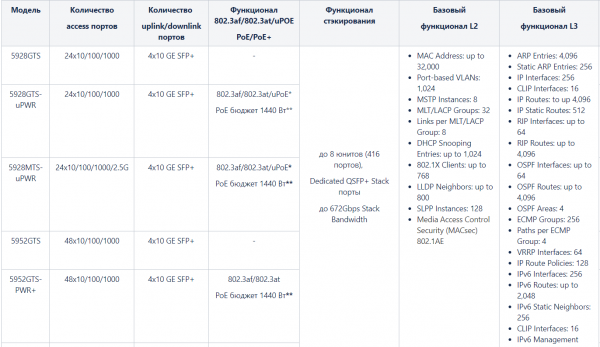
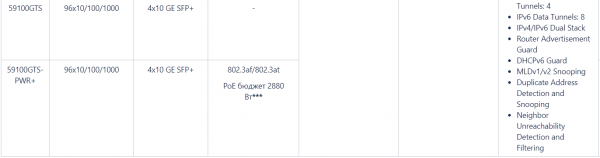
* The 5928GTS-uPWR and 5928MTS-uPWR switches support the so-called Four-Pair PoE initiative (a.k.a. Universal PoE — uPoE) — the ability to power devices with a consumption of up to 60W on the access port, such as certain types of video conferencing systems, thin clients VDI with monitors, small PoE-powered switches or routers, and even some IoT technology systems (like smart lighting control systems).
** The PoE budget of 1440W is achieved when installing 2 power supplies. With 1 power supply installed in the switch, the PoE budget will be 1200W.
*** The PoE budget of 2880W is achieved when installing 4 power supplies. With 1 power supply installed in the switch, the PoE budget will be 1200W. With 2 power supplies installed in the switch, the PoE budget will be 2580W.
Additional L2 and L3 functionality, as with the ERS4900 series, is ensured by purchasing and activating the respective licenses for the switches:

The images below show the front and rear view of the 100-port switch from the ERS5900 series and the stacking options for the 28 and 52 port switches:
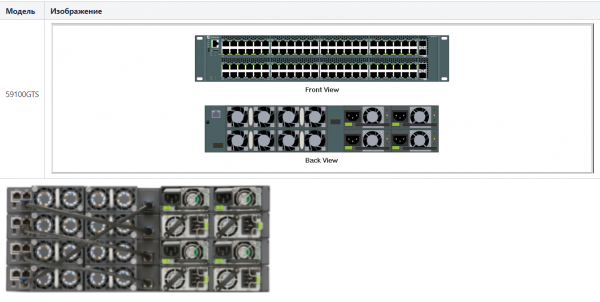
**All switches in the series are managed by the ERS operating system.**
Friends, as you may have noticed, at the end of the series description, I indicate which operating system they are managed by, and I do this for a reason. As many have guessed, the management by a specific operating system entails an individual set of syntactic commands and configuration blocks for each operating system.
Example:
As fans of Avaya switches may have noticed, there is a line in the description of the L2 functionality of the ERS series switches mentioning MLT/LACP Groups, which characterizes the maximum possible number of groups for aggregating interfaces (link aggregation and redundancy). The MLT designation is typical for link aggregation in switches produced by Avaya Holding, where it is used directly in the command syntax for configuring link aggregation.
The fact is that ExtremeNetworks, in line with its development strategy, acquired Avaya Holdings in 2017-2018, which at that time had its own line of switches. Thus, the ERS series is essentially a continuation of Avaya's switch line.
EXOS Series Switches
The EXOS series is considered the "flagship" series of Extreme. The switches in this lineup feature powerful functionality — both a multitude of standard protocols and various proprietary Extreme protocols, which I will try to describe later.
You will find switches to suit any preference:
- for any level of network — access, aggregation, core, switches for data centers
- with any combination of ports 10/100/1000 Base-T, SFP, SFP+, QSFP, QSFP+
- with or without PoE support
- with support for multiple types of "stacking" and "clustering" to ensure redundancy for critical nodes in the network
Before beginning to review this series starting with the youngest model — X440, I would like to explain the licensing policy of the EXOS operating system.
EXOS Licensing (starting from version 22.1)
EXOS has three main types of licenses — Edge License, Advanced Edge License, Core License.
The table below describes the licensing options based on the EXOS series switch lines:
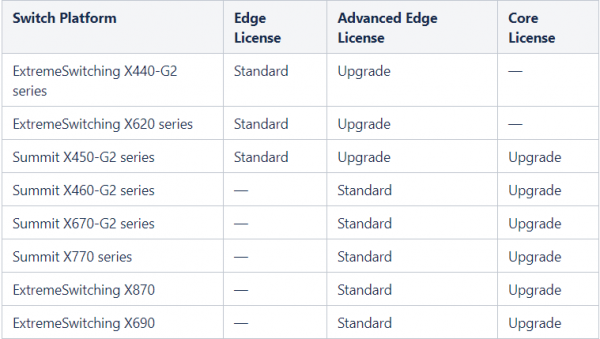
- Standard is the version of the EXOS operating system that comes in the base variant with the switch.
- Upgrade is the capability to extend the EXOS operating system to any level.
You can see the functionality of each type of license and its support on various platforms of the series in the tables below.
Edge License
ExtremeXOS Software Feature
Supported Platforms
EDP
All platforms.
Extreme Network Virtualization (XNV)
All platforms.
Identity Management
All platforms.
LLDP 802.1ab
All platforms.
LLDP-MED extensions
All platforms.
VLANs—Port based and tagged trunks
All platforms.
VLANs—MAC based
All platforms.
VLANs—Protocol based
All platforms.
VLANs—Private VLANs
All platforms.
VLANs—VLAN translation
All platforms.
VMANs—Q-in-Q tunneling (IEEE 802.1ad VMAN tunneling standard)
All platforms.
VMANs—Egress queue selection based on 802.1p value in S‑tag
All platforms.
VMANs—Egress queue selection based on 802.1p value in C‑tag
All platforms.
VMANs—Secondary ethertype support
All platforms.
VMAN Customer Edge Port (CEP—also known as Selective Q-in-Q)
All platforms.
VMAN Customer Edge Port CVID Egress Filtering / CVID Translation
All platforms.
VMAN—CNP port
All platforms.
VMAN—CNP port, double tag support
All platforms.
VMAN—CNP port, double tag with egress filtering
All platforms.
L2 Ping / Traceroute 802.1ag
All platforms.
Jumbo frames (including all related items, MTU disc. IP frag.)
All platforms.
QoS—egress port rate shaping/limiting
All platforms.
QoS—egress queue rate shaping/limiting
All platforms.
Link Aggregation Groups (LAG), static 802.3ad
All platforms.
LAG dynamic (802.3ad LACP) edge, to servers only!
All platforms.
LAG (802.3ad LACP) core, between switches
All platforms.
Port loopback detection and shutdown (ELRP CLI)
All platforms.
Software redundant port
All platforms.
STP 802.1D
All platforms.
STP EMISTP + PVST+ Compatibility mode (1 domain per port)
All platforms.
STP EMISTP, PVST+ Full (multi-domain support)
All platforms.
STP 802.1s
All platforms.
STP 802.1w
All platforms.
ERPS (4 max rings with matching ring ports)
All platforms.
ESRP aware
All platforms.
EAPS edge (4 max domains with matching ring ports)
Note: You can increase the number of domains by upgrading to the Advanced Edge license (see Advanced Edge License)
All platforms.
Link Fault Signaling (LFS)
All platforms.
ELSM (Extreme Link Status Monitoring)
All platforms.
ACLs, applied on ingress ports
- IPv4
- Static
All platforms.
ACLs, applied on ingress ports
- IPv6
- Dynamic
All platforms.
ACLs, applied on egress ports
All platforms.
ACLs, ingress meters
All platforms.
ACLs, egress meters
All platforms.
ACLs
- Layer-2 protocol tunneling
- Byte counters
All platforms.
Convergence End Point (CEP) detection
All platforms.
CPU DoS protect
All platforms.
CPU Monitoring
All platforms.
Direct Attach—based on the IEEE version of VEPA, eliminates the virtual switch layer, simplifying the network and improving performance. Direct Attach enables data center simplification by reducing network tiers from four or five tiers to just two or three tiers, depending on the size of the data center.
All platforms
SNMPv3
All platforms.
SSH2 server
All platforms.
SSH2 client
All platforms.
SCP/SFTP client
All platforms.
SCP/SFTP server
All platforms.
RADIUS and TACACS+ per command authentication
All platforms.
Network login
- Web based method
- 802.1X method
- MAC-based method
- Local database for MAC/web-based methods
- Integration with Microsoft NAP
- Multiple supplicants — same VLAN
- HTTPS/SSL for web-based method
All platforms.
Network login—Multiple supplicants — multiple VLANs
All platforms.
Trusted OUI
All platforms.
MAC security
- Lockdown
- Limit
All platforms.
IP security—DHCP Option 82—L2 mode
All platforms.
IP security—DHCP Option 82—L2 mode VLAN ID
All platforms.
IP security—DHCP IP lockdown
All platforms.
IP security—Trusted DHCP server ports
All platforms.
Static IGMP membership, IGMP filters
All platforms.
IPv4 unicast L2 switching
All platforms.
IPv4 multicast L2 switching
All platforms.
IPv4 directed broadcast
All platforms.
IPv4
- Fast-direct broadcast
- Ignore broadcast
All platforms.
IPv6 unicast L2 switching
All platforms.
IPv6 multicast L2 switching
All platforms.
IPv6 netTools—Ping, traceroute, BOOTP relay, DHCP, DNS, and SNTP.
All platforms.
IPv4 netTools—Ping, traceroute, BOOTP relay, DHCP, DNS, NTP, and SNTP.
All platforms.
IGMP v1/v2 snooping
All platforms.
IGMP v3 snooping
All platforms.
Multicast VLAN Registration (MVR)
All platforms.
Static MLD membership, MLD filters
All platforms.
MLD v1 snooping
All platforms.
MLD v2 snooping
All platforms.
sFlow accounting
All platforms.
CLI scripting
All platforms.
Web-based device management
All platforms.
Web-based management—HTTPS/SSL support
All platforms.
XML APIs (for partner integration)
All platforms.
MIBs — Entity, for inventory
All platforms.
Connectivity Fault Management (CFM)
All platforms.
Remote mirroring
All platforms.
Egress mirroring
All platforms.
Y.1731 compliant frame delay and delay variance measurement
All platforms.
MVRP — VLAN Topology Management
All platforms.
EFM OAM — Unidirectional Link Fault Management
All platforms.
CLEARFlow
All platforms.
System virtual routers (VRs)
All platforms.
DHCPv4:
- DHCPv4 server
- DHCv4 client
- DHCPv4 relay
- DHCPv4 smart relay
- DHCPv6 remote ID
All platforms.
DHCPv6:
- DHCPv6 relay
- DHCPv6 prefix delegation snooping
- DHCPv6 client
- DHCPv6 smart relay
All platforms.
User-created Virtual Routers (VRs)
Virtual Router and Forwarding (VRF)
Summit X450-G2, X460-G2, X670-G2, X770, and ExtremeSwitching X870, X690
VLAN aggregation
All platforms.
Multinetting for forwarding
All platforms.
UDP Forwarding
All platforms.
UDP BootP relay forwarding
All platforms.
IPv4 unicast routing, including static routes
All platforms.
IPv4 multicast routing, including static routes
Note: This feature has limitations in the Edge and Advanced Edge licenses. See details in User Guide for different EXOS versions.
All platforms.
IPv4 Duplicate Address Detection (DAD)
All platforms.
IPv6 unicast routing, including static routes
All platforms.
IPv6 interworking—IPv6-to-IPv4 and IPv6-in-IPv4 configured tunnels
All platforms, except X620 and X440-G2.
IPv6 Duplicate Address Detection (DAD) without CLI management
All platforms.
IPv6 Duplicate Address Detection (DAD) with CLI management
All platforms.
IP security:
- DHCP Option 82—L3 mode
- DHCP Option 82—L3 mode VLAN ID
- Disable ARP learning
- Gratuitous ARP protection
- DHCP secured ARP / ARP validation
- Source IP lockdown
All platforms.
IP address security:
- DHCP snooping
- Trusted DHCP server
- Source IP lockdown
- ARP validation
All platforms.
IP Flow Information Export (IPFIX)
Summit X460-G2.
Multi-Switch Link Aggregation Group (MLAG)
All platforms.
ONEPolicy
All platforms.
Policy based routing (PBR) for IPv4
All platforms.
Policy based routing (PBR) for IPv6
All platforms.
PIM snooping
Note: This feature has limitations in the Edge and Advanced Edge licenses. See details in User Guide for different EXOS versions.
All platforms.
Protocol-based VLANs
All platforms.
RIP v1/v2
All platforms.
RIPng
All platforms.
Routing access policies
All platforms.
Route maps
All platforms.
Universal Port—VoIP auto configuration
All platforms.
Universal Port—Dynamic user-based security policies
All platforms.
Universal Port—Time-of-day policies
All platforms.
SummitStack (switch stacking using native or dedicated ports)
Summit X460-G2 with X460-G2-VIM-2SS optional card, and X450-G2.
SummitStack-V (switch stacking using dual purpose data ports)
All platforms. See the specific models listed in the ‘Support for Alternate Stacking Ports’ section of the User Guide.
SyncE
Summit X460-G2.
Python scripting
All platforms.
Advanced Edge License
ExtremeXOS Software Feature
Supported Platforms
EAPS Advanced Edge—multiple physical rings, and ‘common links’, also known as ‘shared port’.
All platforms.
ERPS-more domains (allows 32 rings with matching ring ports) and multi-ring support
All platforms.
ESRP-Full
All platforms.
ESRP-Virtual MAC
All platforms.
OSPFv2-Edge (limited to max of 4 active interfaces)
All platforms that support the Advanced Edge or Core licenses
OSPFv3-Edge (limited to max of 4 active interfaces)
All platforms that support the Advanced Edge or Core licenses
PIM-SM-Edge (limited to max of 4 active interfaces)
All platforms that support the Advanced Edge or Core licenses
VRRP
All platforms that support the Advanced Edge or Core licenses
VXLAN
Summit X770, X670-G2, and ExtremeSwitching X870, X690.
OVSDB
Summit X770, X670-G2, and ExtremeSwitching X870, X690.
PSTag
Summit X460-G2, X670-G2, X770, and ExtremeSwitching X870, X690 series switches.
Core license
ExtremeXOS Software Feature
Supported Platforms
PIM DM ‘Full’
Core license platforms
PIM SM ‘Full’
Core license platforms
PIM SSM ‘Full’
Core license platforms
OSPFv2 ‘Full’ (not limited to 4 active interfaces)
Core license platforms
OSPFv3 ‘Full’ (not limited to 4 active interfaces)
Core license platforms
BGP4 and MBGP (BGP4+) for IPv4 ECMP
Core license platforms
BGP4 and MBGP (BGP4+) for IPv6
Core license platforms
IS-IS for IPv4
Core license platforms
IS-IS for IPv6
Core license platforms
MSDP
Core license platforms
Anycast RP
Core license platforms
GRE tunneling
Core license platforms
To activate the MPLS functionality, there are separate Feature Packs, which I will discuss shortly.
Series X440-G2
I suggest starting the review of EXOS switches with the switches of this series, which clearly illustrate the concept of ‘pay-as-you-grow’, which is actively supported by Extreme Networks.
The main idea of this concept is to gradually increase the performance and functionality of the purchased and installed equipment without the need to replace the equipment itself or its parts.
To illustrate this, let me give you an example:
- Suppose initially you need a 24 or 48 port switch with copper or optical access ports, where 50% of access ports (12 or 24 units) are occupied and the total traffic on the backbone ports in one direction (typically downlink for working machines) will be up to 1 Gbit/s.
- Suppose you initially chose the X440-G2-24t-10GE4 or X440-G2-48t-10GE4 switch, which have 24 or 48 1000 BASE-T access ports and 4 GigabitEthernet SFP/SFP+ ports that can be expanded to 10 GigabitEthernet.
- You configured and installed the switch, connected it to the core or aggregation with one backbone port (depending on the structure of your network), and connected users to it — everything works, and you and the management are satisfied.
- Over time, your company and network grow — new users, services, and equipment emerge.
- As a result, there may be an increase in traffic at various levels of the network, including at the switch we are considering. This can happen for various reasons — you are connecting new devices to the switch, or users are consuming more traffic from various services, and usually both happen simultaneously.
- Over time, you notice that the load on the switch's backbone port has reached 1 Gbit/s.
- No problem, you think, because you still have 3 GigabitEthernet ports that you can use to aggregate links between the switch and aggregation (core) — you establish another optical or copper link between them and configure aggregation, for example, using the LACP protocol.
- As time goes by, the need arises to install one or more additional switches.
- Several situations may arise that will lead to the necessity of connecting a new switch through your existing X440 switch:
- a lack of aggregation or core ports to connect — in this case, it will be necessary to purchase additional aggregation or core switches.
- The distance of the switch from the aggregation nodes, or the lack of existing capacity of the cable route, such as optical fibers, will require the construction of new communication lines and significant additional costs.
- In the least favorable case, there are two possible options simultaneously.
- After analyzing the network scheme and additional costs with the management, you decide to connect a new X440 switch to the network through the existing one. No problem — you have several options for this:
- Option 1 — stacking:
- You can stack 2 switches using SummitStack-V technology, utilizing the 2 remaining uplink ports on the first X440 switch and 2 uplink ports on the second X440 switch.
- Depending on the distance, you can use either short DAC cables or SFP+ transceivers for distances of several tens of kilometers.
- Thus, stacking the switches will occur through 2 dedicated stacking ports out of 4 uplink ports (usually ports 27, 28 on 24-port models and ports 49, 50 on 48-port models). The bandwidth of the stacking ports at each port will be 20Gb (10Gb in one direction and 10Gb in the other).
- A license to expand uplink ports from 1 GE to 10 GE is not required in this case.
- Option 2 — using trunk ports with the possibility of subsequent aggregation:
- You can connect the second switch using 1 or 2 (in the case of aggregation) remaining uplink ports on the first X440 and 1 or 2 uplink ports on the new X440.
- A license to expand uplink ports from 1 GE to 10 GE will also not be required here.
- Option 1 — stacking:
- You connected one or more switches either in a daisy chain or star topology, with the first X440 switch as you planned.
- Time passes and you notice that the traffic on the uplink ports of the first X440 switch has reached 2 Gbps, and you need to:
- either more ports for link aggregation between the aggregation and the first X440 switch, which in turn may lead you to the same problems as installing a new X440 switch that I described above — a shortage of ports on the aggregation equipment or capacity of the cable infrastructure.
- or use 10 Gigabit Ethernet trunk ports between the aggregation equipment and the first X440 switch
- At this point, the X440 switches' ability to expand the bandwidth of their trunk ports from 1 Gigabit Ethernet to 10 Gigabit Ethernet with the appropriate license will come to your aid. Depending on the options, you decide:
- For option 1 (stacking) — use the Dual 10GbE Upgrade License. You will activate the license on the first X440, which will expand the bandwidth of its 2 trunk ports from 1 Gigabit Ethernet to 10 Gigabit Ethernet (the other 2 ports, as we recall, are used for stacking)
- For option 2 (trunk ports) — use the Dual 10GbE Upgrade License or Quad 10GbE Upgrade License depending on the load on the trunk ports between the first X440 and the second X440. Here, there may also be several options:
- first, you can activate the Dual 10GbE license on the first X440
- then, as traffic on the second X440 grows, associated with connecting one or more additional switches to it sequentially, you will activate another Dual 10GbE license on the first X440 and a Dual 10GbE license on the second X440 switch
- and so on along the switch branch
- As more time passes, your organization continues to grow both horizontally — increasing the number of network nodes, and vertically — complicating the network structure, introducing new services that require specific protocols to operate.
- Depending on your organization's needs, you may decide to move away from layer 2 on your switches and transition to layer 3. The needs that may influence your decision can vary widely:
- network security requirements
- network optimization (for example, reducing broadcast domains, accompanied by the implementation of dynamic routing protocols such as OSPF)
- the introduction of new services requiring specific protocols to operate
- any other reasons
- No problem. The X440 switches will still be relevant, as you can additionally purchase and activate a license that expands their functionality — the Advanced Software License.
As seen in the example I provided, the X440 switches (and most switches from other series) follow the "pay-as-you-grow" principle. You pay for the expansion of the switches' functionality as your organization and network grow.
On this note, I suggest we leave the poetry behind and get closer to examining the switches.
I want to note that there are many configuration options for the X440 series, which you can see for yourself by looking at the table below:
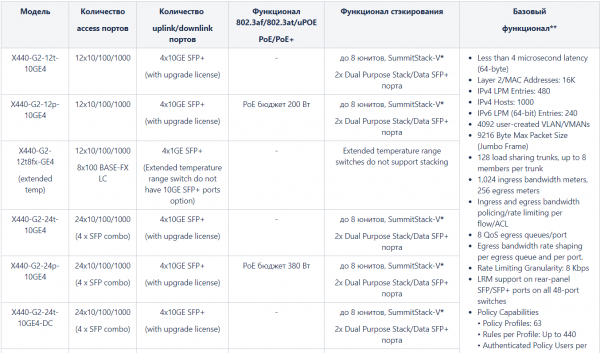
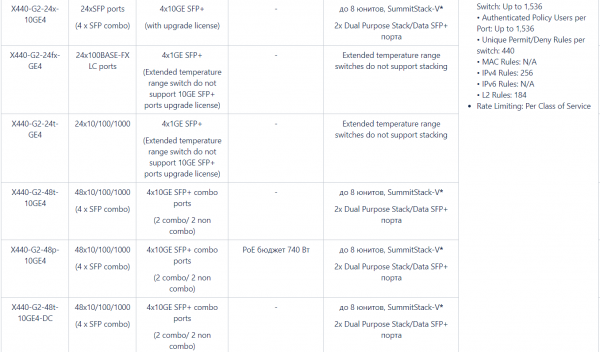
* The X440-G2 series switches support SummitStack-V stacking with switches from other series — X450-G2, X460-G2, X670-G2, and X770. The main condition for successful stacking is using the same version of EXOS on the stack switches.
** The basic feature set table only lists a portion of the capabilities of the series switches. A more complete description of supported protocols and standards can be viewed in the Edge License table.
Switches in this series are equipped with additional inputs — redundant power input to connect RPS power supplies or external battery packs through voltage converters.
The following licenses are available for the X440-G2 series switches:
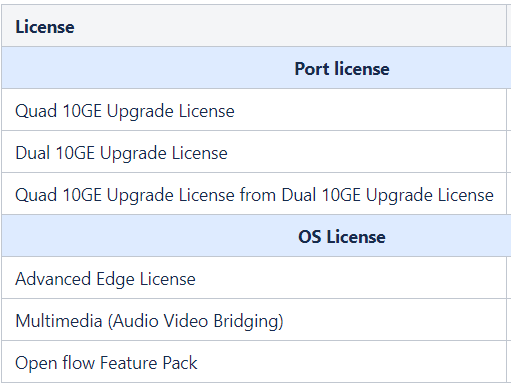
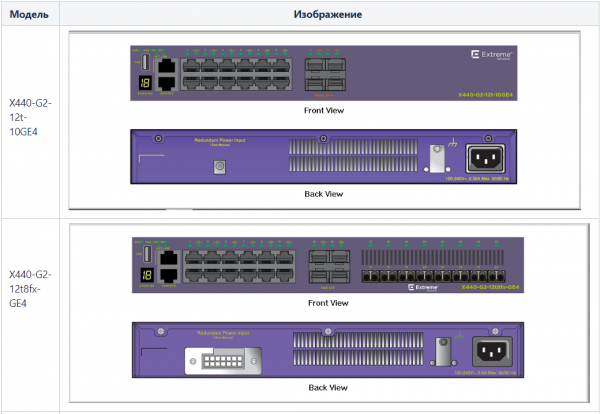
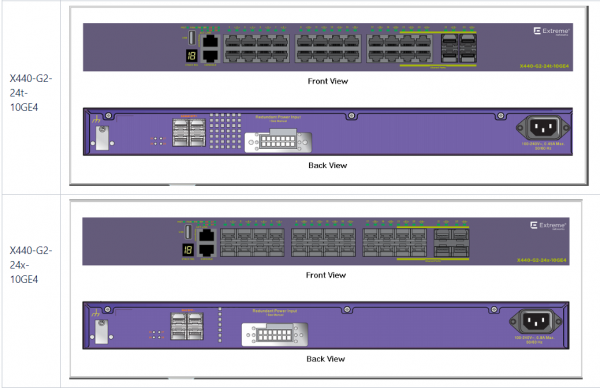
Below are some images depicting the X440 series switches:
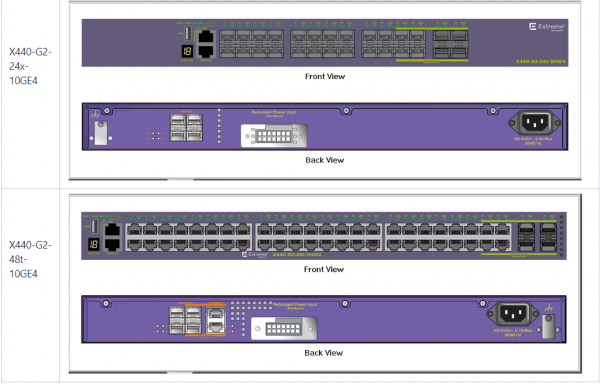
X450-G2 Series
Extreme Networks positions the Summit X450-G2 series as an effective edge switch for campuses.
The main difference between the X450-G2 and X440-G2 series switches is as follows:
- an extended set of licenses (possible functionality) — Edge License, Advanced Edge License, Core License
- the presence of separate QSFP ports for stacking located on the rear panel of the switches
- the ability to equip models that support PoE with an additional power supply
- support for standards
- switches with 10GE SFP+ ports do not require the purchase of a separate license for expanding port throughput from 1Gb to 10Gb
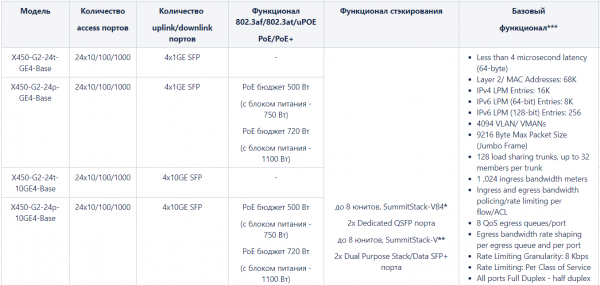
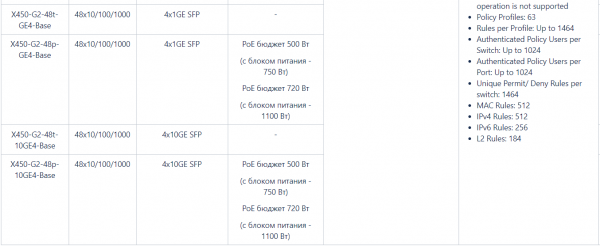
* SummitStack-V84 stacking is only supported within the X450-G2 series.
** The X440-G2 series switches support SummitStack-V stacking with switches from other series — X440-G2, X460-G2, X670-G2, and X770. The main condition for successful stacking is using the same version of EXOS on the stack switches.
*** The basic functionality table lists only a portion of the capabilities of the series switches. A more comprehensive description of the supported protocols and standards can be viewed in the Edge License table.
The switches in this series without PoE are equipped with additional inputs — redundant power input for connecting RPS power supplies or external battery packs through voltage converters.
The switches in this series are supplied without a fan module. It must be ordered separately.
The following licenses are available for the X450-G2 series switches:
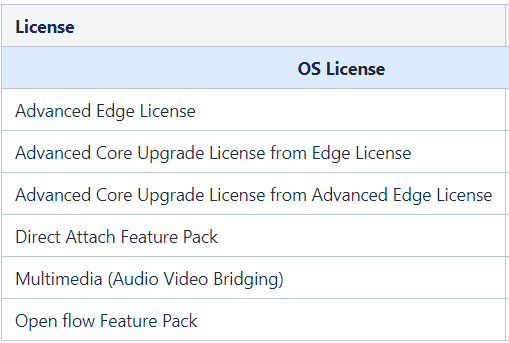
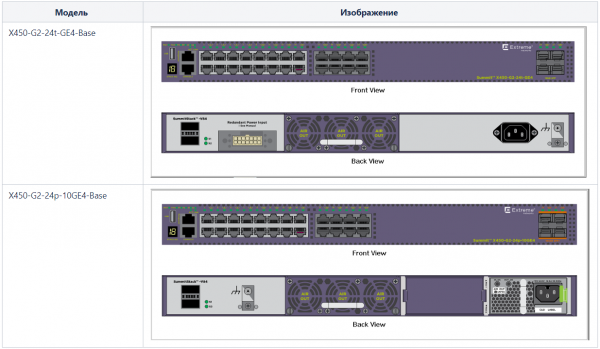
Images of the X450-G2 series switches can be viewed below:
X460-G2 Series
The X460-G2 series switches are the entry-level switches with support for QSFP+ ports. This series is characterized by:
- the presence of a large number of models with flexible sets of various ports
- the availability of a separate VIM slot for using additional VIM modules with ports — SFP+, QSFP+, stacking ports
- support for the 2.5GBASE-T (802.3bz) standard in some models
- support for MPLS
- support for the Synchronous Ethernet standard and the TM-CLK module
- the possibility of equipping all models of switches with additional power supplies
The hardware configuration options for the switches in this series can be seen in the following table:
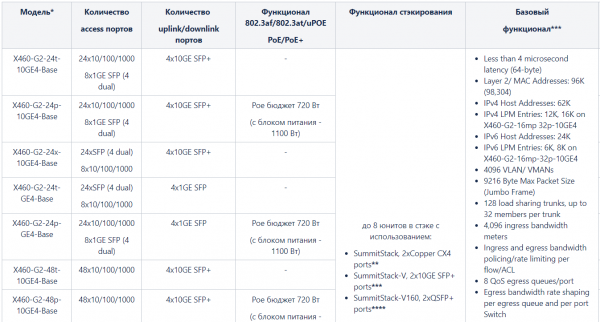
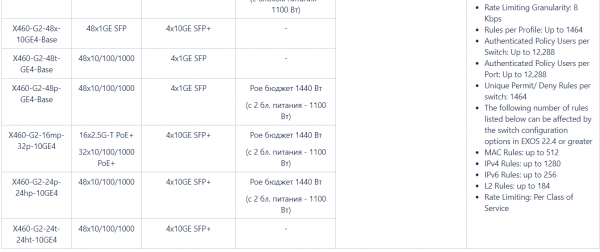
* The switches in this series are supplied WITHOUT power supplies, fan modules, and VIM modules. They need to be ordered separately.
** Compatible with the series X440, X460, X460-G2, and X480; all switches must have the same software version.
*** Compatible with the series X440, X440-G2, X450, X450-G2, X460, X460-G2, X480, X670, X670V, X670-G2, and X770; all switches must have the same software version.
**** Compatible with the series X460-G2, X480, X670V, X670-G2, and X770; all switches must have the same software version.
There are two types of fan modules available — front-to-back and back-to-front, allowing for the selection of a cooling model that meets the requirements of hot and cold aisle configurations in data centers.
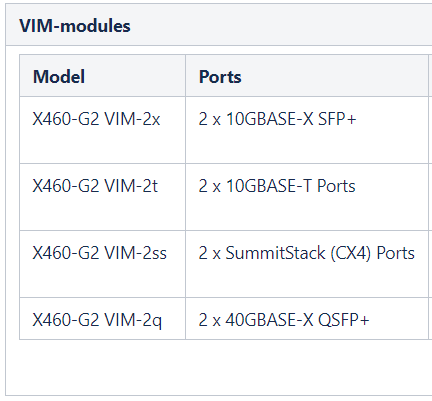
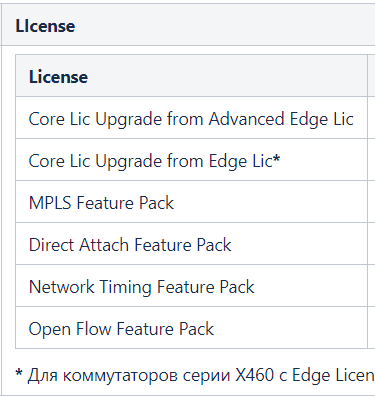
VIM modules for port expansion, as well as licenses available for the X460-G2 series switches, can be selected from the table below:
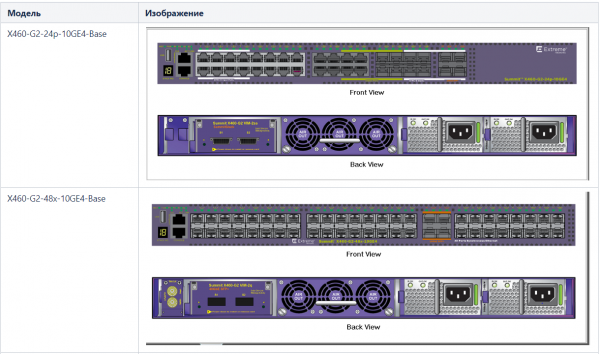
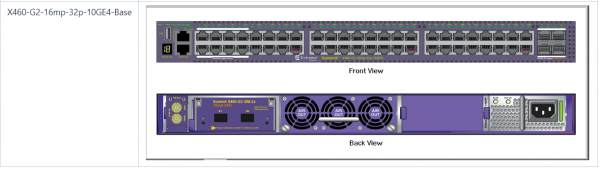
And finally, in this overview of the series, I will present some images of the switches:
X620-G2 Series
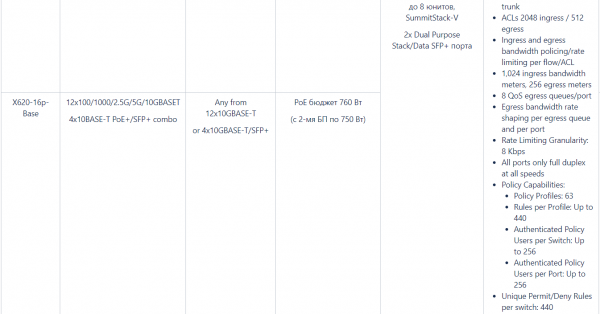
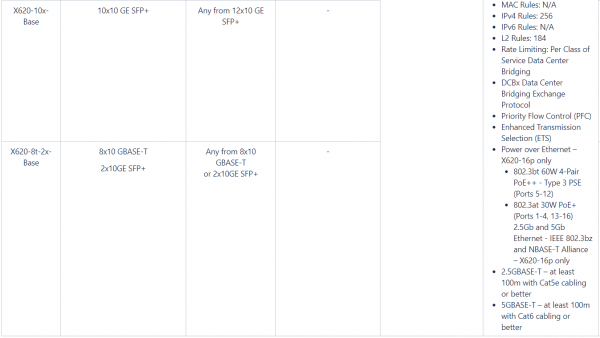
The X620-G2 series switches are compact 10 GE switches with a fixed set of ports. They are available for order with two types of licenses — Edge License and Advanced Edge License.
They support stacking using SummitStack-V technology with the following series of switches — X440-G2, X450-G2, X460-G2, X670-G2, and X770 through 2×10 GE SFP+ dual-purpose ports — Data/Stacking.
The model with PoE+ ports supports 60W 802.3bt 4-Pair PoE++ — Type 3 PSE. All models support the option to install additional power supplies.
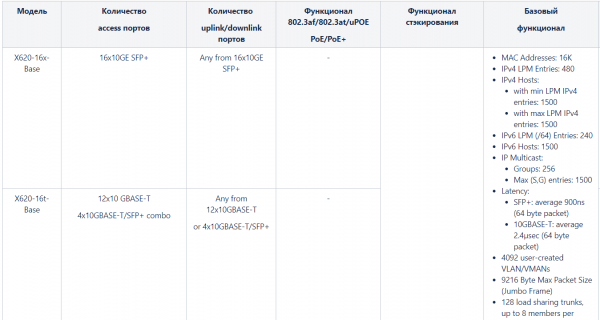
Below is a table of possible hardware configurations for the series:
Several types of licenses are available for order with the switches:

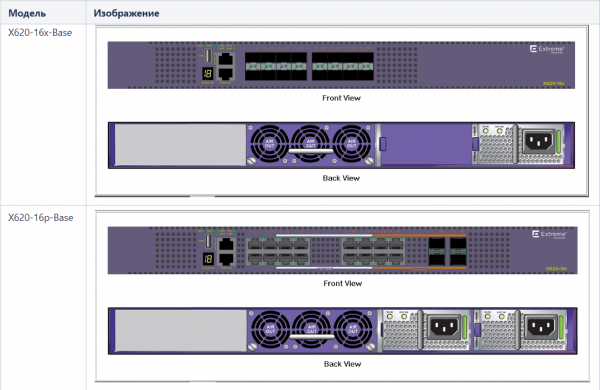
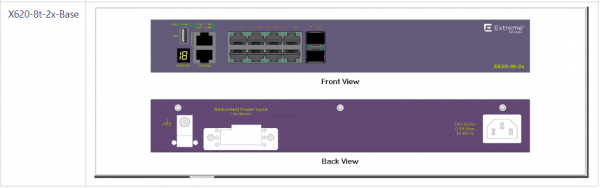
I will also attach a few images of the switches for review:
X670-G2 Series
The X670-G2 series switches are high-performance 1RU aggregation or core switches with a high port density, and they can also act as a Controller Bridge for V400 switches. The switches available for order come with 48 and 72 fixed 10 GE SFP+ ports and 4 QSFP+ ports.
These switches come with 2 types of licenses — Advanced Edge License (as the initial license) and Core License, and support 4 different stacking methods — SummitStack-V, Summit-Stack-80, SummitStack-160, SummitStack-320.
For large internet service providers and very large enterprises, the MPLS Feature Pack will be interesting, which allows extending functionality and using switches as LSR or LER core routers and utilizing them to build multiservice networks supporting — L2VPN (VPLS/VPWS), BGP-based L3VPNs, LSP based on LDP protocol, RSVP-TE, Static provisioning and various tools such as — VCCV, BFD and CFM.
Switches are available for order in 2 configurations:
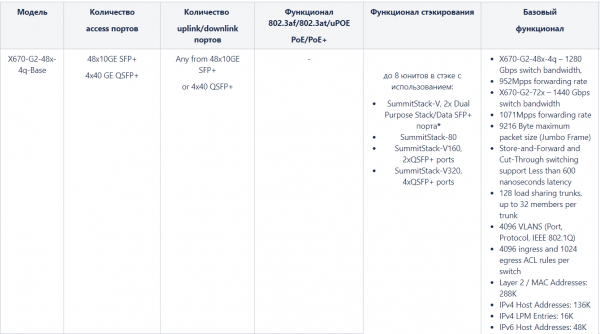
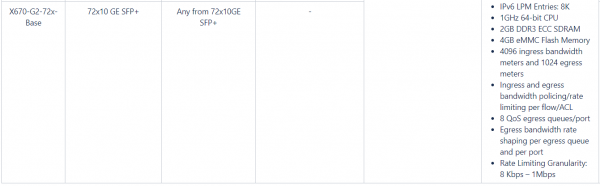
* Stacking is compatible with the series — X440, X440-G2, X450, X450-G2, X460, X460-G2, X480, X670, X670V, and X770
Switches come without fan modules and power supplies — they need to be ordered separately. The main conditions when choosing are:
- a complete set of fan modules — 5 pieces must be installed.
- power supplies and fan modules should be selected to support airflow in the same direction
The following licenses are available for order with the switches of this series:
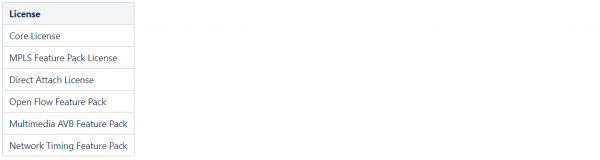
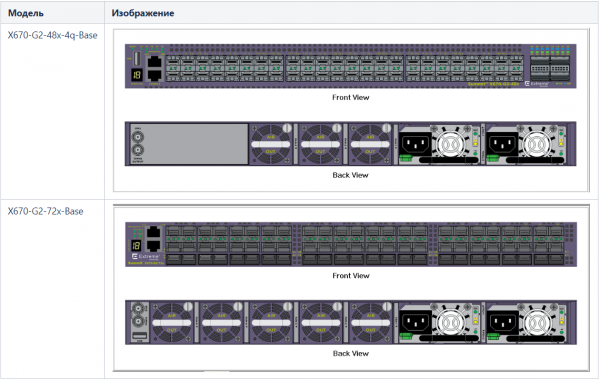
To conclude the overview of this series, I will provide 2 images of the switches:
X590 Series
The series switches have built-in ports of 1GE/10GE/25GE/40GE/50GE/100GE and are intended for use as:
- core or aggregation switches
- Controller Bridge switches in conjunction with access switches V400
- top-of-rack switches for data centers
The switches are available in two types — with SFP and BASE-T ports, and the option to equip two power supplies:
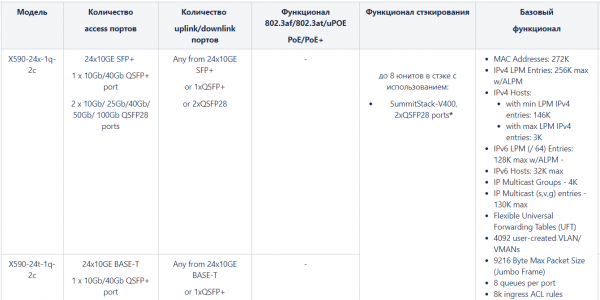
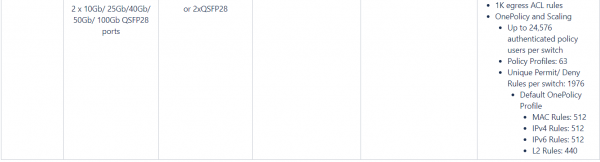
* Compatible with series X690 and X870.
The switches come without fan modules and power supplies — they need to be ordered separately. The main conditions for their selection are as follows:
- a complete set of fan modules must be installed — 4 units.
- power supplies and fan modules should be selected to support airflow in the same direction
- AC and DC power supplies cannot be installed in the switch simultaneously
Licenses available for order with these switches:

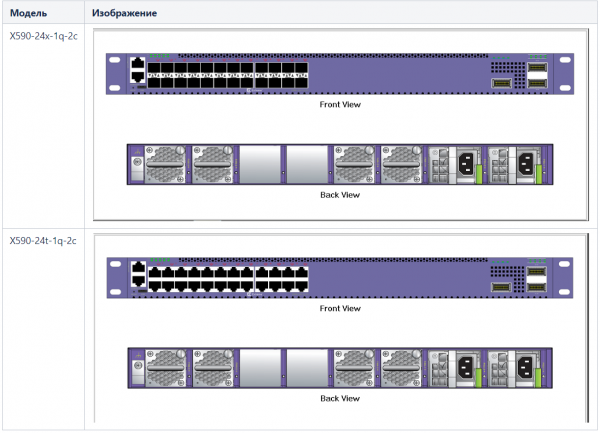
Images of the switches are shown in the figure below:
Series X690
The series switches have a higher number of built-in ports of 1GE/10GE/25GE/40GE/50GE/100GE compared to the series X590 and are also intended for use as:
- core or aggregation switches
- Controller Bridge switches in conjunction with access switches V400
- top-of-rack switches for data centers
The series switches are also available in two types — with SFP and BASE-T ports and the option to equip two power supplies:
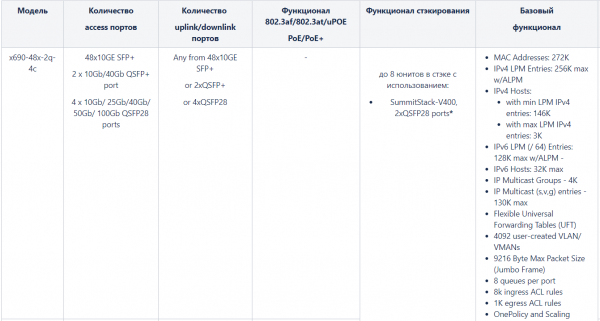
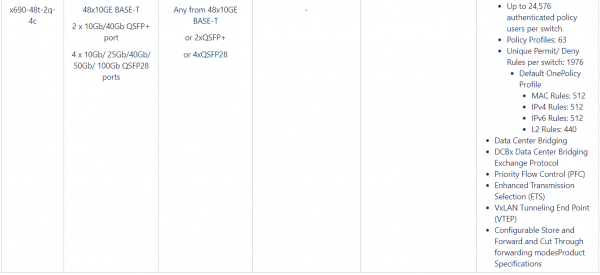
* Compatible with series X590 and X870.
The switches come without fan modules and power supplies — they need to be ordered separately. The main conditions for their selection are as follows:
- a complete set of fan modules must be installed — 6 units
- power supplies and fan modules should be selected to support airflow in the same direction
- AC and DC power supplies cannot be installed in the switch simultaneously
Licenses available for order with these switches:

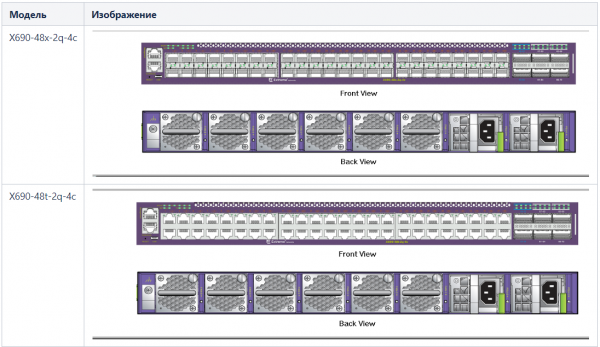
Images of the switches are shown in the figure below:
Series X870
The X870 family represents switches with high port density of 100Gb and can be used as high-performance core switches in Enterprise networks and spine/leaf switches in data centers.
Switching with minimal latency and the functionality of licenses — Advanced, Core, and MPLS make them ideal for use in high-performance data center applications.
The x870-96x-8c-Base switch also implements the 'pay-as-you-grow' ideology — it allows for the expansion of port bandwidth using Upgrade licenses (licenses apply to groups of 6 ports, up to 4 licenses).
The switches are available in two configurations and come with two power supplies:
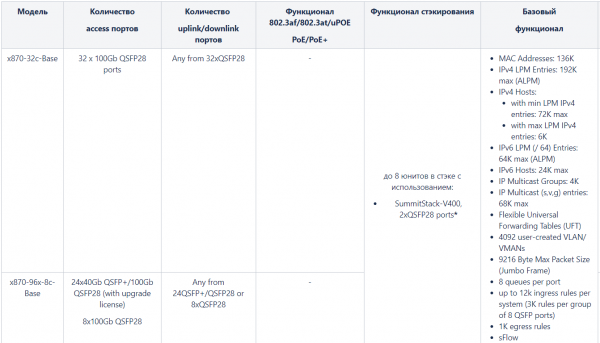
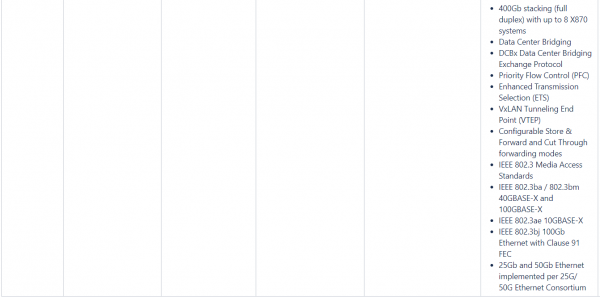
* Compatible with series X590 and X690.
The switches come without fan modules and power supplies — they need to be ordered separately. The main conditions for their selection are as follows:
- a complete set of fan modules must be installed — 6 units
- power supplies and fan modules should be selected to support airflow in the same direction
- AC and DC power supplies cannot be installed in the switch simultaneously
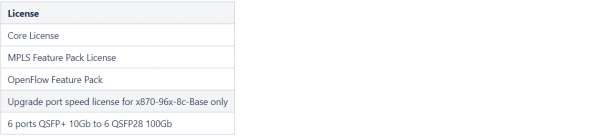
The licenses available for purchase with these switches are as follows:
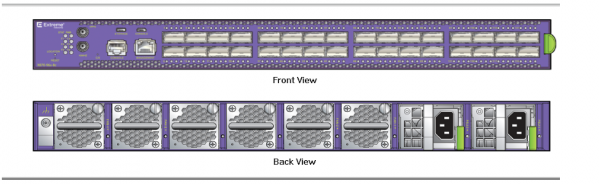
The two types of switches look completely identical, as shown below in the image:
Conclusion
Friends, I would like to conclude the review article on this series to avoid inflating it to a gigantic level, thus complicating its reading and perception.
I must say that ExtremeNetworks offers a variety of switches:
- including VSP (Virtual Services Platform) models, some of which are modular switches that can be configured with various sets of ports.
- There are also the VDX and SLX series switches, which are specialized for data center operations.
I will further describe the aforementioned switches and their functionalities, but this will likely be in a different article.
Lastly, I would like to mention one more important thing — I didn't specify in the article, but Extreme switches support SFP/SFP BASE-T/SFP+/QSFP/QSFP+ modules from third-party manufacturers, and there are no technical or legal restrictions (unlike with Cisco) on using third-party modules — if the transceiver is high-quality and is recognized by the switch, it will work.
Thank you for your attention, and see you in the next articles. To stay updated, below are our channels where you can follow the latest materials:
—
—
—
—
Source: habr.com
