

We all love Ansible, but Ansible is YAML. There are many formats for configuration files: lists of values, key-value pairs, INI files, YAML, JSON, XML, and many more. However, for several reasons, YAML is often considered particularly difficult among them. In particular, despite its refreshing minimalism and impressive capabilities for handling hierarchical values, YAML's syntax can be frustrating with its Python-like approach to indentation.

If YAML annoys you, you can – and should! – take the following 10 steps to bring your irritation down to an acceptable level and learn to love YAML. As with any good list, our top ten tips will be numbered from zero, with meditation and spiritual practices added at your discretion. 😉
0. Make your editor work
It doesn't matter what text editor you have – there is probably at least one plugin for working with YAML. If you don't have one, find and install it immediately. The time spent searching for and setting it up will pay off many times over every time you have to edit YAML.
For example, the editor supports YAML by default, whereas for GNU Emacs you will need to install additional packages, such as .
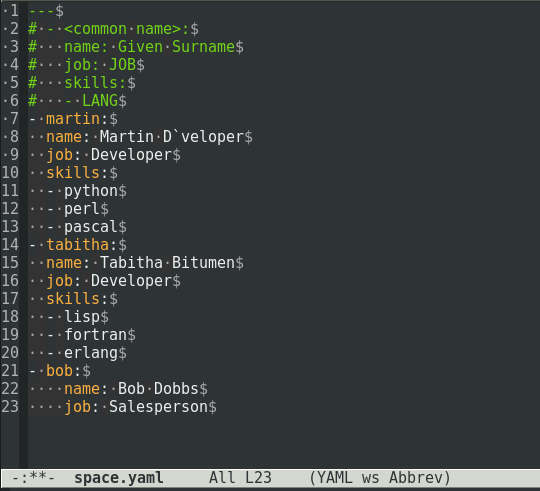
Emacs in YAML mode and displaying spaces.
If your favorite editor doesn't have a YAML mode, some issues can be resolved by working with the settings. For example, GNOME's built-in text editor Gedit doesn't have a YAML mode, but by default, it highlights YAML syntax and allows you to configure indentation settings.
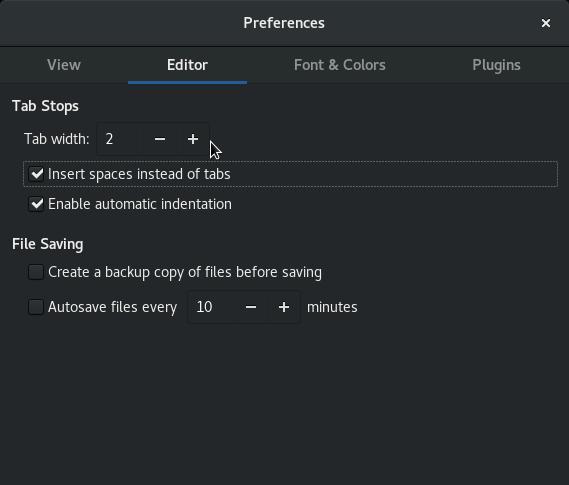
Configuring indentation in Gedit.
And the plugin for Gedit displays spaces as dots, eliminating ambiguities with indentation levels.
In other words, spend some time learning your favorite editor. Find out what it offers for working with YAML, whether through its own features or its development community, and take advantage of those capabilities. You definitely won't regret it.
1. Use a linter
In an ideal world, programming languages and markup languages use predictable syntax. Computers handle predictability well, which is why the concept of a emerged back in 1978. If this concept has passed you by for 40 years and you are still not using a YAML linter, now is the time to try yamllint.
Install you can do this using the default Linux package manager. For example, in 8 or this is done like this:
$ sudo dnf install yamllint
Then you simply run yamllint, passing it the YAML file to check. Here’s how it looks when you pass a file with errors to the linter:
$ yamllint errorprone.yaml
errorprone.yaml
23:10     error    syntax error: mapping values are not allowed here
23:11     error    trailing spaces  (trailing-spaces)
The numbers on the left are not timestamps, but the coordinates of the error: line number and column number. The error description may not mean anything to you, but you know exactly where it is located. Just look at that spot in the code, and everything will likely become clear.
When yamllint does not find any errors in the file, nothing is printed to the screen. If that silence scares you and you want a bit more feedback, you can run the linter with a conditional echo command through a double ampersand (&&), like this:
$ yamllint perfect.yaml && echo "OK"
OK
In POSIX, the double ampersand executes only when the preceding command returns 0. Since yamllint returns the number of errors found, that’s why this conditional structure works.
2. Write in Python, not YAML
If you really hate YAML, just don’t write it, literally. Sometimes YAML is the only format that the application accepts. But even in that case, you don’t have to create a YAML file. Write in whatever you like and then convert it. For instance, there’s a great library for Python and two whole methods for converting: self-conversion and conversion through scripts.
Self-conversion
In this case, the data file also acts as a Python script that generates YAML. This method is best suited for small datasets. You just write the JSON data into a Python variable, prepend it with an import directive, and add three lines at the end of the file for output.
#!/usr/bin/python3
import yaml

d={
"glossary": {
  "title": "example glossary",
  "GlossDiv": {
	"title": "S",
	"GlossList": {
	  "GlossEntry": {
		"ID": "SGML",
		"SortAs": "SGML",
		"GlossTerm": "Standard Generalized Markup Language",
		"Acronym": "SGML",
		"Abbrev": "ISO 8879:1986",
		"GlossDef": {
		  "para": "A meta-markup language, used to create markup languages such as DocBook.",
		  "GlossSeeAlso": ["GML", "XML"]
		  },
		"GlossSee": "markup"
		}
	  }
	}
  }
}

f=open('output.yaml','w')
f.write(yaml.dump(d))
f.close
Now we run this file in Python and get the output file output.yaml:
$ python3 ./example.json
$ cat output.yaml
glossary:
  GlossDiv:
	GlossList:
	  GlossEntry:
		Abbrev: ISO 8879:1986
		Acronym: SGML
		GlossDef:
		  GlossSeeAlso: [GML, XML]
		  para: A meta-markup language, used to create markup languages such as DocBook.
		GlossSee: markup
		GlossTerm: Standard Generalized Markup Language
		ID: SGML
		SortAs: SGML
	title: S
  title: example glossary
This is completely valid YAML, but yamllint will issue a warning that it does not start with —. Well, that can easily be fixed manually or by slightly modifying the Python script.
Converting via scripts
In this case, we write to JSON first and then run the converter as a standalone Python script, which outputs YAML. Compared to the previous method, this approach scales better since the conversion is separated from the data.
First, let’s create a JSON file named example.json; for instance, you can get it from :
{
	"glossary": {
	  "title": "example glossary",
	  "GlossDiv": {
		"title": "S",
		"GlossList": {
		  "GlossEntry": {
			"ID": "SGML",
			"SortAs": "SGML",
			"GlossTerm": "Standard Generalized Markup Language",
			"Acronym": "SGML",
			"Abbrev": "ISO 8879:1986",
			"GlossDef": {
			  "para": "A meta-markup language, used to create markup languages such as DocBook.",
			  "GlossSeeAlso": ["GML", "XML"]
			  },
			"GlossSee": "markup"
			}
		  }
		}
	  }
	}
Then, let’s create a simple converter script and save it as json2yaml.py. This script imports both the YAML and JSON Python modules, loads the specified JSON file provided by the user, performs the conversion, and writes the data to output.yaml.
#!/usr/bin/python3
import yaml
import sys
import json

OUT=open('output.yaml','w')
IN=open(sys.argv[1], 'r')

JSON = json.load(IN)
IN.close()
yaml.dump(JSON, OUT)
OUT.close()
Save this script in the system path and run it as needed:
$ ~/bin/json2yaml.py example.json
3. Parse a lot and often
Sometimes it helps to look at the problem from a different angle. If you find it difficult to visualize the relationships between data in YAML, you can temporarily convert it to something more familiar.
For example, if you're comfortable working with dictionary lists or JSON, you can convert YAML to JSON with just two commands in Python's interactive shell. Let's say you have a YAML file mydata.yaml, then here's how it would look:
$ python3
>>> f=open('mydata.yaml','r')
>>> yaml.load(f)
{'document': 34843, 'date': datetime.date(2019, 5, 23), 'bill-to': {'given': 'Seth', 'family': 'Kenlon', 'address': {'street': '51b Mornington Roadn', 'city': 'Brooklyn', 'state': 'Wellington', 'postal': 6021, 'country': 'NZ'}}, 'words': 938, 'comments': 'Good article. Could be better.'}
You can find many other examples on this topic. In addition, there are numerous online converters and local parsers available. So don’t hesitate to reformat data when you see nothing but an incomprehensible mess.
4. Read the specs
Returning to YAML after a long break, it’s helpful to visit and re-read the specifications. If you’re struggling with YAML but haven’t gotten around to reading the specs, it’s time to change that. The specs are surprisingly well written, and the syntax requirements are illustrated with plenty of examples in .
5. Pseudo-configs
When writing a book or article, it’s always useful to first draft a preliminary outline, even if just in the form of a table of contents. The same goes for YAML. You likely have an idea of what data needs to be recorded in the YAML file, but you might not fully understand how to connect them. Therefore, before crafting your YAML, sketch out a pseudoconfiguration.
A pseudoconfiguration resembles pseudocode, where you don’t need to worry about structure or indentation, parent-child relationships, inheritance, and nesting. Here too, you map out the iterations of data as they arise in your mind.
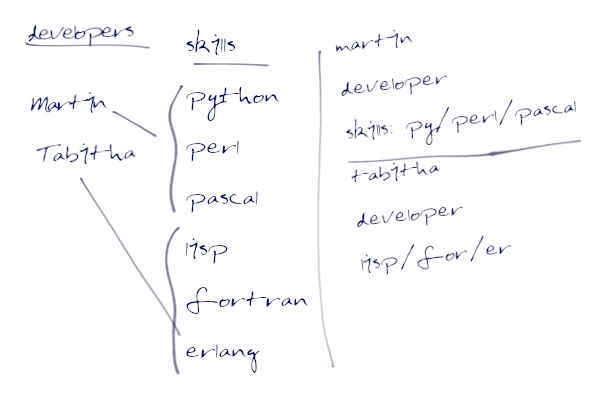
A pseudoconfiguration listing programmers (Martin and Tabitha) and their skills (programming languages: Python, Perl, Pascal and Lisp, Fortran, Erlang, respectively).
After sketching the pseudoconfiguration on paper, carefully analyze it and, if everything is in order, format it as a valid YAML file.
6. The dilemma of ‘tabs or spaces’
You will need to resolve the dilemma . Not in a global sense, but rather at the level of your organization, or at least your project. It doesn’t matter whether this will involve post-processing with a sed script, setting up text editors on programmers' machines, or enforcing strict adherence to linter instructions under threat of termination; all team members who deal with YAML must strictly use spaces (as YAML specification requires).
In any reasonable text editor, you can set up auto-replace of tabs with a specified number of spaces, so there's no need to fear a rebellion by fans of the Tab key.
As every YAML hater knows well, there’s no visible difference on screen between tabs and spaces. And when something is invisible, it tends to be remembered last, after all other potential issues have been addressed. An hour wasted searching for a misaligned tab or block of spaces just screams that you urgently need to create a policy for using one or the other, and then implement a solid check to ensure compliance (for example, through a Git hook for mandatory linter runs).
7. Better less but better (or more – is less)
Some people prefer to write in YAML because it emphasizes structure. They actively use indentation to highlight blocks of data. This is somewhat of a trick to mimic markup languages that use explicit separators.
Here's an example of such structure from :
# Employee records
-  martin:
        name: Martin D'vloper
        job: Developer
        skills:
            - python
            - perl
            - pascal
-  tabitha:
        name: Tabitha Bitumen
        job: Developer
        skills:
            - lisp
            - fortran
            - erlang
For some, this approach helps clarify the structure of YAML, while others find it frustrating due to what they consider unnecessary indentation.
But if you are the owner of a YAML document and responsible for its maintenance, then you and only you should determine how to use indentations. If you are annoyed by large indentations, reduce them to the minimum possible according to the YAML specification. For example, the above file from the Ansible documentation can be rewritten like this without any loss:
---
- martin:
   name: Martin D'vloper
   job: Developer
   skills:
   - python
   - perl
   - pascal
- tabitha:
   name: Tabitha Bitumen
   job: Developer
   skills:
   - lisp
   - fortran
   - erlang
8. Use templates
If you often repeat the same mistakes when filling out a YAML file, it makes sense to insert a template comment in it. Then next time you can simply copy this template and fill in the actual data, for example:
---
# - <common name>:
#   name: Given Surname
#   job: JOB
#   skills:
#   - LANG
- martin:
  name: Martin D'vloper
  job: Developer
  skills:
  - python
  - perl
  - pascal
- tabitha:
  name: Tabitha Bitumen
  job: Developer
  skills:
  - lisp
  - fortran
  - erlang
9. Use something else
If the application isn't holding you captive, it might be worth switching from YAML to another format. Over time, configuration files can outgrow themselves, and it may be better to transform them into simple scripts in Lua or Python.
YAML is great, and many appreciate it for its minimalism and simplicity, but it's far from the only tool in your arsenal. So sometimes it can be set aside. There are easily accessible parsing libraries for YAML, so if you offer convenient migration options, your users will relatively painlessly manage such a switch.
But if YAML is absolutely necessary, then take these 10 tips to heart and conquer your dislike of YAML once and for all!
Source: habr.com
