

It was 2013. I started working at one of the software development companies creating products for private users. I heard various things, but what I least expected to see was what I found: 32 unpaid virtual machines on an obscenely expensive VDS at that time, three 'free' Photoshop licenses, two Corel licenses, paid and unused capacity for IP telephony, and other minor items. In the first month, I 'saved' the infrastructure 230 thousand rubles; in the second, almost 150 (thousand). Then my heroics ended, optimization began, and ultimately we saved half a million in six months.
The experience inspired us, and we started searching for new ways to save. Now I work somewhere else (guess where), so I can share my experiences with the world with a clear conscience. And you should share too; let’s make IT infrastructure cheaper and more efficient!
‘The last bit of wool has been sheared off your spending on servers, licenses, IT assets, and outsourcing,’ grumbled the CFO, demanding planning and budgeting.
1. Be a stickler — plan and budget.
Budget planning for your company's IT environment is a tedious task, and getting it approved can sometimes even be dangerous. But just having a budget practically guarantees you protection from:
- cutbacks on the development of hardware and software (although there can be quarterly optimizations, but you can stand your ground there)
- discontent from the CFO or accounting during the purchase or rental of the next infrastructure element.
- the wrath of management due to unplanned expenses.
Budgeting is necessary not only in large companies — it’s essential for virtually any organization. Gather requirements for software and hardware from all departments, calculate the necessary capacities, consider the dynamics of staff changes (for example, if you have a call center or support that increases during busy seasons and decreases in quieter times), justify expenses, and develop a budget plan broken down by periods (ideally monthly). This way, you’ll know exactly how much funding you’ll have for your resource-intensive tasks, allowing for optimized spending.
2. Use the budget wisely.
Once the budget is approved and signed, there is a tempting urge to redistribute costs and, for example, pour the entire budget into an expensive server that can run the entire DevOps with monitoring and gateways 🙂 In such a case, you may find yourself in a resource shortage for other tasks and face overspending. Therefore, focus solely on actual needs and business objectives for which computational power is required.
3. Upgrade Servers On Time
Outdated hardware servers, just like virtual ones, do not bring any benefits to the organization — they raise questions about security, speed, and intelligence. You spend more time, effort, and money compensating for missing functionality, addressing security issues, and applying patches for speed improvements. So, upgrade your physical and virtual resources — for example, you can do it right now with our promotion. , prices that are not embarrassing to showcase on Habr.
By the way, I have encountered situations where having a physical server in the office was an unjustified decision: most small and medium businesses can address all tasks using virtual capacities and save a lot of money.

4. Optimize Ordinary User Operations
Encourage all your users to save electricity and use the infrastructure wisely. Here are examples of typical overspending on the user side:
- Installing unnecessary applications on a "department-wide" basis — users request software like their neighbor’s, simply because it’s needed or a request is made for "7 Photoshop licenses for the design department." Meanwhile, there are only four employees in the design department working with Photoshop, while the other three are layout designers who use it once every six months. In this case, it’s better to purchase 4 licenses and solve 1-2 tasks a year with the help of colleagues. However, such situations occur more frequently with office software (in particular, the MS Office suite, which is needed in full by absolutely everyone). In reality, the overwhelming majority of employees can manage just fine with open-source editors or practical Google Docs.
- Users consume virtual resources and systematically exhaust all rented capacities — for instance, testers love to create overloaded virtual machines and often forget to power them down, and developers do not hesitate to do the same. The remedy is simple: power them down when you leave 🙂
- Users utilize the company's servers as a global file repository: they upload photos (in RAW), videos, post gigabytes of music, and some particularly bold individuals may even set up a small game server using work resources (we condemned this in a humorous way on the corporate portal — it worked really well).
- Costly employees bring pirated software to work, leading to fines, problems with the police, and issues with vendors. Manage access and policies because they will still bring it in, even if you give heartfelt speeches in the corporate cafeteria and post motivational posters.
- Users believe they have the right to demand any tool that suits them. Thus, my arsenal included Trello, Asana, Wrike, Basecamp, and Bitrix24 rentals. Each project manager selected a comfortable or familiar product for their department. As a result, there were 5 solutions to maintain, 5 different price tags, 5 invoices, 5 different marketplaces and tweaks, etc. No integration, unification, or end-to-end automation — just pure cerebral turmoil. Ultimately, after discussing it with the CEO, I decided to close it down, chose Asana, helped migrate the data, trained the notoriously tough colleagues, and saved quite a lot, including effort and nerves.
In short, negotiate with users, educate them, conduct training, and strive to simplify both their and your work. In the end, they will be grateful to you for order in their affairs, and the management will appreciate the cost reduction. And perhaps you, my dear pros from Habra, have noticed that the solution to the aforementioned problems is nothing less than the creation of corporate information security. A special thank you to the sysadmin (who else will thank you...).
5. Combine cloud and desktop solutions.
In general, considering that I work for a hosting provider and am eager to tell you about an amazing sale of server capacities for companies of any size, I should wave my flag and shout 'Everybody to the cloud!'. But then I would be acting against my engineering qualifications and would look like a marketer. So I urge you to approach the issue wisely and combine cloud and desktop solutions. For example, you could rent a cloud CRM system as a service (SaaS), which according to the brochure costs 1000 rubles per user per month—mere pennies (I will skip the implementation question, as there has already been coverage on Habr about it). So over three years for 10 employees, you would spend 360,000 rubles; for 4—480,000; for 5—600,000, and so on. Meanwhile, you could implement a desktop CRM, paying competitive licenses (+100 to savings) for roughly 250,000 rubles and maintain it like the same Photoshop. Sometimes the savings over a period of 2-5 years are really impressive.
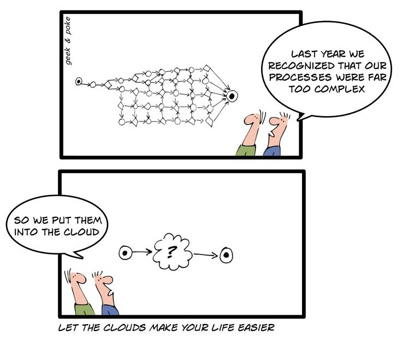
Conversely, cloud technologies often allow you to save on hardware, salaries for engineers, and data protection issues (but do not economize on them at all!), and on scaling. Cloud resources are easy to connect and disconnect, and expenses for cloud services do not count as capital expenditures for the company—overall, there are many advantages. Choose cloud solutions when it makes sense in terms of scaling, responsiveness, and flexibility.
Count, combine, and choose winning combinations—I won't give a universal recipe, as they are unique for each business: some refuse to use clouds outright, while others build their entire business in the cloud. By the way, never skip software updates (even paid ones)—typically, business software developers release more stable and functional versions.
And another rule for software: get rid of old software that delivers less than it consumes in maintenance and support. There are definitely alternatives available on the market.
6. Avoid software duplication.
I've already talked about five project management systems in my IT zoo, but I'll highlight one separately. If you've abandoned certain software and chosen new tools — don't forget to stop paying for the old ones. If you've found new hosting services — terminate the contract with the old provider unless there are specific reasons not to. Keep track of software usage profiles among employees and eliminate unused and duplicate software.
Ideally, you should have a monitoring and analysis system for the installed software — this way, you can see working duplicates and issues in automatic mode. By the way, such efforts help the company avoid duplication and data repetition — sometimes searching for who made a mistake takes too much time.

7. Tidy up the application infrastructure and peripherals
Who keeps track of supplies like cartridges, flash drives, paper, chargers, UPS units, printers, and other disks-tubes? Not many. Start with paper and printers — analyze printing profiles and create a network of printers or multifunction devices with public access. You'll be surprised at how much paper and cartridges will be saved and how much the cost per page of printing will decrease. And no, this isn't being stingy; it's optimizing an important process. Nobody forbids printing term papers and reports on office equipment, but printing books that you're reluctant to buy or don't want to read on a screen is just too much.
Next — always have a reserve of supplies that you purchase from suppliers at a discount so that when technical issues arise, you're not paying triple at the nearest tech store. Keep an eye on depreciation and wear, maintain records, and form a backup fund — by the way, it's also good to have a backup fund for basic office equipment. Simply because downtime at work won't earn you any praise; it's also a loss of money, especially in trade and service companies.
When it comes to applied infrastructure, there are two main cost factors: internet and communication. When choosing a provider, look at package deals, read the fine print on the plans, and pay attention to the quality of communication and SLA. Some admins choose not to complicate things and buy, for example, IP telephony bundled with a paid virtual PBX, which also incurs a monthly subscription. Don’t be lazy; purchase only the traffic and learn to work with Asterisk — it’s the best solution available in the PBX sphere and a nearly hassle-free option for the business needs of small and medium enterprises (if you have the necessary skills).
8. Document and create guidelines for employees
This is necessary despite the inconvenience. Firstly, it will make your work easier; secondly, onboarding new employees will be seamless. Finally, you will know that your infrastructure is current, cohesive, and in good order. Create security protocols, short user manuals, FAQs, and outline the rules and norms for using office equipment. A physical instruction is much more convincing than words; it can always be referenced. This way, you can share a link to the document for any relevant inquiries and won’t have to deal with the argument of "I wasn’t warned." You will effectively save on error resolution.
9. Utilize outsourcing services
Even if you have a full IT department or, conversely, a small infrastructure, there’s no shame in using outsourcing services. Why not leverage the skills of great professionals who specialize in complex issues for a small fee, rather than hiring such a specialist in-house? Outsource parts of DevOps, print services, administration of a busy website, if you have one, support, and call center services. Your value will not diminish; on the contrary, you will gain additional expertise in dealing with external contractors.
If your manager thinks outsourcing is expensive, simply explain how much they will have to pay a dedicated specialist. It really does work.
10. Don't get involved in open source and your own development.
I am an engineer, a former developer, and I firmly believe that open source saves the world — just think of the libraries, monitoring systems, server management systems, etc. However, if your company decides to purchase open source CRM, ERP, ECM, etc., or if the boss shouts at the meeting that you should build your billing system from scratch, save the ship; it is heading for the reefs. Here are arguments to stand on in front of an inspired leader with burning eyes:
- open source is poorly supported if it’s a public repository or very expensive to support if it’s open source from companies (DBMS, office suites, etc.) — you will literally pay for every question, request, and ticket;
- an internal specialist for deploying an internal open source product will be very expensive due to its rarity;
- customizations of open source can be severely limited by knowledge, skills, or even licensing;
- with open source, you will take a long time to start and it will be too complicated to adapt it to business processes.
Is it worth mentioning that developing your own system is a lengthy and costly endeavor? From my experience, it takes at least three years to create a working prototype that meets business requirements and allows users to work in it, provided you have a good team of programmers (you can check salaries on 'My Circle' — the conclusions will be obvious).
So I will be banal and repeat myself: consider all options.
So, let me summarize briefly to ensure I haven't forgotten anything:
- consider the money — compare different options, take into account various factors;
- aim to reduce maintenance and user training time, lower the risk of "fool’s interference";
- try to consolidate and integrate technologies — a streamlined architecture and end-to-end automation solve problems;
- invest in IT development, don’t live with outdated technologies — they will drain money;
- align supply and demand for IT resources.
You might ask — why save someone else's money, since the company pays? A logical question! But your ability to optimize costs and manage IT assets effectively is primarily your experience and your characterization as a professional. We all know how to create a masterpiece from available materials 🙂.
The as a great opportunity to upgrade virtual resources. Visit, take a look, choose — there’s not much time left until April 30.
For others — the traditional of 10% with the promo code habrahabr10.
Source: habr.com
