

Welcome! You are at the eleventh and final lesson of the course. . On We have covered the key aspects related to device administration. Now, to complete the course, I would like to introduce you to the product licensing scheme. and — these schemes usually raise quite a few questions.
As usual, the lesson will be presented in two formats — in text form, as well as in a video lesson, which can be found at the bottom of the article.
Let's start with the technical support variations. In Fortinet terminology, technical support is referred to as FortiCare. There are three options for technical support:
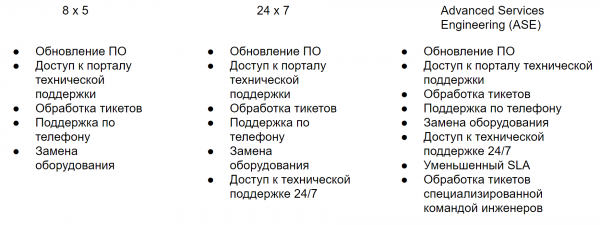
8×5 is one of the standard options for technical support. By purchasing this type of technical support, you gain access to the technical support portal where you can download images for updates, as well as additional software. You have the ability to submit tickets for technical issues. However, in this case, the response time to your request depends not only on a certain SLA but also on the working hours of the engineers (and accordingly, the time zone). It is worth noting that Fortinet is gradually moving away from this type of technical support.
The second option — 24x7 — is the second standard option for technical support. It has the same parameters as 8x5 but with some differences — SLA no longer depends on the working hours of engineers and time zone differences. There is also an option to purchase an extended equipment replacement program, but more on that later.
And the third option — Advanced Services Engineering or ASE — also provides support in a 24/7 mode but with a specific, reduced SLA. In the case of ASE, ticket processing is handled by a specialized team of engineers. Currently, this type of technical support is only available for FortiGate devices.
Now let’s go over the subscriptions. There are numerous individual subscriptions, as well as packages that contain several subscriptions. Technical support is also included in the package. You can see the list of existing subscriptions for FortiGate in the image below.
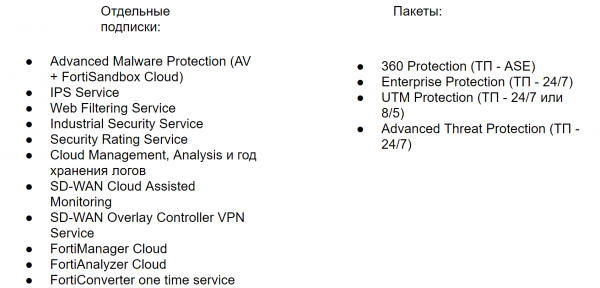
All of the aforementioned subscriptions may be included in the following packages:
360 Protection, Enterprise Protection, UTM Protection, Advanced Threat Protection. At this stage, it is important to remember that the 360 Protection package always includes ASE technical support, the Enterprise package always includes 24/7 support, and the UTM package currently has two variations — a package with 8/5 technical support and a package with 24/7 technical support.
The last package — Advanced Threat Protection — always includes 24/7 support.
Technical support also includes warranty replacement of equipment. However, the 24/7 and ASE support types allow for the purchase of Premium RMA, which helps reduce equipment replacement time and provides additional benefits. There are 4 types of Premium RMA:
- Next Day Delivery — spare equipment will be delivered the next day after the incident with the current equipment is confirmed.
- 4 Hours On-Site Parts Delivery — spare equipment will be delivered by courier within 4 hours after the incident confirmation.
- 4 Hours On-Site Engineer — spare equipment will be delivered by courier within 4 hours after the incident confirmation. An engineer will also be involved to assist with equipment replacement.
- Secure RMA — this service is designed for clients with strict data protection requirements within their physical environment. Firstly, it allows confidential data to be erased by a specific team without voiding the warranty. Secondly, it allows for the non-return of defective equipment, thus protecting data within the physical environment.
But that’s all “on paper”; in reality, it depends on many circumstances, such as geographical location. Therefore, I recommend consulting with a partner and clarifying possible details when purchasing.
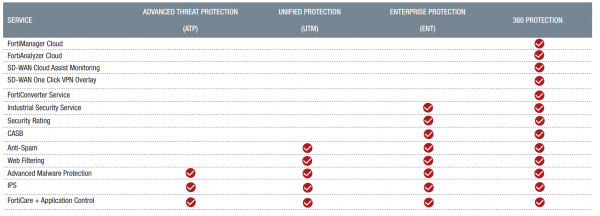
We have dissected the various proposals from Fortinet concerning FortiGate. Now it's time to consolidate all this information. Let’s start with the subscription packages. In the diagram below, the individual subscriptions I mentioned earlier are shown. It illustrates which packages include each subscription. Also, do not forget about the compatibility of technical support for each package. Using this information, you can choose the subscription package that meets your needs.
Now we come to the most important point. What are the purchasing options? Several options are available to choose from:
- A single item in the form of a physical device and a specific subscription package (you can also select the duration of the package — 1 year, 3 years, 5 years)
- A separate item for the physical device, as well as a separate item for the subscription package (you can also select the duration of the package)
- A separate item for the physical device, and specific subscriptions as separate items. In this case, the type of technical support must also be chosen separately — it will also be listed as a separate item
For virtual machines, there are two options:
- A separate item for the license for the virtual machine and a separate subscription package with corresponding technical support
- A separate item for the license for the virtual machine, separate necessary subscriptions, and separate technical support.
Premium RMA services are not included in any package and are purchased as a separate subscription.
The licensing scheme is as follows. That is, FortiGate does not limit the number of users (both regular and VPN users), nor the number of connections, or anything else. Everything depends solely on the performance of the device itself.
The cost of renewal or the annual ownership cost is determined as follows:
It can either be the cost of the selected package or the cost of separate subscriptions and separate technical support. This cost does not include anything else.
With FortiAnalyzer, it's a bit simpler. When purchasing a physical device, you buy the device itself, as well as separate technical support, a subscription for compromise indicators service, and RMA services. The annual ownership cost in this case will be considered as the sum of the services purchased each year — marked in green in the illustration.
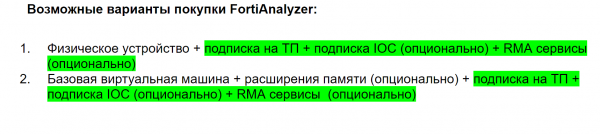
It's similar with a virtual machine. You purchase a license for a basic virtual machine and, if necessary, buy extensions for that virtual machine. Other services are analogous to those provided for a physical device. The annual cost of ownership is calculated in the same way as for a physical device—services included in it are also highlighted in green on the slide.
As promised, I am also attaching a video lesson on this topic. It will suit those who prefer video format, as it contains exactly the information presented above.
In the future, new articles, lessons, or courses on this or other topics may be released. To stay updated, follow the updates on the following channels:
You can also leave suggestions for new lessons or courses on the topic of Fortinet using the .
Source: habr.com
