

Hello, friends! We have finally reached the last, final lesson of the Check Point Getting Started. Today we will discuss a very important topic — Licensing. I want to warn you that this lesson is not a comprehensive guide to choosing hardware or licenses. It is merely a summary of the key points that any Check Point administrator should know. If you are really struggling with the choice of a license or device, it is better to consult professionals, i.e., us :). There are many pitfalls that are quite difficult to cover in a course, and it’s also not easy to remember everything right away.
Today's lesson will be completely theoretical, so feel free to turn off your test servers and relax. At the end of the article, you will find a video lesson where I explain everything in more detail.
Gateway Licensing
Let's start with a description of the licensing features for security gateways. This applies to both hardware appliances and virtual machines. Let's say you decided to buy a gateway. You cannot simply buy hardware or a virtual machine without ‘subscriptions’! There are three options for subscriptions:
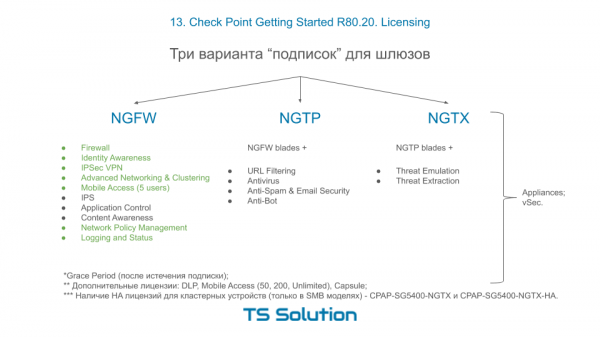
Now here’s the first interesting feature! You can only purchase a device or virtual machine with NGTP or NGTX subscriptions. However, when renewing your subscription, you will have the option to choose the NGFW package if you do not need the AV, AB, URL, AS, TE, and TX blades. That's the point. The subscriptions can be purchased for one, two, or three years.
I can predict your first question! “What happens if the subscription is not renewed?”. I have specifically highlighted in green those blades that will ALWAYS work, and WITHOUT renewals. These are the so-called perpetual blades. The other blades that require constant updates will simply stop working. Well, the IPS will retain its key signatures (but there are very few of them). This is true for both hardware and virtual machines, i.e., vSec.
I have separately highlighted three blades that are not included in any package: DLP, MAB, and Capsule.
Also, remember that if you are purchasing a clustered solution, choose a model with the HA suffix (i.e., High Availability) for the second device. The image shows an example for the 5400 gateway. That covers the gateways. Now, let's move on to the management server.
Management Server Licensing
As we mentioned in the earlier lessons, there are two scenarios for implementing Check Point: Standalone (when both the gateway and management are on one device) and Distributed (when the management server is moved to a separate device). However, the options do not end there. Let's look at three typical scenarios for deploying the management server:
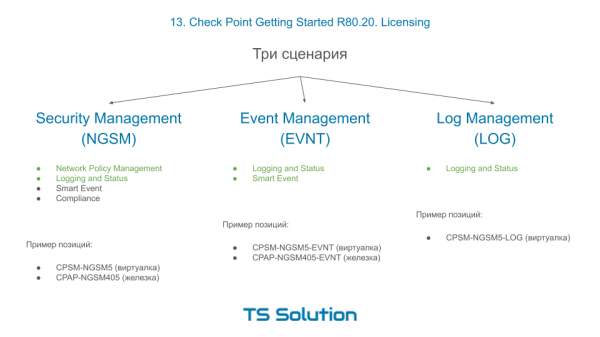
- Purchase of a dedicated NGSM. The most popular option. You can choose either the Smart-1 hardware or a virtual machine. Of course, your choice depends on how many gateways you will be administering—5, 10, 25, etc. Once you have deployed this device, you can use 4 key blades of the management server: NPM (i.e., policy management), Logging and Status (i.e., logging), Smart Event (Check Point's SIEM, which provides us with all reporting), and Compliance (this assesses the quality of configurations, either for compliance with certain regulatory requirements like PCI DSS or simply Best Practices). It is also evident that the NPM and LS blades are permanent blades, meaning they will operate without the need for subscription renewals, while the Smart Event and Compliance blades are included only for the first year! After that, they need to be renewed at an additional cost. This is a crucial point, so don't forget it. And while it may be possible to live without the Compliance blade, the Smart Event blade is definitely essential for everyone.
- Purchase of a dedicated Event Management server In ADDITION to the already existing server NGSM management. Why is this necessary? The fact is that the logging functionality, especially Smart Event, consumes quite a significant amount of system resources. If there are a lot of logs, this can lead to 'lagging' in the server management. Therefore, it is common practice to move this functionality to a separate device, either the Smart-1 hardware or, again, a virtual machine. Large integrations with a substantial number of logs almost always require a dedicated server for Smart Event. It can also receive logs. Thus, your management server will only perform management functions. This significantly enhances the system's stability and responsiveness. As you can see, when purchasing a dedicated Smart Event server, you receive these two blades for permanent use, even without renewal. Over a span of 3-4 years, this will be economically more advantageous than purchasing annual Smart Event renewals for a standard NGSM server.
- Dedicated Log management server, which complements the NGSM and Smart Event servers. The meaning is clear, I believe. With a VERY large number of logs, we can move the logging function to a separate server. A dedicated Log server also has a permanent license and does not require renewal.
Video lesson
Here you will find additional information about license management and technical support for Check Point:

Source: habr.com

 Russian
 Italian
 German
 Polish
 Estonian
 Albanian
 Bulgarian
 Croatian
 Czech
Czech Danish
 Dutch
Dutch English
 French
 Hungarian
 Latvian
 Portuguese
 Romanian
 Slovak
 Slovenian
 Spanish
 Swedish