

Introducing an overview of the latest 3CX updates. There will be a lot of interesting things—stay tuned!
3CX v16 Update 1
We have recently released another update, 3CX v16 Update 1. This update includes new chat features and an updated communication widget for your 3CX Live Chat & Talk website. Additionally, Update 1 introduces a new Call Flow Service that adds a scripted interface for managing calls in the PBX. The scripted engine works alongside the Call Flow Designer development environment and enables the creation of call handling scenarios of any complexity.
Updated chat in the web client
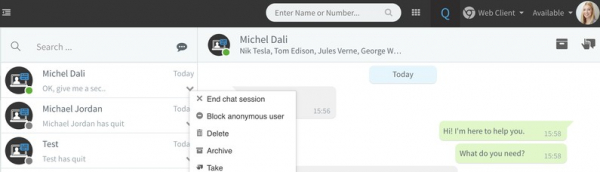
The updated chat now allows you to manage your conversations flexibly. Furthermore, it integrates perfectly with the communication widget. .
- A website visitor can start a chat with the 3CX operators queue. This creates a chat group that includes all queue operators and the visitor.
- Subsequently, a queue operator can switch the group chat to themselves and continue personal communication with the visitor.
- The operator can also transfer the chat to another operator or a regular PBX user if necessary.
- To declutter the web client interface, selected conversations can be moved to the archive (they are not deleted in the process).
- Different types of chats (from the website, group chats, etc.) now have distinct icons for easy identification.
- Now you can quickly send an email to the website visitor by clicking on the email in the chat window.
More details about the new features are described in the and in .
Updated 3CX Live Chat & Talk widget

The updated 3CX Live Chat & Talk widget offers additional interface customization and enhanced integration with websites built on both WordPress CMS and other technologies.
- Chat window icon setup – you can set an appropriate image for the chat window header. This could be, for example, your company logo.
- Operator icon setup – you can also set an icon for the chat operator, such as their photo.
- Widget placement – the 'Position' parameter determines the widget's placement on web pages—bottom right (default) or bottom left.
- The mobile browser view is a small but important addition. Now, when accessing the site from a mobile device, the chat window is displayed minimized by default.
- The chat popup – in 3CX v16 Update 1, the 3CX Live Chat & Talk widget pops up in a separate window, allowing visitors to navigate the site freely while being able to engage in chat at any moment.
Call Flow Service Script Interface
In 3CX v16 Update 1, a new Call Flow Apps Service script interface has been introduced. It supports the new standard 3CX voice applications. However, existing applications in the new version of Call Flow Designer (see below). The architecture of the Call Flow Apps Service is now finalized. The application server operates on 3CX for Debian / Raspbian Linux and Windows.
about migrating your voice applications.
Updating the installation
- Windows:
- Linux: .
- Manual installation on Debian & Raspbian – follow the installation guides for and .
→ in 3CX v16 Beta1.
After installing Update 1, the message database conversion is executed. At this moment, chat is unavailable in 3CX applications.
New 3CX App for iOS beta
We haven't updated our proprietary 3CX app for iOS in a while. Some users even reported issues with file transfer. But in this latest update, all problems have been resolved! This time, the focus is on the integrated chat capabilities. The chat in the mobile app now closely matches the chat in the 3CX web client.
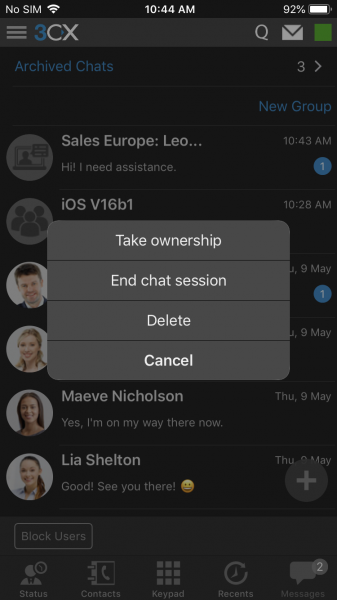
The app now allows you to create group chats and assign names to them. Chat archiving has also been added. To archive a conversation, swipe left on it (similarly, you can restore a conversation from the archive).
Additionally, the app now includes chat with website visitors through the 3CX Live Chat & Talk communication widget. Here’s how it’s currently implemented:
- Swipe left on the chat to open additional options: Take for yourself, Transfer, Complete, and Delete.
- The chat icons from the website differ from the icons of regular chats so you can easily distinguish them.
- PUSH notifications of messages from the site show the visitor's name and the content of the message.
- Chats directed to the Operators Queue include the name of the Queue—for your convenience.
Try the new 3CX App for iOS beta through !
→
New Release of 3CX Call Flow Designer
Just this week, we released a new version of the voice application development environment. It includes new C# components, a refined user interface, improved error handling, and automatic updates for the development environment. The new CFD is essential for creating a new type of voice applications for 3CX v16 Update 1 and above.
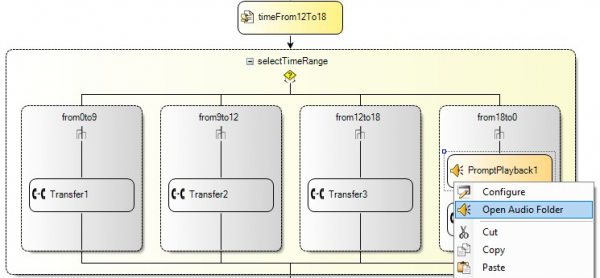
The updated CFD development environment (IDE) offers additional tools for developers:
- New Execute C# File and Code components. They replace the outdated 'Launch External Script' component. The components can execute C# code files or embedded code snippets directly from CFD applications.
- The new 'Set extension status' component allows for easy configuration of extension parameters from the CFD application.
- Error handling has been improved. The new Expression Editor additionally checks values, identifying errors at the compilation stage.
In addition to improvements in the development process, we have added several features that enhance usability within the application:
- Automatic application updates. CFD now automatically checks for new versions and installs updates as soon as they are released.
- The new 'Save Project As' menu option allows you to save the CFD project with a new name or in a different location.
- The new context menu item 'Open Audio Folder' is available for components using audio files. It opens Explorer for convenient browsing of the project's audio file folder.
- Convenient display of disabled components. They are now shown in gray to distinguish them from active CFD components.
The new CFD release is intended for use with 3CX V16 Update 1. and install it according to .
→ CFD
For all questions related to application development for 3CX, we recommend asking on the specialized .
Source: habr.com
