

Hello! Welcome to the eighth lesson of the course. . On and In the previous lessons, we got acquainted with the main security profiles. Now we can release users onto the Internet, protecting them from viruses and regulating access to web resources and applications. Now the question arises about managing user accounts. How can we ensure Internet access for only a specific group of users? How can we prohibit one group of users from visiting certain websites while allowing another? How can we integrate existing user account control solutions with the FortiGate firewall? Today we will discuss these questions and try to practice them.
First, let's look at the authentication methods supported by FortiGate. There are essentially two — local and remote.
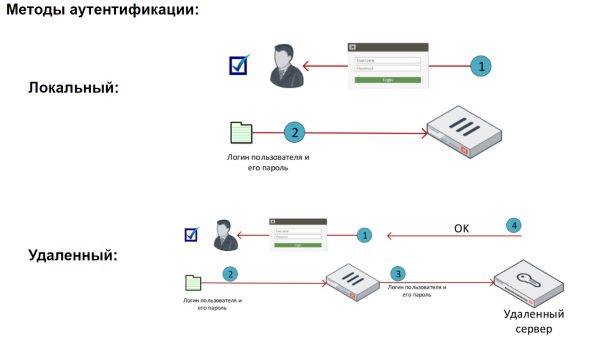
The local method is the simplest form of authentication. In this case, user data is stored locally on the FortiGate. Local users can be grouped together, and access to various resources can be regulated based on users or groups.
When remote authentication is used, users are authenticated by remote servers. This method is useful when multiple FortiGates need to authenticate the same users, or when an authentication server already exists in the network.
When a remote server authenticates users, FortiGate sends the user's credentials entered to that server. The server then checks whether such credentials exist in its database. If they do, the user is successfully authenticated in the system.
It is important to note that in this case, user credentials are not stored on the FortiGate, and the authentication process occurs on the remote server.
It is also worth mentioning the Fortinet Single Sign-On mechanism. It allows for transparent domain user authentication on FortiGate using data from domain controllers. Unfortunately, discussion of this mechanism is beyond the scope of our course.
FortiGate supports various types of authentication servers, such as POP3, RADIUS, LDAP, TACACS+. We will explore working with an LDAP server.
The video covers the basic theory as well as working with local users and the LDAP server.
In the next lesson, we will look at working with logs, specifically exploring the capabilities of FortiAnalyzer. To not miss it, keep an eye on updates on the following channels:
Source: habr.com
