

Backing up important data is essential. But what if you need to get back to work immediately, and every minute counts? At Acronis, we have decided to explore how quickly we can launch a system. This is the first post in the Active Restore series, where I will explain how we began the project in collaboration with Innopolis University, what solution we found, and what we are currently working on. Details are below.

Hello! My name is Daulet Tumbaev, and today I would like to share my experience in developing a system that speeds up disaster recovery. To narrate the entire journey of the project, let's start from a bit earlier. I am currently working at Acronis, but I am also a graduate of Innopolis University, where I completed a master's program in Software Development Management (known as MSIT-SE). Innopolis is a young university, and its curriculum is even newer. However, it is based on the curricula of Carnegie Mellon University, which has a focus on topics like industrial projects.
The goal of the industrial project is to immerse students in real development and solidify their knowledge through practice. For this purpose, the university collaborates with companies like Yandex, Acronis, MTC, and dozens of others (as of 2018, the university had 144 partners). During this collaboration, companies propose their projects to the university, and students choose one that aligns with their interests and skill levels. Just two years ago, I was on the 'other side of the barricades,' working as a student on another Acronis project. This time, I became a technical consultant for students from the company and proposed the Active Restore project to Innopolis. The idea of Active Restore was initially formulated by the Kernel team at Acronis, but the development of the solution began in collaboration with Innopolis University.
Active Restore – what is it needed for?
Traditionally, disaster recovery follows a standard procedure. After experiencing issues with your computer, you log into the web interface of a backup system, such as Acronis True Image, and click the big 'restore' button. You then have to wait for N minutes, and only after this can you continue working.
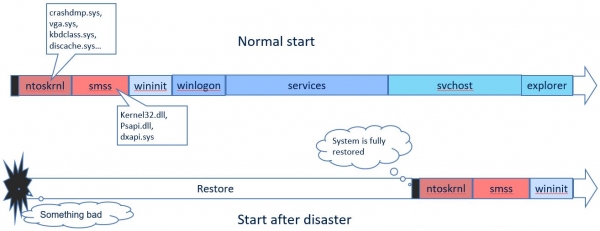
The problem is that this number N, also known as RTO (recovery time objective), the allowable recovery time, can be quite significant, depending on the connection speed (if recovery is from the cloud), the size of your machine's hard drive, and a number of other factors. Can it be reduced? Yes, it can, as resuming operation doesn’t always require the entire computer disk. Files like photos and videos do not affect the device's functionality and can be pulled in later in the background.
Driver needed…
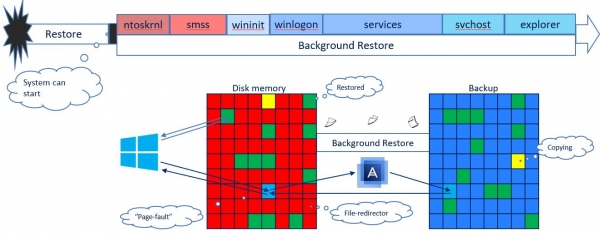
The operating system is designed to start with a fully prepared disk. Therefore, Windows performs a series of integrity checks on the disk. The system will not allow a normal boot if certain files that the OS expects are missing or damaged. To resolve this issue, we decided to place on the disk our so-called redirector files that replace missing or damaged files but are effectively just placeholders. Creating such redirectors doesn't take long, as they essentially contain no content.
Next, recovery occurs as follows. In the background, while the operating system is running, the 'placeholders' are filled with data. The background recovery process takes the disk load into account and does not exceed the set limit. However, the user or the operating system itself may suddenly require a file that is not yet available. This is where the second recovery mode comes into play. The priority of the requested file is raised to maximum, and the recovery process urgently loads the file onto the disk. The operating system receives the required file, albeit with a slight delay.
This is what the ideal picture looks like. However, in the real world, there are countless pitfalls and potential deadlocks. Together with the master's students from Innopolis, we decided to explore this recovery scenario, assess the gains in RTO, and understand whether such an approach is feasible. After all, similar solutions were simply not available on the market at that time.
And while I decided to entrust the service component to the guys from Innopolis, work within Acronis began on The Windows Kernel team took this on. The plan was to
- Launch the driver at an early stage of OS boot,
- During operation, when is fully ready, to load the service
- The service handles driver requests and coordinates its further operation.
Nuances of driver development
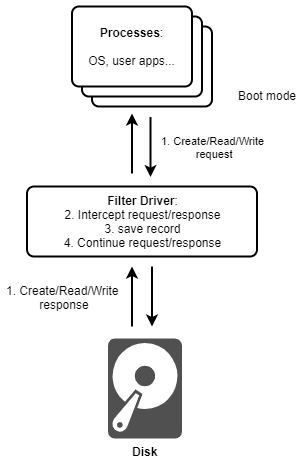
While my colleagues will cover the service in another post, in this text we will reveal the intricacies of driver development. The already developed mini-filter driver has two modes of operation: when the system has booted in normal mode, and when the system has just experienced a failure and is undergoing recovery. Before user libraries and applications, and consequently our service, begin to load, the driver behaves the same. It does not know the current state of the system. As a result, every create, read, and write operation is logged, and all metadata is recorded. When the service comes online, the driver provides this information to the service.
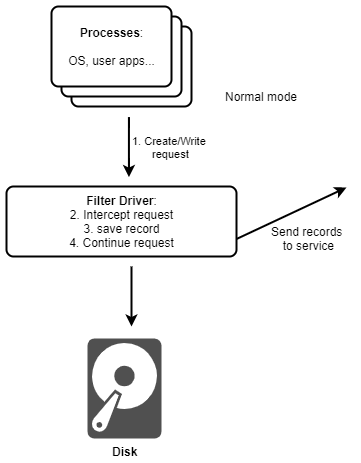
In the case of a normal startup, the service sends the driver a 'Relax' signal, prompting it to 'take it easy' and stop meticulously logging all data. In this case, the driver switches to logging only changes on the disk and reports them to the service, which, using other Acronis tools, keeps the disk backup as current as possible on the medium specified by the user. This can be cloud, remote, incremental, or nightly backups.
If the recovery mode is activated, the service informs the driver that it needs to operate in 'Recovery' mode. The system has just recovered from a failure, and as soon as it requests to open a file on the disk, the mini-filter must intercept this operation, make the request itself, check if such a file exists on the disk, and whether it can be opened.
If the file is missing, the mini-filter passes this information to the service, which raises the priority for file recovery (a recovery process is ongoing in the background). Thus, this file essentially jumps to the front of the queue. After that, the service itself (or other Acronis means) restores this file and notifies the driver that everything is fine, allowing the operating system to access it, and the driver 'releases' the original request from the system to the disk.
If recovery is impossible, the service informs the driver that the file is not available in the backup. Our mini-filter driver simply passes the system request along, and the original requester (the OS or application) receives a 'file not found' error. However, this is perfectly normal if the file was genuinely not on the disk or in the backup.
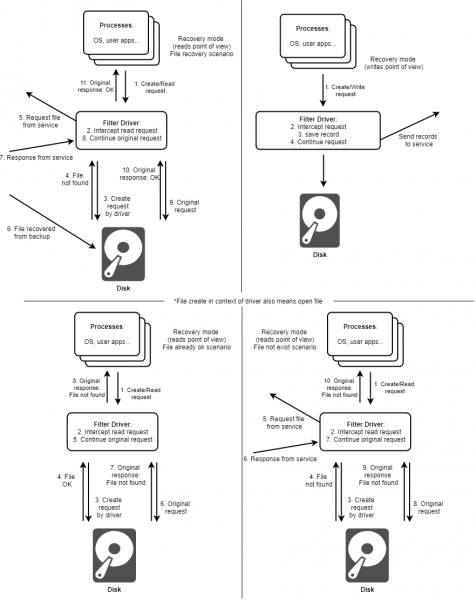
Of course, the operating system will operate much slower because reading any file or library occurs in several stages, possibly with access to remote resources. However, the user can begin working in a shorter time while the recovery continues.
Need to go lower, even lower…
The prototype has proven its functionality. However, we have also identified the need to move further, as deadlocks still occur in some cases. For example, the operating system may request different libraries from multiple threads, leading to our service blocking on itself.
The issue I am currently working on is improving the speed of Active Restore and enhancing the security level of the system. Suppose the system does not need the entire file, just a part of it. For this purpose, another driver—a disk filter driver—was developed. It operates not at the file level but at the block level. The principle of operation is similar: in normal operating mode, the driver simply logs the changed blocks on the disk, while in recovery mode, it tries to read the block itself; if unsuccessful, it requests a priority increase from the service. Meanwhile, all other parts of the system remain unchanged. For example, the OS-level service is not even aware that it is being asked to communicate with a different driver because the main task is to provide the OS with exactly the data it needs to function. This direction requires significant improvements, if only because the service cannot yet think at the block level.
The next step I decided to take is to launch the driver deeper and earlier, going down to the UEFI driver level and Native Windows applications instead of the service. For this purpose, a (or DXE driver) is started and terminated even before the OS starts. However, we will discuss the “history” of UEFI drivers, details on assembly and installation, as well as specifics of Windows Native applications in the next post. So subscribe to our blog, and I will prepare a report on the next phase of work. I would appreciate your comments and advice.
Only registered users can participate in the survey. , please.
Have you ever experienced situations where recovery took an agonizingly long time:
65.1%Yes28
23.2%No10
11.6%I hadn't thought about it5
43 users voted. 3 users abstained.
Source: habr.com
