


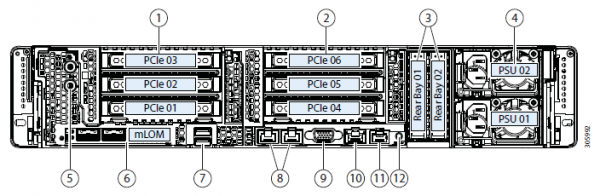
This is a myth that is quite common in the server hardware sector. In practice, however, hyper-converged solutions (where everything is in one) are needed for a variety of reasons. Historically, the first architectures were developed by Amazon and Google for their services. The idea back then was to create a computing farm from identical nodes, each with its own disks. All of this was unified by some kind of system-forming software (hypervisor) and divided into virtual machines. The main task was to minimize maintenance efforts on a single node and reduce problems when scaling: simply add another thousand or so of the same servers and connect them nearby. In practice, these are isolated cases, and much more often the situation involves fewer nodes and a slightly different architecture.
But the benefit remains the same — incredible simplicity of scaling and management. The downside is that different tasks consume resources differently, and in some places there will be many local disks, while in others there will be little RAM, and so on; that is, with different types of tasks, resource utilization will drop.
It turned out that you pay 10–15% more for the convenience of setup. This is what sparked the myth in the title. We searched for a while to find where this technology could be applied optimally and found the answer. The thing is, Cisco did not have its own storage systems, but they wanted the entire server market. So they created Cisco Hyperflex — a solution with local storage on the nodes.
And this unexpectedly resulted in a very good solution for backup data centers (Disaster Recovery). I will explain why and how — and show you cluster tests.
Where needed
Hyper-convergence means:
- Moving disks into computing nodes.
- Full integration of the storage subsystem with the virtualization subsystem.
- Moving/integration with the network subsystem.
Such a combination allows many features of storage systems to be implemented at the virtualization level, all from a single management window.
In our company, projects for designing backup data centers are in high demand, and hyper-converged solutions are often chosen due to the multitude of replication options (including metro clusters) out of the box.
In the case of backup data centers, it usually refers to a remote site located on the other side of the city or even in another city altogether. This allows for the recovery of critical systems in the event of partial or complete failure of the main data center. Data is continuously replicated from the production environment, and this replication can occur at the application level or at the block device level (storage area network).
So now I will talk about the system architecture and tests, followed by a couple of real-world application scenarios with data on cost savings.
Tests
Our instance consists of four servers, each with 10 SSDs of 960 GB. There is a dedicated disk for caching write operations and for storing the service virtual machine. The solution itself is the fourth version. The first was clearly raw (according to feedback), the second was still a bit unpolished, the third is already quite stable, and this one can be considered a release after the beta testing phase with the public. During the testing, I did not encounter any problems; everything works like clockwork.
Changes in v4A whole bunch of bugs have been fixed.
Initially, the platform could only work with the VMware ESXi hypervisor and supported a small number of nodes. Additionally, the deployment process did not always complete successfully; it was necessary to restart some steps, there were issues with upgrading from older versions, and the data in the GUI was not always displayed correctly (though I am still not thrilled with the performance graph display), and there were occasional problems at the virtualization interface.
Now all the initial issues are resolved, HyperFlex supports both ESXi and Hyper-V, plus it allows for:
- Creating a stretched cluster.
- Creating a cluster for offices without using Fabric Interconnect, from two to four nodes (we only purchase the servers).
- The ability to work with external storage systems.
- Support for containers and Kubernetes.
- Creating availability zones.
- Integration with VMware SRM if the built-in functionality is not sufficient.
The architecture does not significantly differ from the solutions of major competitors, and they did not reinvent the wheel. It operates on the VMware or Hyper-V virtualization platform. It is physically hosted on Cisco UCS servers developed in-house. Some people dislike the platform due to the relative complexity of initial setup, the multitude of buttons, the non-trivial template and dependency system, but there are also those who have found their zen, embraced the idea, and no longer wish to work with other servers.
We will specifically look at the solution for VMware, as it was initially created for it and offers greater functionality; Hyper-V was developed later to keep up with competitors and meet market expectations.
There is a cluster of servers filled with drives. There are disks for data storage (SSD or HDD - depending on your taste and needs), and there is one SSD for caching. When data is written to the datastore, it is saved on the caching layer (dedicated SSD and RAM of the service VM). Simultaneously, data blocks are sent to the nodes in the cluster (the number of nodes depends on the cluster's replication factor). After confirmation from all nodes of successful writing, a write acknowledgment is sent to the hypervisor and then to the VM. The written data is deduplicated, compressed, and stored on the storage disks in the background. At the same time, large blocks are always written to the storage disks sequentially, which reduces the load on the storage disks.
Deduplication and compression are enabled permanently and cannot be disabled. Data reading occurs directly from the storage disks or from the RAM cache. If a hybrid configuration is used, reading is also cached on the SSD.
Data is not tied to the current location of the virtual machine and is evenly distributed among the nodes. This approach allows for uniform loading of all disks and network interfaces. An obvious downside arises: we cannot minimize read latency as much as we would like, since there is no guarantee of local data availability. However, I consider this a minor sacrifice compared to the benefits received. Moreover, the latencies in the network have reached levels that practically do not affect the overall outcome.
The operation logic of the disk subsystem is handled by a special service VM Cisco HyperFlex Data Platform controller, which is created on each storage node. In our configuration, the service VM was allocated eight vCPUs and 72 GB of RAM, which is quite substantial. I remind you that the host itself has 28 physical cores and 512 GB of RAM.
The service VM has direct access to physical disks through SAS controller passthrough in the VM. Communication with the hypervisor occurs via a special IOVisor module, which intercepts input/output operations, and through an agent that allows sending commands to the hypervisor API. The agent is responsible for managing HyperFlex snapshots and clones.
In the hypervisor, disk resources are mounted as NFS or SMB shares (depending on the type of hypervisor, guess which is where). Under the hood, this is a distributed file system that enables features typical of mature storage systems: thin provisioning, compression and deduplication, Redirect-on-Write snapshot technology, synchronous/asynchronous replication.
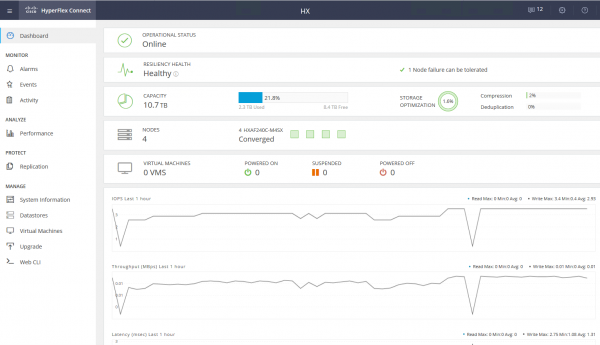
The service VM provides access to the WEB interface for managing the HyperFlex subsystem. There is integration with vCenter, and most routine tasks can be performed from there, but for example, it's more convenient to cut datastores from a separate web interface if you've already switched to the fast HTML5 interface, or use a full Flash client with complete integration. In the service web interface, you can view system performance and detailed system status.
There is another type of node in the cluster — compute nodes. These can be rack or blade servers without built-in disks. You can run VMs on these servers, with data stored on disk servers. From a data access perspective, there is no difference between the types of nodes, as the architecture is designed to abstract from the physical data location. The maximum ratio of compute nodes to storage nodes is 2:1.
Using compute nodes increases flexibility when scaling cluster resources: we don't necessarily need to purchase nodes with disks if we only require CPU/RAM. Additionally, we can add a blade chassis, achieving savings on server rack space.
As a result, we have a hyper-converged platform with the following features:
- Up to 64 nodes in the cluster (up to 32 storage nodes).
- The minimum number of nodes in the cluster is three (two for the Edge cluster).
- Data redundancy mechanism: mirroring with replication factors of 2 and 3.
- Metro cluster.
- Asynchronous replication of VMs to another HyperFlex cluster.
- Orchestration for VM failover to a remote data center.
- Native snapshots using Redirect-on-Write technology.
- Up to 1 PB of usable space with a replication factor of 3 and without considering deduplication. Replication factor 2 is not considered, as it is not an option for serious sales.
Another huge advantage is the simplicity of management and deployment. All the complexities of configuring UCS servers are handled by a specialized VM prepared by Cisco engineers.
Test stand configuration:
- 2 x Cisco UCS Fabric Interconnect 6248UP as the management cluster and network components (48 ports operating in Ethernet 10G/FC 16G mode).
- Four Cisco UCS HXAF240 M4 servers.
Server specifications:
CPU
2 x Intel ® Xeon ® E5-2690 v4
RAM
16 x 32GB DDR4-2400-MHz RDIMM/PC4-19200/dual rank/x4/1.2v
Network
UCSC-MLOM-CSC-02 (VIC 1227). 2 ports 10G Ethernet
Storage HBA
Cisco 12G Modular SAS Pass-through Controller
Storage Disks
1 x SSD Intel S3520 120 GB, 1 x SSD Samsung MZ-IES800D, 10 x SSD Samsung PM863a 960 GB
More configuration optionsIn addition to the selected hardware, the following options are currently available:
- HXAF240c M5.
- One or two CPUs from Intel Silver 4110 to Intel Platinum I8260Y. Second generation available.
- 24 memory slots, modules from 16 GB RDIMM 2600 to 128 GB LRDIMM 2933.
- From 6 to 23 data disks, one caching disk, one system disk, and one boot disk.
Capacity Drives
- HX-SD960G61X-EV 960GB 2.5 Inch Enterprise Value 6G SATA SSD (1X endurance) SAS 960 GB.
- HX-SD38T61X-EV 3.8TB 2.5 inch Enterprise Value 6G SATA SSD (1X endurance) SAS 3.8 TB.
- Caching Drives
- HX-NVMEXPB-I375 375GB 2.5 inch Intel Optane Drive, Extreme Performance & Endurance.
- HX-NVMEHW-H1600* 1.6TB 2.5 inch Ent. Perf. NVMe SSD (3X endurance) NVMe 1.6 TB.
- HX-SD400G12TX-EP 400GB 2.5 inch Ent. Perf. 12G SAS SSD (10X endurance) SAS 400 GB.
- HX-SD800GBENK9** 800GB 2.5 inch Ent. Perf. 12G SAS SED SSD (10X endurance) SAS 800 GB.
- HX-SD16T123X-EP 1.6TB 2.5 inch Enterprise performance 12G SAS SSD (3X endurance).
System / Log Drives
- HX-SD240GM1X-EV 240GB 2.5 inch Enterprise Value 6G SATA SSD (Requires upgrade).
Boot Drives
- HX-M2-240GB 240GB SATA M.2 SSD SATA 240 GB.
Network connectivity via 40G, 25G, or 10G Ethernet ports.
As FI, HX-FI-6332 (40G), HX-FI-6332-16UP (40G), HX-FI-6454 (40G/100G) can be used.
The test
For testing the storage subsystem, I used HCIBench 2.2.1. This is a free utility that allows you to automate the load creation from multiple virtual machines. The load itself is generated by regular fio.
Our cluster consists of four nodes, replication factor 3, all Flash disks.
For testing, I created four datastores and eight virtual machines. The write tests assume a scenario where the caching disk does not get filled up.
The test results are as follows:
100% Read 100% Random
0% Read 100% Random
Block/Queue Depth
128
256
512
1024
2048
128
256
512
1024
2048
4K
0.59 ms 213804 IOPS
0.84 ms 303540 IOPS
1.36 ms 374348 IOPS
2.47 ms 414116 IOPS
4.86 ms 420180 IOPS
2.22 ms 57408 IOPS
3.09 ms 82744 IOPS
5.02 ms 101824 IOPS
8.75 ms 116912 IOPS
17.2 ms 118592 IOPS
8K
0.67 ms 188416 IOPS
0.93 ms 273280 IOPS
1.7 ms 299932 IOPS
2.72 ms 376,484 IOPS
5.47 ms 373,176 IOPS
3.1 ms 41148 IOPS
4.7 ms 54396 IOPS
7.09 ms 72192 IOPS
12.77 ms 80132 IOPS
16K
0.77 ms 164116 IOPS
1.12 ms 228328 IOPS
1.9 ms 268140 IOPS
3.96 ms 258480 IOPS
3.8 ms 33640 IOPS
6.97 ms 36696 IOPS
11.35 ms 45060 IOPS
32K
1.07 ms 119292 IOPS
1.79 ms 142888 IOPS
3.56 ms 143760 IOPS
7.17 ms 17810 IOPS
11.96 ms 21396 IOPS
64K
1.84 ms 69440 IOPS
3.6 ms 71008 IOPS
7.26 ms 70404 IOPS
11.37 ms 11248 IOPS
The values marked in bold indicate points after which there is no performance increase, and sometimes even a noticeable degradation occurs. This is due to being limited by network/controller/disk performance.
- Sequential read 4432 MB/s.
- Sequential write 804 MB/s.
- In the event of one controller failure (fault of the virtual machine or host), performance drops by half.
- In the event of a storage disk failure, the drop is by 1/3. Rebuilding the disk takes 5% of each controller's resources.
With a small block, we hit the performance of the controller (virtual machine), its CPU is loaded at 100%; with an increased block, we hit the bandwidth of the ports. 10 Gbps is insufficient to unleash the potential of the All-Flash system. Unfortunately, the parameters of the provided demo stand do not allow testing at 40 Gbps.
From my impression of the tests and studying the architecture, due to the algorithm that distributes data among all hosts, we achieve scalable, predictable performance, but this also limits us when reading, as we could extract more from local disks; a higher-performing network could help, for example, there are 40 Gbps FI available.
Also, a single disk for caching and deduplication may be a limitation; in fact, in this setup, we can write to four SSD disks. It would be great to have the ability to increase the number of caching disks and see the difference.
Real usage
For organizing a backup data center, two approaches can be used (we do not consider placing backups at a remote site):
- Active-Passive. All applications are hosted in the primary data center. Replication can be synchronous or asynchronous. In the event of a primary data center failure, we need to activate the backup. This can be done manually/scripts/orchestration applications. Here we will achieve an RPO comparable to the replication frequency, and the RTO depends on the response and skills of the administrator and the quality of the failover plan development/testing.
- Active-Active. In this case, only synchronous replication is present, and the availability of data centers is determined by a quorum/arbitrator located strictly at a third site. RPO = 0, and RTO can reach 0 (if the application allows) or equal to the time taken to handle the node failure in the virtualization cluster. At the virtualization level, a stretched (Metro) cluster is created, requiring Active-Active storage.
Typically, we see clients who already have an implemented architecture with traditional storage in the primary data center, so we design another one for replication. As I mentioned, Cisco HyperFlex offers asynchronous replication and the creation of a stretched virtualization cluster. In this case, we do not need dedicated midrange or higher level storage with costly replication features and Active-Active data access across two storages.
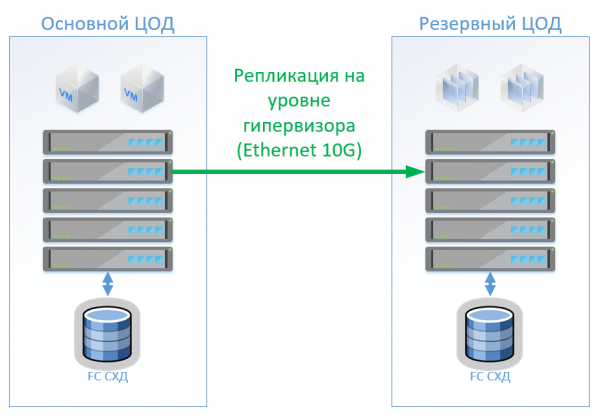
Scenario 1: We have a primary and backup data center, with a virtualization platform on VMware vSphere. All productive systems are located in the primary data center, and virtual machine replication is performed at the hypervisor level, which allows us to keep VMs powered off in the backup data center. Databases and specialized applications are replicated using built-in tools, and we keep VMs powered on. In the event of a primary data center failure, we launch systems in the backup data center. We estimate that we have about 100 virtual machines. While the primary data center is operational, we can run test environments and other systems in the backup data center, which can be disabled in case of switching the primary data center. A scenario with two-way replication is also possible. From the hardware perspective, nothing will change.
In the case of a classic architecture, we will install a hybrid SAN in each data center with FibreChannel access, tiering, deduplication, and compression (but not online), 8 servers at each site, and 2 FibreChannel and 10G Ethernet switches. For replication and failover management in classic architecture, we can use VMware tools (Replication + SRM) or third-party tools, which may be slightly cheaper and sometimes more convenient.
The diagram shows the architecture.
In the case of using Cisco HyperFlex, the following architecture is obtained:
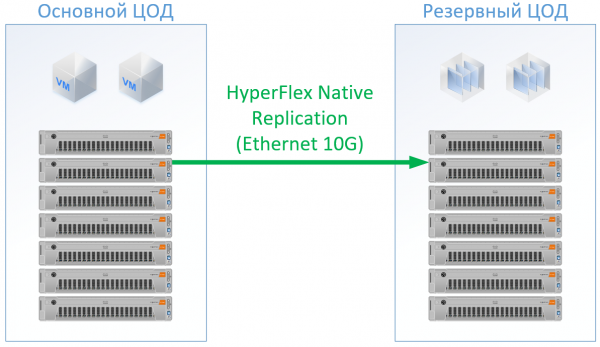
For HyperFlex, I used servers with large CPU/RAM resources, as part of the resources will go to the HyperFlex controller VM. I even slightly over-provisioned CPU and memory in the HyperFlex configuration to avoid compromising Cisco standards and to guarantee resources for the other VMs. However, we can do without the FibreChannel switches, and Ethernet ports are not needed for each server; local traffic is switched within the FI.
As a result, the following configuration was obtained for each data center:
Servers
8 x 1U Server (384 GB RAM, 2 x Intel Gold 6132, FC HBA)
8 x HX240C-M5L (512 GB RAM, 2 x Intel Gold 6150, 3.2 GB SSD, 10 x 6 TB NL-SAS)
NAS
Hybrid SAN with FC Front-End (20TB SSD, 130 TB NL-SAS)
—
LAN
2 x Ethernet switch 10G 12 ports
—
SAN
2 x FC switch 32/16Gb 24 ports
2 x Cisco UCS FI 6332
Licenses
VMware Ent Plus
Replication and/or VM failover orchestration
VMware Ent Plus
For HyperFlex, I did not factor in software replication licenses, as this is available out of the box.
For the classic architecture, I chose a vendor that has established itself as a quality and affordable manufacturer. For both options, I applied the standard discount specific to the solution and ended up with real prices.
The Cisco HyperFlex solution turned out to be 13% cheaper.
Scenario 2: creating two active data centers. In this scenario, we design a stretched cluster on VMware.
The classic architecture consists of virtualization servers, SAN (FC protocol), and two storage systems that can read and write on the stretched network between them. On each storage system, we allocate usable capacity for the local area.
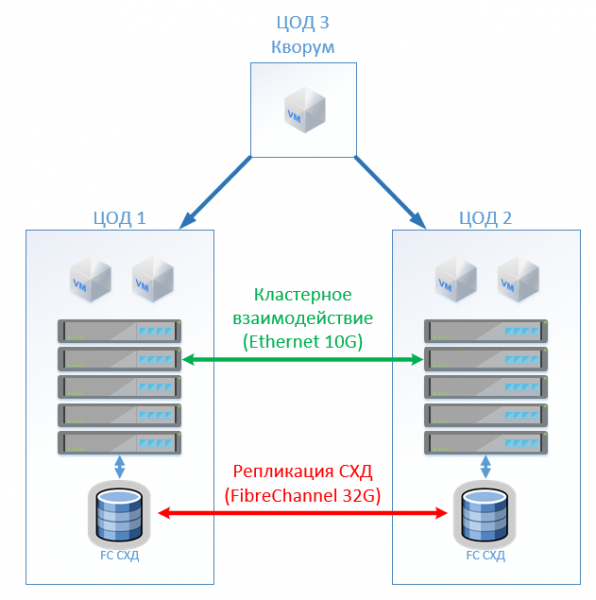
With HyperFlex, we simply create a Stretch Cluster with an equal number of nodes at both sites. In this case, a replication factor of 2+2 is used.
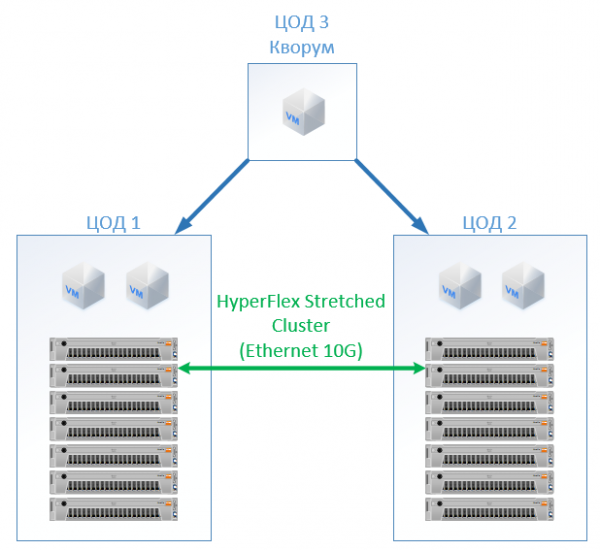
The following configuration was obtained:
Classic Architecture
HyperFlex
Servers
16 x 1U Server (384 GB RAM, 2 x Intel Gold 6132, FC HBA, 2 x 10G NIC)
16 x HX240C-M5L (512 GB RAM, 2 x Intel Gold 6132, 1.6 TB NVMe, 12 x 3.8 TB SSD, VIC 1387)
NAS
2 x AllFlash storage systems (150 TB SSD)
—
LAN
4 x Ethernet switch 10G 24 ports
—
SAN
4 x FC switch 32/16Gb 24 ports
4 x Cisco UCS FI 6332
Licenses
VMware Ent Plus
VMware Ent Plus
In all my calculations, I did not consider the network infrastructure, costs for the data center, etc.: they will be the same for both classic architecture and the HyperFlex solution.
In terms of cost, HyperFlex turned out to be 5% more expensive. It is worth noting that I experienced a resource imbalance for CPU/RAM with Cisco, as I evenly filled the memory controller channels in the configuration. The cost is slightly higher, but not by an order of magnitude, clearly indicating that hyper-convergence is not necessarily a "toy for the rich" and can compete with the standard approach to building a data center. This may also be interesting for those who already have Cisco UCS servers and the corresponding infrastructure for them.
The advantages include no costs for SAN and storage administration, online compression and deduplication, a single point of contact for support (virtualization, servers, which are also the storage), space savings (but not in all scenarios), and simplified operations.
Regarding support, you get it from a single vendor — Cisco. Judging by my experience with Cisco UCS servers, I like it; I never had to open HyperFlex as everything just worked. Engineers respond promptly and can solve not only standard problems but also complex edge cases. Sometimes I contact them with questions like: "Can this be done, attaching this?" or "I configured something here, and it doesn't want to work. Help!" — they patiently find the right guide and point out the correct actions, and they won’t just say, "We only resolve hardware issues."
Links
- My email is StGeneralov@croc.ru
Source: habr.com
