

Many have likely heard of Anycast. In this method of network addressing and routing, a single IP address is assigned to multiple servers within a network. These servers can even be located far apart in different data centers. The idea behind Anycast is that, depending on the location of the request source, data is sent to the nearest server (according to the network topology, specifically the BGP routing protocol). This can reduce the number of hops and latency.
In essence, the same route is announced from multiple data centers worldwide. Thus, clients will be directed to the 'best' and 'closest' data center based on BGP routes. So why choose Anycast? What are the reasons to use Anycast instead of Unicast?
Unicast is indeed suitable for a website with a single web server and a moderate amount of traffic. However, if a service has millions of subscribers, it typically uses multiple web servers, each having the same IP address. These servers are geographically distributed to optimize request handling.
In such a scenario, Anycast will improve performance (traffic is directed to the user with minimal latency), ensure service reliability (thanks to backup servers), and facilitate load balancing—routing to multiple servers will effectively distribute the load among them, enhancing the website's performance.
Operators offer clients various types of load balancing based on Anycast and DNS. Clients can specify IP addresses to which requests will be directed based on the geographic location of the site. This allows for more flexible distribution of user requests.
Let's assume there are several sites between which load needs to be distributed (users), such as an online store with 100,000 requests per day or a popular blog. To restrict the region from which users access a particular site, the Geo Community option can be used. This allows for limiting the region within which the operator will announce the route.
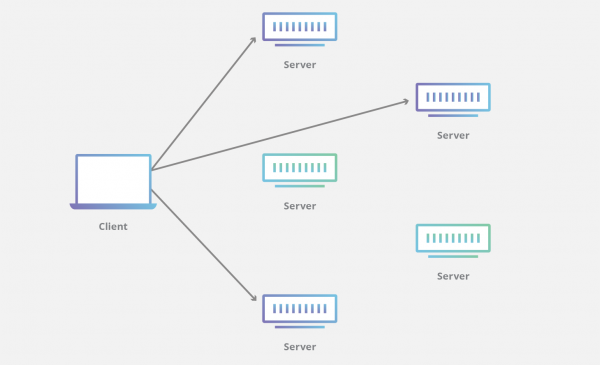
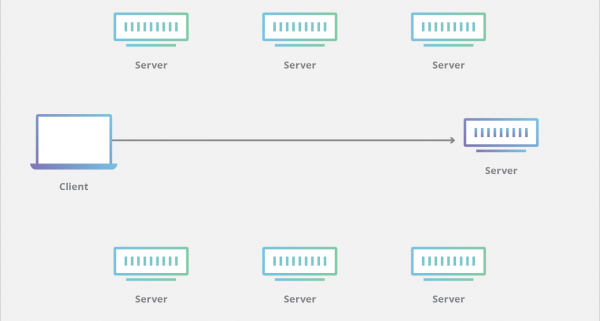
Anycast and Unicast: differences
Anycast is frequently used in applications such as DNS (Domain Name System) and CDN (Content Delivery Network), allowing routing decisions that enhance network performance. Content Delivery Networks utilize Anycast due to the large volumes of traffic they handle, and Anycast offers several advantages in this context (which will be discussed below). In DNS, Anycast significantly improves the reliability and fault tolerance of the service.
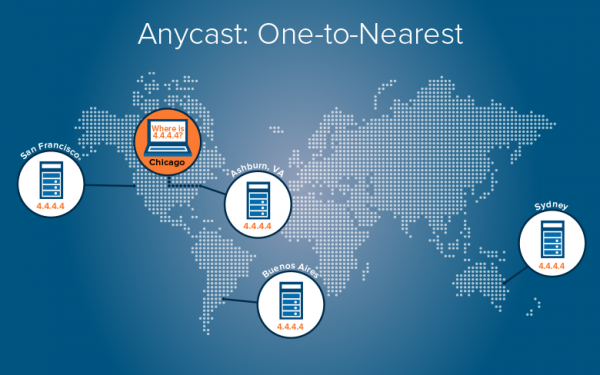
In Anycast IP using BGP, there are multiple routes to a specific host. In fact, these are copies of hosts located in several data centers, used to establish connections with lower latency.
Thus, in an Anycast network, the same IP address is announced from different locations, and the network decides where to route the user's request based on the 'cost' of the route. For instance, the BGP protocol is often used to determine the shortest data transmission route. When a user sends an Anycast request, BGP identifies the best route to the available Anycast servers.
Advantages of Anycast
Reduced Latency
Systems with Anycast can lower latency when processing user requests, as they allow data to be retrieved from the nearest server. This means users will always connect to the 'closest' DNS server (from a routing protocol perspective). Consequently, Anycast decreases response time by reducing the network distance between the client and the server. This not only reduces latency but also ensures load balancing.
Speed
Since traffic is directed to the nearest node, and latency is reduced in data transmission between the client and the node, the result is optimized delivery speed, regardless of where the client requests information from.
Increased Stability and Fault Tolerance
If several servers around the world use the same IP address, then in the event of one server failing or going offline, traffic will be redirected to the nearest server. As a result, Anycast makes the service more resilient and ensures better network access/latency/speed.
Thus, the presence of several servers that are constantly available for users enhances the stability of DNS, for instance, through Anycast. In the event of a node failure, user requests will be redirected to another DNS server without any manual intervention or reconfiguration. Anycast provides virtually seamless switching to other sites, simply removing the routes to the problematic site.
Load Balancing
In an Anycast system, network traffic is distributed across multiple servers. It functions like a load balancer, preventing any single server from receiving the majority of the traffic. Load balancing can be employed, for example, when several network nodes are located at the same geographical distance from the source of requests. In this case, the load is evenly distributed among the nodes.
Mitigating DoS Attack Impact
Another feature of Anycast is its resilience to DDoS attacks. It is unlikely that DDoS attacks could cripple an Anycast system, as it would require overwhelming all servers in that network with a deluge of requests.
DDoS attacks often utilize botnets that can generate such a volume of traffic that it overloads the targeted server. The advantage of using Anycast in this scenario is that each server can 'absorb' part of the attack, reducing the load on a specific server. A denial-of-service attack is more likely to be localized at one server and will not impact the entire service.
High Horizontal Scalability
Anycast systems are well-suited for services with large volumes of traffic. If a service utilizing Anycast requires new servers to handle growing traffic, new servers can be added to the network for processing. They can be deployed at new or already existing locations.
If a significant increase in traffic is observed in a particular location, adding a server will help balance the load for that site. Adding a server at a new location can reduce wait times by creating a new shortest route for some users. Both methods also enhance the stability of the service, as new servers become available on the network. Thus, if a server is overloaded, another can simply be deployed in a location that allows it to handle some of the requests from the overloaded server. This does not require any configuration on the clients' side.
This is the only way to serve terabits of traffic and a very large number of users when there are only a few ports of 10 or 25 Gbps on the server. 100 hosts with a single IP address will enable the processing of terabit volumes of traffic.
Ease of configuration management
As previously mentioned, an interesting use of Anycast is DNS. Multiple different DNS servers can be placed at the nodes of the network, while utilizing a single DNS address. Depending on where the request originates, queries can be directed to the nearest node. This ensures some traffic balancing and redundancy in case of a DNS server failure. Thus, instead of configuring different DNS servers based on their locations, the configuration of a single DNS server can be propagated to all nodes.
Anycast networks can be set up to route requests based not only on distance but also on criteria such as server availability, number of established connections, or response time.
No special servers, networks, or components are required on the client's side to utilize Anycast technology. However, Anycast has its downsides. Its implementation is considered a complex task, requiring additional equipment, reliable providers, and proper traffic routing.
From a pristine source to a wonderful distance
Although Anycast directs users based on the fewest hops, this does not necessarily mean minimal latency. Latency is a more complex metric, as it can be higher for a single hop than for ten.
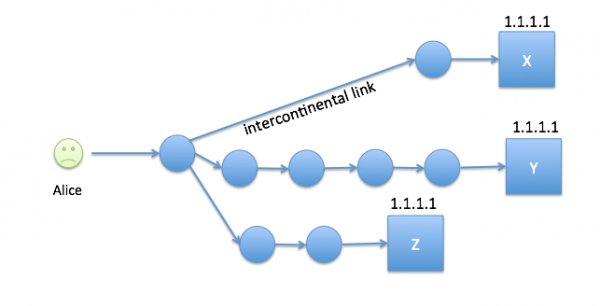
For example, intercontinental communications may include one hop with very high latency.
Anycast is mainly used for UDP-based services like DNS. User requests are directed to the 'best' and 'closest' data center based on BGP routes.
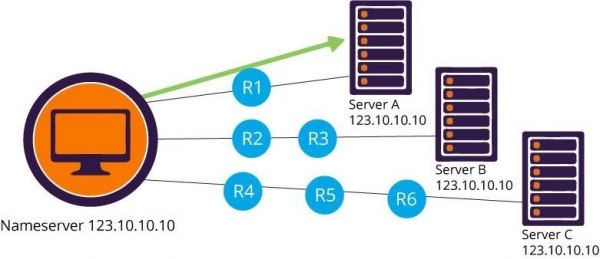
For example, a DNS client workstation with the Anycast DNS IP address 123.10.10.10 performs DNS resolution for the nearest of three DNS name servers deployed using the same Anycast IP. If router R1 or server A fails, DNS client packets will automatically be rerouted to the next closest DNS server via routers R2 and R3. Additionally, the route to our server A will be removed from the routing tables, preventing further use of this name server.
Deployment Scenarios
There are two common schemes used to determine which server the user connects to:
- Network Layer Anycast. Connects the user to the nearest server. Here, the network path from the user to the server is important.
- Application Layer Anycast. In this scheme, there are more computed metrics, including server availability, response time, number of connections, etc. This relies on an external monitor that provides network statistics.
Anycast-based CDN
Now let's return to the use of Anycast in content delivery networks. Anycast certainly represents an interesting networking concept and is gaining more recognition among next-generation CDN providers.
A CDN is a distributed network of servers that delivers content to end users with high availability and low latency. Content delivery networks play a crucial role today, being the backbone of numerous multimedia online services, as consumers are increasingly intolerant of slow loading speeds. Video and voice applications are particularly sensitive to jitter and latency in the network.
A CDN unifies all servers into one network and accelerates content loading. It can sometimes reduce user wait times by 5-6 seconds. The goal of a CDN is to optimize delivery by providing content from the server closest to the end user. This is quite similar to Anycast, where the nearest server is selected based on the end user's location. It would seem that every CDN service provider would by default use Anycast, but in reality, this is not the case.
Applications using protocols such as HTTP/TCP rely on established connections. If a new Anycast node is chosen (for example, during a server failure), service may be interrupted. This is why Anycast was previously recommended for connectionless services like UDP and DNS. However, Anycast also works well for connection-oriented protocols, such as TCP, which functions excellently in Anycast mode.
Some CDN providers use Anycast-based routing, while others prefer DNS-based routing: the nearest server is selected based on the location of the user's DNS server.
Hybrid infrastructures and multi-data center setups are another example of Anycast application. The Load Balancing IP address obtained from the provider allows distributing load among the IP addresses of different client services in the provider's data center. This addressing technology for any device ensures better performance under significant traffic, fault tolerance, and helps optimize response times with a large number of users.
In hybrid infrastructures with multiple data centers, traffic can be distributed among servers or even virtual machines on dedicated servers.
Thus, there is a wide range of technical solutions for building infrastructure. It is also possible to configure load balancing by IP addresses across multiple data centers using group anycast addressing to optimize website performance.
You can distribute traffic according to your own rules by determining the 'weight' of each distributed server in each data center. This configuration is particularly useful when there is a distributed server park and the performance of services is uneven. It will allow for more frequent traffic distribution to improve server performance.
To create a monitoring system using the ping command, it is possible to configure probes. This allows the administrator to define their own monitoring procedures and gain a clearer understanding of the status of each component in the infrastructure. Thus, it is possible to define availability criteria.
It is possible to build a hybrid infrastructure: sometimes it is convenient to keep the back office in the corporate network while outsourcing the frontend to a provider.
You can add SSL certificates for load balancing, encrypting transmitted data, and ensuring secure communication between website visitors and corporate infrastructure. SSL can also be applied when balancing load between data centers.
The Anycast service with load-balanced addresses can be obtained from the provider. This feature will help improve the user interaction algorithm with applications depending on their location. It is enough to declare which services are available in the data center, and the traffic will be redirected to the closest infrastructure. If there are dedicated servers, for example, in France or North America, clients will be directed to the nearest server in the network.
One option for using Anycast is to optimally choose the operator's point of presence (PoP). We can cite . LinkedIn (blocked in Russia) aims not only to improve the performance and speed of its products — mobile and web applications — but also to enhance its network infrastructure for faster content delivery. For this purpose, LinkedIn actively uses PoP points of presence for dynamic content delivery. Anycast is applied to direct users to the nearest PoP.
The issue is that in the case of Unicast, each PoP of LinkedIn has a unique IP address. Users are then assigned to a PoP based on their geographic location using DNS. The problem is that with DNS, around 30% of users in the United States were redirected to a suboptimal PoP. With the phased implementation of Anycast, the rate of suboptimal PoP assignments dropped from 31% to 10%.
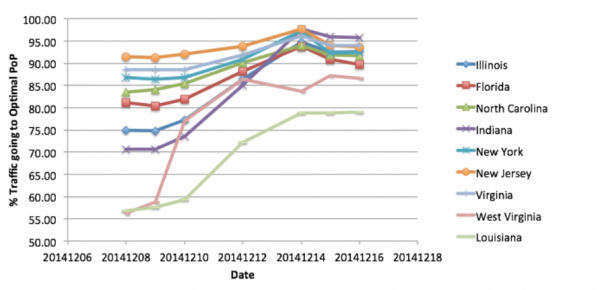
The results of the pilot test are shown in the graph, where the Y-axis represents the percentage of optimal PoP assignment. As Anycast was 'scaled up' in many states across the U.S., there was an observed improvement in the percentage of traffic routed to the optimal PoP.
Anycast Network Monitoring
Theoretically, Anycast networks are simple: multiple physical servers are assigned the same IP address, which BGP uses to determine the route. However, the implementation and design of Anycast platforms are complex, especially those known for their fault tolerance. Effective monitoring of Anycast networks for rapid fault detection and localization is even more challenging.
If services use a third-party CDN to deliver their content, it is crucial to monitor and verify network performance. When monitoring Anycast-based CDNs, the focus is on measuring end-to-end latencies and last-hop characteristics to understand which data center is delivering the content. Analyzing HTTP server headers is another way to determine the source of the data.
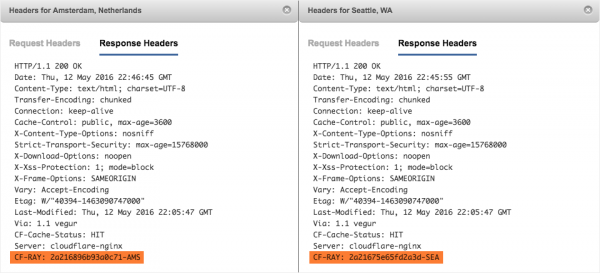
Example: HTTP response headers indicating the location of the CDN server.
For instance, CloudFlare uses its own CF-Ray header in HTTP Response messages, which includes an indication of the data center that received the request. In the case of Zendesk, the CF-Ray header for the Seattle region is CF-RAY: 2a21675e65fd2a3d-SEA, while for Amsterdam it is CF-RAY: 2a216896b93a0c71-AMS. To determine where content is located, HTTP-X headers from the HTTP response can also be utilized.
Other Addressing Methods
There are also other addressing methods for routing user requests to a specific network endpoint:
Unicast
The majority of the internet today uses this method. Unicast is a one-to-one transmission, where an IP address is linked to only one specific node in the network. This is referred to as a one-to-one correspondence.
Multicast
Multicast uses a "one-to-many from many" or "many-to-many" communication method. It allows sending requests from a sender to multiple selected endpoints simultaneously. This enables clients to download files in chunks from several hosts at once, which is beneficial for streaming audio or video. Multicast is often confused with Anycast, but the key difference is that Anycast directs the sender to a specific node even when multiple nodes are available.
Broadcast
A datagram from a single sender is directed to all endpoints associated with a broadcast address. The network automatically replicates datagrams to ensure communication with all recipients in a broadcast (typically within a single subnet).
Geocast
Geocast is somewhat similar to Multicast: requests from the sender are sent to multiple endpoints simultaneously. However, the difference is that the recipient is defined by its geographical location. This is a specialized form of group addressing used by some routing protocols for mobile peer-to-peer networks.
A Geographic Router (Geo Router) calculates its service area and approximates it. Geo routers exchange service areas to build routing tables. The system of geo routers has a hierarchical structure.


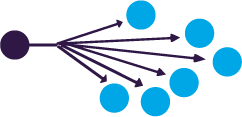
Unicast, Multicast, and Broadcast.
The use of Anycast technology enhances the reliability, fault tolerance, and security of DNS. By employing this technology, operators offer their clients DNS-based load balancing services. In the control panel, IP addresses can be specified to which requests will be sent based on geographical location. This provides clients with greater flexibility in distributing user requests.
Some operators use route monitoring tools at each point of presence (POP): the system automatically analyzes the shortest local and global routes for points of presence and redirects them through geographic locations with the lowest latency and zero downtime.
Currently, Anycast is the most stable and reliable solution for creating high-load DNS services that have high demands for resilience and reliability.
The .ru domain supports 35 Anycast DNS servers grouped into 20 nodes distributed across five Anycast clouds. It employs a geographical building principle, i.e., Geocast. When placing DNS nodes, provisions are made for their deployment in geographically separated locations close to the most active users, a maximum concentration of Russian providers at the node location, as well as available capacity and convenience of interaction with the site.
How to build a CDN?
A CDN is a network of servers that accelerate content delivery to users. brings all servers together into one network and ensures faster content loading. The loading speed is significantly affected by the distance from the server to the user.
A CDN allows the use of servers that are closest to the target audience. This reduces waiting time and helps speed up the loading of websites for all visitors, which is especially critical for websites with large files or multimedia services. Typical areas of application for CDN include e-commerce and entertainment.
The network of additional servers created within the CDN infrastructure, located as close to users as possible, contributes to more stable and faster data delivery. According to statistics, using a CDN reduces latency when accessing a website by more than 70% compared to websites without a CDN.
How? Настройка CDN с использованием собственного решения Anycast может быть достаточно дорогим проектом, но есть более дешевые варианты. Например, можно использовать GeoDNS и обычные серверы с уникальными IP-адресами. С помощью сервисов GeoDNS можно создать CDN с функциями геолокации, в которой решения принимаются на основе реального местоположения посетителя, а не местоположения ресолвера DNS. Можно настроить свою DNS-зону так, чтобы показывать IP-адреса американских серверов посетителям из США, а европейские посетители будут видеть IP-адрес из Европы.
With GeoDNS, different DNS responses can be returned depending on the user's IP address. For this, the DNS server is configured to return different IP addresses based on the source IP address in the request. Usually, a GeoIP database is used to determine the region from which the request is made. Geolocation using DNS allows for delivering content to users from the nearest site.
GeoDNS determines the IP address of the client making the DNS request, or the IP of the recursive DNS server provided by the ISP that is used to process the client request. Based on the client's IP and the GeoIP database, the country/region is identified. The client then receives the IP address of the nearest CDN server. You can learn more about configuring GeoDNS.
Anycast or GeoDNS?
While Anycast is a great way to deliver content on a global scale, it lacks specificity. This is where GeoDNS comes in handy. This service allows you to create rules that direct users to unique endpoints based on their location.
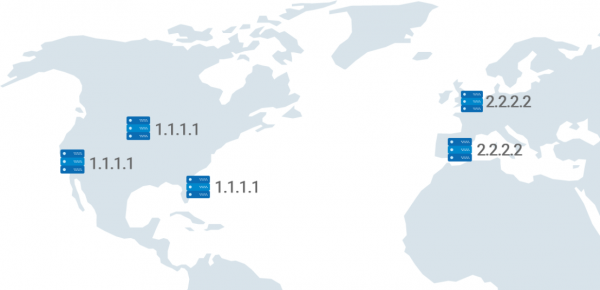
Example: users from Europe are directed to a different endpoint.
It's also possible to block access to domains by dropping all requests. This is, in particular, a quick way to cut off malicious actors.
GeoDNS provides more precise answers than Anycast. In the case of Anycast, the shortest route is determined by the number of hops, while in GeoDNS, routing for end users occurs based on their physical location. This reduces latency and improves accuracy when creating granular routing rules.
When navigating to a domain, the browser queries the nearest DNS server, which, depending on the domain, returns the IP address to load the website. Suppose the online store is popular in the USA and Europe, but it only has DNS servers in Europe. Then users from the USA who want to use the store's services will have to send requests to the nearest server, and since it is located very far away, they will have to wait a long time for a response—the website will not load quickly.
By placing a GeoDNS server in the USA, users will query it directly. The response will be quick, positively affecting the website's loading speed.
In a situation with an existing DNS server in the USA, when a user from the USA navigates to this domain, they will contact the nearest server that will provide the required IP. The user will be directed to the server that contains the website's content, but since the servers with the content are far away, they will not receive it quickly.
If servers and CDN with cached data are placed in the USA, when the client's browser loads, it will send a request to the nearest DNS server, which will return the required IP address. The browser with the obtained IP address will contact the nearest CDN server and the main server, and the CDN server will deliver the cached content to the browser. While the cached content loads, the missing files from the main server will be sent to complete the website loading. As a result, the website loading time decreases since much fewer files are sent from the main server.
Determining the exact location of a given IP address isn't always an easy task: many factors are at play, and IP range owners may choose to announce it from the other side of the world (in which case, you'll have to wait for the database to update to get the correct location). Sometimes, VPS providers assign addresses that are supposedly located in the USA to VPS in Singapore.
Unlike using Anycast addresses, distribution occurs during name resolution rather than during the connection to the caching server. If the recursive server does not support client subnets EDNS, the location of the recursive server will be used instead of the user's who will connect to the caching server.
Client subnets in DNS is an extension of DNS (RFC7871) that defines how recursive DNS servers can send client information to the DNS server, particularly information about the network that the GeoDNS server can use for more accurate client location determination.
Most users utilize DNS servers from their Internet service provider or those that are geographically close to them, but if someone in the USA decides for some reason to use a DNS resolver located in Australia, they will most likely receive the IP address of a server nearest to Australia.
If you want to use GeoDNS, it is crucial to be aware of such nuances, as in some cases, it may increase the distance between the caching servers and the client.
Summary: if you want to combine several VPS into a CDN, the best deployment option is to use a combination of a DNS server with GeoDNS functionality + Anycast 'out of the box.'
Source: habr.com
