


Artem Denisov ( , )
Badoo is the largest dating site in the world. Currently, we have about 330 million users registered globally. However, what is even more significant in the context of our conversation today is that we store around 3 petabytes of user photos. Every day, our users upload approximately 3.5 million new photos, and the read load is about 80,000 requests per second. This is quite a lot for our backend, and we sometimes face challenges with it.
I will discuss the design of this system that stores and serves photos in general, providing a developer's perspective on it. There will be a brief retrospective on its evolution, where I'll highlight the main milestones, but I will focus more on the solutions we are using now.
And now let's get started.
As I mentioned, this will be a retrospective, and to kick it off, let's take the most straightforward example.
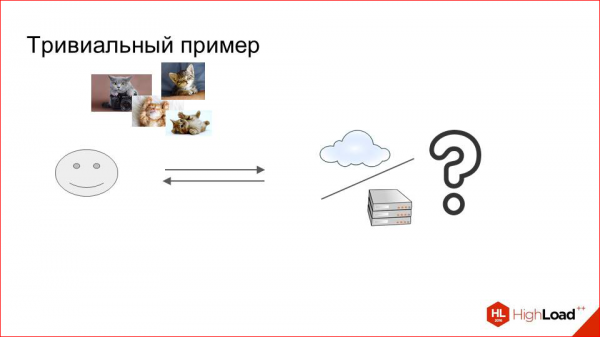
We have a common task: we need to receive, store, and serve user photos. This task is general; we can use whatever we like:
- modern cloud storage,
- off-the-shelf solutions, of which there are many now;
- we could set up several machines in our data center, put large hard drives on them, and store photos there.
Historically, Badoo has always operated on its own servers, within our own data centers, both now and back when it was first established. Therefore, this option was optimal for us.
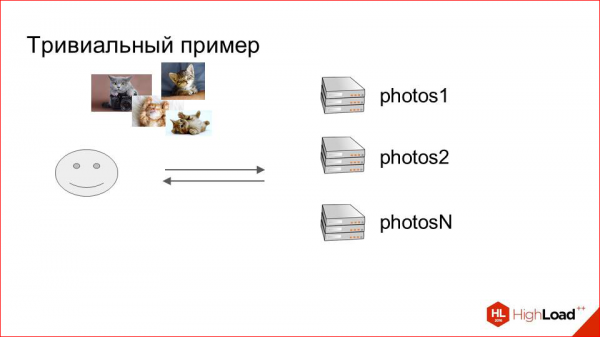
We simply took several machines, named them 'photos', and created a cluster that stores photos. However, it seems something is missing. To ensure this works, we need to determine somehow which photos we will store on which machine. And there's no need to reinvent the wheel here.
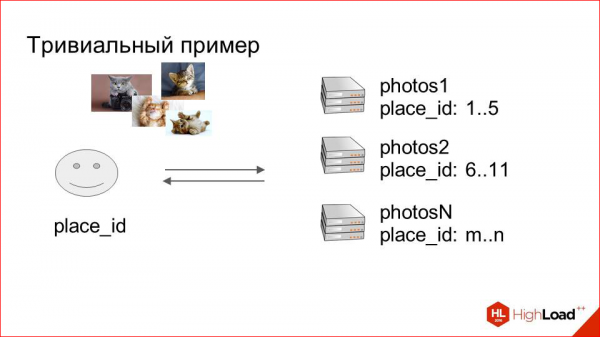
We add a field to our storage containing user information. This will serve as the sharding key. In our case, we called it place_id, and this ID indicates the location where user photos are stored. We create mappings.
In the first stage, this can even be done manually — we say that this user's photo with this place will land on such a server. Thanks to this map, we always know when a user uploads a photo, where to save it, and we know where to deliver it from.
It's a completely trivial scheme, but it has quite significant advantages. The first is that it's simple, as I mentioned, and the second is that with this approach we can easily scale horizontally, simply by bringing in new machines and adding them to the map. Nothing more needs to be done.
And that's how it was for some time with us.
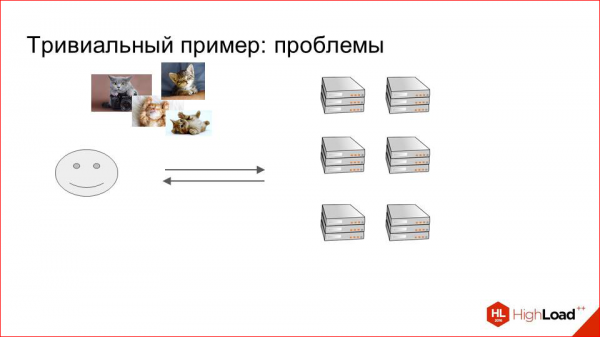
It was around 2009. We were delivering machines.
And at some point, we began to notice that this scheme had certain disadvantages. What disadvantages?
First of all, there is limited capacity. We cannot fit as many hard drives into one physical server as we would like. Over time, and with the growth of the dataset, this became a specific problem.
And secondly, this is an atypical machine configuration, as such machines are hard to reuse in other clusters; they are quite specific, meaning they need to be low-performing but at the same time have large hard drives.
This was all in 2009, but in principle, these requirements are still relevant today. We have a retrospective, so everything was bad with this back in 2009.
And the last point — it's the price.
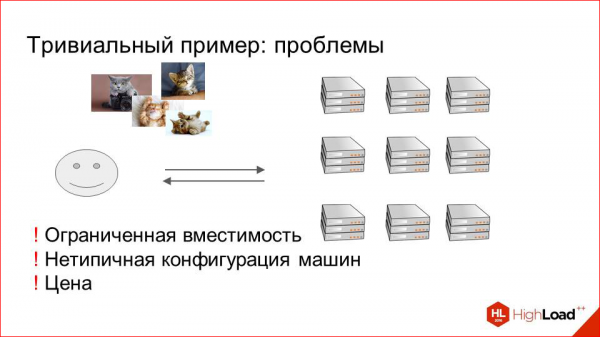
The price was quite steep then, and we needed to look for alternatives. We had to better utilize both the space in data centers and the physical servers on which all this is hosted. Our system engineers conducted extensive research, reviewing a lot of different options. They also looked at clustered file systems like PolyCeph and Lustre. There were performance issues and it was quite heavy to operate. They abandoned that. They tried mounting the entire dataset via NFS on each machine to somehow scale. Reading also didn’t go well; they tried different solutions from various vendors.
In the end, we decided to use what is called a Storage Area Network.
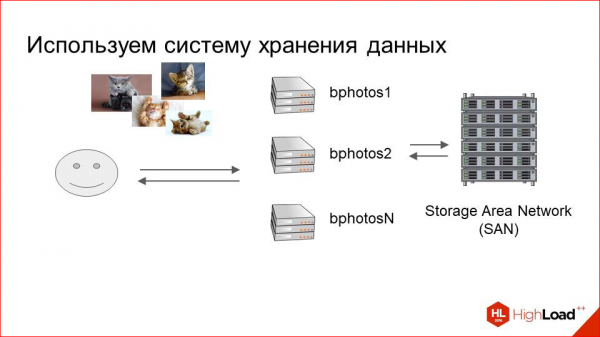
These are large SHDs designed for storing massive amounts of data. They consist of shelves with disks mounted on endpoint output machines via optical connections. Thus, we have a relatively small pool of machines, and these SHDs, which are transparent to our output logic, i.e., for our Nginx or others, handle requests for these images.
This solution had obvious advantages. It's an SHD. It's focused on storing images. It turns out to be cheaper than simply setting up machines with hard drives.
The second advantage.
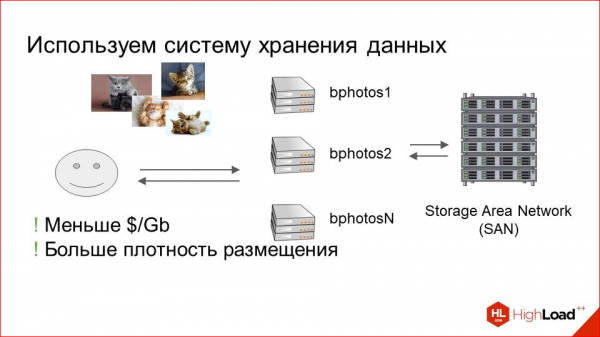
The capacity has significantly increased, meaning we can store much more data in a much smaller space.
But there were also downsides that became apparent quite quickly. As the number of users and load on the system increased, performance issues began to arise. The problem is quite straightforward — any SHD designed to store a lot of images in a small volume tends to suffer from intensive read operations. This is actually relevant to any cloud storage solution or anything else. Currently, there is no perfect storage that is infinitely scalable, can accommodate anything, and handles reads very well, especially random reads.
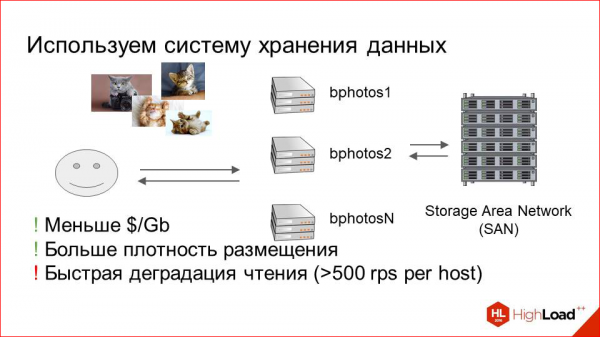
Just like with our photos, because images are requested non-sequentially, and this significantly affects their performance.
Even with today's figures, if we exceed around 500 RPS for images per machine connected to storage, problems start to arise. This was quite bad for us, as the number of users is growing, and things can only get worse. We need to optimize this somehow.
To optimize, we decided to look at the load profile — what is happening that needs optimization.
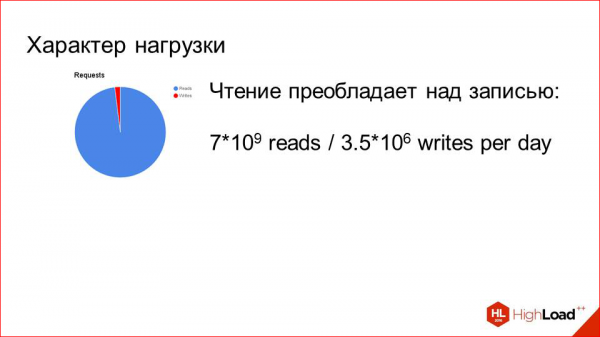
And everything plays in our favor here.
As I mentioned in the first slide: we have 80,000 read requests per second with only 3.5 million uploads per day. That’s a difference of three orders of magnitude. Clearly, we need to optimize reads, and it’s practically clear how to do it.
There's one more small detail. The specificity of the service is such that a person registers, uploads a photo, then actively looks at other people, likes them, and is actively shown to others. Eventually, they find a partner or not, however that plays out, and for a while, they stop using the service. At that moment, while they are using it, their photos are very hot — they are in demand, viewed by many people. Once they stop doing this, they quickly drop out of the intensive visibility to others like before, and their photos are hardly requested.
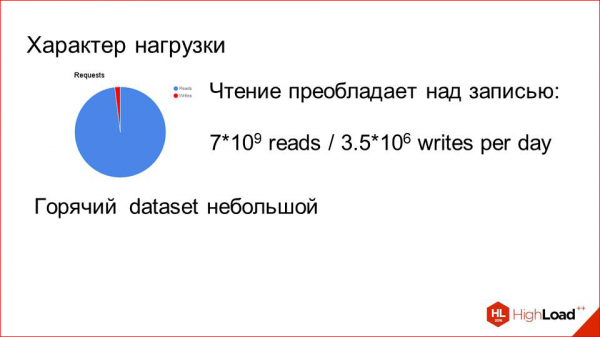
So, we have a very small hot dataset. But there are quite a lot of requests for it. An obvious solution here is to add caching.
Caching with LRU will solve all our problems. What do we do?
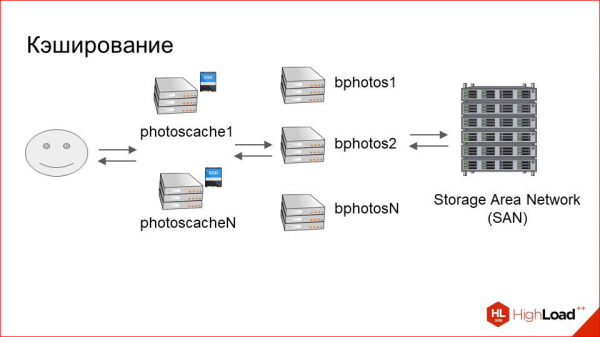
We add another relatively small layer in front of our large storage cluster, which we call photoscache. This is essentially just a caching proxy.
How does this work internally? Here's our user, and there's the storage. Everything’s as before. What do we add in between?
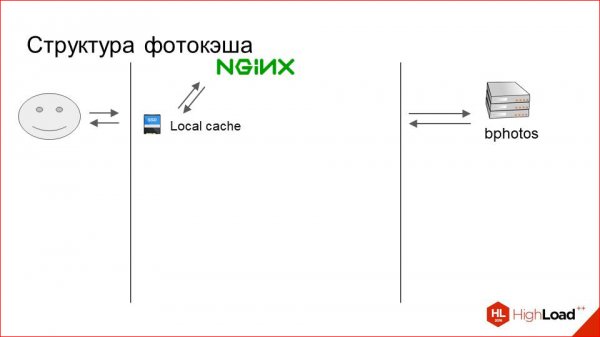
It's simply a machine with a fast physical local disk. This might be an SSD, for instance. And on this disk, we store some local cache.
What does this look like? The user sends a request for a photo. NGINX first looks for it in the local cache. If it's not there, it simply does a proxy_pass to our storage, downloads the photo from there, and provides it to the user.
But this is very basic and unclear what happens inside. It works approximately like this.
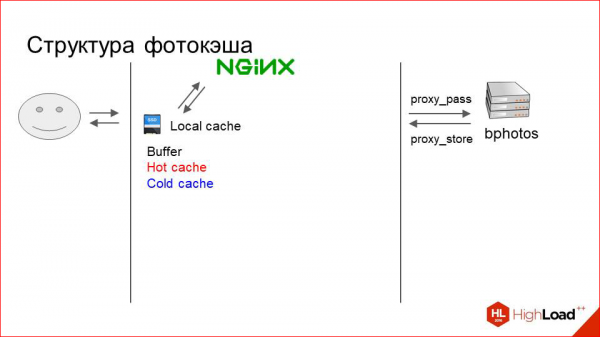
The cache is logically divided into three layers. When I say 'three layers', it doesn't mean there's some complex system. No, it's simply three directories in the file system:
- This is the buffer, where just uploaded photos from the proxy go.
- This is the hot cache, which stores currently actively requested photos.
- And the cold cache, where photos are gradually pushed out from the hot cache when they receive fewer requests.
For this to work, we need to somehow manage this cache, moving photos around in it, etc. This is also a very primitive process.
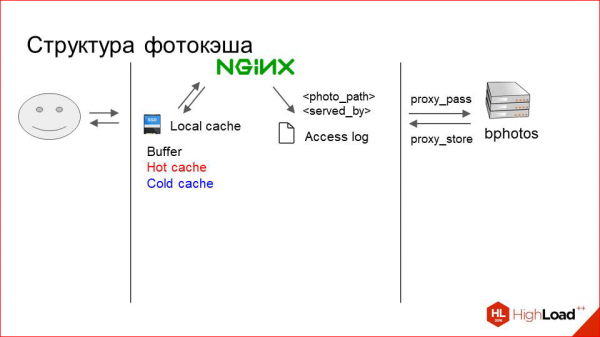
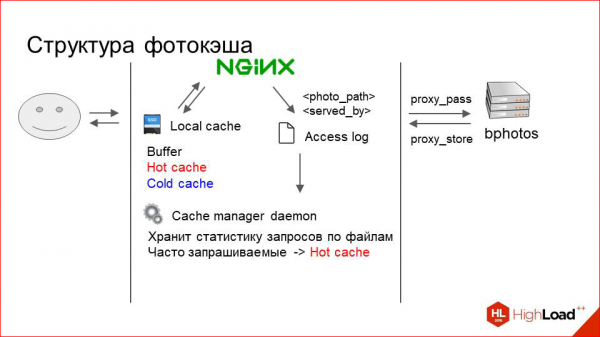
Nginx logs each request to access.log on RAMDisk, specifying the path to the served photo (relative path, of course) and which section it was serviced by. For instance, it might log "photo 1" followed by either a buffer, hot cache, cold cache, or proxy.
Based on this, we need to make a decision on how to handle the photo.
Each machine runs a small daemon that constantly reads this log and keeps track of the usage statistics for various photos in memory.
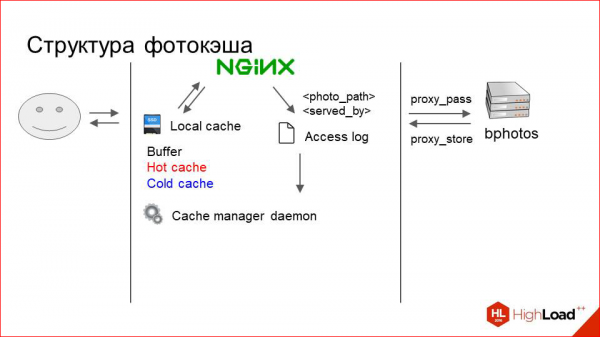
It simply aggregates this data, maintains counters, and periodically does the following: it moves frequently requested photos, which receive many requests, to the hot cache, regardless of their original location.
Photos that are rarely requested and have become even less so are gradually pushed from hot cache to cold cache.
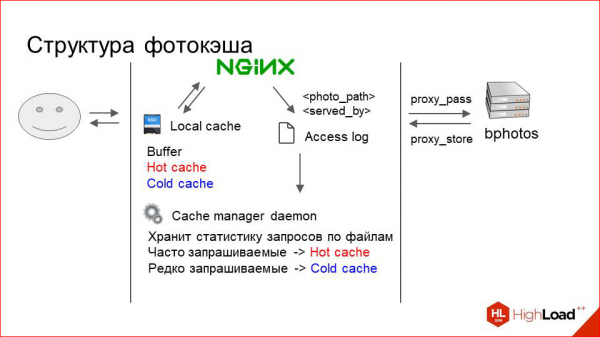
When we run out of space in cache, we simply start deleting everything from the cold cache indiscriminately. This, by the way, works quite well.
To ensure that a photo is saved immediately during proxying to the buffer, we use the proxy_store directive, and the buffer is also RAMDisk, which means it operates very quickly for the user. This pertains to the internal workings of the caching server.
There remains the question of how to distribute requests across these servers.
Suppose there is a cluster of twenty storage machines and three caching servers (that's how it turned out).
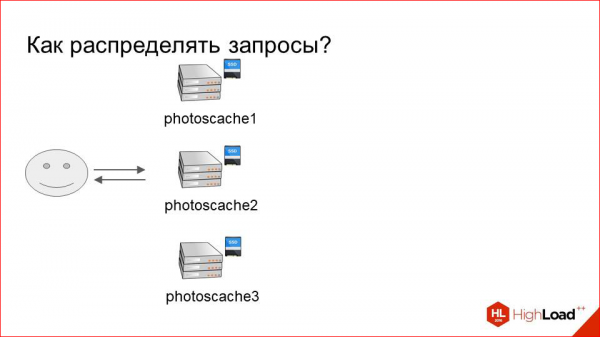
We need to somehow determine which requests are for which photos and where to direct them.
The simplest option is Round Robin. Or should we do it randomly?
This obviously has a number of downsides, as we will use the cache very inefficiently in such a scenario. Requests will be directed to random machines: it may be cached here, but it’s not on the neighboring one. And everything will work poorly, even with a small number of machines in the cluster.
We need to unambiguously determine which server to route which request to.
There is a simple method. We take the hash of the URL or the hash of our sharding key from the URL and divide it by the number of servers. Will this work? Yes.
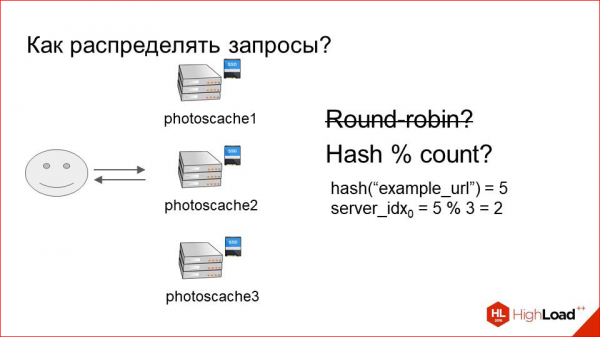
That is, we have a hundred percent request, for example, for some "example_url" will always land on the server with index "2", and the cache will be utilized as effectively as possible.
But there is a problem with resharding in such a scheme. By resharding, I mean changing the number of servers.
Suppose our caching cluster has stopped coping, and we decided to add another machine.
Let’s add it.
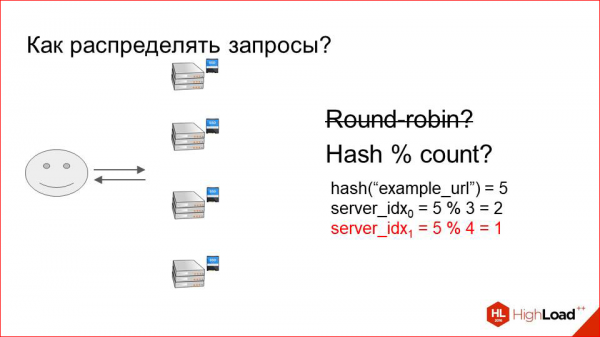
Now everything is divided not by three, but by four. Thus, practically all the keys we used to have, practically all URLs now live on different servers. The entire cache was invalidated in an instant. All requests flooded to our cluster storage, and it became overwhelmed, leading to service denial and unhappy users. We definitely don't want that.
This option doesn’t work for us either.
So what should we do? We need to somehow use the cache efficiently, consistently landing one request on the same server, while still being resilient to reshuffling. There is a solution, and it’s not overly complicated. It's called consistent hashing.
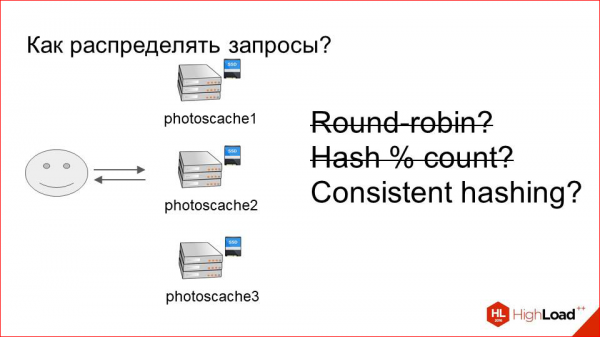
How does it look?
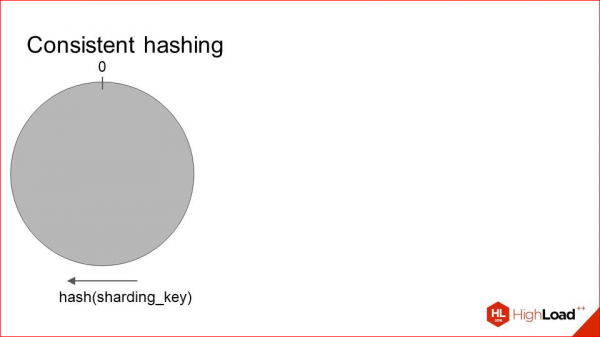
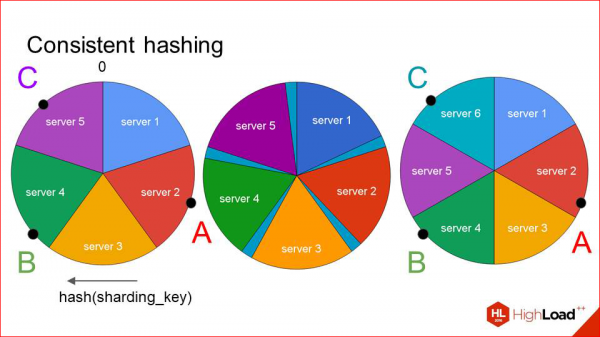
We take some function from the sharding key and distribute all its values on a circle. That is, at point 0, its minimum and maximum values meet. Then we place all our servers on this same circle roughly like this:
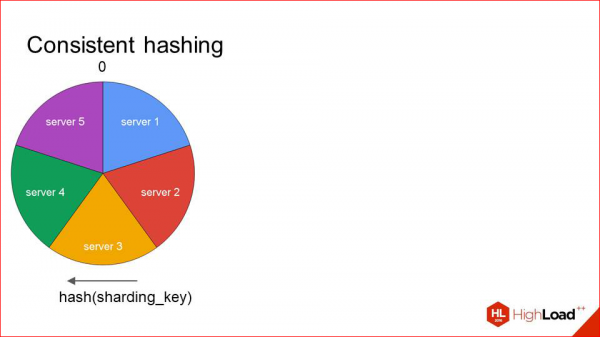
Each server is defined by a single point, and the sector that extends to it clockwise is serviced by this host. When requests come in, we can immediately see, for example, request A — it has this hash — and it is serviced by server 2. Request B — by server 3. And so on.
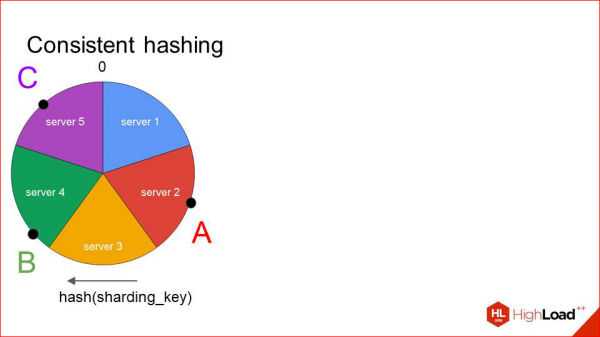
What happens in this situation during reshuffling?
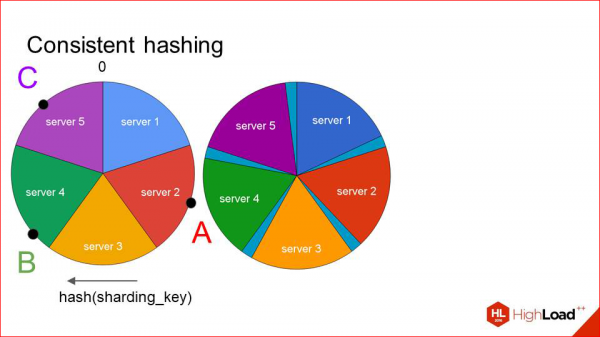
We do not invalidate the entire cache as before, nor do we shift all the keys, but we shift each sector a little distance in such a way, so that in the freed-up space, so to speak, our sixth server we want to add fits in, and we add it there.
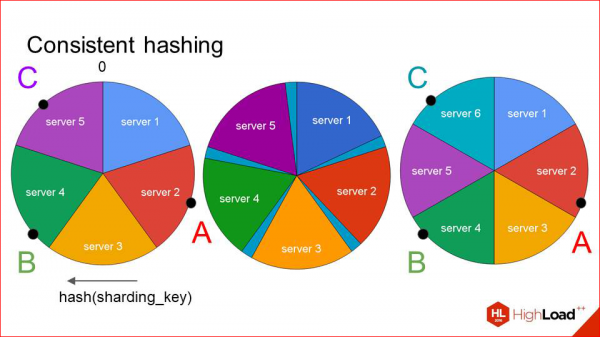
Of course, in such situations, the keys can also shift. But they shift much less than before. We see that our two primary keys remained on their respective servers, while only the caching server for the last key changed. This works quite effectively, and if you add new hosts incrementally, there’s no major problem here. You add a little bit at a time, wait for the cache to fill up again, and everything works fine.
The only question remains during failures. Suppose one of our machines fails.
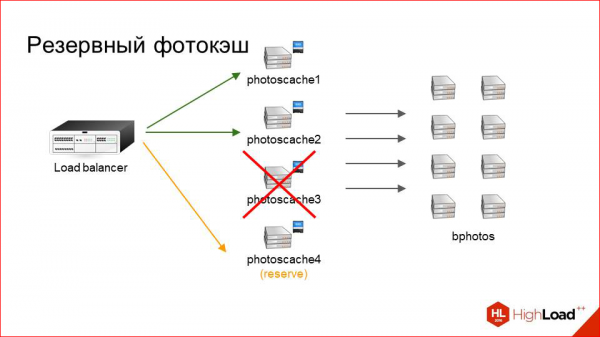
And we wouldn't want to regenerate this map at that moment, invalidate part of the cache, and so on, especially if, for instance, the machine rebooted, and we need to serve requests. We simply keep one backup photo cache at each site, which acts as a replacement for any machine that is currently down. If, suddenly, a server becomes unavailable, traffic is routed there. Naturally, there is no cache there, meaning it is cold, but at the very least, user requests are processed. If it’s a short interval, we can handle it quite calmly. It just increases the load on the storage. If it’s a long interval, we can decide whether to remove that server from the map or not, or perhaps replace it with another one.
This concerns the caching system. Let’s look at the results.
At first glance, it seems straightforward. However, this method of cache management gave us a hit rate of about 98%. That is, out of these 80,000 requests per second, only 1,600 reach the storages, and this is a completely normal load; they handle it well, and we always have a buffer.
We placed these servers in three of our data centers, resulting in three points of presence — Prague, Miami, and Hong Kong.
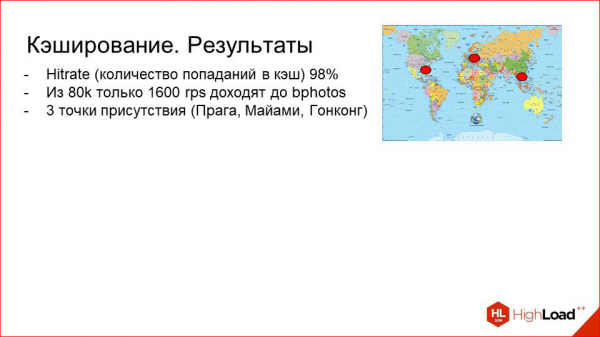
Thus, they are relatively locally situated to each of our target markets.
And as a nice bonus, we ended up with this caching proxy, which actually has idle CPU time because it’s not heavily needed for serving content. Using NGINX + Lua, we implemented a lot of utility logic there.
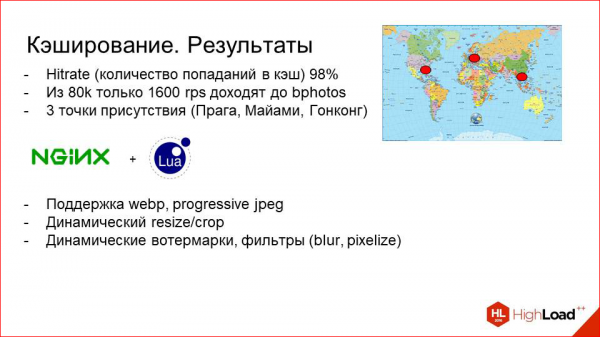
For example, we can experiment with webp or progressive jpeg (these are efficient modern formats), see how it affects traffic, make some decisions, enable it for certain countries, etc.; dynamically resize or crop photos on the fly.
This is a good use case when you have, for example, a mobile application that displays photos, and the mobile app doesn't want to use the client's CPU to request a large photo and then resize it to fit in a view. We can simply dynamically specify some parameters in the URL, and the photo cache will resize the image. Typically, it will select the size that we physically have on disk, closest to the requested size, and downscale it within the specific coordinates.
By the way, we have made video recordings of the last five years of high-load systems developers' conferences publicly available. . Watch, study, share, and subscribe to .
We can also add a lot of product logic there. For example, we can add different watermarks based on URL parameters, blur photos, or pixelate them. This is when we want to show a photo of a person but don't want their face to be visible; it works well, and it has all been implemented here.
What did we achieve? We achieved three points of presence, good hit rates, and at the same time, our CPU on these machines is not idle. It has now become, of course, more important than before. We need to deploy more powerful machines, but it's worth it.
This concerns image delivery. Everything here is quite clear and obvious. I think I’m not revealing America; this is how practically any CDN works.
And, most likely, an experienced listener might have the question: why not just switch everything to a CDN? It would be about the same; all modern CDNs can do that. And there are several reasons.
The first is photos.

This is one of the key aspects of our infrastructure, and we need as much control over them as possible. If it's a solution from a third-party vendor, and you have no control over it, it will be quite difficult to manage when you have a large dataset and a very high volume of user requests.
Let me give you an example. Right now, in our infrastructure, we can, for instance, in case of any problems or underground sounds, access the machine, debug it, so to speak. We can add the collection of specific metrics that we need, experiment in different ways, and see how it impacts the graphs, and so on. Currently, we collect a lot of statistics on this caching cluster. We periodically review it and thoroughly investigate certain anomalies. If this were on the CDN side, it would be much harder to control. For example, if an incident occurs, we know what happened, we know how to deal with it and overcome it. That's the first conclusion.
The second conclusion is more historical, as the system has been evolving for a long time with various business requirements at different stages, and they don’t always fit into the CDN concept.
And the point that follows from the previous one –

Is that we have a lot of specific logic on photo caches that can’t always be added on request. It's unlikely that any CDN will add custom features at your request. For instance, URL encryption, if you don’t want clients to change anything. Want to change a URL on the server and encrypt it, then pass some dynamic parameters here.
What conclusion can be drawn? In our case, a CDN is not a very good alternative.

But in your case, if you have specific business requirements, you can implement what I’ve shown you yourself without any issues. And it will work excellently under a similar load profile.
However, if you have a general solution, and the task is not very specific, you can safely use a CDN. Or if time and resources are much more important to you than control.

Modern CDNs have practically all that I've just talked about, except for plus-minus certain features.
This is regarding the delivery of photos.
Now, let’s move forward a bit in our retrospective and talk about storage.
The year is 2013.
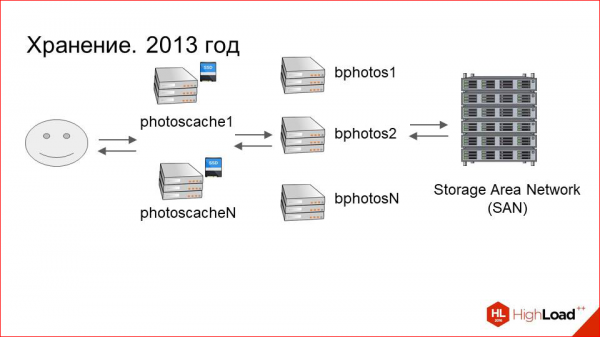
Caching servers have been added, performance issues are gone. Everything is fine. The dataset is growing. In 2013, we had about 80 servers connected to the storage and roughly 40 caching servers in each data center. That's about 560 terabytes of data in each data center, totaling around one petabyte.
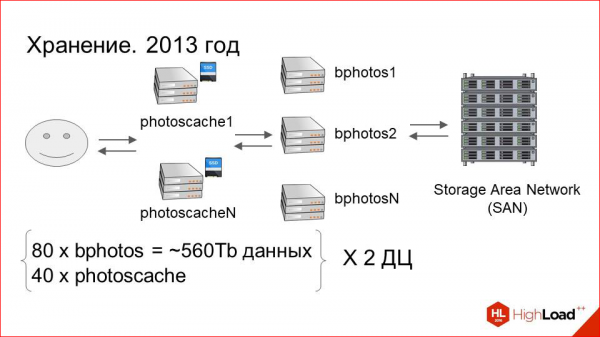
As the dataset has grown, operating costs have also significantly increased. How did this manifest?
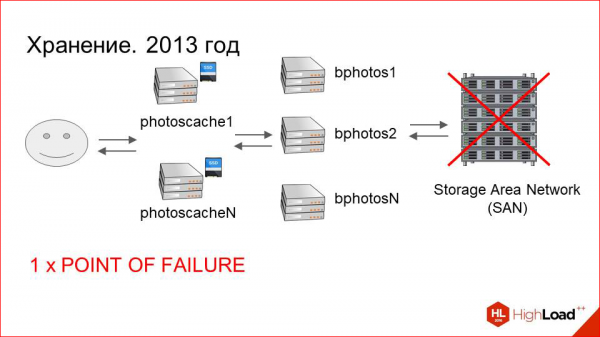
In the scheme depicted here—with the SAN, connected machines, and caches—there are many points of failure. While we have coped with the failure of caching servers before, where things are more or less predictable and understandable, the situation on the storage side was much worse.
Firstly, the Storage Area Network (SAN) itself can fail.
Secondly, it is connected via fiber to the final machines. There could be issues with the optical cards and switches.
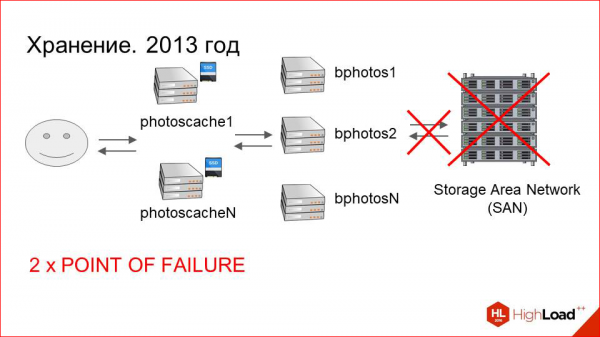
Certainly, there are not as many of these as there are with the SAN itself, but they too are points of failure.
Next, the machine itself, which is connected to the storage, can also fail.
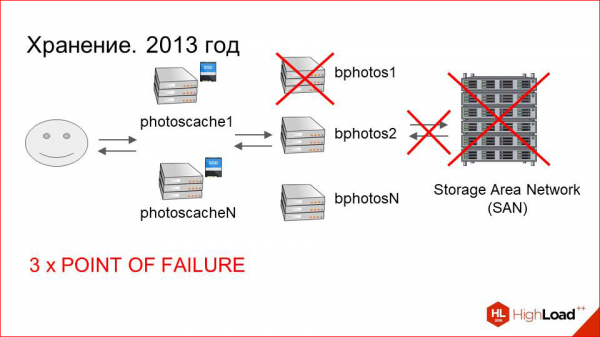
So, we have three points of failure overall.
Additionally, aside from the points of failure, there is the heavy maintenance of the storages themselves.
It’s a complex multi-component system, and it can be challenging for system engineers to deal with it.
Finally, and most importantly, if any of these three points fail, there is a non-zero probability of losing user data, as the file system may become corrupted.
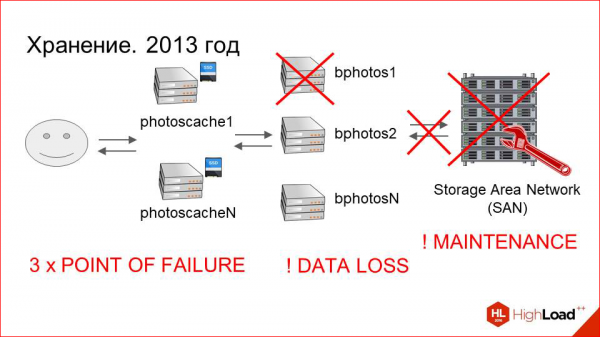
Let’s suppose our file system got corrupted. The recovery process is, firstly, slow—it can take up to a week with a large volume of data. Secondly, in the end, we will likely have a bunch of unrecognizable files that will need to be somehow matched with users' photographs. We risk losing data. The risk is quite high, and the more often such situations occur, and the more problems arise throughout the whole chain, the greater this risk becomes.
We had to do something about this. We decided that we simply needed to back up the data. This is actually an obvious and good solution. What did we do?
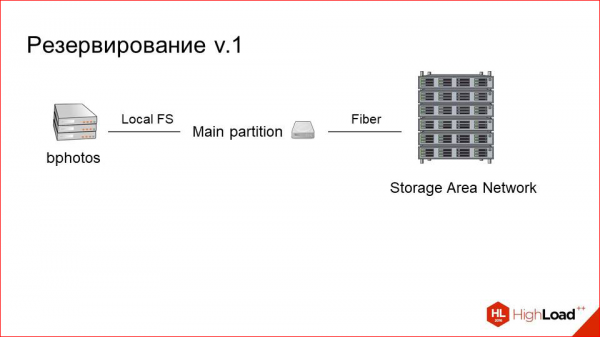
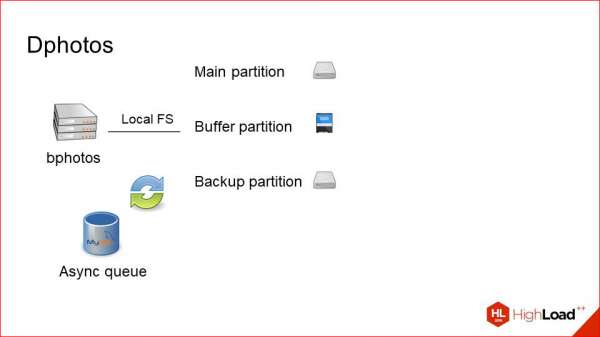
This is what our server looked like that was connected to the storage before. It has one main partition; it is simply a block device that actually represents a mount on remote storage over fiber.
We simply added a second partition.
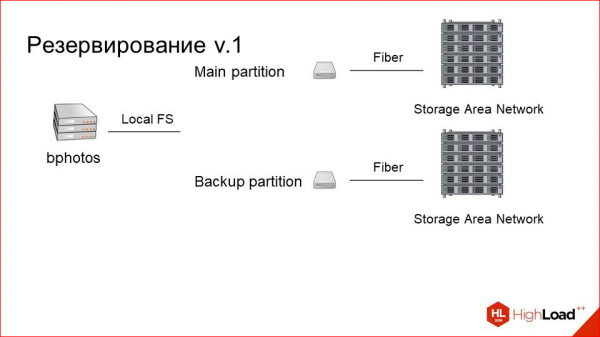
We set up a second storage nearby (fortunately, it wasn't too expensive) and named it the backup partition. It's also connected via fiber optics and is located on the same machine. However, we need to somehow synchronize the data between them.
Here we simply create an asynchronous queue next to it.
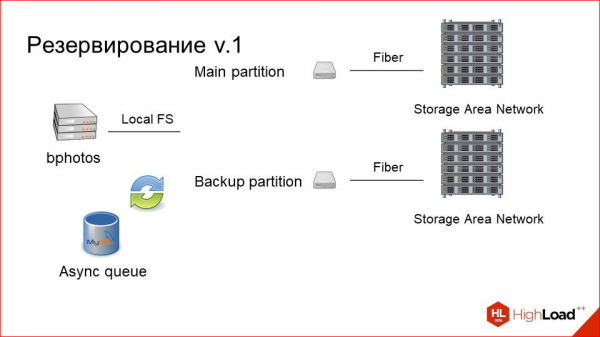
It's not very heavily loaded. We know we have few records. The queue is just a table in MySQL that logs entries like "this photo needs to be backed up." Whenever there's a change or an upload, we copy from the main partition to the backup using either an asynchronous method or some background worker.
This way, we always have two consistent partitions. Even if one part of this system fails, we can always switch the main partition with the backup, and everything will continue to work.
However, this significantly increases the read load, as in addition to clients reading from the main partition—because they initially view the photo there (it is fresher)—they then check the backup if they can't find it (but that's something NGINX handles). Our backup system is also reading from the main partition. While this isn't a bottleneck, we didn't want to increase the load unnecessarily.
We added a third disk, which is a small SSD, and named it a buffer.
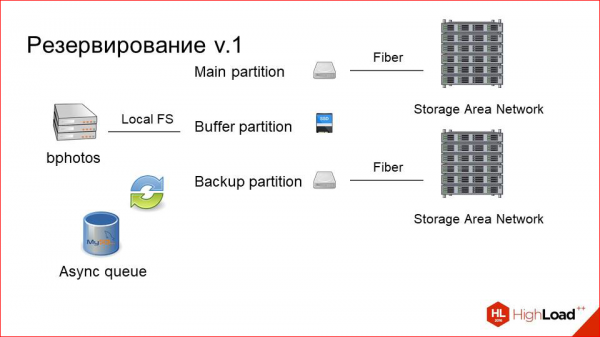
Here’s how it works now.
The user uploads a photo to the buffer, and an event is triggered in the queue indicating that it needs to be copied to both partitions. It gets copied, and the photo resides in the buffer for some time (let’s say a day) before being purged. This greatly enhances the user experience, as when a user uploads a photo, requests usually start coming in immediately, or they refresh the page. But this all depends on the application that handles the upload.
For example, other users who started seeing it immediately send requests for that photo. It’s still not in cache, and the first request is processed very quickly. Essentially, it’s just like with photo caching. The slow storage doesn't participate at all in this. And when it gets purged after a day, it's either cached in our caching layer, or it’s unlikely to be needed anymore. So, the user experience has improved significantly due to these simple manipulations.
Most importantly: we stopped losing data.
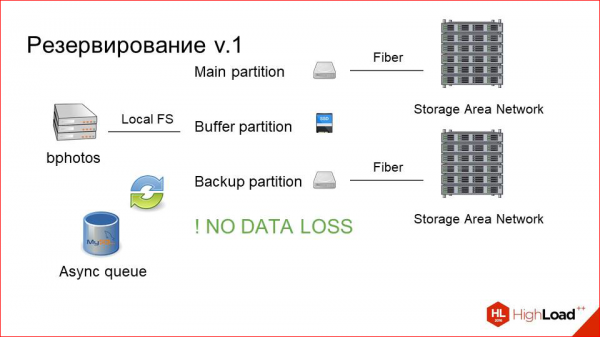
Let’s say we've stopped potentially We are not losing data, as we generally haven't lost it at all. However, there was a risk. We see that this solution is certainly good, but it somewhat resembles treating the symptoms of a problem rather than resolving it completely. Some issues still remain.
Firstly, there is a point of failure in the physical host itself, on which all this machinery operates, and that hasn't gone away.
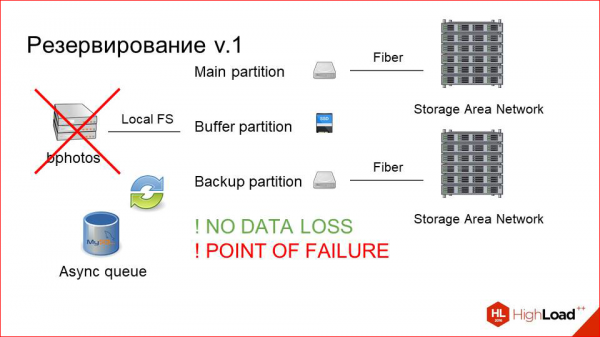
Secondly, there are still issues with SANs, their heavy maintenance, etc. While this wasn't a critical factor, we wanted to try to live without it.
And we created a third version (actually, the second one) — a backup version. How did it look?
This is what it was —
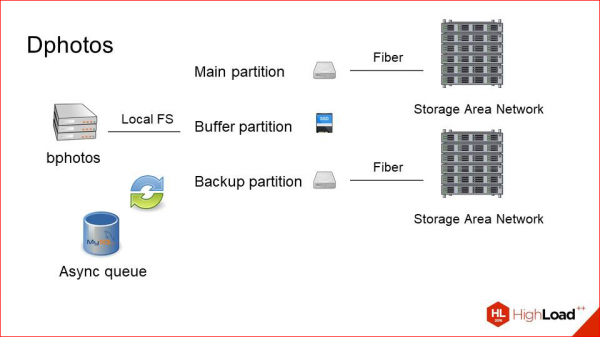
Our main issues are with the physical host.
Firstly, we eliminate SANs because we want to experiment, we want to try using just local hard drives.
It was already 2014-2015, and at that time the situation with disks and their capacity in a single host had improved significantly. We decided, why not give it a try.
Next, we simply take our backup partition and move it physically to a separate machine.
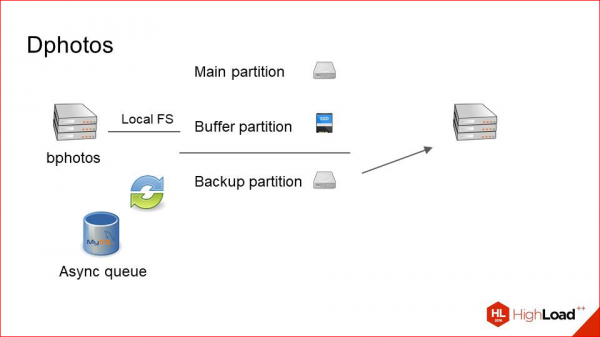
Thus, we get this arrangement. We have two machines that store identical datasets. They fully back each other up and synchronize data across the network using an asynchronous queue in the same MySQL.
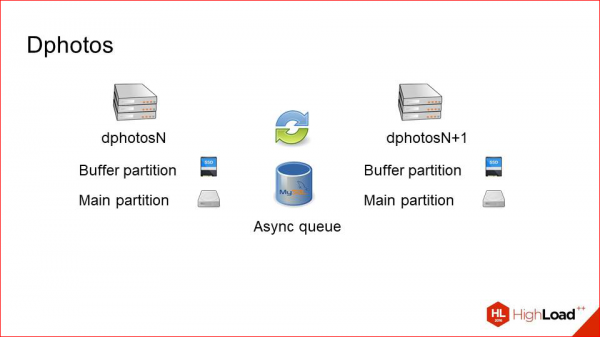
This works well because we have few writes. If the amount of writing were comparable to reading, we might encounter some network overhead and issues. There are few writes and many reads — this method works well, meaning we rarely copy photos between these two servers.
How does this work? Let's take a closer look.
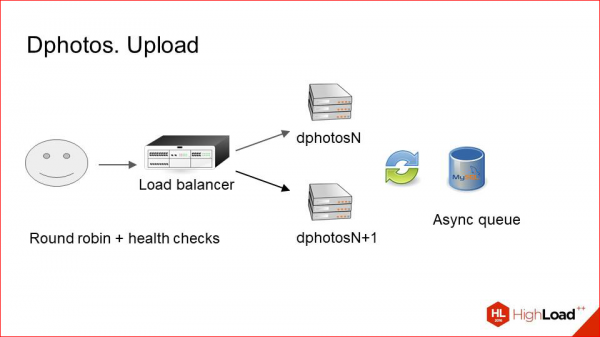
Upload. The load balancer simply selects random hosts from the pair and uploads to it. It naturally performs health checks to ensure that the machine is still functioning. In other words, it uploads photos only to a live server, and then through the asynchronous queue, everything gets copied to its neighbor. The uploading process is straightforward.
The tasks are slightly more complex.
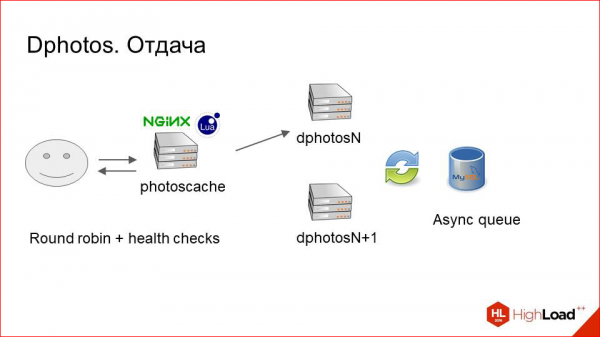
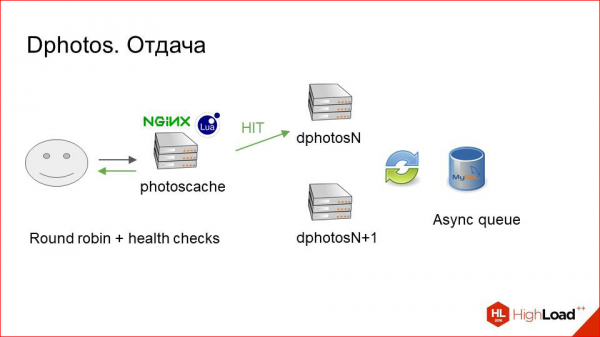
Here, Lua helped us out because it's quite challenging to implement such logic on vanilla NGINX. We first make a request to the primary server, checking if the photo is there, as it might be uploaded to a neighboring server and hasn't reached us yet. If the photo is available, that's great. We immediately deliver it to the client and possibly cache it.
If it isn't available, we simply make a request to the neighbor and we can guarantee getting it from there.
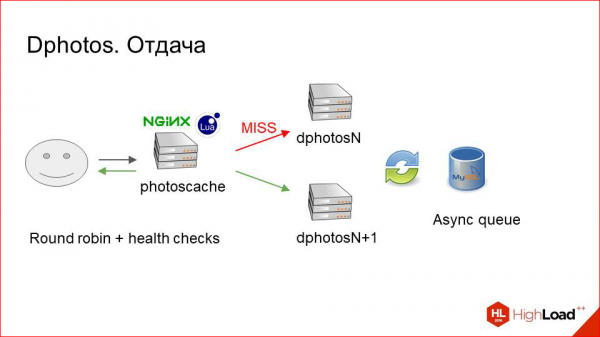
Thus, we can say again: there may be performance issues because of constant round trips — if a photo is uploaded and isn't here, we make two requests instead of one, which should be slow.
In our case, it doesn't work slowly.
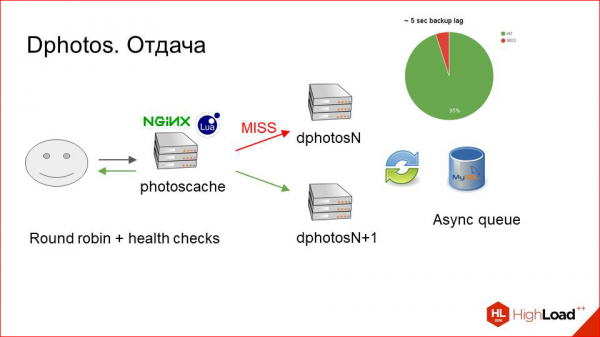
We collect a bunch of metrics on this system, and the hit rate of this mechanism is about 95%. Thus, the lag of this backup is small, and thanks to that, we practically guarantee that after the photo has been uploaded, we retrieve it on the first attempt without needing two requests.
So, what else did we achieve, and what's really cool?
Previously, we had a primary backup section, and we read from those sequentially. We always looked at the primary first, then at the backup. That counted as one request.
Now we utilize reading from two machines simultaneously. We distribute requests using Round Robin. In a small percentage of cases, we make two requests. But in general, we now have twice the reading capacity compared to before. The load has significantly decreased on both the delivery machines and the storages that we had at that time as well.
Regarding fault tolerance. Essentially, that's what we primarily aimed for. With fault tolerance, everything turned out brilliantly.
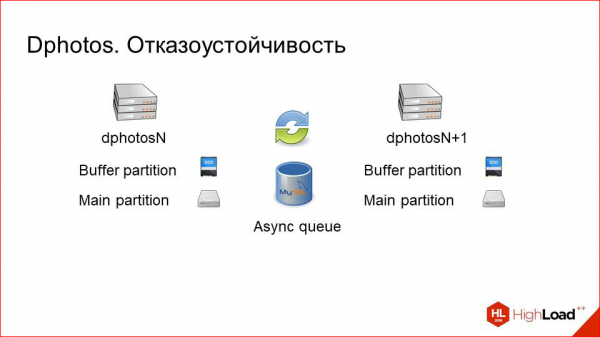
One server goes down.
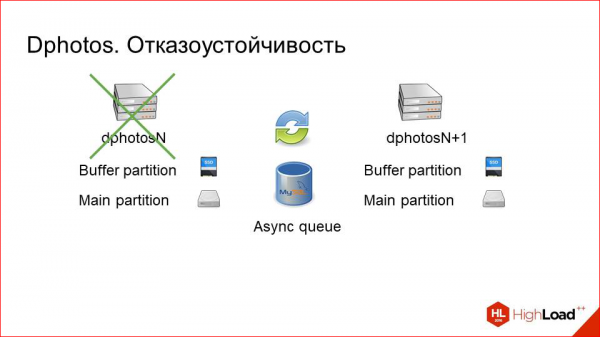
No problem! The systems engineer doesn’t even need to wake up at night; they can wait until morning, and nothing catastrophic will happen.
Even if the queue fails due to this machine going down, it's still not an issue; the log will pile up first on the live machine, then it will handle the queue, and later on the machine that will come back online after some time.
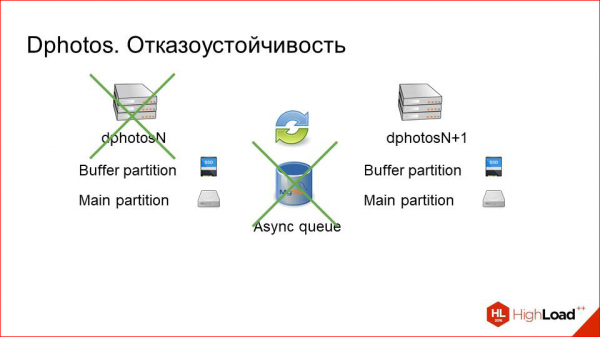
The same applies to maintenance. We simply turn off one of the machines, manually remove it from all pools, traffic to it stops, we perform some maintenance, make some adjustments, and then return it to service. The backup catches up quite quickly, within a couple of minutes after a day's downtime for one machine. That's really quite minimal. With redundancy, as I said before, everything is going well here.
What conclusions can we draw from this backup scheme?
We achieved redundancy.
Simple operation. Since the machines have local hard drives, it is much more convenient from the perspective of the engineers who work with them.
We gained a double reading capacity.
This is a very good bonus in addition to redundancy.
However, there are also problems. Now we have a much more complicated development of features associated with this because the system has become 100% eventually consistent.
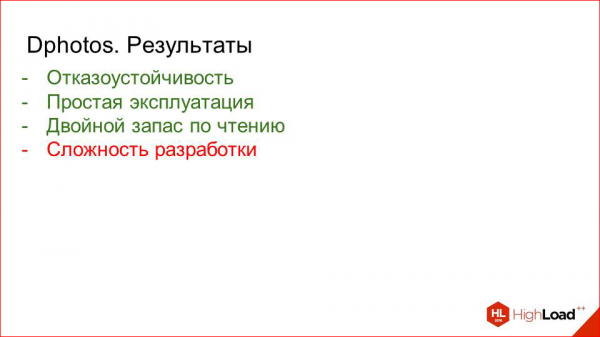
We constantly have to think in some background job: 'Which server are we currently running on?', 'Is there an up-to-date picture here?' and so on. Naturally, all this is wrapped in layers, and for the programmer writing the business logic, it's transparent. Nevertheless, a big complex layer has emerged. But we are willing to live with it in exchange for the benefits we gained.
And again, there is some conflict.
I initially said that storing everything on local hard drives is bad. And now I am saying that we like it.
Indeed, over time the situation has changed significantly, and now this approach has many advantages. First of all, we achieve much simpler operation.
Secondly, it is more efficient because we don’t have those automatic controllers, connecting to storage arrays.
There is massive machinery there, and here, it’s just a few disks that are specifically assembled in RAID on the machine.
But there are also drawbacks.
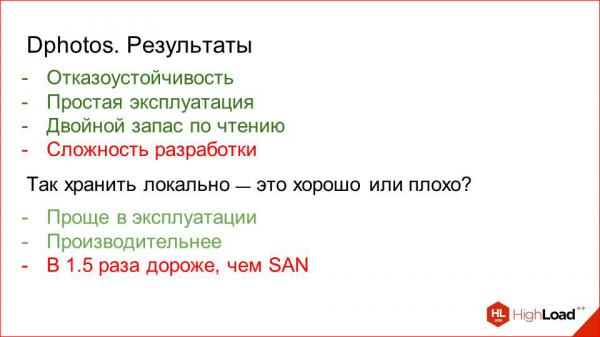
It is approximately 1.5 times more expensive than using SANs even at today's prices. Therefore, we decided not to boldly convert our entire large cluster to machines with local hard drives and opted for a hybrid solution.
Half of our machines work with hard drives (well, not half – probably about 30 percent). The rest are older machines that previously had the first backup scheme. We simply remounted them since we don't need new data or anything else, just moved the mounts from one physical host to two.
We’ve got a big reading buffer now, and we've scaled up. Previously, we mounted one storage on one machine; now we mount four, for instance, on one pair. And it works fine.
Let's summarize briefly what we've achieved, what we've fought for, and whether we've succeeded.
Summary
We have users — a total of 33 million.
We have three points of presence — Prague, Miami, Hong Kong.
They host a caching layer made up of machines with fast local disks (SSDs), running a simple setup with NGINX, its access.log, and Python daemons that handle all of this and manage the cache.
If you wish, in your project, if photos are not as critical for you as they are for us, or if the trade-off between control and speed of development and resource costs leans the other way for you, then you can safely replace it with a CDN, as modern CDNs do this well.
Next is the storage layer, which has clusters of pairs of machines that back each other up, with files asynchronously copied from one to the other upon any change.
Some of these machines work with local hard drives.
Some of these machines are connected to SANs.
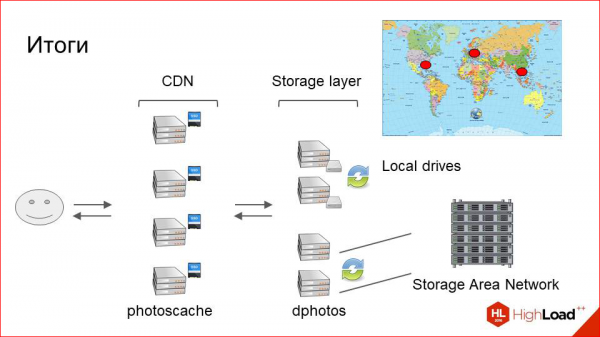
On one hand, this is more convenient to operate and a bit more productive; on the other hand, it's beneficial in terms of density and cost per gigabyte.
This is a brief overview of the architecture of what we've achieved and how it has evolved.
A few more simple tips from the cap.
Firstly, if you suddenly decide that you urgently need to improve everything in your photo infrastructure, measure it first, because you might not need any improvements.

For example, we have a cluster of machines that delivers photos from attachments in chats, and the scheme there still operates from 2009, and no one is suffering from it. Everyone is happy, everyone likes it.
To measure, first set a bunch of metrics, look at them, and then decide what you are unhappy with and what needs improvement. To measure this, we have a cool tool called Pinba.
It allows you to collect very detailed stats from NGINX for each request, including response codes and time distribution — anything you want. It has bindings for various analytics systems, and you can then view all of this beautifully.
First, measure — then improve.
Next. We optimize reading with a cache and writing with sharding, but that's an obvious point.

Next. If you are just starting to build your system, it’s much better to handle images as immutable files. This way, you immediately eliminate a whole class of problems related to cache invalidation, how the logic should find the correct version of the image, and so on.

For instance, if you upload a hundred images and then rotate one, make it a physically different file. That is, don’t think: ‘Now I’ll save a bit of space, overwrite the same file, and change the version.’ It always works poorly and leads to a lot of headaches later.
Next point. About resizing on the fly.
In the past, when users uploaded a photo, we would generate a whole bunch of sizes for every possible case, for different clients, and they all sat on the disk. We’ve now moved away from that.
We only kept three main sizes: small, medium, and large. Everything else we simply downscale from the size requested in Uport, just downsizing and delivering it to the user.
The CPU for the caching layer ends up being much cheaper than if we constantly regenerated these sizes on each storage. For example, if we want to add a new size, it takes a month — running a script everywhere to do this cleanly without crashing the cluster. So, if given the option now, it's better to create as few physical sizes as possible, while still maintaining some distribution, say, three. Everything else can be resized on the fly using available modules. It's very easy and accessible now.
And incremental asynchronous backups are great.
As our practice has shown, this scheme works well with deferred copying of changed files.

The last point is also obvious. If there are currently no such problems in your infrastructure, but something may fail, it will definitely fail when the load increases slightly. So it's better to think about this in advance and avoid any issues. That's all from me.
Contacts
»
»
This report is a transcript of one of the best presentations at the HighLoad conference. . Less than a month remains until the HighLoad++ 2017 conference.
We are already prepared , and the schedule is currently being actively formed.
This year we continue to explore the themes of architecture and scaling:
- / Игорь Васильев
- / Дмитрий Егоров
- / Анатолий Пласковский
- / Роман Шеховцов, Алексей Громатчиков
- / Филипп Дельгядо
Some of these materials are also used in our online training course on developing high-load systems. — is a series of specially curated letters, articles, materials, and videos. Right now, our textbook contains more than 30 unique materials. Join us!
Source: habr.com
