

In projects related to microservice architecture development, CI/CD transitions from being a nice-to-have to an absolute necessity. Automated testing is an integral part of continuous integration, and an effective approach can allow the team to enjoy many pleasant evenings with family and friends. Otherwise, the project risks never being completed.
You can cover the entire microservice code with unit tests using mock objects, but this only partially addresses the issue and leaves many questions and complexities, especially when testing data interactions. As always, the most pressing issues are testing data consistency in a relational database, testing interactions with cloud services, and incorrect assumptions when writing mock objects.
All of this, and a bit more, can be addressed by testing an entire microservice within a Docker container. An undeniable advantage in ensuring test validity is that the same Docker images used in production are subjected to tests.
Automating this approach presents a number of challenges, the solutions to which will be described shortly:
- conflicts of parallel tasks on a single Docker host;
- identifier conflicts in the database during test iterations;
- waiting for microservices to be ready;
- aggregating and outputting logs to external systems;
- testing outgoing HTTP requests;
- testing web sockets (using SignalR);
- testing OAuth authentication and authorization.
This article is inspired by SECR 2019. So for those who are lazy to read, .

In this article, I will explain how to use a script to launch the service under test, the database, and Amazon AWS services in Docker, then execute tests in Postman, and after their completion, stop and remove the created containers. Tests are run with every code change. Thus, we ensure that each version works correctly with the database and AWS services.
The same script is run by both developers on their Windows desktops and the GitLab CI server under Linux.
For the implementation of new tests to be justified, it should not require the installation of additional tools on either the developer's computer or the server where tests are run during commits. Docker solves this problem.
The test must run on a local server for the following reasons:
- The network is not absolutely reliable. Out of a thousand requests, one may fail;
In such a case, the automated test will not pass, the process will stop, and it will be necessary to look for the cause in the logs; - Certain third-party services do not allow overly frequent requests.
Additionally, using a staging environment is undesirable because:
- Not only can bad code running on it break the staging environment, but also data that the correct code cannot process;
- No matter how hard we try to revert all changes made by the test during the test itself, something may go wrong (otherwise, what’s the point of testing?).
About the project and the process organization
Our company developed a microservices web application running in Docker on Amazon AWS. Unit tests were already being used on the project, but errors often arose that unit tests did not catch. It was necessary to test the entire microservice along with the database and Amazon services.
The project applies a standard continuous integration process, which includes testing the microservice on every commit. After a task is assigned, the developer makes changes to the microservice, tests it manually, and runs all existing automated tests. If necessary, the developer modifies the tests. If no issues are found, a commit is made to the task branch. After each commit, tests are automatically run on the server. The merge to the main branch and the execution of automated tests on it occur after a successful review. If the tests on the main branch pass, the service is automatically updated in the testing environment on Amazon Elastic Container Service (staging environment). The staging environment is essential for all developers and testers, and it should not be broken. Testers check fixes or new features in this environment by performing manual tests.
Project architecture
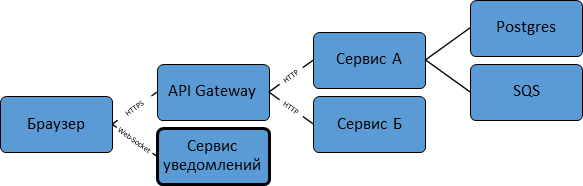
The application consists of more than ten services. Some of them are written in .NET Core, while others are in NodeJs. Each service operates in a Docker container in Amazon Elastic Container Service. Each has its own Postgres database, and some even have Redis. There are no shared databases. If multiple services need the same data, the data is sent to each of these services via SNS (Simple Notification Service) and SQS (Amazon Simple Queue Service) at the time of modification, and the services save it in their isolated databases.
SQS and SNS
SQS allows messages to be placed in a queue and read from the queue using the HTTPS protocol.
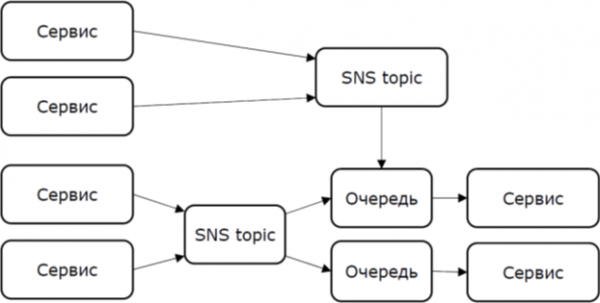
If multiple services read from a single queue, each message is delivered to only one of them. This is useful when running several instances of the same service to distribute the load among them.
If it is necessary for each message to be delivered to multiple services, each recipient must have its own queue, and to duplicate messages to several queues, SNS is needed.
In SNS, you create a topic and subscribe an SQS queue to it, for example. Messages can be sent to the topic, and each message is sent to every queue subscribed to that topic. SNS does not have a method for reading messages. If you need to see what's being sent to SNS during debugging or testing, you can create an SQS queue, subscribe it to the desired topic, and read the queue.
API Gateway
Most services are not directly accessible from the internet. Access is provided through an API Gateway, which checks access rights. This is also our service, and tests are available for it as well.
Real-time notifications
The application uses , to show real-time notifications to the user. This is implemented in the notification service. It is accessible directly from the internet and works with OAuth, as integrating WebSockets in the Gateway proved to be impractical compared to integrating OAuth and the notification service.
A well-known approach to testing
Unit tests substitute mock objects for things like databases. If a microservice, for example, tries to create an entry in a table with a foreign key, and the record to which that key refers does not exist, the request cannot be fulfilled. Unit tests cannot detect this.
In suggests using an in-memory database and injecting mock objects.
An in-memory database is one of the DBMS supported by Entity Framework. It is specifically designed for testing. Data in this database is stored only until the process using it is completed. There is no need to create tables, and data integrity is not checked.
Mock objects simulate a replaceable class only as much as the test developer understands its operation.
The article from Microsoft does not specify how to achieve automatic startup of Postgres and migration execution when running the test. My solution does this without adding any code specifically for tests to the microservice.
Let's move on to the solution
During the development process, it became clear that unit tests were insufficient to timely identify all issues, so it was decided to approach this problem from a different angle.
Setting up the test environment
The first task is to deploy the test environment. The steps necessary to launch the microservice are:
- Configure the service being tested for the local environment, specifying the credentials for connecting to the database and AWS in the environment variables;
- Start Postgres and execute the migration by running Liquibase.
In relational DBMS, before writing data to the database, you need to create a data schema, that is, tables. When updating the application, tables need to be adapted to the format used by the new version, preferably without data loss. This is called migration. Creating tables in an initially empty database is a special case of migration. Migration can be embedded within the application itself. Both .NET and NodeJS have frameworks for migration. In our case, for security reasons, the microservices are stripped of the right to change the data schema, and migration is performed using Liquibase. - Start Amazon LocalStack. This is an implementation of AWS services for running locally. There is a ready-made image for LocalStack on Docker Hub.
- Run the script to create the necessary entities in LocalStack. Shell scripts use AWS CLI.
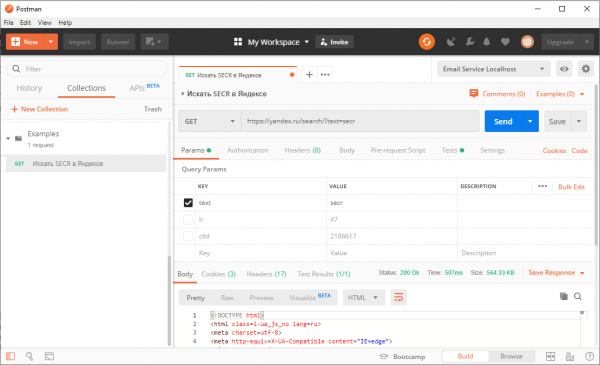
For testing in the project, we use . It was there before, but it was started manually and tested on the application already deployed on the stand. This tool allows you to make arbitrary HTTP(S) requests and check that the responses meet expectations. Requests are grouped into a collection, and you can run the entire collection at once.
How automated testing works
During the test, everything works in Docker: the tested service, Postgres, the migration tool, and Postman, or rather its console version - Newman.
Docker solves a number of issues:
- Independence from host configuration;
- Dependency installation: Docker downloads images from Docker Hub;
- Returning the system to its original state: simply remove the containers.
Docker-compose combines containers into a virtual network, isolated from the internet, where containers find each other by domain names.
The test is managed by a shell script. To run the test on Windows, we use git-bash. Thus, one script is sufficient for both Windows and Linux. Git and Docker are installed by all developers on the project. When Git is installed on Windows, git-bash is also installed, so everyone has it.
The script performs the following steps:
- Building Docker images
to build the images and - Starting the DB and LocalStack
docker-compose up -d - Migrating the DB and preparing LocalStack
docker-compose run - Starting the tested service
docker-compose up -d - Running the test (Newman)
- Stopping all containers
docker-compose down - Posting results to Slack
We have a chat where messages with a green checkmark or a red cross and a link to the log appear.
The following Docker images are involved in these steps:
- The tested service uses the same image as for production. The configuration for the test is done via environment variables.
- Ready-made images from Docker Hub are used for Postgres, Redis, and LocalStack. There are also ready-made images for Liquibase and Newman. We build our own on their basis, adding our files.
- To prepare LocalStack, a ready-made AWS CLI image is used, and based on it, an image containing the script is created.
Using , there's no need to build a Docker image just to add files to the container. However, volumes are not suitable for our environment, because Gitlab CI jobs run themselves in containers. You can manage Docker from such a container, but volumes only mount folders from the host system, not from another container.
Problems that may be encountered
Waiting for readiness
When the container with the service is started, it doesn't mean it's ready to accept connections yet. You have to wait for the connection to proceed.
This task is sometimes solved with the help of a script , which waits for the opportunity to establish a TCP connection. However, LocalStack may return a 502 Bad Gateway error. Additionally, it consists of many services, and if one of them is ready, it doesn’t indicate anything about the others.
Solution: LocalStack preparation scripts that wait for a 200 response from both SQS and SNS.
Conflicts of Parallel Tasks
Multiple tests may run simultaneously on the same Docker host, so container and network names must be unique. Moreover, tests from different branches of the same service can also run at the same time, so it's insufficient to define unique names in each compose file.
Solution: the script sets a unique value for the COMPOSE_PROJECT_NAME variable.
Features of Windows
When using Docker on Windows, there are several things I want to draw your attention to, as this experience is crucial for understanding the reasons behind the errors.
- Shell scripts in the container must have Unix-style line endings.
The CR symbol for the shell is a syntax error. From the error message, it is hard to understand that this is the issue. When editing such scripts in Windows, a proper text editor is needed. Additionally, the version control system must be configured correctly.
Here’s how to configure git:
git config core.autocrlf input- Git Bash emulates standard Linux folders and when calling an executable file (including docker.exe), it converts absolute Linux paths to Windows paths. However, this does not make sense for paths not on the local machine (or paths in the container). This behavior cannot be disabled.
Solution: add an additional slash at the beginning of the path: //bin instead of /bin. Linux understands such paths; for it, multiple slashes are equivalent to one. However, git-bash does not recognize such paths and does not attempt to convert them.
Log Output
When running tests, I would like to see logs from both Newman and the service being tested. Since the events in these logs are interconnected, merging them in one console is much more convenient than having two separate files. Newman is started through docker-compose run, and therefore its output goes to the console. The task now is to ensure that the service's output also reaches there.
The initial solution was to do to start the containers. This command will bring up 3 containers: without the flag -d, but by using shell capabilities, to send this process to the background:
docker-compose up &This worked until it became necessary to send logs from Docker to an external service. to start the containers. This command will bring up 3 containers: stopped outputting logs to the console. However, the command worked docker attach.
Solution:
docker attach --no-stdin ${COMPOSE_PROJECT_NAME}__1 &Identifier conflict during test iterations
Tests are executed through several iterations. The database is not cleared in the process. Records in the database have unique IDs. If specific IDs are written in queries, we will encounter a conflict on the second iteration.
To avoid this, either the IDs must be unique, or all objects created by the test need to be deleted. Some objects cannot be deleted, according to the requirements.
Solution: generate GUIDs with scripts in Postman.
var uuid = require('uuid');
var myid = uuid.v4();
pm.environment.set('myUUID', myid);
Then use the character in the request {{myUUID}}, which will be replaced by the variable value.
Interaction through LocalStack
If the service being tested reads from the SQS queue or writes to it, then for this to be verified the test itself must also work with that queue.
Solution: requests from Postman to LocalStack.
AWS service APIs are documented, allowing you to make requests without the SDK.
If the service writes to the queue, we read it and check the message content.
If the service sends messages to SNS, during the preparation phase LocalStack also creates a queue and subscribes to this SNS topic. Everything else comes down to what is described above.
If the service needs to read a message from the queue, then in the previous step of the test we write this message to the queue.
Testing HTTP requests from the microservice being tested
Some services work over HTTP with something other than AWS, and some AWS functions are not implemented in LocalStack.
Solution: in these cases, , which has a ready-made image in . Expected requests and responses to them are configured with HTTP requests. The API is documented, so we make requests from Postman.
Testing OAuth authentication and authorization
We use OAuth and . For the test, we need an OAuth provider that we can run locally.
All interactions of the service with the OAuth provider come down to two requests: first the configuration is requested /.well-known/openid-configuration, and then the public key (JWKS) is requested from the address in the configuration. All of this is static content.
Solution: our test OAuth provider is a static content server with two files on it. The token is generated once and committed to Git.
Features of testing SignalR
WebSockets do not work with Postman. A special tool was created for testing SignalR.
The SignalR client can be more than just a browser. There is a client library for .NET Core. A client written in .NET Core establishes a connection, authenticates, and waits for a specific sequence of messages. If an unexpected message is received or the connection is dropped, the client exits with code 1. When the last expected message is received, it exits with code 0.
Newman runs concurrently with the client. Multiple clients are launched to check that messages are delivered to everyone who needs them.
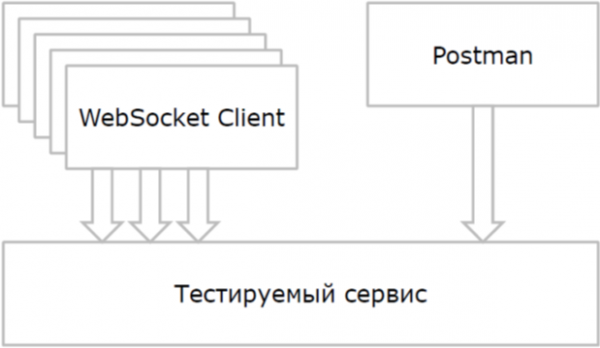
To launch multiple clients, the option is used --scale in the docker-compose command line.
Before launching Postman, the script waits for all clients to establish a connection.
The connection waiting issue has come up for us before. But there were servers there, and here we are dealing with a client. A different approach is needed.
Solution: the client in the container uses the mechanism to inform the script on the host of its status. The client creates a file at a specific path, say, /healthcheck, as soon as the connection is established. The HealthCheck script in the Docker file looks like this:
HEALTHCHECK --interval=3s CMD if [ ! -e /healthcheck ]; then false; fiThe command docker inspect shows the regular status, health status, and exit code for the container.
After Newman finishes, the script checks that all client containers have exited, and with exit code 0.
Happiness exists
After overcoming the difficulties described above, we have a set of consistently working tests. In the tests, each service operates as a whole, interacts with the database, and with Amazon LocalStack.
These tests protect the team of 30+ developers from errors in applications with complex interactions of 10+ microservices during frequent deployments.
Source: habr.com
