

KDB+, a product of the company is a well-known columnar database, exceptionally fast, designed for storing time series and performing analytical computations based on them. Initially, it gained (and continues to enjoy) great popularity in the financial industry — it is used by all top 10 investment banks along with many renowned hedge funds, exchanges, and other organizations. Recently, KX decided to expand its customer base and now offers solutions in other areas where large amounts of time-ordered or otherwise organized data are present — telecommunications, bioinformatics, manufacturing, etc. They have also partnered with the Aston Martin Red Bull Racing team in Formula 1, where they assist in collecting and processing data from the car sensors and analyzing tests in the wind tunnel. In this article, I want to explain the features of KDB+ that make it exceptionally powerful, why companies are willing to spend considerable sums on it, and ultimately, why it is not actually a database.

In this article, I will summarize what KDB+ is, what capabilities and limitations it has, and how it can benefit companies looking to process large volumes of data. I won’t delve into the specifics of KDB+ implementation or its programming language Q. Both of these topics are quite vast and deserve separate articles. A lot of information on these subjects can be found at code.kx.com, including the book on Q — Q For Mortals (see the link below).
Some Terms
- In-memory database. A database that stores data in RAM for faster access. The advantages of such a database are clear, as are the disadvantages — the potential for data loss and the necessity of having substantial memory on the server.
- Columnar database. A database where data is stored by column rather than by row. The primary advantage of such a database is that data from a single column is stored together on the disk and in memory, significantly speeding up access to it. There is no need to load columns not utilized in the query. The main disadvantage is the complexity of modifying and deleting records.
- Time series. Data with a date or time type column. Generally, for such data, chronological order is important to easily determine which entry precedes or follows the current one, or to apply functions whose results depend on the order of entries. Traditional databases are built on a completely different principle — representing a collection of records as a set, where the order of records is fundamentally not defined.
- Vector. In the context of KDB+ — this is a list of elements of a single atomic type, for example, numbers. In other words, an array of elements. Unlike lists, arrays can be stored compactly and processed using vector instructions of the processor.
Historical Background
The company KX was founded in 1993 by Arthur Whitney, who previously worked at Morgan Stanley on the A+ language, a descendant of APL — a very original and once-popular language in the financial world. Naturally, at KX, Arthur continued in the same spirit and created the vector-functional language K, guided by ideas of radical minimalism. Programs in K look like a chaotic set of punctuation marks and special symbols; the meaning of the symbols and functions depends on the context, and each operation carries much more meaning than is typical in familiar programming languages. As a result, a program in K takes up minimal space — a few lines can replace pages of text from a verbose language like Java — and represents a super-concentrated implementation of an algorithm.
A function in K that implements most of the LL1 parser generator based on the given grammar:
1. pp:{q:{(x;p3(),y)};r:$[-11=@x;$x;11=@x;q[`N;$*x];10=abs@@x;q[`N;x]
2.   ($)~*x;(`P;p3 x 1);(1=#x)&11=@*x;pp[{(1#x;$[2=#x;;,:]1_x)}@*x]
3.      (?)~*x;(`Q;pp[x 1]);(*)~*x;(`M;pp[x 1]);(+)~*x;(`MP;pp[x 1]);(!)~*x;(`Y;p3 x 1)
4.      (2=#x)&(@x 1)in 100 101 107 7 -7h;($[(@x 1)in 100 101 107h;`Ff;`Fi];p3 x 1;pp[*x])
5.      (|)~*x;`S,(pp'1_x);2=#x;`C,{@[@[x;-1+#x;{x,")"}];0;"(",]}({$[".s.C"~4#x;6_-2_x;x]}'pp'x);'`pp];
6.   $[@r;r;($[1<#r;".s.";""],$*r),$[1<#r;"[",(";"\/1_r),"]";""]]}
Arthur embodied this philosophy of extreme efficiency with minimal movement in KDB+, which appeared in 2003 (I think it's now clear where the letter K in the name comes from) and is nothing more than an interpreter for the fourth version of the K language. On top of K, a more user-friendly version called Q was added. Q also includes support for a specific SQL dialect — QSQL, and the interpreter has support for tables as a system data type, along with tools for working with in-memory and on-disk tables, etc.
Thus, from the user's perspective, KDB+ is simply an interpreter for the Q language with support for tables and SQL-like expressions in the LINQ style from C#. This is the key distinction of KDB+ from other databases and its main competitive advantage that is often overlooked. It is not a database + a crippled auxiliary language, but a fully-fledged powerful programming language + built-in support for database functions. This distinction will play a crucial role when listing all the advantages of KDB+. For example…
Size
By modern standards, KDB+ has an incredibly tiny size. It is literally one executable file of less than a megabyte and one small text file with some system functions. In reality — less than one megabyte, and companies pay tens of thousands of dollars a year for this program for one processor on a server.
- Such a size allows KDB+ to perform excellently on any hardware — from a Pi microcomputer to servers with terabytes of memory. This does not affect functionality; moreover, Q starts up instantly, which allows it to be used as a scripting language as well.
- With such a size, the Q interpreter fully fits into the processor cache, which accelerates program execution.
- With such a small executable file size, the Q process occupies an insignificantly small amount of memory, allowing hundreds of them to run simultaneously. At the same time, if necessary, Q can operate with tens to hundreds of gigabytes of memory within a single process.
Versatility
Q is perfectly suited for a wide range of tasks. The Q process can serve as a historical database, providing quick access to terabytes of information. For instance, we have dozens of historical databases, some of which contain over 100 gigabytes of uncompressed data for just one day. However, under reasonable constraints, a query to the database will be executed in tens to hundreds of milliseconds. Overall, we have a universal timeout for user queries set at 30 seconds, which is rarely triggered.
With equal ease, Q can function as an in-memory database. Adding new data to in-memory tables happens so quickly that the limiting factor is user queries. Data in the tables is organized by columns, so any column operation will utilize the CPU cache to its fullest. Additionally, at KX, we've tried to implement all basic operations like arithmetic using vector instructions of the CPU, maximizing their speed. Q can also perform tasks not typical for databases—such as processing streaming data and computing 'in real-time' (with delays ranging from tens of milliseconds to several seconds, depending on the task) various aggregating functions for financial instruments across different time intervals or modeling the impact of a completed transaction on the market and profiling it almost immediately after it occurs. In such tasks, the primary time delay is often not caused by Q but by the necessity to synchronize data from different sources. High speed is achieved because the data and the functions processing it are within the same process, and the operations are boiled down to executing several QSQL statements and joins that are run as binary code.
Finally, you can also write any service processes on Q. For example, Gateway processes that automatically distribute user queries to the appropriate databases and servers. The programmer has complete freedom to implement any algorithm for load balancing, prioritization, fault tolerance, access rights, quotas, and anything else they desire. The main challenge here is that you will have to implement all of this yourself.
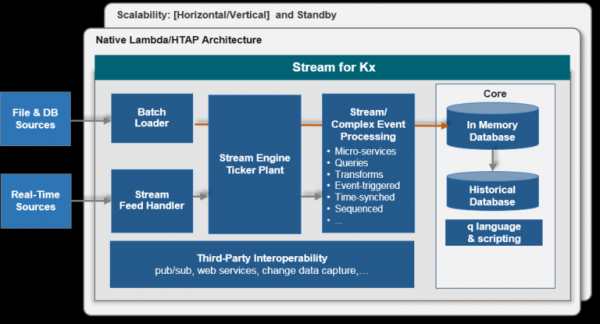
For example, I will list the types of processes we have. All of them are actively used and work together, combining dozens of different databases, processing data from numerous sources, and serving hundreds of users and applications.
- Connectors (feedhandler) to data sources. These processes typically use external libraries that are loaded into Q. The C interface in Q is exceptionally simple and allows for the effortless creation of proxy functions for any C/C++ library. Q is fast enough to handle, for instance, the processing of FIX message streams from all European stock exchanges simultaneously.
- Data distributors (tickerplant), which serve as an intermediary link between connectors and consumers. At the same time, they write incoming data to a special binary log, ensuring resilience for consumers against connection losses or restarts.
- In-memory databases (rdb). These databases provide the fastest access to raw fresh data, storing it in memory. They typically accumulate data in tables throughout the day and reset them at night.
- Persistent databases (pdb). These databases ensure the preservation of today's data in a historical database. They generally do not store data in memory like rdb; instead, they use a special disk cache during the day and copy data to the historical database at midnight.
- Historical databases (hdb). These databases provide access to data from previous days, months, and years. Their size (in days) is limited only by the size of the hard drives. Data can reside anywhere, including on different disks to speed up access. There is an option to compress data using several algorithms of choice. The database structure is well documented and straightforward; data is stored columnwise in regular files, making it possible to process them using operating system tools.
- Databases with aggregated information. They store various aggregations, typically grouped by instrument name and time interval. In-memory databases update their state with each incoming message, while historical ones store precomputed data to speed up access to historical information.
- Finally, gateway processes, servicing applications and users. Q allows for fully asynchronous processing of incoming messages, distributing them to databases, checking access rights, etc. I should note that messages are not limited and are often not SQL expressions, as is the case in other databases. Most often, the SQL expression is hidden within a special function and is constructed based on the parameters requested by the user — time conversion is performed, filtering occurs, data is normalized (for example, stock prices are adjusted if dividends were paid), and so on.
Typical architecture for a single data type:
Speed
Although Q is an interpreted language, it is also a vector language. This means that many built-in functions, particularly arithmetic ones, accept arguments of any form — numbers, vectors, matrices, lists — and the programmer is expected to implement the program as operations on arrays. In such a language, if you add two vectors with a million elements, the fact that the language is interpreted becomes irrelevant; addition will be performed by a super-optimized binary function. Since the lion's share of time in Q programs is spent on operations with tables that utilize these fundamental vectorized functions, the result is quite respectable speed, allowing for the processing of vast amounts of data even in a single process. This is akin to mathematical libraries in Python — although Python itself is a rather slow language, it has many excellent libraries like numpy that allow for numerical data processing at the speed of a compiled language (by the way, numpy is ideologically close to Q).
Additionally, KX has taken great care in designing tables and optimizing their operations. Firstly, it supports multiple types of indexes, which are supported by built-in functions and can be applied not only to table columns but also to any vectors — grouping, sorting, uniqueness attributes, and special grouping for historical databases. Indexing is straightforward and is automatically adjusted when elements are added to a column/vector. Indexes can be successfully applied to table columns both in memory and on disk. When executing a QSQL query, indexes are used automatically when possible. Secondly, working with historical data is done through the operating system's memory map mechanism. Large tables are never loaded into memory; instead, the necessary columns are directly mapped into memory, and only the part that is needed (with the help of indexes, among other things) is actually loaded. For programmers, there is no difference whether the data is in memory or not, as the mmap working mechanism is completely hidden within Q.
KDB+ is a non-relational database, where tables can contain arbitrary data, and the order of rows in a table does not change with the addition of new elements, and indeed, this order must be used when writing queries. This feature is crucial for working with time series (data from exchanges, telemetry, event logs) because if the data is sorted by time, the user does not need to apply any SQL tricks to find the first or last row in time or N rows, to determine which row follows the N-th row, and so on. Joins are also simplified; for instance, finding the latest quote for 16,000 trades of VOD.L (Vodafone) in a table of 500 million elements takes about a second on disk and a few tenths of a millisecond in memory.
An example of a time-based join — the quote table is mapped into memory, thus there is no need to specify VOD.L in the where clause, as the index on the sym column and the fact that the data is sorted by time are implicitly used. Almost all joins in Q are standard functions, not part of the select expression:
1. aj[`sym`time;select from trade where date=2019.03.26, sym=`VOD.L;select from quote where date=2019.03.26]
Finally, it is worth noting that the engineers at KX, starting with Arthur Whitney himself, are truly obsessed with efficiency and make every effort to squeeze the most out of the standard features of Q and optimize the most common usage patterns.
Summary
KDB+ is popular with businesses primarily due to its exceptional versatility — it serves equally well as an in-memory database, a repository for storing terabytes of historical data, and a platform for data analysis. By processing data directly in the database, it achieves high-speed performance and resource efficiency. A full programming language integrated with database functions allows for the implementation of the entire stack of necessary processes on a single platform — from data acquisition to user query processing.
More information
Disadvantages
A significant drawback of KDB+/Q is its high entry barrier. The language has a peculiar syntax, and some functions are heavily overloaded (for example, value has about 11 different uses). Most importantly, it requires a radically different approach to programming. In a vector language, one must constantly think in terms of array transformations, implementing all loops through several variations of map/reduce functions (called adverbs in Q) and never try to economize by replacing vector operations with atomic ones. For example, to find the index of the Nth occurrence of an element in an array, one should write:
1. (where element=vector)[N]
although this seems horrendously inefficient by C/Java standards (it creates a boolean vector, where returns the indices of true elements in it). However, this notation makes the meaning of the expression more understandable, and you leverage fast vector operations instead of slow atomic ones. The conceptual difference between a vector language and others is comparable to the difference between imperative and functional programming approaches, and one must be prepared for that.
Some users are also dissatisfied with QSQL. The thing is, it only resembles actual SQL. In reality, it's just an interpreter for SQL-like expressions that doesn't support query optimization. Users must write optimal queries themselves, specifically in Q, which many are not prepared for. On the other hand, one can always write an optimal query rather than relying on a black-box optimizer.
As an advantage, the book on Q — Q For Mortals is available for free at , and it also collects many other useful materials.
Another significant downside is the cost of the license. It's tens of thousands of dollars per year for one CPU. Only large companies can afford such expenses. Recently, KX has made its licensing policy more flexible, allowing payment only for usage time or renting KDB+ in the Google and Amazon clouds. KX also offers for download (32-bit version or 64-bit version upon request).
Competitors
There are quite a few specialized databases built on similar principles — columnar, in-memory, designed for very large volumes of data. The issue is that these are indeed specialized databases. A vivid example is Clickhouse. This database has a data storage method on disk and an index structure very similar to KDB+, and it executes some queries faster than KDB+, although not significantly. However, even as a database, Clickhouse is more specialized than KDB+ — web analytics versus arbitrary time series (this distinction is very important — for example, Clickhouse does not allow for the ordering of records). But most importantly, Clickhouse lacks the universality of KDB+, the language that allows you to process data directly in the database, rather than pre-loading it into a separate application, to construct arbitrary SQL expressions, to apply arbitrary functions in queries, and to create processes unrelated to the execution of historical database functions. Therefore, it is difficult to compare KDB+ with other databases; they may perform better in certain usage scenarios or simply be better when it comes to classic database tasks. However, I am not aware of any other equally efficient and universal tool for processing temporal data.
Integration with Python
To simplify working with KDB+ for those unfamiliar with the technology, KX has created libraries for close integration with Python within a single process. It is possible to call any Python function from Q as well as vice versa — to call any Q function from Python (in particular, QSQL expressions). The libraries convert data between the formats of one language and the other as necessary (not always for efficiency). As a result, Q and Python coexist in such a close symbiosis that the boundaries between them blur. Consequently, a programmer, on one hand, has full access to numerous useful Python libraries, while on the other hand, they receive a fast database integrated into Python for working with big data, which is particularly useful for those involved in machine learning or modeling.
Working with Q in Python:
1. >>> q()
2. q)trade:([]date:();sym:();qty:())
3. q)
4. >>> q.insert('trade', (date(2006,10,6), 'IBM', 200))
5. k(',0')
6. >>> q.insert('trade', (date(2006,10,6), 'MSFT', 100))
7. k(',1')
Links
Company website —
Developer site —
Q For Mortals (in English) —
Articles on KDB+/Q applications by kx employees —
Source: habr.com
