


This article continues our on RabbitMQ migration and focuses on MongoDB. As we manage numerous Kubernetes clusters and MongoDB instances, we found a natural need to migrate data from one installation to another without downtime. The main scenarios remain the same: migrating MongoDB from a virtual or physical server to Kubernetes, or migrating MongoDB within a single Kubernetes cluster (from one namespace to another).
Our recipe is intended for cases where an old MongoDB cluster is running (for example, consisting of 3 nodes and either already in K8s or on legacy servers), which an application running in Kubernetes is interacting with:
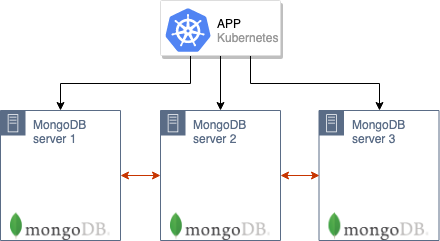
How will we transition such a cluster to a new production environment in Kubernetes?
Theory
The overall migration algorithm is similar to that described in the RabbitMQ situation.
It is important to note that for the migration to be possible, the servers running MongoDB and Kubernetes must be on the same network. The nodes of the MongoDB cluster will communicate with each other via the IPs of the old servers (where the old MongoDB installations are) and through the DNS names of the MongoDB pods in K8s. Therefore, on the physical servers (with old installations), routes to the pods need to be forwarded, and then they should be configured to use the DNS server operating in Kubernetes (or the required names should be entered manually, although in general, it’s better to avoid this option). /etc/hosts, although in general it is better to avoid such a possibility.)
The next step is to bring up the MongoDB cluster in the Kubernetes pods. In our case, the DB cluster consists of 3 nodes, with each node located in a separate K8s pod — however, the number can vary. In the ConfigMap, the address of the master MongoDB from the old installation must be specified: then the MongoDB nodes in the K8s pods will immediately begin synchronizing with it.
After all the pods are up, a MongoDB cluster consisting of 6 nodes will be formed:
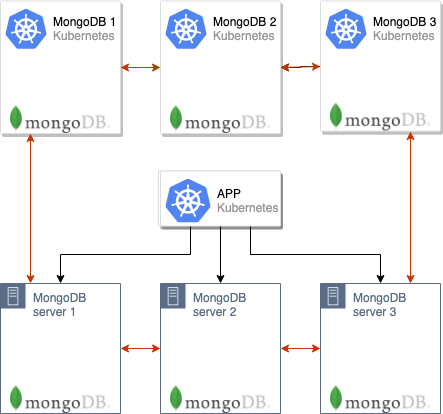
Note that the pods will take a while to initialize because each pod starts sequentially, and at the moment of startup, it synchronizes data with the master.
After this, the application can be switched to use the new MongoDB servers:
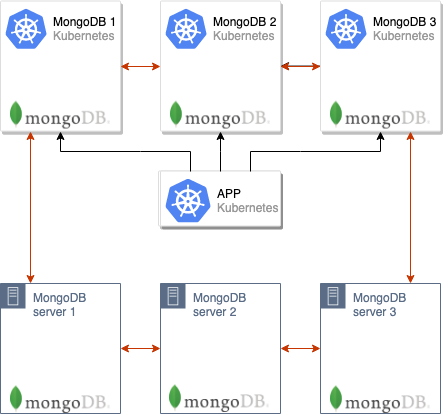
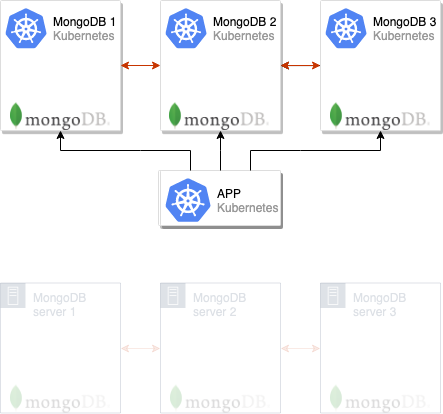
And you will only need to remove the old nodes from the MongoDB cluster, after which the migration can be considered complete:
This scheme is often applied in production, and for ease of use, we implemented it in the module (this utility we ), which allows the distribution of standard MongoDB configurations across many clusters. We plan to publish our modules soon, but for now, we present separate instructions that allow you to try out the proposed solution in action without using the addon-operator.
Let's try it in practice
Requirements
Credentials:
- A Kubernetes cluster (minikube will also work);
- A MongoDB cluster (which can be deployed on bare metal or set up as a standard cluster in Kubernetes using the official Helm chart).
In the example described below, the old MongoDB cluster will be called mongo-old and will be installed in the same Kubernetes cluster where we will later install the new one (mongo-new).
Preparing the old cluster
1. As an example demonstrating the described scheme in action, we will create an 'old' (i.e., to be migrated) MongoDB cluster directly in Kubernetes (in reality, it can also be on separate servers outside K8s). For this, we will download the Helm chart:
helm fetch --untar stable/mongodb-replicaset… and edit it a bit to set up the authorization:
auth:
  enabled: true
  adminUser: mongo
  adminPassword: pa33w0rd
  # metricsUser: metrics
  # metricsPassword: password
  # key: keycontent
  # existingKeySecret:
  # existingAdminSecret:
  # existingMetricsSecret:
You can also set up certificates and much more in values.yaml .
2. We will install the chart:
helm install . --name mongo-old --namespace mongo-oldAfter this, a test 'old' MongoDB installation will be launched:
kubectl --namespace=mongo-old get pods 
Let's go into the pod with its master and create a test database:
kubectl --namespace=mongo-old exec -ti mongo-old-mongodb-replicaset-0 mongo
use admin
db.auth('mongo','password')
use music
db.artists.insert({ artistname: "The Tea Party" })
show dbs 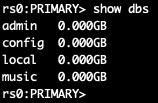
By checking different pods, I found that the master is mongo-old-mongodb-replicaset-0. However, to make this process easier, after installing the Helm chart, a command is given on how to determine the MASTER_POD. In my case (for mongo-old of 3 nodes), it looks like this:
for ((i = 0; i < 3; ++i)); do kubectl exec --namespace mongo-old mongo-old-mongodb-replicaset-$i -- sh -c 'mongo --eval="printjson(rs.isMaster())"'; doneThus, the preparation of the old MongoDB installation, the data of which will be transferred, is complete.
Migration of the MongoDB Cluster
Now we will deploy a new MongoDB installation, which will be in Kubernetes and used by the application in production.
NB: Please note that the same version of MongoDB as before should be used. Otherwise, there is a risk of compatibility issues.
Using the same approach as in the previous section (where we simulated the 'old' MongoDB installation), we will take the previously mentioned Helm chart (with the command helm fetch) and set up authorization, as well as other parameters if they are used. In addition, we will correct the file init\/on-start.sh, temporarily adding the address of the master obtained in the previous step (or known to you from installing MongoDB on separate servers) on line 165:
peers='mongo-old-mongodb-replicaset-0.mongo-old-mongodb-replicaset.mongo-old.svc.cluster.local:27017'We are ready to create a new MongoDB installation:
helm install . --name mongo-new --namespace mongo-newWe wait for all the pods to start (if there is a lot of data, this may take hours):

Now we do exec in the new pod and check the list of databases:
kubectl --namespace=mongo-new exec -ti mongo-new-mongodb-replicaset-0 mongo 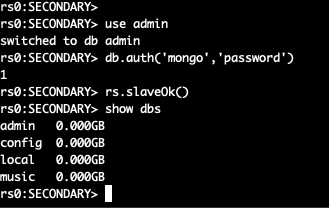
The two MongoDB clusters are merged into one consisting of 6 nodes.
You can now switch the application to the new cluster, but there are still a few steps left to complete the migration.
From the file init\/on-start.sh we remove the line we added in the new installation:
peers='mongo-old-mongodb-replicaset-0.mongo-old-mongodb-replicaset.mongo-old.svc.cluster.local:27017'Now let's access the old cluster master and 'overthrow' it — then a new master will be appointed in the cluster. We access the pod with the MongoDB master:
kubectl --namespace=mongo-old exec -ti mongo-old-mongodb-replicaset-0 mongo
use admin
db.auth('mongo','password')
After that, we change the priorities of the nodes and change the master:
cfg = rs.conf()
cfg.members[5].priority = 2
rs.reconfig(cfg)
rs.stepDown(120)
The current node has ceased to be the master — a new one will be elected. Since we have changed the priorities, the desired node will become the master.
NB: By default, all MongoDB nodes have a priority of 1. We raise the priority of the desired node to 2. Thus, a member of the new cluster will definitely become the overall master. More about how these mechanisms work in MongoDB can be read in .
We will disconnect the old MongoDB installation, after which we will go to the master of the new one and delete the old nodes:
rs.remove("mongo-old-mongodb-replicaset-0.mongo-old-mongodb-replicaset.mongo-old.svc.cluster.local:27017")
rs.remove("mongo-old-mongodb-replicaset-1.mongo-old-mongodb-replicaset.mongo-old.svc.cluster.local:27017")
rs.remove("mongo-old-mongodb-replicaset-2.mongo-old-mongodb-replicaset.mongo-old.svc.cluster.local:27017")
After that, the migration can be considered complete: we have successfully switched from the old MongoDB cluster to the new one!
Summary
The scheme described is suitable for almost all cases where it's necessary to transfer MongoDB or simply move to a new cluster.
Perhaps the main nuance when migrating is the need to route the IP addresses of the new pods to the servers of the old MongoDB installation if it is outside of K8s, and to correctly name them in DNS (or /etc/hosts). In this example, these steps were not necessary as the migration occurred between different namespaces of the same Kubernetes cluster.
P.S.
Also read in our blog:
- «»;
- «»;
- «».
Source: habr.com
