

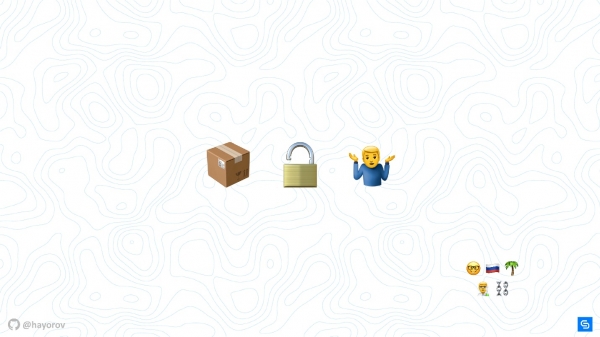
The essence of the story about the most popular package manager for Kubernetes could be illustrated with emojis:
- a box — that’s Helm (the most suitable representation in the latest Emoji release);
- a lock — security;
- a little person — the problem-solving aspect.
In reality, it’s a bit more complex, and the narrative is full of technical details about how to make Helm secure..
- Briefly, what is Helm if you didn’t know or forgot? What problems does it solve and where does it fit in the ecosystem?
- Let’s look at the architecture of Helm. No discussion about security and how to make a tool or a solution safer can skip understanding the architecture of the component.
- We will discuss the components of Helm.
- The most pressing question — the future — the new version of Helm 3.
Everything in this article pertains to Helm 2. This version is currently in production, and it’s likely the one you’re using, which contains security threats.
About the speaker: Alexander Khayorov () has been a developer for 10 years, helping to improve content and joined the committee of He currently works at Chainstack as a development lead — a hybrid role between a development manager and a person responsible for the delivery of final releases. This means he is on the front lines, where everything happens from product creation to operational deployment.
Chainstack is a small, actively growing startup whose mission is to enable clients to forget about infrastructure and the complexities of operating decentralized applications; the development team is based in Singapore. Don’t ask Chainstack to sell or buy cryptocurrency, but feel free to discuss enterprise blockchain frameworks, and they will gladly respond.
Helm
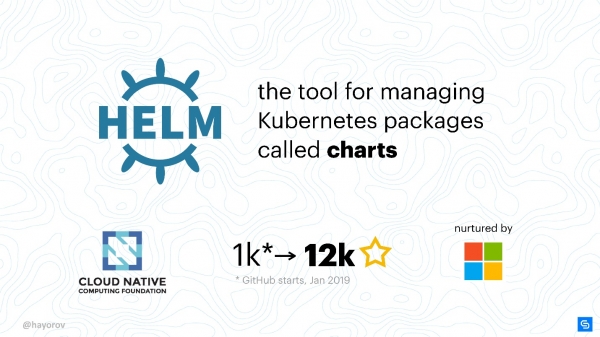
This is a package manager (charts) for Kubernetes. The most straightforward and universal way to bring applications into a Kubernetes cluster.
This is, of course, about a more structured and industrial approach than creating your own YAML manifests and writing small utilities.
Helm is the best currently available and popular solution.
Why Helm? First and foremost because it is supported by the CNCF. Cloud Native is a large organization that is the parent company of projects like Kubernetes, etcd, Fluentd, and others.
Another important fact is that Helm is a very popular project. When I first thought about explaining how to make Helm secure in January 2019, the project had a thousand stars on GitHub. By May, that number had grown to 12,000.
Many are interested in Helm, so even if you haven't used it yet, knowledge about its security will be useful. Security is important.
The main Helm team is supported by Microsoft Azure, making it a fairly stable project compared to many others. The release of Helm 3 Alpha 2 in mid-July indicates that a considerable number of people are working on the project and they are eager to develop and improve Helm.
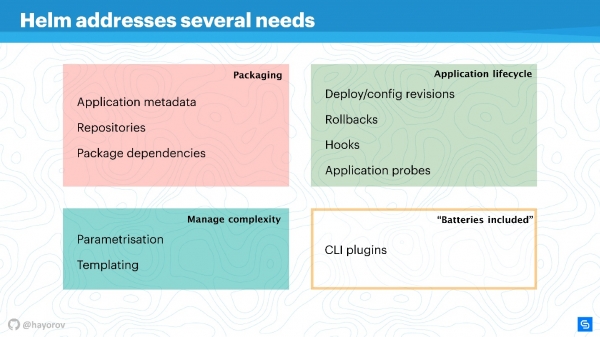
Helm addresses several root problems of application management in Kubernetes.
- Application packaging. Even an application like 'Hello, World' on WordPress comprises several services, and you want to package them together.
- Managing the complexity that arises from managing these applications.
- A lifecycle that does not end after the application is installed or deployed. It continues to live, needs to be updated, and Helm helps with this, bringing the right measures and policies.
Packaging is done in an understandable way: there are metadata fully compliant with the workings of a typical package manager for Linux, Windows, or MacOS. This means a repository, dependencies from various packages, meta-information for applications, configurations, specifics, indexing information, etc. Helm provides all this to be obtained and used for applications.
Managing complexity. If you have many similar applications, parameterization is necessary. This leads to templates, but instead of inventing your own way of creating templates, you can use what Helm offers out of the box.
Application lifecycle management — in my opinion, this is the most interesting and unresolved question. This is why I turned to Helm in the first place. We needed to keep track of the application lifecycle and wanted to migrate our CI/CD and application cycles into this paradigm.
Helm allows you to:
- manage deployments, introducing the concepts of configuration and revision;
- successfully perform rollbacks;
- utilize hooks for various events;
- add additional application checks and respond to their results.
Additionally Helm has 'batteries' — a huge number of tasty things that can be included as plugins, simplifying your life. Plugins can be written independently, they are quite isolated and do not require a structured architecture. If you want to implement something, I recommend doing it as a plugin and possibly include it in upstream later.
Helm is based on three main concepts:
- Chart Repo — a description and an array of parameters available for your manifest.
- Config — that is, values that will be applied (text, numeric values, etc.).
- Release brings together the two upper components, and together they turn into a Release. Releases can be versioned, thereby achieving lifecycle organization: small at the moment of installation and larger at the moment of upgrade, downgrade, or rollback.
Helm Architecture
The conceptual diagram shows the high-level architecture of Helm.
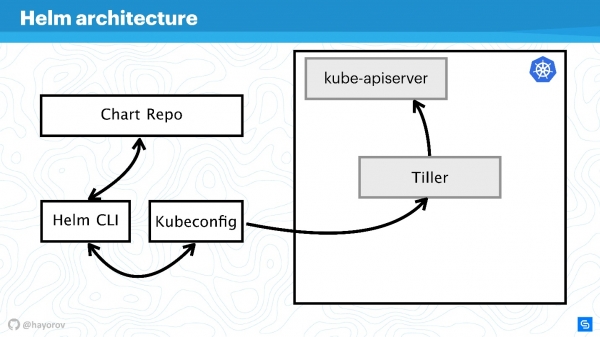
I remind you that Helm is something related to Kubernetes. Therefore, we cannot do without a Kubernetes cluster (rectangle). The kube-apiserver component is located on the master. Without Helm, we have Kubeconfig. Helm brings one small binary, if you can call it that, the Helm CLI utility, which can be installed on a computer, laptop, mainframe — anything.
But that's not enough. Helm has a server component called Tiller. It represents Helm's interests within the cluster, functioning just like any other application inside the Kubernetes cluster.
The next component, Chart Repo — a repository with charts. There is an official repository, and there can also be a private repository for a company or project.
Interaction
Let’s look at how the components of the architecture interact when we want to install an application using Helm.
- We say
Helm install, reaching out to the repository (Chart Repo) and receiving the Helm chart.
- The Helm utility (Helm CLI) interacts with Kubeconfig to find out which cluster to connect to.
- Having this information, the utility calls Tiller, which is located in our cluster, just like an application.
- Tiller interacts with the Kube-apiserver to perform actions in Kubernetes, creating some objects (services, pods, replicas, secrets, etc.).
Next, we will complicate the scheme to see the attack vectors that the entire Helm architecture may be exposed to. Then we will try to defend it.
Attack vector
The first potentially weak point — privileged API—userIn this scheme, it's a hacker who has gained admin access to the Helm CLI.
Unprivileged API user can also pose a threat if nearby. Such a user will have a different context, for example, they may be fixed in a specific namespace in the Kubeconfig settings.
The most interesting attack vector may be a process that is located within the cluster close to Tiller and can access it. This could be a web server or a microservice that sees the network environment of the cluster.
An exotic yet increasingly popular attack option is related to Chart Repo. A chart created by a malicious author can contain insecure resources, and you may execute it, taking it at face value. Alternatively, they could replace the chart you download from the official repository and, for instance, create a resource in the form of policies and escalate their access.
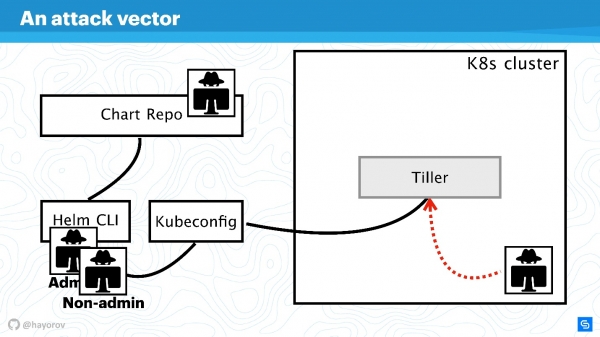
Let's try to defend against attacks from all these four sides and figure out where the problems in the Helm architecture are, and where they possibly aren't.
Let's enlarge the scheme, add more elements, but keep all the basic components.
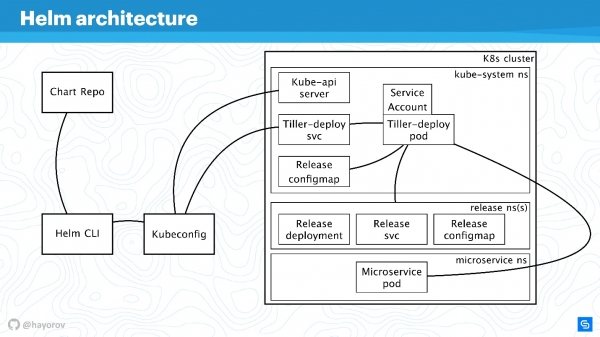
Helm CLI communicates with Chart Repo, interacts with Kubeconfig, and the work is passed to the cluster in the Tiller component.
Tiller is represented by two objects:
- Tiller-deploy svc, which exposes a service;
- Tiller-deploy pod (in the scheme, represented as a single instance in one replica), where all the load runs, which communicates with the cluster.
Different protocols and schemes are used for interaction. From a security perspective, we are most interested in:
- The mechanism by which Helm CLI accesses the chart repo: what protocol, whether authentication is involved, and what can be done with it.
- The protocol by which Helm CLI, using kubectl, communicates with Tiller. This is an RPC server installed inside the cluster.
- Tiller itself is accessible to microservices that are located within the cluster and interacts with Kube-apiserver.
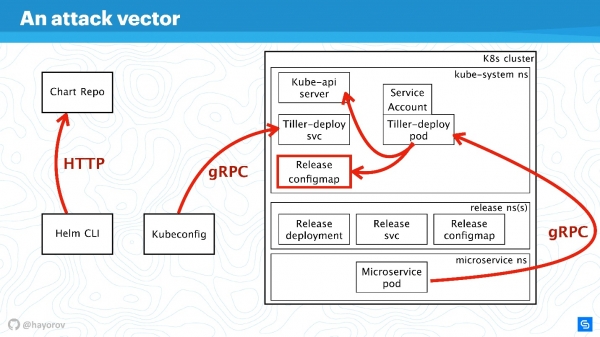
Let's discuss all these directions in order.
RBAC
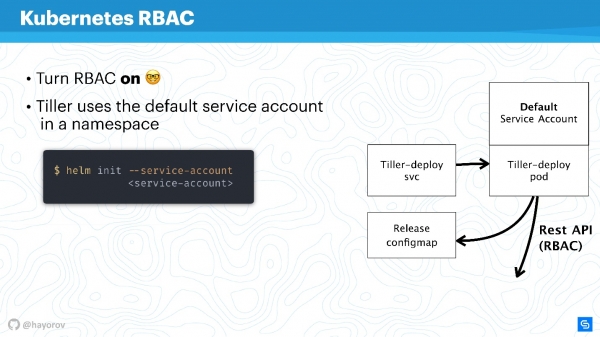
It's pointless to talk about any security of Helm or any other service within the cluster if RBAC is not enabled.
It may not be the newest recommendation, but I am sure many still have not enabled RBAC even in production because it's a significant hassle and requires a lot of configuration. Nevertheless, I urge you to do so.
— the lawyer site for RBAC. It contains a vast array of interesting materials that will help you configure RBAC, demonstrate why it's beneficial, and how to generally manage it in production.
I'll try to explain how Tiller and RBAC work. Tiller operates within the cluster using a service account. Generally, if RBAC isn't configured, it will be a superuser. In the basic configuration, Tiller will be an admin. This is why it's often said that Tiller acts as an SSH tunnel to your cluster. This is indeed the case, so you can use a separate specialized service account instead of the Default Service Account in the diagram above.
When you initialize Helm, and first install it on the server, you can specify the service account using --service-account. This allows you to use a user with the minimal necessary permissions. However, you will need to create a 'chain' of Role and RoleBinding.
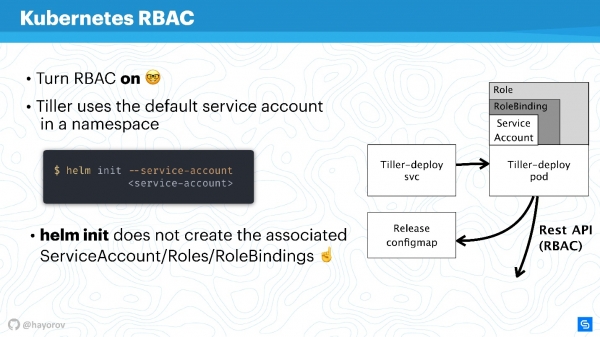
Unfortunately, Helm will not do this for you. You or your Kubernetes cluster administrator need to prepare a set of Role and RoleBinding for the service account in advance to pass to Helm.
The question arises — what is the difference between Role and ClusterRole? The difference is that ClusterRole applies to all namespaces, unlike the standard Role and RoleBinding, which only work for a specific namespace. You can configure policies for the entire cluster and all namespaces or personalize them for each namespace individually.
It's worth mentioning that RBAC also addresses another significant issue. Many complain that Helm unfortunately does not support multitenancy. If multiple teams consume the cluster and use Helm, it is fundamentally impossible to configure policies and restrict their access within that cluster, because there is a service account under which Helm operates, and it creates all resources in the cluster under that account, which can be very inconvenient. This is indeed true — like the binary file itself, as a process, Helm Tiller is not aware of multitenancy..
However, there is a great way to run Tiller in the cluster multiple times. This is not a problem; Tiller can be run in each namespace. This way, you can take advantage of RBAC, using Kubeconfig as context, and restrict access to a dedicated Helm.
It will look as follows.
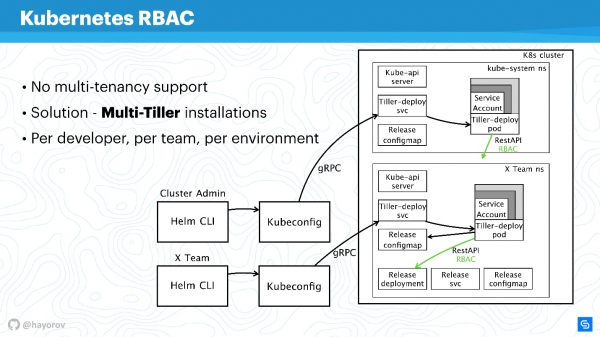
For example, there are two Kubeconfigs with contexts for different teams (two namespaces): X Team for the development team and the admin cluster. The admin cluster has its own wide Tiller, located in the Kube-system namespace, hence an advanced service account. There is a separate namespace for the development team, allowing them to deploy their services in a specific namespace.
This is a workable approach; Tiller isn't that resource-intensive to significantly affect your budget. It's one of the quick solutions.
Don't hesitate to configure Tiller separately and provide Kubeconfig with a context for the team, for a specific developer, or for the environment: Dev, Staging, Production (it's unlikely that everything will be on one cluster, but it can be done).
Continuing our discussion, let's switch from RBAC and talk about ConfigMaps.
ConfigMaps
Helm uses ConfigMaps as a data storage. When we talked about architecture, there was no database holding information about releases, configurations, rollbacks, etc. ConfigMaps serve this purpose.
The main issue with ConfigMaps is well-known—they are fundamentally insecure; you cannot store sensitive data in them. It concerns anything that shouldn't go beyond the service, such as passwords. The most native way for Helm is currently to transition from using ConfigMaps to secrets.This is done very simply. You override the Tiller setting and specify that the storage will be secrets. Then with each deployment, you will receive a secret instead of a ConfigMap.
You might argue that secrets themselves are a strange concept and not very secure. However, it's important to understand that this is managed by the Kubernetes developers. Since version 1.10, which is quite some time ago, there's the option, at least in public clouds, to connect proper storage for storing secrets. The team is currently working on providing even better access to secrets for specific pods or other entities.
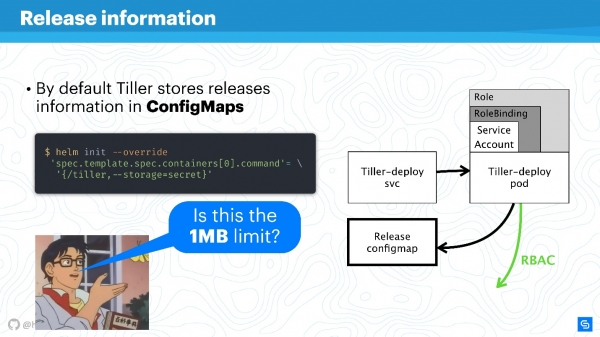
It is better to transition Storage Helm to secrets and secure them centrally.
Of course, there will still be
a limit for data storage of 1 MB data storage limit of 1 MBHere, Helm uses etcd as a distributed store for ConfigMaps. They deemed it a suitable chunk of data for replications, etc. There is an interesting discussion about this on Reddit; I recommend finding this amusing read for the weekend or checking out a summary. .
Chart Repos
Charts are particularly socially vulnerable and can become a source of "Man in the middle," especially when using a stock solution. This primarily concerns repositories that are exposed over HTTP.
Definitely, you should expose the Helm Repo over HTTPS — that's the best option and it's inexpensive.
Note the chart signatures mechanismThe technology is mind-numbingly simple. It's the same thing you use on GitHub, the usual PGP machinery with public and private keys. Set it up, and you can be sure that with the right keys, signing everything makes it truly your chart.
Additionally, The Helm client supports TLS (not in terms of HTTP from the server side, but mutual TLS). You can use server and client keys to communicate. To be honest, I don't use this mechanism due to my dislike of mutual certificates. In principle, — the main tool for exposing Helm Repo for Helm 2 — also supports basic auth. You can use basic auth if it's more convenient and reassuring.
There’s also a plugin , which allows hosting Chart Repos in Google Cloud Storage. This is quite convenient, works well, and is secure enough because all the described mechanisms are utilized.
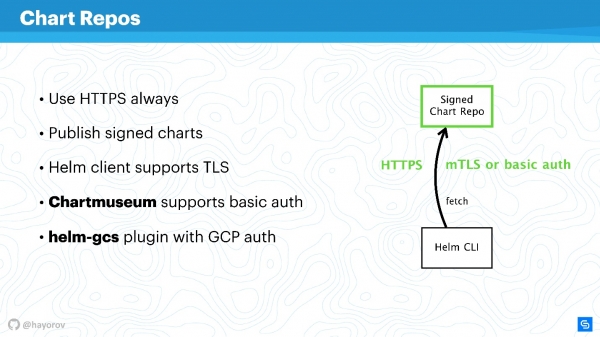
If you enable HTTPS or TLS, use mTLS, and connect basic auth to further reduce risks, you'll have a secure communication channel between Helm CLI and the Chart Repo.
gRPC API
The next step is very critical — securing Tiller, which resides in the cluster and is, on one hand, a server, and on the other hand, it calls other components and tries to identify itself as someone else.
As I mentioned earlier, Tiller is a service that exposes gRPC, and the Helm client reaches it via gRPC. By default, TLS is naturally off. The rationale behind this is a debatable issue; it seems to simplify the initial setup.
For production and even for staging, I recommend enabling TLS on gRPC.
In my opinion, unlike mTLS for charts, this is appropriate and is done very simply here — you generate the PQI infrastructure, create a certificate, launch Tiller, and pass the certificate during initialization. After that, you can execute all Helm commands using the generated certificate and private key.
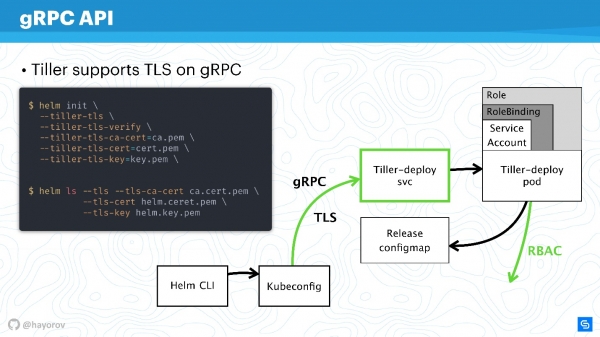
This way, you will protect yourself from all requests to Tiller from outside the cluster.
So, we have secured the connection channel to Tiller, already discussed RBAC, and adjusted the rights of the Kubernetes apiserver, reducing the domain it can interact with.
Secured Helm
Let's take a look at the final scheme. This is the same architecture with the same arrows.
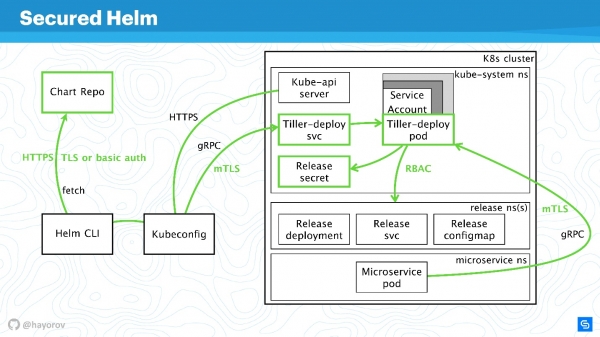
All connections can now confidently be marked in green:
- for Chart Repo we use TLS or mTLS and basic auth;
- mTLS for Tiller, and it is exposed as a gRPC service with TLS, using certificates;
- a special service account is used in the cluster with Role and RoleBinding.
We have significantly secured the cluster, but someone smart said:
“The only absolutely secure solution is a powered-off computer placed in a concrete box guarded by soldiers.”
There are various ways to manipulate data and discover new attack vectors. However, I am confident that these recommendations will help implement a basic industrial security standard.
Bonus
This part is not directly related to security, but it will also be useful. I will show some interesting things that not many people know. For example, how to search for charts — both official and unofficial.
In the repository there are currently about 300 charts and two streams: stable and incubator. Those who contribute know very well how difficult it is to move from incubator to stable and how easy it is to be booted from stable. However, this is not the best tool for finding charts for Prometheus and everything you like, for one simple reason — it is not a portal where it is convenient to search for packages.
But there is a service , which makes finding charts much easier. Most importantly, there are many more external repositories available, with almost 800 charts. Plus, you can connect your own repository if for some reason you do not want to submit your charts to stable.
Try hub.helm.sh and let's develop it together. This service is under the Helm project, and you can contribute even to its UI if you are a front-end developer looking to improve its appearance.
I would also like to draw your attention to Open Service Broker API integration. It sounds cumbersome and unclear, but it solves issues that everyone faces. Let me explain with a simple example.
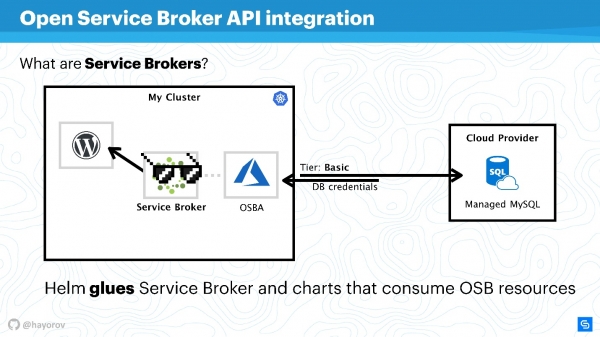
There is a Kubernetes cluster where we want to run a classic application — WordPress. Usually, a database is required for full functionality. There are many different solutions, for instance, you can run your own stateful service. This is not very convenient, but many do it that way.
Others, like us at Chainstack, use managed databases such as MySQL or PostgreSQL for servers. Therefore, our databases are somewhere in the cloud.
But there is a problem: we need to connect our service to the database, create a database flavor, share credentials, and manage them somehow. This is usually done manually by a system administrator or developer. There’s no issue when there are few applications. When there are many, a harvester is needed. This harvester is the Service Broker. It allows the use of a special plugin for the public cloud cluster to order resources from the provider through the Broker, as if it were an API. Native Kubernetes tools can be used for this.
It is very simple. You can request, for example, a Managed MySQL in Azure with a basic tier (this can be configured). Using the Azure API, the database will be created and set up for use. You won't need to intervene; the plugin handles that. For instance, OSBA (Azure plugin) will return the credentials to the service and pass them to Helm. You can use WordPress with cloud MySQL without dealing with managed databases and without worrying about stateful services internally.
You could say that Helm acts as glue, which on one side allows the deployment of services, while on the other side enables the consumption of resources from cloud providers.
You can write your own plugin and use all of this on-premise. Then you will have your own plugin for your corporate cloud provider. I recommend trying this approach, especially if you have a large scale and want to quickly deploy dev, staging, or all infrastructure for a feature. It will simplify life for your operations or DevOps.
Another find that I already mentioned is the helm-gcs plugin, which allows you to use Google buckets (object storage) to store Helm charts.
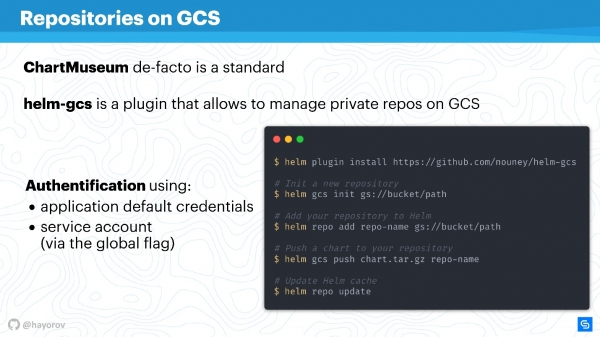
You need just four commands to start using it:
- install the plugin;
- initialize it;
- set the path to the bucket located in GCP;
- publish the charts in the usual way.
The beauty of it is that it will use the native GCP method for authentication. You can use a service account, a developer account — anything that works. It's very convenient and cost-effective in operation. If, like me, you advocate an opsless philosophy, this will be especially handy, particularly for small teams.
Alternatives
Helm is not the only solution for managing services. There are many questions about it, probably why the third version appeared so quickly. Of course, there are alternatives.
These can be specialized solutions, like Ksonnet or Metaparticle. You can also use classic infrastructure management tools (Ansible, Terraform, Chef, etc.) for the same purposes I've mentioned.
Finally, there's the solution , whose popularity is growing.
The Operator Framework is the main alternative to Helm that you should pay attention to.
It's more native to CNCF and Kubernetes, but the entry threshold is much higher, requiring more programming and less manifest description.
There are various addons, such as Draft and Scaffold. They greatly simplify life, for example, making it easier for developers to submit and run Helm for deploying a test environment. I would call them capability enhancers.
Here's a visual chart showing where everything stands.
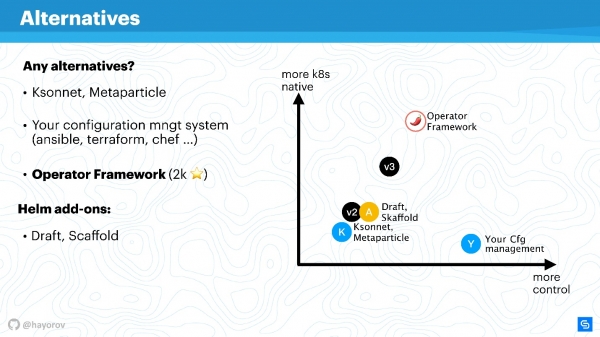
On the x-axis is your level of personal control over what is happening, and on the y-axis is the level of Kubernetes native-ness. Helm version 2 is somewhere in the middle. Version 3 is not dramatically different, but both control and native-ness have improved. Ksonnet-level solutions still lag behind even Helm 2. However, it's worth looking at them to know what else is out there in this world. Of course, your configuration manager will be under your control, but it is absolutely not native to Kubernetes.
The Operator Framework is completely native to Kubernetes and allows for much more elegant and meticulous management (but let's remember the level of entry). Rather, this is suited for specialized applications and creating a manager for them, rather than for a mass tool for packaging a large number of applications using Helm.
Extenders simply improve control a bit, enhance workflow, or streamline CI/CD pipelines.
The Future of Helm
The good news is that Helm 3 is coming. The alpha release of Helm 3.0.0-alpha.2 is already out, and you can try it. It is quite stable, but its functionality is still limited.
Why do we need Helm 3? First and foremost, it's about the disappearance of Tiller, as a component. This, as you might understand, is a huge step forward because it simplifies architecture from a security perspective.
When Helm 2 was created, back in the days of Kubernetes 1.8 or even earlier, many concepts were still immature. For example, the CRD concept is now actively being implemented, and Helm will be using CRD, to store structures. It will be possible to use only the client without holding a server component. Consequently, it will allow native Kubernetes commands to work with structures and resources. This is a significant advancement.
Support for native OCI repositories will emerge (.Open Container Initiative). This is a huge initiative, and Helm is particularly interested in it for hosting its charts. It goes as far as, for example, Docker Hub supporting many OCI standards. I'm not predicting the future, but it's possible that classic Docker repository providers will start allowing you to host your Helm charts. The support for Lua
, as a templating engine for writing scripts, is somewhat controversial for me. I'm not a big fan of Lua, but it will be a completely optional feature. I checked this three times — using Lua will not be mandatory. Therefore, those who wish can use Lua, while those who prefer Go — join our large camp and use go-tmpl for this. Finally, what I definitely missed wasthe emergence of schemas and data type validation
. There will no longer be issues with int or string; you won't need to wrap zero in double quotes. A JSON schema will emerge that allows this to be explicitly described for values. The event-driven model will be significantly revamped.. No more issues with int or string, there will be no need to wrap zero in double quotes. A JSON Schema will be available to explicitly describe this for values.
It will be completely revamped event-driven modelIt has already been conceptually described. Take a look at the Helm 3 branch, and you'll see how many events, hooks, and other features have been added to greatly simplify and, on the other hand, enhance control over deployment processes and their reactions.
Helm 3 will be easier, safer, and more interesting not because we don't like Helm 2, but because Kubernetes is becoming more advanced. Accordingly, Helm can leverage Kubernetes' developments and create excellent managers for Kubernetes.
Another good piece of news is that on Alexander Khayev will talk about Let us remind you that the conference on integrating development, testing, and operational processes will take place in Moscow on September 30 and October 1. There is still time until August 20 to and share your experience in solving DevOps approach tasks.
Follow the conference checkpoints and news in the and .
Source: habr.com
