

BLE Under the Microscope (ATT and GATT…)
Part 1, Overview
Quite a bit of time has passed since the first specification for Bluetooth 4.0 was released. While the topic of BLE is very interesting, it still deters many developers due to its complexity. In my previous articles, I primarily covered the very bottom layer, the Link Layer and the Physical Layer. This allowed us to avoid delving into such complicated and convoluted concepts as the Attribute Protocol (ATT) and the Generic Attribute Profile (GATT). However, there's no escaping it; without understanding them, it's impossible to develop compatible devices. Today, I would like to share this knowledge with you. In this article, I will rely on a beginner's guide from Nordic. So, let's get started.
Why is it so complicated?
In my opinion, it was immediately clear that controlling devices via smartphones is a very promising and long-term topic. Therefore, they decided to structure it right away and to the fullest. This way, manufacturers of various gadgets wouldn't create their own protocols that would later be incompatible. Hence the complexity. Even in the initial stage, the BLE protocol tried to incorporate everything that was possible. It didn't matter whether it would be useful later or not. Additionally, they planned for the possibility of expanding the list of devices in the future.
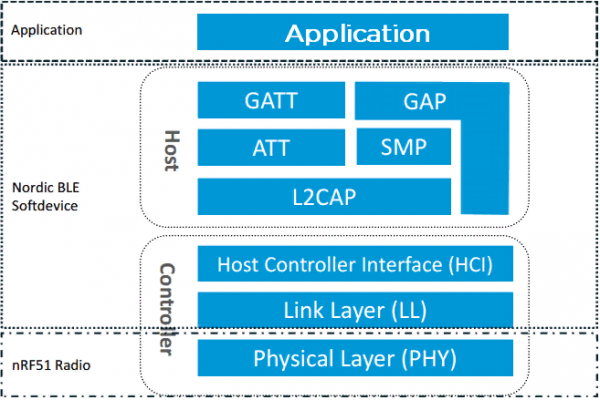
Let's take a look at the diagram showing the BLE protocol. It consists of several layers. The lowest layer, the Physical Layer (PHY), is responsible for the device's radio channel. The Link Layer (LL) contains the entire sequence of bytes in the transmitted message. We studied this in past articles. The Host Controller Interface (HCI) is the protocol for communication between the layers or chips of BLE when the Controller and Host are implemented on different chips. The Logical Link Control and Adaptation Protocol (L2CAP) is responsible for packet formation, segmentation, error control, and packet assembly. The Security Manager Protocol (SMP) handles packet encryption. The Generic Access Profile (GAP) is responsible for the initial data exchange between devices to determine "Who is who". It also includes scanning and advertising. In this article, I will focus on the two remaining parts of the protocol — GATT and ATT. GATT is built on top of ATT, which is why they are tightly interwoven.
To simplify the narrative, I would like to use an analogy. I heard it somewhere and would like to support it. Imagine a BLE device as a bookshelf with several shelves. Each shelf represents a different topic. For example, we have shelves for fiction, mathematics, encyclopedias. On each shelf, there are books related to the specified topic. Some of these books even have paper bookmarks with notes. Additionally, we have a small paper catalog of all the books. If you remember school libraries, it's that narrow box with paper cards. In this analogy, the bookshelf represents the profile of our device. The shelves are the services, the books are the characteristics, and the catalog is the attributes table. The bookmarks in the books are the descriptors, which I will also explain in more detail later.
Everyone who has developed devices knows that many projects have similar pieces of code. The thing is that many devices have similar functionalities. For instance, if devices run on batteries, the issue of charging and monitoring their levels will be the same. The same goes for sensors. Essentially, the object-oriented approach in programming “provides the ability to create objects that combine properties and behaviors into a self-sufficient unit that can be reused many times”. In my opinion, BLE made an attempt at a similar approach. The Bluetooth Special Interest Group (SIG) developed profiles. Devices from different manufacturers that have the same profiles should work effortlessly with one another. Profiles, in turn, consist of services, and services consist of characteristics enhanced by descriptors. In general, this may look like:
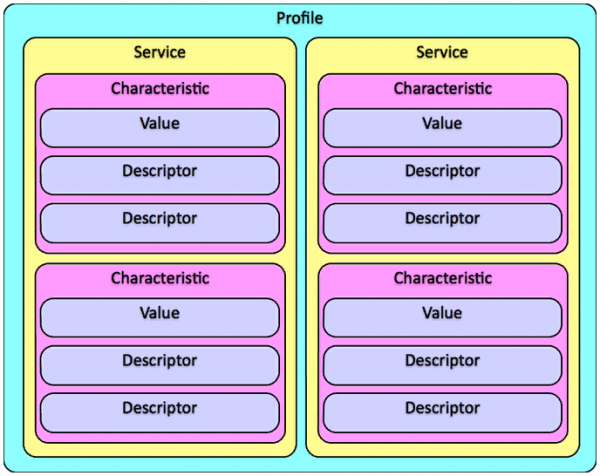
For example, let's consider the profile scheme of a heart rate monitor (fitness bracelet). It consists of two services and several characteristics. From it, the hierarchy of the profile becomes immediately clear. The characteristic of the control point resets the total calorie expenditure to zero.
1. The heart rate service includes three characteristics (0x180D):
a) Mandatory characteristic of heart rate (0x2A37)
b) Optional characteristic of body sensor location (0x2A38)
c) Conditional characteristic of heart rate control point (0x2A39)
2. Battery service (0x180F):
a) Mandatory battery level characteristic (0x2A19)
UUID
In order for us to uniquely refer to elements of the profile (services, characteristics, and descriptors), they need to be numbered somehow. This is where the concept of Universally Unique ID (UUID) comes in. The UUID is specified in parentheses for each line. There is one peculiarity here. For UUIDs, a code length of 16 and 128 bits was decided upon. Why, you might ask? In the BLE protocol, everything is designed to save energy. Therefore, a size of 16 bits is quite reasonable. It is unlikely that more than 65,000 unique services and characteristics will be created in the near future. For now, everything that could be counted has already been counted (remember where this comes from — “he counted you too” :-)) Numbered elements , , and you can view them via the links.
However, I think everyone remembers the story of the 4-byte IP address in the internet. Initially, it was thought to be sufficient, but we still haven't transitioned to a 6-byte address. To avoid repeating this mistake and to give crafty hands some room, SIG decided to introduce 128-bit UUIDs as well. This personally reminds me of the unlicensed range of 433MHz, which was left to various tinkerers. In our case, a 128-bit identifier for services and characteristics was set free. This means that we can use practically any 128-bit value for our services and devices. The probability of coming up with the same UUID is virtually zero.
In fact, short 16-bit UUIDs have an extension to a 128-bit value. In the specification, this extension is called Bluetooth Base UUID and has the value 00000000-0000-1000-8000-00805F9B34FB. For example, if a 16-bit UUID of an attribute has the value 0x1234, the equivalent 128-bit UUID will have the value 00001234-0000-1000-8000-00805F9B34FB. A corresponding formula is also provided:
128_bit_value = 16_bit_value * 2^96 + Bluetooth_Base_UUID
Where this magical number came from, I do not know. If any readers know — please write in the comments (A user with the nickname Sinopteek has already done this. See the comments). As for generating 128-bit UUIDs, you can basically use a special , which will do this for you.
ATT and GATT...
Actually, this is where the most interesting part begins. I will remind you that ATT is based on a client-server relationship. Right now, we are looking at the server device. It contains information such as sensor values, light switch status, location data, and so on. Now that all the 'participants in our parade' are numbered, we need to somehow allocate them in the device's memory. For this, we place them in a table called the attributes table. Remember this well. This is the very heart of BLE. It is this that we will be examining further. Now, each row will be called an attribute. This table is deep in the stack and generally, we do not have direct access to it. We initialize it and refer to it, but what happens inside is hidden from us behind seven seals.
Let’s look at the image from the specification, but before that, I want to point out the frequent confusion in terminology, specifically regarding descriptors. The role of a descriptor is to supplement the description of a characteristic. When you need to extend its capabilities, you use descriptors. They are also attributes and, along with services and characteristics, are located in the attributes table. We will examine them in detail in the second part of the article. However, sometimes descriptors are referred to as the row number in the attributes table. This is something to keep in mind. To avoid confusion, we will use the term 'attribute pointer' for these purposes.

So, an attribute is a discrete value that has the following associated properties:
1. Attribute Handle — this is the index in the table corresponding to the attribute.
2. Attribute Type — this is the UUID that describes its type.
3. Attribute Value — this is the data indexed by the attribute pointer.
4. Attribute Permissions — this is part of the attribute, defining permissions that cannot be read or written using the attribute protocol.
How do we understand all this? The attribute pointer is, so to speak, its number in our table.
It allows the client to reference an attribute in read or write requests. We can number our entries (attributes) from 0x0001 to 0xFFFF. In our association with a bookshelf, this corresponds to the card number in a paper catalog. Similarly, in a library catalog, the cards are arranged in ascending order of number. Each subsequent entry must have a number greater than the previous one. Just like in a library, where some cards sometimes get lost, in our line numbering, there may be gaps. This is acceptable. The main thing is that they are in increasing order.
The attribute type defines what this attribute represents. Similarly to the C language,
where there are boolean, numeric variables, and strings, here too. By the attribute type, we understand
what we are dealing with and how to work with this attribute moving forward. Below, we will review some specific types of attributes. For example, "service declaration" (0x2800), "characteristic declaration" (0x2803), "descriptor declaration" (0x2902).
The attribute value is essentially its value, excuse the tautology. If the attribute type is a string, then an example of an attribute value could be the slogan "Hello World !!!". If the attribute type is a "service declaration", then its value is the service itself. Sometimes it contains information about where to find other attributes and their properties.
Attribute permissions allow the server to understand whether read or write access is allowed.
Note that these permissions apply only to the attribute value, not to the pointer, type, or the field of permissions itself. That is, if writing the attribute is permitted, we can change, for instance, the string "Hello World !!!" to "Good morning". However, we cannot prohibit writing a new string or change the attribute type and designate the string as a "service declaration". When a client contacts the server, the client requests its attributes. This allows the client to learn what the server can provide. Although it is not necessary to read and write values.
What it looks like
The concept of GATT is to group attributes in the attribute table together in a very specific and logical order. Let's take a closer look at the heart rate profile provided below. The leftmost column of this table is optional. It simply describes what this row is (the attribute). All the other columns are already familiar to us.
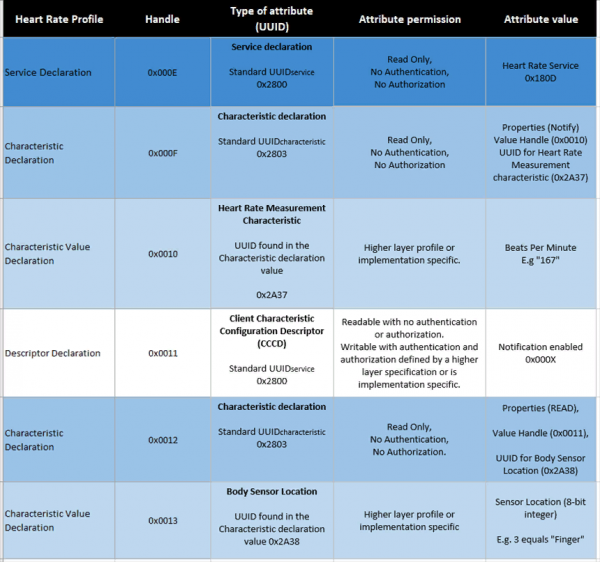
At the top of each group, we always have the service declaration attribute. Its type is always 0x2800, and the pointer depends on how many attributes are already present in the table. Its permissions are always read-only, without any authentication or authorization checks. We'll discuss these concepts a bit later. The value is another UUID that defines what this service is. In the table, the value is 0x180D, which is defined by Bluetooth SIG as the heart rate service.
Following the service declaration, there is a characteristic declaration. It is similar in form to the service declaration. Its UUID is always set to 0x2803, and the permissions are also always read-only without any authentication or authorization checks. Let's take a look at the Attribute Value field, which includes some data. It always contains a pointer, a UUID, and a set of properties. These three elements describe the subsequent characteristic value declaration. The pointer naturally indicates where the characteristic value declaration is located in the attribute table. The UUID describes what type of information or value we can expect. For example, a temperature value, the state of a light switch, or any other arbitrary value. Lastly, the properties describe how we can interact with the characteristic value.
Here we encounter another pitfall. It pertains to the permissions of attributes and the properties of characteristics. Let's take a look at the image of the bit field properties from the specification.
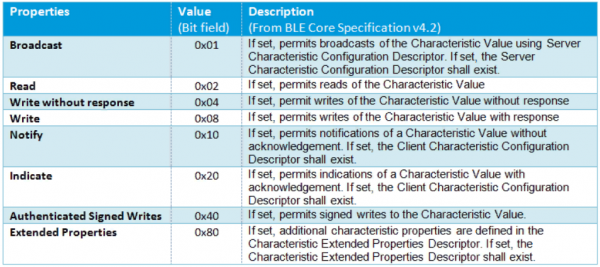
As you can see, there are also fields here that provide read and write capabilities. You may wonder why we have read/write permissions for the attribute and property.
Read/write access for the attribute value? Shouldn't they always be the same? The fact is that the properties for the attribute value are essentially just recommendations for the client, used in GATT and application layers. They are merely hints about what the client can expect from the attribute declaration. Let's delve into this further. What types of permissions does the attribute have?
1. Access permissions:
— read
— write
— read and write
2. Authentication permission:
— authentication required
— authentication not required
3. Authorization permission:
— authorization required
— authorization not required
The main difference between attribute permissions and characteristic properties is that the former pertain to servers, while the latter relate to clients. A server may be permitted to read the characteristic value, but there may also be a requirement for authentication or authorization. Therefore, when the client queries the characteristic properties, we find that reading is allowed. However, when an attempt to read is made, an error will occur. Thus, we can confidently say that permissions take precedence over properties. Knowledge of what permissions an attribute has is something we cannot obtain from the client side.
Descriptor
Let's return to our table. After declaring the characteristic value, the following attribute declarations are possible:
1. New characteristic declaration (there may be many characteristics in the service)
2. New service declaration (there may be many in the table)
3. Descriptor declaration
In the case of measuring heart rate characteristics, in our table, the announcement of the characteristic value is accompanied by the announcement of the descriptor. The descriptor is an attribute that provides additional information about the characteristic. There are several types of descriptors. We will discuss them in detail in the second part of this article. For now, we will only touch on the Client Characteristic Configuration Descriptor (CCCD). It has a UUID equal to 0x2902. With this descriptor, the client can enable indication or notification on the server. The difference between them is small, but still present. Notification does not require acknowledgment of receipt from the client. Indication, on the other hand, does require it, although it occurs at the GATT level without reaching the application level. Why is that, you may ask? Unfortunately, I do not know. I can only say that Nordic specialists recommend using notification. Especially since packet integrity checking (using CRC) occurs in both cases.
Conclusion
At the end of the article, I would like to mention the following. The last table is somewhat confusing. However, I focused on it because it is presented in , which I rely on. In the second part of my article, I intend to delve into the Bluetooth 4.0 specification. There, we will encounter more accurate diagrams and drawings. In the third part, I would like to analyze the log obtained through the Wireshark program from one of the gadgets and see 'live' all the theory we have studied together.
Employee of the Group of Companies
Vladimir Pechersky
Source: habr.com
