

I needed to set up the process of building and delivering software packages from a Git repository to the website. Recently, I came across an article about buildbot here on Habr (link at the end) and decided to try it out for this purpose.
Since buildbot is a distributed system, it makes sense to create a separate build host for each architecture and operating system. In our case, these will be LXC containers (for Linux) and qemu (for Windows):
- vm-srv-build1 — CentOS 7, where the buildbot master will reside along with one worker
- vm-srv-build2 — Debian 10, for building DEB packages
- vm-srv-build3 — Windows 10, for building, you know what for
We will be building — a graphical interface for 1C rac for managing a server cluster. Standard tools will be used for Linux for each OS, while building an exe file for Windows from a tcl script involves using .
Installation
GNU/Linux
There is plenty of installation documentation available online. ,And it doesn't present any particular problems:
For the master:
pip3 install buildbot
pip3 install twisted
pip3 install autobahn
pip3 install pysqlite3
pip3 install sqlalchemy sqlalchemy-migrate
pip3 install buildbot-www buildbot-grid-view buildbot-console-view buildbot-waterfall-view
pip3 install python-dateutil
For the workers, this is sufficient:
pip3 install buildbot-workerOf course, it would be more appropriate to build packages for each OS, but that is beyond the scope of this article. I will also skip the description of configuring containers for operation, just note that I use ProxMox VE. Additionally, it will be necessary to install the packages required for building on each OS (CentOS: rpmdevtools, etc.; Debian: build-essential, dh-make, pbuilder, etc.)
The project builds and buildbot services will run under an unprivileged user, so it is necessary to create one on all hosts involved in the process:
adduser buildbotNext, we will configure the automatic startup of services accordingly on each of the hosts (containers):
Systemd unit for starting the master:
touch /etc/systemd/buildbot-master.service

[Unit]
Description=BuildBot master service
After=network.target

[Service]
User=buildbot
Group=buildbot
WorkingDirectory=/home/buildbot/master
ExecStart=/usr/local/bin/buildbot start --nodaemon
ExecReload=/bin/kill -HUP $MAINPID

[Install]
WantedBy=multi-user.target
and the 'worker'
touch /etc/systemd/buildbot-worker.service

[Unit]
Description=BuildBot worker service
After=network.target

[Service]
User=buildbot
Group=buildbot
WorkingDirectory=/home/buildbot/worker
ExecStart=/usr/local/bin/buildbot-worker start --nodaemon

[Install]
WantedBy=buildbot-master.service
Since all scripts (in our case) are located in /usr/local/, we should define the path to them in the environment variables:
nano /root/.bash_profile

PATH=$PATH:$HOME/.local/bin:$HOME/bin:/usr/local/bin
After that, you can create the directory infrastructure for the 'workers' (on all hosts) by registering as the buildbot user and executing the following commands:
On the first host vm-srv-build1:
su - buildbot
mkdir /home/buildbot/worker
cd ~
buildbot-worker create-worker --umask=0o22 --keepalive=60 worker vm-srv-build1:4000 CentOS 123456
On the second host vm-srv-build2:
su - buildbot
mkdir /home/buildbot/worker
cd ~
buildbot-worker create-worker --umask=0o22 --keepalive=60 worker vm-srv-build1:4000 Debian-10 123456
On the worker hosts, the buildbot-worker service can be started
systemctl start buildbot-workerMS Windows
As a 'worker' for building under Windows, a virtual machine with the latest release of Win10 will be used.
The following will be required:
- To install various dependencies in Python, it was necessary to download
- 7Zip
Once all of the above is installed, you can install buildbot itself:
pip install buildbot-workerLet's create a working directory
md c:workerAnd start it
buildbot-worker start c:workerIf everything works (see log c:workertwistd.log), you can register our 'worker' as a service by adding an entry in the registry with the working directory (the commands are executed in PowerShell run as administrator):
buildbot_worker_windows_service.exe --user VM-SRV-BUILD3buildbot --password 123456 --startup auto install
New-ItemProperty -path Registry::HKEY_LOCAL_MACHINESYSTEMCurrentControlSetservicesBuildBotParameters -Name directories -PropertyType String -Value c:worker
And you can start the service
Start-Service buildbotThat's all for the 'workers', they can be left alone now, all management is done from the master.
Configuring the Master
To start, let's create the infrastructure for the master (on the main host) by registering as the buildbot user and executing the following commands:
su - buildbot
mkdir /home/buildbot/master
cd ~
buildbot create-master master
To create ready packages, let's create a builds directory
mkdir /home/buildbot/buildsIn the /home/buildbot/master/ directory, a file master.cfg was created. This file is a Python script and contains a description of all the system's working mechanisms, and we will work with it further.
nano /home/buildbot/master/master.cfgimport os, re
from buildbot.plugins import steps, util, schedulers, worker, changes, reporters
c= BuildmasterConfig ={}
# Description of our workers.
c['workers'] = [ worker.Worker('CentOS', '123456'), worker.Worker('Debian-10', '123456'), worker.Worker('Windows-10', '123456')]
c['protocols'] = {'pb': {'port': 4000}}
# Indicating to the master which repository to monitor
c['change_source'] = []
c['change_source'].append(changes.GitPoller(
repourl = 'https://bitbucket.org/svk28/rac-gui.git',
project = 'Rac-GUI',
branches = True,
pollInterval = 60
)
)
# Build trigger service
c['schedulers'] = []
c['schedulers'].append(schedulers.SingleBranchScheduler(
name="Rac-GUI-schedulers",
change_filter=util.ChangeFilter(branch='master'),
builderNames=["Rac-GUI-RPM-builder", "Rac-GUI-DEB-builder", "Rac-GUI-WIN-builder"],
properties = {'owner': 'admin'}
)
)
@util.renderer
######################################3
# Building RPM package
rac_gui_build_RPM = util.BuildFactory()
rac_gui_build_RPM.addStep(steps.Git(
repourl = 'https://bitbucket.org/svk28/rac-gui.git',
workdir = 'rac-gui',
haltOnFailure = True,
submodules = True,
mode='full',
progress = True)
)To automate the building of packages of different versions, so that it is not necessary to delve into the code of the master.cfg file, the main script rac_gui.tcl has been updated with lines indicating the current version and release:
######################################################
#        Rac GUI
...
# version: 1.0.3
# release: 1
And based on these lines, buildbot will number the packages. To extract the data, the console command grep is used. In buildbot, you cannot simply define variables for the 'workers' (at least, I couldn't find how). For this, properties serve the purpose. That is, we add steps in the build process to define the version and release, and accordingly, set the properties version and release. Properties can be set in various ways; in this case, it is through a console command call:
# Добавим определение версии из основного файла
rac_gui_build_RPM.addStep(
       steps.SetPropertyFromCommand(
       command="grep version ../rac-gui/rac_gui.tcl | grep -oE 'b[0-9]{1,2}.[0-9]{1,2}.[0-9]{1,2}b'", property="version"
       )
)
# Добавим определение релиза из основного файла
rac_gui_build_RPM.addStep(
       steps.SetPropertyFromCommand(
       command="grep release ../rac-gui/rac_gui.tcl | grep -oE 'b[0-9]{1,3}b'", property="release"
       )
)
The obtained values can be substituted using util.Interpolate().
# Запакуем исходники
rac_gui_build_RPM.addStep(
       steps.ShellCommand(
          command=["tar", "czf", util.Interpolate("/home/buildbot/rpmbuild/SOURCES/rac-gui-%(prop:version)s-%(prop:release)s.tar.gz"), "../rac-gui"]
       )
)
It should be noted that, since the host is also used for manual package building, the build will proceed along the standard paths.
# Копируем spec
rac_gui_build_RPM.addStep(steps.ShellCommand(
       command=["cp", "../rac-gui/rac_gui.spec", "/home/buildbot/rpmbuild/SPECS/rac_gui.spec"]))
To set the correct release and version numbers, the standard sed call is used; that is, the command replaces the values inside the spec file with the necessary ones.
# меняем версию
rac_gui_build_RPM.addStep(steps.ShellCommand(
       command=["sed", "-i", util.Interpolate("s/.*Version:.*/Version:t%(prop:version)s/"), "/home/buildbot/rpmbuild/SPECS/rac_gui.spec"]))
# меняем релиз
rac_gui_build_RPM.addStep(steps.ShellCommand(
       command=["sed", "-i", util.Interpolate("s/.*Release:.*/Release:t%(prop:release)s/"), "/home/buildbot/rpmbuild/SPECS/rac_gui.spec"]))

# запускаем процесс сборки
rac_gui_build_RPM.addStep(steps.RpmBuild(
       specfile="/home/buildbot/rpmbuild/SPECS/rac_gui.spec",
       dist='.el5',
       topdir='/home/buildbot/rpmbuild',
       builddir='/home/buildbot/rpmbuild/build',
       rpmdir='/home/buildbot/rpmbuild/RPMS',
       sourcedir='/home/buildbot/rpmbuild/SOURCES'
      )
)
The finished package and the source archive are copied to the master. However, it is also possible to copy directly from the working files to your repository or website.
# Скопируем файл на мастер
rac_gui_build_RPM.addStep(
       steps.FileUpload(
          workersrc=util.Interpolate("/home/buildbot/rpmbuild/RPMS/noarch/rac-gui-%(prop:version)s-%(prop:release)s.noarch.rpm"),
          masterdest=util.Interpolate("/home/buildbot/builds/rac-gui-%(prop:version)s-%(prop:release)s.noarch.rpm")
      )
)

rac_gui_build_RPM.addStep(
       steps.FileUpload(
       workersrc=util.Interpolate("/home/buildbot/rpmbuild/SOURCES/rac-gui-%(prop:version)s-%(prop:release)s.tar.gz"),
          masterdest=util.Interpolate("/home/buildbot/builds/rac-gui-%(prop:version)s-%(prop:release)s.tar.gz")
       )
)
Let's start the process on the master to copy the built packages to the hosting via FTP. For this purpose, we use in tcl.
rac_gui_build_RPM.addStep(
        steps.MasterShellCommand(
            command=["/usr/local/bin/deploy-ftp.tcl",
                util.Interpolate("--local-file=/home/buildbot/builds/rac-gui-%(prop:version)s-%(prop:release)s.noarch.rpm"),
                util.Interpolate("--remote-file=uploads/rac-gui/rac-gui-%(prop:version)s-%(prop:release)s.noarch.rpm")]
        )
)

rac_gui_build_RPM.addStep(
        steps.MasterShellCommand(
            command=["/usr/local/bin/deploy-ftp.tcl",
                util.Interpolate("--local-file=/home/buildbot/builds/rac-gui-%(prop:version)s-%(prop:release)s.tar.gz"),
                util.Interpolate("--remote-file=uploads/rac-gui/rac-gui-%(prop:version)s-%(prop:release)s.tar.gz")]
        )
)
We're done with RPM. Now let's describe the process of building the DEB package. Since the packaging processes for different systems are independent of each other, many steps will be repeated.
rac_gui_build_DEB = util.BuildFactory()

rac_gui_build_DEB.addStep(steps.Git(
       repourl = 'https://bitbucket.org/svk28/rac-gui.git',
       haltOnFailure = True,
       submodules = True,
       mode='full',
       workdir='build',
       progress = True)
)

# Adding version definition from the main file
rac_gui_build_DEB.addStep(
       steps.SetPropertyFromCommand(
       command="grep version rac_gui.tcl | grep -oE 'b[0-9]{1,2}.[0-9]{1,2}.[0-9]{1,2}b'", property="version"
       )
)

# Adding release definition from the main file
rac_gui_build_DEB.addStep(
       steps.SetPropertyFromCommand(
       command="grep release rac_gui.tcl | grep -oE 'b[0-9]{1,3}b'", property="release"
       )
)

# Rename the executable file
    rac_gui_build_DEB.addStep(steps.ShellCommand(
       command=["mv", "rac_gui.tcl", "racgui"]))
For the RPM package, some of the following procedures are handled by rpm during the build and are described inside the spec file; for Debian, this needs to be done here:
# Поменяем пути к библиотекам
rac_gui_build_DEB.addStep(steps.ShellCommand(
       command=["sed", "-i", "s+^set dir(lib)+set dir(lib) /usr/share/rac-gui/lib ;#+g", "racgui"]))

# Поменяем пути к файлам
rac_gui_build_DEB.addStep(steps.ShellCommand(
       command=["sed", "-i", "s+[pwd]+/usr/share/rac-gui+g", "racgui"]))

# заархивируем исходники
rac_gui_build_DEB.addStep(steps.ShellCommand(
       command=["tar", "czf", util.Interpolate("../rac-gui_%(prop:version)s.orig.tar.gz"), "."]))

# Соберём пакет
rac_gui_build_DEB.addStep(steps.ShellCommand(
       command=["dpkg-buildpackage"]))

# Скопируем файл на мастер
rac_gui_build_DEB.addStep(
       steps.FileUpload(
       workersrc=util.Interpolate("../rac-gui_%(prop:version)s-%(prop:release)s_amd64.deb"),
           masterdest=util.Interpolate("/home/buildbot/builds/rac-gui_%(prop:version)s-%(prop:release)s_amd64.deb")
       )
)
rac_gui_build_DEB.addStep(
        steps.MasterShellCommand(
            command=["/usr/local/bin/deploy-ftp.tcl",
             util.Interpolate("--local-file=/home/buildbot/builds/rac-gui_%(prop:version)s-%(prop:release)s_amd64.deb"),
             util.Interpolate("--remote-file=uploads/rac-gui/rac-gui_%(prop:version)s-%(prop:release)s_amd64.deb")]
        )
)
And that's it for DEB, now onto Windows!
rac_gui_build_WIN = util.BuildFactory()

rac_gui_build_WIN.addStep(steps.Git(
       repourl = 'https://bitbucket.org/svk28/rac-gui.git',
       haltOnFailure = True,
       submodules = True,
       mode='full',
       workdir='build',
       progress = True)
)
Since Windows does not natively have grep and sed (or does it?), we'll be using PowerShell.
# Добавим определение версии из основного файла
rac_gui_build_WIN.addStep(
       steps.SetPropertyFromCommand(
       command="powershell -command "((Get-Content .rac_gui.tcl | Select-String -Pattern 'version:') -split 's')[2]",
       property="version"
       )
    )

# Добавим определение релиза из основного файла
rac_gui_build_WIN.addStep(
       steps.SetPropertyFromCommand(
       command="powershell -command "((Get-Content .rac_gui.tcl | Select-String -Pattern 'release:') -split 's')[2]",
       property="release"
       )
)

# Создадим запускаемый файл
rac_gui_build_WIN.addStep(steps.ShellCommand(
       command=["c:binfreewrap.exe", "rac_gui.tcl"]))

# запакуем то, что получилось
rac_gui_build_WIN.addStep(steps.ShellCommand(
       command=["c:Program Files7-zip7z.exe", "a", "-r", util.Interpolate("..rac-gui_%(prop:version)s-%(prop:release)s.win.zip"), "..build"]))

# скопируем на мастер
rac_gui_build_WIN.addStep(
       steps.FileUpload(
       workersrc=util.Interpolate("..rac-gui_%(prop:version)s-%(prop:release)s.win.zip"),
           masterdest=util.Interpolate("/home/buildbot/builds/rac-gui_%(prop:version)s-%(prop:release)s.win.zip")
       )
)
# Скопируем файл на хостинг
rac_gui_build_WIN.addStep(
        steps.MasterShellCommand(
            command=["/usr/local/bin/deploy-ftp.tcl",
            util.Interpolate("--local-file=/home/buildbot/builds/rac-gui_%(prop:version)s-%(prop:release)s.win.zip"),
            util.Interpolate("--remote-file=uploads/rac-gui/rac-gui_%(prop:version)s-%(prop:release)s.win.zip")]
       )
)

# Тут определяем какие сборщики у нас есть
c['builders'] = [
        util.BuilderConfig(name="Rac-GUI-RPM-builder", workername='CentOS', factory=rac_gui_build_RPM),
        util.BuilderConfig(name="Rac-GUI-DEB-builder", workername='Debian-10', factory=rac_gui_build_DEB),
        util.BuilderConfig(name="Rac-GUI-WIN-builder", workername='Windows-10', factory=rac_gui_build_WIN),
]
To notify about the status of the build process, we will use electrical mail.
c['services'] = []

template=u'''
    <h4>Build status: {{ summary }}</h4>
    <p> Worker used: {{ workername }}</p>
    {% for step in build['steps'] %}
    <p> {{ step['name'] }}: {{ step['result'] }}</p>
    {% endfor %}
    <p><b> -- The Buildbot</b></p>
    '''

mailNotifier = reporters.MailNotifier(fromaddr="builder@domain.ru",
             sendToInterestedUsers=False,
             mode=('all'),
             extraRecipients=["admin@domain.ru"],
             relayhost="mail.domain.ru",
             smtpPort=587,
             smtpUser="builder@domain.ru",
             smtpPassword="******",
             messageFormatter=reporters.MessageFormatter(
                                 template=template, template_type='html',
                                 wantProperties=True, wantSteps=True))

c['services'].append(mailNotifier)

# Main settings of the master
c['title'] = "The process of building"
c['titleURL'] = "http://vm-srv-build1:80/"
c['buildbotURL'] = "http://vm-srv-build1/"
c['www'] = dict(port=80,
                plugins=dict(waterfall_view={}, console_view={}, grid_view={}))
c['db'] = {
       'db_url' : "sqlite:///state.sqlite"
}
Save the file and we can try to start the master service:
systemctl restart buildbot-masterIn the log, we will check that everything is fine with the config and that everything is working as expected. All our workers should now connect, which will be joyfully reported in the log »»'/home/buildbot/master/twistd.log»»:
 2019-07-24 16:50:35+0300 [-] Loading buildbot.tac...
 2019-07-24 16:50:35+0300 [-] Loaded.
 2019-07-24 16:50:35+0300 [-] twistd 19.2.1 (\/usr\/bin\/python3.6 3.6.8) starting up.
 2019-07-24 16:50:35+0300 [-] reactor class: twisted.internet.epollreactor.EPollReactor.
 2019-07-24 16:50:35+0300 [-] Starting BuildMaster -- buildbot.version: 2.3.1
 2019-07-24 16:50:35+0300 [-] Loading configuration from '\/home\/buildbot\/master\/master.cfg'
 2019-07-24 16:50:36+0300 [-] \/usr\/local\/lib\/python3.6\/site-packages\/buildbot\/config.py:90: buildbot.config.ConfigWarning: [0.9.0 and later] `buildbotNetUsageData` is not configured and defaults to basic.
        This parameter helps the buildbot development team to understand the installation base.
        No personal information is collected.
        Only installation software version info and plugin usage is sent.
        You can `opt-out` by setting this variable to None.
        Or `opt-in` for more information by setting it to "full".

 2019-07-24 16:50:36+0300 [-] Setting up database with URL 'sqlite:\/state.sqlite'
 2019-07-24 16:50:36+0300 [-] setting database journal mode to 'wal'
 2019-07-24 16:50:36+0300 [-] adding 1 new services, removing 0
 2019-07-24 16:50:36+0300 [-] adding 1 new change_sources, removing 0
 2019-07-24 16:50:36+0300 [-] gitpoller: using workdir '\/home\/buildbot\/master\/gitpoller-work'
 2019-07-24 16:50:36+0300 [-] adding 3 new builders, removing 0
 2019-07-24 16:50:36+0300 [-] adding 1 new schedulers, removing 0
 2019-07-24 16:50:36+0300 [-] initializing www plugin 'waterfall_view'
 2019-07-24 16:50:36+0300 [-] initializing www plugin 'console_view'
 2019-07-24 16:50:36+0300 [-] initializing www plugin 'grid_view'
 2019-07-24 16:50:36+0300 [-] NOTE: www plugin 'sitenav' is installed but not configured
 2019-07-24 16:50:36+0300 [-] initializing www plugin 'waterfall_view'
 2019-07-24 16:50:36+0300 [-] initializing www plugin 'console_view'
 2019-07-24 16:50:36+0300 [-] initializing www plugin 'grid_view'
 2019-07-24 16:50:36+0300 [-] NOTE: www plugin 'sitenav' is installed but not configured
 2019-07-24 16:50:36+0300 [-] BuildbotSite starting on 80
 2019-07-24 16:50:36+0300 [-] Starting factory
 2019-07-24 16:50:36+0300 [-] adding 3 new workers, removing 0
 2019-07-24 16:50:36+0300 [-] PBServerFactory starting on 4000
 2019-07-24 16:50:36+0300 [-] Starting factory
 2019-07-24 16:50:37+0300 [-] BuildMaster is running
 2019-07-24 16:50:37+0300 [-] buildbotNetUsageData: sending {'installid': 'b6193b126b96689351d2fe95787c5a03fc0879f9', 'versions': {'Python': '3.6.8', 'Buildbot': '2.3.1', 'Twisted': '19.2.1'}, 'platform': {'platform': 'Linux-4.15.18-10- pve-x86_64-with-centos-7.6.1810-Core', 'system': 'Linux', 'machine': 'x86_64', 'processor': 'x86_64', 'python_implementation': 'CPython', 'version': '#1 SMP PVE 4.15.18-32', 'distro': 'centos:7'}, 'plugins': {'buildbot\/worker\/base\/Worker': 3, 'buildbot\/config\/BuilderConfig': 3, 'buildbot\/schedulers\/basic\/SingleBranchScheduler': 1, 'buildbot\/reporters\/mail\/MailNotifier': 1, 'buildbot\/changes\/gitpoller\/GitPoller': 1, 'buildbot\/steps\/worker\/MakeDirectory': 1, 'buildbot\/steps\/source\/git\/Git': 3, 'buildbot\/steps\/shell\/ShellCommand': 9, 'buildbot\/steps\/package\/rpm\/rpmbuild\/RpmBuild': 1}, 'db': 'sqlite', 'mq': 'simple', 'www_plugins': ['waterfall_view', 'console_view', 'grid_view']}
 2019-07-24 16:50:37+0300 [Broker,0,127.0.0.1] worker 'CentOS' attaching from IPv4Address(type='TCP', host='127.0.0.1', port=37332)
 2019-07-24 16:50:37+0300 [Broker,0,127.0.0.1] Got workerinfo from 'CentOS'
 2019-07-24 16:50:37+0300 [-] bot attached
 2019-07-24 16:50:37+0300 [Broker,0,127.0.0.1] Worker CentOS attached to Rac-GUI-RPM-builder
 2019-07-24 16:50:37+0300 [-] buildbotNetUsageData: buildbot.net said: ok
 2019-07-24 16:50:39+0300 [Broker,1,192.168.55.15] worker 'Windows-10' attaching from IPv4Address(type='TCP', host='192.168.5.145', port=49831)
 2019-07-24 16:50:39+0300 [Broker,1,192.168.55.15] Got workerinfo from 'Windows-10'
 2019-07-24 16:50:40+0300 [-] bot attached
 2019-07-24 16:50:40+0300 [Broker,1,192.168.55.15] Worker Windows-10 attached to Rac-GUI-WIN-builder
 2019-07-24 16:50:41+0300 [Broker,2,192.168.55.99] worker 'Debian-10' attaching from IPv4Address(type='TCP', host='192.168.5.9', port=44430)
 2019-07-24 16:50:41+0300 [Broker,2,192.168.55.99] Got workerinfo from 'Debian-10'
 2019-07-24 16:50:41+0300 [-] bot attached
 2019-07-24 16:50:41+0300 [Broker,2,192.168.55.99] Worker Debian-10 attached to Rac-GUI-DEB-builder
The setup process is now complete. You can check the current status through the web interface, where you can also see build errors, kick a stuck process if something went wrong, etc.
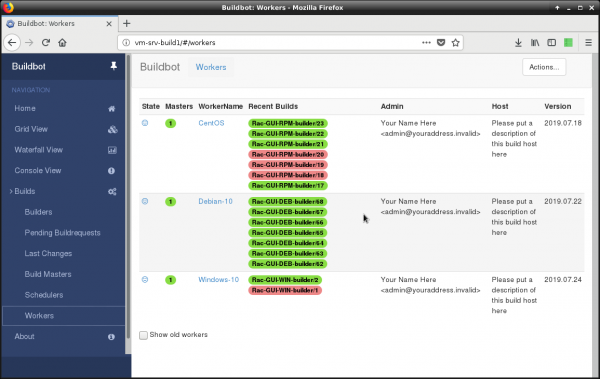
Right after launching our workers, you can view them via the menu "Builds" -> "Workers".
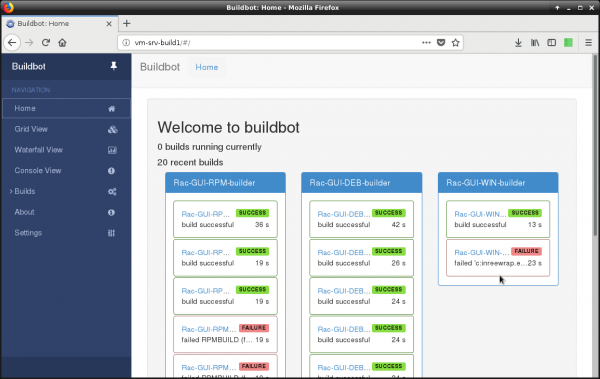
After the first build process is completed (i.e., changes in the Git repository), the status of the processes will appear on the front page.
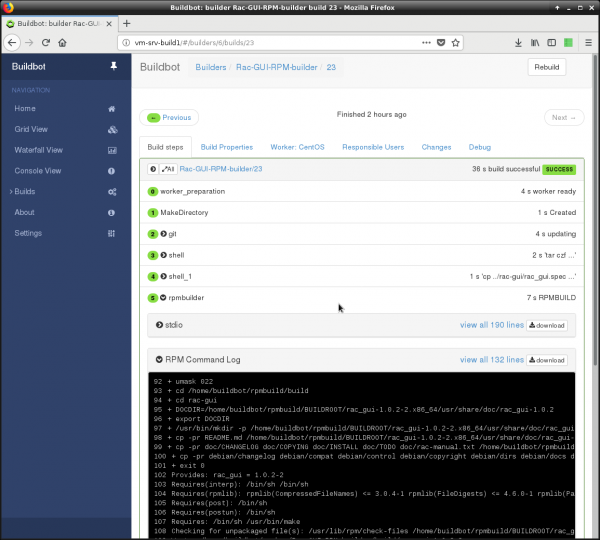
If you click on the desired row, a page will open showing the current status of this process, including what is occurring, what errors there are, etc.
You can get the entire master config here.
import os, re
from buildbot.plugins import steps, util, schedulers, worker, changes, reporters

c= BuildmasterConfig ={}

c['workers'] = [ worker.Worker('CentOS', '123456'), worker.Worker('Debian-10', '123456'), worker.Worker('Windows-10', '123456')]
c['protocols'] = {'pb': {'port': 4000}}

c['change_source'] = []
c['change_source'].append(changes.GitPoller(
    repourl = 'https://bitbucket.org/svk28/rac-gui.git',
    project = 'Rac-GUI',
    branches = True,
    pollInterval = 600
    ))

# Build start service
c['schedulers'] = []
c['schedulers'].append(schedulers.SingleBranchScheduler(
    name="Rac-GUI-schedulers",
    change_filter=util.ChangeFilter(branch='master'),
    builderNames=["Rac-GUI-RPM-builder", "Rac-GUI-DEB-builder", "Rac-GUI-WIN-builder"],
    properties = {'owner': 'admin'}
    ))
@util.renderer
def get_name_version_release(props):
    prog_name = "rac-gui"
    prog_version = "1.0.3"
    prog_release = "3"

    return {
    "prog_name": prog_name
    #"prog_version": prog_version,
    #"prog_release": prog_release
}

rac_gui_build_RPM = util.BuildFactory()

rac_gui_build_RPM.addStep(steps.Git(
    repourl = 'https://bitbucket.org/svk28/rac-gui.git',
    workdir = 'rac-gui',
    haltOnFailure = True,
    submodules = True,
    mode='full',
    progress = True)
    )

# Add version definition from the main file
rac_gui_build_RPM.addStep(
    steps.SetPropertyFromCommand(
    command="grep version ../rac-gui/rac_gui.tcl | grep -oE 'b[0-9]{1,2}.[0-9]{1,2}.[0-9]{1,2}b'", property="version"
    )
)

# Add release definition from the main file
rac_gui_build_RPM.addStep(
    steps.SetPropertyFromCommand(
    command="grep release ../rac-gui/rac_gui.tcl | grep -oE 'b[0-9]{1,3}b'", property="release"
    )
)

rac_gui_build_RPM.addStep(steps.ShellCommand(
    command=["tar", "czf", util.Interpolate("/home/buildbot/rpmbuild/SOURCES/rac-gui-%(prop:version)s-%(prop:release)s.tar.gz"), "../rac-gui"]))

rac_gui_build_RPM.addStep(steps.ShellCommand(
    command=["cp", "../rac-gui/rac_gui.spec", "/home/buildbot/rpmbuild/SPECS/rac_gui.spec"]))

rac_gui_build_RPM.addStep(steps.ShellCommand(
    command=["sed", "-i", util.Interpolate("s/.*Version:.*/Version:t%(prop:version)s/"), "/home/buildbot/rpmbuild/SPECS/rac_gui.spec"]))

rac_gui_build_RPM.addStep(steps.ShellCommand(
    command=["sed", "-i", util.Interpolate("s/.*Release:.*/Release:t%(prop:release)s/"), "/home/buildbot/rpmbuild/SPECS/rac_gui.spec"]))

rac_gui_build_RPM.addStep(steps.RpmBuild(
    specfile="/home/buildbot/rpmbuild/SPECS/rac_gui.spec",
    dist='.el5',
    topdir='/home/buildbot/rpmbuild',
    builddir='/home/buildbot/rpmbuild/build',
    rpmdir='/home/buildbot/rpmbuild/RPMS',
    sourcedir='/home/buildbot/rpmbuild/SOURCES'
    ))

# Copy the file to the master
rac_gui_build_RPM.addStep(
    steps.FileUpload(
    workersrc=util.Interpolate("/home/buildbot/rpmbuild/RPMS/noarch/rac-gui-%(prop:version)s-%(prop:release)s.noarch.rpm"),
        masterdest=util.Interpolate("/home/buildbot/builds/rac-gui-%(prop:version)s-%(prop:release)s.noarch.rpm")
    )
)

rac_gui_build_RPM.addStep(
    steps.FileUpload(
    workersrc=util.Interpolate("/home/buildbot/rpmbuild/SOURCES/rac-gui-%(prop:version)s-%(prop:release)s.tar.gz"),
        masterdest=util.Interpolate("/home/buildbot/builds/rac-gui-%(prop:version)s-%(prop:release)s.tar.gz")
    )
)

rac_gui_build_RPM.addStep(
    steps.MasterShellCommand(
    command=["/usr/local/bin/deploy-ftp.tcl",
     util.Interpolate("--local-file=/home/buildbot/builds/rac-gui-%(prop:version)s-%(prop:release)s.noarch.rpm"),
     util.Interpolate("--remote-file=uploads/rac-gui/rac-gui-%(prop:version)s-%(prop:release)s.noarch.rpm")]
    )
)

rac_gui_build_RPM.addStep(
    steps.MasterShellCommand(
    command=["/usr/local/bin/deploy-ftp.tcl",
     util.Interpolate("--local-file=/home/buildbot/builds/rac-gui-%(prop:version)s-%(prop:release)s.tar.gz"),
     util.Interpolate("--remote-file=uploads/rac-gui/rac-gui-%(prop:version)s-%(prop:release)s.tar.gz")]
    )
)
####################################
##      DEB
####################################

rac_gui_build_DEB = util.BuildFactory()

rac_gui_build_DEB.addStep(steps.Git(
    repourl = 'https://bitbucket.org/svk28/rac-gui.git',
    haltOnFailure = True,
    submodules = True,
    mode='full',
    workdir='build',
    progress = True)
    )

# Add version definition from main file
rac_gui_build_DEB.addStep(
    steps.SetPropertyFromCommand(
    command="grep version rac_gui.tcl | grep -oE 'b[0-9]{1,2}.[0-9]{1,2}.[0-9]{1,2}b'", property="version"
    )
)

# Add release definition from main file
rac_gui_build_DEB.addStep(
    steps.SetPropertyFromCommand(
    command="grep release rac_gui.tcl | grep -oE 'b[0-9]{1,3}b'", property="release"
    )
)

# Rename the executable file
rac_gui_build_DEB.addStep(steps.ShellCommand(
    command=["mv", "rac_gui.tcl", "racgui"]))

# Change library paths
rac_gui_build_DEB.addStep(steps.ShellCommand(
    command=["sed", "-i", "s+^set dir(lib)+set dir(lib) /usr/share/rac-gui/lib ;#+g", "racgui"]))

# Change file paths
rac_gui_build_DEB.addStep(steps.ShellCommand(
    command=["sed", "-i", "s+[pwd]+/usr/share/rac-gui+g", "racgui"]))

# Archive the source files
rac_gui_build_DEB.addStep(steps.ShellCommand(
    command=["tar", "czf", util.Interpolate("../rac-gui_%(prop:version)s.orig.tar.gz"), "."]))

# Build the package
rac_gui_build_DEB.addStep(steps.ShellCommand(
    command=["dpkg-buildpackage"]))

# Copy the file to the master
rac_gui_build_DEB.addStep(
    steps.FileUpload(
    workersrc=util.Interpolate("../rac-gui_%(prop:version)s-%(prop:release)s_amd64.deb"),
        masterdest=util.Interpolate("/home/buildbot/builds/rac-gui_%(prop:version)s-%(prop:release)s_amd64.deb")
    )
)

rac_gui_build_DEB.addStep(
    steps.MasterShellCommand(
    command=["/usr/local/bin/deploy-ftp.tcl",
     util.Interpolate("--local-file=/home/buildbot/builds/rac-gui_%(prop:version)s-%(prop:release)s_amd64.deb"),
     util.Interpolate("--remote-file=uploads/rac-gui/rac-gui_%(prop:version)s-%(prop:release)s_amd64.deb")]
    )
)
############################################
#       WIN
############################################

rac_gui_build_WIN = util.BuildFactory()

rac_gui_build_WIN.addStep(steps.Git(
    repourl = 'https://bitbucket.org/svk28/rac-gui.git',
    haltOnFailure = True,
    submodules = True,
    mode='full',
    workdir='build',
    progress = True)
    )

# Add version definition from main file
rac_gui_build_WIN.addStep(
    steps.SetPropertyFromCommand(
    command="powershell -command "((Get-Content .rac_gui.tcl | Select-String -Pattern 'version:') -split 's')[2]",
    property="version"
    )
)

# Add release definition from main file
rac_gui_build_WIN.addStep(
    steps.SetPropertyFromCommand(
    command="powershell -command "((Get-Content .rac_gui.tcl | Select-String -Pattern 'release:') -split 's')[2]",
    property="release"
    )
)

# Create executable file
rac_gui_build_WIN.addStep(steps.ShellCommand(
    command=["c:binfreewrap.exe", "rac_gui.tcl"]))

# Package the result
rac_gui_build_WIN.addStep(steps.ShellCommand(
    command=["c:Program Files7-zip7z.exe", "a", "-r", util.Interpolate("..rac-gui_%(prop:version)s-%(prop:release)s.win.zip"), "..build"]))

# Copy to master
rac_gui_build_WIN.addStep(
    steps.FileUpload(
    workersrc=util.Interpolate("..rac-gui_%(prop:version)s-%(prop:release)s.win.zip"),
        masterdest=util.Interpolate("/home/buildbot/builds/rac-gui_%(prop:version)s-%(prop:release)s.win.zip")
    )
)

# Copy the file to hosting
rac_gui_build_WIN.addStep(
    steps.MasterShellCommand(
    command=["/usr/local/bin/deploy-ftp.tcl",
     util.Interpolate("--local-file=/home/buildbot/builds/rac-gui_%(prop:version)s-%(prop:release)s.win.zip"),
     util.Interpolate("--remote-file=uploads/rac-gui/rac-gui_%(prop:version)s-%(prop:release)s.win.zip")]
    )
)

c['builders'] = [
        util.BuilderConfig(name="Rac-GUI-RPM-builder", workername='CentOS', factory=rac_gui_build_RPM),
        util.BuilderConfig(name="Rac-GUI-DEB-builder", workername='Debian-10', factory=rac_gui_build_DEB),
        util.BuilderConfig(name="Rac-GUI-WIN-builder", workername='Windows-10', factory=rac_gui_build_WIN),
]

c['services'] = []

template=u'''
<h4>Build status: {{ summary }}</h4>
<p> Worker used: {{ workername }}</p>
{% for step in build['steps'] %}
<p> {{ step['name'] }}: {{ step['result'] }}</p>
{% endfor %}
<p><b> -- The Buildbot</b></p>
'''

mailNotifier = reporters.MailNotifier(fromaddr="112@icvibor.ru",
          sendToInterestedUsers=False,
          mode=('all'),
          extraRecipients=["my@domain.local"],
          relayhost="mail.domain.local",
          smtpPort=587,
          smtpUser="buildbot@domain.local",
          smtpPassword="**********",
          messageFormatter=reporters.MessageFormatter(
                                 template=template, template_type='html',
                                 wantProperties=True, wantSteps=True))

c['services'].append(mailNotifier)

c['title'] = "The process of building"
c['titleURL'] = "http://vm-srv-build1:80/"

c['buildbotURL'] = "http://vm-srv-build1/"

c['www'] = dict(port=80,
                plugins=dict(waterfall_view={}, console_view={}, grid_view={}))
c['db'] = {
    'db_url' : "sqlite://state.sqlite"
}
Materials
The following materials were used in preparing the article:
- And the documentation for the product.
Source: habr.com
