

The quality of wireless networks is inherently included in the concept of service level. If you want to meet high customer demands, it's necessary not only to quickly address arising network issues but also to anticipate the most common ones.
How can this be accomplished? Only by tracking what is truly important in this context — user interaction with the wireless network.
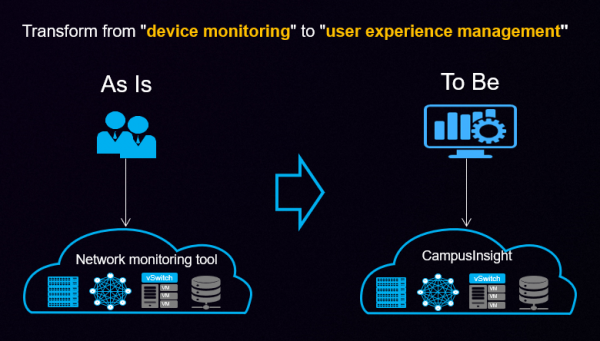
Network loads continue to grow, especially impacting wireless segments — partly due to the openness of their interfaces. With the increasing number of devices and data transfer speeds, problems multiply at several levels. At the physical level, numerous radio signal transmitters interfere with one another, even when operating on adjacent frequency spectrum segments. At the logical level, a large number of connected devices start competing for the right to initiate transmission on a selected frequency, increasing packet delivery delays for each user.
Simultaneously, the expectations of every client regarding network usage are also rising. A 5-second page load in the browser, which seemed like a technological peak 20 years ago, no longer surprises anyone. Clients now expect HD video communication without any freezing.
Partially addressing the issue are new versions of wireless transmission standards that utilize the frequency spectrum more effectively. Each is aimed at deploying increasingly overloaded networks. However, in a large-scale network, where dozens of access points operate, it will not be possible to leave everything to the latest standard (especially since devices operate in backward compatibility mode as soon as they encounter older user devices). Just as it is impossible to continue living with outdated monitoring tools — the network environment is constantly becoming more complex.
Why traditional monitoring no longer works
The classic stereotype that still haunts network administrators, including those of wireless networks, is operating solely on requests. An ‘alarm’ goes off — we wake up and figure out what went wrong. As long as there’s no ‘alarm,’ we can limit ourselves to checking the load on the main components — network and user devices.
According to this task, traditional monitoring and maintenance tools operate based on rigid rules and do not always promptly display existing issues, let alone perform any predictive analysis.
The main problem here lies in the data collection intervals. Information about the state of wireless network connections is collected every few minutes, while incidents may well occur in the intervals between readings (a great example being rare load spikes that 'hang' the network). Without real-time data, it’s quite difficult to determine the root cause of the issue. Is it improper management of network coverage? Or perhaps external interference unrelated to the business (for instance, nearby military operations causing disruptions in the air)? There is no data available to observe the gradual degradation of certain network characteristics, making it challenging to localize the problem. IT staff will end up spending extra hours searching for such a 'needle in a haystack.'
Instead, end users notice the problem almost immediately. Connection errors, video stream interruptions—these are excellent markers.
Classic monitoring tools report that network packets are flowing. However, they cannot answer whether the user has resolved their task.
To get an answer to this question, it will be necessary to change not only the tool but the very approach to organizing monitoring. Transitioning from 'firefighting' work on requests (essentially, monitoring the performance and load of specific hardware) to controlling user experience and identifying situations that could lead to incidents.
This transformation implies the implementation of more complex algorithms for identifying problems than simple alerts triggered by reaching certain thresholds. In Huawei CampusInsight's intelligent network analysis platform, these algorithms are based on the experience of servicing wireless networks and self-learning techniques.
Under the hood of CampusInsight
Huawei CampusInsight is a scalable platform for monitoring wireless networks of various sizes. It is built on a microservices architecture. Each service is deployed across multiple instances, with messages distributed between them via the corresponding bus. Additional instances can be dynamically deployed to increase the tool's capacity.
CampusInsight effectively collects, analyzes, and displays data in its UI in five steps.
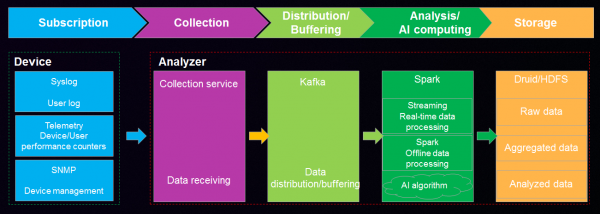
The first and second steps involve accessing data (from devices generating it) and collecting "readings." Using streaming telemetry collection via the Google GPB protocol and "traditional" Syslog (where possible), Huawei CampusInsight gathers data almost in real-time:
- on spectrum utilization;
- on the functioning of access points and other network devices (performance metrics, number of connected users, etc.);
- on the paths of specific users — regarding network profiles, who, when, and to which access point connected or failed to connect (and under what connection parameters);
- on the performance of audio-video applications (using eMDI, implemented in one of the additional packages).
To overcome the limitations of traditional tools that use SNMP for data collection and fixed structures for forwarding, CampusInsight is based on a subscription model for required logs and algorithms for encoding and decoding data.
The third step involves distribution and buffering — that is, sending "raw" data to Kafka for distribution to higher-level analysis services.
The fourth step is analysis. Big Data and AI algorithms help to quickly process "raw" data. As a result, specific problems are identified related to:
- authentication (Dot1x protocol is supported) and DHCP performance;
- connection stability and speed;
- wireless interfaces;
- the performance of individual devices, including specifics like issues with PoE or switching a dual-band device to 2.4 GHz;
- the quality of audio-video streams — though, this functionality is only supported for unencrypted SIP or for certain switches;
- roaming between different access points.
AI algorithms are used to solve specific tasks, such as detecting interference between channels during wireless transmission.
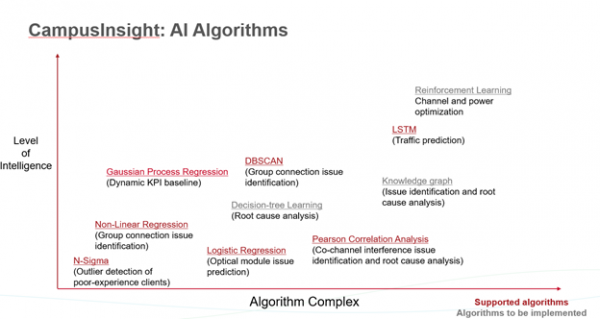
The fifth and final step — saving data in a column-based distributed database Druid for further use.
Analyzing the collected information against the historical data-based "baseline" allows for identifying typical "failure patterns" — determining KPIs corresponding to problematic situations and localizing issues, offering solutions. Thus, approximately 85% of all network problems are considered by the tool.
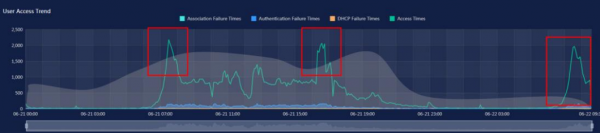
The administrator is presented with data visually according to the hierarchy or topology of the space (for example, the office layout). It is possible to create "heat maps" to analyze how much equipment from certain platforms or manufacturers is affected, etc. This makes it easier to understand the cause of the issue.
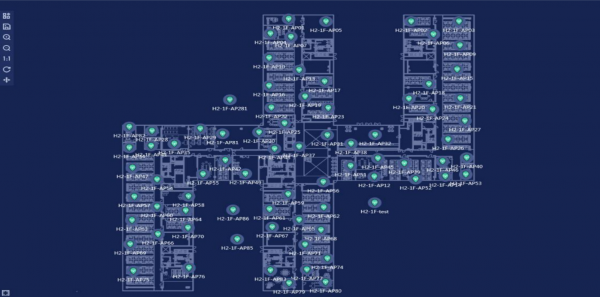
Overall, CampusInsight provides a multitude of tools for classifying problems, comparing affected users, studying data on specific client performance, and even "replaying" events that led up to the incident to quickly identify the source. Additionally, the product supports new Wi-Fi 6, not to mention earlier versions.
Use Cases
CampusInsight has been piloted in practice, although most use cases are covered by NDAs. The most notable public case is the application of the monitoring tool in Huawei's own wireless network.
The network covers enterprises with about 180,000 people, 80,000 of whom belong to the R&D division (offices in more than 170 countries, with a total of 62,000 access points installed).
The implementation of CampusInsight helped optimize over 630 access points while simultaneously increasing incident resolution efficiency by 30%.
Below are a couple of specific situations.
Example 1. Group Failure
High-level issues observed among a large number of users often stem from low-level errors. Such problems can be difficult to identify. For instance, in one office, numerous mobile clients were experiencing authentication issues despite correct settings and no network problems. proxy server Authentication. Visualizing data at different levels helped quickly identify that the source of the issue was a switch that was throwing too many errors. To resolve the situation, it only took replacing a small section of cable. Localization and fixing the problem took 90 minutes.
Example 2. Monitoring Roaming Quality
Gathering data on a specific client's path within a distributed network can reveal non-obvious roaming issues. A common scenario is when mobile users experience connection problems in certain areas of a building (even though the corresponding access point seems fine). One source of such problems can be the excessively high power of the access point in a neighboring room—so instead of connecting to the nearest point, the client attempts to connect to one that is already serving a large number of users (a real case: connecting to an access point in a conference room while the user is just passing by).
To solve the problem, it is sometimes sufficient to reduce the signal strength of the overloaded access point, but identification requires a deep analysis of recurring issues in areas adjacent to the conference room.
By tracking the trends in the development of wireless networks, we can expect that service issues in the foreseeable future will affect not only giants with thousands of access points but also medium-sized businesses that are still only managing incident responses. Given this development scenario, it makes sense to watch for newer, more efficient standards and high-performance equipment. However, it is also important to remember the necessary shift in network service paradigms before customers start migrating en masse to competitors due to service quality.
Of course, the on-site CampusInsight product will provide the most benefit in large-scale deployments, but there is also a cloud subscription available for the service from the local Public Cloud Huawei, aimed at deployments in the SMB sector. In general, those interested can try everything out and 'play around' right now.
Source: habr.com
