


On January 9, the release of Pandas 1.0.0rc took place. The previous version of the library was 0.25.
This first major release contains many wonderful innovations, including improved automatic summarization of dataframes, more output formats, new data types, and even a new documentation site.
All changes can be viewed , but in this article, we will limit ourselves to a small, less technical overview of the most important aspects.
You can install the library as usual using pip, but since at the time of writing this article, Pandas 1.0 is still release candidate, you'll need to explicitly specify the version:
pip install --upgrade pandas==1.0.0rc0Be careful: since this is a major release, the update may break old code!
By the way, this version completely drops support for Python 2 (which might be a good reason — editor's note.). Pandas 1.0 requires at least Python 3.6+, so if you're not sure, check which version you have installed:
$ pip --version
pip 19.3.1 from /usr/local/lib/python3.7/site-packages/pip (python 3.7)

$ python --version
Python 3.7.5
The easiest way to check the Pandas version is like this:
>>> import pandas as pd
>>> pd.__version__
1.0.0rc0
Improved Auto-Summarization with DataFrame.info
My favorite new feature is the update to the DataFrame.info. The function has become much more readable, making the data exploration process even easier:
>>> df = pd.DataFrame({
...:   'A': [1,2,3],
...:   'B': ["goodbye", "cruel", "world"],
...:   'C': [False, True, False]
...:})
>>> df.info()

RangeIndex: 3 entries, 0 to 2
Data columns (total 3 columns):
 #   Column  Non-Null Count  Dtype
---  ------  --------------  -----
 0   A       3 non-null      int64
 1   B       3 non-null      object
 2   C       3 non-null      object
dtypes: int64(1), object(2)
memory usage: 200.0+ bytes
Outputting Tables in Markdown Format
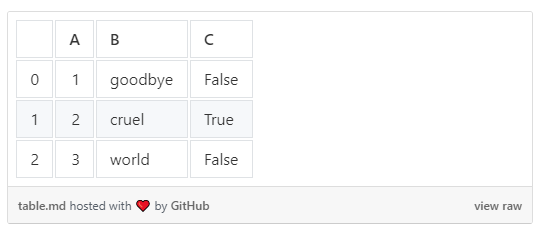
Another pleasant addition is the ability to export dataframes to Markdown tables using DataFrame.to_markdown.
>>> df.to_markdown()
|    |   A | B       | C     |
|---:|----:|:--------|:------|
|  0 |   1 | goodbye | False |
|  1 |   2 | cruel   | True  |
|  2 |   3 | world   | False |
This greatly simplifies publishing tables on websites like Medium using GitHub Gists.
New Types for Strings and Boolean Values
In the Pandas 1.0 release, new experimental types were also added. Their API may still change, so use it with caution. But overall, Pandas recommends using the new types wherever applicable.
For now, type casting needs to be done explicitly:
>>> B = pd.Series(["goodbye", "cruel", "world"], dtype="string")
>>> C = pd.Series([False, True, False], dtype="bool")
>>> df.B = B, df.C = C
>>> df.info()

RangeIndex: 3 entries, 0 to 2
Data columns (total 3 columns):
 #   Column  Non-Null Count  Dtype
---  ------  --------------  -----
 0   A       3 non-null      int64
 1   B       3 non-null      string
 2   C       3 non-null      bool
dtypes: int64(1), object(1), string(1)
memory usage: 200.0+ bytes
Note how the column Dtype displays new types — string and bool.
The most useful feature of the new string type is the ability to select only string columns from data frames. This can significantly simplify the analysis of text data:
df.select_dtypes("string")Previously, string columns couldn’t be selected without explicitly stating their names.
You can read more about the new types .
Thank you for reading! A complete list of changes, as already mentioned, can be viewed .
Source: habr.com
